
sonic-bot

byUmang Suthar

create application for matching the invoice with my generated excel sheet of the payments

LandingReportsDashboardNotificationsMatches
Landing

Comments (0)

No comments yet. Be the first!

System Requirements

System Requirement Document
Page 1 of 4

Sonic-Bot System Requirements Document

Introduction

The Sonic-Bot project aims to develop an application that facilitates the matching of invoices with generated Excel sheets of payments. This document outlines the system requirements for Sonic-Bot, ensuring it meets the needs of users like Umang Suthar in India, with a focus on general-purpose functionality as pre-resolved by an API supervisor.

System Overview

Sonic-Bot is designed to streamline the process of reconciling invoices with payment records stored in Excel sheets. The system will leverage APIs to enhance its general-purpose capabilities, ensuring flexibility and adaptability to various user needs. The application will be accessible via a web interface, providing a user-friendly experience for managing financial records efficiently.

Functional Requirements

  • As a User, I should be able to upload invoices for processing.
  • As a User, I should be able to upload Excel sheets containing payment records.
  • As a User, I should be able to view matched invoices and payments.
  • As a User, I should be able to manually adjust matches if necessary.
  • As a User, I should be able to generate reports of matched and unmatched records.
  • As a User, I should be able to access the application via a web interface.
  • As a User, I should be able to receive notifications for unmatched records.
  • As a User, I should be able to utilize API integrations for enhanced functionality.
Page 2 of 4

User Personas

  • User: Individuals responsible for financial reconciliation, such as accountants or finance managers, who need to match invoices with payment records efficiently.

Core User Flows

  1. User uploads invoice -> User uploads Excel sheet -> System processes and matches records -> User reviews matches -> User adjusts matches if needed -> User generates report.
  2. User accesses web interface -> User uploads files -> System processes data -> User receives notifications for unmatched records -> User takes corrective action.

Visuals Colors and Theme

  • primary: #1E90FF (Dodger Blue)
  • primary_light: #63B8FF (Light Dodger Blue)
  • secondary: #FF6347 (Tomato)
  • accent: #32CD32 (Lime Green)
  • highlight: #FFD700 (Gold)
  • bg: #F5F5F5 (White Smoke)
  • surface: rgba(255, 255, 255, 0.9)
  • text: #333333 (Dark Gray)
  • text_muted: #777777 (Gray)
  • border: rgba(0, 0, 0, 0.1)
Page 3 of 4

Signature Design Concept

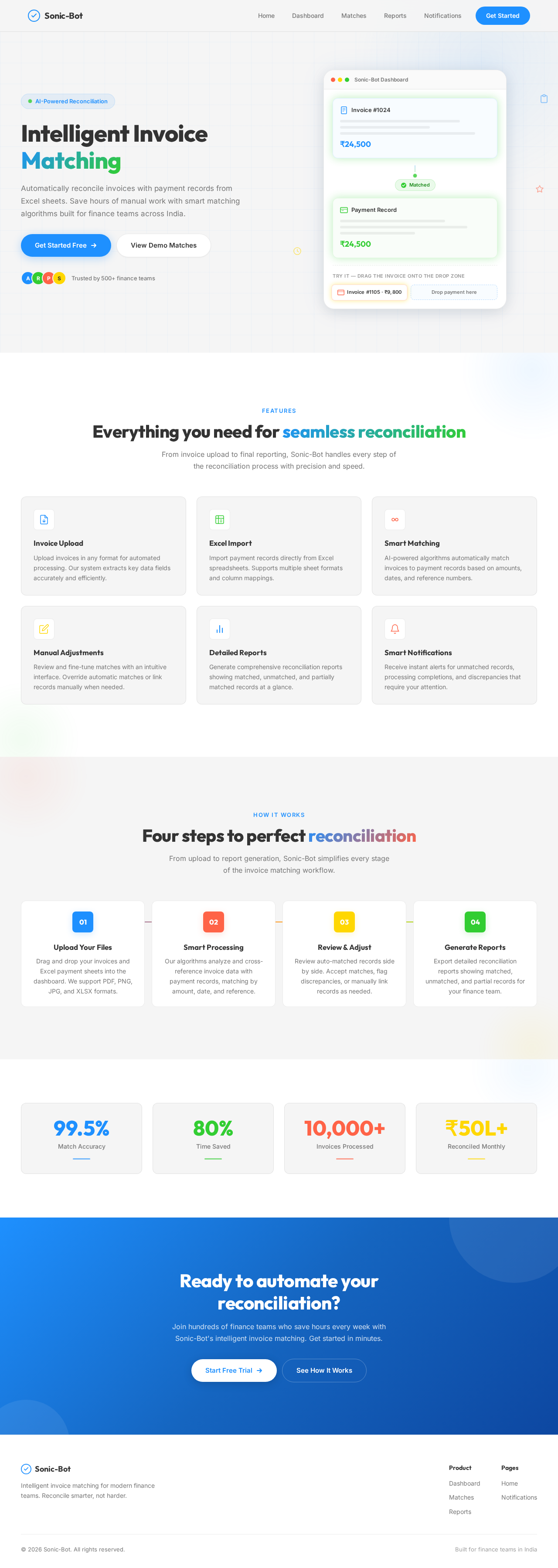
The Sonic-Bot homepage will feature an interactive financial dashboard that resembles a futuristic control panel. Users can drag and drop invoices and Excel sheets into designated areas, triggering animations that simulate data processing. The dashboard will use framer-motion for smooth transitions and gsap for scroll-triggered animations, creating an engaging and dynamic user experience. The interface will highlight matched records with a glowing effect, and unmatched records will pulse gently to draw attention.

Interaction Model & Motion Direction

The landing page will employ a "parallax" interaction model, providing a layered depth effect as users scroll through the page. This model will enhance the storytelling aspect of the application, making the financial reconciliation process visually appealing and intuitive. Internal pages will adopt a "static" model to prioritize clarity and speed in data-heavy environments.

Non-Functional Requirements

  • The system must ensure data security and privacy for all uploaded files.
  • The application should support high availability and scalability to handle varying loads.
  • The user interface must be responsive and accessible across different devices and screen sizes.
Page 4 of 4

Tech Stack

  • Frontend: React for Web
  • Backend: Python, FastAPI
  • Database: MySQL or MariaDB, using Alembic for migrations
  • AI Models: Not applicable
  • AI Tools: Not applicable
  • Local Orchestration: Docker, docker-compose
  • Server-side Orchestration: Kubernetes

Assumptions and Constraints

  • The application will primarily serve users in India, considering local currency and timezone settings.
  • The system will rely on existing APIs for general-purpose functionality enhancements.
  • The application must comply with relevant financial data protection regulations.

Glossary

  • Invoice: A document detailing a transaction between a buyer and a seller.
  • Excel Sheet: A spreadsheet file format used to organize and store data.
  • API: Application Programming Interface, a set of protocols for building and interacting with software applications.
  • Parallax: A visual effect where background images move slower than foreground images, creating an illusion of depth.
  • Framer-motion: A library for creating animations in React applications.
  • GSAP: GreenSock Animation Platform, a suite of tools for creating animations on the web.
Landing design preview
Landing: View Info
Dashboard: Upload Invoice
Dashboard: Upload Excel Sheet
Dashboard: View Matches
Matches: Review Matches
Matches: Adjust Matches
Reports: Generate Report
Notifications: View Alerts
Notifications: Take Action