solutions-architecture
 Небо - не предел
Site about solutions architecture


Comments (0)
Sign in to leave a comment
System Requirements
System Requirements Document for solutions-architecture
1. Introduction
solutions-architecture is a public website about solutions architecture. Its purpose is to present solutions architecture content to visitors: practitioners who want to understand architectural approaches and solutions, and evaluators who want to compare and assess the architecture solutions presented so they can decide whether those solutions fit their needs.
The product intent is deliberately narrow and content-first. The site exists to explain and organize solutions architecture material — approaches, solutions, and the reasoning behind technical decisions — in a form that is quick to navigate and easy to trust. It is not a sales funnel, not a dashboard product, and not an interactive architecture-modelling tool. Visitors arrive, orient themselves, and read.
The audience is two overlapping groups of readers:
- Solutions architecture practitioners, who read the site's architecture content to understand architectural approaches and solutions.
- Site visitors evaluating architecture solutions, who browse the site to compare and assess the solutions architecture offerings presented and to gain enough understanding to decide whether those solutions fit their needs.
Both audiences are anonymous readers. The site has no accounts, no sign-in, and no protected content; every page is publicly readable.
2. System Overview
2a. Product Interpretation and Delivery Boundary
The site is a first-party, publicly readable web application. It has exactly two destinations:
- Landing — the anonymous public entry surface. It explains what the site is, who it is for, and what architecture content it holds, and it routes the visitor onward into the content.
- Architecture Content — the surface that owns the accepted responsibility of letting visitors browse the site's solutions architecture content.
Both destinations are reachable without any identity, session, or account. There is no application-owned identity, no registration, no login, and no per-visitor durable state. Nothing on the site is gated, personalized, or resumed across visits. This is a hard delivery boundary derived from the accepted scope: the site presents content to visitors, and no accepted journey requires a visitor to be recognized.
The frontend is a React application that renders both destinations. A shared FastAPI backend serves the architecture content that the frontend displays, and a MariaDB database holds that content as application-owned persistent data. The database exists to store the site's architecture content — it does not imply user accounts, visitor profiles, or any other domain entity.
Everything the site does is current. There is no accepted future phase, no planned member area, and no roadmap capability. The only forward-looking material in this document is the explicitly labelled future section, which is not part of current acceptance.
2b. Source Content Inventory
Not applicable. No reference directive in this request declares a content_source, so no source content inventory is included.
2c. Page Content and Component Coverage
Landing
Purpose and information
- States what the site is: a site about solutions architecture.
- States who it is for: solutions architecture practitioners and visitors evaluating architecture solutions.
- States what the visitor will find: the site's solutions architecture content, organized so it can be browsed.
- Presents the oversized two-line headline "Make systems / make sense." as the primary statement of the page.
- Presents a three-station route map — DISCOVER, DESIGN, DELIVER — as the visual summary of the solution stages the content covers.
Primary actions
- Enter the Architecture Content surface (the primary call to action, embedded as a route destination in the annotation band beneath the headline).
- Follow a station (DISCOVER / DESIGN / DELIVER) into the corresponding part of the Architecture Content surface.
Supporting actions
- Read the orientation copy that explains the site's audience and content.
- Use the persistent route index in the header to jump to a section of the Landing page.
Domain entities
- Architecture content item (title, category label, route number, summary) — read-only on this page.
- Solution stage (DISCOVER, DESIGN, DELIVER) — a labelled station on the route map.
Component responsibilities
- Route header: persistent route index whose items each begin with a two-digit station number and gain a brick-red line segment when their section is active.
- Hero headline block: the two-line display headline, left-aligned, occupying the upper eight desktop columns.
- Hero route line: a brick-red horizontal route starting at a numbered circular marker beside the headline and connecting to the three labelled stations.
- Station map: the three solution stations stacked as a precise vertical map on the right at desktop width; below the headline as a full-width vertical route at 375px, with no clipped labels.
- Annotation band: a narrow mustard band beneath the headline carrying the primary call to action as a route destination.
- Content preview placards: architecture content modules formatted as transit placards — bold route number, uppercase category label, concise title, ruled metadata row — each linking into the Architecture Content surface.
States
- Loading: the page shell, headline, and station map render immediately; content preview placards show a reserved, ruled placeholder block of the same height so the grid does not shift.
- Empty: if no architecture content items are available, the preview area shows a plain ruled notice that content is not currently available, and the primary call to action into Architecture Content remains present and functional.
- Success: headline, route line, station map, annotation band, and preview placards all render; the primary call to action and every station link navigate to the Architecture Content surface.
- Error: if content previews fail to load, the page keeps the headline, station map, and primary call to action intact and shows a short inline message with a retry control; the visitor can still enter Architecture Content.
- Recovery: retry re-requests the previews; if the retry fails again, the notice persists and the primary call to action remains the reliable path forward.
Architecture Content
Purpose and information
- Presents the site's solutions architecture content for browsing.
- Organizes content by category label and route number so a visitor can scan and compare approaches.
- Shows, for each content item, a bold route number, an uppercase category label, a concise title, and a ruled metadata row.
Primary actions
- Browse the list of architecture content items.
- Open an individual architecture content item to read it in full.
Supporting actions
- Move between content categories using the category labels.
- Return to the Landing page via the route header.
Domain entities
- Architecture content item: route number, category label, title, summary, body, metadata row.
- Category: the uppercase label grouping content items.
Component responsibilities
- Route header: same persistent route index as the Landing page, with the active section marked by a brick-red line segment.
- Section wayfinding bands: full-width numbered bands (01 / FRAME, 02 / CONNECT, 03 / OPERATE) with a signal-colour line continuing across the page, separating content groups.
- Content placard list: the transit-placard modules aligned to a shared grid, each opening its item.
- Content item reader: the long-form reading surface for a single item, held to a 66–72ch measure, with Fira Sans headings and Source Sans 3 body text.
- Diagram block: where an item includes a system diagram, it renders with readable Fira Sans labels, circular interchange nodes, and red/green/mustard route codes, with a text-first linear equivalent beneath it on narrow screens.
States
- Loading: wayfinding bands and placard grid render with reserved ruled placeholders at the correct heights.
- Empty: when a category holds no items, its band still renders and a plain ruled line states that no content is listed in this category yet.
- Success: placards render in the shared grid; opening a placard shows the full item at the readable measure.
- Error: if the content request fails, the page shows a short inline message with a retry control and keeps the route header usable so the visitor can return to the Landing page.
- Recovery: retry re-requests the content; a repeated failure leaves the message in place with the retry control still available.
3. Functional Requirements
FR-1 — The site presents solutions architecture content As a site visitor, I should be able to reach a website about solutions architecture and read its architecture content, so that I can understand the architectural approaches and solutions it presents.
- Provenance: explicit.
- Trigger/input: the visitor opens the site's public address.
- Observable result: the Landing page renders with the site's purpose, audience, and a route into its architecture content.
- Access state: anonymous; no identity required.
- Failure/recovery: if the Landing page's content previews fail to load, the headline, station map, and primary call to action remain usable and a retry control is offered.
- Continuation: the visitor follows the primary call to action or a station link into the Architecture Content surface.
FR-2 — Visitors browse the site's solutions architecture content As a solutions architecture practitioner, I should be able to browse the site's solutions architecture content organized by category and route number, so that I can find clear, relevant architecture material.
- Provenance: explicit.
- Trigger/input: the visitor selects the primary call to action on the Landing page or a station link.
- Observable result: the Architecture Content surface lists architecture content items as transit placards — bold route number, uppercase category label, concise title, ruled metadata row — grouped under numbered wayfinding bands.
- Access state: anonymous; no identity required.
- Failure/recovery: if the content request fails, an inline message with a retry control appears and the route header remains usable to return to the Landing page.
- Continuation: the visitor opens an individual content item, or moves to another category.
FR-3 — Visitors read an individual architecture content item As a site visitor evaluating architecture solutions, I should be able to open a single architecture content item and read it in full, so that I can assess whether the solution fits my needs.
- Provenance: required_inference (indispensable to make browsing usable: a placard that cannot be opened would leave the accepted content unreadable).
- Trigger/input: the visitor selects a content placard on the Architecture Content surface.
- Observable result: the item's full body renders at a 66–72ch reading measure with its route number, category label, title, and metadata row.
- Access state: anonymous; no identity required.
- Failure/recovery: if the item fails to load, an inline message with a retry control appears and the visitor can return to the content list.
- Continuation: the visitor returns to the content list or to the Landing page via the route header.
FR-4 — Visitors orient themselves through the route index As a site visitor, I should see a persistent route index whose items carry two-digit station numbers and mark the active section with a brick-red line segment, so that I always know where I am in the site.
- Provenance: required_inference (indispensable orientation for the accepted browsing journeys across two destinations).
- Trigger/input: the visitor scrolls or navigates between sections and destinations.
- Observable result: the active section's index item gains a brick-red line segment; the change is immediate.
- Access state: anonymous; no identity required.
- Failure/recovery: if the index cannot determine an active section, no item is marked active and all items remain selectable.
- Continuation: the visitor selects an index item and moves to that section.
FR-5 — Visitors read system diagrams with a text equivalent As a site visitor, I should be able to read any system diagram in the architecture content as labelled nodes and connectors, and as a text-first linear equivalent on narrow screens, so that no diagram content is lost on mobile.
- Provenance: required_inference (indispensable to keep accepted architecture content readable at every viewport).
- Trigger/input: the visitor opens a content item that includes a diagram.
- Observable result: the diagram renders with readable Fira Sans labels, circular interchange nodes, and red/green/mustard route codes; beneath it on narrow screens a text-first linear equivalent lists the same nodes and connections.
- Access state: anonymous; no identity required.
- Failure/recovery: if the diagram image fails, the text-first linear equivalent still renders.
- Continuation: the visitor continues reading the item.
4. User Personas
Solutions architecture practitioner
Product context. This reader already works with architectural approaches and wants the site to be a reliable, quickly scannable reference. They arrive knowing what solutions architecture is and are looking for substance: how a given approach is structured, what its stages are, and how it fits together.
Primary goal. Understand architectural approaches and solutions by reading clear, relevant architecture material on the site.
Distinct accepted responsibilities. Browsing the site's architecture content (FR-2) and reading individual items in full (FR-3). This reader is the one most likely to move between categories and to read a diagram closely, so the numbered wayfinding bands and the diagram text equivalents matter most to them.
Relevant inputs and decisions. Which category to open, which placard to read, and whether an item answers the architectural question they arrived with.
Interactions with other accepted participants. None directly. The practitioner and the evaluating visitor read the same public content independently; neither sees the other's activity, and no state is shared between them.
Observable success. The practitioner finds architecture material that is clear and relevant to their question, and can read it end to end without losing diagram content on a narrow screen.
Site visitor evaluating architecture solutions
Product context. This reader is assessing rather than studying. They want to know what solutions architecture offerings the site presents and whether those solutions fit their needs, so they scan for comparison before committing to a deep read.
Primary goal. Gain enough understanding of the presented solutions architecture offerings to decide whether the solutions fit their needs.
Distinct accepted responsibilities. Reaching the site and orienting on the Landing page (FR-1), browsing the content list to compare items (FR-2), and opening the items that look relevant (FR-3). This reader leans on the Landing page's orientation copy and station map to decide whether to continue at all — a step the practitioner typically skips.
Relevant inputs and decisions. Whether the site's stated audience and content match their situation, which categories to compare, and whether the material is sufficient to make a judgement.
Interactions with other accepted participants. None directly; like the practitioner, this reader works anonymously and independently.
Observable success. The visitor leaves with a clear understanding of the solutions architecture offerings presented and a defensible answer to whether those solutions fit their needs.
5. Core User Flows
Flow A — Evaluating visitor orients on the Landing page and enters the content
- The visitor opens the site's public address. No sign-in, account, or cookie consent gate stands in the way; the Landing page renders anonymously.
- The visitor reads the two-line headline "Make systems / make sense." and the orientation copy stating what the site is, who it is for, and what content it holds.
- The visitor scans the station map — DISCOVER, DESIGN, DELIVER — stacked as a vertical route on the right at desktop width, or below the headline as a full-width vertical route at 375px with no clipped labels.
- The visitor decides the site is relevant and selects the primary call to action embedded in the mustard annotation band beneath the headline, or selects one of the three station links.
- The Architecture Content surface opens, listing content placards under numbered wayfinding bands. The route index marks the active section with a brick-red line segment.
- Failure path: if the Landing page's content previews fail to load, the headline, station map, and primary call to action stay intact, an inline message with a retry control appears, and the visitor can still enter the content. If the Architecture Content request itself fails, an inline message with a retry control appears and the route header still returns the visitor to the Landing page.
- Continuation: the visitor proceeds to Flow B.
Flow B — Practitioner browses the architecture content
- The practitioner arrives on the Landing page and goes straight to the primary call to action, skipping the orientation copy.
- The Architecture Content surface lists items as transit placards — bold route number, uppercase category label, concise title, ruled metadata row — aligned to a shared grid and separated by full-width numbered bands (01 / FRAME, 02 / CONNECT, 03 / OPERATE).
- The practitioner scans route numbers and category labels to find the approach relevant to their question, moving between categories using the labels.
- The practitioner selects a placard to read it.
- Failure path: if the content request fails, an inline message with a retry control appears; the practitioner retries, and if the retry fails again the message persists with the retry control still available.
- Continuation: the practitioner proceeds to Flow C, or returns to step 3 to browse another category.
Flow C — Visitor reads an individual architecture content item
- From the Architecture Content surface, the visitor selects a content placard.
- The item opens at a 66–72ch reading measure with its route number, category label, title, and ruled metadata row.
- Where the item includes a system diagram, the visitor reads it as labelled nodes and connectors with circular interchange nodes and red/green/mustard route codes. On a narrow screen, the visitor reads the text-first linear equivalent beneath the diagram, which lists the same nodes and connections.
- The visitor finishes the item and decides whether the solution fits their needs.
- Failure path: if the item fails to load, an inline message with a retry control appears; the visitor retries or returns to the content list.
- Continuation: the visitor returns to the content list to compare another item, or uses the route header to return to the Landing page.
6. Visuals Colors and Theme
The visual system is architecture as typographic infrastructure, after Erik Spiekermann: wayfinding-minded, humanist information design that makes dependencies, stages, capabilities, and implementation paths immediately legible. The register is rigorous and navigable — a well-designed transit system for technical thinking — not futuristic or sales-led.
Colour tokens (light mode)
| Role | Hex | Usage |
|---|---|---|
| Background (warm paper) | #F3EFE7 | Dominant ground, ~65% of the surface |
| Surface | #FFFDF8 | Reading surfaces and architecture modules, ~25% |
| Text / ink | #20231F | All primary text and rules |
| Primary (brick red) | #C84A2F | Active route, key CTA, critical architecture-path signal |
| Accent (mustard) | #D7A51D | Secondary states, annotations, milestones |
| Muted | #697069 | Metadata, secondary labels |
| Functional status (deep green) | #356A4D | Small transit-line accents only, where status differentiation is required |
No blue-first UI. Blue and indigo primary actions on white are forbidden.
Typography
- Headings: Fira Sans — SemiBold and Bold, tracking
-0.025em. Sentence case for major statements; uppercase, widely tracked route labels. - Body: Source Sans 3.
- Scale (compact 1.25): display
clamp(52px, 8vw, 112px)with a 52px mobile minimum; H1 40/64px; H2 30/44px; H3 22/30px; body 17/27px; metadata 13/18px. - Tabular numerals for route numbers, system metrics, and architecture references.
- Large numerical section markers act as architectural anchors, not decoration.
Shape language. Straight transit-line rules; square-cornered content fields; circular numbered route markers; small rounded endpoints only where they explain a flow. Components are built from borders, labels, and alignment — no soft shadows.
Layout. A 12-column desktop information grid collapses to 8 columns at tablet and 4 at mobile. Persistent left-edge route numbering and a slim section index establish orientation. Long-form content stays within a 66–72ch measure; diagrams and system maps may span the full grid. On mobile the index becomes a horizontally scrollable route strip with every item fully reachable.
Imagery. Schematic architecture maps, annotated system diagrams, practical technical documentation fragments, and high-contrast documentary photography of teams, infrastructure, or built systems — only when it clarifies context. No stock handshake imagery, floating 3D blobs, generic dashboard mockups, or decorative abstract gradients.
Readability rule. Headlines, wordmarks, labels, numbers, and card text and controls stay entirely inside the viewport and their container at 375px, 768px, and 1280px, wrapping or scaling to fit. Imagery and decoration may bleed, crop, or overlap; readable text and controls may not.
7. Signature Design Concept
The public entry is a wide architectural route map on warm paper.
An oversized, left-aligned two-line headline — "Make systems / make sense." — occupies the upper eight desktop columns and scales from 52px on mobile to 112px at 1280px. Beside it, a numbered circular marker opens a brick-red horizontal route that crosses the remaining columns and connects three labelled solution stations — DISCOVER, DESIGN, DELIVER — stacked as a precise vertical map on the right. Beneath the headline, a narrow mustard annotation band carries the primary call to action embedded as a route destination rather than a conventional floating button. At 375px the station map moves below the intact headline as a full-width vertical route with no clipped labels.
The concept recomposes only accepted content and controls: the site's purpose and audience copy, the three solution stages, the primary call to action into the Architecture Content surface, and the route index. It introduces no new behaviour and no new destination.
8. Interaction Model & Motion Direction
Interaction Model: Animated Motion Tempo: restrained Hero Dimensionality: flat
Landing Hero Motion Brief
- Focal subject: the brick-red hero route line and its three solution stations (DISCOVER, DESIGN, DELIVER).
- Input → transformation → outcome thesis: as the visitor arrives and scrolls, the route line draws forward from its numbered circular marker toward each station in turn; each station's label and annotation resolve into full opacity as the line reaches it, so the visitor's act of moving down the page assembles the map of what the site covers and lands them at the primary call to action.
- Motion vocabulary: 160ms route-line draws; immediate active-nav changes with no easing delay; short opacity reveals for diagram annotations; on scroll, section numbers lock briefly into place while their associated transit line advances.
- Composed first frame: warm paper ground; the two-line headline fully rendered at its display size; the numbered circular marker and the first segment of the brick-red route already drawn; the three station labels visible at rest; the mustard annotation band and its call to action fully legible.
- Reduced-motion state: with
prefers-reduced-motion, all routes and annotations render fully visible with no animated drawing; the station map and annotation band appear complete in the first frame, and the mobile route strip wraps or scrolls so every item can be brought fully into view.
Motion never delays access to architecture content: the primary call to action is legible and operable in the first frame, before any route-line draw completes.
9. Non-Functional Requirements
- Public readability. Every destination is readable without identity, session, or account. No content is gated. (Provenance: explicit — the site presents content to visitors; access requirement
noneon both pages.) - Viewport integrity. Readable text and controls remain whole and inside their container at 375px, 768px, and 1280px. (Provenance: explicit design constraint.)
- Reduced motion. All routes and annotations render fully visible with no animated drawing under
prefers-reduced-motion. (Provenance: explicit creative direction.) - Reading measure. Long-form architecture content stays within 66–72ch. (Provenance: explicit creative direction.)
- Diagram legibility. Every system diagram carries readable labels and a text-first linear equivalent on narrow screens. (Provenance: explicit creative direction; required_inference for content completeness.)
- Content availability. A failure to load content previews or content lists must not remove the visitor's path into or out of the content; a retry control is always offered. (Provenance: required_inference — indispensable recovery for the accepted browsing journeys.)
- No tracking-dependent behaviour. No accepted requirement depends on recognizing a returning visitor. (Provenance: explicit — no identity in scope.)
10. Tech Stack
- Frontend: React application UI, rendering the Landing and Architecture Content surfaces.
- Backend: a shared FastAPI process serving the architecture content API and hosting the domain modules. New content endpoints extend this existing process, port, and deployment rather than adding a service.
- Database: MariaDB, holding the site's architecture content as application-owned persistent data. No user, account, or session tables are implied.
- Packaging: Docker with
docker-compose.ymlas the service inventory —frontend,backend,database. - Typography: Fira Sans (headings) and Source Sans 3 (body), as specified by the creative direction.
11. Assumptions and Constraints
- A-1. The site's architecture content is authored and stored as application-owned data in MariaDB and served by the shared FastAPI backend. No authoring interface is in scope; content is populated outside the visitor-facing product. (Assumption — not specified by the user.)
- A-2. The site is English-language. (Assumption — not specified by the user.)
- A-3. The site is publicly reachable at a single address with no regional restriction. (Assumption — not specified by the user.)
- C-1. No accounts, sign-in, registration, profiles, or per-visitor durable state. Both destinations have access requirement
none. - C-2. No interactive architecture-modelling, diagram-editing, or comparison-tool capability. The site presents and organizes content; it does not let visitors build or manipulate architectures.
- C-3. No blue or indigo primary actions on white; no glass panels, blurred gradients, floating translucent dashboards, centred SaaS hero copy with a generic product mockup, identical rounded hover-lift card grids, unlabeled decorative connectors, stock meeting photography as primary visual content, overly condensed body text, or all-caps paragraphs.
- C-4. Motion must never delay access to architecture content.
12. Glossary
- Solutions architecture — the discipline of structuring and connecting systems, stages, and capabilities into a coherent solution; the subject matter of the site.
- Architecture content item — a single piece of solutions architecture material presented on the site, identified by a route number, category label, title, and metadata row.
- Route number — the bold two-digit or section numeral that identifies a content item or section, set in tabular numerals.
- Station — one of the three labelled solution stages on the Landing page route map: DISCOVER, DESIGN, DELIVER.
- Wayfinding band — a full-width numbered section divider (01 / FRAME, 02 / CONNECT, 03 / OPERATE) with a signal-colour line continuing across the page.
- Transit placard — the content module format: bold route number, uppercase category label, concise title, ruled metadata row, aligned to the shared grid.
- Route index — the persistent header navigation whose items begin with two-digit station numbers and mark the active section with a brick-red line segment.
- Text-first linear equivalent — the readable list of nodes and connections rendered beneath a system diagram on narrow screens.
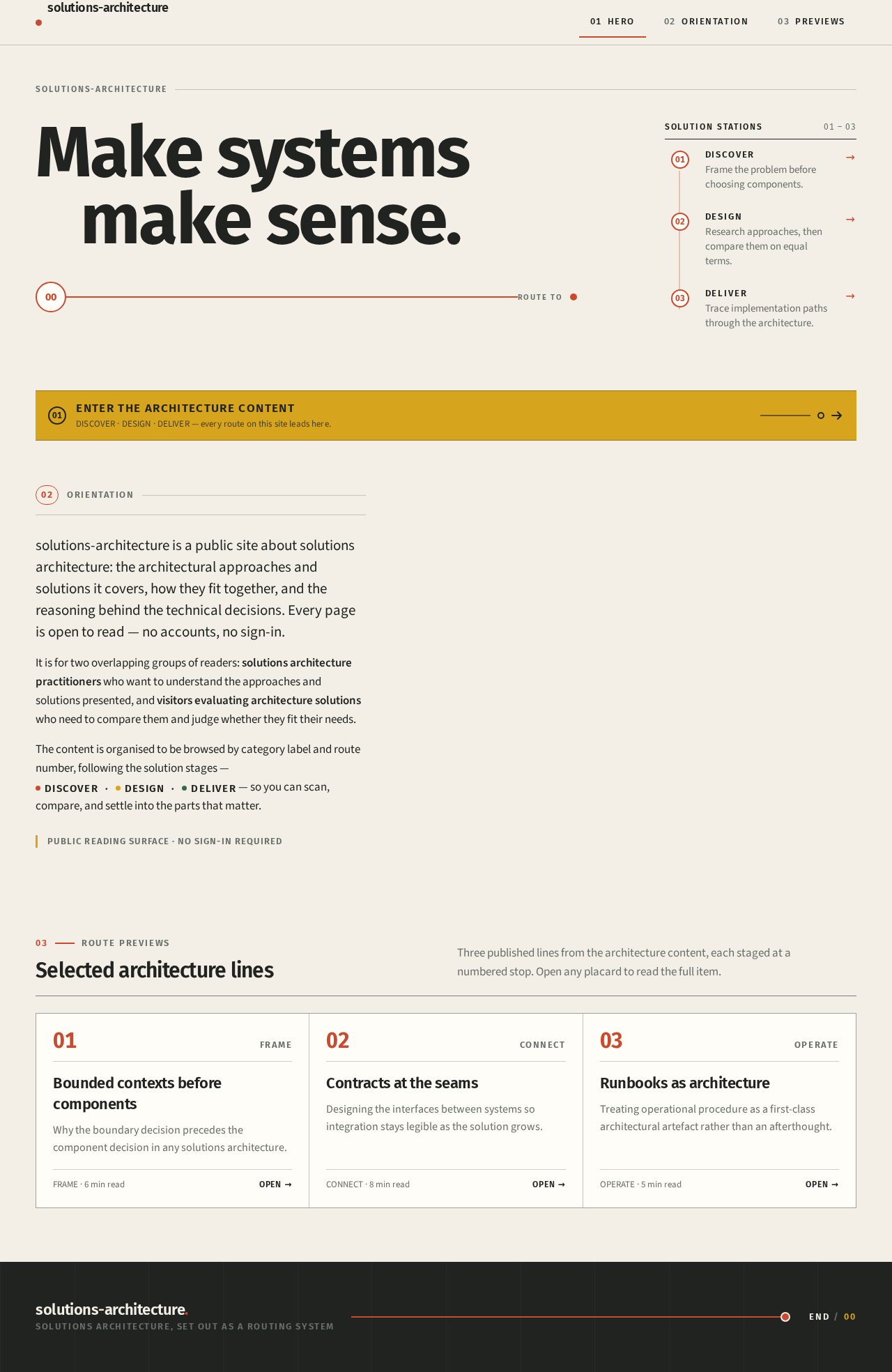
solutions-architecture
Make systems make sense.
Orientation
solutions-architecture is a public site about solutions architecture: the architectural approaches and solutions it covers, how they fit together, and the reasoning behind the technical decisions. Every page is open to read — no accounts, no sign-in.
It is for two overlapping groups of readers: solutions architecture practitioners who want to understand the approaches and solutions presented, and visitors evaluating architecture solutions who need to compare them and judge whether they fit their needs.
The content is organised to be browsed by category label and route number, following the solution stages — DiscoverDesignDeliver — so you can scan, compare, and settle into the parts that matter.
Public reading surface · no sign-in required
03Route previews
Selected architecture lines
Three published lines from the architecture content, each staged at a numbered stop. Open any placard to read the full item.
Bounded contexts before components
Why the boundary decision precedes the component decision in any solutions architecture.
Contracts at the seams
Designing the interfaces between systems so integration stays legible as the solution grows.
Runbooks as architecture
Treating operational procedure as a first-class architectural artefact rather than an afterthought.
solutions-architecture
Make systems make sense.
Orientation
solutions-architecture is a public site about solutions architecture: the architectural approaches and solutions it covers, how they fit together, and the reasoning behind the technical decisions. Every page is open to read — no accounts, no sign-in.
It is for two overlapping groups of readers: solutions architecture practitioners who want to understand the approaches and solutions presented, and visitors evaluating architecture solutions who need to compare them and judge whether they fit their needs.
The content is organised to be browsed by category label and route number, following the solution stages — DiscoverDesignDeliver — so you can scan, compare, and settle into the parts that matter.
Public reading surface · no sign-in required
03Route previews
Selected architecture lines
Three published lines from the architecture content, each staged at a numbered stop. Open any placard to read the full item.
Bounded contexts before components
Why the boundary decision precedes the component decision in any solutions architecture.
Contracts at the seams
Designing the interfaces between systems so integration stays legible as the solution grows.
Runbooks as architecture
Treating operational procedure as a first-class architectural artefact rather than an afterthought.
No comments yet. Be the first!