software-development-company

byUmang Suthar

create single page website for the software development company

Landing
Landing

Comments (0)

No comments yet. Be the first!

System Requirements

System Requirements Document for software-development-company

1. Introduction

This document specifies the single-page website for software-development-company, a software development studio that presents itself to prospective clients. The site exists to do one job well: let a visitor understand what the studio does, see the work it has done, and start a conversation with the studio — all on one page.

The audience is two-sided. Prospective clients arrive to evaluate the studio on craft, taste and trust before deciding whether to engage it. Company representatives are the studio's own staff, who present the firm's services, portfolio and contact details and whose success is a clear, credible presentation that turns visitors into inquiries.

The product is deliberately a single page. There is no multi-page marketing site, no blog, no client portal, and no account system. All accepted content — services, selected work, and contact information with an inquiry form — lives on one anonymously reachable page with in-page navigation.

Page 1 of 20

2. System Overview

The current delivery is one public, anonymously accessible page named Landing. It is a custom first-party surface owned by the application and reachable by both accepted personas without any identity establishment.

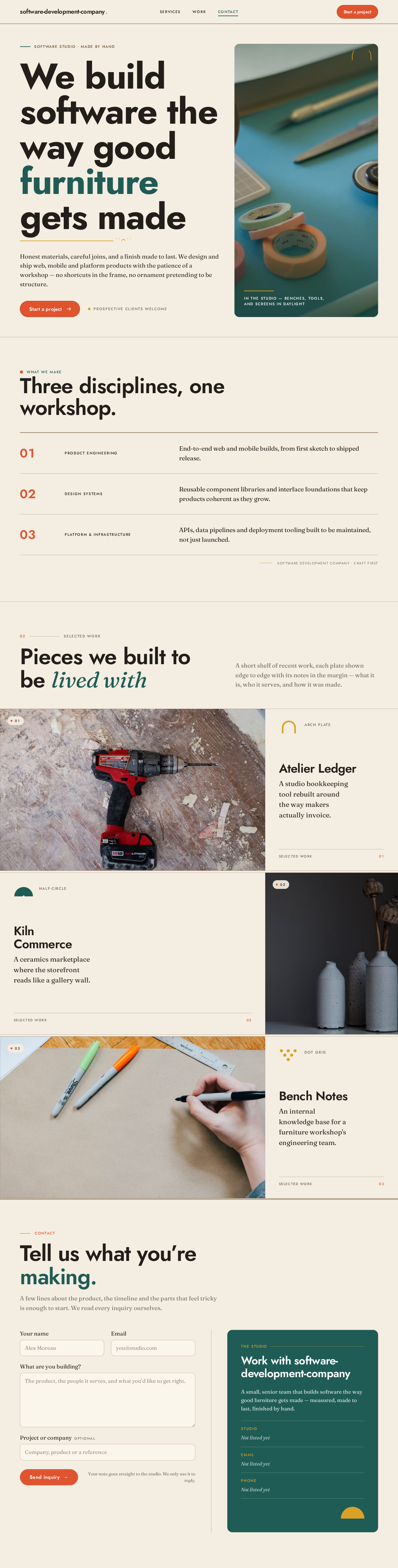
The page presents, in a gallery-like sequence of full-width colour-blocked bands on a warm cream ground:

  • A sticky top navigation with the studio wordmark, in-page section links, and a "Start a project" call-to-action.
  • A split editorial hero with an oversized headline, a short subline, a primary call-to-action, and a teal image block.
  • A services section presented as a ruled three-column table.
  • A selected-work section of alternating full-bleed project plates with margin captions.
  • A contact section split into an inquiry form and a studio-details panel.

The only stateful interaction is the inquiry contact form, which a prospective client fills in and submits to reach the studio. There is no login, no dashboard, no content-management surface, and no differentiated permissions — every visitor sees the same page and the same content.

Removed from scope

  • Multi-page site structure (separate About, Services, Work, Contact pages)
  • User accounts, authentication, or client portal
  • Blog, news, or article publishing
  • E-commerce or online payment
  • Admin or content-management interface
Page 2 of 20

2a. Product Interpretation and Delivery Boundary

The studio's entire public presence is one page. A prospective client lands on it anonymously, reads down through hero, services, work and contact, and either leaves or sends an inquiry through the form. A company representative's role is to have authored and to maintain the content that page presents; the page itself is the delivery, and no separate editing surface is part of this scope.

Access is fully public. No part of the page requires identity, and no accepted journey creates durable actor-specific state that would need an account. The inquiry form is a one-shot submission: the visitor supplies their details and message, submits, and receives confirmation on the page. Nothing about the accepted behavior requires the visitor to return, resume, or privately own state, so no application-owned identity is introduced.

Everything described here is current. There is no future-horizon feature set defined by the source beyond the single page itself.

2b. Source Content Inventory

No content_source reference directive was supplied, so no factual content inventory is included. Company-specific copy (studio name beyond the project name, service names, project names, studio address, phone, email) is not established by the source and must not be invented as authoritative fact; the page structure and content slots are specified in Section 2c.

2c. Page Content and Component Coverage

Page 3 of 20

Landing

The single public page. Anonymous access; no identity required. Owns the entire accepted visitor journey from arrival through inquiry submission.

Information and state

  • Studio wordmark and identity in the sticky header.
  • In-page navigation links to the page's sections (Services, Work, Contact).
  • Hero headline, subline, and primary call-to-action.
  • Services list with labels and descriptive text.
  • Selected work items with captions.
  • Studio contact details (address, email, phone as available).
  • Inquiry form fields and submission state.

Primary actions

  • Navigate to an in-page section via the sticky nav.
  • Activate the hero "Start a project" call-to-action, which moves the visitor to the contact section.
  • Browse services and selected work by scrolling.
  • Complete and submit the inquiry form.

Supporting actions

  • Read a project caption alongside its plate.
  • Read studio details in the contact panel.

Domain entities

  • Service (label, short description).
  • Project / work item (title, caption, image, geometric motif).
  • Inquiry (name, email, message, optional company/project detail, submission status).
Page 4 of 20

Component responsibilities

  • Sticky top navigation — wordmark left, in-page section links centre, tomato-red "Start a project" pill right. Remains visible while scrolling; links scroll smoothly to their target section. On narrow viewports the links collapse to a compact form while the wordmark and CTA remain whole and legible.
  • Hero — 12-column split: left 7 columns hold the oversized left-aligned headline (clamped 56px → 128px), a short serif subline, and the primary pill CTA; right 5 columns is a solid deep-teal block with a hard-cropped warm photograph, a small all-caps label and a thin mustard rule pinned to its lower-left corner. A full-width walnut hairline runs beneath like a shelf edge.
  • Services block — ruled three-column table with walnut hairlines, small all-caps labels, and tabular numerals in tomato red. Reads like a museum wall label; no hover-lift cards.
  • Selected work — alternating full-bleed project plates butting against each other like exhibition panels, each with a margin caption in serif and a small geometric arch motif in mustard or teal. Slow horizontal pan on hover; soft crossfade between items.
  • Contact split — form on cream (left) and deep-teal studio-details panel (right), separated by a thin walnut rule. Pill submit button in tomato red.
  • Inquiry form — fields for name, email, and message (plus any optional project detail the studio chooses to collect); client-side validation of required fields and email format; submit control; inline status messaging.

States

Page 5 of 20
  • Loading — page content renders immediately as static markup; images use reserved aspect ratios so no layout shift occurs. No blocking spinner.
  • Empty — if a content collection (e.g. selected work) has no entries, its section renders a quiet placeholder line rather than an empty band; the page remains navigable.
  • Success (form) — on successful submission the form is replaced or overlaid by a confirmation message acknowledging receipt and stating the studio will be in touch; the visitor can see the outcome without leaving the page.
  • Error (form) — invalid or missing required fields show inline field-level messages and the submit is blocked; a submission failure (network or server) shows a non-destructive error message with the entered values preserved and the submit control available to retry.
  • Recovery — after a failed submission the visitor's typed values remain in the fields so they can retry without re-entering; after success the confirmation is the terminal state for that visit.
  • Reduced motion — with prefers-reduced-motion, all reveals render static and fully visible; the work section wraps or scrolls so every item can be brought fully into view.
Page 6 of 20

3. Functional Requirements

FR-1 — Single-page public presence (explicit) As a prospective client, I should reach the studio's entire public presence on one page, so that I can understand the offering without navigating between separate pages.

  • Trigger: visitor opens the site URL.
  • Observable result: one page renders containing hero, services, selected work, and contact.
  • Access: anonymous; no identity required.
  • Failure/recovery: if a section's content fails to load, the rest of the page remains readable and navigable.
  • Continuation: the visitor scrolls or uses in-page navigation to move between sections.

FR-2 — In-page navigation (explicit) As a prospective client, I should be able to jump to a section from the sticky navigation, so that I can reach services, work, or contact directly.

  • Trigger: visitor activates a nav link.
  • Observable result: the page scrolls to the corresponding section; the sticky nav remains visible.
  • Failure/recovery: if a target section is absent, its nav link is not rendered.
  • Continuation: the visitor reads the section or selects another link.
Page 7 of 20

FR-3 — Services presentation (explicit) As a prospective client, I should see the studio's services presented clearly, so that I can judge whether the studio covers what I need.

  • Trigger: visitor scrolls to or navigates to the services section.
  • Observable result: services appear as a ruled three-column table with labels and descriptions.
  • Failure/recovery: if no services are configured, a quiet placeholder renders instead of an empty band.
  • Continuation: the visitor continues to selected work or contact.

FR-4 — Selected work presentation (explicit) As a prospective client, I should see examples of the studio's work with captions, so that I can assess its craft and taste.

  • Trigger: visitor scrolls to or navigates to the work section.
  • Observable result: alternating full-bleed project plates with margin captions and geometric motifs are shown.
  • Failure/recovery: if no work items exist, a quiet placeholder renders; images that fail to load leave their caption readable.
  • Continuation: the visitor continues to contact.

FR-5 — Contact information (explicit) As a prospective client, I should see the studio's contact details, so that I can reach it by a channel of my choosing.

  • Trigger: visitor scrolls to or navigates to the contact section.
  • Observable result: a deep-teal panel lists the studio's contact details.
  • Failure/recovery: if a detail is unavailable it is omitted rather than shown broken.
  • Continuation: the visitor uses a detail or the adjacent form.
Page 8 of 20

FR-6 — Inquiry submission (explicit) As a prospective client, I should be able to send an inquiry through the contact form, so that I can start a conversation with the studio.

  • Trigger: visitor completes the form and activates submit.
  • Input: name, email, message (and any optional project detail).
  • Observable result: on success, a confirmation message acknowledges receipt on the page.
  • Access: anonymous.
  • Failure/recovery: invalid fields show inline messages and block submission; a submission failure shows an error with entered values preserved and submit available to retry.
  • Continuation: after success the confirmation is terminal for that visit; after failure the visitor retries.

FR-7 — Inquiry receipt by the studio (required_inference) As a company representative, I should receive the submitted inquiry so that the studio can respond to the prospective client.

  • Trigger: a prospective client successfully submits the form.
  • Observable result: the inquiry is delivered to the studio's designated contact channel (e.g. email or stored record) with the submitted fields.
  • Failure/recovery: if delivery fails, the visitor sees the submission error state (FR-6) rather than a false confirmation.
  • Continuation: the representative follows up outside the page; no in-page response surface is in scope.
Page 9 of 20

FR-8 — Company content presentation (explicit) As a company representative, I should have the studio's services, work, and contact details presented credibly on the page, so that visitors are turned into inquiries.

  • Trigger: page is published with the studio's content.
  • Observable result: the page renders the studio's authored services, work, and contact details in the specified layout.
  • Failure/recovery: missing content degrades to placeholders rather than broken layout.
  • Continuation: the representative maintains content outside this scope.

FR-9 — Responsive legibility (explicit, from design constraints) As a prospective client, I should be able to read all headlines, labels, numbers, and controls at any viewport, so that the page is usable on phone, tablet, and desktop.

  • Trigger: page rendered at 375px, 768px, or 1280px.
  • Observable result: readable text and controls stay whole inside the viewport and their container; imagery and decoration may crop or bleed.
  • Failure/recovery: text wraps or scales via clamp() rather than clipping.
  • Continuation: the visitor reads and acts normally.

FR-10 — Reduced-motion support (explicit, from design constraints) As a prospective client who prefers reduced motion, I should see a static, fully visible arrangement, so that I can read services and use the form without distraction.

  • Trigger: prefers-reduced-motion: reduce.
  • Observable result: reveals render static and fully visible; work items wrap or scroll so each is fully viewable.
  • Continuation: the visitor reads and submits as normal.
Page 10 of 20

4. User Personas

Prospective client

A visitor evaluating the software development company to decide whether to engage it. They arrive anonymously, with no account and no prior relationship, and their context is comparison: they are weighing this studio against others on craft, taste and trust. Their primary goal is to understand the offering and make contact. Their distinct responsibilities are to read the services, assess the selected work, and — if convinced — complete and submit the inquiry form. Their key decision is whether the studio's presentation earns a conversation. They interact with the company representative only indirectly: the representative authored the content they read, and receives the inquiry they send. Observable success is that they understand what the studio does and have sent an inquiry (or chosen a listed contact channel).

Company representative

The studio's own staff who present the firm's services, portfolio and contact details on the single page. Their context is authorship and credibility: they are not a visitor but the source of the page's content, and their work is judged by whether the page reads as a serious, human workshop rather than a faceless vendor. Their primary goal is a clear, credible presentation that turns visitors into inquiries. Their distinct responsibilities are to supply accurate services, work and contact details, and to receive and act on submitted inquiries. Their key input is the inquiry that arrives from a prospective client; their decision is how to respond, which happens outside the page. They interact with prospective clients through the content they author and the inquiries they receive. Observable success is a page that presents the studio truthfully and inquiries that reach the studio.

Page 11 of 20

5. Core User Flows

Flow A — Prospective client evaluates the studio and sends an inquiry

  1. The prospective client opens the site URL and lands on Landing anonymously. The hero renders with the oversized headline, subline, and "Start a project" CTA.
  2. They scroll down (or use the sticky nav) to the services section and read the ruled three-column table of services.
  3. They continue to the selected work section and review the alternating project plates and their margin captions.
  4. Convinced, they activate the hero CTA or the nav's "Start a project" pill, which scrolls them to the contact section.
  5. In the contact split, they read the studio details in the teal panel and fill in the inquiry form (name, email, message).
  6. They activate the tomato-red submit pill.
    • Success: the form is replaced by a confirmation acknowledging receipt; the studio will be in touch. The visit ends here.
    • Validation error: inline field messages appear, submission is blocked, and they correct the fields and resubmit.
    • Submission failure: an error message appears with their values preserved; they retry the submit.
  7. Continuation: after success, the prospective client leaves the page; the studio follows up outside the page.
Page 12 of 20

Flow B — Prospective client reaches the studio by a listed channel

  1. The prospective client opens Landing and navigates to the contact section.
  2. They read the studio details in the teal panel (address, email, phone as available).
  3. They choose a listed channel and contact the studio outside the page.
  4. Continuation: the studio responds outside the page.

Flow C — Company representative's content is presented and inquiries arrive

  1. The company representative has authored the studio's services, work, and contact details, which render on Landing.
  2. A prospective client completes Flow A and submits an inquiry.
  3. The studio receives the inquiry through its designated contact channel with the submitted fields.
  4. The representative reviews the inquiry and responds outside the page.
  5. Continuation: the representative maintains the page's content outside this scope; no in-page editing or response surface exists.
Page 13 of 20

6. Visuals Colors and Theme

The muse is Charles & Ray Eames; the headline idea is warm modernism for a studio that builds software like furniture — human, considered, confident, a workshop of serious makers.

Colour tokens (light mode)

  • Background / cream ground: #F4EDE1 (~60% of the page)
  • Surface: #FBF6EC
  • Text / ink: #221E1A
  • Primary / deep teal: #1F5C55 (rules, section grounds, primary buttons)
  • Accent / tomato red: #E0532F (single hot accent — CTA and numeric markers, used sparingly)
  • Muted: #7A6E60
  • Secondary mustard: #D9A227 (small blocks, motifs, rules)
  • Secondary walnut: #6B4A2F (hairline rules, line-art diagrams)

White text only on teal and red grounds; ink on cream for high contrast.

Typography

  • Headings: Jost, 600–700, tracking −0.02em, sentence case, very large display sizes with generous leading; small all-caps Jost 500 labels at 0.14em tracking for eyebrows and service tags.
  • Body: Fraunces, 400, soft optical size, for body copy and pull quotes.
  • Scale (1.333 modular): 56/40/28/20/16 mobile rising to 128/72/40/24/18 desktop; display headline clamped 56px → 128px.
Page 14 of 20

Shape language Organic-modern: soft rounded rectangles (12–20px radii) for panels and cards; occasional half-circle and arch motifs; thin 1px walnut rules; modular panels butting against each other like exhibition walls. Buttons are pill-shaped with solid fill and a 1px darker inner rule. No glass, no blobs.

Layout Gallery-like sequence of full-width colour-blocked bands on the cream ground. Asymmetric 12-column editorial grid: headlines span 9 columns flush left; body holds a readable 62ch measure. Sticky top nav with wordmark left, in-page links centre, tomato-red "Start a project" pill right. Services as a ruled three-column table; selected work as alternating full-bleed plates with margin captions; contact as a two-column split (form left, studio details right).

Imagery Warm, softly lit product-and-workspace photography (hands at a workbench, screens in natural window light, walnut and textile textures). Abstract geometric pattern blocks (arches, dots, half-circles) in mustard and teal as dividers. Diagrams as thin walnut line art on cream. No stock corporate people, no glossy 3D renders, no gradient blobs.

Avoid Blue or indigo primary/accent on white; Inter, Roboto, Arial, Helvetica, Open Sans, Lato, Poppins or system-ui for headings or body; gradient-blob heroes and grids of identical hover-lift cards; centred headline + subtext + blue button compositions; glossy 3D renders or glassmorphism; stock corporate photography; bouncy or particle-based motion.

Page 15 of 20

7. Signature Design Concept

The public entry is a split editorial hero that reads like the cover of a well-made catalogue. On the cream ground, the left 7 of 12 columns hold an oversized, flush-left Jost headline — "We build software the way good furniture gets made" — clamped 56px on mobile to 128px on desktop, with a short Fraunces subline beneath and a tomato-red pill CTA. The right 5 columns are a solid deep-teal block containing a warm, hard-cropped photograph of a studio workbench, with a small all-caps Jost label and a thin mustard rule pinned to the block's lower-left corner. A full-width walnut hairline runs beneath the hero like a shelf edge. Nothing is centred; the dominant element is the oversized left-aligned headline. The concept recomposes only accepted content — headline, subline, CTA, and imagery — and introduces no new behavior.

Page 16 of 20

8. Interaction Model & Motion Direction

Interaction Model: Animated Motion Tempo: restrained Hero Dimensionality: layered_2d

Landing Hero Motion Brief

  • Focal subject: the warm workbench photograph inside the deep-teal hero block, framed by the oversized headline to its left.
  • Input → transformation → outcome thesis: on load, the hero panels rise 16px and fade in over 400–600ms ease-out; the headline settles flush left while the teal block and its pinned mustard rule and label resolve into place — outcome is a composed, readable first frame with the CTA ready.
  • Motion vocabulary: gentle, film-like ease-out reveals; slow horizontal pan across project plates on hover; soft crossfade between work items. No bounce, no particles, no parallax theatrics.
  • Composed first frame: cream ground, oversized left-aligned headline, serif subline, tomato-red pill, teal image block with mustard rule and all-caps label, walnut shelf hairline beneath.
  • Reduced-motion state: everything renders static and fully visible; work items wrap or scroll so each is fully viewable.
Page 17 of 20

9. Non-Functional Requirements

  • Single-page constraint (explicit): the website must be a single page; no additional routes or pages are introduced.
  • Responsive legibility (explicit, design constraints): headlines, wordmarks, labels, numbers, cards' text and controls stay entirely inside the viewport and their container at 375px, 768px and 1280px, wrapping or scaling via clamp(); no other element covers readable text or controls. Imagery and decoration may crop or bleed.
  • Reduced motion (explicit, design constraints): with prefers-reduced-motion, provide a usable static arrangement; scrollable rows need not show every item at once but each must be bringable fully into view.
  • Accessibility contrast (required_inference): ink #221E1A on cream #F4EDE1 and white on teal/red grounds meet readable contrast; form fields have associated labels and inline error messages.
  • Performance (required_inference): images use reserved aspect ratios to avoid layout shift; the page renders as static markup without a blocking loading spinner.
  • No identity or permissions (explicit boundary): the page is anonymous and public; no authentication, accounts, or role-based visibility is introduced.
Page 18 of 20

10. Tech Stack

  • Frontend: React single-page application rendering the Landing page; Jost and Fraunces loaded as web fonts.
  • Backend: Python/FastAPI service exposing an inquiry submission endpoint that validates and delivers inquiries to the studio's designated channel.
  • Storage: lightweight persistence for submitted inquiries (e.g. a database table) alongside delivery to the studio's contact channel.
  • Deployment: Docker / docker-compose running the frontend and backend services.

11. Assumptions and Constraints

  • A-1 (assumption): The studio's specific service names, project names, and contact details are supplied by the company representative and are not invented by this document.
  • A-2 (assumption): Inquiries are delivered to the studio via a designated channel (email or stored record); the exact channel is a configuration detail.
  • A-3 (constraint): The site is exactly one page; in-page navigation only.
  • A-4 (constraint): No accounts, authentication, admin surface, blog, or e-commerce.
  • A-5 (constraint): The generic indigo/blue-on-white SaaS template is forbidden; the Eames warm-modernist direction governs visuals.
  • A-6 (assumption): The inquiry form collects name, email, and message at minimum; optional project detail may be added by the studio.
Page 19 of 20

12. Glossary

  • Landing — the single public page that constitutes the entire website.
  • Inquiry — a message submitted by a prospective client through the contact form.
  • Prospective client — an anonymous visitor evaluating the studio.
  • Company representative — studio staff who author the page's content and receive inquiries.
  • Selected work — the portfolio section of alternating project plates.
  • Services — the ruled three-column table describing what the studio does.
  • Reduced motion — the prefers-reduced-motion user setting under which the page renders static and fully visible.
Page 20 of 20
Landing design preview
Landing: Open published page
Landing: Verify services presentation
Landing: Verify selected work plates
Landing: Verify contact details
Landing: Receive submitted inquiry
Landing: Review inquiry fields
Landing design preview
Landing: Open published page
Landing: Verify services presentation
Landing: Verify selected work plates
Landing: Verify contact details
Landing: Receive submitted inquiry
Landing: Review inquiry fields