society-management-mygate
 ONKAR GHOTALE
You are a senior full-stack engineer and UI/UX designer. Build a complete, production-quality "Society Management Software" (like MyGate Dashboard) using ONLY pure HTML, CSS and vanilla JavaScript (ES6 modules). No frameworks, no build tools. Data is stored in localStorage through a single data-service layer (store.js) so that it can later be swapped for a REST API (Spring Boot + MySQL) without touching UI code. PRODUCT NAME: SocietyPro (editable in settings) ROLES: Society Admin, Accountant, Resident, Security Guard. Role-based sidebar and permissions. Seed demo logins for each. LAYOUT (match modern SaaS dashboard): - Left slim icon sidebar (collapsible, tooltips, red dot for pending items) - Top bar: Search Settings (Ctrl+K command palette), Society name selector, Financial Year dropdown (FY 2026-2027), user profile menu - Main area: card-based dashboard, right column "What's New" + stats - Fully responsive (desktop, tablet, mobile), light + dark theme - Design: clean, rounded 16px cards, soft shadows, pill buttons, Inter font, primary color indigo, accent amber, status colors for paid/pending/overdue DASHBOARD: 1. Shortcuts (user-editable, pill buttons) + Smart Suggestions row 2. Actions Pending cards with counts and arrows: New Users, Move In/Out, Escalated Tickets, Payment Intimations, plus Refresh Data with "Last refreshed" time 3. Defaulters table (Name, Flat, Amount, View All) 4. Society Stats (total flats, occupied, residents, collection % this month, expenses, bank balance) with charts (canvas/SVG, no libraries) 5. Notice highlights, "Ask AI" floating button opening a chat panel (rule-based answers from app data, e.g. "who has not paid?") MODULES (each with list, search, filters, add/edit/delete modal, pagination, CSV export): 1. Society setup: wings/towers, floors, flats (area sqft, type, owner/tenant, parking), residents, family members 2. Manage Admins and role permissions 3. Notice Board: create, category, pin, expiry, read counts 4. Helpdesk Complaints: raise ticket, category, priority, assign, status timeline, auto escalation after N hours to Escalated Tickets 5. Amenity Bookings: amenities, slots, calendar view, charges, approve/reject, clash prevention 6. Entry-Exit Report: visitors, delivery, staff, vehicles; guard screen for pre-approve, check-in/out, date filters 7. Asset PPM Calendar: assets, preventive maintenance schedule, calendar, vendor, due reminders, history 8. New Users and Move In/Out approval workflows ACCOUNTING MODULE (double-entry, important): - Chart of Accounts (Assets, Liabilities, Income, Expense, Equity) with defaults for an Indian housing society (Maintenance Income, Sinking Fund, Repair Fund, Water Charges, Parking, Non-Occupancy Charges, Interest on Late Payment, Electricity, Security Salary, Housekeeping, Lift AMC, Bank, Cash) - Maintenance Bill generator: monthly/quarterly, rules per flat type (fixed, per sqft, mixed), arrears carry forward, late fee/interest %, GST optional, bulk generate for all flats, bill preview + printable PDF (window.print) - Dues Tracker: per flat outstanding, ageing (0-30, 31-60, 61-90, 90+), send reminder (generate WhatsApp link with prefilled message) - Receipt Register: record payments (cash, cheque, UPI, NEFT), auto receipt number, allocate to bills, advance payments, printable receipt - Payment Intimations: resident submits payment proof, admin/accountant approves or rejects, which auto-creates receipt - Invoice History and Vendor Payments: vendor master, purchase invoices, TDS optional, payment vouchers, approval - Journal / Voucher entries (payment, receipt, journal, contra) with debit=credit validation - Ledger Statements: any account or flat, date range, opening/closing balance, running balance - Reports: Trial Balance, Income and Expenditure, Balance Sheet, Bank Reconciliation, Collection Report, Defaulters Report with Excel(CSV) and print-PDF export - Financial year handling: FY switch filters all data, year-end closing with opening balances carried forward, lock closed periods - Audit log of every accounting change (who, when, old/new) CODE STRUCTURE: /index.html, /login.html /css/ (variables.css, base.css, layout.css, components.css, pages/*.css) /js/core/ (router.js hash-based, store.js, auth.js, utils.js, ui.js for modal/toast/table/datepicker) /js/modules/ (dashboard, flats, notices, helpdesk, amenities, visitors, assets, accounting/*.js) /data/seed.js (realistic Indian demo data: 120 flats, names, amounts in ₹ with Indian number formatting) RULES: - Clean reusable components (DataTable, Modal, Form builder, Toast, Charts) - Validate all forms, show empty states and loading skeletons - Accessible (labels, keyboard nav, focus states) - Comment code, no placeholders, no "TODO", all features working - Currency ₹ with Indian grouping (1,23,456.00), dates DD/MM/YYYY DELIVERY: Build in phases. START WITH PHASE 1: full folder structure, design system, layout shell (sidebar, topbar, command palette, theme), router, store.js, auth with 4 roles, and the complete Dashboard with seed data. After finishing, stop and wait for me to say "next phase" for the next module.


Comments (0)
Sign in to leave a comment
System Requirements
System Requirements Document for society-management-mygate
1. Introduction
SocietyPro is a complete, production-quality society management application for Indian housing societies, modelled on the modern SaaS dashboard experience of MyGate Dashboard. It serves four distinct working roles — Society Admin, Accountant, Resident, and Security Guard — through a role-based sidebar and permissions model, with seeded demo logins for each role.
The product is built with only pure HTML, CSS, and vanilla JavaScript (ES6 modules) — no frameworks and no build tools. All data is stored in localStorage through a single data-service layer (store.js) so that the persistence layer can later be swapped for a REST API (Spring Boot + MySQL) without touching UI code. The product name is SocietyPro, editable in settings.
Delivery is phased. Phase 1 delivers the full folder structure, the design system, the layout shell (sidebar, topbar, command palette, theme), the hash-based router, store.js, authentication with the four roles, and the complete Dashboard with seed data. After Phase 1 the build stops and waits for the user to say "next phase" before the next module is built.
The audience is the day-to-day operators of an Indian housing society: an admin juggling approvals, an accountant living in ledgers and dues ageing, a resident checking bills and notices, and a guard at the gate at 11pm.
2. System Overview
SocietyPro is a browser-delivered application. The interface is a modern SaaS dashboard shell: a slim collapsible icon sidebar with tooltips and red pending dots, a top bar with a Ctrl+K command palette, society name selector, financial year dropdown (FY 2026-2027) and user profile menu, and a card-based main area with a right column for "What's New" and stats. It is fully responsive across desktop, tablet and mobile, and supports light and dark themes.
Four roles operate the product: Society Admin, Accountant, Resident, and Security Guard. The sidebar and permissions are role-based, and demo logins are seeded for each role.
Current accepted behavior spans:
- Dashboard — user-editable shortcut pills plus a Smart Suggestions row; Actions Pending cards (New Users, Move In/Out, Escalated Tickets, Payment Intimations) with counts and arrows plus Refresh Data with a "Last refreshed" time; a Defaulters table (Name, Flat, Amount, View All); Society Stats (total flats, occupied, residents, collection % this month, expenses, bank balance) with canvas/SVG charts drawn without libraries; notice highlights; and an "Ask AI" floating button opening a chat panel with rule-based answers from app data.
- Society setup — wings/towers, floors, flats (area sqft, type, owner/tenant, parking), residents, family members.
- Manage Admins — administrators and role permissions.
- Notice Board — create, category, pin, expiry, read counts.
- Helpdesk Complaints — raise ticket, category, priority, assign, status timeline, auto escalation after N hours to Escalated Tickets.
- Amenity Bookings — amenities, slots, calendar view, charges, approve/reject, clash prevention.
- Entry-Exit Report — visitors, delivery, staff, vehicles; guard screen for pre-approve, check-in/out, date filters.
- Asset PPM Calendar — assets, preventive maintenance schedule, calendar, vendor, due reminders, history.
- New Users and Move In/Out approval workflows.
- Accounting — double-entry bookkeeping with Chart of Accounts, Maintenance Bill generator, Dues Tracker, Receipt Register, Payment Intimations, Invoice History and Vendor Payments, Journal/Voucher entries, Ledger Statements, six reports, financial year handling, and an audit log of every accounting change.
Every module provides list, search, filters, add/edit/delete modal, pagination, and CSV export. Currency is ₹ with Indian grouping (1,23,456.00); dates are DD/MM/YYYY.
The provisioned infrastructure is a shared FastAPI backend process for application APIs and domain modules, a MariaDB database for application-owned persistent data, and a React frontend application UI. These services are the authoritative runnable inventory; they do not add product requirements or change access decisions. The current product's data layer is localStorage through store.js; the backend and database are the provisioned target for the later REST API swap (Spring Boot + MySQL is the user's stated future API, and the provisioned FastAPI/MariaDB services are the scaffold's shared backend and database).
Removed from scope
- None stated by the user.
2a. Product Interpretation and Delivery Boundary
SocietyPro is delivered as a first-party browser application. The public entry is a Landing page that explains SocietyPro, its audience, and its society-management capabilities to an anonymous visitor. Returning users verify identity on Login; new residents and other independently starting users enroll on Sign Up, with approval remaining with the society workflow (New Users). Protected destinations — Dashboard, Society setup, Manage Admins, Notice Board, Helpdesk Complaints, Escalated Tickets, Amenity Bookings, Entry-Exit Report, Asset PPM Calendar, New Users, Move In/Out, the accounting destinations, and Settings — require an authenticated session and are role-restricted per the accepted access contract.
The selected society and financial year are established in the top bar before society and accounting data is filtered. Closed financial periods remain locked before accounting changes are accepted. Role permissions are evaluated before exposing protected destinations and durable records.
Current delivery is Phase 1: folder structure, design system, layout shell, router, store.js, four-role auth, and the complete Dashboard with seed data. The remaining modules and the accounting module are accepted current requirements delivered in subsequent phases after the user says "next phase". The localStorage-backed store.js is the current persistence boundary; the provisioned FastAPI backend and MariaDB database are the scaffold's shared services and the future REST API target, and the UI must not need to change when the data layer is swapped.
2b. Source Content Inventory
Not applicable — no reference directive declares content_source.
2c. Page Content and Component Coverage
Landing
- Information/state: SocietyPro product identity, audience explanation, and society-management capability summary for an anonymous visitor. No protected data.
- Primary actions: Navigate to Login; navigate to Sign Up.
- Supporting actions: Read capability summary.
- Domain entities: None (public surface).
- Component responsibilities: Public header with product name; capability summary sections; entry CTAs.
- States: Loading skeleton on first paint; empty state not applicable; success = visitor reaches Login or Sign Up; error = navigation failure with retry; recovery = return to Landing.
Login
- Information/state: Returning-verification form for the four seeded application roles and their role-aware permissions.
- Primary actions: Submit credentials; on success enter the protected application.
- Supporting actions: Navigate to Sign Up; navigate back to Landing.
- Domain entities: User account, role, session.
- Component responsibilities: Form builder with validation; role-aware redirect after success.
- States: Loading skeleton; empty state not applicable; success = authenticated session and redirect to Dashboard; error = invalid credentials with inline message; recovery = retry or go to Sign Up.
Sign Up
- Information/state: Self-service first-use enrollment form for residents and other independently starting application users; approval remains with the society workflow.
- Primary actions: Submit enrollment; receive confirmation that approval is pending.
- Supporting actions: Navigate to Login; navigate back to Landing.
- Domain entities: Enrollment request, applicant, role, approval status.
- Component responsibilities: Form builder with validation; submission creates a New Users approval request.
- States: Loading skeleton; empty state not applicable; success = enrollment submitted and pending approval; error = validation or submission failure with inline message; recovery = correct and resubmit.
Dashboard
- Information/state: Card-based operational overview with a right column "What's New" and stats. Header band with greeting, society context line, and three inline money stats (collection this month, bank balance, defaulters). Shortcuts pill row and Smart Suggestions row. Actions Pending card with four hairline-separated rows (New Users, Move In/Out, Escalated Tickets, Payment Intimations) each with a mono count and arrow, plus Refresh Data with "Last refreshed" time. Defaulters table (Name, Flat, Amount, View All). Society Stats (total flats, occupied, residents, collection % this month, expenses, bank balance) with canvas/SVG charts. Notice highlights. "Ask AI" floating button opening a chat panel.
- Primary actions: Edit shortcuts; follow a Smart Suggestion; open an Actions Pending row; Refresh Data; open a defaulter row or View All; open a notice highlight; open Ask AI and ask a question.
- Supporting actions: Navigate to any permitted module from shortcuts or suggestions.
- Domain entities: Shortcut, suggestion, pending action counts, defaulter, society stat, notice, chart series, AI chat message.
- Component responsibilities: DataTable for defaulters; Charts (canvas/SVG, no libraries); Modal for shortcut editing; Toast for refresh feedback; Ask AI chat panel with rule-based answers rendered as mini tables from app data.
- States: Loading skeletons per card; empty states for no defaulters, no notices, no pending actions; success = refreshed data with updated "Last refreshed"; error = data load failure with retry; recovery = Refresh Data.
Society setup
- Information/state: Wings/towers, floors, flats (area sqft, type, owner/tenant, parking), residents, family members.
- Primary actions: Add, edit, delete records via modal; search; filter; paginate; export CSV.
- Supporting actions: Drill from wing to floor to flat to resident to family member.
- Domain entities: Wing/tower, floor, flat, resident, family member, parking.
- Component responsibilities: DataTable, Modal, Form builder, Toast, pagination, CSV export.
- States: Loading skeleton; empty state per collection; success toast on save; validation errors inline; recovery = correct and resubmit.
Manage Admins
- Information/state: Administrators and role permissions.
- Primary actions: Add, edit, delete admins; adjust role permissions; search; filter; paginate; export CSV.
- Supporting actions: Review effective permissions per role.
- Domain entities: Admin, role, permission.
- Component responsibilities: DataTable, Modal, Form builder, Toast, CSV export.
- States: Loading skeleton; empty state; success toast; validation errors; recovery.
Notice Board
- Information/state: Notices with category, pin, expiry, and read counts.
- Primary actions: Create, edit, delete notice; pin; set expiry; view read counts; search; filter; paginate; export CSV.
- Supporting actions: Read a notice.
- Domain entities: Notice, category, pin flag, expiry date, read count.
- Component responsibilities: DataTable, Modal, Form builder, Toast, CSV export.
- States: Loading skeleton; empty state; success toast; validation errors; recovery.
Helpdesk Complaints
- Information/state: Tickets with category, priority, assignee, and status timeline; auto escalation after N hours to Escalated Tickets.
- Primary actions: Raise ticket; assign; update status; view status timeline; search; filter; paginate; export CSV.
- Supporting actions: Edit/delete ticket via modal.
- Domain entities: Ticket, category, priority, assignee, status timeline entry, escalation threshold N.
- Component responsibilities: DataTable, Modal, Form builder, Toast, status timeline component, CSV export.
- States: Loading skeleton; empty state; success toast; validation errors; escalation state visible; recovery.
Escalated Tickets
- Information/state: Complaints automatically escalated after the configured duration.
- Primary actions: Review escalated ticket; reassign; resolve; search; filter; paginate; export CSV.
- Supporting actions: Open the originating ticket timeline.
- Domain entities: Escalated ticket, escalation timestamp, assignee.
- Component responsibilities: DataTable, Modal, Toast, CSV export.
- States: Loading skeleton; empty state; success toast; recovery.
Amenity Bookings
- Information/state: Amenities, slots, calendar view, charges, approval status, clash prevention.
- Primary actions: Book a slot; approve/reject; add/edit/delete amenity; search; filter; paginate; export CSV.
- Supporting actions: View calendar; view charges.
- Domain entities: Amenity, slot, booking, charge, approval status.
- Component responsibilities: Calendar view, DataTable, Modal, Form builder, Toast, clash-prevention validation, CSV export.
- States: Loading skeleton; empty state; success toast; clash error with recovery; validation errors.
Entry-Exit Report
- Information/state: Visitors, delivery, staff, vehicles; guard screen for pre-approve, check-in/out; date filters.
- Primary actions: Pre-approve; check in; check out; filter by date; search; paginate; export CSV.
- Supporting actions: Add/edit/delete entry via modal.
- Domain entities: Visitor, delivery, staff, vehicle, entry/exit record, pre-approval.
- Component responsibilities: Guard screen, DataTable, Modal, Form builder, Toast, date filters, CSV export.
- States: Loading skeleton; empty state; success toast; validation errors; recovery.
Asset PPM Calendar
- Information/state: Assets, preventive maintenance schedule, calendar, vendor, due reminders, history.
- Primary actions: Add/edit/delete asset; schedule maintenance; assign vendor; view calendar; view history; search; filter; paginate; export CSV.
- Supporting actions: Acknowledge due reminder.
- Domain entities: Asset, maintenance schedule, vendor, reminder, history entry.
- Component responsibilities: Calendar view, DataTable, Modal, Form builder, Toast, CSV export.
- States: Loading skeleton; empty state; success toast; due-reminder state; validation errors; recovery.
New Users
- Information/state: New-user approval requests from Sign Up and other enrollment.
- Primary actions: Approve; reject; search; filter; paginate; export CSV.
- Supporting actions: Review applicant details.
- Domain entities: Approval request, applicant, decision, decision timestamp.
- Component responsibilities: DataTable, Modal, Toast, CSV export.
- States: Loading skeleton; empty state; success toast; recovery.
Move In/Out
- Information/state: Occupancy movement requests.
- Primary actions: Approve; reject; search; filter; paginate; export CSV.
- Supporting actions: Review request details.
- Domain entities: Move request, flat, resident, decision.
- Component responsibilities: DataTable, Modal, Toast, CSV export.
- States: Loading skeleton; empty state; success toast; recovery.
Chart of Accounts
- Information/state: Assets, Liabilities, Income, Expense, Equity with defaults for an Indian housing society (Maintenance Income, Sinking Fund, Repair Fund, Water Charges, Parking, Non-Occupancy Charges, Interest on Late Payment, Electricity, Security Salary, Housekeeping, Lift AMC, Bank, Cash).
- Primary actions: Add/edit/delete account; search; filter; paginate; export CSV.
- Supporting actions: View account category and balance.
- Domain entities: Account, category, default account.
- Component responsibilities: DataTable, Modal, Form builder, Toast, CSV export.
- States: Loading skeleton; empty state; success toast; validation errors; recovery.
Maintenance Bill
- Information/state: Bill generation parameters (monthly/quarterly, rules per flat type — fixed, per sqft, mixed, arrears carry forward, late fee/interest %, optional GST), bulk generate for all flats, bill preview, printable PDF via window.print.
- Primary actions: Configure rules; bulk generate; preview bill; print PDF.
- Supporting actions: Search; filter; paginate; export CSV.
- Domain entities: Bill, billing rule, flat type, arrears, late fee, GST, preview.
- Component responsibilities: Form builder, DataTable, Modal, Toast, print view, CSV export.
- States: Loading skeleton; empty state; success toast; validation errors; recovery.
Dues Tracker
- Information/state: Per-flat outstanding, ageing (0-30, 31-60, 61-90, 90+), send reminder generating a WhatsApp link with prefilled message.
- Primary actions: View outstanding; send reminder; search; filter; paginate; export CSV.
- Supporting actions: Open flat dues detail.
- Domain entities: Flat outstanding, ageing bucket, reminder, WhatsApp link.
- Component responsibilities: DataTable, Toast, CSV export.
- States: Loading skeleton; empty state; success toast; recovery.
Receipt Register
- Information/state: Payments (cash, cheque, UPI, NEFT), auto receipt number, allocation to bills, advance payments, printable receipt.
- Primary actions: Record payment; allocate to bills; record advance; print receipt; search; filter; paginate; export CSV.
- Supporting actions: Edit/delete receipt via modal.
- Domain entities: Receipt, payment mode, allocation, advance, receipt number.
- Component responsibilities: DataTable, Modal, Form builder, Toast, print view, CSV export.
- States: Loading skeleton; empty state; success toast; validation errors; recovery.
Payment Intimations
- Information/state: Resident-submitted payment proofs; admin/accountant approve or reject; approval auto-creates a receipt.
- Primary actions: Submit payment proof (resident); approve; reject; search; filter; paginate; export CSV.
- Supporting actions: View proof; view auto-created receipt.
- Domain entities: Payment intimation, proof, decision, auto-created receipt.
- Component responsibilities: DataTable, Modal, Form builder, Toast, CSV export.
- States: Loading skeleton; empty state; success toast; validation errors; recovery.
Invoice History
- Information/state: Purchase invoices and their vendor-payment history.
- Primary actions: View invoice; view payment history; search; filter; paginate; export CSV.
- Supporting actions: Add/edit/delete invoice via modal.
- Domain entities: Purchase invoice, vendor, payment history.
- Component responsibilities: DataTable, Modal, Toast, CSV export.
- States: Loading skeleton; empty state; success toast; recovery.
Vendor Payments
- Information/state: Vendor master, payment vouchers, optional TDS, payment approvals.
- Primary actions: Add/edit/delete vendor; create payment voucher; apply TDS; approve payment; search; filter; paginate; export CSV.
- Supporting actions: View voucher detail.
- Domain entities: Vendor, payment voucher, TDS, approval.
- Component responsibilities: DataTable, Modal, Form builder, Toast, CSV export.
- States: Loading skeleton; empty state; success toast; validation errors; recovery.
Journal / Voucher
- Information/state: Payment, receipt, journal, and contra vouchers with debit=credit validation.
- Primary actions: Create voucher; validate debit=credit; save; search; filter; paginate; export CSV.
- Supporting actions: Edit/delete voucher via modal.
- Domain entities: Voucher, voucher type, debit line, credit line.
- Component responsibilities: Form builder, DataTable, Modal, Toast, balance validation, CSV export.
- States: Loading skeleton; empty state; success toast; debit≠credit error with recovery; validation errors.
Ledger Statements
- Information/state: Any account or flat, date range, opening/closing balance, running balance.
- Primary actions: Select account or flat; set date range; view opening/closing and running balance; export CSV; print PDF.
- Supporting actions: Search; filter; paginate.
- Domain entities: Ledger entry, account, flat, opening balance, closing balance, running balance.
- Component responsibilities: DataTable, date picker, Toast, CSV export, print view.
- States: Loading skeleton; empty state; success; error with retry; recovery.
Trial Balance
- Information/state: Trial balance report.
- Primary actions: Generate; export CSV; print PDF.
- Supporting actions: Filter by date range.
- Domain entities: Trial balance line, account.
- Component responsibilities: DataTable, Toast, CSV export, print view.
- States: Loading skeleton; empty state; success; error with retry; recovery.
Income and Expenditure
- Information/state: Income and expenditure report.
- Primary actions: Generate; export CSV; print PDF.
- Supporting actions: Filter by date range.
- Domain entities: Income line, expense line.
- Component responsibilities: DataTable, Toast, CSV export, print view.
- States: Loading skeleton; empty state; success; error with retry; recovery.
Balance Sheet
- Information/state: Balance sheet report.
- Primary actions: Generate; export CSV; print PDF.
- Supporting actions: Filter by date range.
- Domain entities: Asset line, liability line, equity line.
- Component responsibilities: DataTable, Toast, CSV export, print view.
- States: Loading skeleton; empty state; success; error with retry; recovery.
Bank Reconciliation
- Information/state: Society bank activity and reconciliation.
- Primary actions: Reconcile; export CSV; print PDF.
- Supporting actions: Filter by date range.
- Domain entities: Bank transaction, reconciliation entry.
- Component responsibilities: DataTable, Toast, CSV export, print view.
- States: Loading skeleton; empty state; success; error with retry; recovery.
Collection Report
- Information/state: Collection performance.
- Primary actions: Generate; export CSV; print PDF.
- Supporting actions: Filter by date range.
- Domain entities: Collection line, flat, period.
- Component responsibilities: DataTable, Toast, CSV export, print view.
- States: Loading skeleton; empty state; success; error with retry; recovery.
Defaulters Report
- Information/state: Outstanding defaulter records.
- Primary actions: Generate; export CSV; print PDF.
- Supporting actions: Filter by date range.
- Domain entities: Defaulter, flat, outstanding amount.
- Component responsibilities: DataTable, Toast, CSV export, print view.
- States: Loading skeleton; empty state; success; error with retry; recovery.
Settings
- Information/state: Product identity (SocietyPro name, editable), theme, financial-year context, and administrative settings.
- Primary actions: Edit product name; switch theme; set financial year; save.
- Supporting actions: Reset to defaults.
- Domain entities: Setting, product name, theme, financial year.
- Component responsibilities: Form builder, Toast.
- States: Loading skeleton; empty state not applicable; success toast; validation errors; recovery.
3. Functional Requirements
Platform and shell
- As a user I should use only pure HTML, CSS, and vanilla JavaScript (ES6 modules), with no frameworks and no build tools. (explicit) — Trigger: application load. Observable result: the application runs without a framework or build step. Access: public and protected surfaces. Failure/recovery: none applicable. Continuation: all other requirements operate within this constraint.
- As a user I should have data stored in localStorage through a single data-service layer (store.js) so it can later be swapped for a REST API (Spring Boot + MySQL) without touching UI code. (explicit) — Trigger: any data read/write. Observable result: all persistence flows through
store.js; UI modules never touchlocalStoragedirectly. Failure/recovery: storage errors surface as toast with retry. Continuation: UI unchanged when the data layer is swapped. - As a user I should see a left slim icon sidebar that is collapsible, with tooltips and a red dot for pending items. (explicit) — Trigger: authenticated session. Observable result: sidebar collapses/expands; tooltips appear on hover and keyboard focus; red dot appears on items with pending work. Failure/recovery: state persists across navigation. Continuation: navigation continues.
- As a user I should see a top bar with search settings via a Ctrl+K command palette, a society name selector, a financial year dropdown (FY 2026-2027), and a user profile menu. (explicit) — Trigger: Ctrl+K or click. Observable result: command palette opens; society and FY selections filter data. Failure/recovery: invalid selection reverts. Continuation: selection persists.
- As a user I should see a card-based dashboard main area with a right column containing "What's New" and stats. (explicit) — Trigger: Dashboard load. Observable result: card grid with right column. Failure/recovery: card-level retry. Continuation: navigation.
- As a user I should have a fully responsive experience across desktop, tablet, and mobile, with light and dark themes. (explicit) — Trigger: viewport change or theme toggle. Observable result: layout reflows; theme switches. Failure/recovery: theme persists. Continuation: navigation.
- As a user I should see a design with clean rounded 16px cards, soft shadows, pill buttons, Inter font, indigo primary color, amber accent, and status colors for paid/pending/overdue. (explicit) — Trigger: any surface. Observable result: design tokens applied consistently. Failure/recovery: none applicable. Continuation: navigation.
- As a user I should have clean reusable components: DataTable, Modal, Form builder, Toast, and Charts. (explicit) — Trigger: any module use. Observable result: components render consistently. Failure/recovery: component errors surface as toast. Continuation: navigation.
- As a user I should have all forms validated, with empty states and loading skeletons shown. (explicit) — Trigger: form submit or data load. Observable result: inline validation; empty state or skeleton shown. Failure/recovery: correct and resubmit. Continuation: navigation.
- As a user I should have an accessible experience with labels, keyboard navigation, and focus states. (explicit) — Trigger: keyboard or assistive use. Observable result: labels, focus rings, keyboard nav. Failure/recovery: none applicable. Continuation: navigation.
- As a developer I should have commented code, with no placeholders, no "TODO", and all features working. (explicit) — Trigger: code review. Observable result: comments present; no placeholders/TODO; features work. Failure/recovery: none applicable. Continuation: delivery.
- As a user I should see currency as ₹ with Indian grouping (1,23,456.00) and dates as DD/MM/YYYY. (explicit) — Trigger: any money or date display. Observable result: formatted per rule. Failure/recovery: none applicable. Continuation: navigation.
- As a user I should receive delivery in phases, starting with Phase 1: full folder structure, design system, layout shell (sidebar, topbar, command palette, theme), router, store.js, auth with 4 roles, and the complete Dashboard with seed data. (explicit) — Trigger: build start. Observable result: Phase 1 delivered; build stops and waits for "next phase". Failure/recovery: none applicable. Continuation: next phase on user instruction.
- As a user I should have the code structure /index.html, /login.html, /css/ (variables.css, base.css, layout.css, components.css, pages/.css), /js/core/ (router.js hash-based, store.js, auth.js, utils.js, ui.js for modal/toast/table/datepicker), /js/modules/ (dashboard, flats, notices, helpdesk, amenities, visitors, assets, accounting/.js), and /data/seed.js. (explicit) — Trigger: build. Observable result: structure present. Failure/recovery: none applicable. Continuation: delivery.
- As a user I should have realistic Indian demo data: 120 flats, names, and amounts in ₹ with Indian number formatting. (explicit) — Trigger: seed load. Observable result: seed data present. Failure/recovery: reseed. Continuation: navigation.
- As a user I should have the product name SocietyPro, editable in settings. (explicit) — Trigger: Settings edit. Observable result: product name updates. Failure/recovery: validation. Continuation: navigation.
- As a user I should have four roles — Society Admin, Accountant, Resident, Security Guard — with role-based sidebar and permissions and seeded demo logins for each. (explicit) — Trigger: login. Observable result: role-appropriate sidebar and permissions. Failure/recovery: invalid credentials. Continuation: navigation.
- As a visitor I should reach Landing before identity establishment or protected work. (required_inference) — Trigger: anonymous visit. Observable result: Landing shown. Failure/recovery: retry. Continuation: Login or Sign Up.
- As a user I should complete Login or approved Sign Up enrollment before accessing protected application state. (required_inference) — Trigger: protected navigation. Observable result: redirect to Login/Sign Up. Failure/recovery: retry. Continuation: protected work.
- As a Society Admin I should approve new-user and move-in/move-out workflows where applicable. (required_inference) — Trigger: pending request. Observable result: decision recorded. Failure/recovery: retry. Continuation: applicant notified.
- As the system I should evaluate role permissions before exposing protected destinations and durable records. (required_inference) — Trigger: navigation. Observable result: unauthorized access blocked. Failure/recovery: redirect. Continuation: permitted navigation.
- As the system I should establish the selected society and financial year before society and accounting data is filtered. (required_inference) — Trigger: selection. Observable result: data filtered. Failure/recovery: revert. Continuation: navigation.
- As the system I should keep closed financial periods locked before accounting changes are accepted. (required_inference) — Trigger: accounting change in closed period. Observable result: change rejected. Failure/recovery: choose open period. Continuation: navigation.
Dashboard
- As a user I should have user-editable shortcut pill buttons plus a Smart Suggestions row. (explicit) — Trigger: Dashboard load. Observable result: shortcuts and suggestions shown; edits persist. Failure/recovery: revert. Continuation: navigation.
- As a user I should have Actions Pending cards with counts and arrows for New Users, Move In/Out, Escalated Tickets, and Payment Intimations, plus Refresh Data with a "Last refreshed" time. (explicit) — Trigger: Dashboard load. Observable result: counts and arrows; refresh updates time. Failure/recovery: retry. Continuation: open row.
- As a user I should have a Defaulters table with Name, Flat, Amount, and View All. (explicit) — Trigger: Dashboard load. Observable result: table shown. Failure/recovery: retry. Continuation: View All.
- As a user I should have Society Stats (total flats, occupied, residents, collection % this month, expenses, bank balance) with charts drawn using canvas/SVG without libraries. (explicit) — Trigger: Dashboard load. Observable result: stats and charts. Failure/recovery: retry. Continuation: navigation.
- As a user I should have notice highlights and an "Ask AI" floating button that opens a chat panel giving rule-based answers from app data (e.g., "who has not paid?"). (explicit) — Trigger: click Ask AI. Observable result: chat panel with rule-based answer. Failure/recovery: retry. Continuation: navigation.
Modules
- As a user I should manage wings/towers, floors, flats (area sqft, type, owner/tenant, parking), residents, and family members in Society setup. (explicit) — Trigger: Society setup. Observable result: records managed. Failure/recovery: validation. Continuation: navigation.
- As a Society Admin I should manage admins and role permissions. (explicit) — Trigger: Manage Admins. Observable result: admins and permissions updated. Failure/recovery: validation. Continuation: navigation.
- As a user I should create notices with category, pin, expiry, and read counts. (explicit) — Trigger: Notice Board. Observable result: notice created. Failure/recovery: validation. Continuation: navigation.
- As a user I should raise tickets with category and priority, assign, show a status timeline, and auto-escalate after N hours to Escalated Tickets. (explicit) — Trigger: Helpdesk. Observable result: ticket lifecycle; escalation. Failure/recovery: validation. Continuation: navigation.
- As a user I should manage amenities, slots, calendar view, charges, approve/reject, and clash prevention in Amenity Bookings. (explicit) — Trigger: Amenity Bookings. Observable result: booking lifecycle. Failure/recovery: clash error. Continuation: navigation.
- As a user I should manage visitors, delivery, staff, and vehicles with a guard screen for pre-approve and check-in/out, and date filters in Entry-Exit Report. (explicit) — Trigger: Entry-Exit Report. Observable result: entries recorded. Failure/recovery: validation. Continuation: navigation.
- As a user I should manage assets, preventive maintenance schedule, calendar, vendor, due reminders, and history in Asset PPM Calendar. (explicit) — Trigger: Asset PPM Calendar. Observable result: schedule managed. Failure/recovery: validation. Continuation: navigation.
- As a Society Admin I should review and decide New Users and Move In/Out approval workflows. (explicit) — Trigger: New Users or Move In/Out. Observable result: decision recorded. Failure/recovery: retry. Continuation: navigation.
- As a user I should have list, search, filters, add/edit/delete modal, pagination, and CSV export in every module. (explicit) — Trigger: module use. Observable result: all controls present. Failure/recovery: validation. Continuation: navigation.
Accounting
- As an Accountant I should have double-entry bookkeeping. (explicit) — Trigger: any accounting entry. Observable result: balanced entries. Failure/recovery: debit≠credit error. Continuation: navigation.
- As an Accountant I should have a Chart of Accounts with Assets, Liabilities, Income, Expense, and Equity, with defaults for an Indian housing society (Maintenance Income, Sinking Fund, Repair Fund, Water Charges, Parking, Non-Occupancy Charges, Interest on Late Payment, Electricity, Security Salary, Housekeeping, Lift AMC, Bank, Cash). (explicit) — Trigger: Chart of Accounts. Observable result: defaults present. Failure/recovery: validation. Continuation: navigation.
- As an Accountant I should generate maintenance bills supporting monthly/quarterly billing, rules per flat type (fixed, per sqft, mixed), arrears carry forward, late fee/interest %, optional GST, bulk generate for all flats, bill preview, and printable PDF via window.print. (explicit) — Trigger: Maintenance Bill. Observable result: bills generated and printable. Failure/recovery: validation. Continuation: navigation.
- As an Accountant I should see per-flat outstanding and ageing (0-30, 31-60, 61-90, 90+) and send reminders generating a WhatsApp link with a prefilled message. (explicit) — Trigger: Dues Tracker. Observable result: ageing shown; WhatsApp link generated. Failure/recovery: retry. Continuation: navigation.
- As an Accountant I should record payments (cash, cheque, UPI, NEFT) with auto receipt number, allocation to bills, advance payments, and printable receipt. (explicit) — Trigger: Receipt Register. Observable result: receipt recorded and printable. Failure/recovery: validation. Continuation: navigation.
- As a Resident I should submit payment proof, and as an admin/accountant I should approve or reject, auto-creating a receipt on approval. (explicit) — Trigger: Payment Intimations. Observable result: decision and auto-receipt. Failure/recovery: validation. Continuation: navigation.
- As an Accountant I should manage vendor master, purchase invoices, optional TDS, payment vouchers, and approval in Invoice History and Vendor Payments. (explicit) — Trigger: Invoice History / Vendor Payments. Observable result: invoices and payments managed. Failure/recovery: validation. Continuation: navigation.
- As an Accountant I should create payment, receipt, journal, and contra vouchers with debit=credit validation. (explicit) — Trigger: Journal / Voucher. Observable result: balanced voucher saved. Failure/recovery: debit≠credit error. Continuation: navigation.
- As an Accountant I should view Ledger Statements for any account or flat with date range, opening/closing balance, and running balance. (explicit) — Trigger: Ledger Statements. Observable result: ledger shown. Failure/recovery: retry. Continuation: navigation.
- As an Accountant I should produce Trial Balance, Income and Expenditure, Balance Sheet, Bank Reconciliation, Collection Report, and Defaulters Report with Excel (CSV) and print-PDF export. (explicit) — Trigger: report page. Observable result: report generated and exported. Failure/recovery: retry. Continuation: navigation.
- As an Accountant I should have financial year handling with FY switch filtering all data, year-end closing with opening balances carried forward, and locking of closed periods. (explicit) — Trigger: FY switch or year-end close. Observable result: data filtered; balances carried; periods locked. Failure/recovery: locked-period rejection. Continuation: navigation.
- As an Accountant I should have an audit log of every accounting change recording who, when, and old/new values. (explicit) — Trigger: accounting change. Observable result: audit entry recorded. Failure/recovery: retry. Continuation: navigation.
4. User Personas
Society Admin
- Product context: Oversees society operations end to end. Uses the Dashboard as the operational cockpit and moves into Manage Admins, New Users, Move In/Out, Escalated Tickets, Notice Board, Society setup, and the accounting reports.
- Primary goal: Keep the society running — clear approvals, resolve escalations, publish notices, and monitor stats and defaulters.
- Distinct accepted responsibilities: Manages admins and role permissions; approves new users and move-in/move-out requests; handles escalated tickets; publishes notices; monitors dashboard stats and defaulters.
- Relevant inputs or decisions: Approval decisions; permission changes; notice content, category, pin, expiry; escalation handling.
- Interactions with other accepted participants: Approves Resident enrollment and move requests; reviews Accountant reports; oversees Security Guard entry-exit activity.
- Observable success: Pending actions cleared; notices published; defaulters visible; reports reviewed.
Accountant
- Product context: Owns the double-entry accounting. Lives in Chart of Accounts, Maintenance Bill, Dues Tracker, Receipt Register, Payment Intimations, Invoice History, Vendor Payments, Journal/Voucher, Ledger Statements, the six reports, financial year handling, and the audit log.
- Primary goal: Keep the society's books accurate, bills issued, dues collected, and reports produced.
- Distinct accepted responsibilities: Maintains chart of accounts; generates maintenance bills; records receipts and payment intimations; manages vendor invoices and vouchers; reconciles bank; produces financial reports; closes financial years.
- Relevant inputs or decisions: Billing rules; receipt allocation; intimation approval/rejection; voucher debit/credit; year-end closing.
- Interactions with other accepted participants: Approves Resident payment intimations (auto-creating receipts); supplies reports to Society Admin; records vendor payments.
- Observable success: Balanced books; bills issued; dues tracked; reports exported; audit log complete.
Resident
- Product context: Uses the Dashboard, Notice Board, Helpdesk Complaints, Amenity Bookings, Entry-Exit Report (pre-approve), Dues Tracker, and Payment Intimations for their flat and family.
- Primary goal: Stay informed, pay dues, raise complaints, book amenities, and pre-approve visitors.
- Distinct accepted responsibilities: Views dues and bills; submits payment intimations with proof; raises helpdesk complaints; books amenities; pre-approves visitors; reads notices.
- Relevant inputs or decisions: Payment proof; complaint category and priority; amenity slot; visitor pre-approval.
- Interactions with other accepted participants: Submits intimations to Accountant/Admin; raises complaints to Admin; pre-approves visitors for Security Guard; receives notices from Admin.
- Observable success: Dues paid and receipted; complaints resolved; bookings approved; visitors admitted; notices read.
Security Guard
- Product context: Operates the guard screen at the gate within Entry-Exit Report.
- Primary goal: Check pre-approved visitors, delivery, staff, and vehicles in and out, and maintain the entry-exit report with date filters.
- Distinct accepted responsibilities: Pre-approve check; check-in/out; date-filtered entry-exit report.
- Relevant inputs or decisions: Visitor/delivery/staff/vehicle identity; pre-approval status; check-in/out action.
- Interactions with other accepted participants: Acts on Resident pre-approvals; records entries visible to Society Admin.
- Observable success: Accurate entry-exit records; pre-approved visitors admitted; date filters used.
5. Core User Flows
Flow 1 — Anonymous visitor reaches Landing and chooses an entry
- Visitor opens the application; Landing renders with SocietyPro identity, audience, and capability summary.
- Visitor reads the summary and chooses Login (returning) or Sign Up (new).
- If Login: Login form renders; visitor submits credentials.
- If Sign Up: Sign Up form renders; visitor submits enrollment; confirmation shows approval pending.
- Failure/recovery: invalid credentials show inline error and retry; enrollment validation errors show inline and allow correction.
- Continuation: successful Login enters the protected application at Dashboard; successful Sign Up waits for New Users approval.
Flow 2 — Society Admin approves a new user
- Society Admin logs in and lands on Dashboard; Actions Pending shows a New Users count.
- Admin opens the New Users row (or New Users from the sidebar).
- Admin reviews the applicant and chooses Approve or Reject.
- Observable result: decision recorded; applicant status updates.
- Failure/recovery: retry on error.
- Continuation: Admin returns to Dashboard; count updates.
Flow 3 — Society Admin approves a move in/out
- Admin opens Move In/Out from Dashboard Actions Pending or sidebar.
- Admin reviews the request and chooses Approve or Reject.
- Observable result: decision recorded; occupancy state updates.
- Failure/recovery: retry.
- Continuation: Admin returns to Dashboard.
Flow 4 — Society Admin handles an escalated ticket
- Admin sees Escalated Tickets count on Dashboard.
- Admin opens Escalated Tickets; reviews the escalated complaint and its timeline.
- Admin reassigns or resolves.
- Observable result: ticket status updates; timeline records the action.
- Failure/recovery: retry.
- Continuation: Admin returns to Dashboard.
Flow 5 — Society Admin publishes a notice
- Admin opens Notice Board.
- Admin creates a notice with category, pin, and expiry.
- Observable result: notice published; read counts begin tracking.
- Failure/recovery: validation errors inline.
- Continuation: notice appears in Dashboard notice highlights.
Flow 6 — Society Admin manages admins and permissions
- Admin opens Manage Admins.
- Admin adds/edits an admin or adjusts role permissions.
- Observable result: permissions updated; sidebar reflects changes on next login.
- Failure/recovery: validation errors.
- Continuation: navigation.
Flow 7 — Accountant generates maintenance bills
- Accountant opens Maintenance Bill.
- Accountant configures monthly/quarterly, rules per flat type (fixed, per sqft, mixed), arrears carry forward, late fee/interest %, optional GST.
- Accountant bulk generates for all flats.
- Accountant previews a bill and prints PDF via window.print.
- Observable result: bills generated; preview and print available.
- Failure/recovery: validation errors; retry.
- Continuation: bills appear in Dues Tracker.
Flow 8 — Accountant tracks dues and sends a reminder
- Accountant opens Dues Tracker.
- Accountant views per-flat outstanding and ageing (0-30, 31-60, 61-90, 90+).
- Accountant sends a reminder; a WhatsApp link with prefilled message is generated.
- Observable result: reminder link ready.
- Failure/recovery: retry.
- Continuation: navigation.
Flow 9 — Resident submits a payment intimation; Accountant approves and a receipt is auto-created
- Resident opens Payment Intimations and submits payment proof.
- Observable result: intimation pending.
- Accountant opens Payment Intimations, reviews proof, and approves or rejects.
- On approval, a receipt is auto-created in Receipt Register.
- Resident sees the updated status and receipt.
- Failure/recovery: validation errors; retry.
- Continuation: navigation.
Flow 10 — Accountant records a receipt
- Accountant opens Receipt Register.
- Accountant records a payment (cash, cheque, UPI, NEFT); auto receipt number assigned; allocates to bills; records advance if applicable.
- Accountant prints the receipt.
- Observable result: receipt recorded and printable.
- Failure/recovery: validation errors.
- Continuation: navigation.
Flow 11 — Accountant manages vendor invoices and payments
- Accountant opens Invoice History to review purchase invoices and payment history.
- Accountant opens Vendor Payments to manage vendor master, create a payment voucher, apply optional TDS, and approve.
- Observable result: invoice and payment recorded.
- Failure/recovery: validation errors.
- Continuation: navigation.
Flow 12 — Accountant creates a journal/voucher
- Accountant opens Journal / Voucher.
- Accountant selects voucher type (payment, receipt, journal, contra) and enters debit and credit lines.
- Debit=credit validation runs; on balance, voucher saves.
- Observable result: balanced voucher recorded; audit log entry created.
- Failure/recovery: debit≠credit error with correction.
- Continuation: navigation.
Flow 13 — Accountant reviews a ledger statement
- Accountant opens Ledger Statements.
- Accountant selects an account or flat and a date range.
- Observable result: opening/closing balance and running balance shown.
- Failure/recovery: retry.
- Continuation: export CSV or print PDF.
Flow 14 — Accountant produces a report
- Accountant opens one of Trial Balance, Income and Expenditure, Balance Sheet, Bank Reconciliation, Collection Report, Defaulters Report.
- Accountant generates the report and exports CSV or prints PDF.
- Observable result: report generated and exported.
- Failure/recovery: retry.
- Continuation: navigation.
Flow 15 — Accountant handles financial year and year-end closing
- Accountant switches FY in the top bar; all data filters to the selected FY.
- Accountant performs year-end closing; opening balances carry forward; closed periods lock.
- Observable result: FY filtered; balances carried; periods locked.
- Failure/recovery: locked-period rejection with correction.
- Continuation: navigation.
Flow 16 — Resident raises a helpdesk complaint
- Resident opens Helpdesk Complaints and raises a ticket with category and priority.
- Admin assigns and updates status; status timeline records each step.
- If unresolved after N hours, the ticket auto-escalates to Escalated Tickets.
- Observable result: ticket lifecycle visible; escalation recorded.
- Failure/recovery: validation errors.
- Continuation: navigation.
Flow 17 — Resident books an amenity
- Resident opens Amenity Bookings and selects an amenity and slot in calendar view.
- Clash prevention validates the slot; charges shown.
- Admin approves or rejects.
- Observable result: booking approved/rejected; clash prevented.
- Failure/recovery: clash error with alternative slot.
- Continuation: navigation.
Flow 18 — Resident pre-approves a visitor; Security Guard checks in/out
- Resident opens Entry-Exit Report and pre-approves a visitor.
- Security Guard opens the guard screen in Entry-Exit Report, sees the pre-approval, and checks the visitor in.
- Guard checks the visitor out; date filters applied.
- Observable result: entry-exit record updated.
- Failure/recovery: validation errors.
- Continuation: navigation.
Flow 19 — Society Admin manages assets and PPM
- Admin opens Asset PPM Calendar.
- Admin adds/edits an asset, schedules preventive maintenance, assigns a vendor, and views the calendar.
- Due reminders appear; history recorded.
- Observable result: schedule and history updated.
- Failure/recovery: validation errors.
- Continuation: navigation.
Flow 20 — Society Admin manages society setup
- Admin opens Society setup.
- Admin manages wings/towers, floors, flats (area sqft, type, owner/tenant, parking), residents, and family members.
- Observable result: records updated.
- Failure/recovery: validation errors.
- Continuation: navigation.
Flow 21 — User uses the Dashboard
- User logs in and lands on Dashboard.
- User sees header band with greeting, society context, and three inline money stats; shortcuts and Smart Suggestions; Actions Pending; Defaulters; Society Stats with charts; notice highlights.
- User edits shortcuts, follows a suggestion, opens an Actions Pending row, refreshes data (updating "Last refreshed"), opens a defaulter or View All, opens a notice highlight, or opens Ask AI and asks a question.
- Observable result: actions taken; Ask AI returns rule-based answer from app data.
- Failure/recovery: retry.
- Continuation: navigation.
Flow 22 — User uses the command palette
- User presses Ctrl+K; command palette opens.
- User types a query; results grouped under eyebrows; keyboard hints shown; arrow-key navigation.
- User selects a result; navigation occurs.
- Observable result: destination reached.
- Failure/recovery: no results state.
- Continuation: navigation.
Flow 23 — User edits product name in Settings
- User opens Settings.
- User edits the product name (SocietyPro), theme, financial year, and administrative settings; saves.
- Observable result: product name and settings updated.
- Failure/recovery: validation errors.
- Continuation: navigation.
6. Visuals Colors and Theme
The creative direction is authoritative for this section. Muse: Rasmus Andersson — systematic product craft with an opinion. Headline: SocietyPro as a warm-paper instrument panel, not a template dashboard.
Light mode tokens
- Background:
#F6F3EE(warm paper ground) - Surface:
#FFFFFF(cards) - Hairline border:
#E6E1D8 - Text:
#141517(ink) - Muted:
#6B6A66 - Primary:
#4F46E5(indigo — active rail item, primary pill buttons, focus rings, chart series 1) - Accent:
#F5A524(amber — pending status, Actions Pending count chips, Ask AI floating button) - Status: paid
#1F8A5B, pending#F5A524, overdue#C0392B, info#4F46E5
Dark mode tokens
- Background:
#141517(graphite ground) - Surface:
#1D1E21 - Hairline border:
#2A2B2F - Text:
#F2EFE9 - Primary:
#4F46E5 - Accent:
#F5A524 - Status: same set as light mode
Typography
- Headings: Inter Tight, tracking
-0.02em, semibold 600 at dashboard scale, bold 700 only on page title and money hero; sentence case everywhere; all-caps only on 11px letterspaced micro-labels (e.g.ACTIONS PENDING,COLLECTION · THIS MONTH). - Body: Inter Tight.
- Numerals: JetBrains Mono, tabular, with ₹ prefix and Indian grouping (₹1,23,456.00). All money and counts use this treatment.
- Scale (1.25 modular): page title 28/34, section head 20/26, card title 16/22, body 14/20, table 13/18, micro-label 11/14 letterspaced 0.08em. Money hero on dashboard 40px desktop → 28px mobile via
clamp(28px, 4vw, 40px).
Shape language
- Rounded 16px cards, 8px inner controls, pill buttons (999px).
- Hairline 1px borders do the structural work instead of heavy shadows.
- Icon rail items are 40px rounded squares; active state is a 3px indigo left bar plus a 12%-indigo tinted fill.
- Charts are flat SVG with 2px strokes, no gradients, no drop shadows.
- No blobs, no glass, no glow.
Layout
- 64px collapsed / 232px expanded left icon rail with tooltips and red pending dots.
- 56px top bar holding the Ctrl+K search field, society selector, FY 2026-2027 dropdown, and profile menu.
- Main area on an 8pt grid, 12-column, with an 8-column primary stack (shortcuts, actions pending, defaulters, stats) and a 4-column right rail ("What's New", notice highlights, quick stats) that stacks below at 768px and collapses the rail to a bottom icon bar at 375px.
- Every card aligns to the same baseline grid; tables use hairline row rules and right-aligned tabular money columns.
Imagery
No stock photography. The interface is the imagery: SVG sparklines, a collection donut, an expenses bar chart, a dues-ageing stacked bar, plus schematic icons drawn on a 24px grid with 1.5px strokes. Empty states get a small line diagram, not an illustration. The Ask AI panel uses a monospace transcript with answers rendered as mini tables pulled from app data.
7. Signature Design Concept
The Dashboard is the hero and it is composed, not decorative. At 1280px the first screen opens with a wide paper-ground header band (full width, no card) where the page title "Good morning, Aarav" sits left in Inter Tight 28px over a single line of context ("Sunrise Heights · 120 flats · FY 2026-2027"), and to its right a row of three inline stat blocks separated by hairline vertical rules — Collection this month (₹18,42,500.00, JetBrains Mono 40px, indigo), Bank balance (₹64,10,220.00), Defaulters (9 flats, overdue red). Directly beneath, the shortcuts pill row and the Smart Suggestions row run edge to edge. The indigo appears as one solid 3px underline that spans the header band's full width and as the active rail bar — nowhere as a gradient or blob. Below the band the card grid begins on white, each card separated by hairlines rather than shadows. At 375px the stat blocks stack into three full-width rows with the money hero clamped to 28px, and the header band loses its underline to a 1px hairline.
Signature moves carried through the product:
- A paper-ground header band with a full-width 3px indigo underline and three hairline-separated inline money stats set in JetBrains Mono at 40px with Indian grouping — the dashboard's typographic centrepiece, not a card.
- The Ctrl+K command palette as a first-class surface: a 560px panel that opens with a fade-and-rise, groups results under 11px letterspaced eyebrows (ACTIONS / FLATS / REPORTS / SETTINGS), shows keyboard hints in monospace on the right of every row, and is fully arrow-key navigable.
- Money as ornament: every ₹ figure across defaulters, receipts, dues ageing and stats is tabular JetBrains Mono with a lighter-weight ₹ glyph, right-aligned on a shared column grid so ledgers read like a printed statement.
- Actions Pending rendered as four pill-chipped rows inside one card — each row a full-width hairline-separated strip with a mono count on the left, label in the middle, and a thin arrow that slides 4px on hover — instead of a grid of identical lift-on-hover cards.
- The slim icon rail's active state: a 3px indigo bar flush to the viewport edge plus a 12%-indigo tinted 40px square, with a red 6px pending dot pinned to the icon's top-right and a monospace tooltip that appears on hover and on keyboard focus.
8. Interaction Model & Motion Direction
Interaction Model: Animated Motion Tempo: restrained Hero Dimensionality: flat
Landing Hero Motion Brief
- Focal subject: The Dashboard header band as the product's defining state — greeting, society context line, and three inline money stats in JetBrains Mono with Indian grouping.
- Input → transformation → outcome thesis: On load, the header band's 3px indigo underline draws left-to-right (stroke-dashoffset, 600ms) while the three money stats fade in with an 8px rise (120–180ms ease-out); the outcome is a composed, legible first frame that reads as a printed statement, not a marketing hero.
- Motion vocabulary: Functional and fast — 120–180ms ease-out on hover, focus, rail expand, command-palette open (fade + 8px rise), theme crossfade; charts draw their SVG paths once on mount (stroke-dashoffset, 600ms). No bounce, no parallax, no decorative loops.
- Composed first frame: Paper-ground band full width; page title left in Inter Tight 28px; context line beneath; three hairline-separated stat blocks right with money hero at 40px; shortcuts and Smart Suggestions rows edge to edge beneath; card grid on white below.
- Reduced-motion state:
prefers-reduced-motiondrops all motion to instant state changes — underline and charts render fully drawn, palette opens without rise, theme switches without crossfade.
9. Non-Functional Requirements
- Pure HTML/CSS/vanilla JS (ES6 modules), no frameworks, no build tools. (explicit) — Rationale: user hard constraint; keeps the app deployable as static files.
- Single data-service layer (
store.js) overlocalStorage, swappable for a REST API (Spring Boot + MySQL) without touching UI code. (explicit) — Rationale: user hard constraint; isolates persistence. - Charts drawn with canvas/SVG without libraries. (explicit) — Rationale: user hard constraint; no chart dependency.
- No placeholders, no "TODO"; all features working. (explicit) — Rationale: user hard constraint; production quality.
- Phased delivery; stop after Phase 1 and wait for "next phase". (explicit) — Rationale: user hard constraint; controls scope per phase.
- Phase 1 scope limited to folder structure, design system, layout shell, router,
store.js, four-role auth, and complete Dashboard with seed data. (explicit) — Rationale: user hard constraint. - Accessibility: labels, keyboard navigation, focus states. (explicit) — Rationale: user hard constraint; inclusive operation.
- Form validation, empty states, loading skeletons. (explicit) — Rationale: user hard constraint; predictable feedback.
- Currency ₹ with Indian grouping (1,23,456.00); dates DD/MM/YYYY. (explicit) — Rationale: user hard constraint; Indian audience.
- Responsive across desktop, tablet, mobile; light and dark themes. (explicit) — Rationale: user hard constraint; multi-device use.
- Role permissions evaluated before exposing protected destinations and durable records. (required_inference) — Rationale: makes accepted role-based access executable.
- Closed financial periods remain locked before accounting changes are accepted. (required_inference) — Rationale: makes accepted year-end closing and period locking executable.
- Selected society and financial year established before society and accounting data is filtered. (required_inference) — Rationale: makes accepted FY switch filtering executable.
10. Tech Stack
- Frontend: Pure HTML, CSS, and vanilla JavaScript (ES6 modules). No frameworks, no build tools. Files:
/index.html,/login.html,/css/(variables.css, base.css, layout.css, components.css, pages/.css),/js/core/(router.js hash-based, store.js, auth.js, utils.js, ui.js for modal/toast/table/datepicker),/js/modules/(dashboard, flats, notices, helpdesk, amenities, visitors, assets, accounting/.js),/data/seed.js. (explicit) - Persistence (current):
localStoragethroughstore.js. (explicit) - Future API target: REST API (Spring Boot + MySQL), swappable without touching UI code. (explicit)
- Provisioned scaffold services (authoritative inventory):
backend— shared FastAPI process for application APIs and domain modules.database— MariaDB for application-owned persistent data.frontend— React application UI.- These services are the runnable inventory; they do not add product requirements or change access decisions. The current product's data layer is
localStoragethroughstore.js; the backend and database are the provisioned target for the later REST API swap.
- Charts: canvas/SVG, no libraries. (explicit)
- Fonts: Inter Tight (headings and body), JetBrains Mono (numerals). (creative direction)
11. Assumptions and Constraints
- Assumption: The provisioned FastAPI backend, MariaDB database, and React frontend are the scaffold's shared services and the future REST API target; the current product's data layer remains
localStoragethroughstore.jsper the explicit user constraint. (required_inference) - Assumption: The four seeded demo logins cover Society Admin, Accountant, Resident, and Security Guard. (explicit)
- Assumption: The financial year dropdown defaults to FY 2026-2027. (explicit)
- Assumption: Seed data includes 120 flats with realistic Indian names and ₹ amounts. (explicit)
- Constraint: No frameworks, no build tools. (explicit)
- Constraint: Single data-service layer (
store.js) overlocalStorage. (explicit) - Constraint: Charts via canvas/SVG without libraries. (explicit)
- Constraint: No placeholders, no "TODO"; all features working. (explicit)
- Constraint: Phased delivery; stop after Phase 1 and wait for "next phase". (explicit)
- Constraint: Phase 1 scope limited to folder structure, design system, layout shell, router,
store.js, four-role auth, and complete Dashboard with seed data. (explicit) - Constraint: Currency ₹ with Indian grouping; dates DD/MM/YYYY. (explicit)
- Constraint: Accessible with labels, keyboard navigation, focus states. (explicit)
- Constraint: Responsive across desktop, tablet, mobile; light and dark themes. (explicit)
12. Glossary
- SocietyPro: The product name, editable in settings.
- Society: The housing society managed in the application; selected in the top bar.
- Wing/Tower: A building block within the society.
- Flat: A unit with area sqft, type, owner/tenant, and parking.
- Resident: A person living in a flat; may have family members.
- Family member: A person associated with a resident.
- Society Admin: Role overseeing society operations, approvals, notices, and permissions.
- Accountant: Role owning double-entry accounting, billing, receipts, and reports.
- Resident (role): Role viewing dues, submitting payment intimations, raising complaints, booking amenities, pre-approving visitors, reading notices.
- Security Guard: Role operating the guard screen for entry-exit.
- Actions Pending: Dashboard card listing New Users, Move In/Out, Escalated Tickets, and Payment Intimations counts.
- Smart Suggestions: Dashboard row of suggested actions.
- Shortcuts: User-editable pill buttons on the Dashboard.
- Ask AI: Floating button opening a chat panel with rule-based answers from app data.
- Command palette: Ctrl+K search surface.
- Chart of Accounts: Double-entry account structure (Assets, Liabilities, Income, Expense, Equity).
- Maintenance Bill: Recurring bill generated per flat type rules.
- Dues Tracker: Per-flat outstanding and ageing view.
- Ageing buckets: 0-30, 31-60, 61-90, 90+ days.
- Receipt Register: Record of payments with auto receipt number and allocation.
- Payment Intimation: Resident-submitted payment proof approved/rejected by admin/accountant.
- Vendor Payment: Payment voucher to a vendor, with optional TDS and approval.
- Journal/Voucher: Payment, receipt, journal, or contra entry with debit=credit validation.
- Ledger Statement: Account or flat ledger with opening/closing and running balance.
- Trial Balance, Income and Expenditure, Balance Sheet, Bank Reconciliation, Collection Report, Defaulters Report: Accounting reports with CSV and print-PDF export.
- Financial Year (FY): Accounting period; FY switch filters all data; year-end closing carries opening balances; closed periods locked.
- Audit log: Record of every accounting change (who, when, old/new).
- PPM: Preventive maintenance schedule for assets.
- Escalated Tickets: Complaints auto-escalated after N hours.
- CSV export: Excel-compatible export available in every module.
- Indian grouping: Currency format 1,23,456.00.
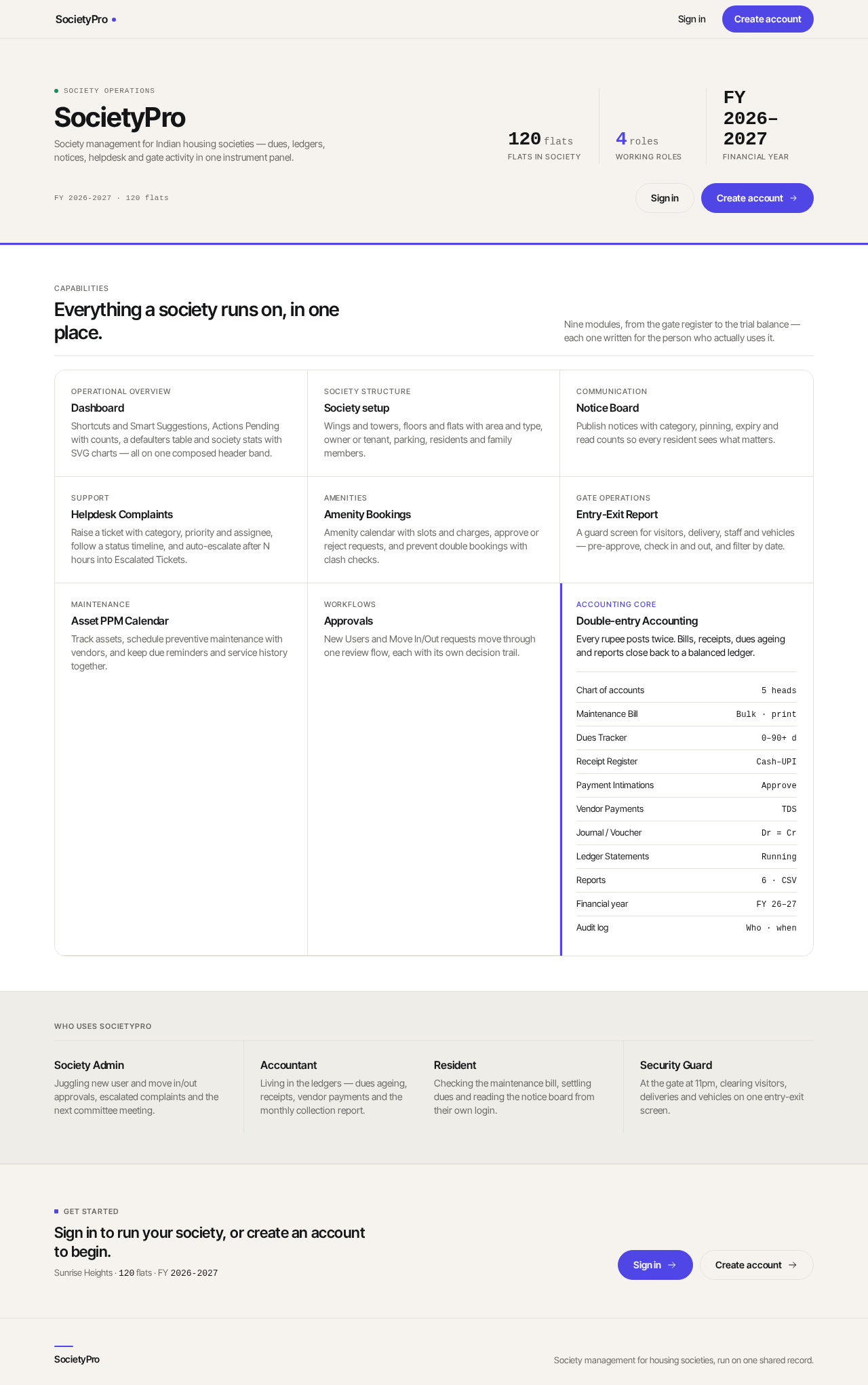
SocietyPro
Society management for Indian housing societies — dues, ledgers, notices, helpdesk and gate activity in one instrument panel.
- Flats in society
- 120flats
- Working roles
- 4roles
- Financial year
- FY 2026–2027
Everything a society runs on, in one place.
Nine modules, from the gate register to the trial balance — each one written for the person who actually uses it.
- Operational overview
Dashboard
Shortcuts and Smart Suggestions, Actions Pending with counts, a defaulters table and society stats with SVG charts — all on one composed header band.
- Society structure
Society setup
Wings and towers, floors and flats with area and type, owner or tenant, parking, residents and family members.
- Communication
Notice Board
Publish notices with category, pinning, expiry and read counts so every resident sees what matters.
- Support
Helpdesk Complaints
Raise a ticket with category, priority and assignee, follow a status timeline, and auto-escalate after N hours into Escalated Tickets.
- Amenities
Amenity Bookings
Amenity calendar with slots and charges, approve or reject requests, and prevent double bookings with clash checks.
- Gate operations
Entry-Exit Report
A guard screen for visitors, delivery, staff and vehicles — pre-approve, check in and out, and filter by date.
- Maintenance
Asset PPM Calendar
Track assets, schedule preventive maintenance with vendors, and keep due reminders and service history together.
- Workflows
Approvals
New Users and Move In/Out requests move through one review flow, each with its own decision trail.
- Accounting core
Double-entry Accounting
Every rupee posts twice. Bills, receipts, dues ageing and reports close back to a balanced ledger.
- Chart of accounts5 heads
- Maintenance BillBulk · print
- Dues Tracker0–90+ d
- Receipt RegisterCash–UPI
- Payment IntimationsApprove
- Vendor PaymentsTDS
- Journal / VoucherDr = Cr
- Ledger StatementsRunning
- Reports6 · CSV
- Financial yearFY 26–27
- Audit logWho · when
Who uses SocietyPro
Society Admin
Juggling new user and move in/out approvals, escalated complaints and the next committee meeting.
Accountant
Living in the ledgers — dues ageing, receipts, vendor payments and the monthly collection report.
Resident
Checking the maintenance bill, settling dues and reading the notice board from their own login.
Security Guard
At the gate at 11pm, clearing visitors, deliveries and vehicles on one entry-exit screen.
Sign in to run your society, or create an account to begin.
Sunrise Heights · 120 flats · FY 2026-2027
SocietyPro
Society management for Indian housing societies — dues, ledgers, notices, helpdesk and gate activity in one instrument panel.
- Flats in society
- 120flats
- Working roles
- 4roles
- Financial year
- FY 2026–2027
Everything a society runs on, in one place.
Nine modules, from the gate register to the trial balance — each one written for the person who actually uses it.
- Operational overview
Dashboard
Shortcuts and Smart Suggestions, Actions Pending with counts, a defaulters table and society stats with SVG charts — all on one composed header band.
- Society structure
Society setup
Wings and towers, floors and flats with area and type, owner or tenant, parking, residents and family members.
- Communication
Notice Board
Publish notices with category, pinning, expiry and read counts so every resident sees what matters.
- Support
Helpdesk Complaints
Raise a ticket with category, priority and assignee, follow a status timeline, and auto-escalate after N hours into Escalated Tickets.
- Amenities
Amenity Bookings
Amenity calendar with slots and charges, approve or reject requests, and prevent double bookings with clash checks.
- Gate operations
Entry-Exit Report
A guard screen for visitors, delivery, staff and vehicles — pre-approve, check in and out, and filter by date.
- Maintenance
Asset PPM Calendar
Track assets, schedule preventive maintenance with vendors, and keep due reminders and service history together.
- Workflows
Approvals
New Users and Move In/Out requests move through one review flow, each with its own decision trail.
- Accounting core
Double-entry Accounting
Every rupee posts twice. Bills, receipts, dues ageing and reports close back to a balanced ledger.
- Chart of accounts5 heads
- Maintenance BillBulk · print
- Dues Tracker0–90+ d
- Receipt RegisterCash–UPI
- Payment IntimationsApprove
- Vendor PaymentsTDS
- Journal / VoucherDr = Cr
- Ledger StatementsRunning
- Reports6 · CSV
- Financial yearFY 26–27
- Audit logWho · when
Who uses SocietyPro
Society Admin
Juggling new user and move in/out approvals, escalated complaints and the next committee meeting.
Accountant
Living in the ledgers — dues ageing, receipts, vendor payments and the monthly collection report.
Resident
Checking the maintenance bill, settling dues and reading the notice board from their own login.
Security Guard
At the gate at 11pm, clearing visitors, deliveries and vehicles on one entry-exit screen.
Sign in to run your society, or create an account to begin.
Sunrise Heights · 120 flats · FY 2026-2027
No comments yet. Be the first!