
snowy-ai

byRaj Pervi

AI-powered accessibility compliance for small websites. It has clear pain, proven demand, and customers already pay because accessibility issues create legal and business risk. Why this is a strong micro SaaS The problem is widespread: many websites are not compliant with accessibility standards, so owners need a simple way to detect and fix issues. Demand is already validated by search interest and an existing competitor landscape, which is a good sign that people are actively looking for a solution. It is a narrow, repeatable workflow product, which fits micro SaaS well: scan, flag issues, generate fixes, and monitor changes over time. What the product does A small business installs a script or connects a URL, and your tool automatically: Scans pages for WCAG/ADA issues. Highlights missing alt text, color contrast problems, labels, keyboard traps, and heading structure issues. Generates simple fix instructions for the site owner or developer. Sends ongoing alerts when new pages introduce problems. Who pays Best buyers are: Small agencies managing client websites. SMBs that need compliance but cannot afford enterprise tooling. Web developers who want an easy recurring-monitoring product for clients. Niche site owners like law firms, clinics, restaurants, and local service businesses. Pricing idea A simple structure could be: Starter: $19–$49/month for one site. Pro: $99–$199/month for multiple sites and scheduled scans. Agency: $299+/month with white-label reports and client management. MVP you can ship fast You do not need a huge platform at first. Build only: URL scanner. Issue report dashboard. Exportable compliance report. Email alerts. Optional branded PDF report for agencies. That MVP is enough to sell to early customers, especially agencies and small businesses that want a quick compliance snapshot. How to validate quickly Create a landing page with “free accessibility scan.” Post in founder, agency, and web-dev communities. Reach out to small agencies and offer a free audit on 20 sites. Track how many users ask for recurring scans, reports, or white-label output. If you want, I can next turn this into a 1-page startup plan with features, positioning, pricing, and first 20 customer acquisition ideas. Follow-ups Yes, please create a 1-page startup plan for this SaaS idea Could you outline a 1-page startup plan including marketing ideas I would like the 1-page plan with a focus on initial growth tactics Yes, please provide the plan and list the first 20 potential customers build me this entire micro saas

LandingLoginClientsReportsIssues
Landing

Comments (0)

No comments yet. Be the first!

System Requirements

System Requirement Document
Page 1 of 5

snowy-ai System Requirements Document

1. Introduction

The "snowy-ai" project aims to develop an AI-powered accessibility compliance tool for small websites. This tool addresses the widespread issue of non-compliance with accessibility standards, providing a simple and effective solution for website owners to detect and fix accessibility issues. The project targets small agencies, SMBs, web developers, and niche site owners who require compliance but cannot afford enterprise-level tools.

2. System Overview

The snowy-ai system will provide an automated solution for scanning websites for accessibility issues, generating reports, and sending alerts. It will be a micro SaaS product with a narrow, repeatable workflow: scan, flag issues, generate fixes, and monitor changes over time.

Key Features:

  • Automated scanning for WCAG/ADA compliance issues.
  • Highlighting of missing alt text, color contrast problems, labels, keyboard traps, and heading structure issues.
  • Generation of simple fix instructions.
  • Ongoing alerts for new issues.
  • Exportable compliance reports.
Page 2 of 5

3. Functional Requirements as Story Points

  • As a small business owner, I should be able to install a script or connect a URL to automatically scan my website for accessibility issues.
  • As a website owner, I want the system to highlight missing alt text, color contrast problems, labels, keyboard traps, and heading structure issues.
  • As a developer, I should receive simple fix instructions for any detected accessibility issues.
  • As a user, I want to receive ongoing alerts when new pages introduce accessibility problems.
  • As an agency, I want to generate exportable compliance reports for my clients.
  • As a small business, I want to receive email alerts for any new accessibility issues detected.
  • As an agency, I want the option to create branded PDF reports for my clients.

4. User Personas

  • Small Business Owner: Needs a simple tool to ensure their website is accessible and compliant with standards.
  • Web Developer: Seeks an easy-to-use product for recurring monitoring of client websites.
  • Agency Manager: Manages multiple client websites and requires white-label reports and client management features.
  • Niche Site Owner: Owns websites for law firms, clinics, restaurants, and local service businesses needing compliance.

5. Core User Flows

  • Small Business Owner installs script -> System scans website -> Issues are highlighted -> Fix instructions are generated -> Ongoing alerts are sent.
  • Agency Manager connects multiple client URLs -> System scans websites -> Compliance reports are generated -> Branded PDF reports are created -> Clients receive reports.
Page 3 of 5

6. Visuals Colors and Theme

  • primary: #1E90FF (Dodger Blue)
  • primary_light: #63B8FF (Light Dodger Blue)
  • secondary: #FFD700 (Gold)
  • accent: #FF4500 (Orange Red)
  • highlight: #32CD32 (Lime Green)
  • bg: #F8F8FF (Ghost White)
  • surface: #FFFFFF (White)
  • text: #000000 (Black)
  • text_muted: #696969 (Dim Gray)
  • border: #D3D3D3 (Light Gray)

7. Signature Design Concept

Interactive Compliance Dashboard

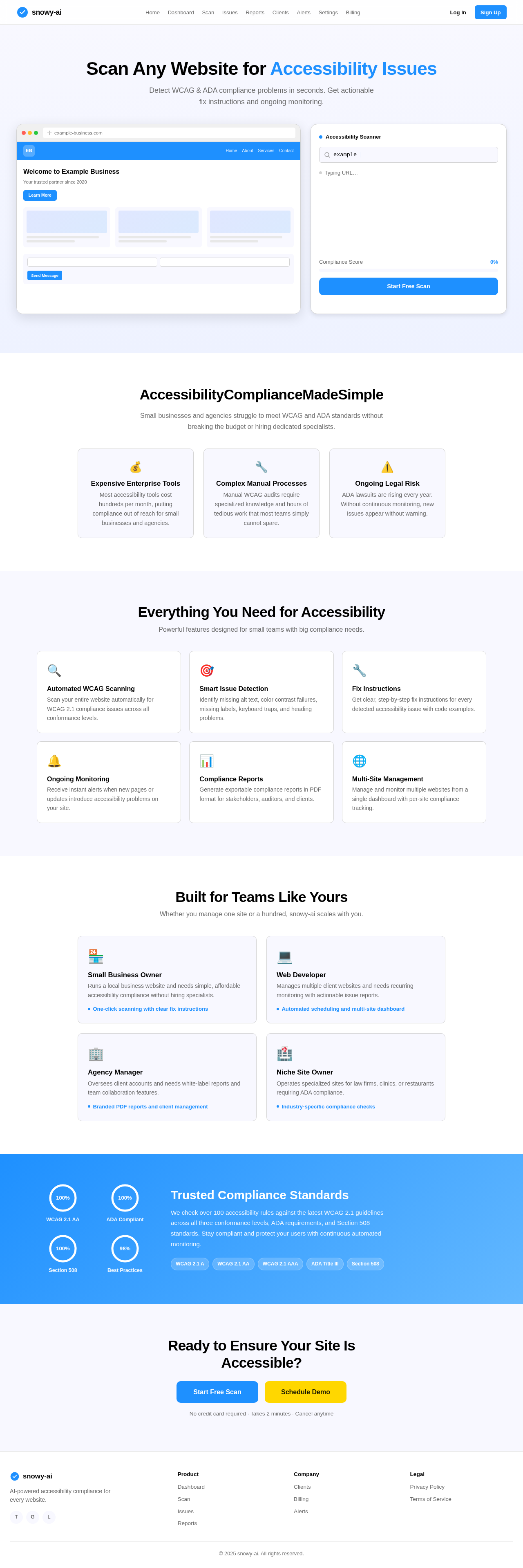
The homepage will feature an interactive compliance dashboard that visually represents the accessibility status of a website. Users can click on different sections of the dashboard to view detailed reports and suggested fixes. The dashboard will use dynamic animations to show the scanning process and highlight areas needing attention.

Page 4 of 5

LANDING HERO MOTION BRIEF

The landing page will feature a dynamic animation where a website URL is entered, and the system visually scans the site, highlighting issues in real-time. The animation will loop every 10 seconds, showing the transformation from a non-compliant to a compliant site. The animation will be built using motion/react for smooth transitions and interactions.

8. Interaction Model & Motion Direction

  • Interaction Model: Animated
  • The landing page will feature moderate scroll-triggered reveals and hover transitions. Interactive elements will have spring physics for a polished user experience.

9. Non-Functional Requirements

  • The system must handle multiple concurrent scans without performance degradation.
  • Reports must be generated within 5 minutes of a scan completion.
  • The system should support internationalization for global users.

10. Tech Stack

  • Frontend: React for Web
  • Backend: Python, FastAPI
  • Database: MySQL or MariaDB
  • AI Models: GPT 5.4 for user-friendly responses
  • AI Tools: Litellm for LLM Routing, Langchain
  • Local Orchestration: Docker, docker-compose
  • Server-side Orchestration: Kubernetes
Page 5 of 5

11. Assumptions and Constraints

  • The system assumes users have basic technical knowledge to install scripts or connect URLs.
  • The system will initially support English, with plans for additional languages based on demand.
  • Compliance checks will be based on the latest WCAG/ADA standards.

12. Glossary

  • WCAG: Web Content Accessibility Guidelines
  • ADA: Americans with Disabilities Act
  • SMB: Small and Medium-sized Business
  • PDF: Portable Document Format

This document outlines the requirements and design for the snowy-ai project, ensuring a comprehensive understanding of the system's capabilities and user interactions.

Landing design preview
Landing: View Info
Signup: Create Account
Dashboard: Connect Client URLs
Dashboard: Manage Clients
Scan: Run Scans
Issues: View Issues
Reports: Generate Compliance Report
Reports: Create Branded PDF
Settings: Configure White-label
Clients: Send Report to Client
Billing: Upgrade to Agency Plan
Landing design preview
Landing: View Info
Signup: Create Account
Dashboard: Connect Client URLs
Dashboard: Manage Clients
Scan: Run Scans
Issues: View Issues
Reports: Generate Compliance Report
Reports: Create Branded PDF
Settings: Configure White-label
Clients: Send Report to Client
Billing: Upgrade to Agency Plan