smokers-fitness
 علي حسين
Create a fitness app specifically designed for smokers who want to improve their stamina and physical fitness gradually. Include a home dashboard, personalized walking plans, beginner workouts, breathing and recovery tracking, progress statistics, and a custom training feature where users can choose exercises, session duration, and rest intervals. The app should have a simple, modern, user-friendly mobile interface.

Comments (0)
Sign in to leave a comment
System Requirements
System Requirements Document for Smokers Fitness
1. Introduction
Smokers Fitness is a mobile-first fitness application built specifically for smokers who want to improve their stamina and physical fitness gradually. The product's intent is to give a person who is rebuilding their capacity for movement a calm, encouraging, and non-judgmental path: short personalized walking plans, beginner workouts, breathing and recovery tracking, honest progress statistics, and a custom training builder where the user chooses exercises, session duration, and rest intervals. The interface must be simple, modern, user-friendly, and designed for a mobile screen.
The audience is the smoker who wants to move again without being shamed, rushed, or overwhelmed. Every capability is framed around gradual improvement: one calm idea per screen, gentle progression, and visible evidence of small gains.
2. System Overview
Smokers Fitness is delivered as a React mobile-web application backed by a shared FastAPI service and a MariaDB database. The application owns user identity: a visitor can read the public Landing page, create an account on Sign Up, and return through Login. Once signed in, the user reaches a private home dashboard and the private fitness surfaces: Walking Plans, Beginner Workouts, Breathing & Recovery, Progress, Custom Training, and Custom Session. All fitness records are private to the signed-in user.
The two accepted personas are the Smoker improving stamina, who follows walking plans and beginner workouts, logs breathing and recovery, and reviews progress statistics, and the Custom training builder, who composes a session from chosen exercises, a session duration, and rest intervals, then performs that custom session. Both personas share the same account and access model; the difference is the work they do, not their permissions.
Current delivery covers the home dashboard, personalized walking plans, beginner workouts, breathing and recovery tracking, progress statistics, and custom training with exercise selection, session duration, and rest intervals. Nothing beyond these accepted capabilities is in scope.
Removed from scope
- Smoking-cessation coaching, quit-date tracking, or nicotine-replacement guidance (the app is designed for smokers improving stamina, not a cessation program).
- Social feeds, leaderboards, or sharing of fitness records.
- Nutrition, calorie, or diet planning.
- Wearable or device-sensor integration.
- Clinical, diagnostic, or medical-advice features.
2a. Product Interpretation and Delivery Boundary
Smokers Fitness is a first-party application. The React frontend renders every screen the user sees, the shared FastAPI backend owns the application APIs and domain logic, and MariaDB stores the user's account and fitness records. There is no provider-owned or external surface in the current scope; every accepted interaction happens inside the application.
Access is split into two boundaries. The public boundary covers Landing, Sign Up, and Login, which are reachable without an account. The private boundary covers the home dashboard, Walking Plans, Beginner Workouts, Breathing & Recovery, Progress, Custom Training, and Custom Session, all of which require a signed-in user because they read or write that user's private fitness records. A protected page never establishes access to itself: a visitor who lands on a private page is sent to Login, and after signing in continues to the page they intended.
The current horizon is the full accepted feature set above. No future features are committed in this document; anything not listed in Section 3 is out of scope.
2c. Page Content and Component Coverage
Landing
- Information/state: Public entry surface. Presents the product name Smokers Fitness, the hero headline "Small steps. More breath.", the subline "Walking plans, easy workouts and breathing rest for a body that wants to move again.", and the call to action "Start gently". Explains in calm, non-shaming language that the app is for smokers who want to improve stamina gradually.
- Primary action: "Start gently" leads a new visitor to Sign Up.
- Supporting actions: A secondary link to Login for returning users.
- Domain entities: None persisted; static product introduction only.
- Component responsibilities: Hero panel (rounded sage panel holding the two-line headline), terracotta breathing ring decoration, entry copy block, primary capsule button, secondary login link.
- States: Loading (static content, no data fetch); empty/success not applicable; error not applicable; recovery not applicable. Reduced-motion renders the breathing ring as a static composed shape.
Sign Up
- Information/state: Anonymous identity-establishment surface. Collects the information needed to create an account so the user's fitness records can be kept privately.
- Primary action: Submit the sign-up form to create the account and enter the private area at the home dashboard.
- Supporting actions: Link to Login for users who already have an account; link back to Landing.
- Domain entities: User account (identity owned by the application).
- Component responsibilities: Form fields for account creation, inline validation messages, submit capsule button, link to Login.
- States: Loading (submitting); empty (blank form with guidance); success (account created, redirect to home dashboard); error (invalid or incomplete input shown inline, or account already exists with a prompt to log in); recovery (form retains entered values after a failed submit so the user can correct and resubmit).
home dashboard
- Information/state: Private landing surface after sign-in. Shows the user's current fitness activity in a calm stacked order: today, walk, breathe, progress. Surfaces the next walking step, the next beginner workout, the latest breathing and recovery entry, and a compact progress summary.
- Primary action: Open the next walking step (Today card with one sage capsule button for the next walk).
- Supporting actions: Navigate to Beginner Workouts, Breathing & Recovery, Progress, Custom Training.
- Domain entities: User, walking plan and its current step, beginner workout, breathing and recovery entry, progress summary.
- Component responsibilities: Today card (rounded oat surface, one sage capsule button), walk card, breathe card, progress card, navigation to the private surfaces.
- States: Loading (fetching the user's current activity); empty (new user with no plan or records yet, showing a gentle prompt to begin a walking plan); success (cards populated); error (a card that fails to load shows a retry affordance without blocking the others); recovery (retry reloads the failed card).
Login
- Information/state: Anonymous identity-verification surface for returning users.
- Primary action: Submit credentials to verify identity and enter the private area.
- Supporting actions: Link to Sign Up for new users; link back to Landing.
- Domain entities: User account.
- Component responsibilities: Credential fields, submit capsule button, inline error message, link to Sign Up.
- States: Loading (verifying); empty (blank form); success (redirect to the intended private page or the home dashboard); error (invalid credentials shown inline without revealing which field was wrong); recovery (form retains the entered identifier so the user can retry).
Walking Plans
- Information/state: Private surface owning the user's personalized walking plan. Presents the plan as a calm vertical path of rounded step markers, showing the current step and the steps ahead.
- Primary action: Start or continue the current walking step.
- Supporting actions: Review upcoming steps; mark a step complete.
- Domain entities: Walking plan, walking step, completion record.
- Component responsibilities: Vertical path with rounded step markers, current-step highlight, start/continue capsule button, completion control.
- States: Loading (fetching the plan); empty (no plan yet, with a prompt to begin one); success (path with current step); error (load failure with retry); recovery (retry reloads the plan; a failed completion keeps the step open so the user can try again).
Beginner Workouts
- Information/state: Private surface owning the beginner workouts the user does. Lists beginner workouts with their content and lets the user open one.
- Primary action: Open and perform a beginner workout.
- Supporting actions: Browse the available beginner workouts; mark a workout complete.
- Domain entities: Beginner workout, workout completion record.
- Component responsibilities: Workout list as rounded cards, workout detail with its steps, completion control.
- States: Loading (fetching workouts); empty (no workouts available, with a calm message); success (list and detail); error (load failure with retry); recovery (retry reloads; a failed completion keeps the workout open).
Breathing & Recovery
- Information/state: Private surface owning the user's breathing and recovery records. Shows breath and recovery as a soft rounded bar rather than a hard chart grid, and lists recorded entries.
- Primary action: Record a breathing and recovery entry.
- Supporting actions: Review past entries; view the soft rounded bar summary.
- Domain entities: Breathing and recovery entry.
- Component responsibilities: Soft rounded bar summary, entry form, entry list.
- States: Loading (fetching entries); empty (no entries yet, with a prompt to record the first one); success (bar and list populated); error (load or save failure with retry); recovery (retry reloads; a failed save keeps the entered values so the user can resubmit).
Progress
- Information/state: Private surface owning the user's progress statistics. Summarizes walking, workout, and breathing and recovery activity over time in calm, readable form.
- Primary action: Review progress statistics.
- Supporting actions: Switch the period being reviewed.
- Domain entities: Aggregated walking, workout, and breathing and recovery records.
- Component responsibilities: Statistic cards, soft rounded bar visualizations, period selector.
- States: Loading (computing statistics); empty (no activity yet, with a calm message); success (statistics shown); error (load failure with retry); recovery (retry recomputes).
Custom Training
- Information/state: Private surface owning the composition of a custom session. The user chooses exercises, a session duration, and rest intervals.
- Primary action: Confirm the chosen exercises, session duration, and rest intervals to begin the custom session.
- Supporting actions: Select and deselect exercises; set session duration; set rest intervals.
- Domain entities: Exercise catalog, custom session definition (chosen exercises, session duration, rest intervals).
- Component responsibilities: Exercise selection list, session duration control, rest interval control, confirm capsule button.
- States: Loading (fetching the exercise catalog); empty (no exercises selected yet, with guidance); success (valid selection ready to confirm); error (invalid selection such as no exercises chosen, or save failure, shown inline); recovery (the selection is retained so the user can correct and confirm again).
Custom Session
- Information/state: Private surface owning the performance of a custom session. Runs the session the user composed, moving through the chosen exercises with the chosen session duration and rest intervals.
- Primary action: Perform the session through its exercises and rest intervals.
- Supporting actions: Pause or end the session early; mark the session complete.
- Domain entities: Custom session definition, custom session performance record.
- Component responsibilities: Current exercise display, session timer, rest interval indicator, completion control.
- States: Loading (preparing the session); empty (no session to run, with a link back to Custom Training); success (session runs and completes); error (session cannot start or save, with retry); recovery (retry restarts or resaves; an ended session is recorded as ended).
3. Functional Requirements
FR-1 — Purpose-built fitness for smokers (explicit) As a smoker improving stamina, I should use a fitness app designed specifically for smokers who want to improve their stamina and physical fitness gradually, so that the whole experience fits my situation.
- Trigger/input: The user opens the app.
- Observable result: The product presents itself as a gradual stamina and fitness app for smokers, with calm, non-shaming language throughout.
- Access state: Public on Landing; private after sign-in.
- Failure/recovery: Not applicable to framing; content loads statically.
- Continuation: The user proceeds to Sign Up or Login.
FR-2 — Home dashboard (explicit) As a smoker improving stamina, I should see a home dashboard showing my current fitness activity, so that I know what to do next.
- Trigger/input: The signed-in user opens the home dashboard.
- Observable result: Today, walk, breathe, and progress cards are shown in a calm stacked order, with the next walking step available from the Today card.
- Access state: Login required.
- Failure/recovery: A card that fails to load shows a retry affordance without blocking the others.
- Continuation: The user opens the next walking step or navigates to another private surface.
FR-3 — Personalized walking plans (explicit) As a smoker improving stamina, I should follow a personalized walking plan laid out as a calm vertical path, so that I progress step by step.
- Trigger/input: The signed-in user opens Walking Plans and starts or continues the current step.
- Observable result: The plan's rounded step markers show the current step and the steps ahead; completing a step advances the path.
- Access state: Login required.
- Failure/recovery: A load failure offers retry; a failed completion keeps the step open for another attempt.
- Continuation: The user returns to the home dashboard or continues to the next step.
FR-4 — Beginner workouts (explicit) As a smoker improving stamina, I should do beginner workouts suited to a gradual start, so that I build fitness without being overwhelmed.
- Trigger/input: The signed-in user opens Beginner Workouts and opens a workout.
- Observable result: The workout's content is shown and can be performed and marked complete.
- Access state: Login required.
- Failure/recovery: A load failure offers retry; a failed completion keeps the workout open.
- Continuation: The user returns to the home dashboard or opens another workout.
FR-5 — Breathing and recovery tracking (explicit) As a smoker improving stamina, I should record and review breathing and recovery entries, so that I can see how my breathing and rest are developing.
- Trigger/input: The signed-in user records a breathing and recovery entry.
- Observable result: The entry is saved and shown in the list and in the soft rounded bar summary.
- Access state: Login required.
- Failure/recovery: A failed save keeps the entered values so the user can resubmit; a load failure offers retry.
- Continuation: The user reviews past entries or returns to the home dashboard.
FR-6 — Progress statistics (explicit) As a smoker improving stamina, I should view progress statistics summarizing my walking, workout, and breathing and recovery activity, so that I can see gradual improvement.
- Trigger/input: The signed-in user opens Progress.
- Observable result: Statistics are shown in calm, readable form with soft rounded bar visualizations.
- Access state: Login required.
- Failure/recovery: A load failure offers retry.
- Continuation: The user switches the period or returns to the home dashboard.
FR-7 — Custom training composition (explicit) As a custom training builder, I should choose exercises, a session duration, and rest intervals, so that I can build a session that fits my own needs.
- Trigger/input: The signed-in user selects exercises and sets session duration and rest intervals on Custom Training.
- Observable result: The chosen exercises, session duration, and rest intervals are captured as a custom session definition ready to begin.
- Access state: Login required.
- Failure/recovery: An invalid selection (for example, no exercises chosen) or a save failure is shown inline and the selection is retained for correction.
- Continuation: The user confirms to begin the custom session.
FR-8 — Custom session performance (explicit) As a custom training builder, I should perform the custom session I composed, so that I complete the training I designed.
- Trigger/input: The signed-in user confirms a custom session definition.
- Observable result: The session runs through the chosen exercises with the chosen session duration and rest intervals, and completion is recorded.
- Access state: Login required.
- Failure/recovery: If the session cannot start or save, a retry is offered; an ended session is recorded as ended.
- Continuation: The user returns to the home dashboard or builds another session.
FR-9 — Simple, modern, mobile interface (explicit) As a smoker improving stamina, I should use a simple, modern, user-friendly mobile interface, so that the app is easy and calm to use.
- Trigger/input: The user views any page.
- Observable result: A single mobile column with generous margins, one calm idea per screen, soft rounded cards, capsule buttons, and readable text and controls that stay whole at every viewport.
- Access state: Applies to public and private pages.
- Failure/recovery: Not applicable.
- Continuation: Not applicable.
FR-10 — Self-service enrollment (required_inference) As a smoker improving stamina, I should create an account on Sign Up before first use, so that my fitness records are kept privately and I can return to them.
- Trigger/input: A visitor selects "Start gently" on Landing.
- Observable result: Submitting valid account information creates the account and enters the private area at the home dashboard.
- Access state: Anonymous entry; the resulting session is authenticated.
- Failure/recovery: Invalid or incomplete input is shown inline and the entered values are retained; an existing account prompts the user to log in.
- Continuation: The user lands on the home dashboard.
FR-11 — Returning identity verification (required_inference) As a smoker improving stamina, I should verify my identity at Login before reaching my private fitness records, so that only I can see and change them.
- Trigger/input: A returning user submits credentials on Login, or a visitor attempts a private page.
- Observable result: Valid credentials grant access to the intended private page or the home dashboard; invalid credentials are rejected inline.
- Access state: Anonymous entry; the resulting session is authenticated.
- Failure/recovery: Invalid credentials are shown inline without revealing which field was wrong, and the entered identifier is retained for retry.
- Continuation: The user reaches the intended private page.
4. User Personas
Smoker improving stamina
- Product context: This person smokes and wants to improve their stamina and physical fitness gradually. They need an app that feels safe and kind rather than clinical or shaming, and that gives them a steady, calm path forward.
- Primary goal: Build stamina step by step through personalized walking plans and beginner workouts, while tracking breathing and recovery and seeing honest evidence of gradual progress.
- Distinct accepted responsibilities: Follows the personalized walking plan on Walking Plans; performs beginner workouts on Beginner Workouts; records and reviews breathing and recovery entries on Breathing & Recovery; reviews progress statistics on Progress; uses the home dashboard to see what to do next.
- Relevant inputs or decisions: Which walking step to start or continue; which beginner workout to open; what to record for breathing and recovery; which period to review on Progress.
- Interactions with other accepted participants: Shares the same account and access model as the Custom training builder; both are the same signed-in user in different modes of work. No cross-user interaction is accepted.
- Observable success: The walking path advances, workouts are completed, breathing and recovery entries accumulate, and Progress shows gradual improvement.
Custom training builder
- Product context: This person wants a session that fits their own needs rather than a fixed plan. They are the same kind of user — a smoker improving stamina — but they take control of the composition of a session.
- Primary goal: Choose exercises, a session duration, and rest intervals, then perform that custom session.
- Distinct accepted responsibilities: Selects exercises, sets session duration, and sets rest intervals on Custom Training; confirms and performs the custom session on Custom Session; ends or completes the session.
- Relevant inputs or decisions: Which exercises to include; how long the session should run; how long rest intervals should be; whether to pause, end early, or complete.
- Interactions with other accepted participants: Shares the same account and access model as the Smoker improving stamina; both are the same signed-in user. No cross-user interaction is accepted.
- Observable success: The custom session runs through the chosen exercises with the chosen duration and rest intervals, and completion is recorded.
5. Core User Flows
Flow A — First visit and enrollment (Smoker improving stamina)
- A visitor opens the app and lands on Landing. The warm oat field, sage hero panel with "Small steps. More breath.", and the terracotta breathing ring are shown.
- The visitor reads the subline and selects "Start gently".
- The visitor arrives at Sign Up and enters the information needed to create an account.
- On submit, the form shows a loading state. If input is invalid or incomplete, inline errors appear and the entered values are retained for correction. If an account already exists, the visitor is prompted to log in.
- On success, the account is created and the visitor enters the private area at the home dashboard.
- Continuation: The new user sees the empty state with a gentle prompt to begin a walking plan and proceeds to Flow B.
Flow B — Following a personalized walking plan (Smoker improving stamina)
- From the home dashboard, the signed-in user sees the Today card with one sage capsule button for the next walk.
- The user selects the button and arrives at Walking Plans, where the plan is laid out as a calm vertical path with rounded step markers.
- The user starts or continues the current step.
- On completion, the step is marked complete and the path advances to the next step.
- Failure/recovery: If the plan fails to load, a retry affordance is shown. If completion fails, the step stays open so the user can try again.
- Continuation: The user returns to the home dashboard, where the Today card now reflects the next step.
Flow C — Performing a beginner workout (Smoker improving stamina)
- From the home dashboard, the user opens Beginner Workouts.
- The user browses the beginner workouts shown as rounded cards and opens one.
- The user performs the workout's content and marks it complete.
- Failure/recovery: A load failure offers retry; a failed completion keeps the workout open.
- Continuation: The user returns to the home dashboard or opens another workout.
Flow D — Recording breathing and recovery (Smoker improving stamina)
- From the home dashboard, the user opens Breathing & Recovery.
- The user records a breathing and recovery entry.
- On save, the entry appears in the list and the soft rounded bar summary updates.
- Failure/recovery: A failed save keeps the entered values so the user can resubmit; a load failure offers retry.
- Continuation: The user reviews past entries or returns to the home dashboard.
Flow E — Reviewing progress statistics (Smoker improving stamina)
- From the home dashboard, the user opens Progress.
- The user reviews statistics summarizing walking, workout, and breathing and recovery activity, shown with soft rounded bar visualizations.
- The user switches the period being reviewed.
- Failure/recovery: A load failure offers retry.
- Continuation: The user returns to the home dashboard.
Flow F — Building and performing a custom session (Custom training builder)
- From the home dashboard, the signed-in user opens Custom Training.
- The user selects exercises from the catalog.
- The user sets the session duration.
- The user sets the rest intervals.
- The user confirms. If no exercises are chosen or the save fails, an inline error appears and the selection is retained for correction.
- On success, the user arrives at Custom Session, where the session runs through the chosen exercises with the chosen session duration and rest intervals.
- The user may pause or end the session early, or mark it complete. An ended session is recorded as ended.
- Failure/recovery: If the session cannot start or save, a retry is offered.
- Continuation: The user returns to the home dashboard or builds another session.
Flow G — Returning user sign-in (Smoker improving stamina / Custom training builder)
- A returning user opens the app and selects the login link on Landing, or attempts a private page and is sent to Login.
- The user submits credentials.
- On success, the user reaches the intended private page or the home dashboard.
- Failure/recovery: Invalid credentials are shown inline without revealing which field was wrong, and the entered identifier is retained for retry.
- Continuation: The user proceeds with any of Flows B–F.
6. Visuals Colors and Theme
The visual direction is humane technology in the spirit of Yves Béhar: soft forms, calm pace, warm materials. A gradual stamina app for smokers must feel safe and kind, not clinical or shaming.
Color tokens (light mode)
- Background:
#F4EFE7(warm oat ground, covers most of the page) - Surface:
#FFFBF5(cards and panels) - Text:
#2B2A27(slate ink for all body text) - Primary:
#3F6B5A(sage green, primary action colour) - Accent:
#C96A4A(terracotta, marks progress and breath) - Muted:
#8C8579(secondary text and quiet labels)
Typography
- Headings: Work Sans, Medium weight, soft tracking, sentence case, large calm headings with open leading.
- Body: Karla.
- Scale: 1.25 modular — 44 / 34 / 26 / 20 / 16. Mobile headline 34px, desktop 44px.
Shape language
- Soft rounded blocks with 20px to 28px radii.
- Capsule buttons and rounded product cards.
- No hard corners and no glossy shine.
Layout
- Single mobile column with generous margins.
- One calm idea per screen.
- Rounded cards stack in a clear order: today, walk, breathe, progress.
Motion
- Slow ease-out reveals of one card at a time.
- The breathing ring expands and contracts at a steady pace.
- No bounce.
Imagery
- Soft still lifes of shoes, a kettle, and natural light.
- Warm fabric textures and calm daylight photography.
- No stock gym scenes.
Readability rule: Headlines, wordmarks, labels, numbers, card text, and controls stay entirely inside the viewport and their container at 375px, 768px, and 1280px, wrapping or scaling (for example font-size: clamp(...) with its mobile size) to fit. No other element covers any part of them. Imagery and decoration may be cropped, bled, rotated, or overlapped as the direction asks, as long as they cover no readable text or control.
Avoid: Cold clinical white and blue gradients; shaming or alarmist copy about smoking; hard corners, dense dashboards, and grid tables; bouncy or fast motion; stock gym photography; the generic indigo/blue-on-white SaaS template.
7. Signature Design Concept
The public entry is a warm oat field. A large rounded sage panel holds the headline "Small steps. More breath." in two lines, with the subline beneath it and a sage capsule button reading "Start gently". A terracotta breathing ring sits at the lower right of the hero and slowly grows and contracts at a fixed, steady pace — the visual promise of the product: breath, patience, and gradual gain. Soft still-life imagery of shoes and a kettle in natural light sits behind or beside the panel, cropped and bled off the edge as decoration only, never covering the headline, subline, or button.
The concept recomposes only accepted content: the product name, the entry copy, the "Start gently" call to action, and the login link. It introduces no new behavior or destination.
8. Interaction Model & Motion Direction
Interaction Model: Animated Motion Tempo: restrained Hero Dimensionality: layered_2d
Landing Hero Motion Brief
- Focal subject: The terracotta breathing ring at the lower right of the warm oat hero, with the sage headline panel as the composed anchor.
- Input → transformation → outcome thesis: On load, the hero composes itself — the sage panel and copy settle in with a slow ease-out, then the terracotta ring begins its steady expand-and-contract cycle. The outcome is a calm first frame that demonstrates the product's promise of breath and gradual progress without demanding action.
- Motion vocabulary: Slow ease-out reveals of one element at a time; the breathing ring expands and contracts at a fixed slow pace; no bounce, no fast transitions.
- Composed first frame: Warm oat background; large rounded sage panel holding the two-line headline; subline beneath; sage capsule "Start gently"; terracotta ring at lower right at mid-expansion; soft still-life imagery cropped at the edge.
- Reduced-motion state: The hero renders as a static composed arrangement — the sage panel, headline, subline, button, and login link fully visible, and the terracotta ring shown as a static composed shape at a fixed size. No animation runs.
9. Non-Functional Requirements
- Mobile-first interface (explicit): The interface is a mobile interface, simple, modern, and user-friendly. Layout is a single mobile column with generous margins and one calm idea per screen.
- Gradual progression (explicit): Walking plans, beginner workouts, and progress statistics must present improvement as gradual; no shaming or alarmist copy about smoking.
- Readability at every viewport (explicit): Readable text and controls stay whole at 375px, 768px, and 1280px, wrapping or scaling to fit, with no element covering them.
- Private fitness records (required_inference): Fitness records are private to the signed-in user; private pages require Login, and a protected page never establishes access to itself.
- Reduced motion (explicit, from creative direction): With
prefers-reduced-motion, a usable static arrangement is provided; the breathing ring becomes a static shape. - Persistence (required_inference): Account and fitness records persist in MariaDB so the user can resume across sessions.
- Accessible contrast (basic_default): Text and controls meet readable contrast against their surfaces using the specified palette.
10. Tech Stack
- Frontend: React application UI, mobile-first, implementing the specified palette, typography, shape language, and motion direction.
- Backend: Shared FastAPI process for application APIs and domain modules (accounts, walking plans, beginner workouts, breathing and recovery, progress statistics, custom training).
- Database: MariaDB for application-owned persistent data (accounts and fitness records).
- Infrastructure: Docker/docker-compose provisioning the backend, database, and frontend services.
11. Assumptions and Constraints
- Assumption (narrow): The two accepted personas are the same signed-in user in different modes of work; no cross-user sharing or differentiated permissions are accepted.
- Assumption (narrow): Personalized walking plans are personalized to the signed-in user's own plan and progress; no additional personalization inputs beyond the accepted scope are introduced.
- Constraint (explicit): The app is designed specifically for smokers.
- Constraint (explicit): Stamina and physical fitness improve gradually.
- Constraint (explicit): The interface is simple, modern, and user-friendly.
- Constraint (explicit): The interface is a mobile interface.
- Constraint (explicit): No shaming or alarmist copy about smoking; no cold clinical white and blue gradients; no hard corners, dense dashboards, or grid tables; no bouncy or fast motion; no stock gym photography.
- Constraint (explicit): The generic indigo/blue-on-white SaaS template is forbidden.
12. Glossary
- Smoker improving stamina: The accepted persona who wants to raise stamina and fitness gradually and follows walking plans, beginner workouts, breathing and recovery tracking, and progress statistics.
- Custom training builder: The accepted persona who chooses exercises, session duration, and rest intervals and performs the resulting custom session.
- Walking plan: A personalized sequence of walking steps presented as a calm vertical path with rounded step markers.
- Beginner workout: A workout suited to a gradual start, listed and performed on Beginner Workouts.
- Breathing and recovery entry: A recorded observation of breathing and recovery, shown in a list and a soft rounded bar summary.
- Progress statistics: Summaries of walking, workout, and breathing and recovery activity shown on Progress.
- Custom session definition: The chosen exercises, session duration, and rest intervals composed on Custom Training.
- Custom session: The performance of a custom session definition on Custom Session.
- Breathing ring: The terracotta ring on the Landing hero that expands and contracts at a fixed slow pace.
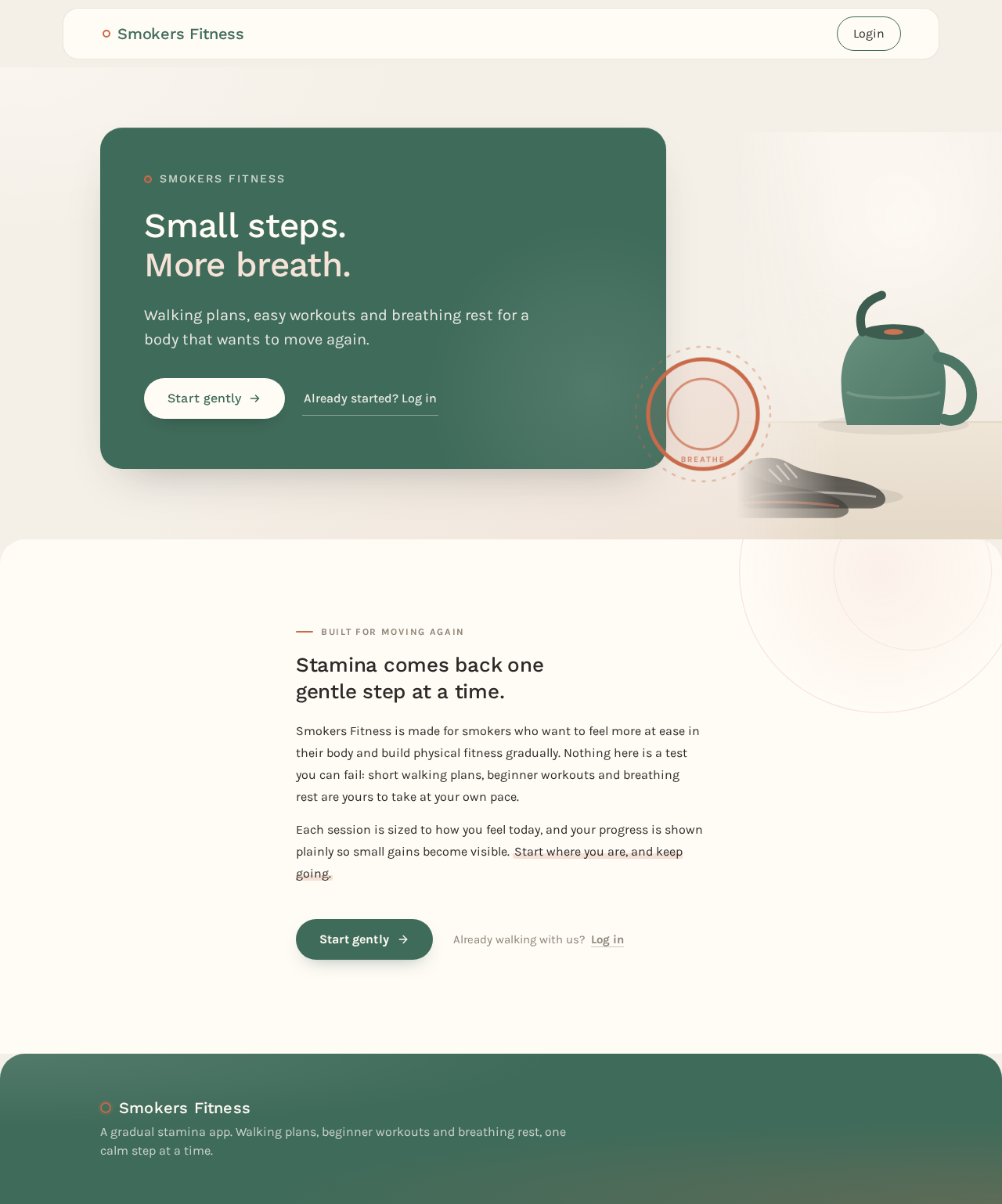
Smokers Fitness
Small steps.More breath.
Walking plans, easy workouts and breathing rest for a body that wants to move again.
Built for moving again
Stamina comes back one gentle step at a time.
Smokers Fitness is made for smokers who want to feel more at ease in their body and build physical fitness gradually. Nothing here is a test you can fail: short walking plans, beginner workouts and breathing rest are yours to take at your own pace.
Each session is sized to how you feel today, and your progress is shown plainly so small gains become visible. Start where you are, and keep going.
Already walking with us?Log in
No comments yet. Be the first!