smart-wise
 Said Gad
صمم صورة لشكل الجهاز التناسلي

Comments (0)
Sign in to leave a comment
System Requirements
System Requirements Document for الجهاز التناسلي
1. Introduction
This System Requirements Document defines the website مدرسة ميت أبو الحارث للتعليم الأساسي (Mit Abu El-Harith Basic Education School). The product intent, derived from the authoritative requirement thread, is a single clear public website that carries the school's name and its basic information for visitors, and that the school administrator can present correctly.
The audience is the local school community in Mit Abu El-Harith, Egypt: students, parents, and the school administrator. The site's purpose is confidence, clarity, and local belonging — a visitor opens the site and immediately finds a clear page bearing the school's name and its basic information.
Note on the requirement thread. The thread contains an earlier request to design an image of the reproductive system ("صمم صورة لشكل الجهاز التناسلي" / "يعني بتصميم صور"). That request is a request for a separate image, and the explicit hard constraint in the Planning Scope states that the builder does not create separate images and builds applications and websites only. The later refinement — "اعمل موقع باسم مدرسة ميت أبو الحارث للتعليم الأساسي" — is the current commitment and supersedes the earlier image request. The image request is therefore not a current product capability and is recorded as removed from scope in Section 2.
Success Criteria
- A visitor can open the site and read the school's name مدرسة ميت أبو الحارث للتعليم الأساسي and its basic information on one clear page.
- The school administrator can present the school's name and information so that it displays correctly to visitors.
- The site is a website (not a standalone image), consistent with the explicit constraint that the builder builds applications and websites only.
2. System Overview
The product is a single public website for مدرسة ميت أبو الحارث للتعليم الأساسي. It is delivered as a React frontend, a shared FastAPI backend, and a MariaDB database, provisioned as the initial scaffold services. The current information architecture is a single public page, الرئيسية, which presents the school's name and its basic information.
Current actors are the زائر الموقع (site visitor), who opens the site to learn the school's name and basic information, and مسؤول المدرسة (school administrator), who presents the school's content so it displays correctly to visitors. The page is publicly accessible with no access requirement.
The current delivery is intentionally narrow: one public page carrying the school's name and basic information. No adjacent capabilities — enrollment, grades, news feeds, galleries, contact forms, or accounts — are accepted by the source and none are added.
Removed from scope
- تصميم صورة للجهاز التناسلي (also: صورة شكل الجهاز التناسلي, تصميم صور) — the earlier image-design request, superseded by the current website commitment and excluded by the explicit constraint that the builder does not create separate images.
2a. Product Interpretation and Delivery Boundary
The requester asked for a website named مدرسة ميت أبو الحارث للتعليم الأساسي. The site is a first-party, publicly reachable web surface. Its single page, الرئيسية, is the public entry surface and carries the school's name and basic information. There is no application-owned identity, no login, and no protected destination: the page's access requirement is none, and no accepted journey requires a visitor to establish identity or resume private state. The school administrator's responsibility — presenting the school's name and information so it displays correctly — is served within the same public page's content, not through a separate authenticated destination.
The explicit constraint that the builder does not create separate images and builds applications and websites only is honored: the deliverable is the website, and the earlier image request is not a current capability. No future-horizon requirements are stated by the source.
2c. Page Content and Component Coverage
الرئيسية
- Information and state. The page presents the school's name, مدرسة ميت أبو الحارث للتعليم الأساسي, as its dominant heading, together with the school's basic information. The page is public and requires no access. Its states are: loading (content being retrieved), empty (no basic information available yet), success (name and basic information displayed), and error (content could not be retrieved).
- Primary action. The visitor reads the school's name and basic information. The entry call to action is "اعرف المدرسة", which brings the visitor to the school's information on the page.
- Supporting actions. The visitor scrolls through the page's numbered sections to read the basic information. The school administrator presents the school's name and basic information so that it displays correctly.
- Domain entities. School identity (the school's name) and school basic information (the descriptive facts the school presents about itself).
- Component responsibilities.
- Fixed header displaying the school's name in Fira Sans Condensed, remaining visible while the visitor reads.
- Hero with the school's name as a large Arabic headline spanning the viewport across three lines on a paper-toned ground, a thin red horizontal rule beneath the headline, and a small yellow circle carrying the section number on the left; the subline "اسم المدرسة ومعلوماتها الأساسية في صفحة واحدة واضحة." and the call to action "اعرف المدرسة".
- Numbered sections separated by thin red horizontal rules, each carrying its number in a large margin numeral and a colored circular route-symbol beside it.
- Basic information block presenting the school's basic information as readable text.
- States.
- Loading: the page shows a restrained placeholder for the school's name and information while content is retrieved.
- Empty: when no basic information is available, the page still shows the school's name and a clear indication that information is not yet available.
- Success: the school's name and basic information are fully displayed and readable at 375px, 768px, and 1280px.
- Error: when content cannot be retrieved, the page shows the school's name and a clear error message with a way to retry loading the information.
- Recovery: retrying reloads the school's name and basic information; on success the page returns to the success state.
3. Functional Requirements
FR-1 — Present the school's name and basic information on a public page. As a زائر الموقع, I should open the website and see the school's name مدرسة ميت أبو الحارث للتعليم الأساسي and its basic information on one clear page, so that I know which school this is and what it is.
- Provenance: explicit (requirement "إنشاء موقع باسم مدرسة ميت أبو الحارث للتعليم الأساسي"; page الرئيسية).
- Trigger/input: the visitor opens the site.
- Observable result: the page displays the school's name as its dominant heading and the school's basic information as readable text.
- Access state: public, no access requirement.
- Failure/recovery: if the information cannot be retrieved, the page shows the school's name and an error message with a retry; retry reloads the information.
- Continuation: the visitor reads the numbered sections of basic information.
- Owner: الرئيسية.
FR-2 — Present the school's content correctly as the school administrator. As a مسؤول المدرسة, I should present the school's name and basic information so that the website displays them correctly to visitors, so that visitors find accurate information about the school.
- Provenance: required_inference (persona "مسؤول المدرسة" in the Planning Scope; success defined as the site displaying the school's name and information correctly).
- Trigger/input: the administrator supplies the school's name and basic information as the content the site presents.
- Observable result: the public page displays the school's name and basic information correctly.
- Access state: the presentation is served within the public page's content; no separate protected destination is accepted by the source.
- Failure/recovery: if the content is unavailable, the page's empty or error state shows the school's name and a clear indication, and the administrator can correct the content so the page returns to the success state.
- Continuation: visitors read the corrected information.
- Owner: الرئيسية.
FR-3 — Reach the school's information from the entry call to action. As a زائر الموقع, I should use the call to action "اعرف المدرسة" on the entry page to bring the school's information into view, so that I reach the basic information directly.
- Provenance: required_inference (entry hero copy supplied in the creative direction; the page's primary action).
- Trigger/input: the visitor activates "اعرف المدرسة".
- Observable result: the school's basic information is brought into view on the same page.
- Access state: public.
- Failure/recovery: if the information is not available, the page's empty or error state applies as in FR-1.
- Continuation: the visitor reads the basic information.
- Owner: الرئيسية.
4. User Personas
زائر الموقع
- Product context. A member of the local community in Mit Abu El-Harith — a student, parent, or neighbor — who opens the school's website to find out about مدرسة ميت أبو الحارث للتعليم الأساسي.
- Primary goal. Find a clear page bearing the school's name and its basic information.
- Distinct accepted responsibilities. Opening the site and reading the school's name and basic information; using the call to action "اعرف المدرسة" to reach the information.
- Relevant inputs or decisions. Whether the page clearly shows the school's name and information; whether to read further into the numbered sections.
- Interactions with other accepted participants. The visitor is the reader of the content the مسؤول المدرسة presents; the visitor's success depends on that content displaying correctly.
- Observable success. The visitor finds the school's name and basic information displayed clearly on one page.
- Provenance. required_inference (Planning Scope persona catalog).
مسؤول المدرسة
- Product context. The person responsible for the school's public presentation, who ensures the website carries the school's name and basic information correctly.
- Primary goal. Have the website display the school's name and information correctly to visitors.
- Distinct accepted responsibilities. Presenting the school's name and basic information as the content the site displays; correcting it when the page shows an empty or error state.
- Relevant inputs or decisions. The school's name and the basic facts the school presents about itself.
- Interactions with other accepted participants. The administrator's presented content is what the زائر الموقع reads; the administrator's success is the visitor finding correct information.
- Observable success. The public page displays the school's name and basic information correctly.
- Provenance. required_inference (Planning Scope persona catalog).
5. Core User Flows
Flow A — A visitor learns about the school
- The زائر الموقع opens the website at الرئيسية. The page is public; no identity is required.
- The page displays the school's name مدرسة ميت أبو الحارث للتعليم الأساسي as a large Arabic headline spanning the viewport across three lines on a paper-toned ground, with a thin red rule beneath it and a small yellow circle carrying the section number on the left.
- The visitor reads the subline "اسم المدرسة ومعلوماتها الأساسية في صفحة واحدة واضحة." and activates the call to action "اعرف المدرسة".
- The school's basic information is brought into view on the same page, presented in numbered sections separated by thin red rules, each with its number in a large margin numeral and a colored circular route-symbol.
- The visitor reads the basic information and reaches the end of the page. Observable result: the visitor has found the school's name and basic information clearly on one page.
- Failure/recovery: if the information cannot be retrieved, the page shows the school's name and an error message with a retry; the visitor retries and, on success, the information appears. If no information is available, the page shows the school's name and a clear indication that information is not yet available.
Flow B — The school administrator presents the school's content
- The مسؤول المدرسة supplies the school's name and basic information as the content the site presents.
- The public page الرئيسية displays the school's name and basic information to visitors.
- The administrator checks that the page displays the name and information correctly. Observable result: visitors find the school's name and basic information displayed correctly.
- Failure/recovery: if the page shows an empty or error state, the administrator corrects the content so the page returns to the success state, and visitors read the corrected information.
6. Visuals Colors and Theme
The creative direction — الوضوح الطباعي كمؤسسة تعليمية, muse Erik Spiekermann — is authoritative for this section.
- Mode. Light mode only.
- Palette (exact hex by role).
- Background:
#F4EFE6— warm paper ground, approximately 70% of the surface. - Surface:
#FFFDF8. - Text:
#1C1A17— dark ink for all body and heading text. - Primary:
#C8341F— signal red for headings' rules and section separators. - Accent:
#E8B10E— yellow for emphasis only (the small section-number circle). - Muted:
#6E675C.
- Background:
- Typography.
- Headings: Fira Sans Condensed, weight 700, large Arabic letterforms, slightly tight tracking, headlines spanning the container width.
- Body: Fira Sans.
- Scale: 1.333; Arabic sizes 44 / 32 / 24 / 18 / 16; hero headline
clamp(40px, 9vw, 120px).
- Shape language. Sharp rectangles, thin horizontal rules, numbered circles as route symbols, no soft shadows.
- Layout. A 12-column grid with visible horizontal rules. The school-name header spans the screen width. Numbered sections carry large numerals in the margin.
- Imagery. Schematic drawings and colored route lines as transit lines; documentary photographs of the school if available; no decorative graphics.
- Motion. Short functional motion of 120–180 ms; sections appear on scroll once only; no bounce.
- Avoid. Identical cards with hover lift; blue or purple gradients on white; Inter, Roboto, or Poppins; soft decorations or blurry shadows; the generic indigo/blue-on-white SaaS template.
7. Signature Design Concept
The public entry, الرئيسية, opens on a warm paper ground (#F4EFE6). The school's name — مدرسة ميت أبو الحارث للتعليم الأساسي — is set in Fira Sans Condensed 700 as a massive Arabic headline spanning the full viewport across three lines, sized with clamp(40px, 9vw, 120px) so it stays whole at 375px, 768px, and 1280px. Beneath the headline runs a thin red horizontal rule (#C8341F), and on the left a small yellow circle (#E8B10E) carries the section number. Below, the subline "اسم المدرسة ومعلوماتها الأساسية في صفحة واحدة واضحة." and the call to action "اعرف المدرسة" sit on the paper ground. A fixed header repeats the school's name in Fira Sans Condensed. Each following section is separated by its own thin red rule and marked by a large margin numeral and a colored circular route-symbol, composing the school's information as a clear transit-style system of lines and stops. The concept recomposes only the accepted content, states, and controls of the page.
8. Interaction Model & Motion Direction
Interaction Model: Animated Motion Tempo: restrained Hero Dimensionality: flat
Landing Hero Motion Brief
- Focal subject. The school's name as a massive Arabic headline on a paper ground, with the thin red rule beneath it and the small yellow section-number circle on the left.
- Input → transformation → outcome thesis. On load, the headline, red rule, and yellow circle compose into their first frame; as the visitor scrolls, each numbered section appears once when it enters the viewport, separated by its thin red rule — the page assembles into a clear, ordered system of information without bounce or decoration.
- Motion vocabulary. Short functional transitions of 120–180 ms; one-time scroll-triggered section appearance; no bounce, no hover lift, no blur.
- Composed first frame. Paper ground
#F4EFE6; the school's name across three lines in Fira Sans Condensed 700 at hero scale; a thin red rule beneath; a small yellow circle with the section number on the left; the subline and "اعرف المدرسة" below. - Reduced-motion state. With
prefers-reduced-motion, sections appear immediately in their final arrangement with no scroll-triggered transitions; all text and controls remain whole and readable at every viewport.
9. Non-Functional Requirements
- NFR-1 — Website, not a separate image. The deliverable is a website; the builder does not create separate images. Provenance: explicit constraint. Rationale: the authoritative constraint states the builder builds applications and websites only.
- NFR-2 — Readable text and controls stay whole. Headlines, the school's wordmark, labels, numbers, and controls stay entirely inside the viewport and their container at 375px, 768px, and 1280px, wrapping or scaling (for example
font-size: clamp(...)) to fit, with no other element covering them. Provenance: creative direction. Rationale: legibility of the school's name and information is the product's purpose. - NFR-3 — Arabic-first typography. Headings use Fira Sans Condensed 700 and body text uses Fira Sans, with the specified Arabic scale. Provenance: creative direction.
- NFR-4 — Restrained motion with reduced-motion support. Motion is 120–180 ms, sections appear once on scroll, no bounce; with
prefers-reduced-motiona usable static arrangement is provided. Provenance: creative direction. - NFR-5 — Public access. The page requires no access; no identity, login, or protected destination is introduced. Provenance: Planning Scope access requirement
none.
10. Tech Stack
- Frontend. React application UI.
- Backend. Shared FastAPI process for application APIs and domain modules.
- Database. MariaDB for application-owned persistent data.
- Infrastructure. The provisioned scaffold services — backend, database, frontend — are the runnable inventory; feature APIs extend the shared backend rather than adding new services.
11. Assumptions and Constraints
- A-1. The school's basic information is the descriptive content the school presents about itself; the source does not enumerate specific fields, so the page presents it as readable text without inventing fields.
- A-2. The مسؤول المدرسة persona is a required inference from the Planning Scope; the source does not specify a separate authenticated destination for the administrator, and none is added.
- A-3. The earlier image-design request is superseded by the current website commitment and excluded by the explicit constraint that the builder does not create separate images.
- A-4. No future-horizon requirements are stated by the source.
12. Glossary
- مدرسة ميت أبو الحارث للتعليم الأساسي — Mit Abu El-Harith Basic Education School; the school the website is named for.
- زائر الموقع — site visitor; the public reader of the school's page.
- مسؤول المدرسة — school administrator; the participant who presents the school's name and basic information.
- الرئيسية — the site's single public page and entry surface.
- المعلومات الأساسية — the school's basic information presented on the page.
- اعرف المدرسة — the entry call to action that brings the school's information into view.
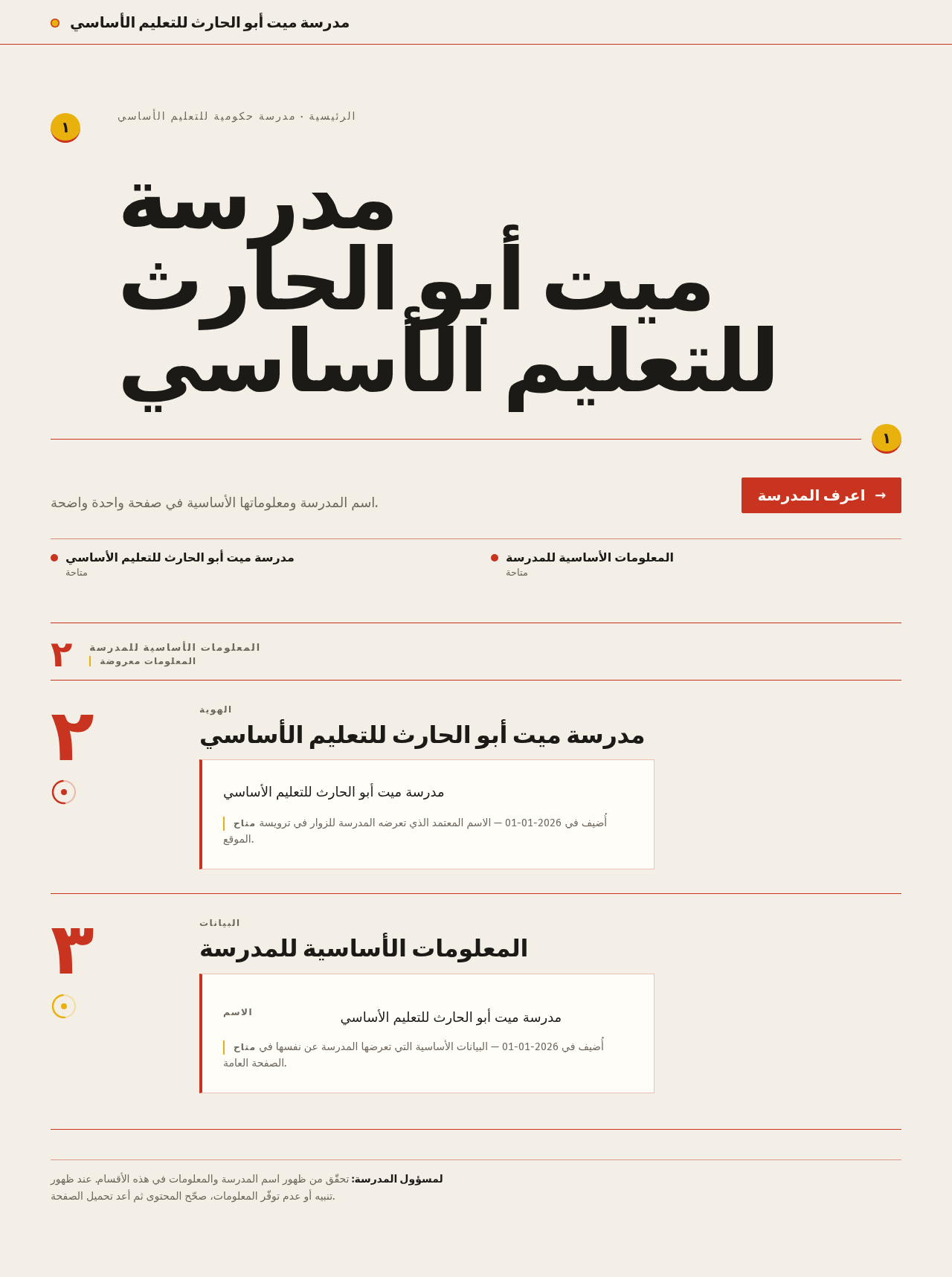
مدرسة ميت أبو الحارث للتعليم الأساسي
الرئيسية · مدرسة حكومية للتعليم الأساسي
مدرسةميت أبو الحارثللتعليم الأساسي
اسم المدرسة ومعلوماتها الأساسية في صفحة واحدة واضحة.
اعرف المدرسة- مدرسة ميت أبو الحارث للتعليم الأساسي
- المعلومات الأساسية للمدرسة
المعلومات الأساسية للمدرسة
المعلومات معروضةمدرسة ميت أبو الحارث للتعليم الأساسي
مدرسة ميت أبو الحارث للتعليم الأساسي
متاح أُضيف في 2026-01-01 — الاسم المعتمد الذي تعرضه المدرسة للزوار في ترويسة الموقع.
المعلومات الأساسية للمدرسة
- الاسم
- مدرسة ميت أبو الحارث للتعليم الأساسي
متاح أُضيف في 2026-01-01 — البيانات الأساسية التي تعرضها المدرسة عن نفسها في الصفحة العامة.
لمسؤول المدرسة: تحقّق من ظهور اسم المدرسة والمعلومات في هذه الأقسام. عند ظهور تنبيه أو عدم توفّر المعلومات، صحّح المحتوى ثم أعد تحميل الصفحة.
مدرسة ميت أبو الحارث للتعليم الأساسي
الرئيسية · مدرسة حكومية للتعليم الأساسي
مدرسةميت أبو الحارثللتعليم الأساسي
اسم المدرسة ومعلوماتها الأساسية في صفحة واحدة واضحة.
اعرف المدرسة- مدرسة ميت أبو الحارث للتعليم الأساسي
- المعلومات الأساسية للمدرسة
المعلومات الأساسية للمدرسة
المعلومات معروضةمدرسة ميت أبو الحارث للتعليم الأساسي
مدرسة ميت أبو الحارث للتعليم الأساسي
متاح أُضيف في 2026-01-01 — الاسم المعتمد الذي تعرضه المدرسة للزوار في ترويسة الموقع.
المعلومات الأساسية للمدرسة
- الاسم
- مدرسة ميت أبو الحارث للتعليم الأساسي
متاح أُضيف في 2026-01-01 — البيانات الأساسية التي تعرضها المدرسة عن نفسها في الصفحة العامة.
لمسؤول المدرسة: تحقّق من ظهور اسم المدرسة والمعلومات في هذه الأقسام. عند ظهور تنبيه أو عدم توفّر المعلومات، صحّح المحتوى ثم أعد تحميل الصفحة.
No comments yet. Be the first!