Intelligent Innovation
Technology is applied with purpose — built to organise complexity, not to add noise to it.
 Back Room

Sign in to leave a comment
Company name: WEWEALTH
Industry: Wealth Technology, Financial Technology and Future Wealth Management.
Brand positioning:
WEWEALTH is an emerging wealth technology venture focused on developing intelligent, organised and technology-driven solutions for the modern wealth ecosystem.
Long-term vision:
To build a respected wealth technology and private wealth institution that combines artificial intelligence, financial research, professional expertise and modern technology.
Brand philosophy:
Intelligence
Trust
Innovation
Transparency
Professionalism
Long-term thinking
Responsible technology
Primary brand headline:
"A SMARTER PERSPECTIVE ON WEALTH."
Supporting statement:
"Building a more organised, intelligent and technology-driven approach to wealth."
Purpose:
Help users understand publicly available financial and economic information.
Set the website title:
WEWEALTH | A Smarter Perspective on Wealth
Build the entire WEWEALTH application in this project.
Project name: smart-mercy.
Name:
WEWEALTH AI Assistant
Your task is to DESIGN, BUILD AND IMPLEMENT a complete, functional, responsive, premium website and web application for a company called WEWEALTH.
IMPORTANT:
Do not merely create a static landing page, wireframe, mockup, presentation or visual prototype.
Build a complete working application with functional navigation, interactive tools, working calculators, functional AI features, responsive layouts, forms, error handling and appropriate backend integrations.
If an integration requires credentials or manual configuration, explain the exact steps and provide a working fallback mode.
Build all the following pages with consistent navigation.
PAGE 1 — HOME
Create a premium homepage.
Hero section:
Brand: WEWEALTH
Headline:
"A Smarter Perspective on Wealth."
Description:
"Building a more organised, intelligent and technology-driven approach to wealth."
Primary button:
"Explore WEWEALTH"
Secondary button:
"Discover Our Technology"
Include a tasteful 3D abstract sphere or premium geometric visual.
Below the hero, create:
A. Our Vision
Explain the company's long-term vision.
B. Our Philosophy
Display four principles:
Intelligent Innovation
Responsible Technology
Research-Driven Thinking
Long-Term Perspective
C. Our Technology
Introduce the WEWEALTH AI ecosystem.
D. Our Solutions
Introduce the planned wealth technology capabilities.
E. Insights
Display educational financial and technology articles.
F. Final call to action
"Discover a smarter perspective on wealth."
PAGE 2 — ABOUT WEWEALTH
Include:
Company introduction
Mission
Vision
Philosophy
Values
Long-term objectives
Commitment to responsible AI
Future direction
Do not invent an established corporate history.
Clearly present WEWEALTH as an emerging venture.
PAGE 3 — SOLUTIONS
Introduce the following technology areas:
Tools intended to help organise hypothetical financial information.
Structured financial summaries and visual reporting.
Research organisation and educational information summaries.
Tools that explain financial concepts and terminology.
Future technology for professional wealth-management workflows.
Clearly distinguish planned capabilities from features that are actually functional.
PAGE 4 — WEALTH TECHNOLOGY
Create a dedicated page explaining the WEWEALTH technology ecosystem.
Include:
Artificial intelligence
Financial education
Research organisation
Financial data visualisation
Reporting technology
Automation
Responsible AI principles
Introduce the WEWEALTH AI tools.
PAGE 5 — WEALTH INSIGHTS
Build an attractive educational content library.
Categories:
Wealth Management
Financial Literacy
Artificial Intelligence
Financial Technology
Business and Economics
Investment Education
Global Wealth Industry
Include:
Search
Category filters
Article reading pages
Publication dates
Reading-time labels
PAGE 6 — WEALTH AI
Create a dedicated interactive AI tools centre.
This is one of the most important parts of WEWEALTH.
Implement all the AI tools described in Section 4.
PAGE 7 — CONTACT
Create a professional contact page.
Include:
General enquiry form
Name
Subject
Message
Consent checkbox
Submit button
Success and error messages
Collect only basic contact information.
If a working email delivery integration is unavailable, clearly explain the limitation and provide a functional alternative such as an email link.
PAGE 8 — LEGAL AND INFORMATION
Include:
Privacy Policy
Terms of Use
AI Usage Disclaimer
Financial Information Disclaimer
Contact Information
Build a visually impressive and genuinely interactive AI centre.
Implement the following features.
Purpose:
Provide educational explanations of financial concepts.
Interface:
Premium AI chat interface
Message input
Send button
Conversation history during the session
Loading animation
Error handling
Clear conversation option
Suggested questions
Example suggested questions:
What is wealth management?
What is asset allocation?
What is diversification?
What is compound interest?
What is private banking?
What is a family office?
What is portfolio management?
What is a mutual fund?
What is a bond?
How does inflation affect purchasing power?
The assistant must:
Explain concepts in simple language.
Give educational examples.
Explain financial terminology.
Distinguish facts from assumptions.
Avoid fabricated statistics.
Avoid personalised investment advice.
Never instruct users to buy, sell or hold financial products.
Avoid promises of financial returns.
Name:
WEWEALTH Report Explainer
Purpose:
Explain hypothetical financial reports and sample financial information.
Features:
Input fields for fictional sample figures.
Explain financial terminology.
Explain assets and liabilities.
Explain income and expenses.
Generate a structured educational summary.
Display key observations.
Explain limitations.
Features:
Topic input
Research explanation
Summary generation
Key terminology
Important considerations
Source and date fields when reliable sources are available
Do not invent live market data, current prices, breaking news or source references.
If live web search is not available, clearly state that the explanation is based on available model knowledge and may not be current.
Name:
WEWEALTH Wealth Calculator
Build a functional calculator using deterministic mathematical calculations.
Include:
Compound interest calculator
Inflation impact calculator
Savings growth calculator
Asset and liability calculator
Net worth calculator
Hypothetical goal calculator
Allow users to enter hypothetical values.
Show:
Input values
Formula used
Calculated result
Clear explanation
Important assumptions
Never describe hypothetical calculations as guaranteed returns.
Name:
WEWEALTH Financial Dictionary
Features:
Search financial terms.
Explain definitions.
Give examples.
Show related terminology.
Group terms by category.
Categories:
Banking, Investments, Wealth Management, Economics, Financial Planning and Private Banking.
Use AI explanations where supported, with sensible fallback content for common terms.
Name:
WEWEALTH Knowledge Centre
Features:
Beginner, intermediate and advanced educational quizzes.
Multiple-choice questions.
Instant explanations.
Score calculation.
Learning progress within the session.
New quiz generation where AI access is available.
Keep questions educational and avoid encouraging speculative financial behaviour.
Create a separate dashboard experience using fictional sample data.
Dashboard sections:
A. Overview
Sample net worth
Sample assets
Sample liabilities
Sample cash flow
B. Asset Overview
Cash
Equities
Bonds
Other hypothetical assets
C. Financial Visualisation
Pie charts
Bar charts
Historical sample trends
D. Reports
Reporting cards
Sample report explanations
E. Financial Education
Every page must be navigable.
Every visible button must perform its advertised action.
Implement:
Working navigation
Working page links
Implement:
Implement:
Implement:
Working AI interactions when credentials and quotas permit
Form validation
Loading states
Error messages
Success notifications
Accessible labels
Keyboard-friendly controls
Requirements:
Secure server-side AI calls
No exposed API keys
Input validation
Basic abuse protection
Error handling
Appropriate session handling
Secure handling of contact enquiries
Prepare the application for deployment using the supported Google AI Studio deployment workflow.
Does the AI assistant respond when the free model access is available?
Does the report explainer work with fictional inputs?
Do all calculators return correct results?
Does the financial dictionary work?
Does the quiz calculate scores correctly?
Does the contact form validate submissions?
| Role | Responsibilities and goals | Inputs | Decisions / observable success | Access |
|---|---|---|---|---|
| Learner (financial knowledge seeker) | Build understanding of publicly available financial and economic information; practise at beginner, intermediate or advanced level | Educational multiple-choice questions; instant explanations; score and session progress | Chooses quiz difficulty and answers; success is an explained answer, a calculated score and visible learning progress within the session | WEWEALTH Knowledge Centre quizzes; Financial Research Explainer content |
Learner journey (Knowledge Centre): select a difficulty level (beginner, intermediate, advanced) → answer multiple-choice questions → receive an instant explanation per question → see the calculated score → track learning progress within the session. Where AI access is available, a new quiz can be generated for further practice.
Learner journey (Research Explainer): bring a question about public financial or economic information → receive an explanation that supports understanding rather than speculation.
Supporting actors (not human personas): the AI quiz-generation capability, available only where AI access exists; without it, existing quizzes remain usable.
Default (labelled): the two capabilities above are presented as one learner role because the evidence names no separate audience for each; no further roles, permissions or persona count are established by this batch.
Actor: Visitor. Trigger: Landing on the Home page.
Actor: Visitor. Trigger: Opening the educational content library.
Actor: Visitor. Trigger: Opening the Wealth AI tools centre (Page 6) and choosing AI Tool 1.
Actor: Visitor. Trigger: Selecting AI Tool 3, the Financial Research Explainer.
Actor: Visitor. Trigger: Selecting AI Tool 4, the WEWEALTH Wealth Calculator.
Actor: Visitor. Trigger: Selecting AI Tool 5, the WEWEALTH Financial Dictionary.
Actor: Visitor. Trigger: Selecting AI Tool 6, the WEWEALTH Knowledge Centre.
Actor: Visitor. Trigger: Opening the separate dashboard experience.
Actor: Visitor. Trigger: Opening the Contact page.
Actor: Visitor. Trigger: Using site search.
Default (not specified in evidence): the exact search scope, result ranking and empty-result messaging are implementation defaults; the application is prepared for deployment using the supported Google AI Studio deployment workflow.
[Design proposal; unspecified choices are defaults.]
WEWEALTH (project smart-mercy) reads as a sophisticated international financial technology company: luxury private banking fused with futuristic wealth technology. Minimalist luxury, futuristic but professional, elegant and understated, with sophisticated editorial layouts and subtle glassmorphism. The muse is Refik Anadol — data made physical, calm and luminous — so the interface sells organised intelligence rather than noise.
Colour tokens (dark mode, by role)
| Role | Token |
|---|---|
| Page background | #101B2B |
| Secondary background | #202B35 |
| Dark surface (panels, cards) | #172438 |
| Primary / accent (champagne gold) | #D6BD8A |
| Primary text (warm white) | #F5F2EA |
| Secondary text | #AAB4C2 |
Deep navy #101B2B holds most of every page; #172438 and #202B35 carry panels. Gold is used sparingly — buttons, highlights, icons, hairline borders and one live data line only. No neon, no indigo/blue primary buttons, no glow overload.
Typography — headings Cormorant Garamond Light, large with tight leading, sentence case for headlines and wide-tracked caps for small labels; body Jost. Modular scale 1.333: 96/60/34/18/16 desktop, 44/34/26/18/15 mobile, applied with clamp() so headlines, wordmarks, labels, numbers and controls stay whole inside the viewport and their container at 375px, 768px and 1280px.
Shape and spacing — corners square or 2px; glass panels with 1px light borders and a faint inner glow, never a drop shadow; thin gold rules; a strict 12-column grid with an asymmetric editorial layout (wide generative field behind a left-aligned type column, data panels on the grid below). Spacing rhythm on a 4px base with generous section padding.
Imagery — generative particle and fluid renders in navy, steel and champagne gold; refined charts; modern dashboard cards; subtle gradients. No stock photography of handshakes or skylines. The design system is consistent across all pages.
Avoid — cryptocurrency-casino aesthetics, excessive neon, unnecessary animation, cluttered layouts, oversized unnecessary graphics, generic corporate stock-photo appearance, centred headline over a gradient blob, identical hover-lift card grids, decorative buttons that do nothing. Every visible button performs its advertised action.
Site title: WEWEALTH | A Smarter Perspective on Wealth.
Create a premium combination of luxury private banking and futuristic wealth technology.
The website should look like a sophisticated international financial technology company.
DESIGN STYLE:
Minimalist luxury
Futuristic but professional
Elegant and understated
Premium private banking aesthetics
Modern fintech interface
Sophisticated editorial layouts
Subtle glassmorphism
Tasteful 3D elements
COLOUR PALETTE:
Primary background: #101B2B
Secondary background: #202B35
Dark surface: #172438
Champagne gold: #D6BD8A
Warm white: #F5F2EA
Secondary text: #AAB4C2
Use gold sparingly for buttons, highlights, icons and borders.
TYPOGRAPHY:
Use sophisticated typography with elegant headings and clean, highly readable body text.
Minimal animated particles
Refined charts
Modern dashboard cards
Subtle gradients
Smooth scrolling
Premium hover effects
Create a consistent design system for all pages.
Do not make the website excessively flashy.
Avoid:
Cryptocurrency casino aesthetics
Excessive neon colours
Unnecessary animations
Cluttered layouts
Oversized unnecessary graphics
Generic corporate stock-photo appearances
[Design proposal; unspecified choices are defaults.]
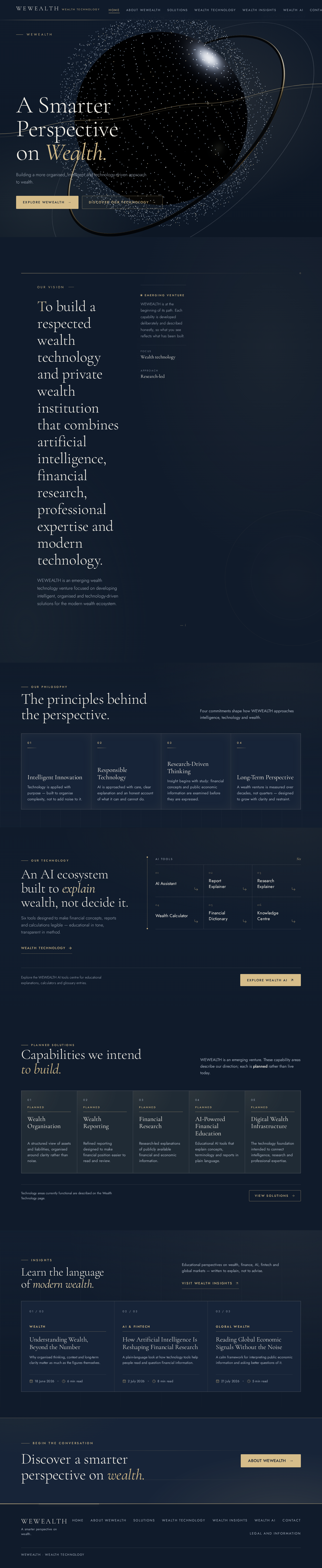
The public entry is one full-bleed generative particle field on #101B2B, with a slow gold data stream crossing it. The headline sits left in the lower third — “A Smarter Perspective on Wealth.” at 44px mobile to 96px desktop — with the subline “Building a more organised, intelligent and technology-driven approach to wealth.” beneath it. Two buttons follow: gold fill for Explore WEWEALTH and a gold hairline outline for Discover Our Technology. The field is the tasteful abstract metallic 3D sphere / premium geometric visual the brief asks for, rendered as a real-time WebGL subject rather than a static image.
Signature moves
The same system extends to the AI Ecosystem centre (premium chat interface, message input, send button, in-session conversation history, loading animation) and to the Wealth Insights library, so the venture feels like the beginning of a serious international wealth technology company, not a template.
VISUAL ELEMENTS:
Abstract metallic 3D sphere
Subtle geometric structures
Elegant financial data visualisations
[Design proposal; unspecified choices are defaults.]
Interaction Model: Parallax Motion Tempo: cinematic Hero Dimensionality: webgl
Landing Hero Motion Brief
Focal subject: a full-bleed generative particle field on #101B2B with a slow gold data stream crossing it — the abstract metallic sphere as luminous data matter.
Thesis: the visitor arrives on a still, composed field; as they scroll, the field morphs and the gold stream resolves into the first chart, so the page performs the product's promise — organised intelligence made visible. Only accepted behaviour is used: scroll, the two hero buttons, and the chart stroke draw.
Motion vocabulary: slow continuous data flow, scroll-linked morph, 160ms state changes for controls, slow stroke animation on chart entry. No bounce, no neon pulse.
Composed first frame: navy field, gold stream entering from the right, headline and subline left in the lower third, gold-fill and gold-hairline buttons beneath, all fully legible at 375/768/1280px.
Reduced-motion state: prefers-reduced-motion freezes the field to a static composed frame, disables the scroll morph, and shows charts fully drawn; any horizontally scrollable row wraps or scrolls so every item can be brought fully into view.
Landing Hero 3D Scene Brief — DIRECTION-DERIVED
A single real-time WebGL/R3F object: a slowly rotating metallic particle sphere in navy, steel and champagne gold, with one gold data stream threading across it. It shows the product's defining state — calm, organised data — and degrades to a static render under reduced motion. No Canvas/R3F is required elsewhere; the rest of the site uses CSS transitions and chart stroke animation only.
Smooth transitions
Excellent visual hierarchy
Use accurate, educational content.
Never invent research findings or cite nonexistent sources.
Do not display fabricated market data as real information.
Keep all API credentials and secrets on the server side. Never expose API keys in frontend code.
Implement:
Responsive desktop layout
Responsive tablet layout
Responsive mobile layout
Avoid decorative buttons that do nothing.
If a feature cannot be fully connected, label it as coming soon instead of pretending it works.
The website must:
Load efficiently.
Work on mobile networks.
Avoid unnecessarily large images.
Use optimised visuals.
Avoid broken links.
Protect server-side secrets.
Validate user inputs.
Avoid storing sensitive financial information.
Display clear privacy information.
Meta description:
"WEWEALTH is an emerging wealth technology venture exploring intelligent financial education, research and technology-driven wealth solutions."
Implement:
Search-friendly headings
Page descriptions
Appropriate image descriptions
Clear page titles
Social sharing metadata
Clean navigation
Do not make unsupported claims about financial services or professional qualifications.
Before declaring the application complete, check:
Does the homepage load?
Do all navigation links work?
Are all eight pages present?
Does the mobile layout work?
Are error and loading states implemented?
Are all sample figures clearly labelled fictional?
Are API keys protected?
Are unavailable features clearly labelled?
Is the deployment ready?
Use Google's Gemini model through supported AI Studio integrations where available.
Use the supported full-stack environment available in Google AI Studio.
Choose the simplest reliable architecture.
Use a database only where it is genuinely required and where a supported free option is available.
Act as an elite multidisciplinary team consisting of:
A world-class fintech product designer
A luxury private banking brand strategist
A senior full-stack application architect
An AI application engineer
A UX/UI designer
A cybersecurity specialist
A financial technology product manager
I am a complete beginner and do not know programming. Make all implementation decisions yourself. Do not ask me to write code or configure complicated systems manually. Use the supported integrations available in your environment.
Prioritise free resources and free-tier services. Do not activate paid services, subscribe to plans, purchase domains, enable billing or use paid APIs without explicit approval.
Do not falsely claim that WEWEALTH is already a licensed investment adviser, asset manager, portfolio manager, bank or regulated financial institution.
Do not invent company history, years of experience, client numbers, assets under management, awards, partnerships, offices or regulatory registrations.
Future technology for professional wealth-management workflows.
Do not collect bank account numbers, passwords, identity documents or sensitive financial records.
Clearly explain that educational tools do not constitute personalised financial or investment advice.
Use free-tier access wherever available. Do not enable paid billing.
Do not ask visitors to upload actual bank statements or personal financial documents.
Do not make personal investment recommendations.
Keep questions educational and avoid encouraging speculative financial behaviour.
IMPORTANT:
All displayed dashboard figures must be clearly labelled as fictional demonstration data.
Do not connect real bank accounts or request sensitive financial information.
Do not require paid external integrations.
Do not create fake authentication or fake database functionality.
If authentication cannot be safely configured for free, do not implement account registration.
The initial version should work without requiring visitors to create accounts.
Do not use real client financial information during development.
Prioritise:
Free hosting options
No-cost deployment quotas
Secure environment configuration
No paid API activation
No billing activation
No custom-domain purchase
If deployment requires additional account configuration, explain the exact steps.
Do not claim the website is published until deployment is successful.
If any feature cannot be completed, tell me exactly what remains instead of pretending it works.
Do not stop after generating the homepage.
Do not merely describe how to build it.
Do not ask me to code.
Do not ask me to create each page individually.
Make reasonable design and technical decisions yourself.
Prioritise a complete, attractive, secure and genuinely functional first release that can grow into a sophisticated wealth technology platform.
The final product should feel like the beginning of a serious international wealth technology company, not a generic website template.
Name:
WEWEALTH Research Assistant
WEWEALTH
Building a more organised, intelligent and technology-driven approach to wealth.
Our Vision
WEWEALTH is an emerging wealth technology venture focused on developing intelligent, organised and technology-driven solutions for the modern wealth ecosystem.
Our Philosophy
Four commitments shape how WEWEALTH approaches intelligence, technology and wealth.
Technology is applied with purpose — built to organise complexity, not to add noise to it.
AI is approached with care, clear explanation and an honest account of what it can and cannot do.
Insight begins with study: financial concepts and public economic information are examined before they are expressed.
A wealth venture is measured over decades, not quarters — designed to grow with clarity and restraint.
Our Technology
Six tools designed to make financial concepts, reports and calculations legible — educational in tone, transparent in method.
Wealth TechnologyWEWEALTH is an emerging venture. These capability areas describe our direction; each is planned rather than live today.
A structured view of assets and liabilities, organised around clarity rather than noise.
Refined reporting designed to make financial position easier to read and review.
Research-led explanations of publicly available financial and economic information.
Educational AI tools that explain concepts, terminology and reports in plain language.
The technology foundation intended to connect intelligence, research and professional expertise.
Educational perspectives on wealth, finance, AI, fintech and global markets — written to explain, not to advise.
Visit WEALTH INSIGHTSWhy organised thinking, context and long-term clarity matter as much as the figures themselves.
A plain-language look at how technology tools help people read and question financial information.
A calm framework for interpreting public economic information and asking better questions of it.
Begin the conversation
WEWEALTH
Building a more organised, intelligent and technology-driven approach to wealth.
Our Vision
WEWEALTH is an emerging wealth technology venture focused on developing intelligent, organised and technology-driven solutions for the modern wealth ecosystem.
Our Philosophy
Four commitments shape how WEWEALTH approaches intelligence, technology and wealth.
Technology is applied with purpose — built to organise complexity, not to add noise to it.
AI is approached with care, clear explanation and an honest account of what it can and cannot do.
Insight begins with study: financial concepts and public economic information are examined before they are expressed.
A wealth venture is measured over decades, not quarters — designed to grow with clarity and restraint.
Our Technology
Six tools designed to make financial concepts, reports and calculations legible — educational in tone, transparent in method.
Wealth TechnologyWEWEALTH is an emerging venture. These capability areas describe our direction; each is planned rather than live today.
A structured view of assets and liabilities, organised around clarity rather than noise.
Refined reporting designed to make financial position easier to read and review.
Research-led explanations of publicly available financial and economic information.
Educational AI tools that explain concepts, terminology and reports in plain language.
The technology foundation intended to connect intelligence, research and professional expertise.
Educational perspectives on wealth, finance, AI, fintech and global markets — written to explain, not to advise.
Visit WEALTH INSIGHTSWhy organised thinking, context and long-term clarity matter as much as the figures themselves.
A plain-language look at how technology tools help people read and question financial information.
A calm framework for interpreting public economic information and asking better questions of it.
Begin the conversation
No comments yet. Be the first!