
smart attendance system-project

byrida Mokashi

Build a complete Smart Attendance System using Java. Project Title: Smart Attendance Management System Technology Stack: - Core Java / Java Full Stack - Spring Boot - Hibernate / JPA - MySQL Database - HTML, CSS, JavaScript - Bootstrap - REST APIs - Maven Project Description: Develop a Smart Attendance Management System that helps educational institutions manage student attendance digitally. The system should allow administrators, teachers, and students to access attendance records through role-based dashboards. Modules: 1. User Authentication - Login and Logout - Role-based Access (Admin, Teacher, Student) - Password Encryption - Session Management 2. Admin Module - Add, Update, Delete Students - Add, Update, Delete Teachers - Manage Classes and Subjects - View Attendance Reports - Search and Filter Records 3. Teacher Module - Mark Student Attendance - View Attendance History - Generate Daily and Monthly Reports - Update Attendance Records 4. Student Module - View Attendance Percentage - View Attendance History - View Subject-wise Attendance 5. Attendance Management - Present/Absent Status - Date-wise Attendance Tracking - Automatic Attendance Percentage Calculation - Attendance Summary Dashboard 6. Reports and Analytics - Daily Attendance Report - Monthly Attendance Report - Subject-wise Attendance Report - Export Reports to PDF and Excel Database Tables: - Users - Students - Teachers - Subjects - Classes - Attendance - Reports UI Requirements: - Modern Responsive Design - Dashboard Layout - Professional Color Theme - Tables with Search and Filter - Attendance Statistics Cards - Charts for Attendance Analysis Additional Features: - Input Validation - Exception Handling - Layered Architecture - Clean Code Practices - RESTful API Design - MVC Architecture Expected Output: - Complete Spring Boot Project - MySQL Database Schema - Entity Classes - Repository Layer - Service Layer - Controller Layer - Frontend Pages - API Documentation - README File with Setup Instructions

LandingClassesSubjectsAlertsLoginStudents
Landing

Comments (0)

No comments yet. Be the first!

System Requirements

System Requirement Document
Page 1 of 4

Smart Attendance System-Project

Introduction

The Smart Attendance System-Project is designed to streamline and digitize the process of managing student attendance in educational institutions. This project will be developed using Java, Spring Boot, Hibernate/JPA, MySQL, HTML, CSS, JavaScript, and Bootstrap. It aims to provide a practical and efficient solution for administrators, teachers, and students to access and manage attendance records through role-based dashboards.

System Overview

The Smart Attendance System will be a web-based application that allows educational institutions to manage attendance records digitally. The system will feature role-based access for administrators, teachers, and students, enabling them to perform tasks such as marking attendance, viewing attendance history, and generating reports. The system will be built using the MVC architecture and will utilize REST APIs for communication between the frontend and backend. The user interface will be responsive and designed using Bootstrap to ensure accessibility across various devices.

Page 2 of 4

Functional Requirements

  • As an Admin, I should be able to log in and manage user roles.
  • As an Admin, I should be able to add, update, delete, and view student records.
  • As an Admin, I should be able to add, update, delete, and view teacher records.
  • As an Admin, I should be able to manage classes and subjects.
  • As an Admin, I should be able to view and generate attendance reports.
  • As a Teacher, I should be able to mark student attendance.
  • As a Teacher, I should be able to view attendance history.
  • As a Teacher, I should be able to generate daily and monthly attendance reports.
  • As a Student, I should be able to view my attendance percentage.
  • As a Student, I should be able to view my attendance history.
  • As a Student, I should be able to view subject-wise attendance.
  • As a User, I should receive alerts if my attendance falls below 75%.
  • As a User, I should be able to search and filter attendance records.

User Personas

  • Admin: Responsible for managing users, classes, subjects, and viewing reports.
  • Teacher: Responsible for marking attendance and generating reports.
  • Student: Can view personal attendance records and receive alerts.

Core User Flows

  • Admin logs in -> Manages students/teachers -> Views attendance reports
  • Teacher logs in -> Marks attendance -> Views/generates reports
  • Student logs in -> Views attendance percentage/history -> Receives alerts
Page 3 of 4

Visuals Colors and Theme

  • primary: #2C3E50 (Dark Blue)
  • primary_light: #34495E (Light Blue)
  • secondary: #E74C3C (Crimson)
  • accent: #F39C12 (Orange)
  • highlight: #F1C40F (Gold)
  • bg: #ECF0F1 (Light Gray)
  • surface: rgba(236, 240, 241, 0.8)
  • text: #2C3E50 (Dark Blue)
  • text_muted: #95A5A6 (Gray)
  • border: rgba(44, 62, 80, 0.2)

Signature Design Concept

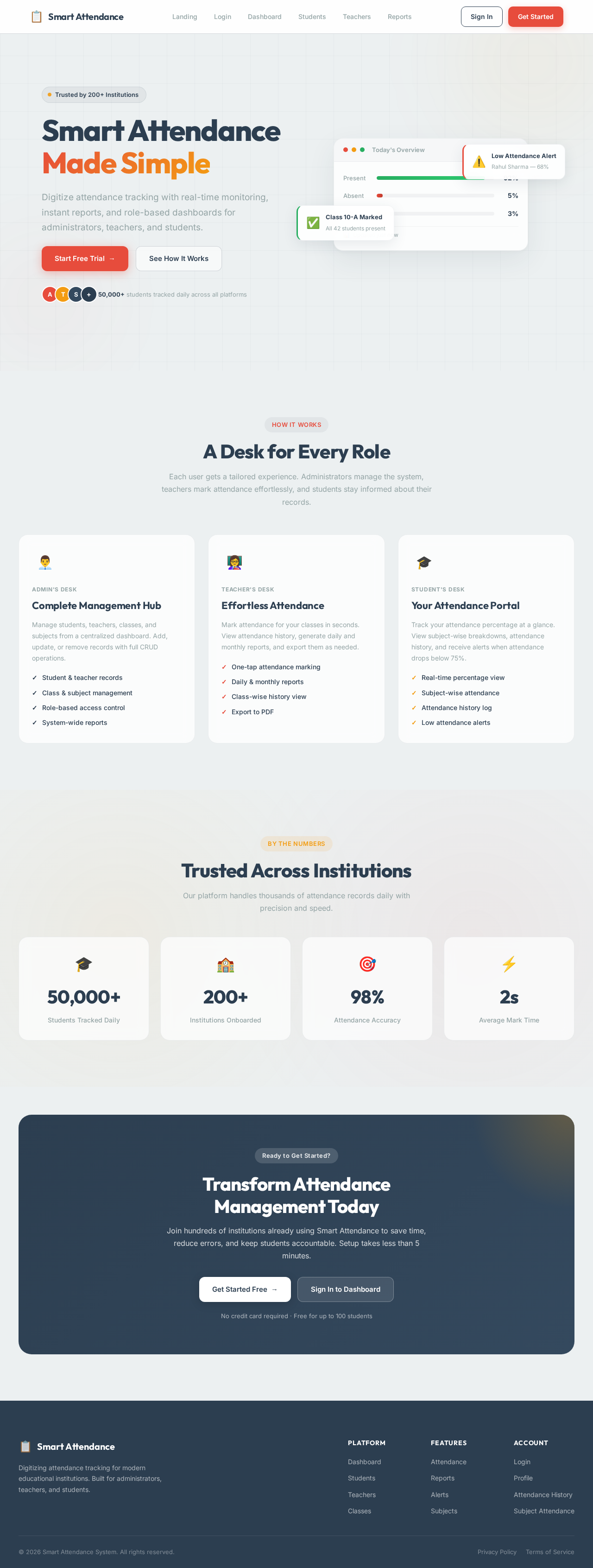
The homepage will feature an interactive dashboard that resembles a digital classroom. Each section of the dashboard will be represented as a "desk" that users can click to access different functionalities. For instance, clicking on the "Teacher's Desk" will lead to attendance marking, while the "Admin's Desk" will lead to user management. The desks will have subtle animations using framer-motion to create a dynamic and engaging experience. The background will feature a soft, animated chalkboard effect using gsap to enhance the educational theme.

Interaction Model & Motion Direction

  • Interaction Model: Parallax
  • Motion Direction: The landing page will utilize parallax scrolling to create a layered depth effect. As users scroll, different elements of the digital classroom will move at varying speeds, creating an immersive experience. Internal pages will maintain a static layout for clarity and ease of use.
Page 4 of 4

Non-Functional Requirements

  • The system should be scalable to accommodate multiple institutions.
  • The system should ensure data security and privacy.
  • The system should be responsive and accessible on various devices.
  • The system should handle concurrent user access efficiently.

Tech Stack

  • Frontend: HTML, CSS, JavaScript, Bootstrap
  • Backend: Java, Spring Boot, Hibernate/JPA
  • Database: MySQL
  • APIs: RESTful APIs

Assumptions and Constraints

  • The system will be used by educational institutions in India.
  • The system will operate in the IST timezone.
  • The system will require internet access for full functionality.

Glossary

  • MVC: Model-View-Controller, a software architectural pattern.
  • REST API: Representational State Transfer, a type of web service.
  • Bootstrap: A front-end framework for developing responsive web applications.
Landing design preview
Landing: View Info
Login: Sign In
Dashboard: View Stats
Students: Add Student
Students: Update Record
Students: Delete Record
Teachers: Manage Teachers
Classes: Manage Classes
Subjects: Manage Subjects
Reports: View Attendance
Reports: Generate Report
Reports: Export PDF