sky-simple
 Diya Trivedi
build a simple single page design of calculator

Comments (0)
Sign in to leave a comment
System Requirements
System Requirements Document for sky-simple
1. Introduction
sky-simple is a simple calculator delivered as a single page. The product intent is narrow and complete: a person opens one page, enters numbers and arithmetic operators, sees the current input and the computed result, and can clear the calculator to begin a new calculation. There is no account, no saved history, and no second destination — the whole product is one page.
The audience is the everyday calculator user: anyone who needs quick arithmetic in a calm, tactile, quietly delightful surface rather than a cold spreadsheet or a hype-tech gadget. The design language is warm modernism in the spirit of Charles & Ray Eames — honest materials, joyful order, and a keypad treated like a piece of furniture.
This document is the System Requirements Document for sky-simple, written for the requester Diya Trivedi (IN).
2. System Overview
sky-simple is a single-page web calculator. The page is anonymous and public: no identity, no session, no persistence of calculations. All arithmetic state lives in the page for the duration of the visit. The page presents an asymmetric editorial spread — wordmark, oversized tabular result numeral, and a warm off-white keypad panel with a 4×5 key grid — and supports digit entry, operator entry, equals, and clear.
Actors:
- Calculator user (active human persona) — enters numbers and operators, reads the current input and result, clears to start again.
- Frontend (React application) — renders the single page and holds the in-page calculator state.
- Shared backend (FastAPI) — provisioned application service; the calculator's arithmetic is performed in the page and does not require a backend call for the accepted behavior.
- Database (MariaDB) — provisioned application-owned storage; the accepted calculator behavior creates no durable domain data, so no calculator entities are stored.
Ownership: the single accepted destination, Calculator, is a first-party custom page owned by the application and reachable anonymously.
Narrow exclusions: no accounts, no saved history, no sharing, no scientific functions, no unit conversion, no multi-page navigation.
Removed from scope
- None. No concept was explicitly removed by the user.
2a. Product Interpretation and Delivery Boundary
The user asked for a simple single-page calculator design. That is the entire current product: one anonymously reachable page that performs everyday arithmetic and displays the current input and result, with a clear control to start a new calculation.
Delivery is a first-party React single-page application served alongside the provisioned shared FastAPI backend and MariaDB database. The backend and database are provisioned infrastructure and remain available for application services, but the accepted calculator behavior is client-side arithmetic on the single page; no backend endpoint or stored record is required to satisfy the accepted requirements. Access is public and ephemeral — there is no sign-in, no account, and no durable state to resume.
Nothing beyond the single calculator page is current. There is no future-horizon feature set accepted by the user; any expansion (history, scientific functions, accounts) would be a new request, not part of this document.
2c. Page Content and Component Coverage
Calculator
The single page of the product. Anonymous public entry; no identity required.
Information and state
- Wordmark "Sky Simple" in Jost 600 at 28px with a small mustard dot accent.
- Short reading line "A simple calculator." in Literata at 18px.
- A 1px ink horizontal rule (#2B2620) beneath the wordmark separating the editorial left column from the keypad.
- Oversized tabular result numeral in Jost 600 at
clamp(56px, 8vw, 128px), set directly on the cream ground with no card or shadow. - Current input expression (the digits and operators entered so far) shown alongside the result numeral.
- Footer caption "a simple calculator" in muted ink (#7A7266).
- Subtle paper-grain texture on the cream background at 4% opacity.
Primary actions
- Digit keys 0–9: append a digit to the current input.
- Operator keys (+, −, ×, ÷): set the pending arithmetic operator.
- Equals key: compute and display the result of the current expression.
- Clear key: reset the calculator to an empty starting state.
Supporting actions
- Decimal point key: begin a fractional entry.
- Keyboard input: digits, operators, Enter (equals), and Escape/Delete (clear) mirror the on-screen keys.
Domain entities
- Expression — the sequence of operands and operators currently entered.
- Operand — a numeric value being entered or already committed.
- Operator — one of +, −, ×, ÷.
- Result — the computed numeric outcome of the current expression.
These are in-page state only; none is persisted.
Component responsibilities
- Editorial column — wordmark, mustard dot, reading line, ink rule, oversized result numeral, current input expression.
- Keypad panel — off-white surface (#FBF6EC), 14px radius, 1px hairline border (#E3D9C8), soft offset shadow, 4×5 key grid.
- Digit keys — ink on cream, soft-cornered rectangles (14px radius).
- Operator keys — mustard (#D9A227) rectangles.
- Equals key — full-height tomato red (#C9542B) capsule running the height of the rightmost keypad column.
- Clear key — circular teal (#1F6F6B) key in the top row.
- Footer — muted caption line.
States
- Loading — not applicable; the page renders immediately with an empty expression and a result display of 0.
- Empty — expression empty, result numeral shows 0, awaiting first digit.
- Success — expression and result displayed; equals produces the computed result with a 320ms fade-and-rise reveal of the numeral and a 600ms crossfade on the equals key.
- Error — division by zero or an unparseable expression shows an inline error message in the result area (e.g., "Cannot divide by zero") and preserves the entered expression so the user can correct it.
- Recovery — the clear key resets expression, result, and any error to the empty state; the user may also correct the expression by continuing to enter digits or operators.
3. Functional Requirements
FR-1 — Single-page calculator (explicit) As a Calculator user, I should reach a simple calculator presented as a single page, so that all arithmetic happens in one place without navigation.
- Trigger: opening the product.
- Observable result: the Calculator page renders with wordmark, reading line, result numeral, and keypad.
- Access: anonymous, public.
- Failure/recovery: if the page fails to render, reloading restores the empty calculator state.
- Continuation: the user proceeds to enter a calculation.
FR-2 — Enter numbers and arithmetic operators (explicit) As a Calculator user, I should enter numbers and arithmetic operators, so that I can build an arithmetic expression.
- Trigger: pressing digit keys, the decimal point, or an operator key (or typing them).
- Observable result: the current input expression updates to show the entered digits and operators; the pressed key shows a 1px downward translate and a brief mustard flash (180ms ease-out).
- Access: anonymous.
- Failure/recovery: an invalid sequence (e.g., two operators in a row) is normalized to the most recent operator; the expression remains editable.
- Continuation: the user presses equals or continues entering.
FR-3 — See current input and computed result (explicit) As a Calculator user, I should see the current input and the computed result on the page, so that I know what I have entered and what it evaluates to.
- Trigger: any entry, or pressing equals.
- Observable result: the current input expression and the result numeral are both visible; a new result appears with a 320ms fade-and-rise reveal.
- Access: anonymous.
- Failure/recovery: division by zero or an unparseable expression shows an inline error in the result area while preserving the expression.
- Continuation: the user corrects the expression or clears.
FR-4 — Clear the calculator (explicit) As a Calculator user, I should clear the calculator to start a new calculation, so that I can begin fresh.
- Trigger: pressing the circular teal clear key (or Escape/Delete).
- Observable result: expression, result, and any error reset to the empty state with the result numeral showing 0.
- Access: anonymous.
- Failure/recovery: none required; clear is always available.
- Continuation: the user begins a new calculation.
FR-5 — Keyboard parity (required_inference) As a Calculator user, I should operate the calculator from the keyboard, so that entry is fast and accessible.
- Trigger: typing digits, operators, Enter, or Escape/Delete.
- Observable result: the same expression and result updates as the on-screen keys.
- Access: anonymous.
- Failure/recovery: unrecognized keys are ignored without altering state.
- Continuation: the user continues entering or clears.
FR-6 — Reduced-motion presentation (required_inference) As a Calculator user who prefers reduced motion, I should still use the calculator with a usable static arrangement, so that motion preferences do not block use.
- Trigger:
prefers-reduced-motion: reduce. - Observable result: transforms are dropped; only opacity fades under 120ms remain; all keys and the result numeral remain fully visible and operable.
- Access: anonymous.
- Failure/recovery: not applicable.
- Continuation: normal use.
4. User Personas
Calculator user
Product context. An everyday person who needs quick arithmetic — a household sum, a quick check, a running total — and wants it to feel calm and tactile rather than clinical. They arrive at the single page anonymously, with no account and no expectation that anything is saved.
Primary goal. Enter a short arithmetic expression and read its result immediately, then clear and start again when needed.
Distinct accepted responsibilities.
- Enter digits, a decimal point, and arithmetic operators to build an expression.
- Press equals to compute and read the result.
- Read the current input alongside the result to confirm what was entered.
- Clear the calculator to begin a new calculation.
- Optionally operate entirely from the keyboard.
Relevant inputs and decisions. Which digits and operators to enter; when to press equals; whether to correct the expression or clear it; whether to use the on-screen keys or the keyboard.
Interactions with other participants. None beyond the page itself. There is no counterparty, no recipient, and no shared state; the calculator is a private, ephemeral tool for the person using it.
Observable success. The result numeral shows the correct computed value for the entered expression; the current input is visible; clearing returns the page to a clean empty state ready for the next calculation.
5. Core User Flows
Flow 1 — Perform a calculation
- The Calculator user opens sky-simple. The Calculator page renders anonymously with the wordmark, the reading line "A simple calculator.", the ink rule, the result numeral showing 0, and the keypad panel.
- The user presses digit keys to enter the first operand. Each key shows a 1px downward translate and a brief mustard flash; the current input expression updates.
- The user presses an operator key (+, −, ×, ÷). The operator is set as pending and shown in the expression.
- The user enters the second operand with digit keys.
- The user presses the tomato red equals capsule. The result is computed and the result numeral updates with a 320ms fade-and-rise reveal; the equals key crossfades over 600ms.
- The user reads the current input and the computed result on the page.
- Continuation: the user may continue entering to build on the result, or clear to start a new calculation (Flow 3).
Failure/recovery: if the user divides by zero, the result area shows an inline error ("Cannot divide by zero") and the expression is preserved; the user corrects the expression or clears.
Flow 2 — Keyboard calculation
- The Calculator user opens the Calculator page.
- The user types digits and operators on the keyboard; the expression and result update exactly as with the on-screen keys.
- The user presses Enter to compute; the result numeral updates.
- The user presses Escape or Delete to clear, or continues typing to refine the expression.
- Failure/recovery: unrecognized keys are ignored without altering state.
Flow 3 — Clear and start a new calculation
- From any state on the Calculator page, the user presses the circular teal clear key (or Escape/Delete).
- The expression, result, and any error reset to the empty state; the result numeral shows 0.
- The user begins a new calculation by entering digits and operators (Flow 1).
Flow 4 — Reduced-motion use
- A Calculator user whose system prefers reduced motion opens the Calculator page.
- The page presents the same layout with transforms dropped and only opacity fades under 120ms; all keys and the result numeral remain fully visible and operable.
- The user completes a calculation as in Flow 1.
6. Visuals Colors and Theme
The creative direction is authoritative: Warm modernism with honest materials and joyful order, muse Charles & Ray Eames, headline register calm, tactile, quietly delightful.
Colour tokens (light mode)
- Background (cream paper ground):
#F2EBDD - Surface (keypad panel):
#FBF6EC - Text (ink):
#2B2620 - Primary (tomato red — equals/result action, hero accent block):
#C9542B - Accent (mustard — secondary operator colour, wordmark dot, key-press flash):
#D9A227 - Tertiary (teal — clear key, focus ring):
#1F6F6B - Muted (labels, secondary metadata, footer caption):
#7A7266 - Hairline border on keypad panel:
#E3D9C8
Colour blocks are large flat fields, never gradients.
Typography
- Headings and display numerals: Jost, 500–600 weight, tight tracking (−0.02em), mixed case.
- Body and reading copy: Literata regular at 16–18px, leading 1.65.
- Scale: 1.333 modular — 96 / 72 / 54 / 40 / 28 / 18 / 16.
- Result display: tabular numerals at
clamp(56px, 8vw, 128px), mobile floor 56px.
Shape language
- Soft-cornered rectangular keys, 14px radius.
- One full-height capsule for the equals key.
- One circular clear key.
- Subtle offset shadow on the keypad panel.
- No blobs, no pill-everything; one small hand-drawn Eames-style dot accent beside the wordmark.
Layout
- Desktop: asymmetric two-column editorial grid — narrow left column (wordmark, oversized display numeral, short reading copy) and wider right column (warm off-white keypad panel with 4×5 key grid).
- Mobile: columns stack; display numeral stays hero-sized (clamp floor 56px); keypad fills the width.
- A single horizontal rule separates the wordmark from the display; a footer line carries the tiny "a simple calculator" caption in muted ink.
Imagery
- No photography inside the calculator panel. The only imagery is the small hand-drawn Eames-style geometric mark (mustard dot and thin tomato rule) beside the wordmark, plus a subtle paper-grain texture on the cream background at 4% opacity.
Accessibility
- Readable text and controls stay whole at 375px, 768px, and 1280px; nothing covers them.
- Focus ring in teal
#1F6F6B.
7. Signature Design Concept
The public entry is an asymmetric editorial spread, not a centred SaaS hero.
- Left column: the wordmark "Sky Simple" in Jost 600 at 28px with a small mustard dot; beneath it the Literata line "A simple calculator." at 18px; beneath that the oversized tabular result numeral in Jost 600 at
clamp(56px, 8vw, 128px), sitting directly on the cream ground with no card behind it — the number itself is the dominant element. A 1px ink horizontal rule spans the left column beneath the wordmark. - Right column: a warm off-white keypad panel (#FBF6EC) with 14px radius, 1px hairline border (#E3D9C8), soft offset shadow, and a 4×5 grid of keys — digits in ink on cream, operators in mustard, the equals key a full-height tomato red capsule on the right edge, and a circular teal clear key in the top row.
Signature moves
- Oversized tabular result numeral set directly on the cream ground — no card, no shadow; the number is the hero.
- A full-height tomato red capsule equals key running the height of the rightmost keypad column, breaking the 4×5 grid as a deliberate Eames-style colour gesture.
- A circular teal clear key in the top row, visually distinct from the rectangular digit keys.
- A 1px ink horizontal rule under the wordmark separating the editorial left column from the keypad, with the wordmark set above it in Jost 600 plus a small mustard dot.
- Key press feedback as a 1px downward translate plus a brief mustard flash, mimicking the tactile response of a physical Eames-era calculator key.
No gradient, no blob, no centred stack.
8. Interaction Model & Motion Direction
Interaction Model: Animated Motion Tempo: restrained Hero Dimensionality: layered_2d
Landing Hero Motion Brief
- Focal subject: the oversized tabular result numeral on the cream ground, with the keypad panel as its furniture-like counterpart.
- Input → transformation → outcome thesis: a key press (input) produces a 1px downward translate and a brief mustard flash on the pressed key (transformation), and the result numeral updates with a 320ms fade-and-rise reveal while the equals key crossfades over 600ms (outcome). Only accepted calculator behavior is animated.
- Motion vocabulary: restrained, film-like — 180ms ease-out on key press; 320ms fade-and-rise reveal of the display numeral on a new result; 600ms crossfade on the equals key on completion. No bounce, no particles, no infinite loops.
- Composed first frame: the asymmetric editorial spread at rest — wordmark with mustard dot, ink rule, result numeral showing 0, and the keypad panel with its tomato capsule equals key and circular teal clear key.
- Reduced-motion state: all transforms dropped; only opacity fades under 120ms remain; the layout is fully static and every key and numeral remains visible and operable.
9. Non-Functional Requirements
- Single page (explicit): the product is exactly one page; no navigation, routes, or secondary destinations.
- Anonymous and ephemeral (explicit): no account, sign-in, or persistence of calculations; state lives only for the visit.
- Responsive readability (explicit): readable text and controls stay whole and inside the viewport and their container at 375px, 768px, and 1280px; the result numeral uses
clamp(56px, 8vw, 128px)with a 56px mobile floor. - Accessibility (required_inference): keyboard operability, visible teal focus ring, and a usable static arrangement under
prefers-reduced-motion. - Performance (required_inference): the page renders immediately with no loading state; arithmetic is computed in the page.
- Correctness (required_inference): arithmetic follows standard operator precedence for the entered expression; division by zero surfaces an inline error rather than a crash.
10. Tech Stack
- Frontend: React single-page application rendering the Calculator page.
- Backend: shared FastAPI process for application APIs and domain modules (provisioned; not required for accepted calculator arithmetic).
- Database: MariaDB for application-owned persistent data (provisioned; no calculator entities are stored).
- Containerization: Docker / docker-compose for the frontend, backend, and database services.
- Fonts: Jost (headings, display numerals) and Literata (body) via web font loading.
11. Assumptions and Constraints
- Assumption: arithmetic is performed client-side in the page; the provisioned backend and database do not add calculator endpoints or stored records. (required_inference)
- Assumption: the calculator supports the four basic operators (+, −, ×, ÷), a decimal point, equals, and clear; no scientific functions, memory, or history. (required_inference, bounded by "simple")
- Constraint (explicit): the design must be a single page.
- Constraint (explicit): the product is a simple single-page calculator design.
- Constraint (explicit): the warm-modernist Eames palette, Jost + Literata typography, cream ground, off-white keypad panel, tomato equals capsule, mustard operators, and teal clear key are preserved as specified.
- Constraint (explicit): the generic indigo/blue-on-white SaaS template is forbidden.
12. Glossary
- Calculator page — the single anonymous page that hosts the calculator.
- Expression — the sequence of operands and operators currently entered.
- Operand — a numeric value being entered or already committed.
- Operator — one of +, −, ×, ÷.
- Result — the computed numeric outcome of the current expression.
- Equals capsule — the full-height tomato red equals key on the right edge of the keypad.
- Clear key — the circular teal key in the top row that resets the calculator.
- Tabular numeral — a numeral rendered with fixed-width digits so values align and do not shift on update.
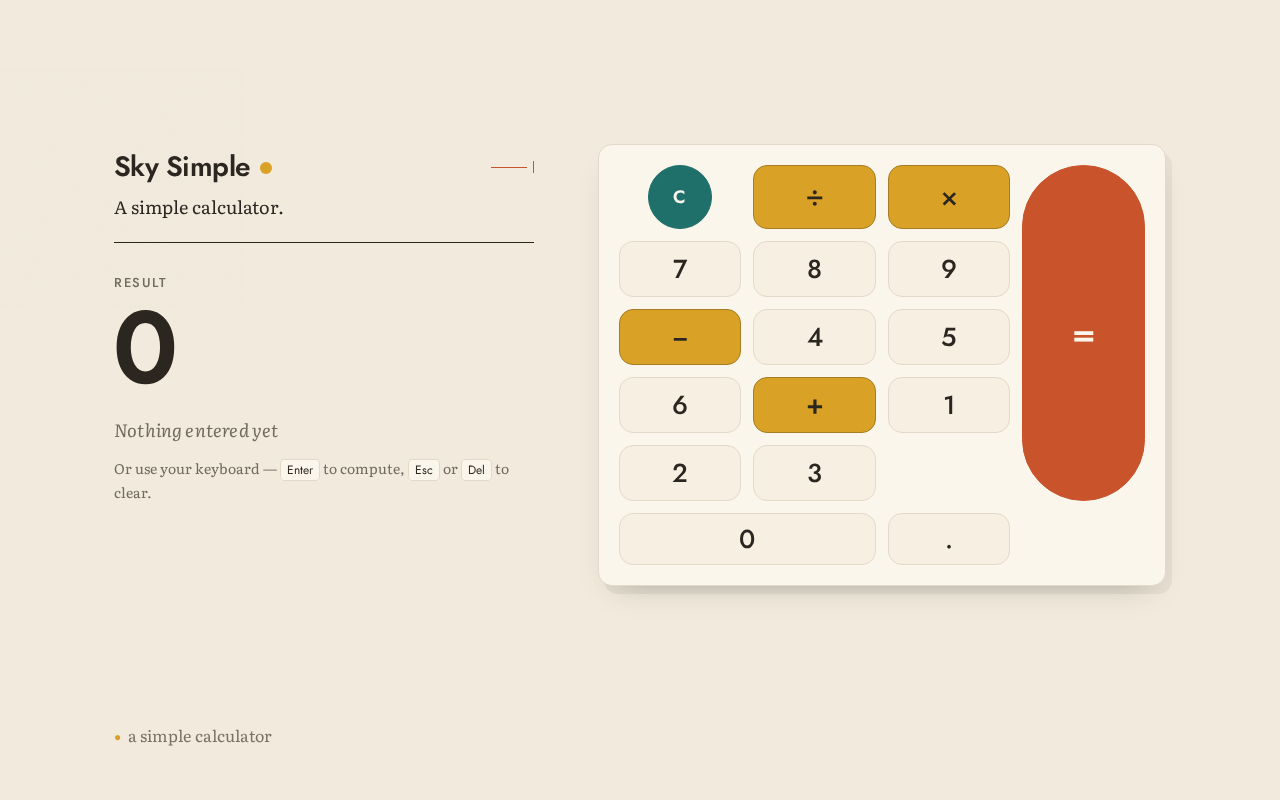
Sky Simple
A simple calculator.
Result
0
Nothing entered yet
Or use your keyboard — Enter to compute, Esc or Del to clear.
Sky Simple
A simple calculator.
Result
0
Nothing entered yet
Or use your keyboard — Enter to compute, Esc or Del to clear.
No comments yet. Be the first!