sky-platform
 Priyank Dave
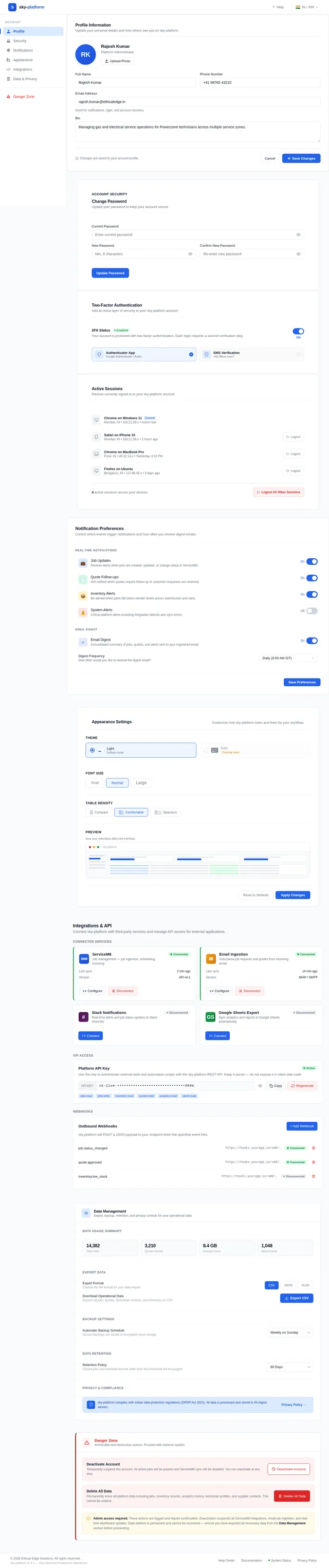
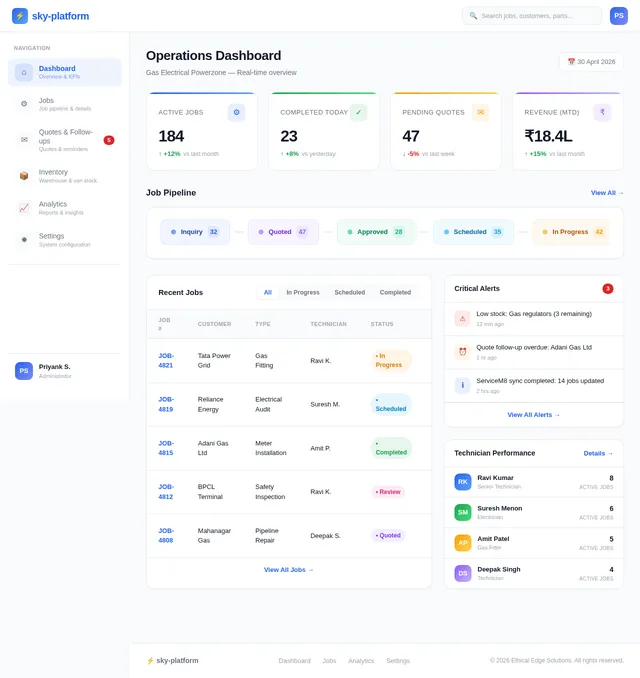
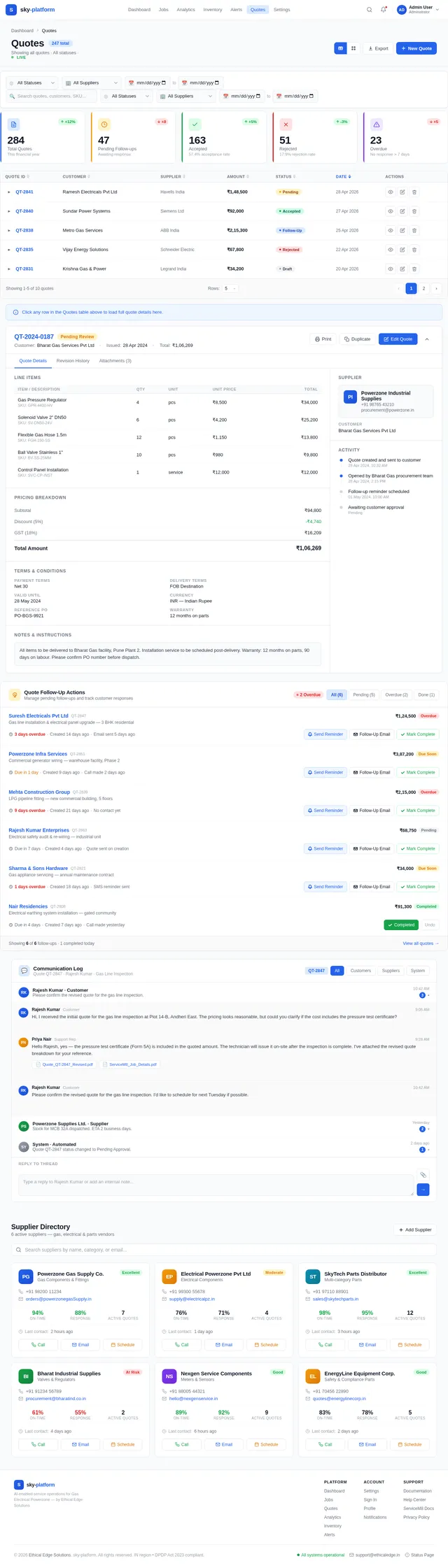
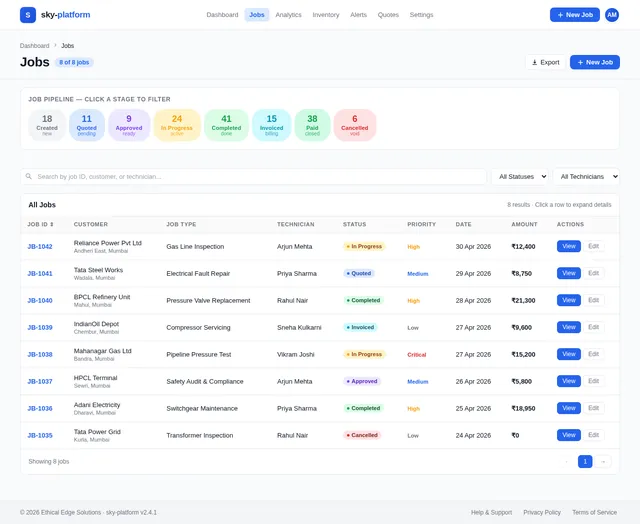
I want to create platform of GE Powerzone Operations is an AI-enabled service operations platform built by Ethical Edge Solutions for Gas Electrical Powerzone. It automates job ingestion from emails and PDFs into ServiceM8, manages inventory across warehouses and vans, and drives smart quote follow-ups and supplier communications. The platform provides full operational visibility through real-time dashboards, YoY analytics, and technician performance tracking — all in one connected system. now i will give how i want page design similar as my requirements # Dashboard Page ## Layout ``` ┌─────────────────────────────────────────────────────────────┐ │ TOPBAR: "Dashboard" [🔍 Search…] [🔔7] [KE Kylie E.] │ ├─────────────────────────────────────────────────────────────┤ │ [KPI Card 1] [KPI Card 2] [KPI Card 3] [KPI Card 4] │ ← 4-col grid ├─────────────────────────────────────────────────────────────┤ │ Job Pipeline strip (8 stage pills, full width) │ ├─────────────────────────────────────────────────────────────┤ │ Recent Jobs table (~72% width) │ Alerts & Actions (~28%) │ └─────────────────────────────────────────────────────────────┘ ``` - Content padding: `24px` - Section gap: `24px` - All cards background: `#1C2A3A`, border `1px solid #263547`, border-radius `12px` --- ## Colors | Element | Hex | |---|---| | Page background | `#0F1923` | | Card / panel background | `#1C2A3A` | | Card border | `#263547` | | Row hover | `#1E2F42` | | Text primary | `#FFFFFF` | | Text secondary / labels | `#8A9BB0` | | Text muted | `#566A7E` | | Positive delta (↑) | `#22C55E` | | Negative delta (↓) | `#EF4444` | | Job number links | `#3B82F6` | | "View All →" link | `#3B82F6` | --- ## Topbar - Height: `56px`, background `#162030`, border-bottom `1px solid #263547` - Left: Page title "Dashboard", `22px`, `700`, `#FFFFFF` - Center-right: Search input - Width `280px`, height `36px`, bg `#1C2A3A`, border `1px solid #263547`, border-radius `8px` - 🔍 icon left, `#566A7E`; placeholder "Search jobs, customers, parts…", `#566A7E`, `14px` - Right side (flex row, gap `12px`): - Notification bell: `36×36px` circle, bg `#1C2A3A`, bell icon `#8A9BB0`; red badge `#EF4444` top-right, white "7" - Avatar: `36×36px` circle, bg `#22C55E`, "KE" bold white `13px` - Name "Kylie E." `13px`, `#FFFFFF`, right of avatar --- ## KPI Cards (4-column grid) - Grid: `repeat(4, 1fr)`, gap `16px` - Card: bg `#1C2A3A`, border `1px solid #263547`, border-radius `12px`, padding `20px` - Top accent bar: `3px solid` per card color, border-radius top `12px` | # | Title | Value | Delta | Icon | Accent Color | |---|---|---|---|---|---| | 1 | Active Jobs | **47** | ↑ +12% vs yesterday | 📄 document | `#3B82F6` | | 2 | Pending Quotes | **8** | ↑ +2 new today | 💬 chat | `#F59E0B` | | 3 | Completed Today | **15** | ↑ +18% this week | ✅ check | `#22C55E` | | 4 | Overdue Jobs | **3** | ↓ 2 critical actions | ⚠️ warning | `#EF4444` | ### Card internals (top → bottom): 1. Large number: `40px`, `800`, `#FFFFFF` — top-left 2. Icon container: `40×40px`, bg `#263547`, border-radius `10px`, icon `22px` — top-right (float right) 3. Label: `13px`, `400`, `#8A9BB0` — below number 4. Delta text: `12px`, `500`, green or red — below label - "↓ 2 critical actions" uses `#EF4444` --- ## Job Pipeline Strip - Full-width card, bg `#1C2A3A`, border-radius `12px`, padding `16px 20px` - Header row: - Left: "Job Pipeline", `14px`, `700`, `#FFFFFF` - Right: "70 active jobs across 8 stages — synced from ServiceM8", `12px`, `#566A7E` - 8 stage pills: horizontal flex, gap `8px`, margin-top `12px` ### Stage Pills Each pill: bg `#0F1923`, border `1.5px solid [stage color]`, border-radius `8px`, padding `12px 16px`, text-align center, min-width `~120px` | Stage | Number | Color | |---|---|---| | Work Orders | 23 | `#3B82F6` | | Quote Required | 8 | `#F59E0B` | | P&A Requested | 6 | `#6366F1` | | Awaiting Approval | 5 | `#F97316` | | Parts on Order | 8 | `#14B8A6` | | Sched. Ready | 4 | `#14B8A6` | | In Progress | 7 | `#3B82F6` | | Awaiting Invoice | 9 | `#22C55E` | - Number: `24px`, `700`, stage color - Label: `11px`, `400`, `#8A9BB0`, margin-top `4px` --- ## Recent Jobs Table - Width: ~72% (left portion of bottom row) - Card: bg `#1C2A3A`, border-radius `12px` - Header bar: padding `16px 20px` - Left: "Recent Jobs", `14px`, `700`, `#FFFFFF` - Right: "View All →", `13px`, `#3B82F6` ### Columns | Column | Width | Style | |---|---|---| | JOB # | `90px` | `#3B82F6`, `600` (link) | | CUSTOMER | `160px` | `#FFFFFF`, `400` | | APPLIANCE | `120px` | `#8A9BB0`, `400` | | TECHNICIAN | `110px` | `#8A9BB0`, `400` | | STATUS | `160px` | Status badge pill | | DAYS | `60px` | Color-coded number, bold | - Column headers: `11px uppercase`, `#566A7E`, `letter-spacing: 0.05em`, padding `10px 20px` - Rows: padding `12px 20px`, border-top `1px solid #263547`, hover bg `#1E2F42` - Row height: `~48px` ### Days Color Coding | Range | Color | |---|---| | 1–2d | `#FFFFFF` | | 3–4d | `#F59E0B` | | 5d+ | `#EF4444` | ### Status Badge Pills Pill: border-radius `20px`, padding `4px 10px`, `11px`, `600`; dot `6px` circle prefix | Status | Background | Text Color | Dot | |---|---|---|---| | P&A Requested | `#6366F120` | `#A5B4FC` | `#6366F1` | | Quote Required | `#F59E0B20` | `#FCD34D` | `#F59E0B` | | In Progress | `#3B82F620` | `#93C5FD` | `#3B82F6` | | Awaiting Approval | `#F9731620` | `#FCA574` | `#F97316` | | Parts on Order | `#14B8A620` | `#5EEAD4` | `#14B8A6` | ### Sample Rows | Job # | Customer | Appliance | Technician | Status | Days | |---|---|---|---|---|---| | 26-0503 | Blue Care Labrador | Dishwasher | Nathan K. | P&A Requested | 3d | | 26-0502 | QT Fuel Mango Hill | Pizza Oven | Kyle N. | Quote Required | 1d | | 26-0501 | Wet N Wild | Combi Oven | Dan R. | In Progress | 2d | | 26-0500 | Stadium Australia | Glass Washer | Kyle N. | Awaiting Approval | 6d | | 26-0499 | McDonald's Strathpine | Deep Fryer | Nathan K. | Parts on Order | 4d | --- ## Alerts & Actions Panel - Width: ~28% (right portion of bottom row) - Card: bg `#1C2A3A`, border-radius `12px`, padding `16px 20px` - Header: "Alerts & Actions" `14px 700 #FFFFFF` left + "5 active" amber pill right - Pill: bg `#F59E0B20`, text `#FCD34D`, `11px 600`, border-radius `10px`, padding `3px 8px` ### Alert Row Structure - Border-radius: `8px`, padding `10px 12px`, margin-bottom `8px` - Left border: `4px solid` (red or amber) - Dot: `10px` circle, top-left of row - Text: `13px`, `#FFFFFF`, 2-line max, margin-left `12px` - Action button: below text, `border-radius: 6px`, bg `#263547`, white `12px 600`, padding `4px 12px` | Priority | Left Border | Dot | Content | Button | |---|---|---|---|---| | 🔴 Critical | `#EF4444` | `#EF4444` | "Hobart Spares — no P&A response in 8 days" | `Follow Up` | | 🔴 Critical | `#EF4444` | `#EF4444` | "Stadium Australia quote pending 6 days" | `Remind` | | 🟡 Warning | `#F59E0B` | `#F59E0B` | "Low stock: Thermocouple K-Type (3 left)" | `Create PO` | | 🟠 Expiry | `#F97316` | `#F97316` | "QT Fuel quote expiring in 2 days" | *(bell icon only)* | --- ## Sidebar (shared across all pages) - Width: `240px`, fixed left, full height, bg `#162030` - Top: logo block (36px icon + app name + subtitle), padding `20px 16px` - Section label "MAIN MENU": `10px uppercase`, `#566A7E`, padding `16px 16px 6px` ### Nav Items - Padding: `10px 16px`, border-radius `8px` (inside sidebar), margin `2px 8px` - Icon: `18px`, left; label: `14px`; badge: right - **Active state**: bg `#1C2A3A`, left border `3px solid #22C55E`, text `#FFFFFF`, icon white - **Inactive state**: bg transparent, text `#8A9BB0` - Badge pill: bg `#263547`, text `#FFFFFF`, `11px 600`, border-radius `10px`, padding `2px 7px` | Icon | Label | Badge | |---|---|---| | 📊 | Dashboard | — (active) | | 📄 | Jobs | 12 | | 💬 | Quotes & Follow-ups | 5 | | 📦 | Inventory | 3 | | 📈 | Analytics | — | - "SYSTEM" section label same style as MAIN MENU - ⚙️ Settings — no badge ### Sidebar Footer (bottom) - Avatar: `32×32px` circle, bg `#22C55E`, "KE" bold white `12px` - Name: "Kylie Ellwood", `13px 600 #FFFFFF` - Role: "Administrator", `11px #8A9BB0` - Padding: `16px`
Comments (0)
Sign in to leave a comment
System Requirements
System Requirements Document (SRD) for sky-platform
1. Introduction
The sky-platform is an AI-enabled service operations platform developed by Ethical Edge Solutions for Gas Electrical Powerzone operations. Designed to streamline workflows, it automates job ingestion from emails and PDFs into ServiceM8, manages inventory across warehouses and vans, and facilitates smart quote follow-ups and supplier communications. The platform provides full operational visibility through real-time dashboards, year-over-year analytics, and technician performance tracking — all in one connected system.
This document outlines the system requirements for the sky-platform, including functional and non-functional requirements, user personas, visual design elements, and technical specifications. The platform is tailored for users in India (IN), with locale-specific considerations such as time zones and currency formats.
2. System Overview
The sky-platform is a centralized solution for managing service operations in the Gas Electrical Powerzone industry. Key features include:
- Automated job ingestion from emails and PDFs into ServiceM8.
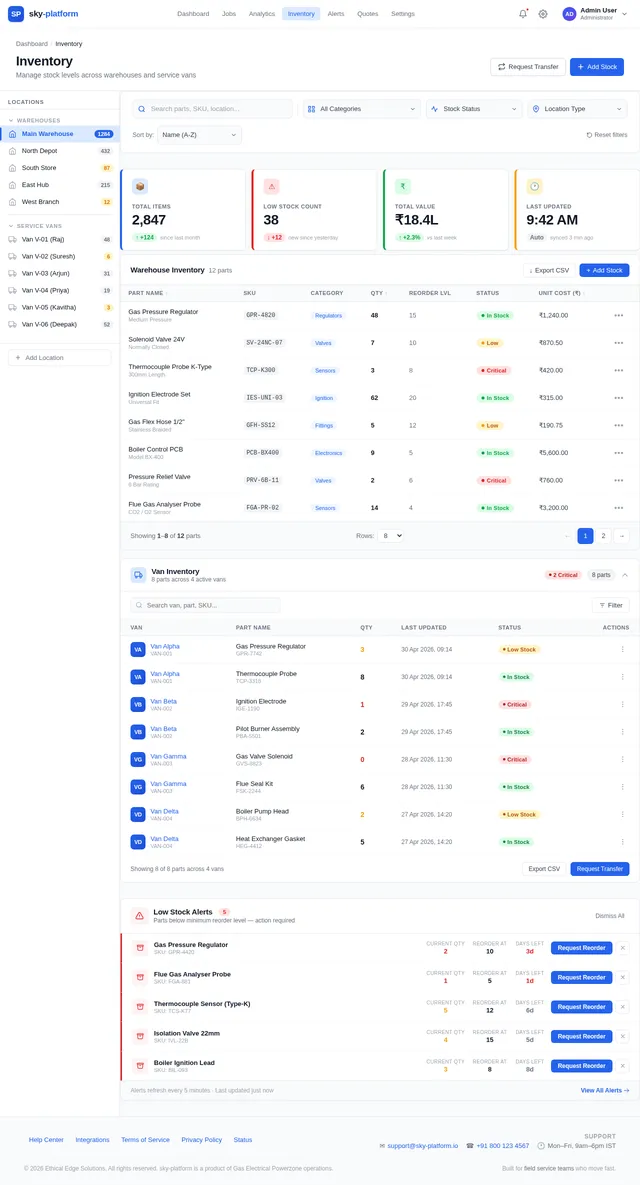
- Inventory management across warehouses and service vans.
- Smart quote follow-ups and supplier communications.
- Real-time dashboards for operational visibility.
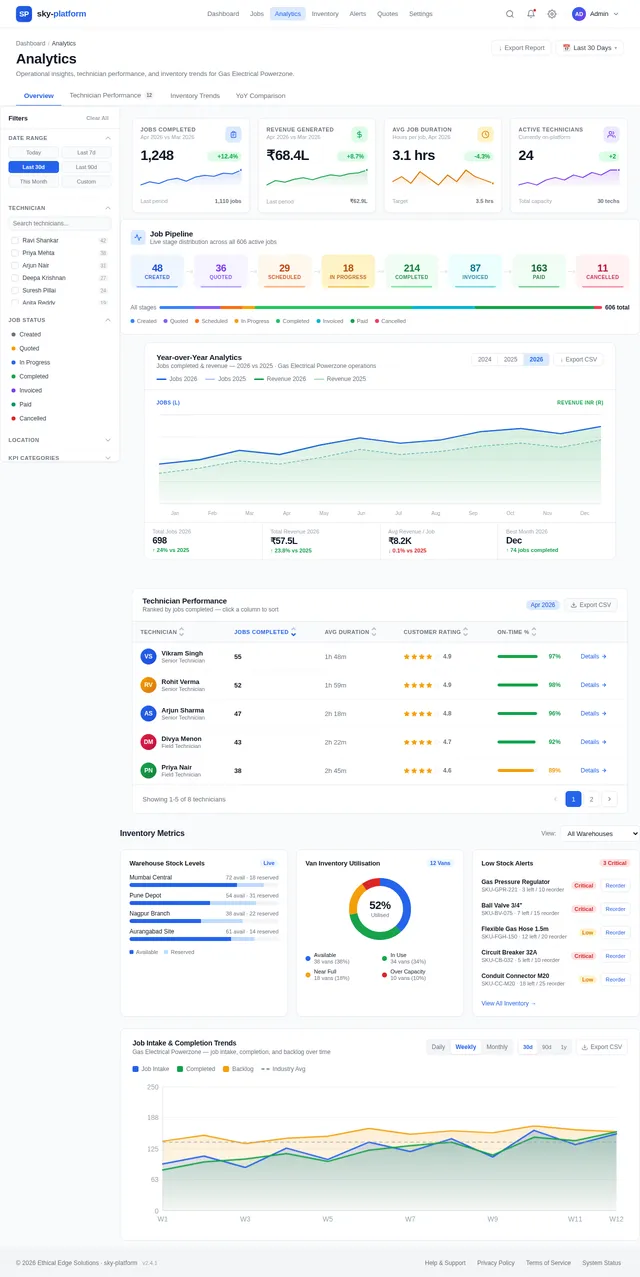
- Year-over-year analytics and technician performance tracking.
The platform is designed to enhance efficiency, reduce manual effort, and provide actionable insights for administrators, technicians, and other stakeholders.
3. Functional Requirements
- As a User, I should be able to view a real-time dashboard with key performance indicators (KPIs).
- As a User, I should be able to track job pipelines across multiple stages.
- As a User, I should be able to view recent job details in a tabular format.
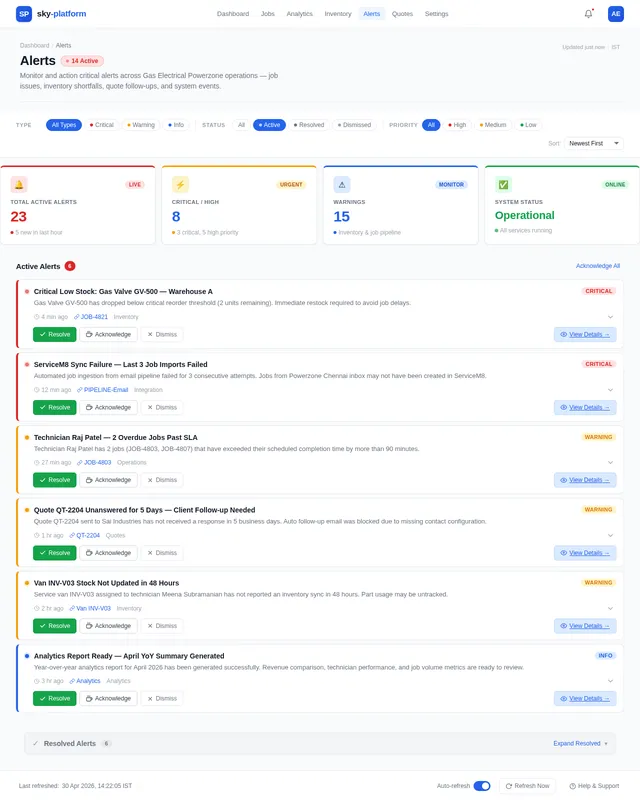
- As a User, I should be able to manage alerts and actions from a dedicated panel.
- As an Admin, I should be able to monitor technician performance and operational analytics.
- As an Admin, I should be able to manage inventory across warehouses and vans.
- As a User, I should be able to follow up on quotes and supplier communications.
- As a User, I should be able to search for jobs, customers, and parts using a search bar.
4. User Personas
4.1 Administrator
- Role: Oversees the entire platform, manages inventory, and monitors analytics.
- Responsibilities:
- Configure system settings.
- Monitor technician performance.
- Generate reports and analytics.
- Needs: High-level operational visibility and control.
4.2 Technician
- Role: Executes service jobs and updates job statuses.
- Responsibilities:
- Access job details and update progress.
- Manage parts and inventory for assigned jobs.
- Needs: Easy access to job pipelines and inventory details.
4.3 Customer Support Representative
- Role: Handles customer inquiries and follows up on quotes.
- Responsibilities:
- Communicate with customers and suppliers.
- Track quote statuses and follow-ups.
- Needs: Tools for efficient communication and tracking.
5. Visuals Colors and Theme
Light Mode Color Palette
| Element | Hex Code |
|---|---|
| Page background | #F9FAFB |
| Card / panel background | #FFFFFF |
| Card border | #E5E7EB |
| Row hover | #F3F4F6 |
| Text primary | #111827 |
| Text secondary / labels | #6B7280 |
| Text muted | #9CA3AF |
| Positive delta (↑) | #16A34A |
| Negative delta (↓) | #DC2626 |
| Job number links | #2563EB |
| "View All →" link | #2563EB |
6. Signature Design Concept
Interactive Job Pipeline Visualization
The homepage will feature an interactive job pipeline strip as its centerpiece. This strip will visually represent the 8 stages of job progress, with each stage displayed as a dynamic pill. Users can hover over each pill to reveal a tooltip with detailed statistics, such as the number of jobs in that stage and their statuses.
Key Features:
- Dynamic Animations: Pills will expand slightly on hover, with a smooth transition effect.
- Color-Coded Stages: Each stage will have a unique accent color for quick identification.
- Progressive Updates: The pipeline will update in real-time as jobs move between stages.
- Interactive Filters: Clicking on a stage will filter the dashboard to show only jobs in that stage.
This design will make the job pipeline both functional and visually engaging, offering users an intuitive way to track job progress.
7. Non-Functional Requirements
- The platform must support a minimum of 1,000 concurrent users.
- The system should load the dashboard within 3 seconds under normal conditions.
- Data updates (e.g., job status changes) should reflect in real-time with a maximum delay of 2 seconds.
- The platform must comply with data protection regulations applicable in India.
- The system should support integration with ServiceM8 and other third-party tools.
8. Tech Stack
Frontend
- React for Web
Backend
- Python
- FastAPI
Database
- MySQL (with Alembic for migrations)
AI Models
- GPT 5.4 for user-friendly responses
- Claude 4.6 Opas for academic or coding work
AI Tools
- Langchain
- Litellm for LLM Routing
Orchestration
- Docker
- Kubernetes
9. Assumptions and Constraints
Assumptions
- The platform will be deployed in the Indian region and will adhere to local regulations.
- Users will access the platform primarily through desktop browsers.
- All users will operate in light mode.
Constraints
- The system must integrate seamlessly with ServiceM8.
- The platform must support real-time data updates without significant latency.
- The design must adhere to the specified light mode color palette.
10. Glossary
- KPI: Key Performance Indicator, a measurable value that indicates how effectively a user is achieving objectives.
- ServiceM8: A job management software used for scheduling, quoting, and invoicing.
- Pipeline: A visual representation of job progress across various stages.
- Delta: The change in a metric compared to a previous time period.
- P&A: Parts and Accessories, referring to items required to complete a job.
- RDBMS: Relational Database Management System, such as MySQL or MariaDB.
This updated SRD reflects the light mode design for the Dashboard page and ensures alignment with Priyank's detailed specifications.
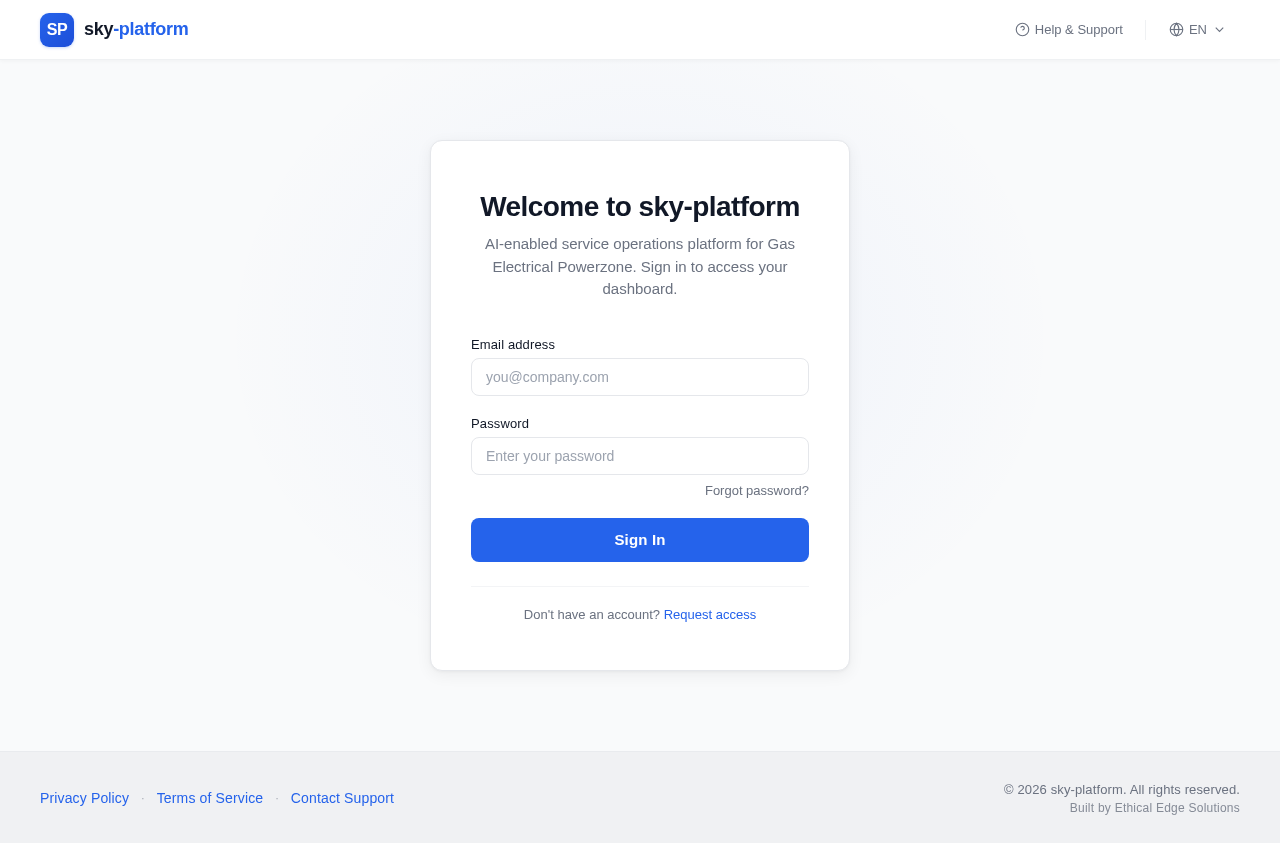
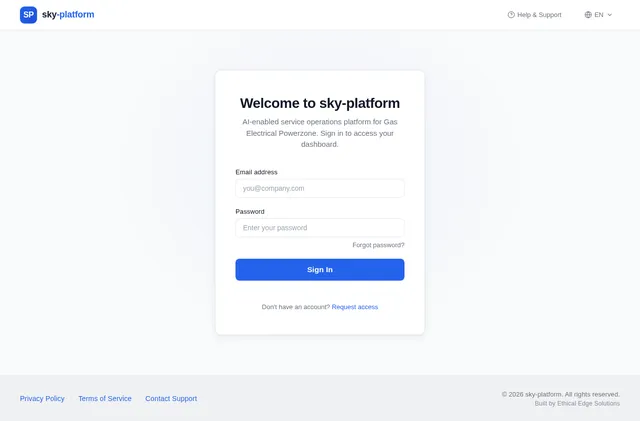
Welcome to sky-platform
AI-enabled service operations platform for Gas Electrical Powerzone. Sign in to access your dashboard.
Don't have an account? Request access
No comments yet. Be the first!