sky-nano
 Mahi Roy
Nano Banana pro image editing ai unlimited use no limit unlimited access unrestriction

Comments (0)
Sign in to leave a comment
System Requirements
System Requirements Document (SRD)
Project Name: sky-nano
1. Introduction
The sky-nano project is an AI-powered image editing platform designed to provide users with advanced tools for creative freedom and professional-grade editing capabilities. With unlimited access and unrestricted usage, sky-nano aims to revolutionize the image editing experience for both professionals and casual users.
This document outlines the system requirements for sky-nano, ensuring alignment with the vision of delivering a seamless, powerful, and user-friendly platform.
2. System Overview
sky-nano is envisioned as a cutting-edge AI image editing tool that leverages advanced artificial intelligence models to provide features such as background removal, retouching, AI-generated filters, and more. The platform is designed to cater to a diverse audience, including photographers, graphic designers, marketers, and casual users, offering unlimited access without any restrictions.
The system will be accessible via web and mobile applications, ensuring flexibility and convenience for users in India and globally. It will integrate state-of-the-art AI models and tools to deliver high-quality results efficiently.
3. Functional Requirements
Story Points:
- As a User, I should be able to remove backgrounds from images with a single click.
- As a User, I should be able to apply AI-generated creative filters to images.
- As a User, I should be able to retouch images automatically using AI.
- As a User, I should have unlimited access to all features without any restrictions.
- As a User, I should be able to upload and edit images in bulk.
- As a User, I should be able to save edited images in multiple formats (e.g., PNG, JPEG, TIFF).
- As a User, I should be able to access the platform on both web and mobile devices.
- As a User, I should be able to use advanced tools like object removal and color correction.
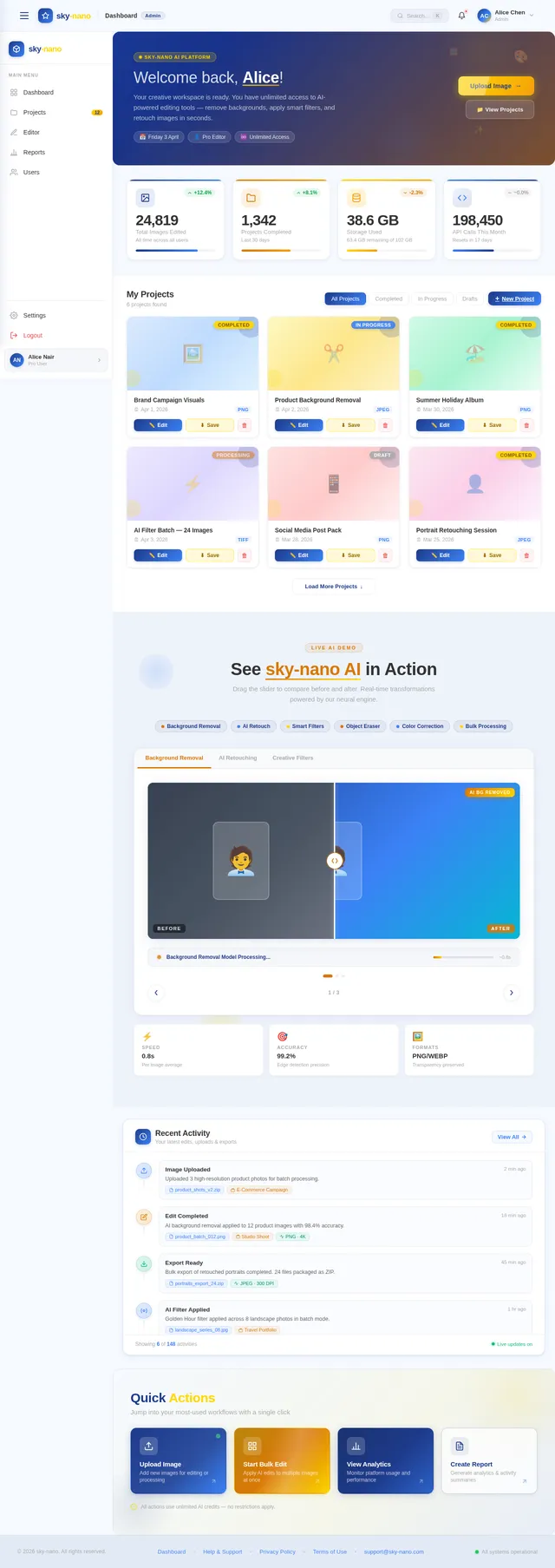
- As an Admin, I should be able to monitor platform usage and generate analytics reports.
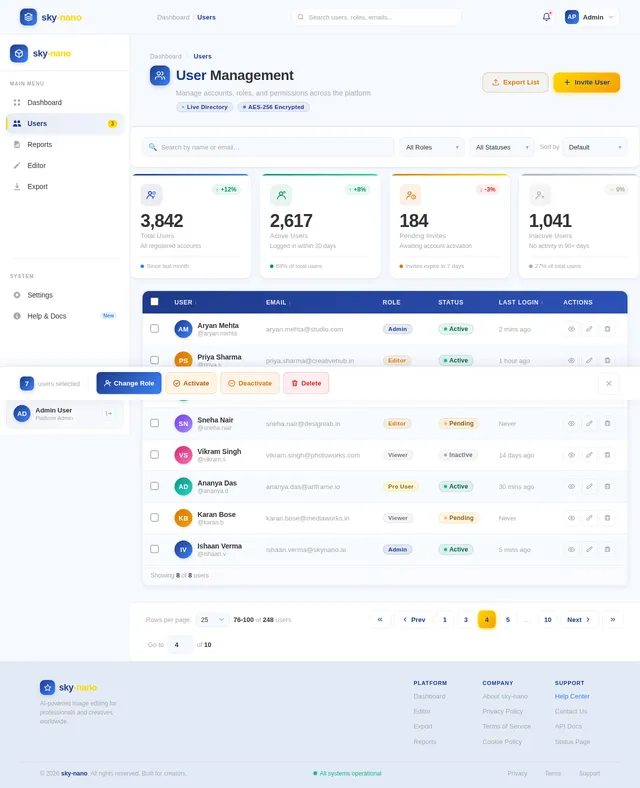
- As an Admin, I should be able to manage user accounts and permissions.
4. User Personas
1. Casual User
- Description: Individuals looking for quick and easy edits for personal use, such as social media posts or family photos.
- Needs: Simple interface, fast processing, creative filters.
2. Professional User
- Description: Photographers, graphic designers, and marketers requiring advanced editing tools for high-quality outputs.
- Needs: Bulk editing, precision tools, format flexibility, unlimited access.
3. Admin
- Description: Platform managers responsible for overseeing operations and user management.
- Needs: Analytics, user account control, system monitoring.
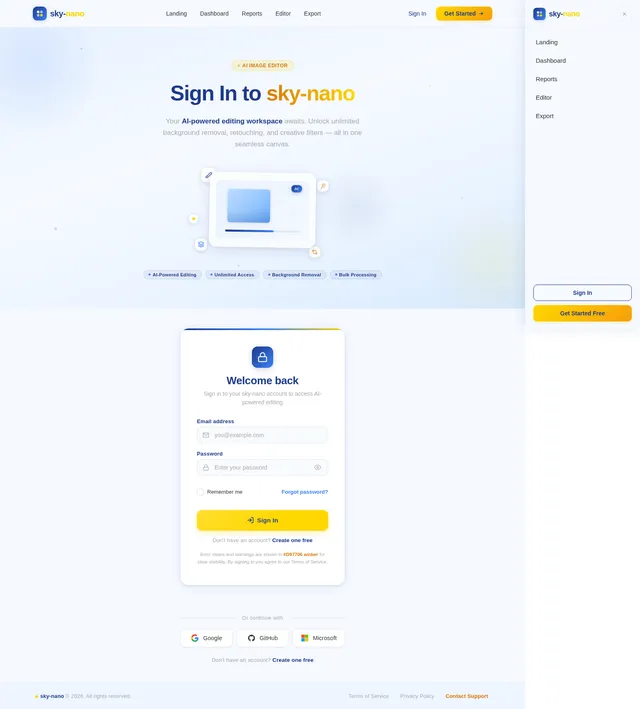
5. Visuals Colors and Theme
Color Palette:
- Background:
#F5F9FF(Soft Sky Blue) - Surface:
#FFFFFF(Pure White) - Text:
#333333(Deep Charcoal) - Accent:
#FFD700(Golden Yellow) - Muted Tones:
#A9A9A9(Light Gray)
Theme:
The theme will evoke a sense of creativity and freedom, with clean, modern aesthetics and vibrant accents to highlight interactive elements.
6. Signature Design Concept
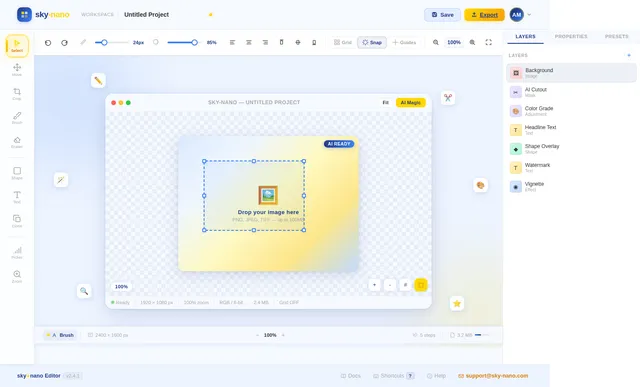
Interactive Floating Canvas
The homepage of sky-nano will feature an interactive floating canvas design. Users will be greeted by a dynamic 3D canvas that appears to hover in space, surrounded by subtle animations of floating tools and icons.
Key Features:
- Canvas Interaction: Users can drag, rotate, and zoom the canvas to explore features.
- Tool Animations: Editing tools will animate into view when hovered over, providing a tactile and engaging experience.
- Color Transitions: The background will subtly shift between shades of sky blue and golden yellow, creating a calming yet vibrant atmosphere.
- Micro-Interactions: Buttons and icons will respond with smooth transitions and playful effects, such as bouncing or glowing.
- AI Showcase: A live demo section will display AI-powered edits in real-time, showcasing the platform's capabilities.
This bold and eccentric design will make sky-nano instantly memorable and captivating for users.
7. Non-Functional Requirements
- Performance: The system must process image edits within 3 seconds for single images and under 30 seconds for bulk edits.
- Scalability: The platform must support up to 1 million users concurrently.
- Security: User data must be encrypted using AES-256 standards.
- Availability: The system must maintain 99.9% uptime.
- Localization: The platform must support multiple languages, with a default locale for India (English and Hindi).
8. Tech Stack
Frontend:
- React for Web
- React Native for Mobile App
Backend:
- Python
- FastAPI
Database:
- MySQL (preferred) or MariaDB for relational data
- MongoDB for NoSQL data
- WeaviateDB for vector-based AI data
AI Models:
- GPT 5.4 for user-friendly responses
- Claude 4.6 Opas for academic or coding work
- Gemini 3.1 Pro for friendly responses
- Google Nano Banana for image generation
AI Tools:
- Litellm for LLM Routing
- Langchain
Orchestration:
- Docker and docker-compose for local orchestration
- Kubernetes for server-side orchestration
9. Assumptions and Constraints
Assumptions:
- Users will have stable internet connections to access the platform.
- The majority of users will access the platform via mobile devices.
- Unlimited access will not lead to abuse or excessive server load.
Constraints:
- The platform must comply with data protection regulations in India (e.g., GDPR-equivalent laws).
- AI models must be optimized to minimize computational costs.
- Bulk editing features may require higher server resources.
10. Glossary
- AI: Artificial Intelligence.
- AES-256: Advanced Encryption Standard with 256-bit keys.
- Bulk Editing: Editing multiple images simultaneously.
- Locale: Regional settings for language and preferences.
- Micro-Interactions: Small animations or effects that enhance user experience.
End of Document.

Create Stunning Images with AI-Powered Editing
Unlimited access to professional-grade tools for everyone. Remove backgrounds, apply creative filters, and retouch photos in seconds.
Interactive Floating Canvas
Explore the sky-nano editing experience. Drag to rotate, zoom to inspect, and hover over tools to discover powerful AI-driven capabilities.
See the AI Difference
Watch sky-nano transform images in real time. Explore each feature with our interactive before & after showcase.
Remove Backgrounds Instantly
Isolate subjects with pixel-perfect precision. sky-nano detects edges automatically and removes backgrounds in under a second, ready for any creative project.
Everything You Need to Edit Like a Pro
sky-nano gives you professional-grade editing tools powered by AI — all in one place, all unlimited, all free.
One-Click Background Removal
Instantly remove or replace backgrounds from any image with a single click. Powered by advanced AI for clean, precise cutouts every time.
AI-Generated Filters
Discover unique, AI-crafted filters that adapt to your image content. Go beyond presets with styles generated specifically for your photos.
Auto Retouching
Let AI handle skin smoothing, blemish removal, and color correction automatically. Professional-quality results without manual effort.
Bulk Editing
Edit hundreds of images at once with batch processing. Apply consistent edits, filters, and adjustments across your entire library in seconds.
Format Flexibility
Export your work in any format you need — PNG, JPEG, TIFF, WebP, and more. Full control over quality, resolution, and compression settings.
Unlimited Access
No paywalls, no usage caps. Every feature, every tool, fully available to every user. Create without limits, completely free.
Built for Everyone Who Creates
Whether you are enhancing a selfie or processing thousands of product photos, sky-nano adapts to your workflow.
Casual Users
Quick, beautiful edits for social media, family photos, and everyday creativity.
- Simple one-click background removal
- AI-generated creative filters for any mood
- Fast processing — edits in seconds
- No learning curve, intuitive interface
- Save in PNG, JPEG, or any format
Professionals
Advanced precision tools for photographers, designers, and marketers.
- Bulk editing for large photo libraries
- Precision retouching and color correction
- Format flexibility — PNG, JPEG, TIFF & more
- Object removal and advanced AI tools
- Unlimited access with no restrictions
Teams
Collaborative editing and oversight for organizations of any size.
- Shared workspace for team collaboration
- Analytics dashboards and usage reports
- User account and permission management
- Web and mobile access for on-the-go editing
- Consistent brand output across projects
Loved by Creators Worldwide
See how photographers, designers, and teams are transforming their creative workflow with sky-nano.
sky-nano completely transformed my workflow. The one-click background removal is incredibly accurate, and I can batch-process an entire wedding shoot in minutes instead of hours.
We switched our entire creative team to sky-nano. The AI-generated filters give our social media content a consistent, professional look without hiring additional designers.
The auto-retouching feature is like having a second pair of expert eyes. It catches imperfections I would have missed, and the color correction is spot-on every single time.
Bulk editing hundreds of product photos used to take days. With sky-nano, I upload everything at once and get studio-quality results in under an hour. Absolute game-changer.
I love that sky-nano is completely free with unlimited access. The format flexibility lets me export for Instagram, YouTube thumbnails, and print all from one platform.
The precision of the object removal tool is remarkable. I use sky-nano daily for cleaning up mockup screenshots and creating polished presentations for clients.
Start Creating Today—Completely Free
Every professional-grade tool, zero cost. No catches, no hidden fees.
✓No credit card required · No usage limits · Full access
Everything Included
| One-Click Background Removal | ✓ |
| AI-Generated Creative Filters | ✓ |
| Auto Retouching | ✓ |
| Bulk Image Editing | ✓ |
| Object Removal | ✓ |
| Color Correction | ✓ |
| Multi-Format Export | ✓ |
| Web & Mobile Access | ✓ |
| Unlimited Usage | ✓ |
See it in Action—Upload and Edit in Seconds
Drop an image below and preview our AI-powered filters instantly. No sign-up required.
Ready to Transform Your Images?
Join thousands of creators using sky-nano to edit, enhance, and export stunning visuals — completely free with no restrictions.
Frequently Asked Questions
Everything you need to know about sky-nano. Can’t find what you’re looking for? Feel free to reach out to our team.
Yes! sky-nano offers unlimited access to all features at no cost. There are no hidden fees, no credit card required, and no usage restrictions. Every tool—from background removal to AI filters—is completely free for all users.
sky-nano supports all major image formats including PNG, JPEG, and TIFF. You can upload in any of these formats and export your edited images in whichever format best suits your needs.
Most edits are processed in seconds thanks to our advanced AI models. One-click background removal typically takes under 3 seconds, and AI filters are applied almost instantly. Bulk editing of multiple images is optimized for speed as well.
Absolutely. sky-nano is built for both casual users and professionals. Photographers, graphic designers, and marketers rely on our precision tools, bulk editing capabilities, and high-quality output for their daily workflows.
No limits at all. sky-nano provides truly unlimited access—edit as many images as you need, as often as you want. Whether you are processing a single photo or a batch of hundreds, there are no restrictions.
Yes, sky-nano is fully accessible on both web and mobile devices. The platform is optimized for touch interactions and responsive layouts, so you can edit images on the go with the same powerful tools available on desktop.
sky-nano includes one-click background removal, AI-generated creative filters, automatic retouching, object removal, color correction, and more. Our AI models are continuously improved to deliver professional-grade results effortlessly.
Simply sign up for a free account and you can start editing immediately. No software installation is needed—everything runs in your browser. Upload your first image, choose a tool, and see the results in seconds.
No comments yet. Be the first!