sky-calculator
 Diya Trivedi
start simple single page design of calculator

Comments (0)
Sign in to leave a comment
System Requirements
System Requirements Document for sky-calculator
1. Introduction
sky-calculator is a single-page calculator. Its product intent is deliberately narrow: give one anonymous visitor a simple, immediately usable calculator on one page, where entering numbers and operations produces a correct, immediately visible result without navigating anywhere else.
The audience is the Calculator User — anyone who opens the page wanting one correct answer, quickly, with no account, no onboarding, and no chrome competing for attention. The design register is calm numeric confidence: an instrument face rather than a dashboard.
The product is defined as much by what it excludes as by what it includes. There is no multi-page navigation, no history browser, no account system, no marketing surface, and no adjacent workflow. The calculator artefact is the product.
2. System Overview
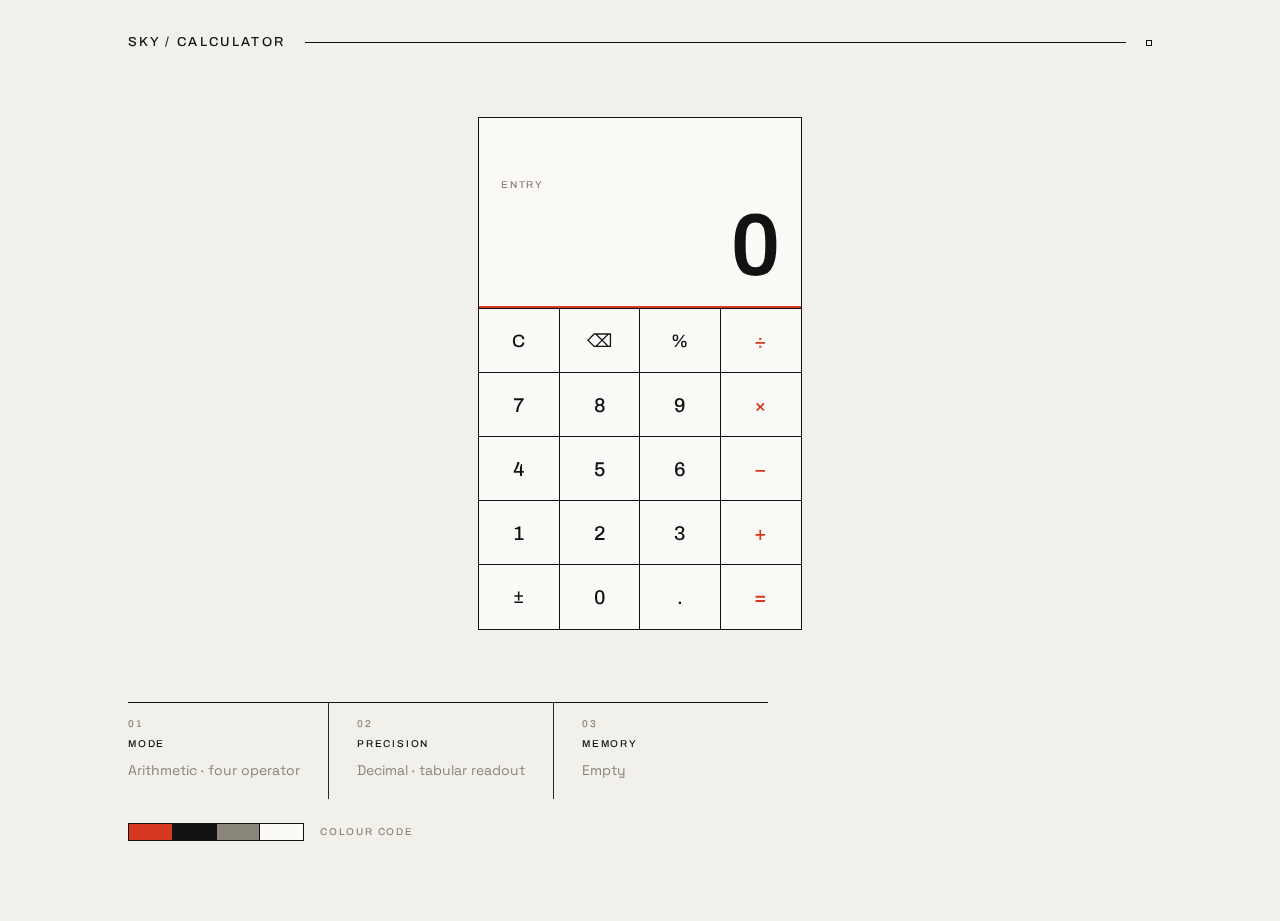
sky-calculator is delivered as a single custom page, Calculator, owned by the application and reachable anonymously. The page contains one centred calculator artefact: a display readout above a ruled key grid, with a sparse metadata row beneath it. All accepted behavior — entering digits, choosing an operator, computing a result, clearing, and correcting — happens on that one page.
Actors
- Calculator User (active human persona, required inference): the sole human actor. Enters numbers and operations, reads the result.
- Calculator engine (system process, supporting): evaluates the entered expression and returns the displayed value. It has no independent user-facing surface; its output is observed on the Calculator page.
Accepted behavior in summary
- A single page containing a calculator.
- Entry of numeric operands and arithmetic operators.
- An observable computed result.
- Clearing and correction so a mistaken entry can be recovered from.
- A simple, uncluttered presentation.
Narrow exclusions
- No second page, route, tab, or separately navigable destination.
- No account creation, sign-in, or identity establishment.
- No history, saved calculations, sharing, or export.
- No scientific, programmer, or unit-conversion modes beyond what is stated here.
- No marketing headline above the calculator.
2a. Product Interpretation and Delivery Boundary
The authoritative requirement is "start simple single page design of calculator," reinforced by an exact one-page constraint. That constraint is hard: the entire product is one page, and the calculator is that page.
Delivery ownership. The calculator is first-party custom UI owned by the application. The arithmetic evaluation that produces the displayed result is a supporting system process inside the same application; it is not a separate product surface and does not require a separate service.
Access ownership. The page is anonymous. Nothing in the source requires an account, a session, or persisted identity, and no accepted journey depends on resuming state across visits. The Calculator page is therefore reachable directly, with no identity establishment step and no protected destination. Because there is no protected state, there is no anonymous-entry-versus-protected-state split to reconcile.
Current versus future. Everything in this document is current. No future horizon, roadmap item, or deferred capability was accepted by the user. The word "start" in the requirement signals a beginning point for the design, not an accepted backlog; nothing beyond the single-page calculator is committed here.
2b. Source Content Inventory
Not applicable. No reference directive in this request declares a content_source, so no factual inventory is carried into this document.
2c. Page Content and Component Coverage
The page contract is exact and contains one page. It is reproduced here exactly once.
Calculator
Purpose and access. The anonymous public entry surface and the sole working surface of the product. A visitor lands directly on it; no identity step precedes or gates it.
Information and state
- Display readout — the current entry or the computed result, set flush-right in tabular numerals. This is the page's hero visual and its primary state indicator.
- Pending expression state — which operand has been entered, which operator is active, and whether the display is showing a fresh entry or a completed result.
- Active operator state — exactly one operator key may be marked active at a time; the mark is a red 2px inset rule plus red numeral, never a filled block.
- Error state — when an expression cannot be evaluated (for example division by zero), the display shows an explicit error indication rather than a stale or blank value.
- Metadata row — three small-caps blocks (MODE / PRECISION / MEMORY) reporting the calculator's current configuration, aligned flush-left beneath the artefact like sleeve credits.
Primary actions
- Enter digits 0–9 and a decimal point.
- Select one of the four arithmetic operators (+, −, ×, ÷).
- Press equals to compute and display the result.
- Clear the current entry and reset the calculation.
Supporting actions
- Correct the current entry before committing it (backspace-style deletion of the last entered digit).
- Toggle the sign of the current entry.
- Enter a percentage of the current value.
Domain entities
- Entry — the digit string currently being typed.
- Operand — a committed numeric value.
- Operator — one of +, −, ×, ÷.
- Expression — the pending operand–operator–operand structure awaiting equals.
- Result — the evaluated value shown in the readout.
Component responsibilities
- Wordmark block — top-left,
SKY / CALCULATORin 13px Archivo caps at +0.18em, with a hairline rule extending to the right edge of the grid. Frames the artefact like a catalogue plate. Non-interactive. - Calculator panel — the hard-edged
#FBFAF6surface, max-width 420px, 1px#121212frame, zero radius, containing the display and the key grid. - Display block — the oversized tabular readout in the upper third of the panel, with a 2px
#D6371Frule running the full panel width directly beneath it as the page's single colour event. - Key grid — a 4-column by 5-row ruled grid of 1px ink-ruled rectangular keys separated by single hairlines with no gaps, so the pad reads as one engraved instrument face. Every key carries a text label; no icon-only keys.
- Operator column and equals key — carry the exact spot red
#D6371Fas numeral colour and, when active, a 2px inset rule. - Metadata row — three flush-left small-caps blocks with hairline rules.
- Colour-code strip — a four-cell graphic strip (red, black, warm grey, paper) beneath the metadata row. Purely graphic and non-interactive.
States
- Loading — the artefact fades in once over 300ms on load; under
prefers-reduced-motionthe fade is removed and the artefact appears immediately. There is no data fetch, so no spinner or skeleton is required. - Empty / initial — the display reads
0; no operator is active; the metadata row reports the default mode, precision, and empty memory. - Entry in progress — the display shows the digits typed so far; the chosen operator key is marked active.
- Success — equals replaces the display with the computed result; the expression state clears to a completed result ready to seed the next calculation.
- Error — an unevaluable expression shows an explicit error in the readout; the next digit entry or clear returns the calculator to a usable state.
- Recovery — clear resets display, expression, and active operator to the initial state; backspace removes the last entered digit without discarding the rest of the entry.
Responsive behavior
- At 1280px: centred single-column composition on a 12-column grid with a wide 8-column margin; artefact max-width 420px at roughly 4:5 proportion.
- At 768px: the artefact remains centred and within the grid; the metadata row stays flush-left.
- At 375px: the artefact fills the width minus 24px gutters; the metadata row stacks; the key grid stays 4 columns with a 56px minimum key height; the result readout floors at 44px.
- At every viewport, the wordmark, readout, key labels, and metadata text stay entirely inside the viewport and their container, wrapping or scaling to fit, with nothing covering them.
3. Functional Requirements
FR-1 — Single-page calculator (explicit) As a Calculator User, I should get a calculator on one single page, so that I can perform a calculation without navigating anywhere.
- Trigger: the visitor opens the application.
- Observable result: the Calculator page renders with the calculator artefact visible and the display reading
0. - Access: anonymous; no identity step.
- Failure/recovery: if the artefact fails to render, the page shows the wordmark and metadata row with an explicit unavailable indication in the display area rather than a blank panel.
- Continuation: the user proceeds directly to entering a calculation.
- Acceptance: exactly one page exists; no navigation control leads to another destination.
FR-2 — Simple, uncluttered presentation (explicit) As a Calculator User, I should see a simple design with nothing competing for attention, so that I can find the display and keys immediately.
- Observable result: the page presents one artefact, a wordmark, a metadata row, and a colour-code strip, and nothing else.
- Acceptance: no marketing headline sits above the calculator; no element other than the accepted components appears on the page.
FR-3 — Enter numeric operands (explicit) As a Calculator User, I should enter digits and a decimal point, so that I can build the number I want to calculate with.
- Trigger: the user presses a digit key or the decimal key.
- Observable result: the display updates to show the digits entered so far, flush-right in tabular numerals.
- Failure/recovery: a second decimal point in the same entry is ignored rather than producing an invalid number; backspace removes the last entered digit.
- Continuation: the user selects an operator or presses equals.
- Acceptance: each key press appends exactly one character to the current entry and the display reflects it immediately.
FR-4 — Select an arithmetic operator (explicit) As a Calculator User, I should choose one of the four arithmetic operators, so that I can specify the operation to perform.
- Trigger: the user presses +, −, ×, or ÷.
- Observable result: the pressed operator key is marked active with a red 2px inset rule and red numeral; the committed operand is retained.
- Failure/recovery: pressing a different operator before entering a second operand replaces the active operator rather than stacking operators.
- Continuation: the user enters the second operand and presses equals.
- Acceptance: at most one operator key is marked active at any time.
FR-5 — Compute and display the result (explicit) As a Calculator User, I should press equals and see the computed result, so that I get the one correct answer I came for.
- Trigger: the user presses equals with a complete expression.
- Observable result: the display replaces the expression with the evaluated value, set in the oversized tabular readout.
- Failure/recovery: if the expression is incomplete, equals leaves the display unchanged; if the expression cannot be evaluated, the display shows an explicit error.
- Continuation: the result seeds the next calculation — entering a digit starts a fresh entry, and selecting an operator continues from the result.
- Acceptance: the displayed value equals the arithmetic result of the entered expression.
FR-6 — Clear and reset (explicit) As a Calculator User, I should clear the calculator, so that I can recover from a mistaken entry and start again.
- Trigger: the user presses the clear key.
- Observable result: the display returns to
0, the expression state empties, and no operator key is marked active. - Continuation: the user begins a new calculation from the initial state.
- Acceptance: after clear, the calculator is indistinguishable from its initial state.
FR-7 — Correct the current entry (required_inference) As a Calculator User, I should delete the last digit I typed, so that a single typo does not force me to abandon the whole entry.
- Trigger: the user presses the backspace key while an entry is in progress.
- Observable result: the last entered digit is removed and the display updates; removing the final digit returns the display to
0. - Failure/recovery: backspace on a completed result leaves the result unchanged.
- Continuation: the user continues typing the corrected entry.
- Acceptance: each backspace removes exactly one character from the current entry.
- Rationale: the accepted capability of entering numbers is only usable if a mistyped digit can be corrected without discarding the whole calculation; this is the minimum recovery mechanic for FR-3.
FR-8 — Toggle sign and enter percentage (required_inference) As a Calculator User, I should negate the current value and take a percentage of it, so that the common forms of the numbers I need are reachable from the same key grid.
- Trigger: the user presses the sign key or the percent key.
- Observable result: the display shows the negated value, or the value divided by one hundred.
- Failure/recovery: applying either to an error state first returns the calculator to a usable state.
- Continuation: the resulting value is used as the current operand.
- Acceptance: the displayed value reflects the transformation applied to the prior displayed value.
- Rationale: these are the two remaining keys of the accepted 4×5 key grid; the grid's shape is fixed by the creative direction, and leaving cells empty would contradict the ruled-grid artefact.
FR-9 — Report calculator configuration (required_inference) As a Calculator User, I should see the calculator's mode, precision, and memory state, so that I understand how the displayed result is being presented.
- Observable result: three small-caps blocks beneath the artefact report MODE, PRECISION, and MEMORY, aligned flush-left.
- Acceptance: the reported values match the calculator's actual configuration; the blocks are non-interactive.
- Rationale: the metadata row is a fixed element of the accepted artefact composition and must report truthful state rather than decorative text.
4. User Personas
Calculator User
Product context. An anonymous visitor who arrives at sky-calculator with a single, immediate need: to perform an arithmetic calculation. They have no account, no history with the product, and no interest in exploring it. They may arrive on a phone in one hand or at a desktop between other tasks. The page is the whole product, and they will judge it in the first second.
Primary goal. Get one correct answer, immediately, with no chrome competing for attention.
Distinct accepted responsibilities. This persona is the only human actor, and their responsibilities are the complete set of interactions the product supports: entering digits and a decimal point, selecting an arithmetic operator, pressing equals to compute, clearing to reset, correcting a mistyped digit, and applying sign or percentage. They also read the metadata row to understand the calculator's configuration.
Relevant inputs and decisions. The persona supplies numeric operands and an operator, and decides when the expression is complete enough to evaluate. Their key decision is which operator applies; their key correction decision is whether to backspace a single digit or clear entirely.
Interactions with other accepted participants. The Calculator User has no human counterpart. Their only counterpart is the calculator engine, a supporting system process that evaluates the expression they have entered and returns the value they observe. The persona initiates every calculation; the engine never initiates.
Observable success. The display shows the correct computed value in the oversized tabular readout, the active operator is marked, and the metadata row truthfully reports the configuration. The persona can complete a calculation and begin another without ever leaving the page.
What makes this role distinct. There is no second role to distinguish it from. The persona's work is defined by its narrowness: every accepted responsibility is a single key press on one artefact, and every observable outcome is a change in one readout. There is no collaboration, no approval, no persistence, and no return visit to design for.
5. Core User Flows
Flow 1 — Perform a basic calculation
- The Calculator User opens sky-calculator. The Calculator page loads anonymously; the artefact fades in once over 300ms (immediately under
prefers-reduced-motion). - The display reads
0, no operator is active, and the metadata row reports the default mode, precision, and empty memory. - The user presses digit keys to enter the first operand. Each press appends one character and the display updates flush-right in tabular numerals.
- The user presses an operator key. That key takes a red 2px inset rule and red numeral; the first operand is committed.
- The user presses digit keys to enter the second operand; the display shows the new entry.
- The user presses equals. The calculator engine evaluates the expression and the display replaces it with the computed result.
- Continuation: the user either presses an operator to continue calculating from the result, presses clear to reset to
0, or leaves the page. No navigation occurs at any point.
Flow 2 — Correct a mistyped entry
- The user is mid-entry on the Calculator page and notices a wrong digit in the display.
- The user presses backspace. The last entered digit is removed and the display updates; if it was the only digit, the display returns to
0. - The user continues typing the corrected number.
- Alternative recovery: if the entry is wrong beyond a single digit, the user presses clear. The display returns to
0, the expression empties, and no operator is marked active — the calculator is indistinguishable from its initial state. - The user begins the calculation again from step 3 of Flow 1.
Flow 3 — Use sign and percentage
- The user has a value in the display on the Calculator page.
- The user presses the sign key. The display shows the negated value.
- The user presses the percent key. The display shows the value divided by one hundred.
- The resulting value stands as the current operand; the user selects an operator or presses equals to use it.
- Failure path: if the display is showing an error, pressing either key first returns the calculator to a usable state before the transformation applies.
Flow 4 — Encounter and recover from an error
- The user enters an expression that cannot be evaluated, for example a division by zero, and presses equals.
- The display shows an explicit error indication in the readout rather than a stale or blank value. The metadata row continues to report the configuration truthfully.
- The user presses clear, or begins typing a new digit. The calculator returns to a usable state with the display reading
0or the new entry. - The user proceeds with a new calculation via Flow 1.
6. Visuals, Colors and Theme
Muse and headline. Peter Saville — one coded artefact, a lot of silence. The register is an instrument face or a Factory Records sleeve, not a SaaS dashboard: exact, a little austere, quietly confident.
Mode. Light mode only.
Colour tokens
| Role | Hex | Usage |
|---|---|---|
| Background (ground) | #F2F0EA | Paper-warm off-white covering the whole page |
| Surface | #FBFAF6 | The calculator body, framed by a 1px ink rule |
| Text / primary | #121212 | The only text and key colour; all hairlines and rules |
| Accent | #D6371F | Operator column, equals key, and the single 2px rule above the display — never a fill behind body text |
| Muted | #8A867C | Micro-labels and the secondary memory row only |
Proportion roughly 80% ground/silence, 15% ink, 5% red. Blue and indigo appear nowhere.
Typography
- Headings and labels: Archivo, 500 weight, all caps, letterspaced +0.18em at small sizes.
- Wordmark and result readout: Archivo 600, tight −0.02em tracking, tabular numerals.
- Body: Space Grotesk.
- Scale: 1.25 modular, with a numeric exception — result readout
clamp(44px, 9vw, 88px)tabular; wordmark 13px caps; key labels 20px; micro-labels 10px caps +0.18em; body/notes 14px/1.6. Mobile result floor 44px, desktop ceiling 88px. - No display serif, no rounded terminals, nothing decorative.
Shape language. Hard edges only: zero border-radius on the calculator body and on every key. Keys are 1px ink-ruled rectangles on the paper surface, separated by single hairlines rather than gaps, so the pad reads as one ruled grid. One thin 2px red rule sits directly beneath the display as the only horizontal colour event.
Layout. Centred single-column composition on a 12-column grid with a wide 8-column margin at 1280px. Top-left: the tiny caps wordmark SKY / CALCULATOR with a hairline rule extending to the right edge. Centre: the calculator artefact, max-width 420px, 4:5 proportion, display block above a 4×5 ruled key grid. Below the artefact: a sparse metadata row of three small-caps blocks (MODE / PRECISION / MEMORY) aligned flush-left, like sleeve credits. At 375px the artefact fills the width minus 24px gutters, the metadata row stacks, and the key grid stays 4 columns with 56px minimum key height.
Imagery. No photography, no illustration. The "image" is the artefact itself plus one coded element: a small 4-cell colour-code strip (red, black, warm grey, paper) printed beneath the metadata row as a Saville-style colour alphabet, purely graphic and non-interactive. The numeric readout is the hero visual.
Avoid. Rounded keys, pill buttons, soft drop shadows; blue or indigo anywhere; gradient backgrounds or glass panels; icon-only keys without text labels; bouncy or scaling press animations; filled colour blocks behind body text or numerals; decorative illustration or stock photography; a centred marketing headline above the calculator.
7. Signature Design Concept
The catalogue plate.
The first screen is a paper-warm field of near-total silence. At the top-left, a 13px Archivo caps wordmark reads SKY / CALCULATOR at +0.18em, and a hairline rule runs from it to the right edge of the grid, framing everything below like a plate in a printed catalogue.
The dominant element is the calculator artefact itself: a hard-edged #FBFAF6 panel, 420px wide, centred on the 12-column grid, ruled in 1px ink. In its upper third sits the oversized tabular result readout, flush-right, scaling from 44px on a phone to 88px on a desktop. Directly beneath it, a 2px #D6371F rule runs the full panel width — the page's single colour event.
Below the rule, the 4×5 key grid reads as one engraved instrument face: 1px ink hairlines between keys, zero radius, no gaps, every key carrying a text label. The operator column and the equals key carry the exact spot red as numeral colour, and when an operator is active it takes a red 2px inset rule rather than a fill.
Beneath the artefact, three flush-left small-caps blocks — MODE / PRECISION / MEMORY — sit with hairline rules like sleeve credits, followed by the four-cell colour-code strip in red, black, warm grey, and paper.
The composition reads like a record sleeve: one artefact, credits underneath, nothing else. The only colour on the page is the red rule plus the red operator and equals keys.
8. Interaction Model & Motion Direction
Interaction Model: Static Motion Tempo: still Hero Dimensionality: flat
Landing Hero Motion Brief
- Focal subject. The calculator artefact — specifically the oversized tabular result readout sitting above the 2px red rule. The readout is the hero; the key grid is its instrument face.
- Input → transformation → outcome thesis. A key press is the input; the display value swaps without slide or bounce as the transformation; the outcome is a new number sitting flush-right in the readout, with the active operator marked by a red inset rule. Nothing else on the page moves.
- Motion vocabulary. A 120ms precise fade on key press. The display value swaps in place — no slide, no bounce, no scale. A single 300ms fade-in of the artefact on load. The active operator key holds a red 2px inset rule instead of a colour fill. No hover lift, no scale.
- Composed first frame. The paper-warm ground fills the viewport. The wordmark and its hairline sit top-left. The artefact is centred, fully composed, display reading
0, no operator active, metadata row and colour-code strip in place beneath it. The frame is complete before any interaction. - Reduced-motion state. With
prefers-reduced-motion, the 300ms load fade is removed and the artefact appears immediately; the 120ms key-press fade is removed and the display swaps instantly. Everything is static. All content and controls remain fully visible and usable.
9. Non-Functional Requirements
NFR-1 — Single-page constraint (explicit) The product must consist of exactly one page. No additional route, tab, or navigable destination may exist. Rationale: the user's exact one-page constraint.
NFR-2 — Simplicity (explicit) The design must remain simple: one artefact, a wordmark, a metadata row, and a colour-code strip, with no element competing for attention. Rationale: the user's explicit simplicity constraint.
NFR-3 — Readable text and controls at every viewport (explicit, from the creative direction)
Headlines, wordmarks, labels, numbers, and controls must stay entirely inside the viewport and their container at 375px, 768px, and 1280px, wrapping or scaling (for example font-size: clamp(...) with its mobile size) to fit, with no other element covering any part of them. Rationale: the direction's readability rule, which takes precedence over any cropping gesture.
NFR-4 — Reduced-motion support (explicit, from the creative direction)
Under prefers-reduced-motion, the load fade and key-press fade are removed and the page is fully static and usable. Rationale: the direction's motion specification.
NFR-5 — Immediate result visibility (required_inference) A key press must be reflected in the display without perceptible delay, so that the persona's goal of an immediately visible answer holds. Rationale: the persona's stated success condition is an immediately visible result.
NFR-6 — Anonymous access (required_inference) The Calculator page must be reachable without any identity step. Rationale: no accepted journey requires identity, and no protected state exists to bind to a participant.
NFR-7 — No persistence requirement (required_inference) No calculation state needs to survive a page reload. Rationale: no accepted capability depends on resuming prior state, and adding persistence would be an adjacent capability the source did not accept.
10. Tech Stack
- Frontend: React, single-page application rendering the one Calculator page. (Default — not specified by user)
- Styling: plain CSS with custom properties for the colour and type tokens in Section 6, so the exact hex values and
clamp()type scale are preserved verbatim. (Default — not specified by user) - Calculation engine: a client-side arithmetic evaluator module within the same frontend application. No server round-trip is required for evaluation. (Default — not specified by user)
- Backend: none required. The accepted behavior is entirely client-side; no API, storage, or service is needed to satisfy any requirement in this document.
- Deployment: static hosting of the built single-page application. (Default — not specified by user)
No source-specified technology was provided; the above are labeled defaults and impose no product behavior.
11. Assumptions and Constraints
Constraints (binding)
- The product is exactly one page. No additional page, route, or destination may be added.
- The design must be simple, with nothing competing with the calculator for attention.
- The palette, fonts, surfaces, tone, and layout in Section 6 are fixed by the creative direction and the user's instruction to preserve them.
- Blue and indigo are excluded from the palette.
- No marketing headline appears above the calculator.
Assumptions (narrow, labeled)
- A-1 (required_inference) The calculator supports the four basic arithmetic operations (+, −, ×, ÷) with decimal input. The source says "calculator" without enumerating operations; these four are the minimum set that makes the accepted capability of computing a result meaningful.
- A-2 (required_inference) The key grid is 4 columns by 5 rows, as fixed by the creative direction. The twenty cells are populated with digits, decimal, the four operators, equals, clear, backspace, sign, and percent — the minimum set that fills the accepted grid without leaving empty cells.
- A-3 (required_inference) "Precision" in the metadata row reports the number of decimal places the display is configured to show. The source does not define the value; the implementation must report it truthfully rather than decoratively.
- A-4 (required_inference) "Memory" in the metadata row reports whether a value is held in memory. No memory-store or memory-recall key is accepted by the source, so the block reports the empty state and is non-interactive.
- A-5 (required_inference) The calculator engine evaluates expressions with standard operator precedence for a single pending binary operation; chained operations evaluate left to right as each equals is pressed.
- A-6 (required_inference) Error states are shown as an explicit textual indication in the readout, since the direction forbids icon-only presentation.
Explicit exclusions
- No account creation, sign-in, or identity establishment.
- No calculation history, saved calculations, sharing, or export.
- No scientific, programmer, or unit-conversion modes.
- No second page or navigable destination of any kind.
12. Glossary
- Calculator User — the sole active human persona; an anonymous visitor who enters numbers and operations and reads the result.
- Calculator engine — the supporting system process that evaluates the entered expression and returns the displayed value.
- Artefact — the calculator panel itself: the
#FBFAF6hard-edged surface containing the display and the key grid. - Display readout — the oversized tabular numeral area in the upper third of the artefact showing the current entry, result, or error.
- Key grid — the 4×5 ruled grid of 1px ink-ruled rectangular keys separated by single hairlines with no gaps.
- Active operator — the single operator key currently marked with a red 2px inset rule and red numeral.
- Metadata row — the three flush-left small-caps blocks (MODE / PRECISION / MEMORY) beneath the artefact.
- Colour-code strip — the four-cell non-interactive graphic strip in red, black, warm grey, and paper beneath the metadata row.
- Entry — the digit string currently being typed, before it is committed as an operand.
- Operand — a committed numeric value in the pending expression.
- Expression — the pending operand–operator–operand structure awaiting equals.
- Result — the evaluated value shown in the readout after equals.
- Spot red — the exact accent colour
#D6371F, used only on the operator column, the equals key, and the 2px rule above the display.
Colour code
Colour code
No comments yet. Be the first!