site-matrix
 Osibodu Hezekiah
SITE MATRIX 3D ENGINE **Role & Goal:** You are a principal software engineer and 3D graphics specialist. Your mission is to architect the core specs, technical framework, and UX workflow for **SITE MATRIX 3D**—an immersive mobile application that empowers users to design, visualize, and inspect architectural structures using a floating holographic 3D viewport. --- ### 1. VISUAL STYLE & HOLOGRAPHIC HUD (Ref: Sci-Fi Architectural Display) * **3D Wireframe Aesthetic:** Render structures in a high-contrast glowing cyan/neon-blue vector line style set against a dark grid void. Nodes, vertices, and key structural junctions should feature luminous point markers. * **Floating Pedestal Base:** The building structure must float over a multi-layered, interactive circular rotation disc anchored to a 3D ground plane. * **Dynamic Coordinate Callouts:** Display live $xyz$ dimensional vectors that point directly to key structural points (e.g., roof apex, foundation corners, structural beams) and update in real-time as the model expands. * **Technical Blueprint HUD:** Overlay top and side metadata panels displaying Project Numbers, Revision Codes (e.g., `Rev. 003647_ALPHA`), scale rulers on the lateral edges, and bottom quick-action icon toolbars (Layers, Settings, Search/Inspect, Actions). --- ### 2. REALISTIC LIVE MOVEMENT & AMBIENT ANIMATION * **Continuous Spatial Presence:** Incorporate subtle physical physics to make the building feel "alive"—including gentle levitation oscillation on the base pedestal, micro-rotations, continuous light/shadow shimmer along wireframe edges, and ambient particle effects in the surrounding grid space. * **Material & Structure Physics:** Allow dynamic switching between holographic wireframe mode, volumetric solid rendering, and exploded-view structural layers. --- ### 3. THUMB-DRIVEN ERGONOMIC NAVIGATION * **One-Thumb Camera Controls:** Implement virtual thumb joysticks and touch gesture zones on the lower third of the mobile screen. * **Left-Thumb Region:** Drag to pan laterally and adjust elevation ($Z$-axis height). * **Right-Thumb Region:** Swipe to orbit $360^\circ$ around the floating building and pinch/spread to zoom into interior room views or structural details. * **Gyroscope / AR Tilt:** Allow users to tilt their physical device to subtly alter the perspective angle of the floating matrix. --- ### 4. CREATIVE FREEDOM & AI RECOMMENDATION ENGINE * **Imagination Engine:** Allow users to start with freehand drawing or procedural block stacking to build any house, skyscraper, or custom structure without strict CAD restrictions. * **Real-time AI Co-Pilot:** An embedded design engine analyzes the structure in real time and offers contextual suggestions: * *Structural:* "Load warning: Add support column beneath second-floor overhang." * *Architectural:* "Suggest adding window openings on the East wall for daylighting." * *Aesthetic:* "Add a pitched roof or chimney element to complement this layout." * **Dual Blueprint Generation:** Automatically project the 3D floating structure into standardized 2D architectural CAD floor plans and elevation views in real time. --- ### REQUIRED TECHNICAL DELIVERABLES: 1. **Graphics Engine Tech Stack:** Recommend the best engine and libraries for mobile deployment (e.g., Unity with custom Shader Graph, Three.js with WebGL/WebGPU, or Unreal Engine). 2. **Shader & HUD Architecture:** Provide code snippets for the glowing wireframe shader and floating coordinate callout engine. 3. **Control & Gesture Matrix:** Map out touch inputs for single-thumb navigation and orbit physics. 4. **Data Schema (JSON):** Define the database structure storing 3D coordinates, object properties, layers, and project metadata.


Comments (0)
Sign in to leave a comment
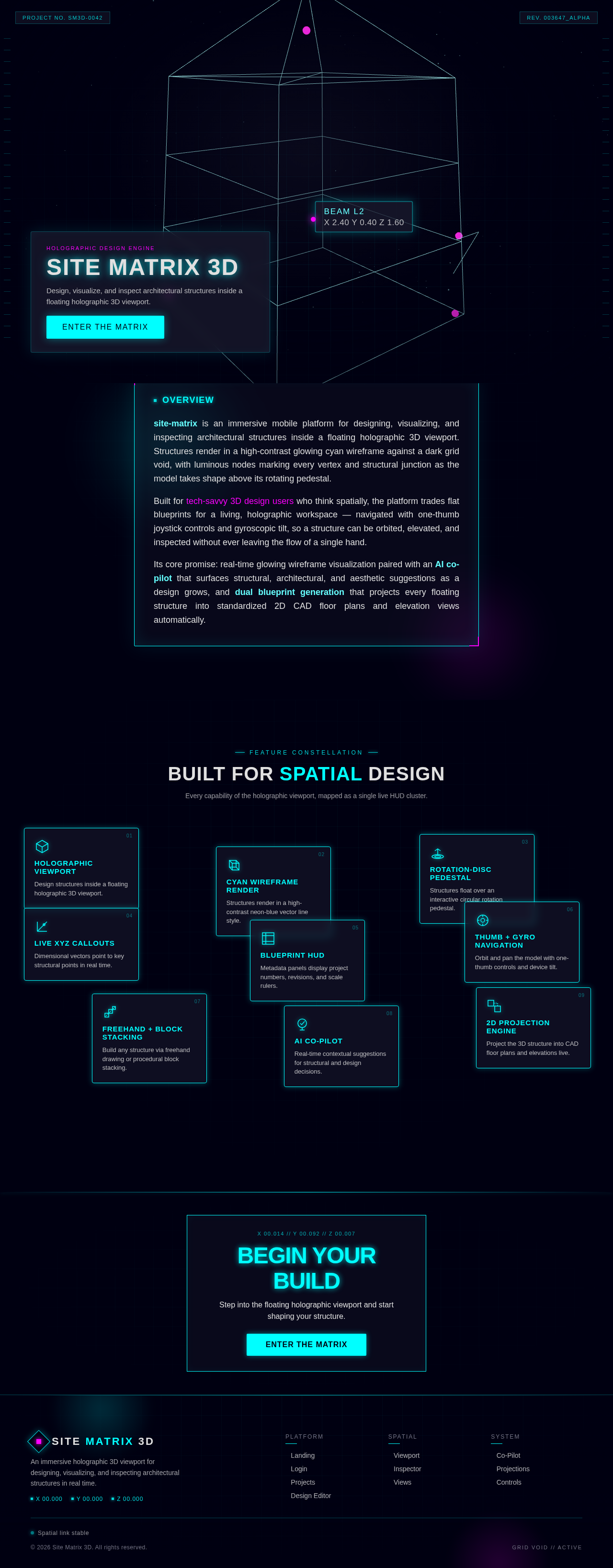
HOLOGRAPHIC DESIGN ENGINE
SITE MATRIX 3D
Design, visualize, and inspect architectural structures inside a floating holographic 3D viewport.
ENTER THE MATRIXOverview
site-matrix is an immersive mobile platform for designing, visualizing, and inspecting architectural structures inside a floating holographic 3D viewport. Structures render in a high-contrast glowing cyan wireframe against a dark grid void, with luminous nodes marking every vertex and structural junction as the model takes shape above its rotating pedestal.
Built for tech-savvy 3D design users who think spatially, the platform trades flat blueprints for a living, holographic workspace — navigated with one-thumb joystick controls and gyroscopic tilt, so a structure can be orbited, elevated, and inspected without ever leaving the flow of a single hand.
Its core promise: real-time glowing wireframe visualization paired with an AI co-pilot that surfaces structural, architectural, and aesthetic suggestions as a design grows, and dual blueprint generation that projects every floating structure into standardized 2D CAD floor plans and elevation views automatically.
Feature Constellation
Built For Spatial Design
Every capability of the holographic viewport, mapped as a single live HUD cluster.
Holographic Viewport
Design structures inside a floating holographic 3D viewport.
Cyan Wireframe Render
Structures render in a high-contrast neon-blue vector line style.
Rotation-Disc Pedestal
Structures float over an interactive circular rotation pedestal.
Live XYZ Callouts
Dimensional vectors point to key structural points in real time.
Blueprint HUD
Metadata panels display project numbers, revisions, and scale rulers.
Thumb + Gyro Navigation
Orbit and pan the model with one-thumb controls and device tilt.
Freehand + Block Stacking
Build any structure via freehand drawing or procedural block stacking.
AI Co-Pilot
Real-time contextual suggestions for structural and design decisions.
2D Projection Engine
Project the 3D structure into CAD floor plans and elevations live.
Begin Your Build
Step into the floating holographic viewport and start shaping your structure.
Enter the MatrixHOLOGRAPHIC DESIGN ENGINE
SITE MATRIX 3D
Design, visualize, and inspect architectural structures inside a floating holographic 3D viewport.
ENTER THE MATRIXOverview
site-matrix is an immersive mobile platform for designing, visualizing, and inspecting architectural structures inside a floating holographic 3D viewport. Structures render in a high-contrast glowing cyan wireframe against a dark grid void, with luminous nodes marking every vertex and structural junction as the model takes shape above its rotating pedestal.
Built for tech-savvy 3D design users who think spatially, the platform trades flat blueprints for a living, holographic workspace — navigated with one-thumb joystick controls and gyroscopic tilt, so a structure can be orbited, elevated, and inspected without ever leaving the flow of a single hand.
Its core promise: real-time glowing wireframe visualization paired with an AI co-pilot that surfaces structural, architectural, and aesthetic suggestions as a design grows, and dual blueprint generation that projects every floating structure into standardized 2D CAD floor plans and elevation views automatically.
Feature Constellation
Built For Spatial Design
Every capability of the holographic viewport, mapped as a single live HUD cluster.
Holographic Viewport
Design structures inside a floating holographic 3D viewport.
Cyan Wireframe Render
Structures render in a high-contrast neon-blue vector line style.
Rotation-Disc Pedestal
Structures float over an interactive circular rotation pedestal.
Live XYZ Callouts
Dimensional vectors point to key structural points in real time.
Blueprint HUD
Metadata panels display project numbers, revisions, and scale rulers.
Thumb + Gyro Navigation
Orbit and pan the model with one-thumb controls and device tilt.
Freehand + Block Stacking
Build any structure via freehand drawing or procedural block stacking.
AI Co-Pilot
Real-time contextual suggestions for structural and design decisions.
2D Projection Engine
Project the 3D structure into CAD floor plans and elevations live.
Begin Your Build
Step into the floating holographic viewport and start shaping your structure.
Enter the Matrix
No comments yet. Be the first!