Page 1 of 9
System Requirements Document for simple-premium
1. Introduction
The project "simple-premium" aims to develop a premium, production-quality SaaS demo UI for a product called QuoteFlow. This UI is intended to serve as a visual/product-design demonstration, focusing on the aesthetics and user experience of a high-end enterprise SaaS application. The target audience includes freight forwarders, procurement teams, and 3PLs who need to compare carrier quotes, normalize pricing, and identify hidden fees. The UI should convey the value of QuoteFlow as a sophisticated, enterprise-grade product that could realistically sell for $299–$799/month.
2. System Overview
The QuoteFlow demo UI is a non-functional, visual representation of a SaaS application designed to showcase the product's potential value and premium quality. The UI will use realistic static/mock data to simulate interactions and workflows without implementing backend functionality. The design will adhere to a sophisticated enterprise aesthetic, inspired by leading industry designs, and will include a polished dark-mode version. The UI will consist of several screens, each serving a specific purpose in the freight quote comparison workflow.
Page 2 of 9
2a. Product Interpretation and Delivery Boundary
The QuoteFlow UI is strictly a visual demo, with no backend, database, authentication, or real data processing. It will use static/mock data to simulate the user experience. The design will focus on creating a premium feel through typography, spacing, hierarchy, and data presentation. The UI will be desktop-first, optimized for a resolution of approximately 1440 × 900. The application shell will include a compact sidebar for navigation and a top bar for user interactions. The UI will not include any real integrations or exports.
2b. Source Content Inventory
Not applicable as there is no content source directive.
2c. Page Content and Component Coverage
Landing
- Purpose: Introduce QuoteFlow, its audience, and its value proposition.
- Components: Tagline, product description, and entry point to the demo.
Overview
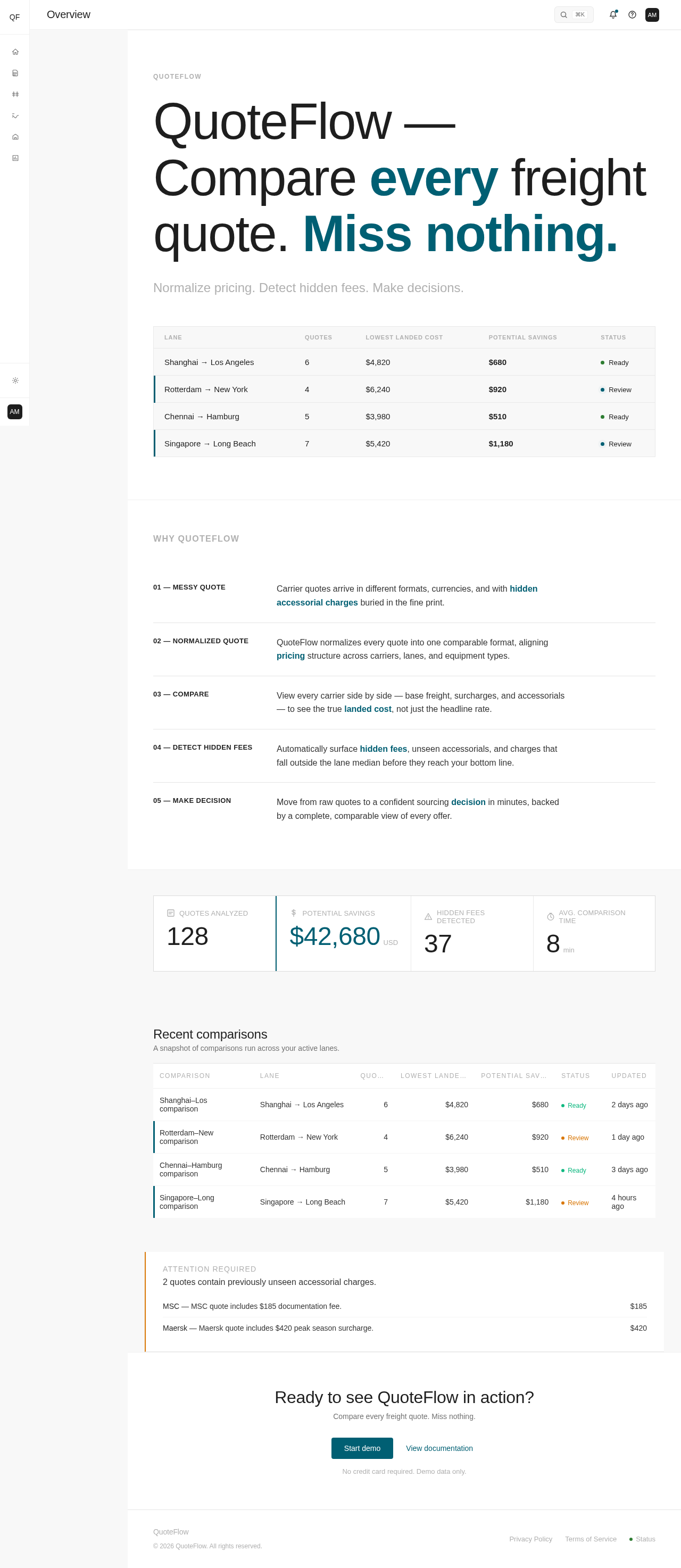
- Header: "Good morning, Alex" with a summary of freight quote activities.
- Actions: "+ New comparison", "Import quotes".
- Metrics: Quotes analyzed, potential savings, hidden fees detected, average comparison time.
- Recent Comparisons Table: Displays recent comparison data with columns for comparison, lane, quotes, lowest landed cost, potential savings, status, and updated time.
- Attention Panel: Highlights quotes with unseen accessorial charges.
Page 3 of 9
Quotes
- Header: "All freight quotes in one place."
- Controls: Search, filter, date, carrier, lane, status.
- Action: "+ Add quote".
- Data Table: Displays quote details including carrier, origin, destination, equipment, base rate, surcharges, accessorials, total, validity, and status.
Quote Detail
- Header: "MSC — Shanghai → Los Angeles".
- Status: "Needs review".
- Actions: "Compare quote", "More".
- Fee Breakdown: Base freight, fuel surcharge, peak season surcharge, documentation, terminal handling, other accessorials.
- Total Landed Cost: Displayed prominently.
- Detected Issues: Lists pricing anomalies with explanations.
Comparison
- Header: "Shanghai → Los Angeles".
- Action: "Export comparison".
- Comparison Table: Side-by-side comparison of carrier quotes with highlights for lowest/highest totals, missing/unusually high fees, and best value.
- Insight: Explanation of why the best quote isn't always the cheapest.
Hidden Fee Detection
- Header: "Hidden fee detection".
- Metrics: Fees detected, potential overcharges, new fee types.
- Anomaly Table: Lists fees with carrier, lane, amount, comparison, severity, and reason.
Page 4 of 9
Lanes
- Header: "Lanes".
- Lane Intelligence: Displays metrics for each lane including quote count, average landed cost, lowest/highest cost, median, and potential savings.
- Trend Visualization: Subtle cost trend visualization.
Suppliers
- Header: "Suppliers".
- Supplier Table: Displays supplier metrics such as quotes, average landed cost, average variance, hidden fees, and reliability.
- Detail View: Elegant presentation of supplier details.
Reports
- Header: "Reports".
- Report Previews: Monthly freight savings, supplier comparison, lane cost analysis, accessorial fee report, quote variance report.
Settings
- Purpose: Access to visual settings and design-mode controls.
Page 5 of 9
3. Functional Requirements
- As a Quote Operations Analyst, I should be able to view an overview of freight quote activities to understand current metrics and recent comparisons. (explicit)
- As a Quote Operations Analyst, I should be able to browse, search, filter, and add freight quotes to manage quote records effectively. (explicit)
- As a Quote Operations Analyst, I should be able to view detailed information about a specific quote, including fee breakdowns and detected anomalies, to assess its validity. (explicit)
- As a Quote Operations Analyst, I should be able to compare quotes side-by-side to identify the best value and make informed decisions. (explicit)
- As a Quote Operations Analyst, I should be able to detect hidden fees in quotes to avoid unexpected charges. (explicit)
- As a Freight Operations Manager, I should be able to view lane intelligence to evaluate cost metrics and savings opportunities. (explicit)
- As a Freight Operations Manager, I should be able to view supplier metrics and details to assess reliability and fee exposure. (explicit)
- As a Freight Operations Manager, I should be able to preview reports to gain insights into savings, supplier performance, lane costs, and fee variances. (explicit)
4. User Personas
Quote Operations Analyst
- Context: Works in freight-forwarding, procurement, or 3PL operations.
- Primary Goal: Review and manage incoming carrier quotes, inspect pricing and fee components, compare costs, and identify anomalies.
- Responsibilities: Browsing and filtering quotes, viewing quote details, comparing quotes, detecting hidden fees.
- Success: Efficiently manages quotes and identifies cost-saving opportunities.
Freight Operations Manager
- Context: Decision-maker in operations, overseeing freight activities.
- Primary Goal: Monitor quote activity, evaluate carrier performance, and communicate sourcing outcomes.
- Responsibilities: Viewing overview metrics, lane intelligence, supplier metrics, and report previews.
- Success: Makes informed decisions based on comprehensive data insights.
5. Core User Flows
Page 6 of 9
5.1 Quote Operations Analyst
- Overview Access: Opens the Overview page to view current metrics and recent comparisons.
- Quote Management: Navigates to the Quotes page to browse, search, and filter quotes.
- Quote Detail Review: Selects a quote to view detailed information, including fee breakdowns and anomalies.
- Comparison: Accesses the Comparison page to view side-by-side carrier quotes and identify the best value.
- Hidden Fee Detection: Visits the Hidden Fee Detection page to review detected fees and avoid unexpected charges.
5.2 Freight Operations Manager
- Overview Monitoring: Starts at the Overview page to monitor overall quote activity.
- Lane Intelligence: Navigates to the Lanes page to evaluate cost metrics and savings opportunities.
- Supplier Assessment: Accesses the Suppliers page to view metrics and details for carrier reliability and fee exposure.
- Report Preview: Opens the Reports page to preview insights into savings, supplier performance, and fee variances.
Page 7 of 9
6. Visuals Colors and Theme
- Muse: Dieter Rams
- Headline: Functional clarity after Dieter Rams
- Palette (Light Mode):
- Background: #F8F8F8
- Surface: #FFFFFF
- Text: #333333
- Primary: #1E1E1E
- Accent: #005F73
- Muted: #B0B0B0
- Typography:
- Headings: Söhne — Medium weight
- Body: Inter Tight
- Scale: 1.25 modular (48/32/24/16)
- Shape Language: Rounded-rectangle controls, dense layout
- Layout: Strict grid system
- Motion: Instant, mechanical feedback
- Motion Tempo: Restrained
- Hero Dimensionality: Flat
7. Signature Design Concept
The landing page will feature a composed data-centric hero with a dense overview table spanning the width of the page. The design will use the signal color sparingly to highlight key metrics and actions. The page will open with a 10-column headline in Söhne, followed by the tagline in Inter Tight. Subtle hover transitions will enhance navigation elements, and dashboard-like metrics will include inline icons for clarity.
Page 8 of 9
8. Interaction Model & Motion Direction
- Interaction Model: Static
- Motion Tempo: Restrained
- Hero Dimensionality: Flat
- Landing Hero Motion Brief: The landing hero will present a dense overview table with key metrics highlighted using the signal color. The initial frame will show the table with a focus on the most critical data points. In reduced-motion settings, the table will remain static with no transitions.
9. Non-Functional Requirements
- The UI must maintain a consistent design system across all screens, ensuring a cohesive user experience. (explicit)
- The application must be optimized for a desktop-first experience at a resolution of approximately 1440 × 900. (explicit)
- The UI must support both light and dark modes, maintaining design consistency across both. (explicit)
10. Tech Stack
- Frontend: React
- Styling: CSS-in-JS (styled-components or equivalent)
- Mock Data: JSON files or similar static data sources
11. Assumptions and Constraints
- The UI is a visual demo only and will not include any backend functionality. (explicit)
- All interactions are simulated using static/mock data. (explicit)
- The design must adhere to the specified visual direction and design system. (explicit)
Page 9 of 9
12. Glossary
- 3PL: Third-Party Logistics
- Freight Forwarder: A company that arranges the transportation of goods on behalf of its clients.
- Landed Cost: The total cost of a product once it has arrived at a buyer's doorstep, including the original price, transportation fees, customs, duties, taxes, insurance, currency conversion, crating, handling, and payment fees.
- Accessorial Charges: Additional fees that may apply to freight shipments, such as fuel surcharges, peak season surcharges, or documentation fees.


No comments yet. Be the first!