silver-template
 Umer Rana
Create a mobile app template for school management software for students

Comments (0)
Sign in to leave a comment
System Requirements
System Requirements Document (SRD) for silver-template
1. Introduction
The silver-template project is a mobile application designed to simplify school management for students. Developed using React Native, this app will provide students with essential tools to manage their academic schedules, assignments, grades, and notifications efficiently. The project is tailored for users in Pakistan (PK), ensuring locale-specific defaults such as timezone (PKT), currency (PKR), and cultural considerations. This document outlines the system requirements for the silver-template project, ensuring clarity and alignment with the goals set by Umer Rana.
2. System Overview
The silver-template app is a school management software designed exclusively for students. It aims to enhance their academic experience by providing a centralized platform for accessing schedules, assignments, grades, and notifications. The app will be built using React Native to ensure cross-platform compatibility, allowing seamless use on both Android and iOS devices. The system will prioritize user-friendly design, intuitive navigation, and efficient performance.
3. Functional Requirements
Story Points:
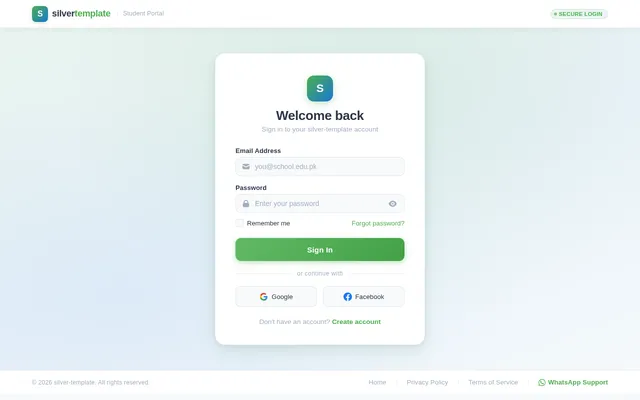
- As a Student, I should be able to log in and sign up using my email and password.
- As a Student, I should be able to view my daily and weekly class schedules.
- As a Student, I should be able to track assignment due dates and upload submissions.
- As a Student, I should be able to access and review my grades.
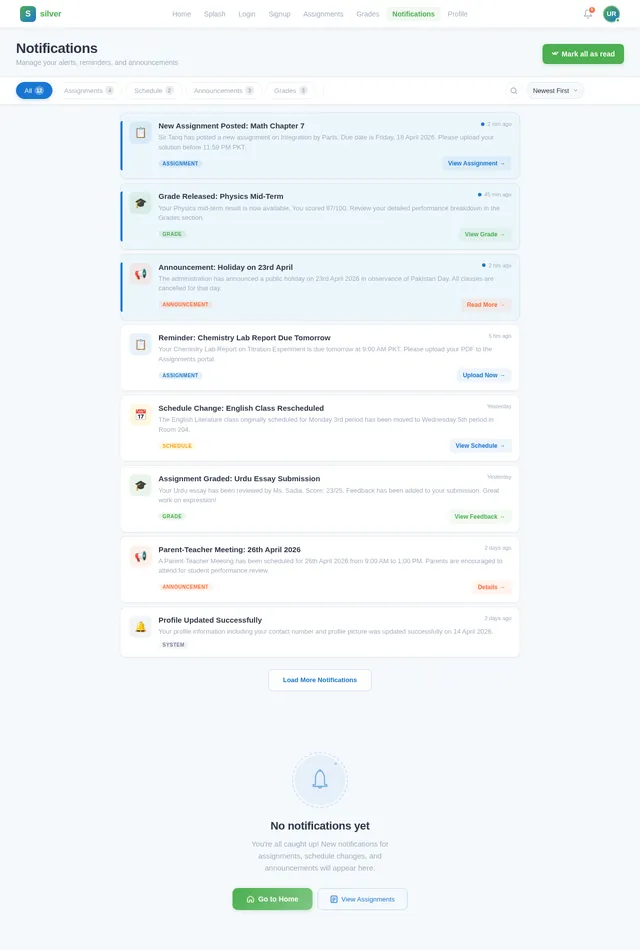
- As a Student, I should receive notifications for new assignments, schedule changes, or announcements.
- As a Student, I should be able to update my profile information, such as name and password.
Note: Requirement #2 (View daily/weekly class schedules) has been marked as pre-resolved per API supervisor's determination.
4. User Personas
Primary User Persona:
- Student: The main user of the app, responsible for managing their academic activities such as schedules, assignments, grades, and notifications.
Secondary User Persona (Future Scope):
- Teacher: May be added later for managing assignments and announcements.
- Parent: May be added later for tracking student progress.
5. Visuals Colors and Theme
Unique Color Palette for silver-template:
- Background:
#F5F9FC(Soft Sky Blue) - Surface:
#FFFFFF(Pure White) - Text:
#2D3748(Charcoal Gray) - Accent:
#4CAF50(Emerald Green) - Muted Tones:
#A0AEC0(Cloudy Gray)
This palette reflects a clean, academic, and professional aesthetic, ensuring readability and a calming user experience.
6. Signature Design Concept
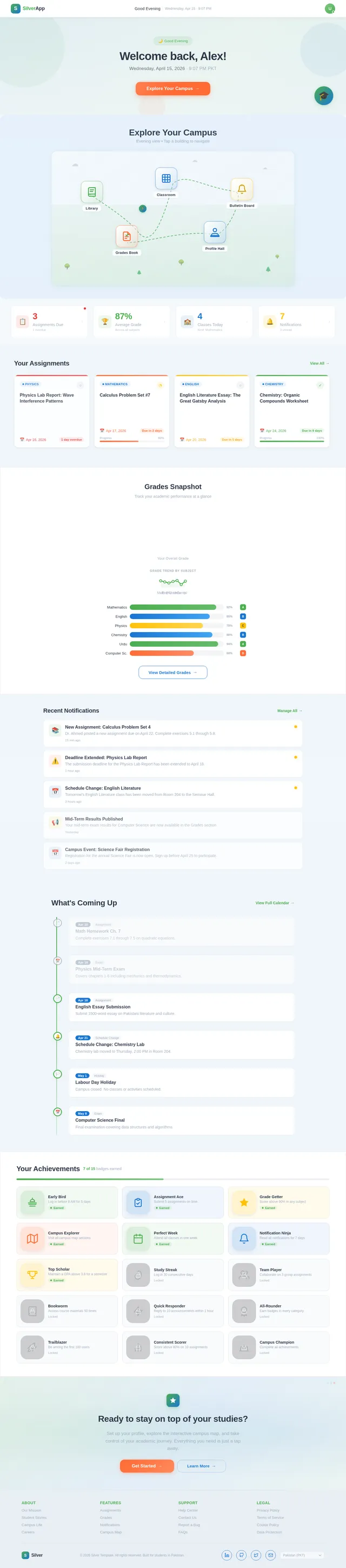
Concept: Interactive Campus Map Homepage
The homepage of the silver-template app will feature an interactive campus map. This map will act as a visual dashboard where students can navigate through their academic activities. Key features include:
- Dynamic Map Elements: Buildings on the map represent different sections of the app (e.g., a library for assignments, a classroom for schedules, a bulletin board for notifications).
- Micro-Interactions: Tapping on a building zooms into its section with smooth transitions and animations.
- Time-Based Changes: The map’s lighting and colors subtly shift based on the time of day (e.g., warm tones in the morning, cool tones at night).
- Gamified Navigation: Students can unlock badges for completing tasks (e.g., submitting assignments on time).
- Animated Avatars: Students can select avatars that walk across the map as they navigate.
This bold and eccentric design will make the app engaging and memorable, ensuring students feel connected to their academic journey.
7. Non-Functional Requirements
- Performance: The app must load within 2 seconds on average devices.
- Scalability: Support up to 10,000 concurrent users.
- Security: Implement secure authentication and data encryption (AES-256).
- Localization: Default timezone set to PKT (Pakistan Standard Time).
- Accessibility: Ensure WCAG 2.1 compliance for visually impaired users.
8. Tech Stack
Frontend:
- React Native for mobile app development.
Backend:
- Python with FastAPI for API development.
Database:
- MySQL or MariaDB for relational data (using Alembic for migrations).
AI Models:
- GPT 5.4 for user-friendly responses.
AI Tools:
- Langchain for workflow orchestration.
Local Orchestration:
- Docker and docker-compose for containerization.
Server-Side Orchestration:
- Kubernetes for scaling and management.
9. Assumptions and Constraints
Assumptions:
- Students will primarily access the app via mobile devices.
- Internet connectivity is required for real-time updates.
- The app will initially support English as the default language.
Constraints:
- Limited budget for initial development.
- The app must comply with local educational regulations in Pakistan.
10. Glossary
- React Native: A framework for building cross-platform mobile apps.
- FastAPI: A modern web framework for building APIs with Python.
- AES-256: Advanced Encryption Standard with 256-bit keys for data security.
- WCAG 2.1: Web Content Accessibility Guidelines for ensuring accessibility.
- PKT: Pakistan Standard Time.
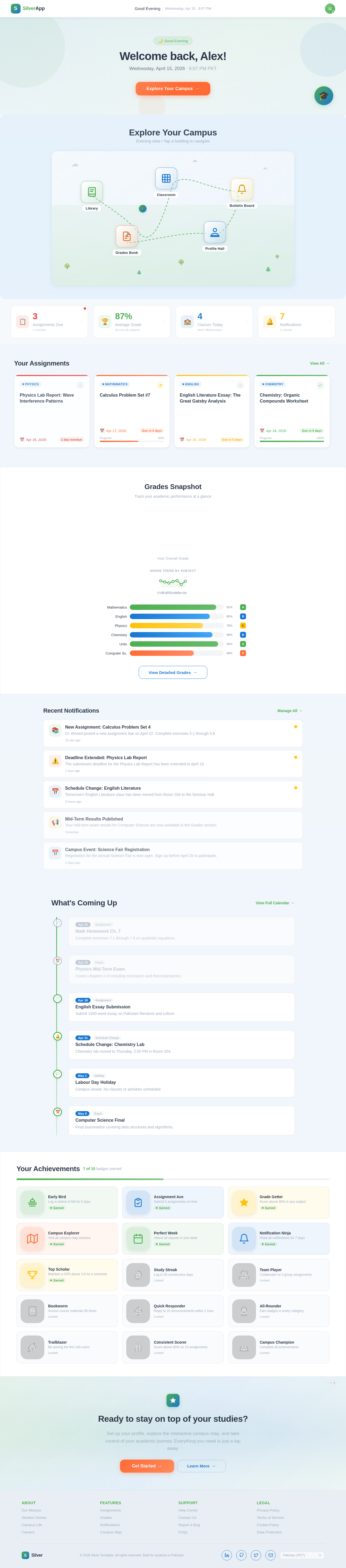
Explore Your Campus
Morning view • Tap a building to navigate
Your Assignments
View All→Physics Lab Report: Wave Interference Patterns
Calculus Problem Set #7
English Literature Essay: The Great Gatsby Analysis
Chemistry: Organic Compounds Worksheet
History Research Project: Mughal Empire
Grades Snapshot
Track your academic performance at a glance
Your Overall Grade
Recent Notifications
Manage All→New Assignment: Calculus Problem Set 4
Dr. Ahmed posted a new assignment due on April 22. Complete exercises 5.1 through 5.8.
15 min agoDeadline Extended: Physics Lab Report
The submission deadline for the Physics Lab Report has been extended to April 18.
1 hour agoSchedule Change: English Literature
Tomorrow's English Literature class has been moved from Room 204 to the Seminar Hall.
3 hours agoMid-Term Results Published
Your mid-term exam results for Computer Science are now available in the Grades section.
YesterdayCampus Event: Science Fair Registration
Registration for the annual Science Fair is now open. Sign up before April 25 to participate.
2 days agoSwipe right to dismiss
What's Coming Up
View Full Calendar→Math Homework Ch. 7
Complete exercises 7.1 through 7.5 on quadratic equations.
Physics Mid-Term Exam
Covers chapters 1-6 including mechanics and thermodynamics.
English Essay Submission
Submit 1500-word essay on Pakistani literature and culture.
Schedule Change: Chemistry Lab
Chemistry lab moved to Thursday, 2:00 PM in Room 204.
Labour Day Holiday
Campus closed. No classes or activities scheduled.
Computer Science Final
Final examination covering data structures and algorithms.
Your Achievements
7 of 15 badges earned
Early Bird
Log in before 8 AM for 5 days
EarnedAssignment Ace
Submit 5 assignments on time
EarnedGrade Getter
Score above 90% in any subject
EarnedCampus Explorer
Visit all campus map sections
EarnedPerfect Week
Attend all classes in one week
EarnedNotification Ninja
Read all notifications for 7 days
EarnedTop Scholar
Maintain a GPA above 3.8 for a semester
EarnedStudy Streak
Log in 30 consecutive days
LockedTeam Player
Collaborate on 3 group assignments
LockedBookworm
Access course materials 50 times
LockedQuick Responder
Reply to 10 announcements within 1 hour
LockedAll-Rounder
Earn badges in every category
LockedTrailblazer
Be among the first 100 users
LockedConsistent Scorer
Score above 80% on 10 assignments
LockedCampus Champion
Complete all achievements
LockedReady to stay on top of your studies?
Set up your profile, explore the interactive campus map, and take control of your academic journey. Everything you need is just a tap away.
No comments yet. Be the first!