silver-html
 9527 cy
深度思考,创建一个HTML,内容是用SVG绘制一个鹈鹕骑自行车的2D动画。你不能进行 任何测试,不能调用skills,不能网络检索,不能调用子智能体,直接生成。

Comments (0)
Sign in to leave a comment
System Requirements
System Requirements Document for silver-html
1. Introduction
silver-html is a single-page, self-contained HTML deliverable whose entire purpose is to present a 2D animation, drawn with inline SVG, of a pelican riding a bicycle. The page opens and the animation plays automatically; the visitor watches a hand-drawn pelican pedal a coral-red bicycle across a sunny afternoon landscape. There is no account, no data entry, no navigation beyond the single page, and no server interaction required to experience the animation.
The audience is the ordinary visitor who opens the page and immediately watches the loop. The product intent is friendly, absurd, hand-made, and instantly delightful: the two-dimensional SVG nature of the artwork is the visual language itself, not a limitation to be disguised as a generic product page. The page is a lightweight interactive animation piece, not a SaaS marketing site.
The requester also imposed a strict generation constraint: the HTML must be produced directly, with no testing performed, no skills invoked, no network retrieval, and no sub-agent calls. These are binding constraints on how the deliverable is produced and are recorded in Section 11.
Success Criteria
- A single HTML file exists that, when opened in a browser, renders a complete 2D SVG scene of a pelican riding a bicycle.
- The animation plays automatically on load without any visitor interaction.
- The scene is composed entirely of inline SVG (no photos, no external image assets, no 3D renders).
- Readable text (headline, wordmark, status labels, control labels) and the play/pause control remain fully visible and uncropped at 375px, 768px, and 1280px viewport widths.
- With
prefers-reduced-motionactive, the page presents a complete, clear, static riding pose instead of motion. - The deliverable was generated directly, honoring the no-testing / no-skills / no-network / no-sub-agent constraints.
2. System Overview
silver-html is delivered as one HTML page named Landing. It is anonymously reachable with no access requirement, no identity, and no session continuity. The page owns the entire accepted outcome: it presents the wordmark and loop status, a two-line headline, a short explanatory line, a status plaque, a play/pause control, and the inline SVG riding stage that animates automatically.
The only active human actor is the Viewer, who opens the page and watches the animation. There are no other human participants, no counterparties, and no durable state produced for any persona. The animation is a self-contained client-side loop; no backend call, database read, or authentication is involved in the accepted behavior.
The provisioned scaffold (a shared FastAPI backend, a MariaDB database, and a React frontend) is infrastructure inventory only. It does not create product requirements: the accepted deliverable is a single static HTML page with inline SVG and CSS/SMIL-style keyframe animation, and no accepted workflow requires persistence, APIs, or accounts. The animation page is served as a static asset; the backend and database remain available but unused by the accepted feature set.
Removed from scope
- None. No concept was explicitly removed by the user; the requirement thread is a single additive request.
2a. Product Interpretation and Delivery Boundary
The product is a presentation artifact, not an application with workflows. Delivery is a single first-party HTML page that a visitor opens directly. Access is anonymous and public; there is no login, no account creation, and no protected state. All animation logic runs in the browser using inline SVG groups and CSS keyframe animation (with prefers-reduced-motion fallbacks). Nothing in the current scope depends on the backend, the database, or the React build pipeline; those services exist in the environment but carry no accepted product behavior. There is no future-horizon requirement stated by the user beyond the current single-page animation.
2c. Page Content and Component Coverage
Landing
- Information and state
- Top bar: a hand-drawn capsule wordmark reading
silver-html, and a single-line loop status on the right readingLOOP 01 · 12s, separated by a small sun icon, both with thick dark-charcoal outlines. - Headline: a two-line display headline
\xe9\xb9\x88\xe9\xb9\x95/出发。where the period of the second line is replaced by a small golden-yellow sun; the two lines alternate coral-red and dark-charcoal treatment. - Sub-line: one short explanatory sentence beneath the headline.
- Status plaque: a small rounded plaque reading
正在骑行 · SVG 动画, fixed beneath the headline. - Footer: a single visible line of loop explanation plus a muted motion legend; no card grid.
- Animation state: playing (default) or paused; the play/pause control label and
aria-labelreflect the current state.
- Top bar: a hand-drawn capsule wordmark reading
- Primary actions
- Watch the automatically playing SVG riding loop (no interaction required).
- Toggle play/pause via the circular control in the animation stage corner.
- Supporting actions
- None beyond the play/pause toggle. No navigation, no forms, no CTA.
- Domain entities
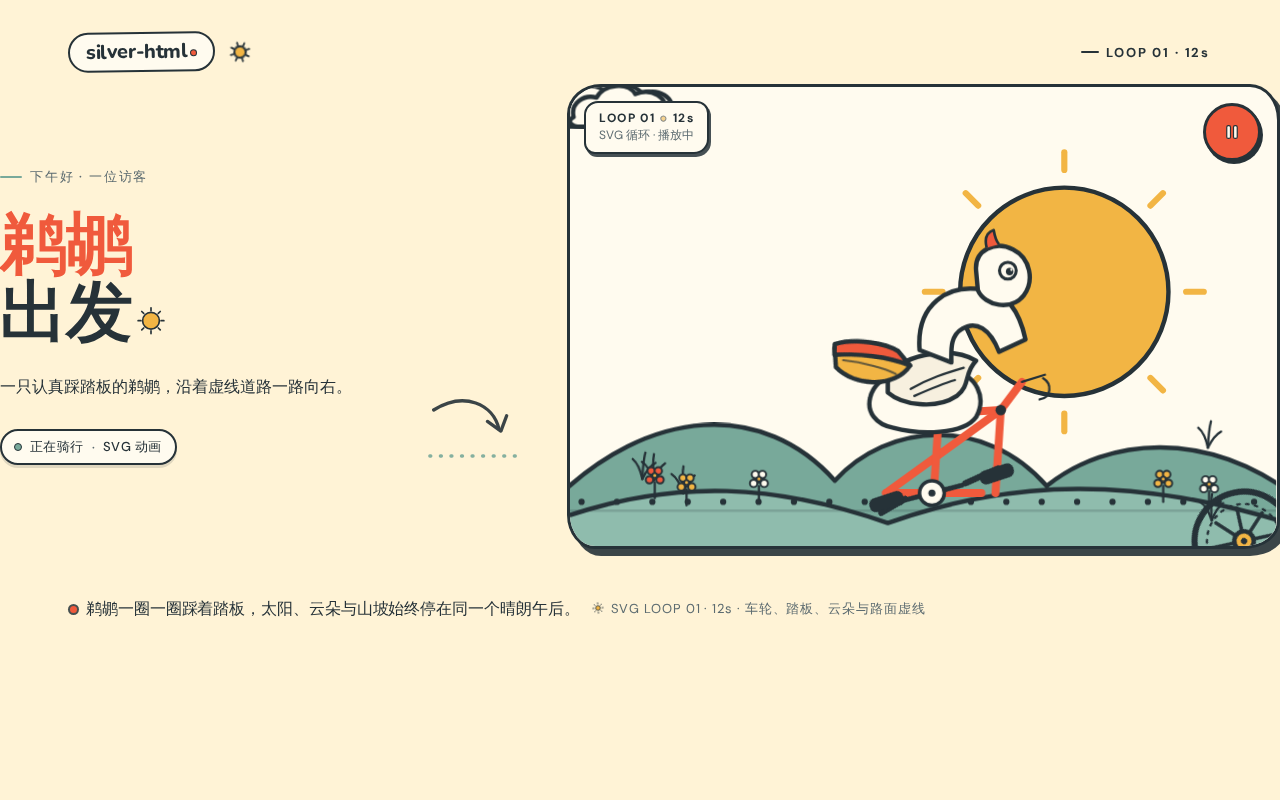
- The SVG scene graph: pelican (body, long curved beak, beak pouch, bean-shaped wings, large eye), bicycle (rounded tube frame, two solid wheels with hubs, exaggerated large pedals, crank/leg linkage), and background (flat sun, clouds, arched hills, wildflowers, dashed road).
- Animation state:
playing/paused, and the reduced-motion static state.
- Component responsibilities
- Wordmark capsule: brand identity, thick outline, non-link decorative label.
- Loop status: communicates the loop identity and duration (
LOOP 01 · 12s). - Headline block: oversized display type in its own safe area, never overlapped by the SVG stage.
- Status plaque: communicates that the animation is running.
- SVG stage: owns the layered 2D scene; independent SVG groups for wheels, pedals, legs, body, wings, beak pouch, clouds, grass, and road dashes, each with explicit
transform-originfor its loop. - Play/pause control: circular button, keyboard-focusable, updates visible text and
aria-labeltogether. - Footer legend: static loop explanation and muted motion legend.
- States
- Loading: not applicable; the page is static HTML with inline SVG and renders immediately.
- Empty: not applicable; the scene is always fully populated.
- Success: animation plays automatically; wheels counter-rotate at constant speed, pedals and legs turn in sync, body bobs, wings open/close every fourth pedal stroke, beak pouch sways with slight delay, clouds drift horizontally, grass sways in two frames, road dashes advance via
stroke-dashoffset. - Error/recovery: if the browser cannot run CSS animation, the static composed riding pose remains visible and readable; the play/pause control still reflects state.
- Reduced motion: wheels and background stop; a complete, clear static riding pose is shown; the play/pause control remains usable.
3. Functional Requirements
FR-1 — Single HTML page delivery (explicit) As a Viewer, I should receive the entire experience as one HTML page so that opening the file shows the animation without any setup.
- Trigger/input: the Viewer opens the HTML file or URL.
- Observable result: the Landing page renders with wordmark, headline, status plaque, SVG stage, and play/pause control.
- Access state: anonymous, no identity required.
- Failure/recovery: if external assets were missing the page would degrade; because all artwork is inline SVG, the scene still renders.
- Continuation: the Viewer watches the loop or toggles play/pause.
FR-2 — Inline SVG 2D pelican-on-bicycle animation (explicit) As a Viewer, I should see a 2D animation of a pelican riding a bicycle drawn with SVG so that the page delivers its promised visual.
- Trigger/input: page load.
- Observable result: a layered inline SVG scene shows a pelican on a coral-red bicycle moving right along a dashed road, with rotating wheels, turning pedals and legs, bobbing body, periodically flapping wings, swaying beak pouch, drifting clouds, swaying grass, and advancing road dashes.
- Access state: anonymous.
- Failure/recovery: if animation is unavailable, the static composed pose remains.
- Continuation: the loop repeats continuously.
FR-3 — Automatic playback (explicit) As a Viewer, I should see the animation play automatically on load so that I do not need to press anything to enjoy it.
- Trigger/input: page load with motion allowed.
- Observable result: the loop begins immediately and repeats.
- Access state: anonymous.
- Failure/recovery: with
prefers-reduced-motion, the page shows the static pose instead (see FR-6). - Continuation: continuous loop.
FR-4 — Play/pause control (explicit, from creative direction signature moves) As a Viewer, I should be able to pause and resume the animation with a circular control in the stage corner so that I can hold a still frame or restart motion.
- Trigger/input: activating the circular play/pause button (pointer or keyboard).
- Observable result: animation pauses or resumes; the button's visible text and
aria-labelupdate in sync to reflect the new state. - Access state: anonymous.
- Failure/recovery: the control remains focusable and operable; state label always matches actual state.
- Continuation: the Viewer may toggle again or leave the page.
FR-5 — Readable text and controls remain whole (explicit, from creative direction) As a Viewer, I should see the headline, wordmark, status labels, plaque, footer legend, and play/pause control fully visible and uncropped at 375px, 768px, and 1280px so that nothing readable is clipped or covered.
- Trigger/input: resizing the viewport to the specified widths.
- Observable result: text wraps or scales (e.g.,
clamp()with mobile minimum) to stay inside the viewport and its container; no SVG element covers any readable text or control. - Access state: anonymous.
- Failure/recovery: decoration may bleed off edges, but readable text and controls are never cropped or covered.
- Continuation: layout remains usable at all widths.
FR-6 — Reduced-motion static arrangement (explicit, from creative direction)
As a Viewer with prefers-reduced-motion, I should see a complete, clear static riding pose instead of motion so that the page is usable without animation.
- Trigger/input: OS/browser reduced-motion preference active.
- Observable result: wheels and background movement stop; a full static riding scene is shown; the play/pause control remains present and usable.
- Access state: anonymous.
- Failure/recovery: the static pose is complete and readable.
- Continuation: the Viewer can still read all text and use the control.
FR-7 — Direct generation without testing, skills, network, or sub-agents (explicit constraint) As the requester, I should have the HTML generated directly so that the stated production constraints are honored.
- Trigger/input: the generation request.
- Observable result: the deliverable is produced in one direct pass with no test execution, no skill invocation, no web retrieval, and no sub-agent calls.
- Access state: not applicable (production constraint, not a Viewer-facing behavior).
- Failure/recovery: not applicable.
- Continuation: not applicable.
4. User Personas
Viewer
- Product context: An ordinary visitor who opens the single silver-html page, likely from a direct link or local file, with no prior relationship to the product and no expectation of an account or workflow.
- Primary goal: Immediately watch a charming, hand-drawn 2D SVG animation of a pelican riding a bicycle, and optionally pause it to hold a frame.
- Distinct accepted responsibilities: Opening the page, watching the automatic loop, and optionally toggling play/pause. The Viewer is the sole active human actor; there is no counterparty, no data entry, and no durable state to own.
- Relevant inputs or decisions: Whether to pause or resume the animation; whether to keep watching. No forms, no selections, no commitments.
- Interactions with other accepted participants: None. No other human persona participates in any accepted lifecycle.
- Observable success: The scene renders and animates on load; all readable text and the control are fully visible at mobile, tablet, and desktop widths; reduced-motion users see a complete static pose; the play/pause label matches the actual state.
5. Core User Flows
Flow A — First visit and automatic playback (Viewer)
- The Viewer opens the silver-html HTML page (anonymous; no identity required).
- The Landing page renders: the capsule wordmark
silver-htmland loop statusLOOP 01 · 12sappear at the top; the two-line headline\xe9\xb9\x88\xe9\xb9\x95/出发。(with the sun-replaced period) appears in its own safe area; the status plaque正在骑行 · SVG 动画sits beneath the headline. - The inline SVG stage renders the layered scene: golden sun behind the pelican, sage-green hills across the bottom, clouds, wildflowers, and a dark-charcoal dashed road.
- The animation begins automatically: wheels counter-rotate, pedals and legs turn in sync, the body bobs, wings open/close every fourth pedal stroke, the beak pouch sways with slight delay, clouds drift, grass sways, and road dashes advance.
- Observable result: the Viewer sees a continuous, readable riding loop.
- Continuation: the loop repeats; the Viewer may leave the page or proceed to Flow B.
Flow B — Pause and resume (Viewer)
- From the playing Landing page, the Viewer activates the circular play/pause control in the stage corner (pointer or keyboard).
- The animation pauses; the control's visible text and
aria-labelupdate together to indicate the paused state. - Observable result: a still frame of the riding scene is held.
- The Viewer activates the control again to resume; the label updates back to the playing state and the loop continues.
- Failure/recovery: if the Viewer's browser cannot animate, the static pose remains visible and the control still reflects state.
- Continuation: the Viewer may toggle repeatedly or leave the page.
Flow C — Reduced-motion visit (Viewer with prefers-reduced-motion)
- The Viewer with reduced-motion preference opens the Landing page.
- The page renders a complete, clear static riding pose: wheels and background movement are stopped.
- All readable text (wordmark, loop status, headline, plaque, footer legend) and the play/pause control remain fully visible and usable.
- Observable result: the Viewer can read the scene and use the control without motion.
- Continuation: the Viewer may leave the page.
Flow D — Responsive viewing (Viewer at 375px / 768px / 1280px)
- The Viewer opens the Landing page at a given viewport width.
- On mobile, the headline and explanatory line sit above the SVG stage, which falls fully below them with safe padding; on tablet and desktop, the asymmetric left-text / right-stage composition places the stage at roughly 58% of the visible width.
- Observable result: headline, wordmark, labels, plaque, footer legend, and control remain entirely inside the viewport and their containers; decoration may bleed off edges but never covers readable text or controls.
- Continuation: the Viewer watches the loop or toggles play/pause.
6. Visuals Colors and Theme
The creative direction is authoritative for this section.
- Muse and headline: Pablo Stanley — a friendly, absurd, hand-made, instantly delightful single-page animation piece; the 2D SVG nature is the visual language.
- Mode: light.
- Color tokens (exact hex by role):
- Background:
#FFF3D6(cream yellow, covers the page) - Surface:
#FFFBEF(ivory, for SVG plaques and small info areas) - Text:
#263238(dark charcoal, all body text, outlines, readable labels) - Primary:
#F05A3C(coral red — bicycle frame, primary buttons, visual rhythm) - Accent:
#F2B544(marigold yellow — pelican beak, sun, hub details) - Muted:
#78A99A(sage green — ground, leaves, secondary decoration)
- Background:
- Typography:
- Headings: Nunito, Nunito ExtraBold — rounded and bold, sentence case (not all caps), tight but not cramped, slight negative letter-spacing; headlines always wrap fully and never overlap the SVG protagonist.
- Body: DM Sans.
- Scale (fluid): display headline
clamp(44px, 9vw, 112px)with 44px mobile minimum; subtitleclamp(20px, 3vw, 32px); body 16px; labels and animation status 13px. - Forbidden fonts: Inter, Roboto, Arial, Helvetica, Open Sans, Lato, Poppins, system-ui.
- Shape language: every SVG element uses visible thick dark-charcoal outlines, round line caps, and imperfectly asymmetric rounded geometry. The pelican is built from reusable circular body, curved long beak, bean-shaped wings, and large eyes; the bicycle uses slender rounded tubes, solid circular wheels, and exaggerated large pedals. Clouds, grass blades, sun, and road signs appear as sticker-like 2D symbols.
- Layout rhythm: single-screen animation stage; top capsule wordmark and
SVG LOOP / 01status marker; asymmetric left-text / right-stage composition in the middle; mobile stacks headline and one explanatory line above the stage with safe padding; tablet/desktop stage occupies about 58% of visible width; bottom keeps only one visible loop explanation and a muted motion legend — no card grid. - Imagery style: inline SVG only — no photos, no 3D renders, no gradient blobs, no external illustrations. Flat sun, clouds, arched hills, wildflowers, and dashed road. Decoration may bleed past the SVG frame edge but must not cover the headline, explanatory text, or controls.
- Avoid: generic centered SaaS hero with a single blue button; blue/indigo as primary on white; gradient blobs, glassmorphism, glowing panels, 3D objects; identical floating card grids; photos, external images, realistic people; readable text or controls cropped or covered by the SVG scene; over-complex physics simulation; the forbidden font list above.
7. Signature Design Concept
The public entry is a cream-yellow horizontal riding stage, not a centered SaaS hero. The top-left carries an oversized two-line headline \xe9\xb9\x88\xe9\xb9\x95 / 出发。 alternating coral-red and dark-charcoal, with the second line's period replaced by a small golden-yellow sun; the headline lives in its own safe area and never overlaps the animation. To the right and below, a giant inline SVG pelican (about 68% of stage height) rides a coral-red bicycle rightward along a dark-charcoal dashed road, with a golden sun pressed behind the bird and sage-green hills across the bottom. Beneath the headline sits a small rounded status plaque reading 正在骑行 · SVG 动画 — no centered CTA. The whole scene is flat, layered 2D, and the motion is the protagonist.
Signature moves to implement:
- Split the pelican, frame, pedals, wheels, and wings into independent SVG groups; hub rotation, pedal rotation, leg swing, and body bounce each loop around an explicit
transform-origin. - The oversized two-line headline sits in a dedicated safe zone; the second line's period is a small golden sun.
- The road is a single dark-charcoal round-capped dashed line across the stage;
stroke-dashoffsetloops to create forward motion without moving readable content. - The top bar is a hand-drawn capsule wordmark
silver-htmlplus a single-line loop statusLOOP 01 · 12s, separated by a small sun icon with thick outlines. - A circular play/pause button in the stage corner; on pause, its text and
aria-labelupdate together; under reduced-motion the complete static scene is shown by default.
8. Interaction Model & Motion Direction
Interaction Model: Animated Motion Tempo: expressive Hero Dimensionality: layered_2d
Landing Hero Motion Brief
- Focal subject: the giant inline SVG pelican riding the coral-red bicycle, with the golden sun behind it and sage-green hills beneath.
- Input → transformation → outcome thesis: page load (or resume) → the SVG groups begin their keyframe loops (wheels counter-rotate, pedals and legs turn in sync, body bobs, wings open/close every fourth pedal stroke, beak pouch sways with slight delay, clouds drift, grass sways, road dashes advance via
stroke-dashoffset) → the Viewer perceives continuous forward riding. Pausing freezes the composed frame; reduced-motion shows the complete static pose. - Motion vocabulary: auto-looping SVG keyframes; constant-speed counter-rotating wheels; synchronized pedal/leg rotation; small rhythmic body bob; wing flap every fourth pedal stroke; slightly delayed beak-pouch sway; slow horizontal cloud drift; two-frame grass sway; looping
stroke-dashoffsetroad dashes. - Composed first frame: cream-yellow stage; top capsule wordmark and
LOOP 01 · 12s; left safe-area headline\xe9\xb9\x88\xe9\xb9\x95/出发。with sun-period; status plaque正在骑行 · SVG 动画; right/below the pelican on the bicycle mid-stroke on the dashed road; sun behind; hills across the bottom; circular play/pause control in the stage corner. - Reduced-motion state: wheels and background movement stop; a complete, clear static riding pose remains; all readable text and the control stay fully visible and usable.
9. Non-Functional Requirements
- NFR-1 — Self-contained delivery (explicit): the experience is one HTML page with inline SVG and CSS; no external image, font-file, or script dependency is required for the accepted scene to render. Rationale: the user asked for a single HTML with SVG-drawn animation.
- NFR-2 — No testing, skills, network retrieval, or sub-agents during generation (explicit): the deliverable is produced directly in one pass. Rationale: explicit user constraint.
- NFR-3 — Readable text and control integrity (explicit, creative direction): headline, wordmark, labels, plaque, footer legend, and play/pause control remain entirely inside the viewport and their containers at 375px, 768px, and 1280px; decoration may bleed but never covers readable text or controls. Rationale: accessibility and the direction's readability rule.
- NFR-4 — Reduced-motion support (explicit, creative direction):
prefers-reduced-motionyields a complete static pose with wheels and background stopped. Rationale: accessibility. - NFR-5 — Accessible control state (explicit, creative direction): the play/pause control's visible text and
aria-labelupdate in sync; the control is keyboard-focusable. Rationale: operable and truthful state. - NFR-6 — Pure 2D SVG visual language (explicit, creative direction): no photos, 3D renders, gradient blobs, glassmorphism, or external illustrations; flat layered 2D only. Rationale: the direction's imagery rule.
- NFR-7 — Performance-appropriate animation (required_inference): the loop uses lightweight CSS/SVG keyframes without heavy physics simulation, keeping the single page smooth. Rationale: the direction forbids over-complex physics and the page must play immediately.
10. Tech Stack
- Deliverable: a single HTML file with inline SVG and CSS keyframe animation (plus minimal inline JavaScript for the play/pause toggle and
aria-labelsync). No build step is required for the accepted page. - Provisioned scaffold (inventory, not required by accepted behavior):
frontend: React application UI (available; the accepted page is a static HTML artifact and does not depend on it).backend: shared FastAPI process for application APIs and domain modules (available; no accepted API is required).database: MariaDB for application-owned persistent data (available; no accepted domain entity or persistence is required).
- Fonts: Nunito (headings) and DM Sans (body), per the creative direction; forbidden fonts excluded.
- Deployment: static hosting of the single HTML page is sufficient; Docker/docker-compose and Kubernetes are not required by the accepted feature set.
11. Assumptions and Constraints
- Hard constraints (explicit): no testing may be performed; no skills may be invoked; no network retrieval may be performed; no sub-agents may be called; generate directly.
- Assumption A-1 (required_inference): the page is opened in a modern browser that supports inline SVG and CSS keyframe animation; if animation is unsupported, the static composed pose remains visible.
- Assumption A-2 (required_inference): the Viewer has no account and no identity; the page is anonymous and public with no protected state.
- Assumption A-3 (required_inference): the provisioned backend, database, and React frontend are environment inventory and carry no accepted product behavior for this single-page animation; they are not invoked by the accepted flows.
- Assumption A-4 (required_inference): the loop duration is 12 seconds as stated by the
LOOP 01 · 12sstatus label in the creative direction. - Constraint C-1 (explicit): the visual language is inline SVG 2D only; no photos, 3D, gradient blobs, glassmorphism, or external illustrations.
- Constraint C-2 (explicit): readable text and controls are never cropped or covered at 375px, 768px, or 1280px.
- Constraint C-3 (explicit): the forbidden font list (Inter, Roboto, Arial, Helvetica, Open Sans, Lato, Poppins, system-ui) is not used.
12. Glossary
- SVG: Scalable Vector Graphics; the inline vector format used to draw the pelican, bicycle, and background.
- Inline SVG: SVG markup embedded directly in the HTML document rather than loaded from an external file.
- 2D animation: motion produced by animating flat two-dimensional vector shapes, here via CSS/SVG keyframes.
- Keyframe loop: a repeating animation cycle defined by start/end keyframes, used for wheels, pedals, body bob, wings, clouds, grass, and road dashes.
transform-origin: the pivot point around which an SVG group rotates or scales; each animated group has an explicit one.stroke-dashoffset: the SVG property animated to make the dashed road appear to advance.prefers-reduced-motion: a CSS media feature indicating the user prefers reduced motion; triggers the static pose.aria-label: the accessible name of the play/pause control, kept in sync with its visible text.- Loop status (
LOOP 01 · 12s): the top-bar label identifying the animation loop and its 12-second duration. - Status plaque (
正在骑行 · SVG 动画): the small rounded label beneath the headline indicating the animation is running. - Viewer: the sole active human persona; opens the page and watches the animation.
下午好 · 一位访客
鹈鹕出发
一只认真踩踏板的鹈鹕,沿着虚线道路一路向右。
正在骑行SVG 动画下午好 · 一位访客
鹈鹕出发
一只认真踩踏板的鹈鹕,沿着虚线道路一路向右。
正在骑行SVG 动画
No comments yet. Be the first!