silver-channel
build a faceless youtube channel



Comments (0)
Sign in to leave a comment
System Requirements
System Requirements Document (SRD)
Project Name: silver-channel
1. Introduction
The silver-channel project aims to create a faceless YouTube channel that leverages AI technologies to produce engaging and high-quality YouTube Shorts. The focus is on delivering content that captivates audiences without requiring an on-camera presence, making it ideal for niches like storytelling, tutorials, or trending topics. This document outlines the system requirements to ensure the successful development and deployment of the silver-channel platform.
The project is designed with the Australian context in mind, considering local time zones (AEST/AEDT), cultural preferences, and audience engagement patterns.
2. System Overview
The silver-channel system will be a fully automated platform for generating and managing YouTube Shorts. It will integrate AI tools for content creation, including text-to-speech, video editing, and visual effects, ensuring seamless production of high-quality videos. The system will also include features for scheduling, analytics, and optimization to maximize audience reach and engagement.
Key components of the system include:
- AI-powered content generation (text, visuals, and audio).
- Automated video editing and rendering.
- Integration with YouTube for direct upload and scheduling.
- Analytics dashboard for performance tracking and insights.
3. Functional Requirements
- As a User, I should be able to generate AI-powered YouTube Shorts.
- As a User, I should be able to input text or prompts to create video content.
- As a User, I should be able to select from multiple AI-generated voiceovers.
- As a User, I should be able to customize video themes, colors, and styles.
- As a User, I should be able to preview videos before publishing.
- As a User, I should be able to schedule videos for automatic upload to YouTube.
- As a User, I should be able to track video performance metrics (views, likes, comments).
- As a User, I should be able to access trending topic suggestions for content ideas.
- As a User, I should be able to integrate AI-generated characters or animations into videos.
4. User Personas
1. Content Creator
- Description: Individuals or small teams looking to create engaging YouTube Shorts without appearing on camera.
- Goals: Generate high-quality, automated content quickly and efficiently.
- Pain Points: Lack of technical skills, time constraints, and difficulty in maintaining consistent content quality.
2. Social Media Manager
- Description: Professionals managing multiple social media accounts, including YouTube.
- Goals: Automate content creation and scheduling to save time and increase productivity.
- Pain Points: Managing multiple platforms, analyzing performance metrics, and staying updated with trends.
5. Visuals Colors and Theme
The silver-channel project will adopt a sleek, modern, and futuristic aesthetic to align with its AI-driven nature. Below is the unique color palette:
- Background: #1A1A2E (Deep Midnight Blue)
- Surface: #16213E (Dark Navy)
- Text: #EAEAEA (Soft White)
- Accent: #F05454 (Vivid Coral Red)
- Muted Tones: #6C757D (Muted Gray)
This palette ensures a professional yet vibrant look, appealing to a tech-savvy audience.
6. Signature Design Concept
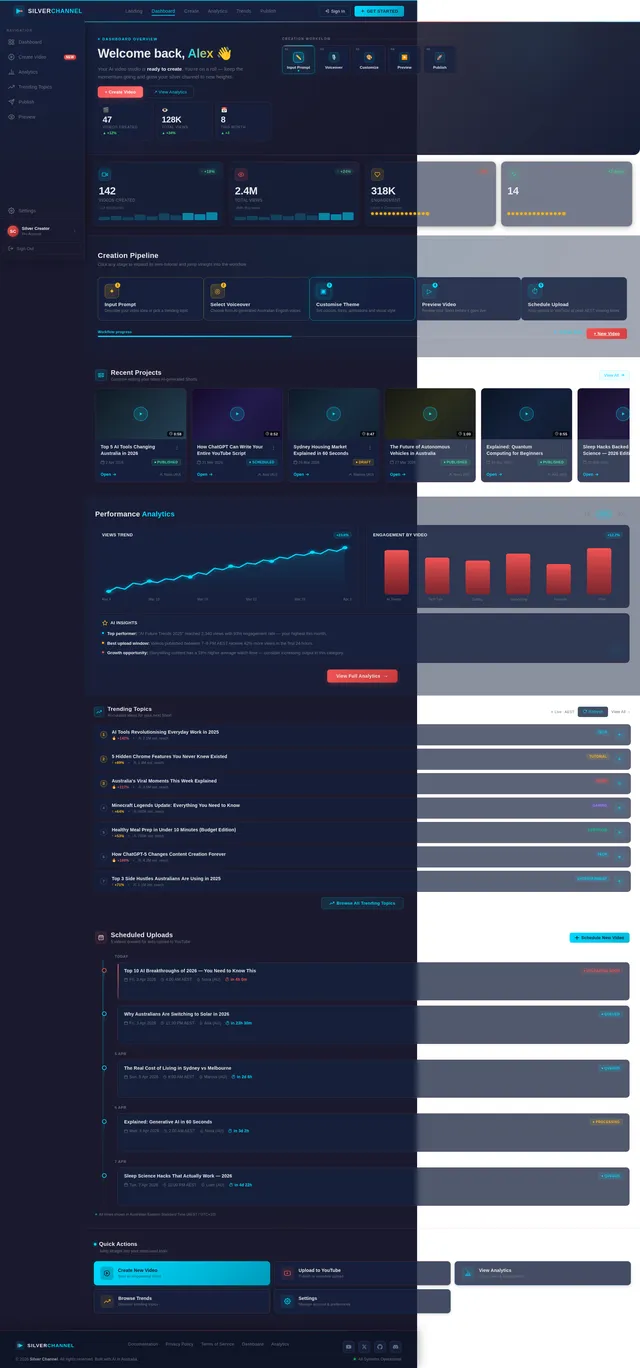
The silver-channel homepage will feature an interactive AI-powered storyboard.
Concept Details:
- Visuals: A dynamic, animated storyboard that evolves as the user scrolls. Each "frame" of the storyboard represents a step in the video creation process (e.g., input text, select voiceover, customize visuals).
- Interactions: Users can click on each frame to expand it into a mini-tutorial or demo. For example, clicking on the "voiceover" frame will play a sample of AI-generated voices.
- Animations: Smooth transitions between frames, with subtle glowing effects on hover. The storyboard will have a futuristic, holographic look, with elements that appear to "float" in 3D space.
- Micro-interactions: When users hover over buttons or icons, they will emit a soft pulse or glow, reinforcing the high-tech theme.
- Color Shifts: The background will subtly shift between shades of midnight blue and dark navy as the user interacts with the storyboard, creating a sense of depth and immersion.
This design will make the homepage unforgettable, drawing users into the creative process from the moment they arrive.
7. Non-Functional Requirements
- The system must support high availability, with 99.9% uptime.
- The platform should load within 3 seconds on standard broadband connections.
- The AI-generated content must comply with YouTube’s community guidelines.
- The system should support Australian English as the default language.
- All user data must be stored securely, adhering to Australian data privacy laws.
8. Tech Stack
Frontend
- React for Web
Backend
- Python
- FastAPI
Database
- MySQL (with Alembic for migrations)
AI Models
- GPT 5.4 for user-friendly responses
- Claude 4.6 Opas for academic or coding work
- Google Nano Banana for image generation
AI Tools
- Litellm for LLM Routing
- Langchain
Local Orchestration
- Docker
- docker-compose
Server-Side Orchestration
- Kubernetes
9. Assumptions and Constraints
- The platform assumes users have a basic understanding of YouTube Shorts and content creation.
- The system will initially target Australian users but can be expanded globally in future phases.
- The project is constrained by YouTube’s API limits and guidelines.
- AI-generated content may require periodic updates to remain relevant and engaging.
10. Glossary
- AI: Artificial Intelligence.
- YouTube Shorts: Short-form video content on YouTube, typically under 60 seconds.
- LLM: Large Language Model, used for generating text or speech.
- Storyboard: A visual representation of the video creation process.
- Micro-interactions: Small, subtle animations or effects that enhance user experience.

Create Viral YouTube Shorts with AI
Transform your ideas into captivating faceless videos in minutes. Our AI handles text-to-speech, editing, and publishing — so you can focus on growing your audience.
Trusted by 5,000+ creators across Australia and beyond
Your AI-Powered Creative Journey
Every viral Short begins with a simple idea. Our interactive storyboard guides you through five seamless steps — from entering your prompt to publishing on YouTube — all powered by intelligent automation designed for creators who want results without the complexity.
Your AI-Powered Creative Storyboard
Five simple steps to create stunning YouTube Shorts. Click any frame to explore a live demo of each stage in your creative journey.
Input Prompt
Enter your topic or script and let AI craft a compelling narrative.
Select Voiceover
Choose from realistic AI voices tailored for your content style.
Customise Theme
Pick colours, animations, and visual styles for your video.
Preview Video
Watch a real-time preview and fine-tune before publishing.
Schedule Upload
Set the perfect time and auto-publish to YouTube.
Everything You Need to Create Viral Shorts
From AI-powered voiceovers to automated scheduling, silver-channel gives you a complete toolkit for faceless YouTube content.
AI Text-to-Speech
Transform scripts into natural-sounding voiceovers with advanced AI voices tailored for YouTube Shorts.
Smart Voiceover Selection
Choose from dozens of AI-generated voices and accents to match your content style and audience.
Theme Customization
Personalize video themes, colors, and visual styles to build a consistent brand identity.
Real-Time Preview
Instantly preview your Shorts before publishing to ensure every detail looks and sounds perfect.
Auto-Scheduling
Schedule uploads to YouTube at optimal times based on audience engagement patterns in your timezone.
Analytics Tracking
Monitor views, likes, and engagement metrics with a powerful dashboard built for creators.
From Idea to Published Short
Four seamless phases powered by AI take your content from concept to live on YouTube — no camera, no editing skills required.
Content Idea
Input your topic or let AI suggest trending ideas based on real-time analytics and audience engagement patterns across Australia.
AI Generation
Our AI engine transforms your prompt into a complete video script with voiceover, visuals, and dynamic animations in seconds.
Customization
Fine-tune themes, colors, voiceover style, and visual effects. Preview every change in real-time before finalising.
Publishing
Schedule your YouTube Short for optimal engagement times or publish instantly with one click. Track performance live.
Built for Every Creator
Generate high-quality Shorts without appearing on camera. Perfect for solo creators who want consistent, professional content without the time or technical overhead.
Automate content creation and scheduling across channels. Save 10+ hours per week while maintaining a steady publishing cadence for every client account.
Transform lessons and tutorials into bite-sized, engaging Shorts that reach new audiences. Ideal for educators in science, history, finance, and more.
Loved by Creators Everywhere
Join thousands of content creators who are transforming their YouTube Shorts workflow with AI-powered automation.
Stay Ahead with AI-Powered Trends
Discover what's trending right now. Our AI analyses millions of data points to surface the hottest content ideas for your next YouTube Short.
AI Storytelling Shorts
Captivating short-form narratives powered by AI voiceovers and dynamic visuals are dominating Australian feeds this week.
Explore→Quick Tutorial Hacks
Bite-sized how-to videos with AI-generated step-by-step guides are seeing massive engagement across APAC audiences.
Explore→Viral Science Facts
Mind-blowing science explainers with AI animations and text-to-speech narration are trending among 18-34 demographics.
Explore→Tech News Recaps
Daily tech roundups using AI-generated visuals and curated headlines are gaining rapid traction on YouTube Shorts.
Explore→Simple, Transparent Pricing
Choose the plan that fits your content creation goals. Start free, upgrade anytime. All prices in AUD.
Starter
Perfect for solo creators getting started with AI-powered Shorts.
- ✓10 AI-generated Shorts per month
- ✓3 AI voiceover styles
- ✓Basic theme customisation
- ✓Video preview before publish
- ✓Manual YouTube upload
- ✓Community support
Pro
For serious creators who want full automation and analytics.
- ✓Unlimited AI-generated Shorts
- ✓12+ premium AI voiceovers
- ✓Advanced theme & style editor
- ✓Real-time video preview
- ✓Auto-scheduling to YouTube
- ✓Performance analytics dashboard
- ✓Trending topic suggestions
- ✓Priority support (AEST hours)
Enterprise
For agencies and teams managing multiple channels at scale.
- ✓Everything in Pro, plus:
- ✓Multi-channel management
- ✓Custom AI character animations
- ✓White-label video exports
- ✓Dedicated account manager
- ✓API access for integrations
- ✓Advanced analytics & reporting
- ✓SLA with 99.9% uptime guarantee
Ready to Transform Your Content?
Harness the power of AI to create scroll-stopping YouTube Shorts in minutes.
No camera, no editing skills — just your ideas brought to life automatically.
No comments yet. Be the first!