silent-rental
 Suresh Basnet
You are a senior full-stack engineer, product designer, and database architect. Build **Phase 1 only** of a production-quality multi-tenant SaaS web application called **RentalDesk**. RentalDesk is a mobile-first operating system for small equipment and party-rental businesses, such as bounce-house, table/chair, tent, AV, tool, photo-booth, and generator rental companies. In later phases, it will manage inventory availability, quotes, customer deposits, bookings, delivery/pickup jobs, check-in/check-out inspections, damage charges, late fees, refunds, and Stripe subscription billing. In this phase, build ONLY the foundation. # 1. Phase 1 goal By the end of Phase 1, a new user must be able to: 1. Sign up with email and password. 2. Log in, log out, and reset their password. 3. Create a rental business. 4. Become the owner of that business. 5. See a protected dashboard. 6. See the app navigation. 7. See empty-state screens for future modules. 8. Access only their own business data. 9. Never access another business’s data. Do not build any feature that is not explicitly listed below. # 2. Tech stack Use exactly this stack: - Next.js App Router - TypeScript - Tailwind CSS - shadcn/ui - Supabase for Postgres, Auth, Storage, and Row Level Security - @supabase/supabase-js - @supabase/ssr - Zod for validation - React Hook Form for forms - Vercel-ready deployment structure Use cookie-based Supabase Auth for Next.js App Router. Create separate Supabase clients for: - Browser/client components - Server components - Server actions / route handlers Never expose these values to the browser: - SUPABASE_SERVICE_ROLE_KEY - STRIPE_SECRET_KEY - STRIPE_WEBHOOK_SECRET - RESEND_API_KEY Use environment variables and provide a `.env.example` file. # 3. What to build in Phase 1 ## A. Project setup Create a clean, production-quality Next.js project with: - TypeScript strict mode - ESLint - Prettier - Tailwind CSS - shadcn/ui - Absolute imports using `@/` - A scalable folder structure - Reusable UI components - Consistent error and loading states - Mobile-first responsive layout Do not use unnecessary libraries. ## B. Authentication Implement Supabase Auth with email and password. Build these pages: 1. `/auth/sign-up` 2. `/auth/login` 3. `/auth/forgot-password` 4. `/auth/reset-password` 5. `/auth/callback` Requirements: - Email and password signup - Email confirmation flow if Supabase requires it - Login - Logout - Forgot password - Reset password - Redirect unauthenticated users away from protected routes - Redirect authenticated users away from login/signup pages - Show clear validation errors - Show loading states on all auth buttons - Disable submit buttons while submitting - Prevent duplicate form submission - Never reveal whether an email exists during password reset Use Supabase Auth’s built-in session handling. Do not build custom JWT handling. ## C. Business onboarding After signup, if the user does not have a business, redirect them to: ```text /onboarding/create-business


Comments (0)
Sign in to leave a comment
System Requirements
System Requirements Document for RentalDesk
1. Introduction
RentalDesk is a mobile-first operating system for small equipment and party-rental businesses — bounce-house, table/chair, tent, AV, tool, photo-booth, and generator rental companies. This document specifies Phase 1 only: the foundation on which later phases will add inventory availability, quotes, customer deposits, bookings, delivery/pickup jobs, check-in/check-out inspections, damage charges, late fees, refunds, and Stripe subscription billing.
Phase 1 delivers a production-quality multi-tenant SaaS foundation in which a new user can sign up with email and password, log in, log out, and reset their password; create a rental business and become its owner; see a protected dashboard with the app navigation and empty-state screens for future modules; and access only their own business data — never another business's data.
The audience is the small rental operator who runs the business from a phone between jobs. The product must feel like a precise, calm working instrument rather than a playful consumer app.
Success criteria for Phase 1 (document topic). Phase 1 is successful when, end to end and on a mobile viewport: a new visitor can create an account, confirm the email when Supabase requires it, sign in, create a business, land on a protected dashboard as that business's owner, see the app navigation and the empty-state module screens, sign out, and reset a forgotten password — and when no authenticated user can read or write another business's data under any request path, with all privileged secrets confined to the server.
2. System Overview
RentalDesk Phase 1 is a Next.js App Router application (TypeScript, Tailwind CSS, shadcn/ui) deployed Vercel-ready, backed by Supabase for Postgres, Auth, Storage, and Row Level Security. Authentication is cookie-based Supabase Auth using @supabase/ssr, with three separate Supabase clients: browser/client components, server components, and server actions/route handlers. Forms use React Hook Form with Zod validation.
The single active human actor is the Rental business owner. The owner's accepted work is: establish identity (sign up, confirm email, log in, log out, reset password), create a rental business and become its owner, and use a protected dashboard with app navigation and empty-state screens for future modules. Supabase Auth is the provider that owns credential verification, session issuance, confirmation and recovery emails, and the callback exchange; the application owns the business record, the owner membership, and the row-level isolation that guarantees a user sees only their own business data.
The provisioned infrastructure is a shared FastAPI backend process for application APIs and domain modules, a MariaDB database for application-owned persistent data, and a React application UI. The product's authoritative stack is Next.js + Supabase; the backend and database services are the provisioned runtime inventory and are reused rather than multiplied. Supabase Postgres with RLS remains the authoritative store for identity-linked business data because the source requires Supabase for Postgres, Auth, Storage, and Row Level Security; the MariaDB service is available for application-owned persistent data and does not by itself justify new domain entities, authentication, or an ER diagram.
Removed from scope (later phases, not built now):
- Inventory availability (also: availability management)
- Quotes
- Customer deposits (also: deposits)
- Bookings
- Delivery/pickup jobs (also: delivery jobs, pickup jobs)
- Check-in/check-out inspections (also: inspections)
- Damage charges
- Late fees
- Refunds
- Stripe subscription billing (also: subscription billing)
2a. Product Interpretation and Delivery Boundary
RentalDesk Phase 1 is a first-party web application with application-owned identity. Anonymous visitors reach the public Landing page and the auth surfaces (/auth/sign-up, /auth/login, /auth/forgot-password, /auth/reset-password, /auth/callback). Identity is established through Supabase Auth with email and password; Supabase owns credential verification, session cookies, confirmation and recovery email delivery, and the callback token exchange. The application never implements custom JWT handling.
Once a session exists, the owner is routed by business state: a user without a business is sent to /onboarding/create-business; a user with a business reaches the protected Dashboard. Both /onboarding/create-business and the Dashboard require login. The Dashboard is the durable home for the app navigation and the empty-state screens for future modules; those empty states are presentational placeholders and do not implement the future modules.
Data isolation is a delivery boundary, not a feature toggle: every business-scoped row is protected by Supabase Row Level Security so that a user can only reach rows belonging to a business they own. Privileged secrets — SUPABASE_SERVICE_ROLE_KEY, STRIPE_SECRET_KEY, STRIPE_WEBHOOK_SECRET, RESEND_API_KEY — live only in server-side environment variables and are never exposed to the browser; a .env.example documents them.
Everything in the later-phase list above is future and out of the current build. No page, control, or flow in this document implements those modules; the empty-state screens only name them as forthcoming.
2c. Page Content and Component Coverage
Landing
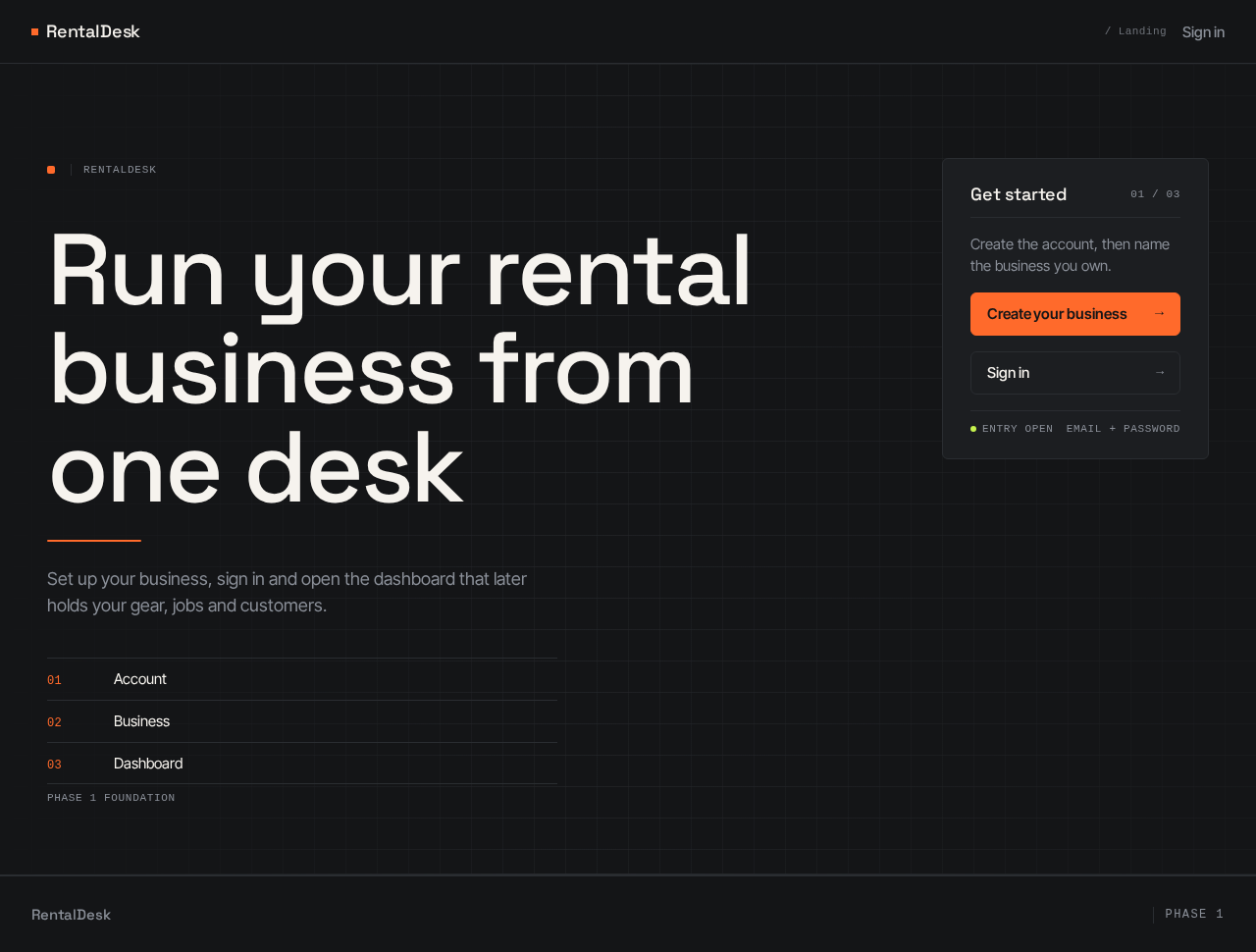
- Information/state: Public, anonymous entry. Product name RentalDesk; hero headline "Run your rental business from one desk"; subline "Set up your business, sign in and open the dashboard that later holds your gear, jobs and customers."; primary call to action "Create your business"; secondary path to sign in.
- Primary actions: "Create your business" →
/auth/sign-up; "Sign in" →/auth/login. - Supporting actions: None beyond the two entry links.
- Domain entities: None persisted; presents product intent only.
- Component responsibilities: Full-width graphite hero panel with a stacked Space Grotesk headline (44px mobile → 104px desktop) and a tangerine rule beneath it; a compact sign-up card pinned right on desktop and stacked below on mobile; a schematic/ruled panel treatment rather than illustration; no stock photography.
- States: Static content; no loading, empty, or error states. Reduced-motion users get the same static arrangement.
/auth/sign-up
- Information/state: Anonymous. Email and password fields; validation messages; submit control with loading state.
- Primary actions: Submit email and password to create an account via Supabase Auth.
- Supporting actions: Link to
/auth/login; link to/auth/forgot-password. - Domain entities: Supabase Auth user (email, password credential).
- Component responsibilities: React Hook Form + Zod schema for email format and password rules; submit button disabled and showing a loading state while submitting to prevent duplicate submission; clear inline validation errors; on success, route to the email-confirmation outcome or, when confirmation is not required, into the business-state redirect.
- States: Loading (submit in progress, button disabled); success (confirmation-sent message or redirect); error (validation errors, provider error surfaced clearly); recovery (correct the field and resubmit). Authenticated users are redirected away from this page.
/auth/login
- Information/state: Anonymous. Email and password fields; validation messages; submit control with loading state.
- Primary actions: Submit credentials to Supabase Auth; on success, route by business state (no business →
/onboarding/create-business; business exists → Dashboard). - Supporting actions: Link to
/auth/sign-up; link to/auth/forgot-password. - Domain entities: Supabase Auth session (cookie-based).
- Component responsibilities: React Hook Form + Zod; disabled/loading submit button preventing duplicate submission; clear error for invalid credentials; session established through Supabase Auth built-in handling.
- States: Loading; success (redirect); error (invalid credentials or unconfirmed email, stated clearly); recovery (retry or go to forgot-password). Authenticated users are redirected away from this page.
/auth/forgot-password
- Information/state: Anonymous. Email field; neutral confirmation message.
- Primary actions: Request a password reset email.
- Supporting actions: Link back to
/auth/login. - Domain entities: Supabase Auth recovery request.
- Component responsibilities: React Hook Form + Zod email validation; loading/disabled submit; the response is identical whether or not the email exists — the page never reveals whether an email exists.
- States: Loading; success (neutral "if that email exists, a reset link was sent" message); error (validation only, plus generic failure that still does not disclose existence); recovery (resubmit).
/auth/reset-password
- Information/state: Reached from the recovery email link. New password and confirmation fields; validation messages.
- Primary actions: Set the new password through Supabase Auth.
- Supporting actions: Link to
/auth/loginafter success. - Domain entities: Supabase Auth user credential update.
- Component responsibilities: React Hook Form + Zod for password rules and matching confirmation; loading/disabled submit; clear validation errors; on success, confirm and route to login.
- States: Loading; success (confirmation and route to login); error (invalid or expired recovery link, mismatched passwords, weak password); recovery (request a new link via
/auth/forgot-password).
/auth/callback
- Information/state: Route handler that receives the Supabase Auth email-confirmation/recovery callback and exchanges the code for a session cookie.
- Primary actions: Complete the exchange and redirect to the correct destination (business-state redirect or reset-password).
- Supporting actions: None user-facing.
- Domain entities: Supabase Auth session.
- Component responsibilities: Server-side Supabase client for route handlers; no secrets in the browser; on failure, redirect to an auth surface with a clear error.
- States: Loading (transient exchange); success (redirect); error (invalid or expired link → clear message and path to retry).
/onboarding/create-business
- Information/state: Requires login. Business name field (and only the fields needed to create the business); validation messages; submit control with loading state.
- Primary actions: Create the rental business and become its owner.
- Supporting actions: Sign out.
- Domain entities: Business record; owner membership linking the authenticated user to that business.
- Component responsibilities: React Hook Form + Zod; server action/route handler using the server Supabase client to insert the business and the owner membership atomically; loading/disabled submit preventing duplicate creation; on success, redirect to the Dashboard. A user who already has a business is routed to the Dashboard instead.
- States: Loading; empty (first visit, no business yet); success (redirect to Dashboard); error (validation, or creation failure with a clear message and retry); recovery (resubmit without creating a duplicate business).
Dashboard
- Information/state: Requires login. Shows the authenticated owner's business identity, the app navigation, and empty-state screens for future modules. Shows only the owner's own business data.
- Primary actions: Navigate via the app navigation; sign out.
- Supporting actions: Move between the empty-state module screens.
- Domain entities: Business (owner-scoped), owner membership, session identity.
- Component responsibilities: Left rail navigation on desktop with numbered monospace section labels and a tangerine active-section rule; bottom tab bar on mobile; ruled schematic empty-state panels for future modules (inventory, quotes, bookings, jobs, inspections, billing) that state the module is coming later and contain no working controls for it; tabular numerals in data rows; server-side session check redirecting unauthenticated users away.
- States: Loading (session/business resolution); empty (no module data yet — the ruled empty-state panels); success (business identity and navigation rendered); error (session or data failure with a clear message and retry); recovery (re-authenticate if the session expired). Unauthenticated access redirects to
/auth/login.
3. Functional Requirements
FR-1 — Email and password sign-up. As a rental business owner, I should create an account with email and password so that I can start using RentalDesk. Provenance: explicit. Lifecycle: actor enters email and password on /auth/sign-up; Zod/React Hook Form validate; submit is disabled and shows loading while in flight, preventing duplicate submission; Supabase Auth creates the user. Observable result: a confirmation-sent state, or a session when confirmation is not required. Failure/recovery: clear validation or provider error, correct and resubmit. Continuation: confirm email (FR-2) or proceed to business-state redirect (FR-6).
FR-2 — Email confirmation flow. As a rental business owner, I should confirm my email when Supabase requires it so that my account becomes usable. Provenance: required_inference. Lifecycle: Supabase sends the confirmation email; the owner opens the link to /auth/callback; the route handler exchanges the code for a session cookie. Observable result: confirmed account and session. Failure/recovery: invalid or expired link routes back to an auth surface with a clear message and a path to retry. Continuation: login or business-state redirect.
FR-3 — Login. As a rental business owner, I should log in with email and password so that I can reach my protected workspace. Provenance: explicit. Lifecycle: credentials on /auth/login; loading/disabled submit; Supabase Auth verifies and sets the cookie session. Observable result: redirect by business state. Failure/recovery: clear invalid-credential or unconfirmed-email error; retry or use forgot-password. Continuation: onboarding or Dashboard.
FR-4 — Logout. As a rental business owner, I should log out so that my session ends on this device. Provenance: explicit. Lifecycle: owner triggers sign out from the authenticated surface; Supabase Auth clears the session cookie. Observable result: redirected to an anonymous surface; protected routes now redirect to login. Failure/recovery: if sign-out fails, a clear error and retry. Continuation: log in again.
FR-5 — Forgot and reset password. As a rental business owner, I should request a reset and set a new password so that I can regain access. Provenance: explicit. Lifecycle: enter email on /auth/forgot-password; the response never reveals whether the email exists; Supabase sends the recovery link; the owner opens it to /auth/reset-password (via /auth/callback) and sets a new password with loading/disabled submit. Observable result: neutral confirmation, then a successful password change and route to login. Failure/recovery: invalid/expired link or mismatched passwords produce clear errors and a path to request a new link. Continuation: log in with the new password.
FR-6 — Business-state routing after authentication. As a rental business owner, I should be sent to the right place after signing in so that I never land on a page I cannot use. Provenance: required_inference. Lifecycle: after authentication the app checks whether the user has a business; if not, redirect to /onboarding/create-business; if yes, to the Dashboard. Observable result: correct destination. Failure/recovery: if business lookup fails, a clear error with retry rather than a silent wrong redirect. Continuation: onboarding or Dashboard.
FR-7 — Create a rental business and become its owner. As a rental business owner, I should create my rental business so that my workspace is bound to me as owner. Provenance: explicit. Lifecycle: authenticated user without a business submits the business form on /onboarding/create-business; server action inserts the business and the owner membership; loading/disabled submit prevents duplicates. Observable result: business exists with the user as owner; redirect to Dashboard. Failure/recovery: validation or creation error with clear message and retry that does not create a duplicate. Continuation: Dashboard.
FR-8 — Protected dashboard. As a rental business owner, I should see a protected dashboard so that I have a home for my business. Provenance: explicit. Lifecycle: authenticated owner with a business opens the Dashboard; server verifies the session and loads only that owner's business. Observable result: business identity and dashboard content rendered. Failure/recovery: unauthenticated access redirects to /auth/login; data failure shows a clear error with retry. Continuation: navigate via the app navigation.
FR-9 — App navigation. As a rental business owner, I should see the app navigation so that I can move around the product. Provenance: explicit. Lifecycle: the Dashboard renders a left rail on desktop and a bottom tab bar on mobile, with numbered monospace section labels and a tangerine active-section marker. Observable result: the owner can move between the dashboard and the empty-state module screens. Failure/recovery: navigation to a protected destination without a session redirects to login. Continuation: return to the Dashboard.
FR-10 — Empty-state screens for future modules. As a rental business owner, I should see empty-state screens for future modules so that I understand what is coming without being offered unfinished features. Provenance: explicit. Lifecycle: the owner opens a module section from the navigation; a ruled schematic empty-state panel explains the module is forthcoming. Observable result: a clear empty state with no working module controls. Failure/recovery: if the section fails to load, a clear error with retry. Continuation: return to the Dashboard.
FR-11 — Redirect unauthenticated users away from protected routes. As a rental business owner, I should be kept out of protected routes until I sign in so that my workspace stays private. Provenance: explicit. Lifecycle: an unauthenticated request to /onboarding/create-business or the Dashboard is intercepted by the server-side session check. Observable result: redirect to /auth/login. Failure/recovery: after login, the owner continues to the intended destination via business-state routing. Continuation: protected work.
FR-12 — Redirect authenticated users away from login/signup. As a rental business owner, I should not see login or signup once I am signed in so that I am not confused by redundant forms. Provenance: explicit. Lifecycle: an authenticated request to /auth/login or /auth/sign-up is redirected. Observable result: the owner lands on the business-state destination. Failure/recovery: if session resolution fails, the owner is treated as anonymous and can sign in again. Continuation: Dashboard or onboarding.
FR-13 — Clear validation errors, loading states, and duplicate-submission prevention. As a rental business owner, I should get clear feedback on every form so that I know what to fix and never submit twice. Provenance: explicit. Lifecycle: on every auth and business form, Zod validation surfaces field-level errors; every submit button shows a loading state and is disabled while submitting. Observable result: no duplicate submissions; errors are specific and readable. Failure/recovery: correct the field and resubmit. Continuation: the form's success path.
FR-14 — Password reset never reveals whether an email exists. As a rental business owner, I should get the same reset response regardless of whether my email is registered so that account existence is not disclosed. Provenance: explicit. Lifecycle: any email submitted to /auth/forgot-password yields the identical neutral confirmation. Observable result: no existence disclosure in copy, timing-sensitive messaging, or error text. Failure/recovery: validation errors concern format only. Continuation: use the emailed link if it arrives.
FR-15 — Business data isolation. As a rental business owner, I should access only my own business data and never another business's data so that my business stays private. Provenance: explicit. Lifecycle: every business-scoped read and write runs under Supabase Row Level Security bound to the authenticated user's owner membership. Observable result: only the owner's business rows are returned or mutated. Failure/recovery: a request for another business's data is denied by RLS and surfaces as not-found/denied, never as leaked data. Continuation: the owner's own work.
FR-16 — Server-only secrets and environment configuration. As a rental business owner, I should trust that privileged keys never reach the browser so that my account and business are not exposed. Provenance: explicit. Lifecycle: SUPABASE_SERVICE_ROLE_KEY, STRIPE_SECRET_KEY, STRIPE_WEBHOOK_SECRET, and RESEND_API_KEY are read only in server contexts; a .env.example documents required variables. Observable result: no privileged key appears in client bundles or browser-visible configuration. Failure/recovery: missing configuration fails fast with a clear server-side error. Continuation: normal operation.
FR-17 — Cookie-based Supabase Auth with separate clients. As a rental business owner, I should have a session that persists across server and client rendering so that navigation feels continuous. Provenance: explicit. Lifecycle: cookie-based Supabase Auth via @supabase/ssr, with distinct browser, server-component, and server-action/route-handler clients; no custom JWT handling. Observable result: consistent session across renders and actions. Failure/recovery: an expired session redirects to login. Continuation: protected work.
4. User Personas
Rental business owner
Product context. The owner runs a small equipment or party-rental business — bounce houses, tables and chairs, tents, AV, tools, photo booths, or generators — and works from a phone between jobs. RentalDesk is their operating tool, and Phase 1 gives them the account, the business, and the protected workspace that later phases will fill with gear, jobs, and customers.
Primary goal. Get from "no account" to "my own business, open on a protected dashboard" quickly and without ambiguity, and be certain that no other business can see their data.
Distinct accepted responsibilities.
- Establish identity: sign up with email and password, confirm the email when Supabase requires it, log in, log out, and recover a forgotten password without the product disclosing whether an email exists.
- Create the rental business and become its owner, so the workspace is bound to them.
- Use the protected dashboard: see the app navigation and the empty-state screens for future modules, and understand what is coming without being offered unfinished features.
- Rely on isolation: only their own business data is ever reachable.
Relevant inputs and decisions. Email and password; the business name at onboarding; the decision to sign out on a shared device; the decision to reset a forgotten password.
Interactions with other accepted participants. The owner interacts with Supabase Auth as the identity provider (credential verification, session cookies, confirmation and recovery emails, callback exchange). No other human persona participates in Phase 1; there are no staff, customer, or admin roles in this phase.
Observable success. The owner reaches the Dashboard as the owner of their business, sees the navigation and ruled empty-state panels, can sign out and back in, can reset a password, and can never reach another business's data.
5. Core User Flows
Flow A — New owner signs up, confirms email, creates a business, and reaches the dashboard
- Anonymous visitor opens the Landing page and reads the headline "Run your rental business from one desk" and the subline; the sign-up card is pinned right on desktop and stacked below on mobile.
- The visitor selects "Create your business" and arrives at
/auth/sign-up. - The owner enters email and password. Zod validation runs; the submit button shows a loading state and is disabled, preventing duplicate submission.
- Supabase Auth creates the user. If Supabase requires confirmation, the page shows a confirmation-sent state and Supabase emails the confirmation link.
- The owner opens the link, which lands on
/auth/callback; the route handler exchanges the code for a session cookie. If the link is invalid or expired, the owner is returned to an auth surface with a clear message and can sign in or request a new link. - With a session and no business, business-state routing sends the owner to
/onboarding/create-business. - The owner enters the business name and submits; the server action creates the business and the owner membership. The submit button is disabled and loading while in flight.
- On success the owner is redirected to the Dashboard, which shows the business identity, the app navigation (left rail on desktop, bottom tab bar on mobile), and the ruled empty-state panels for future modules.
- Failure/recovery: a validation or creation error shows a clear message and the owner retries without creating a duplicate business. Continuation: the owner explores the navigation and empty-state screens.
Flow B — Returning owner logs in and reaches the dashboard
- The owner opens
/auth/login(or is redirected there from a protected route). - The owner enters email and password; the submit button shows a loading state and is disabled.
- Supabase Auth verifies the credentials and sets the cookie session.
- Business-state routing sends the owner to the Dashboard because a business exists.
- Failure/recovery: invalid credentials or an unconfirmed email produce a clear error; the owner retries or uses forgot-password. Continuation: the owner works from the Dashboard.
Flow C — Owner logs out
- From the authenticated surface, the owner triggers sign out.
- Supabase Auth clears the session cookie and the owner is returned to an anonymous surface.
- Any subsequent request to
/onboarding/create-businessor the Dashboard redirects to/auth/login. - Failure/recovery: if sign-out fails, a clear error is shown and the owner retries. Continuation: the owner logs in again when needed.
Flow D — Owner forgets their password and resets it
- The owner opens
/auth/forgot-passwordand enters their email. - The page returns the identical neutral confirmation whether or not the email exists — existence is never revealed.
- If the email is registered, Supabase sends the recovery link; the owner opens it and passes through
/auth/callbackto/auth/reset-password. - The owner enters and confirms a new password; the submit button is disabled and loading while in flight; validation errors are specific.
- On success the owner is routed to
/auth/loginand signs in with the new password. - Failure/recovery: an invalid or expired link, mismatched passwords, or a weak password produce clear errors and a path to request a new link. Continuation: normal login.
Flow E — Owner navigates the dashboard and views empty-state module screens
- The authenticated owner with a business opens the Dashboard.
- The owner uses the app navigation — left rail with numbered monospace section labels on desktop, bottom tab bar on mobile — with the tangerine rule marking the active section.
- The owner opens a future-module section and sees a ruled schematic empty-state panel stating the module is coming later, with no working module controls.
- Failure/recovery: if a section fails to load, a clear error with retry is shown; if the session has expired, the owner is redirected to login. Continuation: the owner returns to the Dashboard.
Flow F — Isolation check (system-enforced, owner-observable)
- Any business-scoped read or write the owner triggers runs under Supabase Row Level Security bound to their owner membership.
- A request for another business's data is denied by RLS and surfaces as not-found/denied — never as leaked data.
- Continuation: the owner continues working only within their own business.
6. Visuals Colors and Theme
The creative direction — systematic product craft after Rasmus Andersson — is authoritative. The interface is the image: schematic diagrams, ruled tables, and code-like panels; no stock photography.
Mode. Dark mode as the primary ground.
Color tokens (exact hex by role).
- Background:
#141517(graphite ground) - Surface:
#1C1E21 - Text:
#F6F3EE(warm paper) - Primary:
#FF6A2B(tangerine — primary actions and active nav) - Accent:
#C6F24E(acid green — status only) - Muted:
#8A8F98 - Hairline border:
#2A2D31
Typography.
- Headings: Space Grotesk — tight tracking, medium weight, sentence case, large scale contrast.
- Body: Inter Tight.
- Numerals: JetBrains Mono, tabular, used as ornament in every data row.
- Scale: 1.25 modular — 40 / 32 / 24 / 18 / 15 px.
Shape language. Compact rounded controls at 6px radius; hairline 1px borders; sharp data rows with tabular alignment. No large-radius pill buttons.
Spacing rhythm. 4/8-pt spacing scale.
Layout. Left rail navigation on desktop; bottom tab bar on mobile; dense ruled rows and label/value pairs.
Imagery style. The interface itself is the imagery — schematic diagrams, ruled tables, code-like panels. No stock photos, no gradient blobs, no glass panels, no playful illustration.
Readability constraint. Headlines, wordmarks, labels, numbers, and card text and controls stay entirely inside the viewport and their container at 375px, 768px, and 1280px, wrapping or scaling (for example clamp() with its mobile size) to fit; no other element covers any part of them.
7. Signature Design Concept
The public entry is a full-width graphite panel (#141517) carrying a 9-column stacked Space Grotesk headline at 44px on mobile rising to 104px on desktop: "Run your rental business from one desk", with the subline "Set up your business, sign in and open the dashboard that later holds your gear, jobs and customers." A single tangerine (#FF6A2B) rule sits beneath the headline. A compact sign-up card — hairline #2A2D31 border, 6px radius, surface #1C1E21 — pins to the right on desktop and stacks below the headline on mobile, carrying the primary call to action "Create your business" and a secondary "Sign in" path. The composition reads as a ruled instrument panel: the headline spans the viewport width, the tangerine rule marks the entry point, and the card is the one actionable object. It recomposes only accepted content and controls — no new behavior, page, or destination.
8. Interaction Model & Motion Direction
Interaction Model: Static Motion Tempo: restrained Hero Dimensionality: flat
Landing Hero Motion Brief.
- Focal subject: the stacked Space Grotesk headline on the graphite panel, with the tangerine rule and the pinned sign-up card.
- Input → transformation → outcome thesis: as the visitor scrolls the Landing page, the single hero subject reveals once — the headline and its tangerine rule settle into place and the sign-up card resolves — so the visitor's attention lands on "Create your business" and the path to
/auth/sign-up. - Motion vocabulary: fast 120–200ms functional transitions; no decorative motion; one subject revealed on scroll.
- Composed first frame: graphite ground, full-width stacked headline, tangerine rule beneath it, sign-up card pinned right on desktop and stacked below on mobile.
- Reduced-motion state: the same static arrangement with no reveal animation; all text and controls fully visible and whole.
9. Non-Functional Requirements
- Security — secrets.
SUPABASE_SERVICE_ROLE_KEY,STRIPE_SECRET_KEY,STRIPE_WEBHOOK_SECRET, andRESEND_API_KEYare never exposed to the browser; they are read only in server contexts and documented in.env.example. Provenance: explicit. Rationale: the source names these keys as never-browser-visible. - Security — tenant isolation. Supabase Row Level Security enforces that a user accesses only their own business data and never another business's data. Provenance: explicit. Rationale: the source states this as a hard constraint.
- Security — session handling. Cookie-based Supabase Auth via
@supabase/ssrwith separate browser, server-component, and server-action/route-handler clients; no custom JWT handling. Provenance: explicit. - Security — reset privacy. Password reset never reveals whether an email exists. Provenance: explicit.
- Access control.
/onboarding/create-businessand the Dashboard require login; unauthenticated users are redirected away from protected routes; authenticated users are redirected away from login/signup. Provenance: explicit. - Form behavior. Clear validation errors; loading states on all auth buttons; submit buttons disabled while submitting; duplicate submission prevented. Provenance: explicit.
- Code quality. TypeScript strict mode, ESLint, Prettier, absolute imports with
@/, a scalable folder structure, reusable UI components, consistent error and loading states. Provenance: explicit. - Responsiveness. Mobile-first responsive layout; readable text and controls stay whole at 375px, 768px, and 1280px. Provenance: explicit (mobile-first) and creative direction (readability).
- Deployment. Vercel-ready deployment structure. Provenance: explicit.
- Library restraint. Do not use unnecessary libraries. Provenance: explicit.
10. Tech Stack
Source-specified stack, preserved exactly:
- Next.js App Router
- TypeScript (strict mode)
- Tailwind CSS
- shadcn/ui
- Supabase for Postgres, Auth, Storage, and Row Level Security
@supabase/supabase-js@supabase/ssr(cookie-based Supabase Auth for Next.js App Router)- Zod for validation
- React Hook Form for forms
- Vercel-ready deployment structure
- ESLint, Prettier, absolute imports with
@/
Provisioned infrastructure inventory (authoritative for runnable services):
- frontend — React application UI (the Next.js App Router application).
- backend — shared FastAPI process for application APIs and domain modules; reused for feature APIs rather than multiplied into new services.
- database — MariaDB for application-owned persistent data.
Supabase Postgres with RLS remains the authoritative store for identity-linked business data because the source requires Supabase for Postgres, Auth, Storage, and Row Level Security. The MariaDB service is available for application-owned persistent data and does not by itself justify new domain entities, authentication, or an ER diagram.
11. Assumptions and Constraints
Constraints (binding).
- Build Phase 1 only; do not build any feature not explicitly listed.
- Later-phase features — inventory availability, quotes, customer deposits, bookings, delivery/pickup jobs, check-in/check-out inspections, damage charges, late fees, refunds, and Stripe subscription billing — are out of scope for this phase.
- Use exactly the specified tech stack; do not use unnecessary libraries.
- Never expose
SUPABASE_SERVICE_ROLE_KEY,STRIPE_SECRET_KEY,STRIPE_WEBHOOK_SECRET, orRESEND_API_KEYto the browser. - A user must never access another business's data.
- Do not build custom JWT handling.
Assumptions (narrow, labeled).
[Assumption]Email confirmation is required only when the Supabase project configuration requires it; the flow supports both cases.[Assumption]A user owns at most one business in Phase 1; business-state routing therefore reduces to "has a business" or "does not."[Assumption]The business creation form collects the business name and only the fields needed to create the business; no additional business profile fields are specified.[Assumption]The empty-state module screens name the future modules from the source list and contain no working controls for them.[Assumption]The provisioned FastAPI backend and MariaDB database are runtime inventory; Supabase remains the authoritative store for identity-linked business data per the explicit stack requirement.
12. Glossary
- RentalDesk — The multi-tenant SaaS product specified here; Phase 1 is its foundation.
- Phase 1 — The current build scope: authentication, business onboarding with owner assignment, protected dashboard and navigation with empty-state screens, and RLS-enforced data isolation.
- Business — A rental company record created during onboarding; the tenant boundary for data isolation.
- Owner — The authenticated user who created a business and is bound to it by an owner membership.
- Owner membership — The link between an authenticated user and the business they own; the basis for RLS access.
- Business-state routing — The post-authentication redirect: no business →
/onboarding/create-business; business exists → Dashboard. - RLS (Row Level Security) — Supabase Postgres policy mechanism that restricts rows to the authenticated owner's business.
- Empty-state screen — A ruled schematic panel on the Dashboard naming a future module as forthcoming, with no working controls.
- Supabase Auth — The provider owning credential verification, cookie sessions, confirmation and recovery emails, and the callback exchange.
- Callback — The
/auth/callbackroute handler that exchanges a Supabase Auth code for a session cookie. - App navigation — The left rail (desktop) and bottom tab bar (mobile) with numbered monospace section labels and a tangerine active-section rule.
RentalDesk
Run your rental business from one desk
Set up your business, sign in and open the dashboard that later holds your gear, jobs and customers.
Phase 1 foundation
Create the account, then name the business you own.
Create your businessSign inRentalDesk
Run your rental business from one desk
Set up your business, sign in and open the dashboard that later holds your gear, jobs and customers.
Phase 1 foundation
Create the account, then name the business you own.
Create your businessSign in
No comments yet. Be the first!