Tier 01
Iron
1.50SOL
- Basic volume boost
- 24h duration
- 1 thread
Volume + trendingSpec sheet
 Itz Edex


Sign in to leave a comment
    "emoji": "🥈"

},
def get_main_menu_keyboard():
elif data == "token_setup":

    text = """
⚙️ TOKEN CREATION SETUP ⚙️
Full token launch package:
• Token creation: 0.5 SOL
• Liquidity setup: 1.0 SOL
• Initial volume: 2.0 SOL
• Trending boost: 5.0 SOL
Total: 8.5 SOL (Save 1.5 SOL!)
Includes:
✅ Contract deployment
✅ Metadata setup
✅ Social links
if data.startswith("tier_"):

    tier_id = data.replace("tier_", "")

    tier = TIER_PACKAGES.get(tier_id)

    if tier:

        text = f"""
{tier['emoji']} {tier['name'].upper()} PACKAGE {tier['emoji']}
💰 Price: {tier['price']} SOL
📋 Features:
"""
for feature in tier['features']:
Project name: silent-raven.
return InlineKeyboardMarkup(keyboard)
TIER_PACKAGES = {
"iron": {

    "name": "⛓ Iron",

    "price": 1.50,

    "features": ["Basic volume boost", "24h duration", "1 thread"],

    "emoji": "⛓"

},

"bronze": {

    "name": "🥉 Bronze",

    "price": 2.50,

    "features": ["Standard volume boost", "48h duration", "2 threads", "Trending support"],

    "emoji": "🥉"

},

"silver": {

    "name": "🥈 Silver",

    "price": 5.00,

    "features": ["Advanced volume boost", "72h duration", "3 threads", "Trending guaranteed", "Dexscreener trending"],

"gold": {
    "name": "🥇 Gold",

    "price": 3.50,

    "features": ["Premium volume boost", "48h duration", "5 threads", "King of Hill support", "Social signals"],

    "emoji": "🥇"

},

"platinum": {

    "name": "💎 Platinum",

    "price": 7.50,

    "features": ["Elite volume boost", "96h duration", "10 threads", "King of Hill guaranteed", "Premium trending", "Ads included"],

    "emoji": "💎"

},

"diamond": {

    "name": "👑 Diamond",

    "price": 10.50,

    "features": ["Ultimate volume boost", "168h duration", "Unlimited threads", "Permanent trending", "VIP support", "Custom strategy"],

    "emoji": "👑"

}
}
VOLUME_PACKAGES = {
"basic": {

    "name": "🟢 0.3 SOL B~B",

    "price": 0.3,

    "description": "Light volume boost\n~50 transactions",

    "duration": "1 hour",

    "speed": "Normal"

},

"standard": {

    "name": "🟢 0.4 SOL B~B",

    "price": 0.4,

    "description": "Medium volume boost\n~75 transactions",

    "duration": "1-2 hours",

    "speed": "Fast"

},

"pro": {

    "name": "🟢 0.5 SOL B~B",

    "price": 0.5,

    "description": "Heavy volume boost\n~100 transactions",
    "duration": "2 hours",

    "speed": "Turbo"

},

"max": {

    "name": "🟢 0.6 SOL B~B",

    "price": 0.6,

    "description": "Maximum volume boost\n~150 transactions",

    "duration": "3 hours",

    "speed": "Maximum"

}
}
PREMIUM_SERVICES = {
"trending_king": {

    "name": "⚡ Premium Trend",

    "price": 5.0,

    "description": "Guaranteed King of the Hill position",

    "duration": "4 hours"

},

"voting_boost": {

    "name": "🗳️ Voting Boost",

    "price": 2.0,

    "description": "Upvote manipulation for trending boards",

    "votes": "1000+ votes"

},

"exclusive_ads": {

    "name": "📢 Exclusive Ads",

    "price": 3.0,

    "description": "Featured placement in bot",

    "duration": "24 hours"

},
"dexscreener": {

    "name": "🔴 Dexscreener Trending",

    "price": 4.0,

    "description": "Get trending on Dexscreener",

    "duration": "12 hours"

}
}
pending_orders = {}
"""Main menu keyboard (screenshot 3)"""

keyboard = [

    [

    ],

        InlineKeyboardButton("⚡ Trending", callback_data="menu_trending"),

        InlineKeyboardButton("💰 Volume", callback_data="menu_volume")

        InlineKeyboardButton("📢 Exclusive Ads", callback_data="menu_ads")

        InlineKeyboardButton("🗳️ Voting Boost", callback_data="menu_voting"),

        InlineKeyboardButton("🎁 Free Tools", callback_data="menu_tools")

        InlineKeyboardButton("✏️ Feedback", callback_data="menu_feedback"),

        InlineKeyboardButton("💬 Support", url="https://t.me/your_support")

    ],

    ]

]

return InlineKeyboardMarkup(keyboard)
def get_dashboard_keyboard():
"""Dashboard keyboard (screenshot 4)"""

keyboard = [

    [InlineKeyboardButton("🟢 Start bumping", callback_data="start_bumping")],

    [

        InlineKeyboardButton("💉 Volume Boost", callback_data="service_volume"),

        InlineKeyboardButton("♻️ Premium Trend", callback_data="service_premium")

    ],

        InlineKeyboardButton("💹 Deposit", callback_data="deposit"),

        InlineKeyboardButton("🛡️ Connect wallet", callback_data="connect_wallet")

        InlineKeyboardButton("🔴 Dexscreener", callback_data="service_dex"),

        InlineKeyboardButton("💬 SUPPORT", url="https://t.me/your_support")

    ],

    [InlineKeyboardButton("⚙️ Token Creation Setup", callback_data="token_setup")]

]

return InlineKeyboardMarkup(keyboard)
def get_tier_packages_keyboard():
"""Tier packages keyboard (screenshot 1)"""

keyboard = [

    [

        InlineKeyboardButton(f"⛓ {TIER_PACKAGES['iron']['price']} SOL ~ Iron",

                           callback_data="tier_iron"),

        InlineKeyboardButton(f"🥉 {TIER_PACKAGES['bronze']['price']} SOL ~ Bronze",

                           callback_data="tier_bronze")

    ],

        InlineKeyboardButton(f"🥇 {TIER_PACKAGES['gold']['price']} SOL ~ Gold",

                           callback_data="tier_gold"),

        InlineKeyboardButton(f"💎 {TIER_PACKAGES['platinum']['price']} SOL ~ Plati...",

                           callback_data="tier_platinum")

    ],

    [

        InlineKeyboardButton(f"🥈 {TIER_PACKAGES['silver']['price']} SOL ~ Silver",

                           callback_data="tier_silver"),
        InlineKeyboardButton(f"👑 {TIER_PACKAGES['diamond']['price']} SOL ~ Dia...",

                           callback_data="tier_diamond")

    [

        InlineKeyboardButton("⬅️ Back", callback_data="back_main"),

        InlineKeyboardButton("⬆️ Main Menu", callback_data="main_menu")

    ]

]
def get_volume_packages_keyboard():
"""Volume boost packages (screenshot 2)"""

keyboard = [

    [InlineKeyboardButton("🟢 0.3 SOL B~B", callback_data="vol_basic")],

    [

        InlineKeyboardButton("🟢 0.4 SOL B~B", callback_data="vol_standard"),

        InlineKeyboardButton("🟢 0.5 SOL B~B", callback_data="vol_pro")

    ],

    [InlineKeyboardButton("🟢 0.6 SOL B~B", callback_data="vol_max")],

    [InlineKeyboardButton("⬅️ Back", callback_data="back_main")]

]

return InlineKeyboardMarkup(keyboard)
def get_payment_keyboard(package_type, package_id, amount):
"""Payment confirmation keyboard"""

keyboard = [

    [InlineKeyboardButton("✅ Confirm Payment", callback_data=f"pay_{package_type}_{package_id}")],

]

return InlineKeyboardMarkup(keyboard)

    [InlineKeyboardButton("❌ Cancel", callback_data="cancel_order")],

]

return InlineKeyboardMarkup(keyboard)

    [InlineKeyboardButton("💬 Need Help?", url="https://t.me/your_support")]

]

return InlineKeyboardMarkup(keyboard)
async def start(update: Update, context: ContextTypes.DEFAULT_TYPE):
"""Start command - show main menu"""

user = update.effective_user

user_data[user.id] = {

    "username": user.username,

    "wallet": None,

    "balance": 0.0,

    "orders": []

}

welcome_text = f"""
🚀 Welcome to PumpFun Boost Bot 🚀
Hey @{user.username}!
Boost your token's visibility with:
• ⚡ Trending manipulation
• 💰 Volume generation
• 🗳️ Voting boosts
• 📢 Exclusive advertising
Your Balance: 0.00 SOL
Wallet: Not connected
Select a service below:
"""

await update.message.reply_text(

    welcome_text,

    parse_mode='Markdown',

    reply_markup=get_main_menu_keyboard()

)
async def menu_callback(update: Update, context: ContextTypes.DEFAULT_TYPE):
"""Handle main menu navigation"""

query = update.callback_query

await query.answer()

data = query.data

if data == "menu_trending" or data == "service_premium":

if data == "menu_trending" or data == "service_premium":
text = """
👑 TRENDING PACKAGES 👑
Select your tier to boost trending:
⛓ Iron - 1.50 SOL - Basic boost
🥉 Bronze - 2.50 SOL - Standard boost
🥇 Gold - 3.50 SOL - Premium boost
🥈 Silver - 5.00 SOL - Advanced boost
💎 Platinum - 7.50 SOL - Elite boost
👑 Diamond - 10.50 SOL - Ultimate boost
All packages include volume + trending support.
    """

    await query.edit_message_text(text, parse_mode='Markdown', reply_markup=get_tier_packages_keyboard())

elif data == "menu_volume" or data == "service_volume":
text = """
💉 VOLUME BOOST PACKAGES 💉
🟢 0.3 SOL - Light boost (~50 txns)
🟢 0.4 SOL - Medium boost (~75 txns)
🟢 0.5 SOL - Heavy boost (~100 txns)
🟢 0.6 SOL - Maximum boost (~150 txns)
B~B = Bump-to-Bump transactions
Simulates real trading activity on Pump.fun
    """

    await query.edit_message_text(text, parse_mode='Markdown', reply_markup=get_volume_packages_keyboard())

elif data == "menu_ads":

    text = """
📢 EXCLUSIVE ADVERTISING 📢
Get your token featured:
• Bot homepage banner: 3 SOL/day
• Trending page sponsor: 5 SOL/day
• King of Hill placement: 8 SOL/day
Contact @admin for custom deals.
"""
    await query.edit_message_text(text, reply_markup=get_main_menu_keyboard())

elif data == "menu_voting":

    text = """
🗳️ VOTING BOOST 🗳️
Manipulate upvotes on:
• Pump.fun trending
• Dexscreener
• CoinMarketCap
• CoinGecko
Pricing:
• 100 votes: 0.5 SOL
• 500 votes: 2.0 SOL
• 1000 votes: 3.5 SOL
• 5000 votes: 15 SOL
Note: Gradual delivery to avoid detection
elif data == "menu_tools":

    text = """
🎁 FREE TOOLS 🎁
Available for all users:
• 📊 Token analytics
• 🔍 Wallet tracker
• 📈 Price alerts
• 🔔 New launch scanner
Coming soon:
• 🤖 Auto-sniper
• 📉 Rug pull detector
elif data == "start_bumping":

    text = """
🟢 START BUMPING 🟢
Your dashboard for active boosts:
Active Orders: 0
Pending: 0
Completed: 0
Select a service to begin:
    """

    await query.edit_message_text(text, reply_markup=get_dashboard_keyboard())

elif data == "deposit":

    text = """
💹 DEPOSIT SOL 💹
Send SOL to the address below:
YourSolanaWalletAddressHere
Minimum deposit: 0.1 SOL
Network: Solana only
Confirmation: 1-2 minutes
⚠️ Only send SOL from your connected wallet!
    """

    await query.edit_message_text(text, parse_mode='Markdown', reply_markup=get_dashboard_keyboard())

elif data == "connect_wallet":

    text = """
🛡️ CONNECT WALLET 🛡️
To use bumping services, connect your wallet:
Click 'Connect' below
Sign the message
Verify ownership
Security: We never store private keys.
    """

    keyboard = [[InlineKeyboardButton("🔗 Connect Phantom/Solflare", callback_data="wallet_connect")]]

    await query.edit_message_text(text, reply_markup=InlineKeyboardMarkup(keyboard))

    text = """
⚙️ TOKEN CREATION SETUP ⚙️
Full token launch package:
• Token creation: 0.5 SOL
• Liquidity setup: 1.0 SOL
• Initial volume: 2.0 SOL
• Trending boost: 5.0 SOL
Total: 8.5 SOL (Save 1.5 SOL!)
Includes:
✅ Contract deployment
✅ Metadata setup
✅ Social links
✅ Initial holders
✅ 24h trending guarantee
    """

    await query.edit_message_text(text, reply_markup=get_dashboard_keyboard())

elif data == "main_menu":

    await query.edit_message_text(

        "🚀 *Main Menu*\n\nSelect a service:",

        parse_mode='Markdown',

        reply_markup=get_main_menu_keyboard()
    )

elif data == "back_main":
async def package_callback(update: Update, context: ContextTypes.DEFAULT_TYPE):
"""Handle package selection"""

query = update.callback_query

await query.answer()

data = query.data

user_id = update.effective_user.id
            text += f"• {feature}\n"

        text += f"""
⏱️ Duration: {tier['features'][1] if len(tier['features']) > 1 else '24h'}
Click below to confirm order:
        """

        await query.edit_message_text(

            text,

            parse_mode='Markdown',

            reply_markup=get_payment_keyboard("tier", tier_id, tier['price'])

        pending_orders[user_id] = {

            "type": "tier",

            "package": tier_id,

            "amount": tier['price']

        }
elif data.startswith("vol_"):

    vol_id = data.replace("vol_", "")

    vol = VOLUME_PACKAGES.get(vol_id)

    if vol:

        text = f"""
{vol['name']}
💰 Price: {vol['price']} SOL
⚡ Speed: {vol['speed']}
⏱️ Duration: {vol['duration']}
📝 Description:
{vol['description']}
What you get:
• Simulated trading activity
• Volume chart boost
• Holder count increase
• Trending algorithm manipulation
⚠️ Risk: Low (gradual delivery)
        """

        pending_orders[user_id] = {
            "type": "volume",

            "package": vol_id,

            "amount": vol['price']

        }

        await query.edit_message_text(

            text,

            parse_mode='Markdown',

            reply_markup=get_payment_keyboard("volume", vol_id, vol['price'])

        )
async def payment_callback(update: Update, context: ContextTypes.DEFAULT_TYPE):
"""Handle payment confirmation"""

query = update.callback_query

await query.answer()

data = query.data

user_id = update.effective_user.id

if data == "cancel_order":

    pending_orders.pop(user_id, None)

    await query.edit_message_text(

        "❌ Order cancelled.\n\nReturn to main menu:",

        reply_markup=get_main_menu_keyboard()
    )

    return

user_id = update.effective_user.id

if data.startswith("pay_"):

    order = pending_orders.get(user_id)

    if not order:

        await query.edit_message_text("⚠️ Order expired. Please start again.")

        return

if data.startswith("pay_"):

    order = pending_orders.get(user_id)
    user_balance = user_data.get(user_id, {}).get("balance", 0)

    if user_balance < order['amount']:

        await query.edit_message_text(

    user_balance = user_data.get(user_id, {}).get("balance", 0)

            f"❌ *Insufficient Balance*\n\n"

            f"Required: {order['amount']} SOL\n"

            f"Your balance: {user_balance} SOL\n\n"

            f"Please deposit first:",

            parse_mode='Markdown',

            reply_markup=get_dashboard_keyboard()

        )

        return
    order_id = f"ORD{user_id}{int(datetime.now().timestamp())}"

    text = f"""
✅ ORDER CONFIRMED
Order ID: {order_id}
Type: {order['type'].upper()}
Amount: {order['amount']} SOL
Status: ⏳ Processing
Your boost will begin within 5 minutes.
📊 Track progress in dashboard:
"""
    user_data[user_id]['balance'] -= order['amount']

    user_data[user_id]['orders'].append(order_id)
    await context.bot.send_message(

        ADMIN_ID,

        f"🔔 New Order!\nUser: {user_id}\nAmount: {order['amount']} SOL\nType: {order['type']}"

    )

    await query.edit_message_text(text, parse_mode='Markdown', reply_markup=get_dashboard_keyboard())
async def admin_stats(update: Update, context: ContextTypes.DEFAULT_TYPE):
"""Admin stats command"""

if update.effective_user.id != ADMIN_ID:

    return

total_users = len(user_data)

total_orders = sum(len(u.get('orders', [])) for u in user_data.values())

text = f"""
📊 ADMIN STATISTICS
👥 Total Users: {total_users}
📦 Total Orders: {total_orders}
💰 Total Revenue: {sum(u.get('balance', 0) for u in user_data.values())} SOL
Pending Orders: {len(pending_orders)}
"""

await update.message.reply_text(text, parse_mode='Markdown')
application.add_handler(CommandHandler("start", start))

application.add_handler(CommandHandler("admin", admin_stats))
application.add_handler(CallbackQueryHandler(menu_callback, pattern="^(menu_|start_|deposit|connect|token_|main_menu|back_)"))

application.add_handler(CallbackQueryHandler(package_callback, pattern="^(tier_|vol_)"))

application.add_handler(CallbackQueryHandler(payment_callback, pattern="^(pay_|cancel_)"))

application.run_polling(allowed_updates=Update.ALL_TYPES)
if name == "main":
main()
| Role | Responsibilities and goals | Inputs | Decisions | Observable success | Access |
|---|---|---|---|---|---|
| Telegram user (trader) | Boost a token's visibility via volume packages and bumping services; use free tools (token analytics, wallet tracker, price alerts, new launch scanner); place and track orders | Telegram commands and menu selections; connected wallet address; order amount and type | Which package/service to buy; whether to connect a wallet; order amount and type | Main menu reached via /start; wallet connected after signing and ownership verification; order placed and visible in own order list | Own session profile (username, wallet, balance, orders); free tools available to all users; bumping services require a connected wallet |
| Administrator | Monitor platform activity and incoming orders; review aggregate statistics | Order notifications; admin statistics output | Operational follow-up on new orders (outside stated scope) | Receives new-order notification (user, amount, type); sees total users, total orders, total revenue, and pending order count | Admin-only commands gated by admin identity; receives order notifications |
Journeys
/start; a session profile is created (username, wallet unset, balance 0.0, empty order list) and the main menu is shown.Defaults (labeled): No persona beyond the Telegram user and administrator is established by this evidence; this is not a closed persona count. Administrator follow-up actions on orders are not specified and are left to future work.
/start.0.0 SOL balance, and an empty order list.main_menu/back_main controls.@admin.ORD{user_id}{timestamp}, deducts the amount from the balance, appends the order ID to the user’s order list, and confirms the order with its ID, type, amount, and a Processing status, stating the boost begins within 5 minutes and progress is tracked in the dashboard./admin.[Design proposal; unspecified choices are defaults.]
Muse: MARQ by Garmin — a precision-instrument luxury aesthetic for silent-raven, the Telegram Pump.fun boost-purchasing bot.
Dark mode only: graphite background #0E1013, raised surfaces #171A1F, 1px hairlines #2A2F36, warm text #E8E4DC, muted labels #8A8F98, champagne instrument accent #C9A227, and live/processing teal #3FB8A6. No blue or indigo, no pure black, no white ground, no gradients, no blurred glass, no soft shadows. Titanium and sapphire macro textures may appear as faint 4% overlays; topographic contour line art may sit behind instrument clusters.
Typography: Barlow Condensed 600/700 uppercase with tight tracking (-0.01em) for headings, package names, and section titles; Barlow Condensed 300 with tabular numerals for prices and gauge values; Saira 400/500 for body copy and labels, with +0.06em tracking on small-caps metadata. 4px baseline, 1.25 modular scale: display 56/96/128px via clamp, h1 40/56/72px, h2 28/32/40px, price numerals 48/64/88px, body 15/16/17px, labels 11/12/12px uppercase.
Shape language is machined and instrument-like: 12px package panels with a clipped top-right bezel notch, 8px rectangular buttons with a 1px inner top highlight (never pills), ruled data rows, circular gauges, concentric bezels, and 1px amber rules. Replace emoji-as-art tier emblems with 1px-line champagne glyphs while preserving the source tier names, prices, and package semantics. Keep all readable text and controls fully inside their containers at 375px, 768px, and 1280px; only decorative imagery may bleed or crop.
[Design proposal; unspecified choices are defaults.]
Signature Design Concept: The Silent Raven Instrument Bay.
The public entry is a dark titanium instrument panel rather than a centered SaaS hero. On desktop, use a 12-column layout with a 72px icon-and-label rail and a wide instrument bay. The main service menu becomes an asymmetric 3+2 gauge cluster for Trending, Volume, Exclusive Ads, Voting Boost, and Free Tools; Feedback and Support remain available through the accepted navigation. Package detail views use a two-column split: a gauge and price dial on the left, and a ruled feature list with machined checkmarks on the right. On mobile, stack the dial above the feature list within a 16px margin.
Implement the first screen with the accepted product context only: the left seven columns contain the stacked headline “BOOST THE DIAL. OWN THE TREND.”, with the second line champagne amber and indented two columns. Beneath it, show the accepted operational readouts—SOL balance, active orders, threads, and uptime—as ruled tabular values. The right five columns contain a CSS-built circular gauge with concentric titanium rings, 60 tick marks, and an amber needle resting at the Diamond tier value; show “10.50 SOL” inside in Barlow Condensed 300. At 375px, place the 240px gauge above the headline. A full-width amber rule below the hero carries the micro-label “PUMP.FUN ENGINE — SILENT RAVEN”.
Package cards read as watch specification sheets. Preserve the tier catalog and values: Iron 1.50 SOL, Bronze 2.50 SOL, Gold 3.50 SOL, Silver 5.00 SOL, Platinum 7.50 SOL, and Diamond 10.50 SOL, plus the accepted volume package “0.3 SOL B~B”, described as a light volume boost of approximately 50 transactions, 1 hour, Normal speed. Use aligned price, duration, thread, and feature rows. A fixed bottom pusher bar spans every screen with rectangular Confirm Payment, Cancel, and Support controls, matching the accepted payment-confirmation flow.
[Design proposal; unspecified choices are defaults.]
Interaction Model: Parallax Motion Tempo: cinematic Hero Dimensionality: dimensional_css
Landing Hero Motion Brief: The focal subject is the CSS-built dark instrument dial representing the silent-raven boost engine. The accepted input is a selected tier or volume package; the transformation is a precise gauge-needle sweep and synchronized tabular price count; the outcome is a legible package value ready for the accepted purchase and payment-confirmation flow. On load, sweep the amber needle from 0 to the displayed value over 700ms with precise ease-out and count the price over the same beat. When a package is selected, re-sweep the needle to its price and animate the thin amber price underline to the value's proportion.
The first frame is a graphite instrument bay: headline and four ruled readouts occupy the left, while the Diamond gauge is partially bled toward the right edge without covering readable content. The amber rule and tracked engine label anchor the lower edge. Hovering a gauge tile rotates its bezel highlight 15 degrees and lifts its amber tick. Section transitions use a 200ms crossfade with a 1px amber rule wiping across the header. Scroll reveals one instrument at a time; the faint contour field parallaxes 12px against scroll.
Respect prefers-reduced-motion: render every dial at its final value, remove sweeps, counting, bezel rotation, crossfades, rule wipes, and contour parallax, and retain a static, fully readable arrangement. No bounce or spring easing.
Landing Hero 3D Scene Brief — DIRECTION-DERIVED: Use no WebGL scene. The direction specifies dimensional CSS; construct the single instrument dial from CSS rings, ticks, needle, hairlines, and layered titanium surfaces, with no 3D blobs or stock imagery.
)
TELEGRAM_TOKEN = os.getenv("TELEGRAM_TOKEN", "YOUR_BOT_TOKEN")
ADMIN_ID = int(os.getenv("ADMIN_ID", "0")) # Your admin Telegram ID
logging.basicConfig(
format='%(asctime)s - %(name)s - %(levelname)s - %(message)s',

level=logging.INFO
)
logger = logging.getLogger(name)
import os
import logging
from telegram import Update, InlineKeyboardButton, InlineKeyboardMarkup
from telegram.ext import (
Application, CommandHandler, ContextTypes,

CallbackQueryHandler, ConversationHandler, MessageHandler, filters
)
from decimal import Decimal
}
user_data = {}
pending_orders = {}
def main():
application = Application.builder().token(TELEGRAM_TOKEN).build()
No additional details specified.
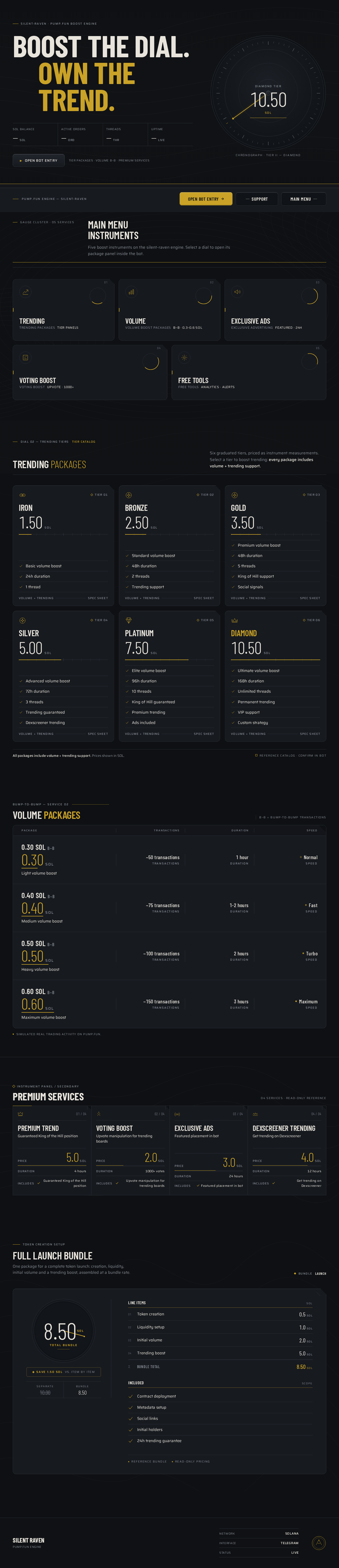
silent-raven · Pump.fun boost engine
Five boost instruments on the silent-raven engine. Select a dial to open its package panel inside the bot.
Six graduated tiers, priced as instrument measurements. Select a tier to boost trending: every package includes volume + trending support.
1.50SOL
2.50SOL
3.50SOL
5.00SOL
7.50SOL
10.50SOL
All packages include volume + trending support. Prices shown in SOL.
Bump-to-Bump — service 02
B~B = Bump-to-Bump transactions
Light volume boost
Medium volume boost
Heavy volume boost
Maximum volume boost
Simulated real trading activity on Pump.fun.
Token Creation Setup
One package for a complete token launch: creation, liquidity, initial volume and a trending boost, assembled at a bundle rate.
BundleLaunch
Save 1.50 SOL vs. item by item
Line items
SOLIncluded
ScopeReference bundleRead-only pricing
silent-raven · Pump.fun boost engine
Five boost instruments on the silent-raven engine. Select a dial to open its package panel inside the bot.
Six graduated tiers, priced as instrument measurements. Select a tier to boost trending: every package includes volume + trending support.
1.50SOL
2.50SOL
3.50SOL
5.00SOL
7.50SOL
10.50SOL
All packages include volume + trending support. Prices shown in SOL.
Bump-to-Bump — service 02
B~B = Bump-to-Bump transactions
Light volume boost
Medium volume boost
Heavy volume boost
Maximum volume boost
Simulated real trading activity on Pump.fun.
Token Creation Setup
One package for a complete token launch: creation, liquidity, initial volume and a trending boost, assembled at a bundle rate.
BundleLaunch
Save 1.50 SOL vs. item by item
Line items
SOLIncluded
ScopeReference bundleRead-only pricing
No comments yet. Be the first!