silent-habit
Build Daylight, a simple personal habit tracker. Include a dashboard with daily progress, a habits page to add and complete habits, and a weekly insights page. Use a clean, friendly design with teal accents. Keep the first version focused on these three pages.


Comments (0)
Sign in to leave a comment
System Requirements
System Requirements Document for Daylight
1. Introduction
Daylight is a simple personal habit tracker for one person who returns daily to a quiet ritual: adding the habits they want to keep, marking them complete, and watching small progress accumulate. The product is deliberately small. Its first version is focused on exactly three working pages — a Dashboard with daily progress, a Habits page to add and complete habits, and a Weekly Insights page — reached through a public Landing page and a Login page that establish and verify the user's own durable habit records.
The audience is a single habit tracker user who wants calm, low-pressure tracking rather than competition, streak pressure, or gamified noise. The design is clean and friendly with teal accents, and the experience is built around quiet space, one calm subject per screen, and whispering type.
2. System Overview
Daylight is a web application delivered as a React frontend, a shared FastAPI backend, and a MariaDB database for application-owned persistent data. The frontend presents five pages: a public Landing page, a Login page for identity access, and three protected working pages — Dashboard, Habits, and Weekly Insights. The backend owns habit records, daily completion records, and the derived daily and weekly progress figures. The database stores those records durably so a returning user sees their own history.
The only active human actor is the Habit tracker user. The system itself (backend and database) performs persistence and aggregation but is not a persona and has no page of its own.
Current accepted behavior:
- A public Landing page explains Daylight and its habit tracking purpose before sign-in.
- A Login page lets the user enroll or verify identity so their habit records remain their own.
- The Dashboard shows daily progress.
- The Habits page lets the user add habits and complete habits.
- The Weekly Insights page shows weekly insights.
- The design is clean and friendly with teal accents.
Narrow exclusions: the first version stays focused on these three working pages (Dashboard, Habits, Weekly Insights) plus the Landing and Login access surfaces. No social features, sharing, competitions, reminders/notifications, multi-user collaboration, or additional reporting pages are part of this version.
Removed from scope
- Social or shared habit tracking
- Streak pressure badges and confetti celebrations
- Additional analytics or reporting pages beyond Weekly Insights
- Notifications and reminders
2a. Product Interpretation and Delivery Boundary
Daylight is a first-party application. The user's habit definitions and daily completions are durable, application-owned state that must remain bound to the correct person across visits, so the product establishes and verifies identity through its own Landing and Login surfaces before any protected habit work. The Landing page is anonymously reachable and explains the product; the Login page is anonymously reachable and is where the user enrolls on first use or verifies on return. The Dashboard, Habits, and Weekly Insights pages require login and show only the signed-in user's own records.
All habit tracking, daily progress, and weekly insight computation is owned by Daylight itself; there is no provider-owned or external surface in this version. The delivery boundary for the first version is the five pages above and nothing more. Future ideas (for example reminders or richer reporting) are out of scope for this version and are not represented in any current page.
2c. Page Content and Component Coverage
Landing
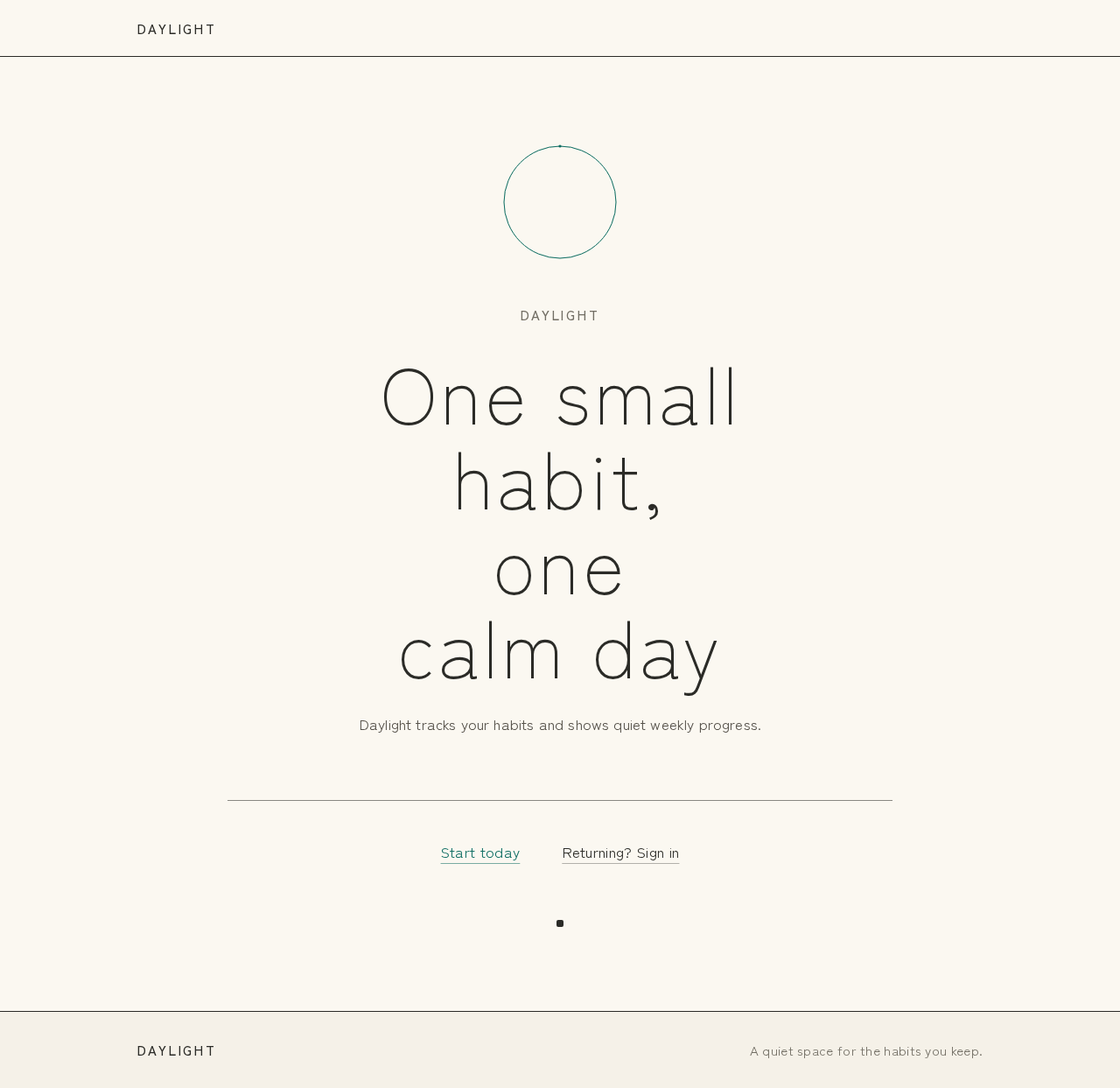
- Information/state: Product name "Daylight", the hero headline "One small habit, one calm day", the subline "Daylight tracks your habits and shows quiet weekly progress.", and a single call to action "Start today". A full-height paper-white field with one small teal progress ring at the optical centre, a hairline rule, and one charcoal text link closing the composition.
- Primary action: "Start today" leads the visitor to the Login page to enroll or verify.
- Supporting actions: The charcoal text link offers a secondary path into Login for returning users.
- Domain entities: None persisted; the page is presentational and entry-only.
- Component responsibilities: Hero field (ring, headline, subline, rule, link); no cards, no button blocks, no phone imagery.
- States: Loading — static content, no spinner needed. Empty — not applicable. Success — the visitor reaches Login. Error — if navigation fails, the link remains available to retry. Recovery — the visitor can re-trigger "Start today".
Login
- Information/state: A minimal identity form for first-use enrollment or returning verification, presented on the same paper-white field with teal accents. Clear labels in small caps with wide tracking.
- Primary action: Submit credentials to establish or verify identity and continue to the Dashboard.
- Supporting actions: Switch between first-use enrollment and returning verification; return to Landing.
- Domain entities: User identity (application-owned), session.
- Component responsibilities: Identity form, submit control, inline validation messaging, link back to Landing.
- States: Loading — submit disabled with a quiet pending indicator. Empty — blank fields with labels. Success — redirect to Dashboard. Error — inline message for invalid or mismatched credentials, fields preserved for correction. Recovery — the user can correct and resubmit, or return to Landing.
Dashboard
- Information/state: Today's daily progress shown as one large hairline teal progress ring, a ruled habit list for today, and a quiet week strip. The ring is the single signal mark on the screen.
- Primary action: View today's daily progress at a glance.
- Supporting actions: Navigate to Habits to add or complete habits; navigate to Weekly Insights.
- Domain entities: Habits, today's completions, daily progress (completed vs. total for today).
- Component responsibilities: Progress ring (draws its stroke once on load; static under reduced motion); ruled habit list with 1px charcoal rules; week strip; navigation to Habits and Weekly Insights.
- States: Loading — ring and list placeholders in quiet beige. Empty — no habits yet, with a plain text prompt to add the first habit on Habits. Success — ring reflects today's completed/total and the list shows each habit's state. Error — a quiet inline message if progress cannot be loaded, with retry. Recovery — retry reloads progress and list.
Habits
- Information/state: One ruled list of the user's habits, each row separated by a full-width 1px charcoal rule, with 17px text and 0.18em caps labels and no boxes. An inline add row as a plain underlined text line that opens in place.
- Primary action: Add a habit via the inline add row.
- Supporting actions: Complete a habit for today by marking its row; navigate to Dashboard and Weekly Insights.
- Domain entities: Habit (name), completion record for today.
- Component responsibilities: Ruled habit list; per-row completion control; inline add row (opens in place, not a modal card); navigation.
- States: Loading — list skeleton in quiet beige. Empty — no habits, with the inline add row ready. Success — a new habit appears in the list; a completed habit shows its completed state for today. Error — inline message if add or complete fails, with the row preserved for retry. Recovery — retry the add or completion.
Weekly Insights
- Information/state: One thin 7-day strip of vertical hairline bars on beige summarizing the week's completions, with quiet labels.
- Primary action: Review the week's habit progress.
- Supporting actions: Navigate to Dashboard and Habits.
- Domain entities: Weekly completion aggregates per day.
- Component responsibilities: 7-day hairline bar strip; day labels; navigation.
- States: Loading — strip placeholder in beige. Empty — no completions this week, with a quiet explanatory line. Success — bars reflect each day's completions. Error — inline message with retry. Recovery — retry reloads the week.
3. Functional Requirements
FR-1 — Public product entry (explicit) As a Habit tracker user, I should see a Landing page that explains Daylight and its habit tracking purpose before sign-in, so that I understand what the product does.
- Trigger: visiting the application root while signed out.
- Observable result: the Landing page renders the product name, hero headline, subline, and "Start today" call to action.
- Access: anonymous.
- Failure/recovery: if navigation fails, the call to action remains available to retry.
- Continuation: "Start today" leads to Login.
FR-2 — Identity establishment and verification (required_inference) As a Habit tracker user, I should complete self-service enrollment on first use or returning verification on later visits before protected habit work, so that my habit records remain my own.
- Trigger: submitting the Login form.
- Observable result: a session is established and the user is taken to the Dashboard.
- Access: anonymous entry on Login; protected pages become available only after success.
- Failure/recovery: invalid or mismatched credentials show an inline message with fields preserved for correction; the user may return to Landing.
- Continuation: on success, the user proceeds to the Dashboard.
FR-3 — Dashboard daily progress (explicit) As a Habit tracker user, I should see my daily progress on the Dashboard, so that I know how today is going at a glance.
- Trigger: opening the Dashboard while signed in.
- Observable result: one large hairline teal progress ring reflects today's completed vs. total habits, alongside a ruled habit list and a quiet week strip.
- Access: login required.
- Failure/recovery: if progress cannot be loaded, a quiet inline message offers retry.
- Continuation: the user can navigate to Habits to act or to Weekly Insights to review.
FR-4 — Add a habit (explicit) As a Habit tracker user, I should add habits on the Habits page, so that I can track what I want to keep.
- Trigger: using the inline add row (a plain underlined text line that opens in place).
- Observable result: the new habit appears in the ruled list and counts toward today's total.
- Access: login required.
- Failure/recovery: if the add fails, an inline message appears and the entered text is preserved for retry.
- Continuation: the user can immediately complete the new habit or add another.
FR-5 — Complete a habit (explicit) As a Habit tracker user, I should complete habits on the Habits page, so that my daily progress reflects what I did.
- Trigger: marking a habit's row as complete for today.
- Observable result: the habit shows its completed state for today and today's progress updates.
- Access: login required.
- Failure/recovery: if completion fails, an inline message appears and the row remains available to retry.
- Continuation: the user can complete further habits or review the Dashboard.
FR-6 — Weekly insights (explicit) As a Habit tracker user, I should see weekly insights on the Weekly Insights page, so that I can review quiet weekly progress.
- Trigger: opening Weekly Insights while signed in.
- Observable result: a thin 7-day strip of vertical hairline bars on beige summarizes the week's completions with day labels.
- Access: login required.
- Failure/recovery: if the week cannot be loaded, an inline message offers retry.
- Continuation: the user can return to the Dashboard or Habits.
FR-7 — Clean, friendly teal design (explicit) As a Habit tracker user, I should experience a clean, friendly design with teal accents, so that tracking feels calm and low-pressure.
- Observable result: paper-white and unbleached beige surfaces dominate; teal #0F6E63 is the only signal colour, used on one mark per screen and the active habit ring; light type and hairline rules carry the layout.
- Failure/recovery: not applicable (presentation constraint).
FR-8 — Focused first version (explicit) As a Habit tracker user, I should encounter only the Landing, Login, Dashboard, Habits, and Weekly Insights pages in this version, so that the product stays simple.
- Observable result: no additional working pages or adjacent capabilities are present.
4. User Personas
Habit tracker user
- Product context: A single person who returns daily to Daylight to keep a small set of personal habits. They want a quiet, private ritual rather than competition or streak pressure.
- Primary goal: Add the habits they care about, mark them complete each day, and see their daily and weekly progress without noise.
- Distinct accepted responsibilities: Enrolls or verifies identity on Login; adds habits and completes habits on Habits; checks daily progress on Dashboard; reviews weekly progress on Weekly Insights.
- Relevant inputs or decisions: Which habits to add; which habits to mark complete today; when to review the week.
- Interactions with other accepted participants: None beyond the system; the product is personal and single-user in this version.
- Observable success: The Dashboard ring reflects today's completions, the Habits list shows added and completed habits, and the Weekly Insights strip shows the week's completions.
5. Core User Flows
Flow A — First visit and enrollment
- The Habit tracker user opens Daylight while signed out and lands on Landing.
- They read the headline "One small habit, one calm day" and the subline, then choose Start today.
- They arrive on Login and complete self-service enrollment.
- On success, they are taken to the Dashboard.
- Failure/recovery: if enrollment fails, an inline message appears, fields are preserved, and they can correct and resubmit or return to Landing.
Flow B — Returning verification
- The returning user opens Daylight and reaches Login (directly or via Landing).
- They submit their credentials for verification.
- On success, they are taken to the Dashboard showing their own records.
- Failure/recovery: invalid credentials show an inline message; the user corrects and resubmits.
Flow C — Add a habit
- From the Dashboard, the user navigates to Habits.
- They use the inline add row — a plain underlined text line that opens in place — and type a habit name.
- They confirm; the habit appears in the ruled list and counts toward today's total.
- Failure/recovery: if the add fails, an inline message appears and the entered text is preserved for retry.
- Continuation: they can complete the new habit or add another.
Flow D — Complete a habit
- On Habits, the user marks a habit's row as complete for today.
- The habit shows its completed state and today's progress updates.
- Failure/recovery: if completion fails, an inline message appears and the row remains available to retry.
- Continuation: the user completes further habits or returns to the Dashboard.
Flow E — Check daily progress
- The user opens the Dashboard while signed in.
- The hairline teal progress ring draws once on load and reflects today's completed vs. total habits; the ruled habit list and quiet week strip are shown.
- Failure/recovery: if progress cannot be loaded, a quiet inline message offers retry.
- Continuation: the user navigates to Habits to act or to Weekly Insights to review.
Flow F — Review weekly insights
- The user opens Weekly Insights while signed in.
- A thin 7-day strip of vertical hairline bars on beige shows the week's completions with day labels.
- Failure/recovery: if the week cannot be loaded, an inline message offers retry.
- Continuation: the user returns to the Dashboard or Habits.
6. Visuals Colors and Theme
Muse: Kenya Hara — emptiness as content. Headline: "One small habit, one calm day".
Palette (light mode):
- Background:
#F5F1E8(unbleached beige) - Surface:
#FBF8F1(paper white) - Text:
#2B2B27(charcoal) - Primary / accent:
#0F6E63(teal — the only signal colour) - Muted:
#8C877A
Paper white and unbleached beige cover roughly 90 percent of each page. Charcoal carries all reading. Teal appears on one mark per screen and on the active habit ring.
Typography: Zen Kaku Gothic New throughout. Headings Light 300 with 0.04em tracking; small 500 labels in caps with 0.18em tracking; nothing bold. Modular scale 1.25 — 40/32/24/17/15; hero clamp(40px, 7vw, 96px).
Shape language: Square and near-square blocks with 2px radii; thin 1px charcoal rules divide sections; one circular progress ring drawn as a hairline stroke.
Layout: Centered single column with wide margins on a 12-column grid. The Dashboard stacks one large progress ring, a ruled habit list, and a quiet week strip. The Habits page holds one ruled list and one inline add row.
Imagery: One softly lit still-life object per screen (a stone, a cup, a folded cloth). No people, no decorative icons.
Avoid: Gradient blobs and glass panels; bright multi-colour charts; streak pressure badges and confetti; bold heavy headline weights; identical card grids with hover lift; the generic indigo/blue-on-white SaaS template.
7. Signature Design Concept
The public entry is a full-height paper-white field with one small teal hairline progress ring at the optical centre. Below it sits the headline "One small habit, one calm day" in light type spanning no more than 9 columns, then the subline "Daylight tracks your habits and shows quiet weekly progress." A hairline rule and one charcoal text link close the composition, with "Start today" as the single call to action. There are no button blocks, no cards, and no phone imagery. The concept recomposes only accepted content and controls: the ring previews the daily progress the user will see, and the call to action leads to Login.
8. Interaction Model & Motion Direction
Interaction Model: Static Motion Tempo: still Hero Dimensionality: flat
Landing Hero Motion Brief
- Focal subject: one small teal hairline progress ring at the optical centre of a paper-white field.
- Thesis: on load, the ring's hairline stroke draws once (600ms fade/draw) to signal quiet daily progress; the headline, subline, rule, and link fade in slowly beneath it, leading the visitor to "Start today".
- Motion vocabulary: slow 600ms fades only; no parallax, no scroll-linked depth.
- Composed first frame: empty paper-white field, ring at centre, headline below in light type, hairline rule and charcoal link closing the composition.
- Reduced-motion state: the ring is rendered fully drawn and static; all content appears without animation.
9. Non-Functional Requirements
- Durability (required_inference): habit definitions and daily completions persist in MariaDB so a returning user sees their own history.
- Identity continuity (required_inference): protected pages (Dashboard, Habits, Weekly Insights) are available only after Login; Landing and Login are anonymously reachable.
- Accessibility (explicit design constraint): readable text and controls stay whole at 375px, 768px, and 1280px, wrapping or scaling to fit; nothing covers readable text or controls.
- Reduced motion (explicit design constraint): with
prefers-reduced-motion, the progress ring is static and all content is usable without animation. - Visual constraint (explicit): clean, friendly design with teal accents; the generic indigo/blue-on-white SaaS template is forbidden.
- Scope constraint (explicit): the first version stays focused on the three working pages plus Landing and Login.
10. Tech Stack
- Frontend: React application UI.
- Backend: shared FastAPI process for application APIs and domain modules (habits, completions, daily and weekly progress).
- Database: MariaDB for application-owned persistent data.
- Deployment: docker-compose with the backend, database, and frontend services.
11. Assumptions and Constraints
- Assumption (required_inference): identity is application-owned and self-service, established on Login, because habit records must remain bound to the correct user across visits.
- Assumption (required_inference): daily progress is computed as today's completed habits vs. today's total habits; weekly insights aggregate completions per day across the current week.
- Constraint (explicit): the first version is limited to Landing, Login, Dashboard, Habits, and Weekly Insights.
- Constraint (explicit): design is clean and friendly with teal accents; teal #0F6E63 is the only signal colour.
- Constraint (explicit): no social, sharing, competition, reminders, or additional reporting pages in this version.
12. Glossary
- Habit: A named personal behavior the user wants to keep, added on the Habits page.
- Completion: A record that a habit was marked done for a given day.
- Daily progress: Today's completed habits relative to today's total habits, shown on the Dashboard ring.
- Weekly insights: A 7-day summary of completions shown as a hairline bar strip on Weekly Insights.
- Habit tracker user: The single active human persona who uses Daylight.
Daylight
One small habit, one calm day
Daylight tracks your habits and shows quiet weekly progress.
Daylight
One small habit, one calm day
Daylight tracks your habits and shows quiet weekly progress.
No comments yet. Be the first!