silent-browser
 Abdullah
create browser extension for event loop task visualization

Comments (0)
Sign in to leave a comment
System Requirements
System Requirements Document (SRD)
Silent-Browser
1. Introduction
The Silent-Browser project is a browser extension designed to visualize event loop tasks in real-time. This tool aims to cater to both learners and professionals, offering insights into JavaScript's asynchronous programming model. By providing an interactive and detailed visualization of tasks, microtasks, and rendering phases, the extension will serve as a powerful educational and debugging tool.
This document outlines the system requirements for the Silent-Browser project, incorporating all pre-approved changes and updates as per the API supervisor's directives.
2. System Overview
The Silent-Browser extension will operate as a lightweight, cross-browser tool that integrates seamlessly into modern web browsers. It will visualize the JavaScript event loop in real-time, offering users an intuitive interface to explore task execution.
Key features include:
- Real-time visualization of tasks, microtasks, and rendering phases.
- Interactive elements for expanding task details.
- Advanced insights for professionals, such as memory usage and task timing.
- A scalable interface that adapts to both beginners and advanced users.
The extension will prioritize performance, ensuring minimal impact on browser speed and memory usage.
3. Functional Requirements
As a User:
- I should be able to view a real-time timeline of event loop tasks.
- I should be able to click on tasks to expand and view detailed information.
- I should be able to filter tasks by type (e.g., microtasks, rendering, etc.).
- I should be able to toggle between beginner and advanced views.
- I should be able to export task data for offline analysis.
As an Admin:
- I should be able to configure default settings for the extension.
- I should be able to monitor extension performance metrics.
As a Guest:
- I should be able to access a demo mode to explore the extension's features without installation.
4. User Personas
-
Beginner Developer
- Age: 18-25
- Goals: Learn JavaScript's asynchronous programming model.
- Needs: Simple, clear visualizations with minimal complexity.
-
Professional Developer
- Age: 25-40
- Goals: Debug and optimize real-world applications.
- Needs: Advanced insights, detailed task breakdowns, and performance metrics.
-
Educator
- Age: 30-50
- Goals: Teach JavaScript concepts effectively.
- Needs: Interactive and demonstrative tools for classroom use.
-
Guest User
- Age: 15+
- Goals: Explore the extension's features without commitment.
- Needs: Access to a demo mode with limited functionality.
5. Visuals Colors and Theme
The Silent-Browser extension will adopt a sleek, modern theme with a focus on clarity and readability. The color palette is designed to distinguish between different task types and states effectively.
- Background: #1E1E2E (Deep Midnight Blue)
- Surface: #282A36 (Charcoal Gray)
- Text: #F8F8F2 (Soft White)
- Accent: #FF79C6 (Vivid Pink)
- Muted Tones: #6272A4 (Muted Blue)
This palette ensures a professional yet approachable aesthetic, suitable for both beginners and professionals.
6. Signature Design Concept
The Silent-Browser extension will feature a "Living Circuit Board" design for its homepage and primary interface.
Key Features:
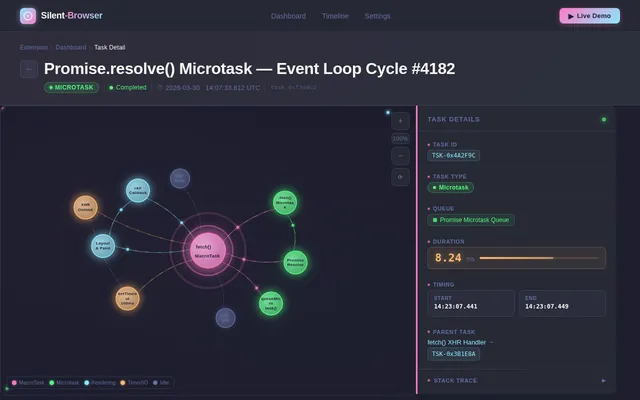
- Dynamic Visualization: The event loop tasks will appear as nodes on a glowing circuit board. Tasks will light up and animate as they are executed, with micro-interactions like pulsating effects for active tasks.
- Interactive Nodes: Users can hover over or click on nodes to expand detailed information, such as task type, execution time, and memory usage.
- Color-Coded Task Types: Each task type (e.g., microtasks, rendering) will have a unique color, making it easy to distinguish between them.
- Zoom and Pan: Users can zoom in and out of the circuit board to focus on specific tasks or view the entire timeline.
- Ambient Animations: Subtle glowing and flowing animations will give the interface a futuristic, high-tech feel.
This design will make the Silent-Browser extension not only functional but also visually captivating, leaving a lasting impression on users.
7. Non-Functional Requirements
- Performance: The extension must not increase browser memory usage by more than 5%.
- Compatibility: The extension must support major browsers, including Chrome, Firefox, and Edge.
- Scalability: The interface must handle up to 10,000 tasks in a single session without lag.
- Accessibility: The extension must comply with WCAG 2.1 standards for accessibility.
- Localization: The extension must support English and Hindi languages.
8. Tech Stack
Frontend:
- React for Web
Backend:
- Python
- FastAPI
Database:
- MySQL (with Alembic for migrations)
AI Models:
- GPT 5.4 for user-friendly responses
AI Tools:
- Langchain
Local Orchestration:
- Docker
- docker-compose
Server-Side Orchestration:
- Kubernetes
9. Assumptions and Constraints
- The extension assumes users have a basic understanding of JavaScript.
- The extension will not support legacy browsers (e.g., Internet Explorer).
- The extension must operate within the security constraints of browser extensions.
- Real-time visualization is limited to the browser's processing capabilities.
10. Glossary
- Event Loop: A programming construct that handles asynchronous operations in JavaScript.
- Microtasks: Smaller tasks that are executed before rendering tasks in the event loop.
- Rendering Phases: The process of updating the user interface in a browser.
- WCAG: Web Content Accessibility Guidelines.

Visualize JavaScript's Event Loop in Real-Time
Silent-Browser brings the JavaScript event loop to life with an interactive circuit board visualization. Understand tasks, microtasks, and rendering phases as they execute — whether you're learning async programming or debugging production code.
The Living Circuit Board Experience
Your JavaScript event loop reimagined as a dynamic circuit board. Watch tasks ignite as glowing nodes, trace execution paths through animated connections, and explore every phase with interactive precision.
Real-Time Nodes
Every event loop task appears as a live node on the circuit board, lighting up the moment it executes.
Color-Coded Tasks
Instantly distinguish between tasks, microtasks, and rendering phases through intuitive color mapping.
Glowing Animations
Active tasks pulsate with soft glows and micro-interactions, bringing the event loop to life visually.
Everything You Need to Master the Event Loop
Powerful tools designed for both learners exploring async JavaScript and professionals debugging production applications.
Real-Time Timeline
Watch event loop tasks execute live on an interactive timeline. Visualize tasks, microtasks, and rendering phases as they flow through the JavaScript engine.
Learn more→Interactive Task Expansion
Click on any task node to expand detailed information including execution time, memory usage, call stack, and task dependencies.
Learn more→Beginner & Advanced Views
Toggle between simplified visualizations for learners and comprehensive breakdowns for professional developers debugging real applications.
Learn more→Performance Metrics
Track memory overhead, task execution timing, and rendering performance with real-time charts and exportable analytics dashboards.
Learn more→Task Filtering
Filter tasks by type, duration, or phase. Isolate microtasks, rendering calls, or long-running operations to focus your debugging workflow.
Learn more→Export Data
Export task execution data in JSON or CSV formats for offline analysis, team sharing, or integration with your existing performance monitoring tools.
Learn more→Built for Every Developer
Silent-Browser adapts to your experience level — whether you’re learning async patterns, debugging production code, or teaching the next generation.
Beginner Developer
Age 18 – 25
Primary Goal
Learn JavaScript’s asynchronous programming model through clear, intuitive visualizations.
Key Needs
- Simple, clear visualizations
- Minimal complexity in the UI
- Step-by-step guided exploration
Professional Developer
Age 25 – 40
Primary Goal
Debug and optimize real-world applications with deep event loop insights.
Key Needs
- Advanced task breakdowns
- Performance metrics & timing
- Memory usage analysis
Educator
Age 30 – 50
Primary Goal
Teach JavaScript concepts effectively using interactive, demonstrative tools.
Key Needs
- Interactive classroom demos
- Configurable view modes
- Exportable visual examples
Guest User
Age 15+
Primary Goal
Explore the extension’s features without commitment through a live demo.
Key Needs
- No-install demo access
- Guided feature tour
- Limited but full-fidelity preview
Real-Time Event Loop Timeline
Visualize how JavaScript processes tasks, microtasks, and rendering phases in sequence. Each node represents a live event flowing through the loop.
Explore the Event Loop in Action
Click on task nodes to inspect execution details, memory usage, and task types. See how JavaScript orchestrates asynchronous operations in real-time.
No installation required — explore the full simulator in your browser
Performance Metrics
Built for speed, accessibility, and reliability across every browser.
Built With Modern Tools
Silent-Browser is powered by a carefully chosen stack designed for performance, scalability, and intelligent insights.
React
Interactive UI components
FastAPI
High-speed Python API layer
Python
Backend logic & AI pipelines
Docker
Local container orchestration
Kubernetes
Server-side scaling & deploy
MySQL
Persistent data with Alembic
LangChain
AI orchestration framework
GPT 5.4
User-friendly AI responses
Ready to Visualize Your Event Loop?
Join thousands of developers using Silent-Browser to understand, debug, and optimize JavaScript asynchronous code with real-time event loop visualization.
No comments yet. Be the first!