shopify-gst-invoicing
 Ayush Tech
1. Indian Shopify operations suite Instead of building one broad Shopify app, create a modular Indian merchant operations product. Start with one painful workflow and add adjacent modules only after acquiring the same customer. A practical starting point is: GST-compliant invoice generation. State-aware CGST, SGST, and IGST handling. GSTIN validation and invoice numbering. Order-to-invoice reconciliation. PDF invoice and e-invoice export. Support for Shopify orders and common Indian payment gateways. The opportunity is attractive because the Shopify ecosystem already provides distribution. One 2026 market analysis estimates more than 4 million Shopify merchants globally and identifies Indian-specific requirements such as GST, local payment methods, logistics, and regional-language support as underserved areas. The best expansion path would be: GST invoicing. COD-to-prepaid conversion. WhatsApp order notifications. Indian courier rate comparison. Marketplace settlement reconciliation. This is better than launching five unrelated apps because each new module increases account value and retention. Revenue example: At ₹1,499/month, 300 merchants produce approximately ₹4.5 lakh MRR. At 1,000 merchants, the same product produces approximately ₹15 lakh MRR before platform fees. Build a complete production-ready micro-SaaS


Comments (0)
Sign in to leave a comment
System Requirements
System Requirements Document for shopify-gst-invoicing
1. Introduction
shopify-gst-invoicing is a modular Indian merchant operations product for Shopify sellers. Rather than launching one broad Shopify app or five unrelated apps, the product starts with a single painful, high-stakes workflow — GST-compliant invoice generation — and adds adjacent modules only after acquiring the same customer, so each new module increases account value and retention.
The first module lets an Indian Shopify merchant connect their store, sync orders, validate customer GSTINs, generate GST-compliant invoices with state-aware CGST/SGST/IGST handling and compliant sequential numbering, reconcile orders against invoices, and export PDF invoices and e-invoices. It supports Shopify orders as the order source and common Indian payment gateways.
The audience is Indian Shopify merchants (store owners/operators) and their finance/accounts staff, who must produce audit-grade GST invoices without manual re-keying. The commercial model is a micro-SaaS subscription (illustratively ₹1,499/month; ~₹4.5 lakh MRR at 300 merchants and ~₹15 lakh MRR at 1,000 merchants before platform fees).
Success Criteria and KPIs
- Every synced Shopify order can reach a correct, exportable GST invoice.
- Tax splits (CGST/SGST vs IGST) are correct for the place of supply on every invoice.
- Invoice numbering is sequential and gap-free per series.
- Order-to-invoice reconciliation surfaces unmatched orders and mismatches.
- PDF and e-invoice exports are available for every generated invoice.
- Illustrative revenue targets: ₹1,499/month per merchant; ~₹4.5 lakh MRR at 300 merchants; ~₹15 lakh MRR at 1,000 merchants before platform fees.
2. System Overview
shopify-gst-invoicing is delivered as a production-ready micro-SaaS with three provisioned services:
- frontend — React application UI (the custom pages below).
- backend — a shared FastAPI process hosting all application APIs and domain modules (store connection, order sync, GSTIN validation, invoice generation, reconciliation, payments, exports).
- database — MariaDB for application-owned persistent data (stores, orders, invoices, invoice series, payments, reconciliation state).
Actors. Two active human personas: the Indian Shopify merchant (store owner/operator) and Merchant finance/accounts staff. External systems: Shopify (order source) and common Indian payment gateways (payment records).
Accepted behavior (current). GST-compliant invoice generation; state-aware CGST/SGST/IGST handling by place of supply; GSTIN validation and compliant invoice numbering; order-to-invoice reconciliation; PDF invoice and e-invoice export; Shopify orders as order source; common Indian payment gateway support; delivered as a complete production-ready micro-SaaS.
Ownership. All human-facing work is owned by first-party custom pages (Landing, Login, Dashboard, Store Connection, Orders, Invoice Details, Invoices, Reconciliation, Payments). Shopify and payment gateways are external providers; order sync, tax computation, numbering, and export generation run in the shared backend.
Narrow exclusions. The initial product scope is GST invoicing only. COD-to-prepaid conversion, WhatsApp order notifications, Indian courier rate comparison, and marketplace settlement reconciliation are future expansion, not current scope.
Removed from scope
- COD-to-prepaid conversion (also: COD conversion)
- WhatsApp order notifications (also: WhatsApp notifications)
- Indian courier rate comparison (also: courier rate comparison)
- Marketplace settlement reconciliation (also: settlement reconciliation)
2a. Product Interpretation and Delivery Boundary
The product is a first-party web application. An anonymous visitor reaches the Landing page, which explains the GST invoicing product for Indian Shopify merchants. Identity is application-owned: merchants and finance staff establish access through the Login page (self-service enrollment or returning verification). All working destinations — Dashboard, Store Connection, Orders, Invoice Details, Invoices, Reconciliation, Payments — require login.
Shopify is an external provider that supplies orders; the merchant connects their store and the backend syncs orders. Indian payment gateways are external providers whose payments are recorded/viewed against orders. The product does not own Shopify's or the gateways' surfaces.
Current vs. future. Current scope is GST invoicing only. The expansion modules (COD-to-prepaid conversion, WhatsApp order notifications, Indian courier rate comparison, marketplace settlement reconciliation) are explicitly future and are not built, paged, or accepted now.
2c. Page Content and Component Coverage
Landing
- Information/state: Anonymous public entry. Explains the GST invoicing product for Indian Shopify merchants — who it is for and what it does (GST-compliant invoices, state-aware CGST/SGST/IGST, GSTIN validation, sequential numbering, order-to-invoice reconciliation, PDF/e-invoice export, Shopify orders, Indian payment gateways).
- Primary action: Proceed to Login to enroll or sign in.
- Supporting actions: Read product explanation; view capability highlights.
- Domain entities: None persisted.
- Component responsibilities: Hero (per Signature Design Concept), capability sections, CTA to Login.
- States: Loading (static content), success (rendered), error (fallback content). No empty state (static marketing content).
Login
- Information/state: Neutral access surface. Self-service enrollment and returning verification for merchants and finance staff.
- Primary actions: Enroll (create access) or sign in (returning verification).
- Supporting actions: Switch between enrollment and sign-in.
- Domain entities: Account identity (application-owned).
- Component responsibilities: Credential entry, submit, error display.
- States: Empty (blank form), loading (submitting), success (redirect to Dashboard), error (invalid credentials / enrollment failure with recovery).
Dashboard
- Information/state: Post-authentication summary hub. Routes to Store Connection, Orders, Invoices, Reconciliation, Payments. Shows summary counts (orders synced, invoices generated, unmatched orders, payments recorded) and the invoice-series counter.
- Primary actions: Navigate to each working destination.
- Supporting actions: View summary dials (CGST/SGST/IGST bezel band).
- Domain entities: Store, orders, invoices, payments (read summaries).
- Component responsibilities: Summary dials, navigation rail, series counter.
- States: Loading (fetching summaries), empty (no store connected — prompt to connect), success (summaries shown), error (summary fetch failure with retry).
Store Connection
- Information/state: Owner for connecting a Shopify store and syncing its orders. Shows connection status and last sync.
- Primary actions: Connect Shopify store; trigger order sync.
- Supporting actions: View sync status/result.
- Domain entities: Store (connection), synced orders.
- Component responsibilities: Connect control, sync control, status display.
- States: Empty (no store connected), loading (connecting/syncing), success (connected, orders synced), error (connection or sync failure with retry).
Orders
- Information/state: Recurring browse of synced Shopify orders and their invoice status (invoiced / not invoiced).
- Primary actions: Browse/filter orders; open an order to generate its invoice (Invoice Details).
- Supporting actions: View invoice status per order.
- Domain entities: Orders, invoice status.
- Component responsibilities: Ruled order rows, status indicators, row action to Invoice Details.
- States: Loading, empty (no orders synced — prompt to sync), success (list), error (fetch failure with retry).
Invoice Details
- Information/state: Focused owner for a single order's invoice. Shows order facts (left) and a live tax computation dial plus GSTIN validator (right). Displays computed CGST/SGST/IGST split by place of supply and the next sequential invoice number.
- Primary actions: Validate customer GSTIN; generate GST invoice (CTA anchored beneath the dial).
- Supporting actions: Review tax split and invoice number before generating.
- Domain entities: Order, customer GSTIN, invoice (on generation), invoice series.
- Component responsibilities: Order-facts panel, tax computation dial, GSTIN validator ring, generate CTA.
- States: Loading (order facts), empty (GSTIN not yet entered), success (GSTIN valid, invoice generated), error (invalid GSTIN, generation failure with recovery).
Invoices
- Information/state: Revisitable invoice ledger of generated invoices with numbering, tax split, and status.
- Primary actions: Review invoices; download PDF; export e-invoice.
- Supporting actions: Filter/browse ledger.
- Domain entities: Invoices, invoice series.
- Component responsibilities: Ruled ledger rows, PDF download control, e-invoice export control.
- States: Loading, empty (no invoices yet), success (ledger), error (export/download failure with retry).
Reconciliation
- Information/state: Owner for reconciling Shopify orders against generated invoices; surfaces unmatched orders and mismatches.
- Primary actions: Run reconciliation; review unmatched orders and mismatches.
- Supporting actions: Drill into a mismatch.
- Domain entities: Orders, invoices, reconciliation results.
- Component responsibilities: Reconciliation trigger, results list, mismatch indicators.
- States: Loading (running), empty (nothing to reconcile), success (matched/unmatched/mismatch results), error (reconciliation failure with retry).
Payments
- Information/state: Owner for recording or viewing payments received through common Indian payment gateways against orders.
- Primary actions: Record a payment against an order; view recorded payments.
- Supporting actions: Filter by order/gateway.
- Domain entities: Payments, orders, gateways.
- Component responsibilities: Payment entry, payment list, gateway reference.
- States: Loading, empty (no payments recorded), success (payment recorded/listed), error (record failure with retry).
3. Functional Requirements
FR-1 — Modular product starting with GST invoicing (explicit) As an Indian Shopify merchant I should get a modular operations product whose first module is GST-compliant invoice generation, so that I start with one painful workflow and gain adjacent modules only later.
- Trigger: Merchant enrolls and connects a store.
- Observable result: GST invoicing module is available; no adjacent modules are present.
- Failure/recovery: N/A (scope constraint).
- Continuation: Proceed to store connection and order sync.
FR-2 — State-aware CGST/SGST/IGST invoice generation (explicit) As an Indian Shopify merchant I should generate GST-compliant invoices with state-aware CGST, SGST, and IGST handling based on place of supply, so that tax is correct for each order.
- Trigger: Merchant opens an order in Invoice Details and generates an invoice.
- Input: Order facts and place of supply.
- Observable result: Invoice shows correct CGST/SGST (intra-state) or IGST (inter-state) split.
- Access: login.
- Failure/recovery: Computation/generation failure surfaces an error with retry.
- Continuation: Invoice appears in Invoices ledger.
FR-3 — GSTIN validation (explicit) As an Indian Shopify merchant I should validate customer GSTINs before issuing a GST invoice, so that invoices carry a valid tax identity.
- Trigger: Merchant enters a customer GSTIN in Invoice Details.
- Observable result: Validator reports valid/invalid.
- Failure/recovery: Invalid GSTIN blocks generation with a clear message; merchant corrects and retries.
- Continuation: Valid GSTIN enables generation.
FR-4 — Compliant invoice numbering (explicit) As an Indian Shopify merchant I should have GST-compliant sequential invoice numbering, so that my invoice series is gap-free and audit-ready.
- Trigger: Invoice generation.
- Observable result: Each invoice receives the next sequential number in its series; the series counter advances.
- Failure/recovery: Numbering conflict surfaces an error and does not issue a duplicate.
- Continuation: Numbered invoice appears in the ledger.
FR-5 — Order-to-invoice reconciliation (explicit) As a merchant finance/accounts staff member I should reconcile Shopify orders against generated invoices, so that I can surface unmatched orders and mismatches.
- Trigger: Run reconciliation on Reconciliation.
- Observable result: Matched, unmatched, and mismatched orders are listed.
- Failure/recovery: Reconciliation failure surfaces an error with retry.
- Continuation: Resolve mismatches by generating missing invoices or correcting data.
FR-6 — PDF invoice export (explicit) As an Indian Shopify merchant I should export generated invoices as PDF, so that I can deliver and file them.
- Trigger: Download PDF from Invoices.
- Observable result: PDF of the invoice is produced.
- Failure/recovery: Export failure surfaces an error with retry.
- Continuation: PDF delivered to customer/accounting.
FR-7 — E-invoice export (explicit) As a merchant finance/accounts staff member I should export e-invoices, so that I can meet e-invoicing/filing needs.
- Trigger: Export e-invoice from Invoices.
- Observable result: E-invoice export is produced for the invoice.
- Failure/recovery: Export failure surfaces an error with retry.
- Continuation: Export used for filing.
FR-8 — Shopify orders as order source (explicit) As an Indian Shopify merchant I should connect my Shopify store and sync its orders, so that invoices are generated from real orders without re-keying.
- Trigger: Connect store and sync on Store Connection.
- Observable result: Orders appear in Orders.
- Failure/recovery: Connection/sync failure surfaces an error with retry.
- Continuation: Browse orders and generate invoices.
FR-9 — Common Indian payment gateways (explicit) As an Indian Shopify merchant I should record or view payments received through common Indian payment gateways against orders, so that payment status is tracked alongside invoices.
- Trigger: Record/view payment on Payments.
- Observable result: Payment is recorded/listed against the order.
- Failure/recovery: Record failure surfaces an error with retry.
- Continuation: Payment visible in Payments and reflected in reconciliation context.
FR-10 — Production-ready micro-SaaS delivery (explicit) As an Indian Shopify merchant I should use a complete, production-ready micro-SaaS, so that the product is dependable for real invoicing.
- Observable result: Frontend, shared backend, and database operate together for all above capabilities.
FR-11 — Anonymous entry to Landing (required_inference) As an anonymous visitor I should reach the Landing page before any identity establishment, so that I understand the product before enrolling.
- Access: none.
FR-12 — Self-service enrollment / returning verification (required_inference) As a merchant or finance staff member I should enroll or verify my identity via Login, so that I can access durable order, invoice, and payment records.
- Access: none (entry); success grants login.
- Failure/recovery: Invalid credentials/enrollment failure with recovery.
FR-13 — Store connection prerequisite (required_inference) As an Indian Shopify merchant I should connect a store and sync orders before invoices can be generated, so that invoices are grounded in real orders.
FR-14 — GSTIN-before-issue prerequisite (required_inference) As an Indian Shopify merchant I should have the customer GSTIN validated before a GST invoice is issued, so that issued invoices are compliant.
FR-15 — Invoice-before-export prerequisite (required_inference) As a merchant or finance staff member I should have a generated invoice before PDF download or e-invoice export, so that exports reference a real invoice.
4. User Personas
Indian Shopify merchant (store owner/operator)
- Product context: Runs a Shopify store selling in India and needs GST-compliant invoices for orders without manual re-keying.
- Primary goal: Every order has a correct, exportable GST invoice.
- Distinct responsibilities: Connect the Shopify store; review synced orders; validate customer GSTINs; generate state-aware CGST/SGST/IGST invoices with correct numbering; reconcile orders against invoices; export PDF invoices and e-invoices for filing and customer delivery.
- Inputs/decisions: Which orders to invoice; customer GSTIN; place of supply; when to export.
- Interactions: With finance staff (who verify numbering/tax and resolve mismatches); with Shopify (order source) and payment gateways (payments).
- Observable success: Every order has a correct, exportable GST invoice.
Merchant finance/accounts staff
- Product context: Handles tax and bookkeeping for the merchant's Shopify sales.
- Primary goal: A clean, reconciled invoice ledger with no gaps or tax errors.
- Distinct responsibilities: Check invoice numbering continuity; verify tax splits by place of supply; resolve order-to-invoice mismatches; download PDF/e-invoice exports for accounting and GST filing.
- Inputs/decisions: Reconciliation results; mismatch resolution; export selection.
- Interactions: With the merchant (who generates invoices); with Shopify orders and payment records.
- Observable success: A clean, reconciled invoice ledger with no gaps or tax errors.
5. Core User Flows
Flow A — Merchant: enroll, connect store, sync orders
- Anonymous visitor lands on Landing and reads the product explanation.
- Visitor proceeds to Login and completes self-service enrollment.
- On Dashboard (empty state), merchant is prompted to connect a store and navigates to Store Connection.
- Merchant connects their Shopify store and triggers order sync.
- Observable result: connection status shows connected and orders appear in Orders.
- Failure/recovery: connection or sync failure shows an error with retry.
- Continuation: merchant browses Orders.
Flow B — Merchant: generate a GST invoice for an order
- Merchant opens Orders and selects an order (not yet invoiced).
- On Invoice Details, merchant reviews order facts and the live tax computation dial.
- Merchant enters the customer GSTIN; the validator ring reports valid/invalid.
- If invalid, merchant corrects the GSTIN and retries (generation blocked until valid).
- Merchant reviews the state-aware CGST/SGST or IGST split and the next sequential invoice number.
- Merchant clicks the generate CTA.
- Observable result: invoice is generated with correct tax split and sequential number; series counter advances.
- Failure/recovery: generation failure shows an error with retry.
- Continuation: invoice appears in Invoices.
Flow C — Merchant: export PDF and e-invoice
- Merchant opens Invoices and selects a generated invoice.
- Merchant downloads the PDF.
- Merchant exports the e-invoice.
- Observable result: PDF and e-invoice export produced.
- Failure/recovery: export failure shows an error with retry.
- Continuation: exports delivered to customer/accounting.
Flow D — Finance staff: reconcile orders against invoices
- Finance staff signs in via Login and reaches Dashboard.
- Staff opens Reconciliation and runs reconciliation.
- Observable result: matched, unmatched, and mismatched orders are listed.
- Staff drills into a mismatch.
- Failure/recovery: reconciliation failure shows an error with retry.
- Continuation: staff resolves mismatches (e.g., missing invoice generated via Invoice Details).
Flow E — Finance staff: verify numbering and tax, export for filing
- Finance staff opens Invoices and reviews numbering continuity and tax splits by place of supply.
- Staff downloads PDF and exports e-invoices for accounting and GST filing.
- Observable result: clean, reconciled ledger with exports available.
- Failure/recovery: export failure shows an error with retry.
Flow F — Merchant/Finance: record or view payments
- Merchant or finance staff opens Payments.
- They record a payment received through a common Indian payment gateway against an order, or view recorded payments.
- Observable result: payment recorded/listed against the order.
- Failure/recovery: record failure shows an error with retry.
- Continuation: payment visible in Payments and reflected in reconciliation context.
6. Visuals Colors and Theme
Muse: MARQ by Garmin — precision luxury instrument. Headline register: instrument-grade trust.
Palette (dark mode):
- Background:
#0E1113(graphite/titanium ground, ~70% of surface) - Surface:
#181C1F(raised panels, 1px#2A3034hairlines, faint warm top-edge highlight) - Text:
#ECE7DC(warm ivory, ~13:1 contrast) - Primary:
#C8A96A(champagne-titanium — bezels, active ring strokes, wordmark, primary buttons) - Accent:
#F2A03D(amber — single instrument signal: validated/balanced/paid, live counters, the one CTA that matters) - Muted:
#7C8388(never below 14px) - Error/mismatch:
#C4553B(rust — strictly for mismatch/error) - No blue anywhere. Status encoded by amber (ok), titanium (neutral), rust (mismatch).
Typography:
- Headings: Barlow Condensed 600/700, uppercase for section labels and stat dials, tight tracking (-0.01em) at display sizes, wide tracking (+0.14em) at micro-label sizes.
- Body: Saira 400/500.
- Numerals: tabular and oversized; invoice totals and GSTIN strings get display size.
- Scale (1.333 modular): display clamp(56px, 9vw, 128px); h1 40/56/72; h2 28/36/44; dial numerals 32/44/56; body 16/16/17; micro-label 12/12/13 uppercase; line-height 1.1 display, 1.5 body.
Shape language: Circular gauges and bezels as recurring motif; every compliance state is a ring or dial, never a pill. Ruled data rows with hairline #2A3034 dividers. Sharp 0–2px corners on panels, 4px on buttons, 999px only on the small status bead. Thin 1px luminous strokes on active rings; no drop shadows — depth from a single inner top highlight and a 1px lower shade line.
Layout: Strict instrument grid — 12 columns, 24px gutters at desktop, persistent left rail (72px collapsed / 224px expanded) of icon+label nav. Hero full-bleed dark field with macro instrument photograph on right 5 columns and oversized condensed headline on left 7. Dashboards use a bezel band of three circular GST dials (CGST/SGST/IGST) above a ruled invoice ledger. Invoice Details is a two-column instrument panel: order facts left, live tax computation dial and GSTIN validator right, generate CTA anchored beneath the dial.
Imagery: Macro product photography of a machined titanium instrument on graphite — brushed bezel edges, engraved markings, a single amber-lit index. Topographic/grid etchings as section backdrops at 6% opacity. No stock people, no gradient blobs, no illustration. In-product imagery is the interface itself: dials, ruled rows, tabular numerals, a two-arc gauge for the CGST/SGST vs IGST split.
7. Signature Design Concept
The public entry (Landing) is a full-bleed graphite field (#0E1113). Left 7 columns: an oversized Barlow Condensed uppercase headline — "GST INVOICES, MEASURED TO THE RUPEE" — set 56px mobile to 128px desktop, stacked in two tight lines, with a one-line Saira subhead beneath and a single amber CTA ("Connect your Shopify store") pinned flush-left under the subhead; no centred stack. Right 5 columns: a macro titanium instrument photograph bled off the right and bottom edges, its bezel partially cropped, with a thin amber index line and a live "last invoice #INV-2026-0417 · validated" micro-label overlaid on the bezel. A single hairline rule runs the full viewport width beneath the composition, carrying three tiny uppercase metadata pairs (GSTIN verified · CGST/SGST/IGST split · sequential numbering). The headline never overlaps the photograph and stays whole at 375px, where it stacks above the image and the image crops to the bottom third. The CTA routes to Login.
Signature moves (recomposing accepted content only): three circular GST dials (CGST/SGST/IGST) as the Dashboard bezel band with proportional arc strokes and needle-sweep on mount; oversized tabular invoice numbers and GSTIN strings as gauge readouts; a GSTIN validator ring that closes from rust to amber as the 15 characters validate with a live valid/invalid micro-label at 12 o'clock; a persistent left instrument rail with icon+label nav and a bottom-pinned invoice-series counter that ticks up as invoices are generated; hairline-ruled data rows that lift from #2A3034 to titanium #C8A96A on hover with the key value switching to tabular amber — no card lifts, no shadows.
8. Interaction Model & Motion Direction
Interaction Model: Animated Motion Tempo: restrained Hero Dimensionality: dimensional_css
Landing Hero Motion Brief
- Focal subject: the macro machined titanium instrument photograph on the right 5 columns, bezel partially cropped, with a thin amber index line and the live "last invoice · validated" micro-label.
- Input → transformation → outcome thesis: on load, the amber index line sweeps once along the bezel and the micro-label settles to "validated" — expressing the product's core promise (a measured, verified invoice) using only accepted behavior; the CTA remains static and immediately usable.
- Motion vocabulary: precise and mechanical — a single needle sweep (600ms, cubic-bezier(0.2,0,0,1)); numbers count up once on mount then hold; hover on a data row lifts the hairline to titanium; section transitions are a 200ms fade with a 4px upward settle.
- Composed first frame: graphite field, headline stacked left, subhead and amber CTA flush-left, instrument photograph right with index line at rest and micro-label visible.
- Reduced-motion state: rings render fully drawn, counters render final values, no sweeps; the hero is a complete static composition.
9. Non-Functional Requirements
- Production-ready delivery (explicit): the micro-SaaS must be complete and dependable for real invoicing.
- Tax correctness (explicit): CGST/SGST/IGST splits must be state-aware by place of supply.
- Numbering integrity (explicit): invoice numbering must be GST-compliant and sequential per series.
- Durable state (required_inference): orders, invoices, invoice series, payments, and reconciliation results persist in MariaDB so merchants and finance staff can resume and revisit.
- Access control (required_inference): all working destinations require login; Landing and Login are anonymous.
- Readability/accessibility (creative direction): readable text and controls stay whole at 375px, 768px, and 1280px; body contrast ~13:1; muted tone never below 14px; reduced-motion static arrangement provided.
- No blue/indigo (creative direction): forbidden anywhere in the UI.
10. Tech Stack
- Frontend: React application UI.
- Backend: shared FastAPI process hosting all application APIs and domain modules (store connection, order sync, GSTIN validation, invoice generation, reconciliation, payments, exports).
- Database: MariaDB for application-owned persistent data.
- External providers: Shopify (order source); common Indian payment gateways (payment records).
- Deployment: docker-compose with the three provisioned services (frontend, backend, database).
11. Assumptions and Constraints
- Constraint (explicit): Start with one painful workflow (GST invoicing); add adjacent modules only after acquiring the same customer.
- Constraint (explicit): Do not launch five unrelated apps; each new module must increase account value and retention.
- Constraint (explicit): Initial scope is GST invoicing only; COD-to-prepaid conversion, WhatsApp order notifications, Indian courier rate comparison, and marketplace settlement reconciliation are future expansion, not current scope.
- Assumption: Identity is application-owned; merchants and finance staff share access to the same store's records (no differentiated permissions specified).
- Assumption: Shopify and payment gateways are external providers; the product does not own their surfaces.
- Assumption: Pricing (₹1,499/month) and MRR figures are illustrative commercial targets, not enforced product behavior.
12. Glossary
- GST: Goods and Services Tax (India).
- CGST/SGST: Central/State GST, applied on intra-state supply.
- IGST: Integrated GST, applied on inter-state supply.
- Place of supply: The location determining whether CGST/SGST or IGST applies.
- GSTIN: 15-character GST identification number.
- Invoice series: The sequential numbering sequence for invoices.
- E-invoice: Electronic invoice export for filing.
- Reconciliation: Matching Shopify orders against generated invoices to surface unmatched orders and mismatches.
- Micro-SaaS: A focused, subscription software product.
- MRR: Monthly recurring revenue.
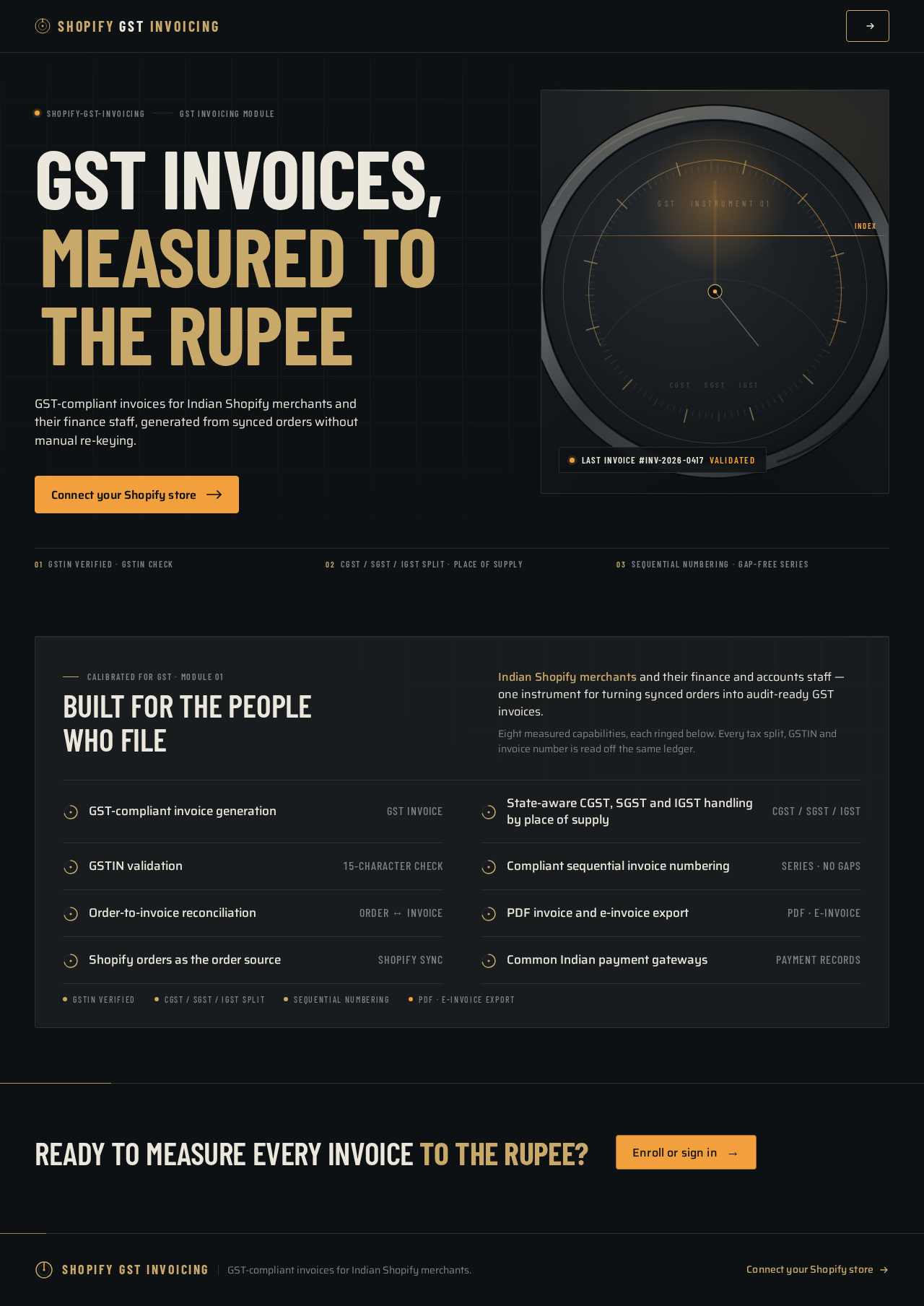
shopify-gst-invoicingGST invoicing module
GST invoices,measured to the rupee
GST-compliant invoices for Indian Shopify merchants and their finance staff, generated from synced orders without manual re-keying.
Connect your Shopify storeCalibrated for GST · Module 01
Built for the people who file
Indian Shopify merchants and their finance and accounts staff — one instrument for turning synced orders into audit-ready GST invoices.Eight measured capabilities, each ringed below. Every tax split, GSTIN and invoice number is read off the same ledger.
GST-compliant invoice generation
GST invoiceState-aware CGST, SGST and IGST handling by place of supply
CGST / SGST / IGSTGSTIN validation
15-character checkCompliant sequential invoice numbering
Series · no gapsOrder-to-invoice reconciliation
Order ↔ invoicePDF invoice and e-invoice export
PDF · e-invoiceShopify orders as the order source
Shopify syncCommon Indian payment gateways
Payment records
Ready to measure every invoice to the rupee?
Enroll or sign inshopify-gst-invoicingGST invoicing module
GST invoices,measured to the rupee
GST-compliant invoices for Indian Shopify merchants and their finance staff, generated from synced orders without manual re-keying.
Connect your Shopify storeCalibrated for GST · Module 01
Built for the people who file
Indian Shopify merchants and their finance and accounts staff — one instrument for turning synced orders into audit-ready GST invoices.Eight measured capabilities, each ringed below. Every tax split, GSTIN and invoice number is read off the same ledger.
GST-compliant invoice generation
GST invoiceState-aware CGST, SGST and IGST handling by place of supply
CGST / SGST / IGSTGSTIN validation
15-character checkCompliant sequential invoice numbering
Series · no gapsOrder-to-invoice reconciliation
Order ↔ invoicePDF invoice and e-invoice export
PDF · e-invoiceShopify orders as the order source
Shopify syncCommon Indian payment gateways
Payment records
No comments yet. Be the first!