shiny-single
 Diya Trivedi
create a simple single page design of calculator

Comments (0)
Sign in to leave a comment
System Requirements
System Requirements Document for shiny-single
1. Introduction
shiny-single is a simple, single-page calculator. The product intent is a single-purpose utility: a person opens one page, enters numbers and arithmetic operations, and reads the computed result. There is no account, no dashboard, no stored data, and no navigation beyond the one page.
The audience is anyone who needs quick arithmetic — the "Calculator User" — who wants a working calculator interface immediately, with no sign-in, setup, or surrounding marketing content. The design intent is a crafted precision instrument: the calculator itself is the only content on the page.
2. System Overview
shiny-single delivers one anonymous, publicly reachable page — Calculator — that hosts the entire calculator interface. The page presents a display for the current entry and result, a keypad for digits and arithmetic operations, and controls to evaluate and clear. All interaction happens on this single page; the result updates as the user interacts with it.
Actors
- Calculator User (human, active): the sole intended user, who enters numbers and operations and reads the result.
- No other human personas, systems, providers, or external services are part of the current product.
Accepted behavior
- A simple calculator interface contained in a single page.
- Entry of numbers and arithmetic operations, and display of the computed result.
Narrow exclusions
- No additional pages, routes, or navigation.
- No accounts, authentication, or user profiles.
- No persistence of calculations, history, or memory across sessions.
- No marketing sections, footer cards, or headline/CTA above the calculator.
2a. Product Interpretation and Delivery Boundary
shiny-single is a first-party, browser-delivered single page. The page is anonymously reachable: no identity is established, required, or inferred, because the calculator holds no durable actor-specific state, commitment, or entitlement. All calculator state (current entry, pending operation, displayed result) is ephemeral and lives only in the page session.
The current delivery horizon is exactly one page: the Calculator. Nothing in the accepted requirements calls for additional destinations, backend services, or future phases. The single-page constraint is binding — the calculator interface, its display, and its controls all live on that one page.
2c. Page Content and Component Coverage
Calculator
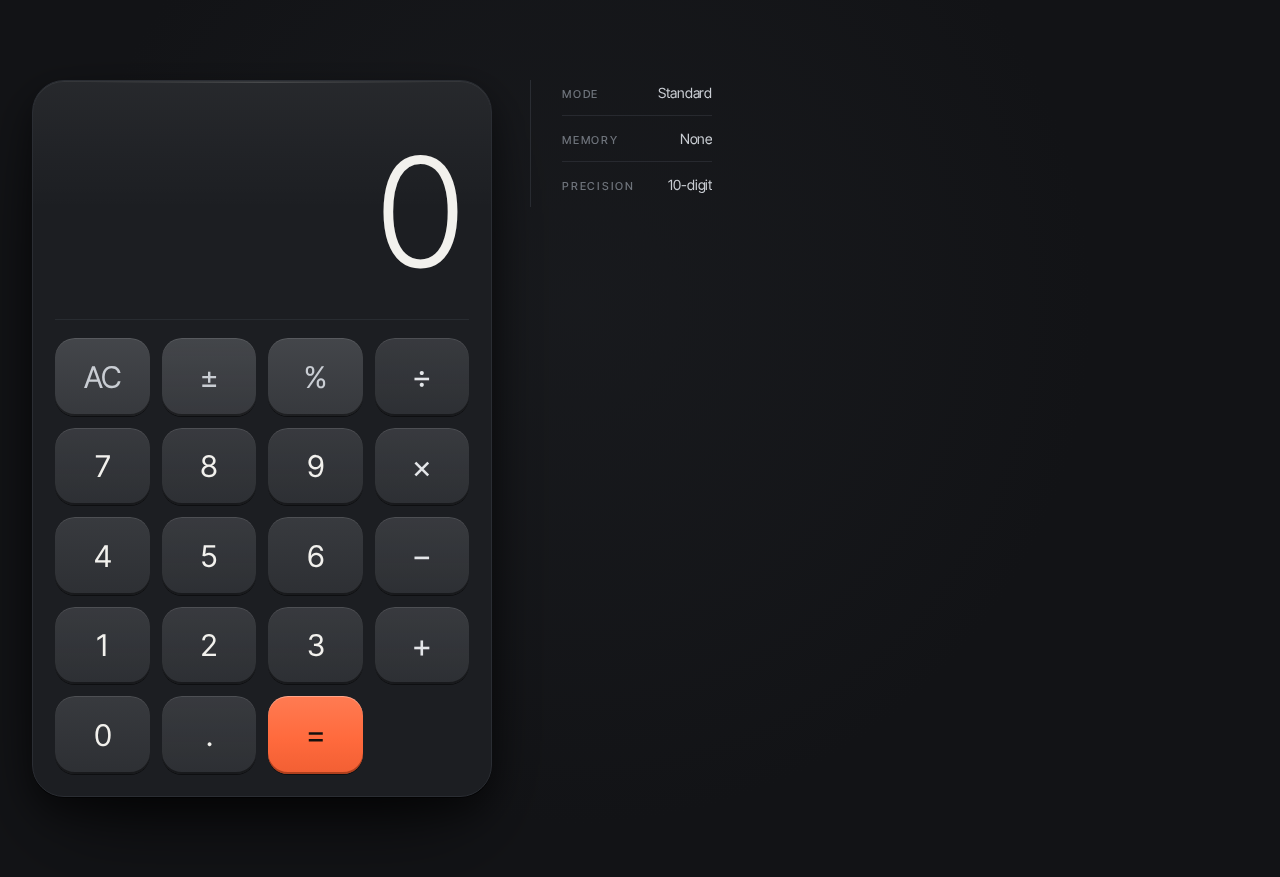
The single page and public entry. It is the calculator itself — a centered graphite chassis containing a display and a keypad, with a hairline micro-metadata column beside it on desktop.
Information and state
- Current display value (the number being entered or the computed result), set in oversized light-weight tabular numerals, flush right inside the chassis.
- A live operator indicator (a small accent dot and uppercase operator label) shown above the display when an operation is pending.
- Micro-metadata: MODE, MEMORY, PRECISION — presented as uppercase micro-labels in a vertical hairline column to the right of the chassis on desktop, collapsing to a single ruled row beneath the display at 768px and 375px. These are presentational labels describing the calculator's fixed mode (standard arithmetic), memory state (none), and display precision; they do not introduce new capabilities.
Primary actions
- Press digit keys (0–9) and a decimal point to build the current entry.
- Press operator keys (+, −, ×, ÷) to select an arithmetic operation.
- Press the equals key (the only accent-colored surface) to evaluate and display the result.
- Press clear to reset the current entry and pending operation.
Supporting actions
- Sign toggle and percent, presented as part of the standard keypad, applied to the current entry.
Domain entities
- Entry: the number currently being typed.
- Pending operation: the selected operator and the stored left operand awaiting the right operand.
- Result: the computed value shown in the display.
Component responsibilities
- Chassis: a single rounded slab (32px continuous-curve radius, 1px #2A2D33 border, faint top-edge light line) holding display and keypad; max-width 420px on mobile, 460px on desktop; centered with wide margins, sitting slightly left of center at 1280px.
- Display: renders the current value at clamp(64px, 18vw, 152px), weight 300, tabular numerals, flush right; cross-fades the digit group on update (220ms) rather than sliding.
- Operator indicator: a 6px accent dot plus uppercase operator label above the display, visible only while an operation is pending.
- Keypad: a 4×5 grid of aluminum key plates (20px radius, 1px top highlight, 2px inner bottom shadow) that depress 1px on press; the equals key is the sole #FF6A3D surface.
- Micro-metadata column: vertical hairline-ruled stack of MODE / MEMORY / PRECISION on desktop; a single ruled row beneath the display at 768px and 375px.
- Studio-light falloff: a soft radial ellipse of #1C1E22 at 60% behind the chassis on the #121316 ground.
States
- Loading: the chassis fades in from 8px below with a soft shadow bloom on page load; the display shows
0. - Empty: initial state — display reads
0, no operator indicator, no pending operation. - Success: after equals, the display shows the computed result and the operator indicator clears.
- Error: division by zero or an otherwise undefined result shows an explicit error state in the display (for example, an "Error" message) instead of a numeric value; the next digit entry or clear returns the calculator to a usable state.
- Recovery: clear resets display to
0and discards any pending operation; entering a new digit after an error starts a fresh entry.
3. Functional Requirements
FR-1 — Single-page calculator design (explicit) As a Calculator User, I should see a simple calculator design contained entirely in a single page, so that I can use the calculator without navigating anywhere else.
- Trigger: opening the page.
- Observable result: one page renders the complete calculator interface — display and keypad — with no other pages, routes, or navigation.
- Access: anonymous, public.
- Failure/recovery: if the page fails to load, reloading the page restores the calculator in its initial state.
- Continuation: the user proceeds to enter numbers and operations.
FR-2 — Calculator interface for arithmetic (explicit) As a Calculator User, I should have a calculator interface on the page for performing arithmetic calculations, so that I can enter numbers and operations and read the computed result.
- Trigger: the user presses digit, decimal, and operator keys.
- Input: digits 0–9, a decimal point, operators +, −, ×, ÷, and equals.
- Observable result: the display shows the current entry as it is typed; pressing equals replaces it with the computed result.
- Access: anonymous, public.
- Failure/recovery: an undefined operation (such as division by zero) shows an explicit error in the display; clear or a new digit entry returns the calculator to a usable state.
- Continuation: the user may chain further calculations from the displayed result or clear and start again.
FR-3 — Clear and reset (required_inference) As a Calculator User, I should be able to clear the current entry and any pending operation, so that I can start a fresh calculation.
- Trigger: pressing clear.
- Observable result: the display returns to
0and no operator indicator is shown. - Access: anonymous, public.
- Failure/recovery: clear is always available and always returns the calculator to its initial state.
- Continuation: the user begins a new entry.
FR-4 — Live operator indication (required_inference) As a Calculator User, I should see which operation is pending while I enter the next number, so that I can confirm what the calculator will do when I press equals.
- Trigger: pressing an operator key.
- Observable result: the accent operator indicator appears above the display showing the selected operator; it clears when equals is pressed.
- Access: anonymous, public.
- Failure/recovery: pressing a different operator replaces the pending operator; clear removes it.
- Continuation: the user enters the right operand and presses equals.
4. User Personas
Calculator User
Product context. The Calculator User arrives at shiny-single with a single, immediate need: to do arithmetic. They are not signing in, not managing anything, and not browsing — they open the one page and expect a working calculator in front of them.
Primary goal. Enter numbers and operations and read a correct, clearly displayed result as quickly as possible.
Distinct accepted responsibilities.
- Enter digits and a decimal point to build the current number.
- Select an arithmetic operation (+, −, ×, ÷).
- Press equals to evaluate and read the result.
- Clear the calculator to start over.
- Read the operator indicator to confirm the pending operation.
Relevant inputs and decisions. Which digits to enter, which operator to apply, when to evaluate, and when to clear. The user decides when a calculation is complete and whether to continue from the result or reset.
Interactions with other participants. None. The Calculator User is the only participant; the calculator responds directly to their input with no handoff to another person or service.
Observable success. The display shows the entered number as it is typed, the operator indicator reflects the pending operation, and pressing equals shows the correct computed result — or a clear error message when the operation is undefined — with the calculator remaining ready for the next calculation.
5. Core User Flows
Flow 1 — Perform a basic calculation
- The Calculator User opens shiny-single. The single Calculator page loads; the chassis fades in and the display reads
0. - The user presses digit keys to enter the first number. The display updates with each key press, digits cross-fading into place.
- The user presses an operator key (for example, +). The accent operator indicator appears above the display showing the pending operation.
- The user presses digit keys to enter the second number. The display shows the new entry while the operator indicator remains visible.
- The user presses the equals key. The display cross-fades to the computed result and the operator indicator clears.
- Continuation: the user may press an operator to continue calculating from the displayed result, or press clear to reset to
0and start again.
Flow 2 — Recover from an undefined operation
- The user has entered a calculation that is undefined (for example, division by zero) and presses equals.
- The display shows an explicit error state instead of a numeric result.
- Recovery: the user presses clear — the display returns to
0and any pending operation is discarded — or presses a digit key to begin a fresh entry. - The calculator is usable again and the user proceeds with a new calculation as in Flow 1.
Flow 3 — Clear and start over
- Mid-entry, the user decides the current calculation is wrong.
- The user presses clear. The display returns to
0and the operator indicator disappears. - The user begins a new calculation as in Flow 1.
6. Visuals, Colors and Theme
Muse and headline. Quiet precision after Jony Ive — a calculator lit like a product, not a webpage. The interface is the image: a graphite chassis floating on a near-black ground under a single soft overhead light.
Mode. Dark.
Color tokens (exact hex by role)
- Background / ground:
#121316(covers ~70% of the frame) - Surface (chassis, key base):
#1C1E22 - Text (primary, display, key numerals):
#F2F1ED - Primary (aluminum key faces):
#C9CDD3at 8–14% opacity over surface - Accent (equals key and live operator indicator only):
#FF6A3D - Muted (secondary micro-labels only, 13px+):
#6E737B - Chassis border:
#2A2D33(1px), with a faint top-edge light line
The accent #FF6A3D is reserved exclusively for the equals key and the live operator indicator — never for decoration. Body text #F2F1ED on #121316 exceeds AAA contrast.
Typography
- Headings and body: Inter Tight.
- Display result: Inter Tight weight 300, tabular numerals, so digits never jitter as they change.
- Micro-labels: weight 500, 11px, uppercase, 0.16em tracking, muted grey.
- Scale: 1.333 modular on a 4/8pt grid — display result
clamp(64px, 18vw, 152px), wordmark 20px, key numerals 26–32px, micro-labels 11px, helper copy 15px/1.6.
Shape language. Continuous-curve radii everywhere: keys at 20px (squircle-like), outer chassis at 32px; no sharp corners except hairline rules. Keys are soft extruded plates with a 1px top highlight and a 2px bottom inner shadow — machined, not flat. The chassis is a single rounded slab with a 1px #2A2D33 border and a faint top-edge light line.
Layout. Single-column, product-first. The chassis is centered with wide margins (max-width 420px on mobile, 460px on desktop); the display occupies the top third of the device at oversized scale. At 1280px the device sits slightly left of center with a vertical hairline column of micro-metadata (MODE / MEMORY / PRECISION) to its right; at 768px and 375px the metadata collapses beneath the display as a single ruled row. Nothing else on the page — no nav, no footer cards, no marketing sections.
Imagery. No photography, no illustration. Hairline dividers, engraved micro-labels, and a faint radial studio-light falloff behind the chassis (a single soft ellipse of #1C1E22 at 60% on the #121316 ground) imply a lit product on a plain surface.
Readability. All readable text and controls — wordmark, micro-labels, display numerals, key labels — stay entirely inside the viewport and their container at 375px, 768px, and 1280px, wrapping or scaling to fit, with nothing covering them.
7. Signature Design Concept
The lit instrument. The first screen is one product shot: a graphite calculator chassis floating on a near-black ground with a single soft overhead light falloff, occupying the center-left of a 1280px viewport. The dominant element is the oversized display result — clamp(64px, 18vw, 152px) light-weight tabular numerals in #F2F1ED, flush right inside the chassis, with a tiny uppercase operator indicator above it. Beneath the display, a 4×5 grid of aluminum keys with the equals key as the only #FF6A3D surface. A vertical hairline to the right of the chassis carries three muted micro-labels (MODE / MEMORY / PRECISION) stacked with generous leading. No headline above the fold, no CTA button, no gradient blob — the device is the hero.
Signature moves
- Oversized tabular result numerals (clamp 64px→152px, weight 300) flush-right inside the chassis, updating with a 220ms cross-fade instead of a slide.
- A single
#FF6A3Dequals key as the only saturated surface on the page, with the live operator indicator echoing the same accent as a 6px dot beside the display. - Aluminum key plates with a 1px top highlight and 2px inner bottom shadow that depress 1px on press — machined feedback, no ripple.
- A vertical hairline column of uppercase 11px/0.16em micro-metadata (MODE · MEMORY · PRECISION) ruled beside the chassis on desktop, collapsing to a single ruled row under the display at 768px and 375px.
- A soft radial studio-light falloff behind the chassis on the
#121316ground, implying a product photographed on a plain surface.
Avoid. Blue–indigo accent or white/near-white ground; centered marketing headline with subtext and a CTA above the calculator; gradient blobs, glassmorphism panels, floating cards; bouncy or springy key animations, ripples, particle effects; stock photography of people or hands on keyboards; grids of identical hover-lift feature cards; neon glows or techno HUD framing; rounded pill buttons or emoji iconography.
8. Interaction Model & Motion Direction
Interaction Model: Animated Motion Tempo: restrained Hero Dimensionality: layered_2d
Landing Hero Motion Brief
- Focal subject: the calculator chassis itself — display and keypad — as a single lit object on the graphite ground.
- Input → transformation → outcome thesis: each key press depresses its plate 1px with an inner-shadow shift and updates the display; the result digit group cross-fades on update rather than sliding, so the user sees a precise, physical response to every input and a trustworthy result.
- Motion vocabulary: slow physical easing
cubic-bezier(0.22, 0.61, 0.36, 1)at 220–320ms; 1px key depression with inner-shadow shift; 220ms cross-fade of the result digit group; one purposeful load reveal — the chassis fades from 8px below with a soft shadow bloom. No bounce, no particles, no gradient drift. - Composed first frame: the chassis already in place at rest, display reading
0, equals key glowing accent, micro-metadata column ruled to the right — the product shot before any interaction. - Reduced-motion state: with
prefers-reduced-motion, the load reveal and cross-fades resolve instantly; key presses still show their depressed state without transition; the layout and all readable text and controls remain whole and fully visible.
9. Non-Functional Requirements
- NFR-1 — Single page (explicit). The product must be a single page; no additional pages, routes, or navigation may be introduced.
- NFR-2 — Simplicity (explicit). The design must remain simple: the calculator is the only content, with no marketing sections, footer cards, or headline/CTA above it.
- NFR-3 — Anonymous access (required_inference). The page is publicly reachable with no account, sign-in, or identity establishment, because the calculator holds no durable actor-specific state.
- NFR-4 — Responsive readability (explicit design constraint). All readable text and controls stay entirely inside the viewport and their container at 375px, 768px, and 1280px, wrapping or scaling to fit, with nothing covering them.
- NFR-5 — Accessibility contrast (explicit design constraint). Body text
#F2F1EDon#121316exceeds AAA; muted#6E737Bis used only for secondary labels at 13px+ and non-critical metadata. - NFR-6 — Reduced motion (explicit design constraint). With
prefers-reduced-motion, a usable static arrangement is provided; motion resolves instantly while all content remains readable and operable. - NFR-7 — No persistence (required_inference). Calculator state is ephemeral to the page session; no calculation history or memory is stored.
10. Tech Stack
- Frontend: React, delivered as a single-page browser application.
- Styling: CSS with the specified tokens — Inter Tight typeface, exact hex palette, continuous-curve radii, and the motion easing
cubic-bezier(0.22, 0.61, 0.36, 1). - Backend/storage: None required. The calculator evaluates arithmetic entirely in the browser; there is no server, database, or persistence.
- Deployment: Static hosting of the single page. No Docker, Kubernetes, or additional services are needed for the accepted scope.
11. Assumptions and Constraints
- A-1 (constraint, explicit): The design must be a single page — "create a simple single page design of calculator."
- A-2 (assumption, required_inference): The calculator supports the standard arithmetic operations (+, −, ×, ÷), a decimal point, equals, clear, sign toggle, and percent, as the conventional contents of a simple calculator interface; no scientific, memory, or history functions are included.
- A-3 (assumption, required_inference): Division by zero and other undefined operations produce an explicit error state in the display rather than a numeric value, with clear or a new digit entry restoring usability.
- A-4 (assumption, required_inference): The MODE / MEMORY / PRECISION micro-labels are presentational metadata describing the calculator's fixed standard mode, empty memory, and display precision; they do not introduce memory or mode-switching capabilities.
- A-5 (constraint, explicit): No accounts, authentication, persistence, or additional pages are part of the current product.
12. Glossary
- Calculator User — the sole active human persona; the person performing arithmetic on the page.
- Chassis — the single rounded graphite slab that contains the display and keypad.
- Display — the oversized tabular-numeral area showing the current entry or computed result.
- Entry — the number currently being typed by the user.
- Pending operation — the selected operator and stored left operand awaiting the right operand.
- Operator indicator — the accent dot and uppercase operator label shown above the display while an operation is pending.
- Keypad — the 4×5 grid of aluminum key plates for digits, operators, equals, and clear.
- Micro-metadata — the MODE / MEMORY / PRECISION labels presented in a hairline-ruled column or row.
- Studio-light falloff — the soft radial ellipse of
#1C1E22behind the chassis on the#121316ground.
No comments yet. Be the first!