Identity lockMASTER · 01
Master identity reference
LockedFace, hair and proportions locked as one permanent profile.
 DUGGU WADHWA


Sign in to leave a comment
PROJECT: INFLUENCE AI
Complete Product Requirements Document (PRD) & Development Prompt
Act as a world-class product designer, senior full-stack developer, AI engineer, and SaaS architect.
Build a professional, production-ready AI Influencer Creation platform inspired by the capabilities and premium experience of Higgsfield AI.
The platform must allow users to create photorealistic AI influencers, generate consistent character images, produce cinematic AI videos, create UGC advertisements, build fashion campaigns, and manage complete AI influencer identities.
Do not create a basic image generator. Build a complete AI content production ecosystem.
Create an all-in-one AI Influencer Studio where anyone can build a virtual influencer from scratch and use that influencer to produce professional social media content.
Create a specialized fashion content generator.
FINAL GOAL:
Deliver a premium AI Influencer Creation SaaS platform that combines AI character creation, consistent image generation, cinematic video production, fashion photography, UGC advertising, voice generation, and social media content production in one unified application.
The project name is shiny-polar.
Sidebar navigation:
Home
AI Influencers
Image Studio
Video Studio
Fashion Studio
UGC Ads
Voice Studio
Storyboard
Prompt Library
My Projects
Generation History
Billing & Credits
Settings
ADMIN PANEL
Planning resolved these page and owner names itself instead of stopping. Review them before building.
Added during planning
Create:
Professional landing page
Sign up and login
Google authentication
User profile
Personal workspace
Subscription management
Credit balance
Generation history
Saved projects
Account settings
Create a dedicated AI character creation studio.
Features:
A. Character Creation
Generate male and female influencers.
Select age (adult characters only).
Select nationality and appearance.
Select skin tone.
Select eye color.
Select hairstyle and hair color.
Select facial structure.
Select body type.
Select fashion aesthetic.
Customize personality and niche.
Enter custom character descriptions.
B. Character Identity Lock
Every influencer must have a permanent character profile.
Save:
Master face reference
Facial structure
Eye shape
Nose and lips
Hairstyle
Skin details
Body proportions
Identity reference images
Allow users to generate different outfits, locations, poses, and expressions while preserving the same character identity.
C. Character Library
C. Character Library
C. Character Library
C. Character Library
C. Character Library
C. Character Library
Build a professional image generation workspace.
Features:
Text-to-image
Image-to-image
Multiple reference images
Character reference
Face consistency
Outfit reference
Pose reference
Background reference
Style reference
Image editing
Background replacement
Object removal
Inpainting
Outpainting
Upscaling
Face restoration
Lighting adjustments
Camera angle controls
Image variations
Aspect ratios:
1:1
4:5
3:4
9:16
16:9
Build a dedicated cinematic video generation workspace.
Features:
Features:
Features:
Features:
Features:
Features:
Features:
Features:
Features:
Features:
Features:
Features:
Features:
Video extension
Video variations
Video upscaling
Camera movements:
Dolly in
Dolly out
Pan left
Pan right
Tilt up
Tilt down
Orbit
Tracking shot
Handheld camera
Drone shot
Cinematic slow motion
Video settings:
5 seconds
10 seconds
15 seconds
30 seconds, where supported
720p and 1080p, where supported
9:16, 16:9 and 1:1
Features:
Outfit replacement
Dress generation
Luxury fashion styling
Streetwear
Casual wear
Formal wear
Bikini and swimwear for adult fictional characters
Wedding fashion
Traditional clothing
Accessories
Jewelry
Footwear
Fashion lookbooks
Allow users to upload clothing reference images and apply the outfits to their saved AI influencer while preserving identity.
Build a complete UGC advertisement generator.
Features:
Product image upload
Product description
AI influencer selection
Script generation
Scene generation
Voice selection
Lip-sync
Product presentation
Lifestyle scenes
Call-to-action scenes
Generate:
15-second advertisements
30-second advertisements
60-second advertisements
Support multiple scenes with individual prompts, dialogue, and camera instructions.
Generate content for:
TikTok
YouTube Shorts
Features:
Instagram post creator
Instagram carousel creator
Reels generator
TikTok video creator
YouTube Shorts generator
Features:
Captions
Hashtags
SEO titles
Features:
Content calendars
Post ideas
Viral hook suggestions
Brand campaign planning
Features:
Text-to-speech
Multiple voice styles
Male and female voices
American English
British English
Hindi
Multilingual voice generation
Voice speed control
Emotion control
Dialogue generation
Background music integration
Sound effects
Create a professional filmmaking workspace.
Features:
AI storyboard
Scene generator
Shot generator
Camera presets
Cinematic lighting presets
Character continuity
Environment consistency
Video transitions
Timeline editor
Multi-scene video creation
Export final video
Create a searchable prompt marketplace/library.
Categories:
Fashion
Beauty
Luxury
Allow users to save, edit, duplicate, and reuse prompts.
Create a project dashboard.
Users can:
Create projects
Rename projects
Save generations
Organize images and videos
Create folders
View generation history
Download assets
Delete assets
Duplicate projects
Dashboard homepage:
Welcome section
Create New Influencer button
Generate Image button
Generate Video button
Recent projects
Saved characters
Recent generations
Credit balance
Build a modular AI provider architecture.
Integrate external AI providers through secure APIs.
Required provider categories:
Image generation:
Photorealistic image generation models
Image editing models
Upscaling models
Video generation:
Text-to-video models
Image-to-video models
Reference-based video models
Audio:
Text-to-speech
Speech-to-speech
Important:
Do not pretend AI generation works if no provider is connected.
Build provider adapters so different models can be integrated or replaced without rebuilding the application.
Show available models, generation limits, processing status, and credit costs.
Create a credit-based billing system.
Plans:
Free
Starter
Pro
Studio
Enterprise
Features:
Features:
Features:
Features:
Features:
Features:
Features:
Features:
Create an admin dashboard.
Admin features:
Admin features:
Admin features:
Admin features:
Admin features:
Admin features:
Admin features:
Admin features:
Admin features:
Admin features:
Admin features:
Admin features:
User activity
Job status tracking
Secure file uploads
Save user projects automatically.
Use professional empty states and onboarding.
Provide sample prompts and templates.
Phase 1: Authentication, dashboard, database, and user management.
Start by creating the complete application architecture, database schema, design system, and functional dashboard.
Phase 2: AI Influencer Creator and character library.
Phase 3: Image generation and identity reference workflows.
Phase 4: Video generation and motion tools.
Phase 5: Fashion Studio and UGC Ad Creator.
Phase 6: Voice Studio and Storyboard.
Phase 7: Credits, subscriptions, and payments.
Phase 8: Admin panel, testing, security, and deployment.
If an API is unavailable, create a clearly labeled integration placeholder and document exactly what is needed to activate it.
Create an all-in-one AI Influencer Studio where anyone can build a virtual influencer from scratch and use that influencer to produce professional social media content.
Target users:
AI influencer creators
Instagram and TikTok creators
Fashion brands
Marketing agencies
UGC advertising creators
Digital artists
Film and video creators
Actor: Creator. Trigger: Creator opens the AI Influencer Creator from the dashboard's Create New Influencer button.
Result: A reusable master identity available to image and video generation. Failure/recovery: If generation fails, credits are refunded (see Credits & Billing).
Actor: Creator. Trigger: Creator opens Image Studio.
Result: Images consistent with the saved identity. Continuation: Selected images feed Journey 3.
Actor: Creator. Trigger: Creator opens Video Studio, optionally with an image from Journey 2.
Result: Exported video. Failure/recovery: Failed generations are refunded; processing status is visible in the workspace.
Actor: Creator. Trigger: Creator opens the UGC Ad Creator.
Result: Multi-scene advertisement. Branch: Creator may revise any scene and regenerate before export.
Actor: Creator. Trigger: Creator opens the social content workspace.
Result: Platform-ready social assets.
Actor: Creator. Trigger: Creator opens the Cinematic Tools workspace.
Result: Exported multi-scene video.
Actor: Creator. Trigger: Creator works from the dashboard or project workspace.
Result: Organized, reusable assets and prompts.
Actor: Creator. Trigger: Creator opens account settings or the credit area.
Result: Active subscription with tracked credits. Failure/recovery: Failed generations are refunded automatically.
Actor: Administrator. Trigger: Administrator opens the admin dashboard.
Result: Governed platform operations.
New users see professional empty states with sample prompts and templates (default: shown until the user creates a first project or character).
Example AI influencer workflow:
Step 1: User opens AI Influencer Creator.
Step 2: User enters character details.
Step 3: AI generates character options.
Step 4: User selects one character.
Step 5: User saves the master identity reference.
Step 6: User opens Image Studio.
Step 7: User selects the saved influencer.
Step 8: User enters outfit, pose, environment, and camera prompts.
Step 9: AI generates images while preserving character identity as closely as the selected model allows.
Step 10: User sends the selected image to Video Studio.
Step 11: User generates a cinematic video.
Step 12: User adds voice, dialogue, and music.
Step 13: User exports the final content.
[Design proposal; unspecified choices are defaults.]
Muse: Gleb Kuznetsov — dark, motion-first interfaces with luminous 3D subjects. shiny-polar is a cinematic AI influencer studio, so the surface must read as filmic production tooling, not a basic image generator.
Palette (dark mode, exact tokens by role):
| Role | Token | Coverage |
|---|---|---|
| Ground | #07070B | 70% |
| Surface / panels | #121218 | 20% |
| Primary text | #F2F0FF | — |
| Primary (violet) | #8B5CF6 | 10% combined glow |
| Accent (cyan) | #22D3EE | thin strokes, focus rings |
| Muted text | #8A8798 | — |
Violet and cyan appear only as thin luminous strokes, focus rings and rim light — never as large fills. No white or near-white ground.
Typography: Headings Space Grotesk — wide geometric caps for labels, tight medium weights for headlines; uppercase micro-labels at 11px / 0.16em tracking. Body IBM Plex Sans. Modular scale 1.25: 96/64/40/28/18/16/14/11; display headline clamp(40px, 7vw, 96px). Inter, Roboto and system-ui are excluded.
Shape and spacing: Rounded 20px panels with 1px violet-tinted borders; floating glass layers over black; 12-column grid with wide gutters; generous vertical rhythm so large visual previews dominate.
Imagery quality bar: High resolution, photorealistic skin texture, natural lighting, professional DSLR aesthetics, fashion-editorial quality. One volumetric 3D portrait bust with soft rim light, supported by abstract particle fields and HUD data rings. No flat clip art, no stock photography of people.
Readability rule: Headlines, wordmarks, labels, numbers, card text and controls stay whole inside the viewport and their container at 375px, 768px and 1280px, wrapping or scaling via clamp(...). Imagery and decoration may bleed, crop or overlap; readable text and controls never do.
Quality:
High resolution
Photorealistic skin texture
Natural lighting
Professional DSLR aesthetics
Fashion editorial quality
Design a premium dark interface.
Design direction:
Black and charcoal background
Subtle purple and electric blue accents
Premium typography
Minimalist navigation
Large visual previews
Rounded cards
Smooth transitions
[Design proposal; unspecified choices are defaults.]
The stage, not the dashboard. Every screen is a black stage (#07070B) on which the user's influencer is the subject. The fixed left sidebar holds the 13 sections — Home, AI Influencers, Image Studio, Video Studio, Fashion Studio, UGC Ads, Voice Studio, Storyboard, Prompt Library, My Projects, Generation History, Billing & Credits, Settings — as uppercase 11px micro-labels with a glowing active rail on the left edge. Content sits on charcoal #121218 panels with 1px violet-tinted borders, floating as glass over the ground.
Public entry composition. A full-bleed black hero: a luminous violet-and-cyan 3D portrait bust at right, scaled to 60% of viewport height, orbited by thin HUD rings. A glass control panel floats over the left third carrying the headline in Space Grotesk at clamp(40px, 7vw, 96px) — "Build the influencer. Film the campaign." — the subline "Create a photoreal character, then generate consistent images, cinematic video and UGC ads from one studio.", and the CTA "Enter the studio" as a violet pill with a cyan focus ring. This recomposes only accepted content and the accepted entry control.
Continuity of identity. The same character bust language carries into the studio: character profiles, image previews and video frames are presented as large visual previews on rounded cards, so the influencer reads as one persistent identity across Image Studio, Fashion Studio, UGC Ads and Video Studio.
Progress as instrument. Generation states use a thin cyan arc with counting numbers in monospace — a radial gauge, not a spinner — matching the HUD rings of the hero. Empty states and onboarding are treated as first-class panels, not blank canvases.
Avoid: gradient-blob hero, centred SaaS stack, white ground, grid of identical hover-lift cards, flat clip art.
[Design proposal; unspecified choices are defaults.]
Interaction Model: Parallax Motion Tempo: cinematic Hero Dimensionality: webgl
Landing Hero 3D Scene Brief — DIRECTION-DERIVED
A single real-time R3F/WebGL scene: one volumetric portrait bust, violet-and-cyan rim lit, turning in a slow orbit at 60% viewport height on the right. Thin HUD data rings orbit the bust at differing radii and speeds; a sparse particle field drifts behind it. The glass control panel on the left third carries the headline, subline and violet CTA pill with cyan focus ring, and receives a soft light sweep across its edge on section entry.
Input → transformation → outcome thesis: pointer movement and scroll position drive parallax depth between the bust, the HUD rings and the glass panel; the bust continues its slow orbit; the outcome is the studio's defining promise — a persistent, photoreal character — presented as a living subject rather than a static image. No new behaviour, page or destination is introduced.
Motion vocabulary: slow orbit, light sweeps across glass, scroll-scrubbed depth, thin cyan arc with counting monospace numbers for progress, soft light sweep on section transitions.
Composed first frame: black ground, bust at right in three-quarter turn with rim light, HUD rings at rest, glass panel left with headline fully legible, CTA pill visible.
Reduced-motion state: prefers-reduced-motion freezes the orbit and parallax to a single composed still frame; the bust, rings, headline, subline and CTA remain fully visible and operable, and any scrollable rows wrap or scroll so every item can be brought fully into view.
In-product motion: generation progress uses the cyan arc with counting numbers; loading states are professional and never blank; errors surface as clear messages; transitions between sections use the soft light sweep. Every button performs its intended action.
Build a scalable full-stack application.
Requirements:
Secure API key storage
Role-based access control
Input validation
Rate limiting
Error handling
Database backups
Logging and monitoring
Mobile responsiveness
Every major feature must have a functional workflow.
Every button must perform its intended action.
Show progress indicators during generation.
Show clear error messages.
Support mobile and desktop.
Do not deliver only a static UI prototype. Build real workflows with connected backend services and actual AI integrations.
Suggested architecture:
Frontend: Next.js / React
Styling: Tailwind CSS
Backend: Node.js / Next.js API
Database: PostgreSQL
Authentication: Secure authentication provider
Storage: S3-compatible cloud storage
Background jobs: Redis and job queue
AI: Modular third-party API integrations
Payments: Stripe or supported local payment gateway
Use licensed or authorized voice models and require consent for voice cloning.
Credit costs must be configurable by administrators and based on actual provider costs.
Build the platform in phases.
Then implement each module in phases.
Lifestyle
Travel
Fitness
Gaming
Cinematic
UGC
Product advertising
Portrait photography
Social media trends
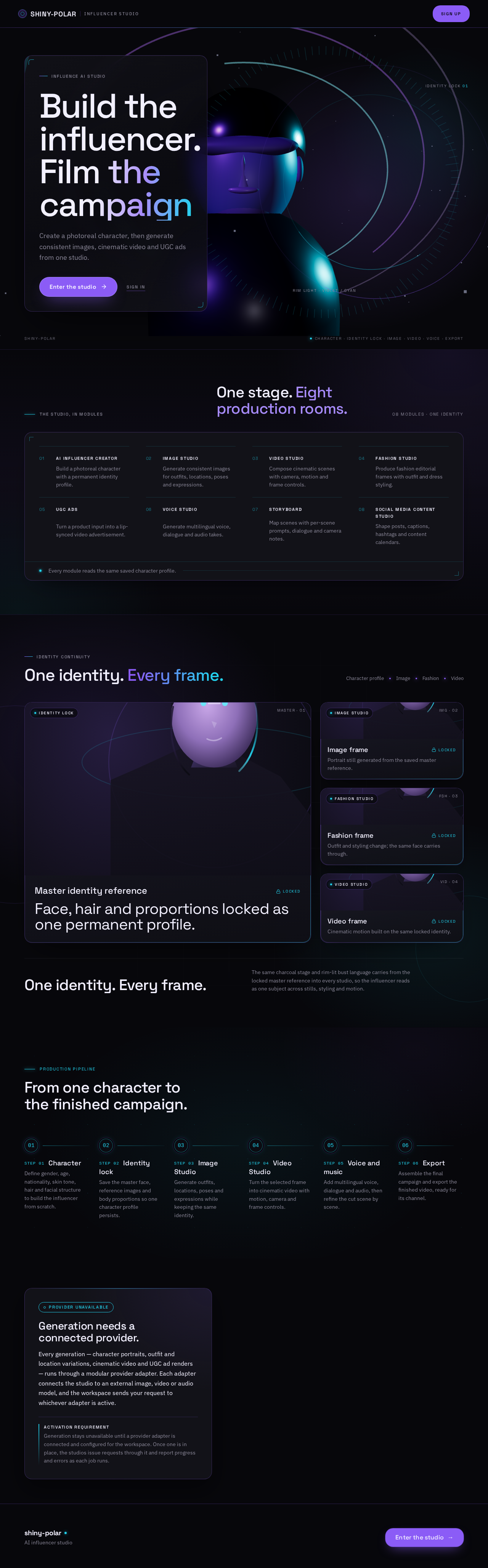
Influence AI Studio
Create a photoreal character, then generate consistent images, cinematic video and UGC ads from one studio.
The studio, in modules
08 modules · one identity
Build a photoreal character with a permanent identity profile.
Generate consistent images for outfits, locations, poses and expressions.
Compose cinematic scenes with camera, motion and frame controls.
Produce fashion editorial frames with outfit and dress styling.
Turn a product input into a lip-synced video advertisement.
Generate multilingual voice, dialogue and audio takes.
Map scenes with per-scene prompts, dialogue and camera notes.
Shape posts, captions, hashtags and content calendars.
Face, hair and proportions locked as one permanent profile.
Portrait still generated from the saved master reference.
Outfit and styling change; the same face carries through.
Cinematic motion built on the same locked identity.
Production pipeline
Define gender, age, nationality, skin tone, hair and facial structure to build the influencer from scratch.
Save the master face, reference images and body proportions so one character profile persists.
Generate outfits, locations, poses and expressions while keeping the same identity.
Turn the selected frame into cinematic video with motion, camera and frame controls.
Add multilingual voice, dialogue and audio, then refine the cut scene by scene.
Assemble the final campaign and export the finished video, ready for its channel.
Every generation — character portraits, outfit and location variations, cinematic video and UGC ad renders — runs through a modular provider adapter. Each adapter connects the studio to an external image, video or audio model, and the workspace sends your request to whichever adapter is active.
Activation requirementGeneration stays unavailable until a provider adapter is connected and configured for the workspace. Once one is in place, the studios issue requests through it and report progress and errors as each job runs.
Influence AI Studio
Create a photoreal character, then generate consistent images, cinematic video and UGC ads from one studio.
The studio, in modules
08 modules · one identity
Build a photoreal character with a permanent identity profile.
Generate consistent images for outfits, locations, poses and expressions.
Compose cinematic scenes with camera, motion and frame controls.
Produce fashion editorial frames with outfit and dress styling.
Turn a product input into a lip-synced video advertisement.
Generate multilingual voice, dialogue and audio takes.
Map scenes with per-scene prompts, dialogue and camera notes.
Shape posts, captions, hashtags and content calendars.
Face, hair and proportions locked as one permanent profile.
Portrait still generated from the saved master reference.
Outfit and styling change; the same face carries through.
Cinematic motion built on the same locked identity.
Production pipeline
Define gender, age, nationality, skin tone, hair and facial structure to build the influencer from scratch.
Save the master face, reference images and body proportions so one character profile persists.
Generate outfits, locations, poses and expressions while keeping the same identity.
Turn the selected frame into cinematic video with motion, camera and frame controls.
Add multilingual voice, dialogue and audio, then refine the cut scene by scene.
Assemble the final campaign and export the finished video, ready for its channel.
Every generation — character portraits, outfit and location variations, cinematic video and UGC ad renders — runs through a modular provider adapter. Each adapter connects the studio to an external image, video or audio model, and the workspace sends your request to whichever adapter is active.
Activation requirementGeneration stays unavailable until a provider adapter is connected and configured for the workspace. Once one is in place, the studios issue requests through it and report progress and errors as each job runs.
No comments yet. Be the first!