shiny-like
 nothingness
CREATE A WEBSITE LIKE BIASLOOP.IN


Comments (0)
Sign in to leave a comment
System Requirements
System Requirements Document for shiny-like
1. Introduction
The "shiny-like" project aims to create a website inspired by BiasLoop.in, focusing on providing a public-facing experience for visitors to discover and consume content related to technology solutions addressing real-world challenges through software, automation, and data capabilities. The audience primarily includes businesses or organizations seeking end-to-end solutions in these areas.
2. System Overview
The shiny-like website will deliver a public-facing experience similar in character to BiasLoop.in, without replicating its exact content or implementation. The site will feature a public entry point for visitors and a content management system for operators. The system will include identity management for content operators to ensure secure content maintenance.
2a. Product Interpretation and Delivery Boundary
The shiny-like website will be a likeness-based build of BiasLoop.in, focusing on the overall product and presentation character. It will not replicate BiasLoop.in's exact content or implementation. The public-facing entry experience is the accepted scope, with no private, provider-managed, or external-recipient workflows specified. The site will include application-owned identity for content operators, requiring first-use enrollment and returning verification for content management.
2b. Source Content Inventory
Not applicable as no content source directive was provided.
2c. Page Content and Component Coverage
Landing
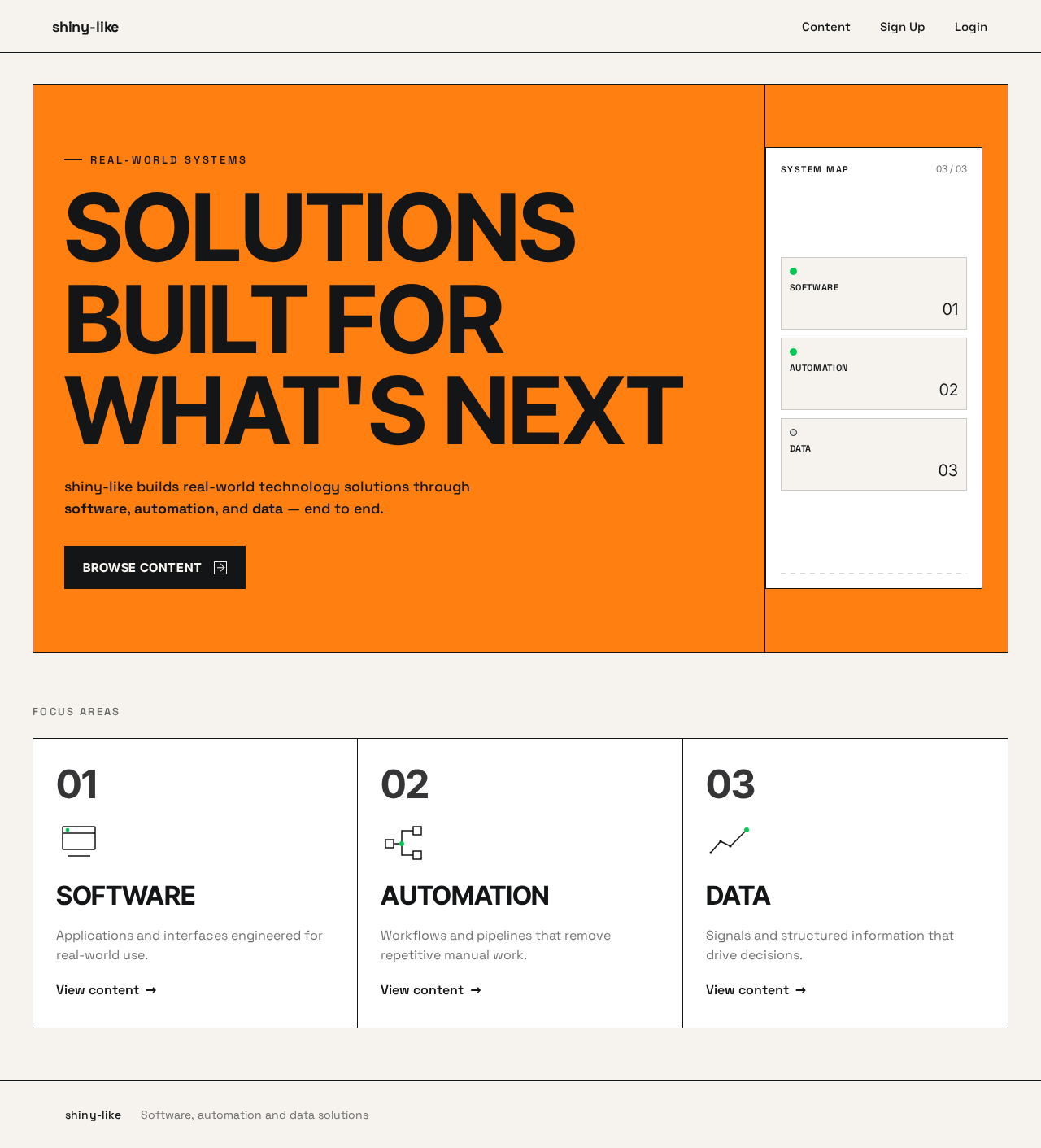
- Purpose: Public entry point explaining the website's purpose and leading visitors to published content.
- Components:
- Hero section with a large typographic headline and subheadline.
- Navigation to content sections.
- Introduction to the site's focus areas: Software, Automation, Data.
Login
- Purpose: Verification page for returning content operators.
- Components:
- Username and password fields.
- "Forgot Password" link.
- Login button.
Sign Up
- Purpose: Enrollment page for new content operators.
- Components:
- Registration form with fields for name, email, and password.
- Sign-up button.
Content
- Purpose: Browse destination for visitors to discover and consume available content.
- Components:
- Content listings categorized by focus areas.
- Search functionality.
- Pagination controls.
Content Editor
- Purpose: Workspace for content operators to create and edit content.
- Components:
- Rich text editor.
- Media upload functionality.
- Save and publish buttons.
3. Functional Requirements
- As a Public Visitor, I should be able to browse the website's content without needing to log in. (Provenance: explicit)
- As a Site Content Operator, I should be able to sign up for an account to manage content. (Provenance: required_inference)
- As a Site Content Operator, I should be able to log in to access the content management system. (Provenance: required_inference)
- As a Site Content Operator, I should be able to create, edit, and publish content to the website. (Provenance: required_inference)
- As a Site Content Operator, I should be able to save drafts of content before publishing. (Provenance: required_inference)
4. User Personas
Public Visitor
- Context: Visits the website to explore available content.
- Primary Goal: Discover and consume content related to technology solutions.
- Responsibilities: Browse content, search for specific topics, and read articles.
- Interactions: Navigates through content sections, uses search functionality.
Site Content Operator
- Context: Manages the website's content to ensure it is current and accurate.
- Primary Goal: Maintain and update content for public consumption.
- Responsibilities: Sign up, log in, create/edit content, publish updates.
- Interactions: Uses the content editor to manage content, verifies identity through login.
5. Core User Flows
5.1 Public Visitor Browsing Content
- Start: Visitor lands on the Landing page.
- Action: Visitor navigates to the Content page.
- Result: Visitor browses through available content.
- Continuation: Visitor reads articles or uses search to find specific topics.
5.2 Site Content Operator Sign-Up
- Start: Operator accesses the Sign Up page.
- Action: Operator fills out the registration form.
- Result: Operator submits the form and receives confirmation.
- Continuation: Operator logs in to access the Content Editor.
5.3 Site Content Operator Login and Content Management
- Start: Operator accesses the Login page.
- Action: Operator enters credentials and logs in.
- Result: Operator gains access to the Content Editor.
- Continuation: Operator creates, edits, or publishes content.
6. Visuals Colors and Theme
- Muse: Rasmus Andersson
- Palette:
- Background: #F6F3EE
- Surface: #FFFFFF
- Text: #141517
- Primary: #FF7F11
- Accent: #00C853
- Muted: #E0E0E0
- Typography:
- Headings: Inter Tight, Bold, uppercase
- Body: Space Grotesk
- Scale: 1.25 modular
- Shape Language: Crisp edges, hairline borders
- Layout: 8-pt spacing, clear hierarchy
- Motion: Fast, functional transitions
7. Signature Design Concept
The Landing page will feature a structured hero section with a large typographic headline spanning the viewport over a tangerine block. The call-to-action will be integrated into the design, using the warm off-white background to frame the content.
8. Interaction Model & Motion Direction
- Interaction Model: Static
- Motion Tempo: Restrained
- Hero Dimensionality: Flat
- Landing Hero Motion Brief: The hero section will feature a large typographic headline with a fast, functional transition to the main content. The design will focus on clarity and purpose, avoiding decorative animations.
9. Non-Functional Requirements
- The website must be responsive and accessible across different devices and screen sizes. (Provenance: required_inference)
- The website should load quickly and efficiently, providing a seamless user experience. (Provenance: required_inference)
10. Tech Stack
- Frontend: React
- Backend: Python/FastAPI
- Storage: Appropriate storage solution for content management
- Deployment: Docker/docker-compose
11. Assumptions and Constraints
- The website will not replicate BiasLoop.in's exact content or implementation but will be inspired by its character and presentation.
- The public-facing entry experience is the primary focus, with no private or external workflows specified.
12. Glossary
- Public Visitor: An individual visiting the website to explore content.
- Site Content Operator: A user responsible for managing and maintaining the website's content.
- Content Editor: A tool for creating and editing content on the website.
No comments yet. Be the first!