shiny-app
 Paresh Patel
create a app that scans website url from their it should pick business branding like logo, colours, fonts, and services , also, it should scan entire website to figure our about business like their journey, products/services, and more. They using the same, user should be able to create business posts about their services/ products, and more. this will be used by those business which are small and have no budget to hire agency to create their posts and banners to post on several platforms.

Comments (0)
Sign in to leave a comment
System Requirements
System Requirements Document (SRD)
Project Name: shiny-app
1. Introduction
The shiny-app is an innovative solution designed to empower small businesses in India to create professional branding and marketing materials effortlessly. Developed for users like Paresh Patel, the app scans a business's website URL to extract branding elements such as logos, colors, fonts, and services. It then leverages AI to generate industry-specific templates and allows users to create custom posts and banners for various platforms. This tool is tailored for businesses with limited budgets, enabling them to compete effectively in the digital space without hiring expensive agencies.
2. System Overview
The shiny-app is a web-based application that utilizes advanced AI and machine learning technologies to simplify branding and marketing for small businesses. By scanning a website URL, the app identifies key branding elements and business information, such as the company’s journey, products, and services. Using this data, the app provides two primary functionalities:
- AI-Generated Templates: Automatically creates industry-specific post templates based on extracted branding and business details.
- Custom Prompt-Based Creation: Allows users to input prompts to generate unique images and posts using AI, while adhering to the extracted branding.
The app is designed to be intuitive and user-friendly, ensuring accessibility for users with minimal technical expertise.
3. Functional Requirements
Story Points:
- As a User, I should be able to input a website URL for scanning and extracting branding elements like logo, colors, fonts, and services.
- As a User, I should be able to view the extracted branding elements and business information in a structured format.
- As a User, I should be able to generate industry-specific post templates using AI based on the extracted branding.
- As a User, I should be able to input a custom prompt to generate AI-created images and posts for my business.
- As a User, I should be able to edit and customize the branding elements after extraction for further personalization.
- As a User, I should be able to download or share the generated posts directly to social media platforms.
- As a User, I should be able to save my branding and post templates for future use.
4. User Personas
1. Small Business Owner
- Description: Entrepreneurs running small businesses with limited budgets for branding and marketing.
- Goals: Create professional-looking posts and banners without hiring agencies.
- Pain Points: Lack of technical expertise, limited time, and budget constraints.
2. Freelance Marketer
- Description: Independent marketers assisting small businesses with branding and social media management.
- Goals: Quickly generate posts tailored to client branding.
- Pain Points: Need for efficient tools to streamline content creation.
5. Visuals Colors and Theme
Color Palette:
The shiny-app will feature a vibrant yet professional color scheme that reflects creativity and accessibility:
- Background:
#F5F5F5(Soft Gray) - Surface:
#FFFFFF(Pure White) - Text:
#333333(Dark Charcoal) - Accent:
#FF6F61(Warm Coral) - Muted Tones:
#B0BEC5(Cool Steel Blue)
6. Signature Design Concept
Interactive Branding Canvas
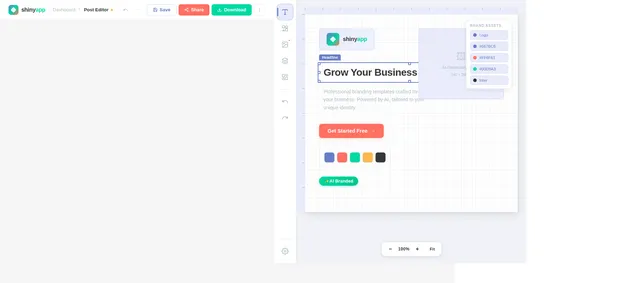
The homepage of shiny-app will feature an Interactive Branding Canvas. Upon entering a website URL, users will see a dynamic visualization of their branding elements.
- Animation: Logos, colors, and fonts extracted from the website will "float" into place on a canvas, creating a visually engaging experience.
- Interaction: Users can drag and drop elements to customize their branding directly on the canvas.
- Micro-Interactions: Hovering over elements will display tooltips with additional details (e.g., font name, color hex code).
- AI Integration: A sidebar will suggest post templates and image ideas based on the branding.
- Transitions: Smooth transitions between sections, with subtle color shifts matching the extracted palette.
This concept ensures the app makes a memorable first impression while emphasizing its core functionality.
7. Non-Functional Requirements
- Performance: The app should process website scans and generate templates within 5 seconds.
- Scalability: Support up to 10,000 concurrent users.
- Security: Ensure data privacy and secure handling of user inputs and extracted branding elements.
- Localization: Default settings tailored for Indian businesses, including INR currency and IST timezone.
8. Tech Stack
Frontend:
- React for Web
Backend:
- Python
- FastAPI
Database:
- MySQL (with Alembic for migrations)
AI Models:
- GPT 5.4 for user-friendly responses
- Google Nano Banana for image generation
AI Tools:
- Litellm for LLM Routing
- Langchain
Orchestration:
- Docker for local orchestration
- Kubernetes for server-side orchestration
9. Assumptions and Constraints
Assumptions:
- Users will have access to the website URL of their business.
- Small businesses in India are the primary target audience.
- The app will primarily be used on desktop devices.
Constraints:
- Limited budget for hosting and infrastructure.
- AI-generated images must adhere to branding guidelines extracted from the website.
10. Glossary
- Branding Elements: Visual and textual components that define a business’s identity, such as logos, colors, and fonts.
- AI-Generated Templates: Pre-designed post layouts created by AI based on industry and branding data.
- Prompt-Based Creation: User-defined input for generating custom images and posts using AI.
- Interactive Branding Canvas: A dynamic interface for visualizing and customizing branding elements.

Turn Your Website Into Stunning Marketing in Seconds
Scan your website URL, extract your branding elements automatically, and generate professional social media posts and banners with AI — no design skills needed.
Everything You Need to Shine Online
From automated brand extraction to AI-powered content creation, shiny-app gives small businesses the tools to compete with the big players.
Scan & Extract
Enter your website URL and let our AI instantly detect your logo, brand colors, fonts, and key services—building a complete brand profile in seconds.
AI Templates
Generate industry-specific social media posts, banners, and marketing materials tailored to your brand—ready for Instagram, LinkedIn, Twitter, and more.
Custom Creation
Describe what you need in plain language and our AI generates unique images and posts that match your brand identity—no design skills required.
See the Branding Canvas in Action
Enter any website URL and watch as AI extracts logos, colors, fonts, and services — then drag elements to customize your canvas.
Your Branding Canvas
Enter a URL above and click Scan to extract branding elements
Ready to build your brand identity?
Try It Now→Everything You Need to Build Your Brand
From scanning your website to publishing polished posts, shiny-app handles your entire branding workflow in one place.
URL Scanning
Simply enter your website URL and our AI instantly scans and extracts your branding elements — logos, colors, fonts, and business details — in seconds.
Branding Extraction
Automatically detect and organize your brand identity into a structured canvas, ready to be used across all your marketing materials.
AI Template Generation
Generate industry-specific post templates powered by AI that match your brand perfectly — Instagram stories, LinkedIn banners, YouTube thumbnails, and more.
Custom Prompt Studio
Write your own prompts to create unique AI-generated images and posts while staying true to your extracted branding guidelines.
Multi-Platform Download
Export your creations in optimized formats for every major social platform. Download or share directly to Instagram, LinkedIn, Twitter, and more.
Save & Reuse
Save your branding elements and favourite templates to your library. Reuse them anytime to maintain consistent branding across all campaigns.
From URL to Stunning Posts in 4 Simple Steps
Transform your website into professional marketing materials effortlessly. No design experience needed.
Enter Website URL
Simply paste your business website URL and let our intelligent scanner do the rest. No technical skills required.
AI Extracts Branding
Our AI automatically identifies and extracts your logo, brand colors, fonts, and key business information in seconds.
Generate or Customize
Choose from AI-generated industry templates or create custom posts using prompts — all styled with your brand identity.
Download & Share
Export your polished creations in multiple formats and share directly to social media platforms with one click.
Built for People Like You
shiny-app is designed for entrepreneurs and marketers who want professional branding without the complexity or cost.
Paresh Patel
Small Business Owner
Entrepreneurs running small businesses with limited budgets for branding and marketing. They need professional-looking content but cannot afford to hire agencies or dedicated design teams.
Goals
- ✓Create professional-looking posts and banners without hiring agencies
- ✓Build a consistent brand identity across all social platforms
- ✓Save time with AI-generated templates tailored to their industry
Pain Points
- •Lack of technical expertise in design and branding tools
- •Limited time to learn complex software while running a business
- •Budget constraints prevent hiring professional designers
Meera Singh
Freelance Marketer
Independent marketers assisting small businesses with branding and social media management. They juggle multiple clients and need efficient workflows to deliver quality content quickly.
Goals
- ✓Quickly generate posts tailored to each client's unique branding
- ✓Manage multiple brand identities from a single platform
- ✓Deliver high-quality marketing materials on tight deadlines
Pain Points
- •Need efficient tools to streamline content creation at scale
- •Switching between different tools for each client wastes time
- •Maintaining brand consistency across diverse client portfolios
Ready-Made Templates for Every Platform
Browse AI-generated templates tailored to your industry. Pick a design, customize with your brand, and publish in minutes.
Instagram Post
Eye-catching product showcase with brand colors and logo overlay for your storefront.
LinkedIn Banner
Corporate-ready header banner featuring your brand identity and value proposition.
Twitter/X Graphic
Shareable announcement graphic optimized for engagement and brand visibility.
YouTube Thumbnail
High-impact video thumbnail with bold typography and brand-consistent styling.
Facebook Cover
Welcoming cover photo showcasing your services, location, and brand personality.
WhatsApp Status
Quick promotional status card perfect for daily offers and menu highlights.
Trusted by Small Businesses Across India
See how entrepreneurs and marketers are creating professional branding without breaking the bank.
Shiny-app completely transformed how we handle our social media. We used to spend hours trying to make posts look professional. Now the AI picks up our branding and generates stunning templates in seconds. It saved us lakhs on agency fees.
Priya Sharma
Owner, Sharma Textiles
As a freelancer managing 12 small business clients, this tool is a game-changer. I scan each client's website, and within minutes I have brand-consistent templates ready. The custom prompt feature lets me create unique posts that truly stand out.
Rajesh Mehta
Freelance Digital Marketer
We're a small spice business in Ahmedabad with zero design skills. Shiny-app extracted our logo, colors, and fonts from our website and created beautiful Instagram posts automatically. Our engagement has grown 3x since we started using it.
Anita Desai
Founder, Desai Spice Co.
Simple, Transparent Pricing
Start free and scale as your business grows. No hidden fees, no surprises — just the tools you need to create stunning branded content.
Free
Perfect for trying out Shiny
- ✓5 website scans per month
- ✓Basic branding extraction
- ✓3 AI-generated templates
- ✓Standard resolution downloads
- ✓Community support
Pro
Best for growing businesses
- ✓Unlimited website scans
- ✓Full branding canvas editor
- ✓Unlimited AI templates
- ✓Custom prompt studio access
- ✓HD downloads + direct sharing
- ✓Priority email support
Enterprise
For agencies & large teams
- ✓Everything in Pro
- ✓Multi-brand management
- ✓Team collaboration tools
- ✓Custom AI model training
- ✓API access & integrations
- ✓Dedicated account manager
Frequently Asked Questions
Everything you need to know about creating professional branding materials with shiny-app.
Simply paste your business website URL into the scanner, and our AI automatically extracts your branding elements including logo, color palette, fonts, and key business information. The process takes just a few seconds and gives you a structured overview of your brand assets.
Not at all! shiny-app is built for small business owners and marketers with minimal technical expertise. Our AI handles the heavy lifting by generating professional templates and posts based on your extracted branding. Just scan, customize if you like, and download.
You can create content for all major platforms including Instagram posts, LinkedIn banners, Twitter graphics, YouTube thumbnails, Facebook covers, and more. Our AI-generated templates are industry-specific, so the content is tailored to your business type.
Absolutely. After generating templates, you can use the Branding Canvas to drag and drop elements, adjust colors, swap fonts, and edit text. You can also use the Prompt Studio to describe exactly what you want and let the AI create it from scratch while staying on-brand.
Yes! Our free plan lets you scan your website, extract branding elements, and generate a limited number of templates each month. For unlimited template generation, custom prompt-based creation, and priority support, check out our Pro and Enterprise plans.
Yes. All your extracted branding elements and generated templates are saved to your account. You can revisit, edit, and reuse them anytime from the Saved Posts section. This makes it easy to maintain consistent branding across all your marketing materials.
Unlike generic design tools, shiny-app starts with your existing brand. By scanning your website, it understands your logo, colors, fonts, and business context. Every template and post it generates is already aligned with your brand identity, saving you hours of manual customization.
Still have questions? Get in touch with our team
Ready to Transform Your Branding?
Join thousands of small businesses and freelance marketers who create stunning, on-brand social media content in minutes — no design skills needed.
No comments yet. Be the first!