shiny-ai
 Kamlesh Yadav
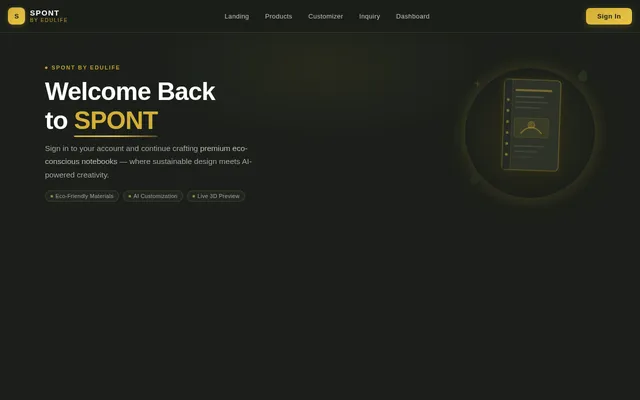
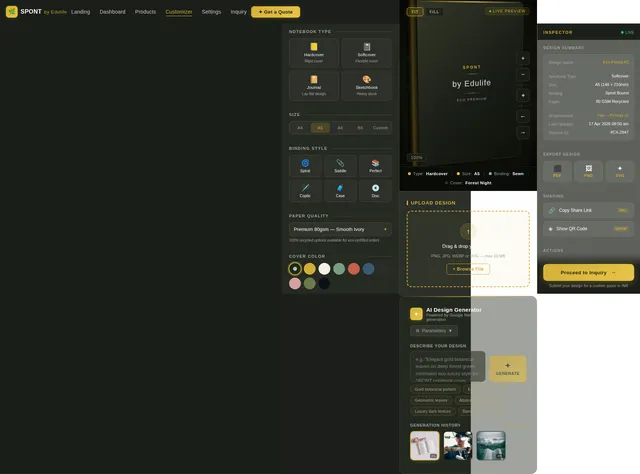
Create a premium, futuristic, AI-powered website using Next.js (App Router) for a brand called "SPONT by Edulife", focused on eco-friendly packaging and customizable notebooks. --- ### 🎨 DESIGN LANGUAGE * Theme: Luxury eco-minimal + futuristic * Color palette: * Primary: #3F4837 (deep green) * Secondary: #EADEB9 (cream) * Accent: soft gold gradients * Use cinematic lighting, soft shadows, and premium textures * Typography: * Headings: Bebas Neue * Accent: Playfair Display (italic) * Body: DM Sans --- ### 🧠 AI-GENERATED VISUALS (VERY IMPORTANT) The system should automatically generate high-quality images using AI: 1. Generate product visuals: * Eco paper bags * Notebooks * Packaging boxes * Coffee cups * Honeycomb paper 2. Style of images: * 3D photorealistic renders * Soft studio lighting * Natural eco environment (plants, wood textures) * Depth of field (blur background) * Premium brand mockups 3. Motion in visuals: * Subtle floating animation * Slow rotation (3D feel) * Parallax on scroll * Hover → slight zoom + tilt 4. Use AI-generated textures: * Paper grain * Kraft texture * Embossed logo effects --- ### 🎬 HERO SECTION (3D + AI VISUAL) * Split layout * Left: strong branding text + CTA * Right: * AI-generated 3D notebook or packaging model * Model rotates slowly * Mouse movement → parallax tilt * Background particles floating --- ### 🧩 PRODUCT GRID * Each card uses AI-generated product image * Hover animation: * Glow border * Lift effect * Image zoom + rotate --- ### ⚙️ CUSTOM DESIGN TOOL (CORE FEATURE) Create a Vistaprint-style live product customizer: --- #### 🖥️ LAYOUT: * LEFT → Live 3D preview * RIGHT → Form builder --- ### 🖼️ LIVE PREVIEW (AI + 3D) 1. Views: * Front cover * Back cover * Combined open view 2. When user uploads image: * Apply it on 3D notebook surface * Render realistic lighting + shadows * Auto adjust perspective 3. Zoom Features: * Slider (50%–200%) * Drag to reposition * Fit / Fill toggle 4. AI Enhancement: * Auto upscale uploaded image * Improve contrast for print * Remove background (optional toggle) --- ### 🤖 AI IMAGE GENERATION INSIDE CUSTOMIZER Add a button: 👉 “Generate Design with AI” User enters prompt: Example: "minimal eco leaf logo with gold emboss effect" System should: * Generate image * Apply it to notebook instantly * Show preview in real-time --- ### 📥 FORM PANEL Structured like real product form: * Notebook type * Size * Binding * Paper quality * Color selection * Upload: * Front image * Back image Each upload: * Preview visible * Replace/remove option --- ### 🔄 INTERACTION FLOW 1. User customizes product 2. Sees real-time preview (3D) 3. Clicks "Preview & Submit" 4. Final preview modal opens 5. User fills: * Name * Phone * Email 6. Submit as inquiry --- ### 🎥 ANIMATIONS & MOTION * Framer Motion for transitions * Scroll-based animations * 3D hover tilt * Floating elements * Smooth easing (premium feel) --- ### ⚡ TECH STACK * Next.js (App Router) * Tailwind CSS * Framer Motion * React Three Fiber (3D) * Zustand (state) * AI image generation API (like Stability / DALL·E) --- ### 🎯 OUTPUT * Fully responsive * Clean component-based code * Realistic 3D visuals * AI-generated images integrated * Feels like a premium SaaS product customizer --- Make the entire experience feel interactive, intelligent, and visually stunning — not a basic website.

Comments (0)
Sign in to leave a comment
No comments yet. Be the first!