sharp-khatabook
 Deepak Kumar
want to make an App Similar to Khatabook exact same copy of that but for My company only that too with Google Sheet based integraition for saving real time data and a daily simmary of what came and what went out in terms of credit and debit Name it as "Jai Sri Krishna Agency" Pending Payments System and it should also incllude download template and upload previous data there should be a customer number based master creation tab as well and when entering the credit for the first time this should beasking fro number and all Keep the interface super simple and hancy and foucs on bigger outputs like the paymetns app

Comments (0)
Sign in to leave a comment
System Requirements
System Requirements Document for sharp-khatabook
1. Introduction
This document specifies the "Jai Sri Krishna Agency" Pending Payments System — an internal, company-only pending-payments and credit/debit ledger application for Jai Sri Krishna Agency. The product is a Khatabook-style payment-record workflow scoped strictly to this one trading agency: counter staff record what customers owe (credit) and what the agency has received or paid out (debit), maintain a customer master keyed by customer number, and keep every record persisted in real time to a connected Google Sheet. The agency owner or manager reviews a daily summary of what came in and what went out.
The audience for this document is the implementation team building the app. The audience for the app itself is Jai Sri Krishna Agency's own counter staff and its owner/manager — people working on a phone, standing at a counter, between customers, often more comfortable in Hindi than English. The interface must therefore stay super simple and handy, and must foreground the big outputs of a payments app: the amount, who owes it, and today's net.
2. System Overview
The system is a single-company ledger application. It provides:
- A public Landing surface that explains the system and its company-only purpose before access is established.
- A Login surface for invitation-based first use and returning identity verification.
- A protected working area: Dashboard, Customers, Customer Details, Payments, Import, Templates, and Daily Summary.
- Real-time persistence of customer and transaction changes to a connected Google Sheet.
- A daily summary of incoming credit and outgoing debit.
- Downloadable data template and upload of previous data.
- Customer-number-based master creation, including first-time-credit interception that collects the customer number and details before money can be recorded against an unknown customer.
Actors are Agency Staff (records customers and transactions, imports/exports data) and Agency Owner or Manager (reviews daily incoming/outgoing activity and the pending-payments picture). Google Sheets is an external provider integration, not a persona.
2a. Product Interpretation and Delivery Boundary
Delivery ownership. The application owns its own identity: staff and the owner/manager are invited or provisioned before first use, and returning users verify identity through Login before reaching protected records. Landing and Login are anonymously reachable; every other page requires an established session. Customer and transaction data is owned by the application and mirrored to the agency's connected Google Sheet in real time — the Sheet is the requested persistence integration, not a separate user-facing product surface.
Current boundary. Everything in this document is current: the ledger workflow, customer-number master creation, first-time-credit interception, template download, previous-data upload, daily credit/debit summary, and Google Sheets real-time saving.
Exclusions. The app is for Jai Sri Krishna Agency only — it is not a multi-company or public multi-tenant product. No adjacent accounting, invoicing, GST filing, payroll, or third-party marketplace capability is in scope. Khatabook is a reference for the payment-record workflow and interaction model only; the implementation stays scoped to this company's pending-payments use case.
2b. Source Content Inventory
Not applicable — no reference directive declares content_source.
2c. Page Content and Component Coverage
Landing
- Information/state: ALL-CAPS micro-label
JAI SRI KRISHNA AGENCY; three-line headlinePENDING / PAYMENTS / SYSTEM.with the full stop in signal red; one 40px hairline; a single line of copy describing the company-only pending-payments ledger; a live-looking ledger card on#FFFDF8with four ruled rows (customer number, name, red credit amount, green debit amount) and a heavy black rule aboveNET TODAY ₹ 42,150. - Primary actions:
Open Ledger(red) → Login. Supporting action:Download template(plain underlined) → Templates. - Domain entities: illustrative ledger row (customer number, name, credit amount, debit amount), net-today figure.
- Component responsibilities: hero block (7 columns), ledger card (5 columns), numbered section header, hairline rules, signal bars.
- States: loading (static first frame, no spinner needed); empty (not applicable — static content); success (n/a); error (n/a); recovery (n/a).
Login
- Information/state: numbered section header
01 · LOGIN; invitation/provisioning notice for first-time users; identity fields; session state. - Primary actions: verify identity and enter the protected area. Supporting actions: follow invitation link to establish first-use access.
- Domain entities: invited/provisioned user identity, session.
- Component responsibilities: identity form, invitation acceptance entry, error region, submit control.
- States: loading (submit in progress); empty (no invitation detected → guidance to contact the agency administrator); success (redirect to Dashboard); error (invalid credentials or expired invitation → inline message with retry); recovery (re-request invitation or retry verification).
Dashboard
- Information/state: numbered section header
02 · DASHBOARD; today's money figure as the largest type on screen (44–64px, tabular numerals, smaller muted ₹, counts up once on load over 400ms); recent ledger rows; Sheet sync status chip (SHEET · SYNCED 2s AGOwith green dot, or red dot +RETRY). - Primary actions: open Payments to record an entry; open Customers. Supporting actions: open Daily Summary; retry Sheet sync.
- Domain entities: ledger row, daily totals, sync state.
- Component responsibilities: hero amount, ledger row list, numbered nav rail (desktop) / bottom tab bar (mobile), sync chip.
- States: loading (skeleton ruled rows, amount counts up once); empty (no entries today → ruled empty ledger with prompt to record first entry); success (rows and totals rendered); error (Sheet unreachable → red dot +
RETRYchip, local entries retained); recovery (retry sync; entries re-pushed).
Customers
- Information/state: numbered section header
03 · CUSTOMERS; searchable list of customer masters keyed by customer number; per-row customer number (tabular numerals), name, outstanding balance with red/green signal bar; sticky column header row. - Primary actions: open a customer's details; start a new customer master. Supporting actions: search/filter by customer number or name.
- Domain entities: customer master (customer number, name, contact details, outstanding balance).
- Component responsibilities: search field, sticky header, ledger row list, signal bars, floating
+button (999px radius). - States: loading (ruled skeleton rows); empty (no customers yet → prompt to create the first master or import previous data); success (list rendered); error (load failure → inline retry); recovery (retry load; unsynced local masters flagged).
Customer Details
- Information/state: numbered section header
04 · CUSTOMER DETAILS; customer number shown as a locked, red-highlighted field when reached from first-time-credit interception; name and contact fields; the customer's credit/debit history as ruled rows; outstanding balance as the hero amount. - Primary actions: save the customer master; record a credit or debit for this customer. Supporting actions: return to Customers.
- Domain entities: customer master, ledger entries for that customer, outstanding balance.
- Component responsibilities:
NEW CUSTOMER MASTERruled panel (slides up when intercepted from a first-time credit), locked number field, detail form, history list, hero balance. - States: loading (form and history skeleton); empty (new master with no history → ruled empty history); success (master saved and pushed to Sheet; history updated); error (duplicate customer number → inline conflict message; Sheet write failure → retained locally with retry); recovery (correct the number or retry the Sheet write).
Payments
- Information/state: numbered section header
05 · PAYMENTS; credit/debit toggle; entry sheet on#FFFDF8with one soft shadow; customer number field, amount field (hero-sized, tabular numerals), date in a fixed 88px column; pending-payment context per customer; Sheet sync chip. - Primary actions: record a credit entry; record a debit entry. Supporting actions: switch credit/debit toggle (120–160ms ease-out); open the customer master from an entry row.
- Domain entities: credit entry, debit entry, customer master reference, pending balance.
- Component responsibilities: credit/debit toggle, entry sheet, customer number lookup, amount input, date column, ledger row list, first-time-credit interception panel.
- States: loading (entry sheet ready, list skeleton); empty (no entries → ruled empty ledger); success (entry saved, row inserted with 120–160ms ease-out, Sheet synced); error (unknown customer number →
NEW CUSTOMER MASTERpanel slides up with the typed number pre-filled and locked in red; Sheet write failure → local retention + retry); recovery (complete the master, then the credit is recorded; or retry the Sheet write).
Import
- Information/state: numbered section header
06 · IMPORT; upload control (2px-stroke upload-arrow pictogram); template reference; validation results per row; import progress and outcome. - Primary actions: upload previous data file. Supporting actions: download the template before preparing a file; review and correct rejected rows.
- Domain entities: uploaded file, parsed customer masters, parsed credit/debit entries, validation errors.
- Component responsibilities: upload drop/select control, template link, validation result table, progress indicator, sync chip.
- States: loading (upload and parse in progress); empty (no file selected → prompt to download the template first); success (rows imported and pushed to Sheet, count reported); error (malformed file or invalid rows → per-row errors with reasons, valid rows still importable); recovery (download template, correct the file, re-upload; or fix flagged rows inline).
Templates
- Information/state: numbered section header
07 · TEMPLATES; description of the supported data template and its columns; download control (2px-stroke download-tray pictogram). - Primary actions: download the data template. Supporting actions: navigate to Import after downloading.
- Domain entities: template file, template column definitions.
- Component responsibilities: template description block, download control, column reference list.
- States: loading (brief); empty (n/a — template always available); success (file downloaded); error (download failure → inline retry); recovery (retry download).
Daily Summary
- Information/state: numbered section header
08 · DAILY SUMMARY; two-column ruled passbook table —CREDIT (came in)left,DEBIT (went out)right; heavy 3px black rule aboveNET;Sheet synced HH:MMstamp in the corner like a ledger stamp; date selector for the day being viewed. - Primary actions: review the day's credit and debit totals and net. Supporting actions: change the date; open a row's customer.
- Domain entities: daily credit total, daily debit total, net, per-entry rows.
- Component responsibilities: date selector, two-column ruled table, heavy net rule, sync stamp, ledger rows.
- States: loading (totals count up once over 400ms, tabular numerals so nothing reflows); empty (no activity that day → ruled empty passbook with zero totals); success (totals and rows rendered); error (Sheet unreachable → stale stamp with red dot and
RETRY); recovery (retry sync; last known totals remain visible).
3. Functional Requirements
FR-1 — Company-only pending-payments app. As an Agency Staff member, I should use a pending-payments application built exclusively for Jai Sri Krishna Agency, so that the agency's own credit and debit records are managed in one place. (explicit)
- Trigger/input: opening the application.
- Observable result: the app identifies itself as the "Jai Sri Krishna Agency" Pending Payments System and serves only this company's records.
- Access state: Landing is anonymous; working pages require an established session.
- Failure/recovery: if the session is absent or expired, the user is returned to Login.
- Continuation: after access, the user reaches Dashboard.
FR-2 — Khatabook-similar payment-record workflow. As an Agency Staff member, I should record and review payments through a Khatabook-similar workflow focused on pending payments, so that the interaction feels familiar and fast. (explicit)
- Trigger/input: opening Payments or a customer's ledger.
- Observable result: credit and debit entries are captured as ruled ledger rows against a customer, with the pending balance visible.
- Access state: requires login.
- Failure/recovery: entry errors are shown inline and the entry sheet retains the typed values.
- Continuation: the saved row appears in the customer's history and in Daily Summary.
FR-3 — Google Sheets real-time saving. As an Agency Staff member, I should have every customer and transaction change saved to the connected Google Sheet in real time, so that the agency's Sheet always reflects the current ledger. (explicit; persistence mechanics required_inference)
- Trigger/input: saving a customer master, a credit entry, a debit entry, or an import.
- Observable result: the change is written to the connected Google Sheet and the sync chip shows
SHEET · SYNCED <time> AGOwith a green dot. - Access state: requires login.
- Failure/recovery: on write failure the change is retained locally, the chip shows a red dot with
RETRY, and retry re-pushes the change. - Continuation: once synced, the change is visible in the Sheet and in all in-app views.
FR-4 — Daily summary of credit and debit. As an Agency Owner or Manager, I should see a daily summary of what came in and what went out in terms of credit and debit, so that I know the day's position at a glance. (explicit)
- Trigger/input: opening Daily Summary, or selecting a date.
- Observable result: a two-column ruled table shows the day's credit (came in) and debit (went out) totals with a heavy rule above the net.
- Access state: requires login.
- Failure/recovery: if the Sheet is unreachable, last known totals remain visible with a stale sync stamp and
RETRY. - Continuation: the manager can drill into a row's customer or change the date.
FR-5 — Download data template. As an Agency Staff member, I should download a data template, so that previous data can be prepared in the supported format. (explicit)
- Trigger/input: activating the download control on Templates (or the Landing supporting link).
- Observable result: the template file is downloaded with the supported columns.
- Access state: Templates requires login; the Landing link routes to Templates.
- Failure/recovery: download failure shows an inline retry.
- Continuation: the user prepares the file and proceeds to Import.
FR-6 — Upload previous data. As an Agency Staff member, I should upload previous data, so that existing customer and payment records are brought into the system. (explicit)
- Trigger/input: selecting a prepared file on Import.
- Observable result: valid rows are imported as customer masters and credit/debit entries, pushed to the Sheet, and the imported count is reported.
- Access state: requires login.
- Failure/recovery: malformed files or invalid rows produce per-row errors with reasons; valid rows still import; the user can correct and re-upload.
- Continuation: imported records appear in Customers, Payments, and Daily Summary.
FR-7 — Customer-number-based master creation tab. As an Agency Staff member, I should create and maintain customer masters keyed by customer number in a dedicated tab, so that every customer is uniquely identified. (explicit)
- Trigger/input: opening Customers and starting a new master, or completing the interception panel.
- Observable result: a customer master is saved with its customer number as the key and appears in the customer list.
- Access state: requires login.
- Failure/recovery: a duplicate customer number produces an inline conflict message and the master is not duplicated.
- Continuation: the master is available for credit/debit entry.
FR-8 — First-time credit asks for number and details. As an Agency Staff member, when I enter a credit for the first time against a customer number that has no master, I should be asked for the customer's number and related details, so that money is never recorded against an unknown customer. (explicit)
- Trigger/input: entering a credit against a customer number with no existing master.
- Observable result: a ruled
NEW CUSTOMER MASTERpanel slides up pre-filled with the typed number, the number field is locked and shown in red, and the master is created before the credit is recorded. - Access state: requires login.
- Failure/recovery: if the master cannot be saved, the credit is not recorded and the panel retains the entered details for retry.
- Continuation: once the master exists, the credit is recorded and appears in the customer's history.
FR-9 — Super simple, handy interface focused on big outputs. As an Agency Staff member, I should work in an interface that is super simple and handy and that foregrounds the big outputs of a payments app, so that I can record entries quickly between customers. (explicit)
- Trigger/input: any working screen.
- Observable result: the amount is the largest type on screen, ledger rows are aligned label/value pairs, and navigation is a short numbered list.
- Access state: requires login.
- Failure/recovery: n/a — presentation constraint.
- Continuation: the user completes the entry and returns to the ledger.
FR-10 — Invitation or provisioning before first use. As an Agency Staff member or Agency Owner or Manager, I should receive an invitation or provisioning before first use, so that only company personnel can reach the agency's records. (required_inference)
- Trigger/input: an administrator invites or provisions the user.
- Observable result: the user can establish access through Login using the invitation.
- Access state: anonymous entry at Login.
- Failure/recovery: an expired or invalid invitation shows guidance to contact the agency administrator.
- Continuation: after establishing access, the user reaches Dashboard.
FR-11 — Returning identity verification. As an Agency Staff member or Agency Owner or Manager, I should verify my identity through Login when I return, so that protected records stay bound to the correct person. (required_inference)
- Trigger/input: opening a protected page without a valid session.
- Observable result: the user is routed to Login and, on success, to the requested protected page.
- Access state: Login is anonymous; all other pages require login.
- Failure/recovery: invalid credentials show an inline error and allow retry.
- Continuation: the user resumes the intended work.
FR-12 — Role-scoped working pages. As an Agency Owner or Manager, I should have the working pages scoped so that customer and payment maintenance sits with Agency Staff while daily oversight sits with me, so that each role sees the surface it works in. (required_inference; per-page access as contracted)
- Trigger/input: navigating the numbered nav rail or bottom tab bar.
- Observable result: Agency Staff reach Dashboard, Customers, Customer Details, Payments, Import, and Templates; the Agency Owner or Manager reaches Dashboard and Daily Summary.
- Access state: role-restricted pages require login and the appropriate role.
- Failure/recovery: an unauthorized navigation attempt returns the user to Dashboard.
- Continuation: the user continues in an allowed page.
4. User Personas
Agency Staff
Product context. Agency Staff work the counter of Jai Sri Krishna Agency, often on a phone, standing up, between customers, and often more comfortable in Hindi than English. They are the people who actually touch the money record: they open a customer's ledger, write down what the customer owes, and mark what has been received.
Primary goal. Capture accurate credit and debit entries quickly and keep the customer master current, so that the pending-payments picture is always right.
Distinct accepted responsibilities. Creating and maintaining customer masters keyed by customer number (FR-7); recording credit and debit entries against customers (FR-2); handling the first-time-credit interception that collects the customer's number and details before money is recorded (FR-8); downloading the data template (FR-5); uploading previous data (FR-6); relying on real-time Google Sheets saving (FR-3).
Relevant inputs or decisions. The customer number and name; the amount and whether it is credit or debit; the date; whether a typed number already has a master; whether an uploaded file's rows are valid.
Interactions with other accepted participants. Agency Staff create the masters and entries that the Agency Owner or Manager later reviews in Daily Summary. They depend on the agency administrator's invitation or provisioning to get access (FR-10).
Observable success. Entries are saved, the row appears in the customer's ledger, the sync chip reads SHEET · SYNCED, and no money is ever recorded against a customer number without a master.
Agency Owner or Manager
Product context. The Agency Owner or Manager runs Jai Sri Krishna Agency and needs the day's position without maintaining every transaction. They are not the primary data-entry hand; they want the answer to "what came in and what went out today" and a clear pending-payments picture.
Primary goal. See the day's incoming credit and outgoing debit and the net, clearly and without digging.
Distinct accepted responsibilities. Reviewing the daily summary of credit and debit (FR-4); overseeing the pending-payments picture through the Dashboard and Daily Summary; relying on real-time Google Sheets saving so the Sheet matches the app (FR-3).
Relevant inputs or decisions. Which day to review; whether the sync stamp is current or stale; whether to drill into a customer's ledger.
Interactions with other accepted participants. The Owner or Manager consumes the records Agency Staff create and depends on the same invitation or provisioning and Login verification (FR-10, FR-11).
Observable success. The two-column passbook shows credit on the left, debit on the right, a heavy rule above the net, and a Sheet synced HH:MM stamp — and the numbers match the Sheet.
5. Core User Flows
Flow A — Agency Staff: first-time access and first credit entry
- Starting context: Agency Staff has received an invitation or been provisioned by the agency administrator (FR-10).
- On Landing, the staff member reads the company-only pending-payments description and the live-looking ledger card, then activates
Open Ledger. - On Login, the staff member establishes access from the invitation and verifies identity (FR-11). On success they land on Dashboard.
- On Dashboard, the staff member sees today's money figure as the largest type on screen, recent ledger rows, and the sync chip. They open Payments.
- On Payments, the staff member sets the toggle to CREDIT, types the customer number, the amount, and the date, and submits.
- First-time interception: the typed number has no master. A ruled
NEW CUSTOMER MASTERpanel slides up pre-filled with the typed number; the number field is locked and shown in red (FR-8). The staff member completes the customer's name and details and saves. - Observable result: the master is created and pushed to the connected Google Sheet in real time; the credit is then recorded against it; the row is inserted with a 120–160ms ease-out and the sync chip reads
SHEET · SYNCED <time> AGO(FR-3, FR-7). - Failure/recovery: if the master cannot be saved, the credit is not recorded and the panel retains the entered details for retry. If the Sheet write fails, the entry is retained locally, the chip shows a red dot with
RETRY, and retry re-pushes it. - Next step: the staff member returns to the customer's ledger or records the next entry.
Flow B — Agency Staff: recording a debit against an existing customer
- Starting context: the customer master already exists.
- On Payments, the staff member sets the toggle to DEBIT, enters the customer number and amount, and submits.
- Observable result: the debit row is inserted with a green signal bar, the customer's pending balance updates, and the change is written to the Google Sheet in real time.
- Failure/recovery: an unknown customer number triggers the same
NEW CUSTOMER MASTERinterception; a Sheet write failure retains the entry locally withRETRY. - Next step: the staff member continues with the next customer.
Flow C — Agency Staff: maintaining the customer master
- Starting context: the staff member needs to add or correct a customer.
- On Customers, they search by customer number or name, or start a new master with the floating
+button. - On Customer Details, they enter or correct the customer number, name, and contact details and save.
- Observable result: the master is saved and pushed to the Sheet; the customer's credit/debit history and outstanding balance are shown with the balance as the hero amount.
- Failure/recovery: a duplicate customer number produces an inline conflict message and no duplicate is created.
- Next step: the staff member records an entry for that customer or returns to the list.
Flow D — Agency Staff: downloading the template and uploading previous data
- Starting context: the agency has previous records to bring in.
- On Templates, the staff member reads the supported column reference and activates the download control (FR-5).
- Observable result: the data template file is downloaded.
- On Import, the staff member selects the prepared file and uploads it (FR-6).
- Observable result: valid rows are imported as customer masters and credit/debit entries, pushed to the Sheet, and the imported count is reported.
- Failure/recovery: malformed files or invalid rows produce per-row errors with reasons; valid rows still import; the staff member corrects the file and re-uploads.
- Next step: the imported records appear in Customers, Payments, and Daily Summary.
Flow E — Agency Owner or Manager: reviewing the day
- Starting context: the Owner or Manager has been invited or provisioned and has verified identity through Login (FR-10, FR-11).
- On Dashboard, they see today's money figure and the sync chip, then open Daily Summary.
- On Daily Summary, they review the two-column ruled passbook:
CREDIT (came in)on the left,DEBIT (went out)on the right, with a heavy 3px black rule aboveNETand aSheet synced HH:MMstamp in the corner (FR-4). - Observable result: the day's credit total, debit total, and net are shown; the totals count up once over 400ms with tabular numerals so nothing reflows.
- Failure/recovery: if the Sheet is unreachable, last known totals remain visible with a stale stamp, a red dot, and
RETRY; retry refreshes the stamp. - Next step: the Owner or Manager changes the date to review another day, or opens a row's customer to see the pending balance.
6. Visuals Colors and
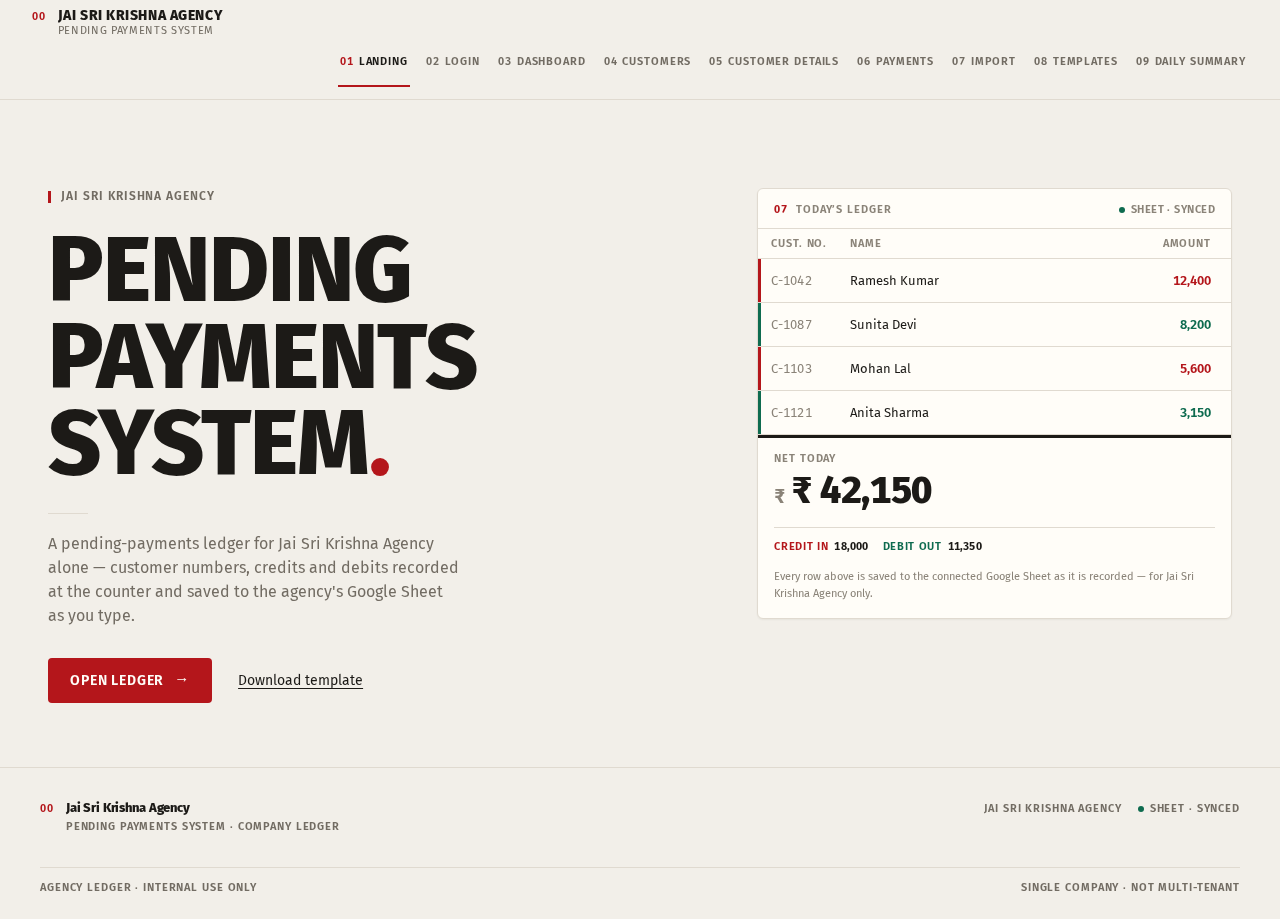
JAI SRI KRISHNA AGENCY
PENDINGPAYMENTSSYSTEM.
A pending-payments ledger for Jai Sri Krishna Agency alone — customer numbers, credits and debits recorded at the counter and saved to the agency's Google Sheet as you type.
- C-1042Ramesh Kumar12,400
- C-1087Sunita Devi8,200
- C-1103Mohan Lal5,600
- C-1121Anita Sharma3,150
₹ 42,150
- Credit in18,000
- Debit out11,350
Every row above is saved to the connected Google Sheet as it is recorded — for Jai Sri Krishna Agency only.
JAI SRI KRISHNA AGENCY
PENDINGPAYMENTSSYSTEM.
A pending-payments ledger for Jai Sri Krishna Agency alone — customer numbers, credits and debits recorded at the counter and saved to the agency's Google Sheet as you type.
- C-1042Ramesh Kumar12,400
- C-1087Sunita Devi8,200
- C-1103Mohan Lal5,600
- C-1121Anita Sharma3,150
₹ 42,150
- Credit in18,000
- Debit out11,350
Every row above is saved to the connected Google Sheet as it is recorded — for Jai Sri Krishna Agency only.
No comments yet. Be the first!