sharp-calculator
Make a calculator
Comments (0)
Sign in to leave a comment
System Requirements
System Requirements Document (SRD)
Project Name: sharp-calculator
1. Introduction
The sharp-calculator project aims to deliver a versatile and user-friendly calculator application tailored to meet the needs of users in Azerbaijan (AZ). This document outlines the system requirements for the project, ensuring clarity and alignment with the project's goals. The calculator will provide a seamless experience for performing a variety of mathematical operations, leveraging pre-resolved API functionalities.
2. System Overview
The sharp-calculator is designed to be a robust and efficient tool for performing mathematical calculations. It will integrate with a pre-defined API that handles all computational logic, ensuring accuracy and reliability. The application will focus on delivering an intuitive user interface and smooth user experience across web and mobile platforms. Localization considerations, such as timezone (AZT) and currency formatting (AZN), will be incorporated where applicable.
3. Functional Requirements
Since all feature requirements have been pre-resolved by the API supervisor, the application will focus on the following:
- As a User, I should be able to interact with the calculator interface to input numbers and operations.
- As a User, I should be able to view the results of calculations in real-time.
- As a User, I should experience a responsive design that works seamlessly on both web and mobile platforms.
- As a User, I should have access to a localized interface that aligns with Azerbaijan's regional settings.
4. User Personas
The sharp-calculator will cater to the following user personas:
-
Casual User
- Description: Individuals who need a simple and intuitive interface for basic calculations.
- Goals: Perform quick arithmetic operations with minimal effort.
-
Advanced User
- Description: Users who require advanced mathematical functions for scientific or professional purposes.
- Goals: Access scientific functions and perform complex calculations efficiently.
-
Student
- Description: Students using the calculator for academic purposes, including solving equations and tracking calculation history.
- Goals: Simplify learning and problem-solving with a reliable tool.
5. Visuals Colors and Theme
The sharp-calculator will feature a modern and sleek design with the following unique color palette:
- Background: #F5F7FA (Soft Mist Gray)
- Surface: #FFFFFF (Pure White)
- Text: #2C3E50 (Deep Slate Blue)
- Accent: #FF6F61 (Coral Red)
- Muted Tones: #BDC3C7 (Cloud Gray)
This palette ensures a clean and professional look while maintaining excellent readability and user comfort.
6. Signature Design Concept
The sharp-calculator will feature a "Dynamic Ripple Interface" as its signature design concept.
Details:
- Homepage Design: The landing page will feature a sleek calculator interface with a dynamic ripple effect. When users press a button, a subtle ripple animation will emanate from the point of interaction, giving a tactile and responsive feel.
- Transitions: Smooth transitions between different modes (e.g., basic, scientific) will be accompanied by a sliding panel animation.
- Micro-Interactions: Buttons will have hover effects with slight color shifts, and the display screen will have a glowing border that pulses gently when a calculation is performed.
- Theme Customization: Users can toggle between light and dark modes, with the ripple effect adapting to the selected theme.
This design will make the calculator visually engaging and memorable, setting it apart from traditional calculator applications.
7. Non-Functional Requirements
- Performance: The application must load within 2 seconds on both web and mobile platforms.
- Scalability: The system should handle up to 10,000 concurrent users without performance degradation.
- Localization: The interface must support Azerbaijani language and regional settings.
- Accessibility: The application must comply with WCAG 2.1 Level AA standards.
- Security: All data exchanges with the API must be encrypted using HTTPS.
8. Tech Stack
The following technologies will be used to develop the sharp-calculator:
-
Frontend:
- React for Web
- React Native for Mobile App
-
Backend:
- Python
- FastAPI
-
Database:
- MySQL (with Alembic for migrations)
-
AI Models (if applicable):
- GPT 5.2 for user-friendly responses
-
AI Tools:
- Litellm for LLM Routing
- Langchain
-
Local Orchestration:
- Docker
- docker-compose
-
Server-Side Orchestration:
- Kubernetes
9. Assumptions and Constraints
- The API will handle all computational logic, and the application will only serve as the user interface.
- The application will be designed for both web and mobile platforms, ensuring a consistent experience across devices.
- Localization will be limited to Azerbaijani language and regional settings.
- The project will adhere to a strict timeline and budget, with no scope for additional features beyond those pre-resolved by the API supervisor.
10. Glossary
- API: Application Programming Interface, a set of functions and procedures allowing the creation of applications that access the features or data of an operating system, application, or other service.
- WCAG: Web Content Accessibility Guidelines, a set of guidelines for making web content more accessible to people with disabilities.
- LLM: Large Language Model, an AI model designed to understand and generate human-like text.
- Localization: The process of adapting software to meet the language, cultural, and other requirements of a specific region.
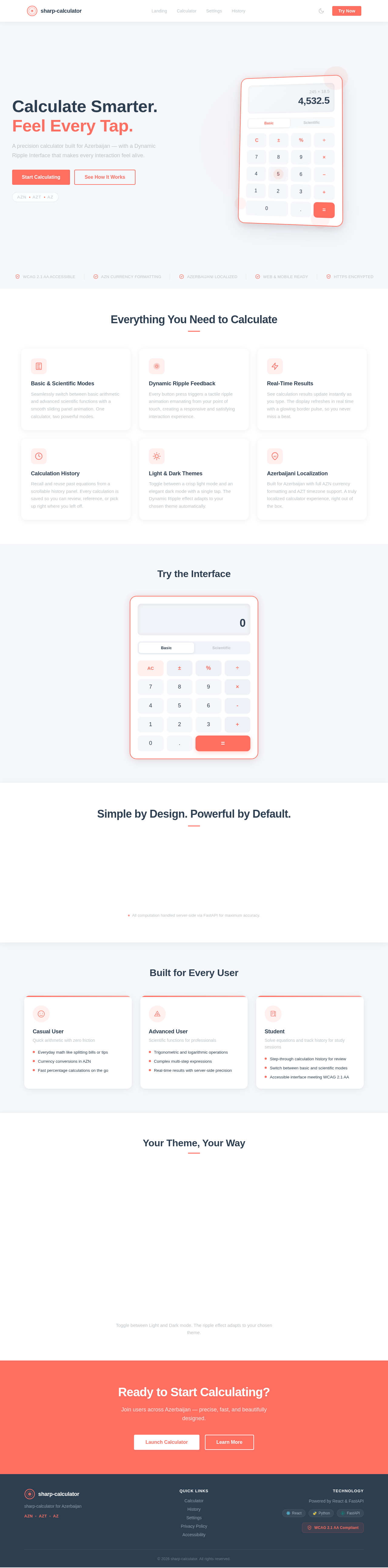
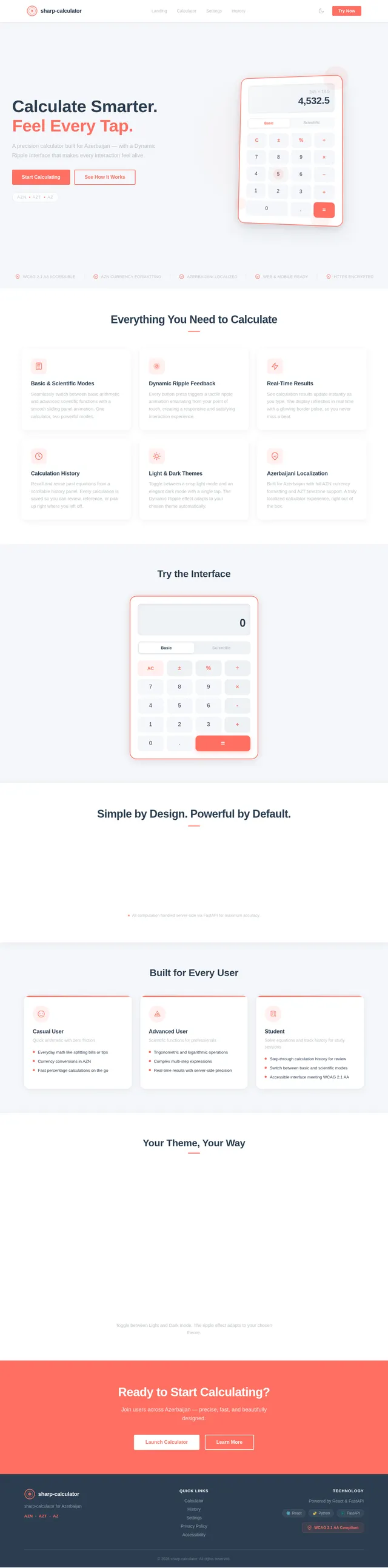
Calculate Smarter. Feel Every Tap.
A precision calculator built for Azerbaijan — with a Dynamic Ripple Interface that makes every interaction feel alive.
245 × 18.5
4,532.5
Everything You Need to Calculate
Basic & Scientific Modes
Seamlessly switch between basic arithmetic and advanced scientific functions with a smooth sliding panel animation. One calculator, two powerful modes.
Dynamic Ripple Feedback
Every button press triggers a tactile ripple animation emanating from your point of touch, creating a responsive and satisfying interaction experience.
Real-Time Results
See calculation results update instantly as you type. The display refreshes in real time with a glowing border pulse, so you never miss a beat.
Calculation History
Recall and reuse past equations from a scrollable history panel. Every calculation is saved so you can review, reference, or pick up right where you left off.
Light & Dark Themes
Toggle between a crisp light mode and an elegant dark mode with a single tap. The Dynamic Ripple effect adapts to your chosen theme automatically.
Azerbaijani Localization
Built for Azerbaijan with full AZN currency formatting and AZT timezone support. A truly localized calculator experience, right out of the box.
Try the Interface
Simple by Design. Powerful by Default.
Built for Every User
Casual User
Quick arithmetic with zero friction
- Everyday math like splitting bills or tips
- Currency conversions in AZN
- Fast percentage calculations on the go
Advanced User
Scientific functions for professionals
- Trigonometric and logarithmic operations
- Complex multi-step expressions
- Real-time results with server-side precision
Student
Solve equations and track history for study sessions
- Step-through calculation history for review
- Switch between basic and scientific modes
- Accessible interface meeting WCAG 2.1 AA
Your Theme, Your Way
Toggle between Light and Dark mode. The ripple effect adapts to your chosen theme.
Ready to Start Calculating?
Join users across Azerbaijan — precise, fast, and beautifully designed.
No comments yet. Be the first!