sharp-app
 Prateek Singh
Are you built a app free?
Comments (0)
Sign in to leave a comment
System Requirements
System Requirements Document (SRD) for sharp-app
1. Introduction
The sharp-app is a grocery delivery application designed to provide a seamless and user-friendly experience for customers in India. This document outlines the system requirements for the development of the app, ensuring it meets the needs of users like Prateek Singh and aligns with the project's goals. The app will focus on core functionalities such as real-time tracking, payment options, and efficient product browsing, tailored to the local market.
2. System Overview
The sharp-app is envisioned as a platform that connects users with grocery stores in their locality or broader regions. It will allow users to browse products, add items to their cart, make payments, and track their orders in real-time. The system will include features for both customers and administrators, ensuring smooth operations and a delightful user experience. The app will be developed with scalability and reliability in mind, leveraging modern technologies to handle high demand and ensure secure transactions.
3. Functional Requirements
The following are the functional requirements for the sharp-app, expressed as story points:
- As a User, I should be able to sign up and log in to the app.
- As a User, I should be able to browse and search for grocery products.
- As a User, I should be able to add items to my cart and proceed to checkout.
- As a User, I should be able to make payments using UPI, cards, or other payment gateways.
- As a User, I should be able to track my delivery in real-time.
- As a User, I should be able to view my order history.
- As an Admin, I should be able to manage product listings and inventory.
- As an Admin, I should be able to view and manage user orders.
- As an Admin, I should be able to generate reports on sales and user activity.
4. User Personas
4.1 Customer
- Description: End-users who will use the app to order groceries.
- Goals: Conveniently browse, purchase, and receive groceries.
- Pain Points: Delayed deliveries, limited payment options, and lack of real-time tracking.
4.2 Admin
- Description: Administrators who manage the app's backend, including product listings and orders.
- Goals: Ensure smooth operations, manage inventory, and oversee user activity.
- Pain Points: Inefficient tools for managing inventory and orders.
5. Visuals Colors and Theme
The sharp-app will feature a vibrant and modern color palette that reflects freshness and trust, aligning with the grocery delivery theme. Below is the unique color palette for the app:
- Background:
#F9F9F9(soft white for a clean and minimal look) - Surface:
#FFFFFF(pure white for cards and containers) - Text:
#333333(dark gray for readability) - Accent:
#FF6F61(bright coral for buttons and highlights) - Muted Tones:
#B0BEC5(light gray for secondary text and borders)
6. Signature Design Concept
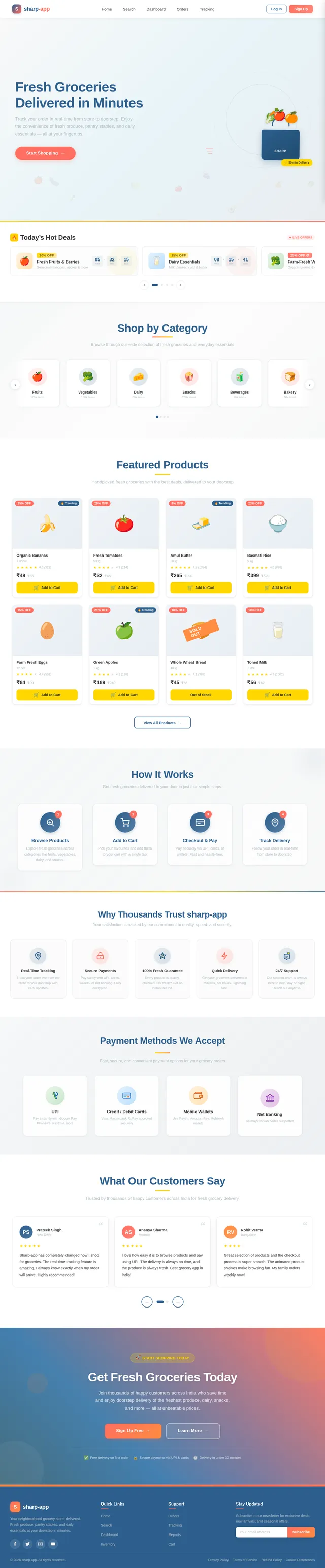
The sharp-app will feature a dynamic, interactive homepage that immerses users in a "marketplace" experience. The landing page will resemble a virtual grocery aisle, where users can scroll horizontally through product categories like fruits, vegetables, dairy, and snacks. Each category will have animated icons that "bounce" slightly when hovered over, creating a playful and engaging interaction.
Key features of the homepage:
- Animated Product Shelves: As users scroll, shelves will slide into view with subtle animations, mimicking the experience of walking through a grocery store.
- Real-Time Offers Section: A banner at the top will display live discounts and offers, with smooth transitions between promotions.
- Interactive Cart Icon: The cart icon will "fill up" visually as users add items, providing instant feedback.
- Color Shifts: The background will subtly change hues based on the time of day (e.g., warm tones in the morning, cooler tones in the evening), creating a dynamic and personalized feel.
This design will make the app visually memorable and encourage users to explore its features.
7. Non-Functional Requirements
- Performance: The app must load within 2 seconds for 90% of users.
- Scalability: The system should support up to 10,000 concurrent users.
- Security: All user data must be encrypted, and payment gateways must comply with PCI DSS standards.
- Availability: The app should have 99.9% uptime.
- Localization: The app will support Indian languages like Hindi and English, and display prices in INR.
8. Tech Stack
The following technologies will be used to develop the sharp-app:
Frontend
- React for Web
- React Native for Mobile App
Backend
- Python
- FastAPI
Database
- MySQL (with Alembic for migrations)
AI Models
- GPT 5.4 for user-friendly responses
- Google Nano Banana for image generation
AI Tools
- Litellm for LLM Routing
- Langchain
Orchestration
- Docker and docker-compose for local orchestration
- Kubernetes for server-side orchestration
9. Assumptions and Constraints
- The app will initially target users in India, with INR as the default currency.
- Users will require an active internet connection to access the app.
- Payment gateway integration will depend on third-party APIs, which may have their own constraints.
- The app will be designed for Android and iOS platforms, as well as a responsive web version.
10. Glossary
- UPI: Unified Payments Interface, a real-time payment system in India.
- PCI DSS: Payment Card Industry Data Security Standard, a set of security standards for handling card payments.
- LLM: Large Language Model, an AI model used for natural language processing.
- Docker: A platform for developing, shipping, and running applications in containers.
- Kubernetes: An open-source system for automating deployment, scaling, and management of containerized applications.
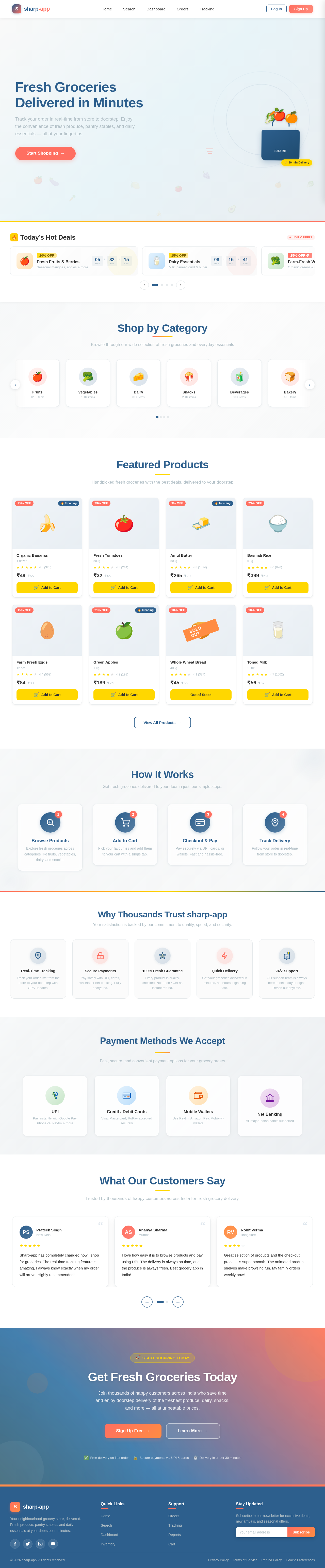
Fresh Groceries Delivered in Minutes
Track your order in real-time from store to doorstep. Enjoy the convenience of fresh produce, pantry staples, and daily essentials — all at your fingertips.
Start ShoppingShop by Category
Browse through our wide selection of fresh groceries and everyday essentials
Fruits
120+ itemsVegetables
150+ itemsDairy
80+ itemsSnacks
200+ itemsBeverages
90+ itemsBakery
60+ itemsMeat & Fish
70+ itemsSpices
110+ itemsFrozen Foods
55+ itemsPersonal Care
95+ itemsFeatured Products
Handpicked fresh groceries with the best deals, delivered to your doorstep
Organic Bananas
1 dozen
Fresh Tomatoes
500g
Amul Butter
500g
Basmati Rice
5 kg
Farm Fresh Eggs
12 pcs
Green Apples
1 kg
Whole Wheat Bread
400g
Toned Milk
1 litre
How It Works
Get fresh groceries delivered to your door in just four simple steps.
Browse Products
Explore fresh groceries across categories like fruits, vegetables, dairy, and snacks.
Add to Cart
Pick your favourites and add them to your cart with a single tap.
Checkout & Pay
Pay securely via UPI, cards, or wallets. Fast and hassle-free.
Track Delivery
Follow your order in real-time from store to doorstep.
Why Thousands Trust sharp-app
Your satisfaction is backed by our commitment to quality, speed, and security.
Payment Methods We Accept
Fast, secure, and convenient payment options for your grocery orders
UPI
Pay instantly with Google Pay, PhonePe, Paytm & more
Credit / Debit Cards
Visa, Mastercard, RuPay accepted securely
Mobile Wallets
Use Paytm, Amazon Pay, Mobikwik wallets
Net Banking
All major Indian banks supported
What Our Customers Say
Trusted by thousands of happy customers across India for fresh grocery delivery.
Get Fresh Groceries Today
Join thousands of happy customers across India who save time and enjoy doorstep delivery of the freshest produce, dairy, snacks, and more — all at unbeatable prices.
No comments yet. Be the first!