shadow-elements
 Harsha Manjunath Naik
A 3d website with a interactive and responsive design where each element move with each scroll in smooth way in a story telling manner. It should be based on MT15. Where it contains all the information of the bike and its variants. Use a 3d realistic model of the bike.


Comments (0)
Sign in to leave a comment
Project Tasks33
Implement LandingHero3D for Landing
As a frontend developer, implement the LandingHero3D section for the Landing page. This section renders a full-screen hero (`lh3d-root`) with a parallax decorative background layer featuring three `lh3d-glow` divs and a `lh3d-grid` using CSS custom property `--scroll` at 0.3x speed. The centerpiece is a `lh3d-stage` div that cycles through 5 Unsplash MT15 photography frames (`BIKE_FRAMES`) via pointer drag interaction: `onPointerDown`, `onPointerMove`, and `onPointerUp` handlers track drag state via `dragState` ref, advancing frames every ~40px of drag delta using the `advanceBy` callback. Before user interaction, a `useEffect` auto-advances frames every 1400ms via `window.setInterval` stored in `autoRef`; once `interacted` state becomes true the interval is cleared. Frame transitions use `framer-motion` `motion` components. The navbar includes `NAV_LINKS` array with 5 links, a `Menu` icon (lucide-react), and a `Move` + `ChevronRight` icon for the drag hint overlay. Implement all pointer event handlers, the auto-play/stop logic, and the CSS parallax glow/grid background.
Implement LandingBikeShowroom for Landing
As a frontend developer, implement the LandingBikeShowroom section for the Landing page. This section renders an interactive studio showroom (`lh3d-stage`) built around a single Unsplash MT15 studio image (`SHOWROOM_IMAGE`). Six feature hotspots (`FEATURES` array: engine, frame, suspension, wheels, lights, tank) are rendered as positioned overlay pins using `pos.x` / `pos.y` percentage coordinates and per-feature accent colors. Clicking a hotspot opens an `AnimatePresence`-driven detail panel (framer-motion) showing the feature `title`, `desc`, and a `specs` array rendered as a grid. The panel includes a close (`X`) button. The stage supports zoom in/out via `ZoomIn` / `ZoomOut` lucide icons updating a zoom state, and a `RotateCcw` reset button. A `MousePointerClick` and `Sparkles` icon are used for UI hints. State is managed with `useState` for active feature and zoom level; drag panning uses `useRef` and `useCallback`. Implement all hotspot positioning, AnimatePresence panel transitions, zoom/pan logic, and the full CSS layout.
Implement LandingFeatureStory for Landing
As a frontend developer, implement the LandingFeatureStory section for the Landing page. This section implements a scroll-driven feature story with 4 scenes (`SCENES` array: engine, frame, suspension, performance), each containing `label`, `idx`, `title`, `img`, `desc`, and a two-item `metrics` array with `val`, `unit`, and `key` fields. A `useEffect` scroll handler reads `sectionRef.current.getBoundingClientRect()` to compute a 0–1 `progress` value and derives the `active` scene index (0–3) stored in `useState`. GSAP (`gsap`) is used to animate `railFills` refs — an array of progress rail elements — as the user scrolls. A `MousePointerClick` lucide icon provides a click-to-advance hint. The layout shows a sticky side panel with scene navigation tabs and an image panel that cross-fades between scene images. Metrics counters animate in on scene activation. Implement the scroll listener, GSAP rail fill animation, scene switching logic, and full CSS for the sticky scroll storytelling layout.
Implement LandingVariantsPreview for Landing
As a frontend developer, implement the LandingVariantsPreview section for the Landing page. This section renders a variant selector for 4 MT15 variants (`VARIANTS` array: Sport, Comfort, Track, Limited) each with `id`, `name`, `tag`, `price`, `baseColor`, `img`, and a 5-item `specs` array using icon keys mapped via `ICON_MAP` to lucide-react components (`Gauge`, `Zap`, `Weight`, `Fuel`, `Cog`). Active variant is tracked with `useState`; switching variants triggers `AnimatePresence` exit/enter transitions (framer-motion) on the bike image and spec cards. A color customizer renders `PRESET_COLORS` (6 swatches: navy, blue, red, amber, black, green) as clickable circles, with the selected color applied via `useMemo`-derived style. An `ArrowRight` lucide icon appears on the CTA button per variant. Implement the variant tab switcher, AnimatePresence image swap, color swatch picker with live color application, spec grid rendering with dynamic icon mapping, and the full CSS grid layout.
Implement LandingCallToAction for Landing
As a frontend developer, implement the LandingCallToAction section for the Landing page. This section renders a final CTA area with 3 action buttons (`CTAS` array: 'Explore Full Specs' → /Features, 'Connect With Community' → /Contact, 'Schedule a Test Drive' → /Variants) with `primary` and `secondary` variants and lucide-react icons (`ArrowRight`, `Users`, `CalendarCheck`). Three social-proof badges (`BADGES`: '120K+ Riders worldwide', '4.9/5 Owner rating', '8,400 Test rides booked') animate in on reveal. An `IntersectionObserver` (threshold 0.2) on `sectionRef` sets `revealed` state to trigger framer-motion entrance animations. A particle system renders 26 particles (`PARTICLE_COUNT`) via `particleEls` ref array; `particleData` ref stores per-particle state (`homeX`, `homeY`, `x`, `y`, `phase`, `amp`, `speed`). A `requestAnimationFrame` tick loop (`rafRef`) applies sinusoidal drift and a magnetic cursor-pull effect using `target` ref tracking mouse position — particles accelerate toward the cursor with `pull = min(120, 6000/dist)`. GSAP is imported for additional entrance animations. A `bikeExit` state controls a bike image exit animation. Implement the full particle system RAF loop, IntersectionObserver reveal, magnetic cursor interaction, AnimatePresence CTA transitions, and CSS layout.
Bike Info API Endpoints
As a Backend Developer, implement FastAPI endpoints for MT15 bike data: GET /api/bikes (list all bikes/variants), GET /api/bikes/{id} (bike detail), GET /api/bikes/{id}/specs (specifications), GET /api/variants (list all variants with color/price/specs). Return structured JSON matching the VARIANTS data shape used in frontend components (id, name, tag, price, color, speed, desc, specs array). Use MongoDB for storage via motor async driver.
Contact Form Submission API
As a Backend Developer, implement FastAPI endpoints for contact form handling: POST /api/contact (accept name, email, phone, subject, message; validate server-side; store in MongoDB contacts collection; return success/error JSON). Include input sanitization, rate limiting middleware, and proper HTTP status codes (200, 400, 422, 500). Optionally send confirmation email stub.
Gallery Images API Endpoints
As a Backend Developer, implement FastAPI endpoints for gallery/image management: GET /api/gallery (paginated list of MT15 images with metadata: id, url, angle, scene, tags), GET /api/gallery/{scene} (images for a specific scene/category). Serve image metadata from MongoDB. Images themselves served via static file hosting or CDN URLs stored in DB. Supports filtering by scene type (showroom, engine, action, etc.).
MongoDB Models and Seed Data
As a Backend Developer, define MongoDB document schemas (Pydantic models) for: Bike (id, name, specs, variants, images), Variant (id, bikeId, name, color, price, specs), GalleryImage (id, url, scene, tags, angle), Contact (id, name, email, phone, subject, message, createdAt). Create seed script (seed.py) to populate development database with all 4 MT15 variants (Sport, Comfort, Track, Limited), their specs, and sample gallery image metadata matching frontend VARIANTS/SPECS arrays. Run via docker-compose entrypoint.
FastAPI CORS and Middleware Setup
As a Backend Developer, configure FastAPI application-level middleware: CORS (allow React frontend origin in dev/prod), request logging middleware, error handler middleware returning consistent JSON error shapes, and health check endpoint GET /api/health. Configure environment-based settings (DATABASE_URL, CORS_ORIGINS, etc.) using pydantic-settings. This is a prerequisite for all other API endpoints.
Global Theme and Design System
As a Frontend Developer, establish the global design system for Shadow-Elements: create src/styles/theme.css (or theme.js) with all CSS custom properties matching the SRD color palette (--primary: #1E3A8A, --primary-light: #3B82F6, --secondary: #F59E0B, --accent: #EF4444, --highlight: #FBBF24, --bg: #F3F4F6, --surface: rgba(255,255,255,0.8), --text: #111827, --text-muted: #6B7280, --border: rgba(209,213,219,0.5)). Add global typography scale, spacing tokens, and reset/base styles. Configure Tailwind (if used) or global CSS entry point. Ensures visual consistency across Landing, Features, Variants, Gallery, and Contact pages.
React Router Page Routing Setup
As a Frontend Developer, configure React Router (v6) with routes for all 5 pages: / (Landing), /Features, /Variants, /Gallery, /Contact. Set up App.jsx with BrowserRouter, route definitions, and lazy loading (React.lazy + Suspense) for each page component to optimize initial load. Add 404 fallback route. Configure scroll restoration on route change. This is a prerequisite for Navbar links and CTA buttons across all pages to function correctly.
MT15 Image Assets Optimization
As a DevOps Engineer, set up image optimization pipeline for all MT15 realistic images used across pages: configure image compression (WebP conversion, srcset generation), add static file serving in FastAPI (or Nginx) for /assets/images/, implement browser caching headers, and create an image manifest JSON. Ensures images load efficiently per Non-Functional Requirement: optimized for performance across different devices and browsers. Add Nginx config for static asset caching (max-age) in docker-compose.
Implement VariantsHero for Variants
As a frontend developer, implement the VariantsHero section for the Variants page. This section renders a full-screen hero with a React Three Fiber Canvas containing a procedural BikeAccent3D component built from Three.js primitives (capsuleGeometry for body/tank, boxGeometry for seat, coneGeometry for front cowl, torusGeometry for wheels, cylinderGeometry for handlebar and exhaust). The BikeAccent3D uses useFrame for continuous Y-axis rotation (delta * 0.28) and @react-three/drei Float components with varying speed/rotationIntensity/floatIntensity for organic floating motion. The section maintains useState for the active VARIANT_COLORS entry (6 color swatches: Deep Indigo, Speed Blue, Racing Red, Amber Gold, Stealth Black, Emerald Green) and passes the selected hex as accentColor prop to BikeAccent3D, dynamically updating meshStandardMaterial color. Framer Motion is used for entrance animations. The Canvas is wrapped in Suspense. Styles live in VariantsHero.css (6514 chars). Note: Navbar component may already exist from the Landing page tasks.
Frontend API Service Layer
As a Frontend Developer, implement a shared API service layer (src/services/api.js or api.ts) that wraps all backend calls: fetchBikes(), fetchVariants(), fetchBikeSpecs(id), fetchGallery(scene), submitContact(formData). Use axios or fetch with base URL from environment variable REACT_APP_API_URL. Handle loading/error states. Export typed response interfaces. This layer will be consumed by VariantsExplorer, GallerySceneOne, ContactForm, and LandingVariantsPreview components. NOTE: Should depend on backend-bike-api, backend-contact-api, backend-gallery-api, and backend-cors-middleware tasks being completed first.
Implement VariantsExplorer for Variants
As a frontend developer, implement the VariantsExplorer section for the Variants page. This section renders an interactive variant explorer powered by a VARIANTS data array (4 variants: MT15 Sport, MT15 Comfort, MT15 Track, MT15 Limited) each with id, name, tag, price, color, speed, desc, and a specs array of 5 items. The section uses useState to track the active variant selection and a custom color override from PRESET_COLORS (6 swatches). Specs are rendered using lucide-react icons mapped via ICON_MAP (Gauge, Zap, Weight, Fuel, Cog) and a Star icon. A React Three Fiber Canvas with Environment and ContactShadows from @react-three/drei renders a 3D bike accent that responds to the selected variant color. AnimatePresence and motion from framer-motion handle variant card transitions. useMemo is used for derived display state. Styles live in VariantsExplorer.css (9814 chars).
Implement VariantsComparison for Variants
As a frontend developer, implement the VariantsComparison section for the Variants page. This section renders a full comparison table/grid for all 4 VARIANTS (Sport, Comfort, Track, Limited) with fields: topSpeed, power, engine, kerbWeight, tankCapacity, priceNum. It includes a FILTERS array (6 filters: All, Fastest, Most Powerful, Lightest, Longest Range, Premium) using lucide-react icons (Gauge, Zap, Weight, Fuel, DollarSign) to highlight winning variants. A SORT_KEYS map (7 keys) drives column-header-click sorting. A Table2/LayoutGrid toggle from lucide-react switches between table and card grid view modes. ChevronDown indicates sortable columns, Flame/TrendingUp/Anchor are used as indicator badges. A BackgroundParticles React.memo component renders 30 floating geometric primitives in a React Three Fiber Canvas (useFrame for slow Y+X rotation). useMemo derives filtered and sorted variant arrays. useRef tracks DOM for scroll reveal. Styles live in VariantsComparison.css (9595 chars).
Implement VariantsCTA for Variants
As a frontend developer, implement the VariantsCTA section for the Variants page. This section renders a conversion-focused CTA with an IntersectionObserver (threshold 0.15) that sets revealed state via useState, triggering staggered CSS entrance animations. A useCallback helper rc() computes reveal class strings with delay suffixes (d1–d4). The layout includes: three decorative gradient blob spans (vcta-blob--a/b/c) and a vcta-grid-overlay for background texture; an eyebrow label with vcta-eyebrow-dot; an h2 headline with vcta-accent-red span for 'MT15'; a subtext paragraph; a two-button row linking to /Variants ('Customize & Order' with Wrench icon) and /Contact ('Schedule Test Drive' with Calendar icon); a trust block with a blockquote testimonial and five Star icons rendered via Array.from({length:5}); and a BADGES array (3 items: 120K+ riders, 4.9/5 rating, 4 variants). Styles live in VariantsCTA.css (8334 chars).
Implement Navbar for Gallery
As a frontend developer, implement the shared Navbar section for the Gallery page. This component may already exist from previous pages (Landing, Variants, Features). It uses useState for `scrolled` and `menuOpen`, a useEffect scroll listener that sets `nv-scrolled` class when window.scrollY > 12, and renders a NAV_LINKS array of 4 links (Features, Variants, Gallery, Contact) using lucide-react icons (Zap, ArrowRight, ChevronRight). Includes a hamburger burger button toggling `nv-panel` mobile drawer with `nv-panel-open` class, and a CTA link to /Gallery. Verify the component is reused or re-implemented consistently with Navbar.css.
Integrate Landing Page Backend
As a Tech Lead, verify end-to-end integration between the Landing page frontend sections (LandingVariantsPreview, LandingBikeShowroom, LandingFeatureStory) and the backend Bike API (GET /api/bikes, GET /api/variants). Ensure BIKE_FRAMES and SHOWROOM_IMAGE are served from API or asset pipeline, VARIANTS data in LandingVariantsPreview hydrates from /api/variants, SCENES metrics in LandingFeatureStory reflect real spec values, and all image URLs resolve correctly in both dev and production environments.
Implement GalleryHero for Gallery
As a frontend developer, implement the GalleryHero section for the Gallery page. Uses @react-three/fiber Canvas with Suspense, @react-three/drei Environment, ContactShadows, Float, and OrbitControls. Contains a memoized TeaserModel component with a useRef group that auto-rotates via useFrame at delta * 0.35. The procedural MT15 silhouette is built from Three.js primitives: capsuleGeometry (tank/body, color #1E3A8A), boxGeometry (seat, handlebars, swingarm), coneGeometry (front cowl, color #3B82F6), torusGeometry (front and rear wheels, color #1f2937), cylinderGeometry (fork tubes, color #9CA3AF). Includes a ChevronDown lucide icon for scroll hint. Wrap Canvas in Suspense with a fallback loader. Apply GalleryHero.css.
Implement GallerySceneOne for Gallery
As a frontend developer, implement the GallerySceneOne section for the Gallery page. Features a full interactive 3D showroom using @react-three/fiber Canvas and @react-three/drei (Environment, ContactShadows, OrbitControls, useProgress, Html). Includes a memoized MT15Model component with useRef group/bodyGroup/wheelF/wheelR that auto-rotates via useFrame (delta * autoSpeed.current = 0.12) and spins wheels using state.clock.elapsedTime * 5. Renders TOOLTIP_POINTS array (4 hotspots: tank, engine, fork, swingarm) with 3D HTML overlays and hover interactions via onPartHover/onPartLeave callbacks. Displays a SPECS panel (5 entries: Top Speed, Power, Engine, Kerb Weight, Torque) with ICON_MAP mapping gauge/zap/weight/cog/flame to lucide-react icons (Gauge, Zap, Weight, Cog, Flame). Includes a useProgress-based Loader component that fades out when progress === 100. Uses RotateCw, ArrowRight lucide icons. Apply GallerySceneOne.css.
Implement GallerySceneTwo for Gallery
As a frontend developer, implement the GallerySceneTwo section for the Gallery page. Features a 3D engine exploded-view scene using @react-three/fiber Canvas, @react-three/drei (Environment, ContactShadows, Float, Html), framer-motion for animated component cards, and lucide-react icons (Cpu, Gauge, Zap, Droplets, Cog, Layers, ChevronDown). Renders ENGINE_COMPONENTS array (6 items: block, vva, piston, turbo, fuel, crank) each with distinct colors, shapes (block/gear/piston/turbo/injector/crank), explodedPos coordinates, and spec/desc text. Includes CROSS_SECTIONS array (3 items: cs-vva, cs-turbo, cs-fuel) with angle values for cross-section slice UI. Implements memoized EngineBlockMesh with groupRef and meshRefs using useFrame for animation, hover state via hoveredId/onHover/onUnhover callbacks. Framer-motion motion components animate component detail cards on selection. Apply GallerySceneTwo.css.
Implement GallerySceneThree for Gallery
As a frontend developer, implement the GallerySceneThree section for the Gallery page. Features a live color configurator 3D scene using @react-three/fiber Canvas, @react-three/drei (Environment, ContactShadows), framer-motion (motion, AnimatePresence), and lucide-react icons (Droplets, Sparkles). Defines PRESETS array (6 color presets: Midnight Indigo #1E3A8A, Electric Blue #3B82F6, Performance Red #EF4444, Amber Glow #F59E0B, Stealth Graphite #111827, Emerald Green #10B981) each with metalness and roughness values. Implements memoized BikeModel accepting color/metalness/roughness props with useRef group auto-rotating at delta * 0.45 via useFrame. Bike geometry includes capsuleGeometry (tank), boxGeometry (seat), coneGeometry (front cowl), sphereGeometry (headlight accent with emissive #FBBF24), cylinderGeometry (handlebars, front forks). Selecting a preset re-renders BikeModel with new material values. AnimatePresence wraps color swatch transitions. Apply GallerySceneThree.css.
Implement GalleryCTA for Gallery
As a frontend developer, implement the GalleryCTA section for the Gallery page. Features a rich CTA block combining a @react-three/fiber Canvas 3D background (AmbientShards component: 18 IcosahedronGeometry shards, colors alternating #3B82F6/#F59E0B, opacity 0.18, animated via useFrame with sinusoidal x/y motion per-shard using shardData.current ref), a 2D HTML magnetic particle swarm overlay (useParticleSwarm custom hook, PARTICLE_COUNT = 32 particles with homeX/homeY/x/y/phase/amp/speed, rAF tick loop), and GSAP animations triggered on mount. Uses framer-motion for section entrance animations. Lucide icons: CalendarCheck, Bike, ArrowRight, Star, CheckCircle. Buttons have refs (btnRefPrimary, btnRefSecondary) passed to useParticleSwarm for magnetic hover interactions. containerRef wraps the entire section for particle bounds. Apply GalleryCTA.css.
Implement Footer for Gallery
As a frontend developer, implement the shared Footer section for the Gallery page. This component may already exist from previous pages (Landing, Variants, Features). Uses useState for `email` and `subscribed` fields, with a handleSubscribe form handler that sets subscribed=true when email is non-empty. Renders four navigation columns: brand column with ftr-emblem, ftr-brand-name 'Shadow-Elements', ftr-brand-tag 'MT15 Virtual Showroom', blurb text, and conditional email subscribe form (showing ArrowRight on button) vs subscribed confirmation (Check icon). exploreLinks and supportLinks arrays each contain 4 href entries (/Features, /Variants, /Gallery, /Contact). socials array renders Instagram, Twitter, Youtube, Facebook lucide-react icons. Includes ftr-glow decorative element. Apply Footer.css.
Implement ContactHeader for Contact
As a frontend developer, implement the ContactHeader section for the Contact page. This section renders a full-width hero header (`ch-root`) with a layered 3D canvas background and content overlay. The 3D layer (`ch-canvas-wrap`) uses `@react-three/fiber` Canvas with a `DecorativeRing` component (React.memo) that animates two torus geometries via `useFrame`: an outer ring (torusGeometry args [2.2, 0.06, 16, 80], navy blue #1E3A8A, opacity 0.35) rotating on Y and oscillating on X, and an inner ring (torusGeometry args [1.6, 0.04, 16, 64], blue #3B82F6, opacity 0.25) counter-rotating on Y with cosine Z oscillation. Camera is positioned at [0,0,6] with fov 45, dpr capped at 1.5, alpha transparent GL context. The content layer (`ch-content`) includes: a breadcrumb nav with Home→Contact links (`ch-breadcrumb`, `ch-breadcrumb-sep`, `ch-breadcrumb-current`), an H1 headline with `ch-accent` span on 'Touch', a subheading paragraph about MT15 enquiries and 24hr response, and a decorative `ch-divider` element. Uses `useRef` and `useMemo`, with `Suspense fallback={null}` wrapping DecorativeRing. Note: Navbar may already exist from Gallery page (task c008c80f-6bb5-4cd9-8120-c70ab9e90ed4).
Implement ContactForm for Contact
As a frontend developer, implement the ContactForm section for the Contact page. This section contains a fully validated contact form with a 3D animated particle background. The `ParticleField` component uses `useFrame` to animate 40 randomly initialized sphereGeometry particles (size 0.02–0.06) in sinusoidal floating motion across x/y axes; particles are colored red (#EF4444), blue (#3B82F6), or amber (#F59E0B) based on index modulo. The main `ContactForm` component manages `formData` state (name, email, phone, subject, message fields), `touched` state for field blur tracking, `submitting` boolean, and `globalFeedback` (null | success | error). Validation via `useCallback`-memoized `errors()` function covers: name (required, min 2 chars), email (required, regex format), phone (optional, regex format), subject (required, min 3 chars). Icons from lucide-react: `Send`, `CheckCircle`, `AlertCircle`, `XCircle` used for submit button and feedback states. Form renders field-level error messages when touched. Submission sets `submitting=true`, shows global feedback on resolution. Canvas uses alpha transparent background with ambient+directional lighting. Imports from `@react-three/fiber`. CSS in ContactForm.css (6912 chars of form layout, field states, error styling, submission feedback).
Implement ContactInfo for Contact
As a frontend developer, implement the ContactInfo section for the Contact page. This section features a detailed contact information panel alongside a 3D mini MT15 bike showcase model. The `BikeModel` component (React.memo) uses `useFrame` for continuous Y-axis rotation (delta * 0.3) and renders a full procedural bike via Three.js primitives: capsuleGeometry body (navy #1E3A8A, metalness 0.7), boxGeometry seat (dark #111827), coneGeometry front cowl (amber #F59E0B), emissive sphereGeometry headlight (#FBBF24, emissiveIntensity 0.9), two cylinderGeometry handlebars, cylinderGeometry exhaust (grey #9CA3AF), and two torusGeometry wheels (dark grey, rotation PI/2). The Canvas integrates `ContactShadows`, `Float`, and `Environment` from `@react-three/drei`. The info panel uses lucide-react icons: `Mail`, `Phone`, `MapPin`, `Clock`, `ExternalLink`, `ArrowRight` for displaying contact details (email, phone, address, hours). `useMemo` is used to memoize the `tanks` geometry group. Wraps 3D content in `Suspense`. CSS in ContactInfo.css (4306 chars) handles two-column layout, info card styling, and 3D canvas sizing.
Implement ContactCTA for Contact
As a frontend developer, implement the ContactCTA section for the Contact page. This section renders a team-focused call-to-action (`cocta-root`) with decorative CSS blob backgrounds (`cocta-blobs` containing three `cocta-blob` spans: one, two, three). Content is divided into: (1) a headline block (`cocta-cta-block`) with H2 featuring `.accent` span on 'Our Team' and supporting paragraph about 24hr response time; (2) a trust badges row (`cocta-trust-row`) rendering 4 `TRUST_BADGES` entries — ShieldCheck (Verified Support, default), Award (ISO Certified, gold), Star (4.9 Rating, gold), Clock (24hr Response, red) — each as a `cocta-badge` div with conditionally classed `cocta-badge-icon`; (3) a team carousel section (`cocta-team-section`) with `Users` icon label and `cocta-carousel` rendering 5 `TEAM_MEMBERS` (Rajesh Kumar/Lead Support, Priya Sharma/Community Manager, Arjun Verma/Technical Specialist, Meera Nair/Customer Success, Deepak Iyer/Service Advisor), each with initials avatar using `avatarClass` variants (sport, comfort, track, limited, support) and online presence indicator. Uses `useState` hook, lucide-react icons: `ArrowRight`, `Phone`, `ShieldCheck`, `Award`, `Star`, `Clock`, `Users`. CSS in ContactCTA.css (8755 chars) handles blob animations, badge variants, carousel scrolling, avatar color variants, and online status dots.
Integrate Variants Page Backend
As a Tech Lead, verify end-to-end integration between the Variants page frontend sections (VariantsExplorer, VariantsHero, VariantsComparison, VariantsCTA) and the backend Bike/Variants API (GET /api/variants, GET /api/bikes/{id}/specs). Ensure the VARIANTS data array in frontend components is replaced/hydrated from real API responses, AnimatePresence transitions still work with async data, spec comparison table renders correctly with live data, and loading/error states are handled gracefully. NOTE: Also depends on frontend-api-service and backend-bike-api.
Integrate Gallery Page Backend
As a Tech Lead, verify end-to-end integration between the Gallery page frontend sections (GallerySceneOne, GallerySceneTwo, GallerySceneThree, GalleryHero) and the backend Gallery API (GET /api/gallery, GET /api/gallery/{scene}). Ensure 3D scene image sources are loaded from API responses, scene transitions work with dynamic image URLs, color configurator presets remain client-side while base images come from API, and error/fallback states display placeholder content.
Integrate Contact Form Backend
As a Tech Lead, verify end-to-end integration between the ContactForm frontend section and the backend Contact API (POST /api/contact). Ensure form submission POSTs correctly structured JSON to the API, server-side validation errors map to field-level error display in the UI, global success/error feedback states reflect API response, submitting boolean correctly disables the form during in-flight requests, and network error handling shows user-friendly messages.
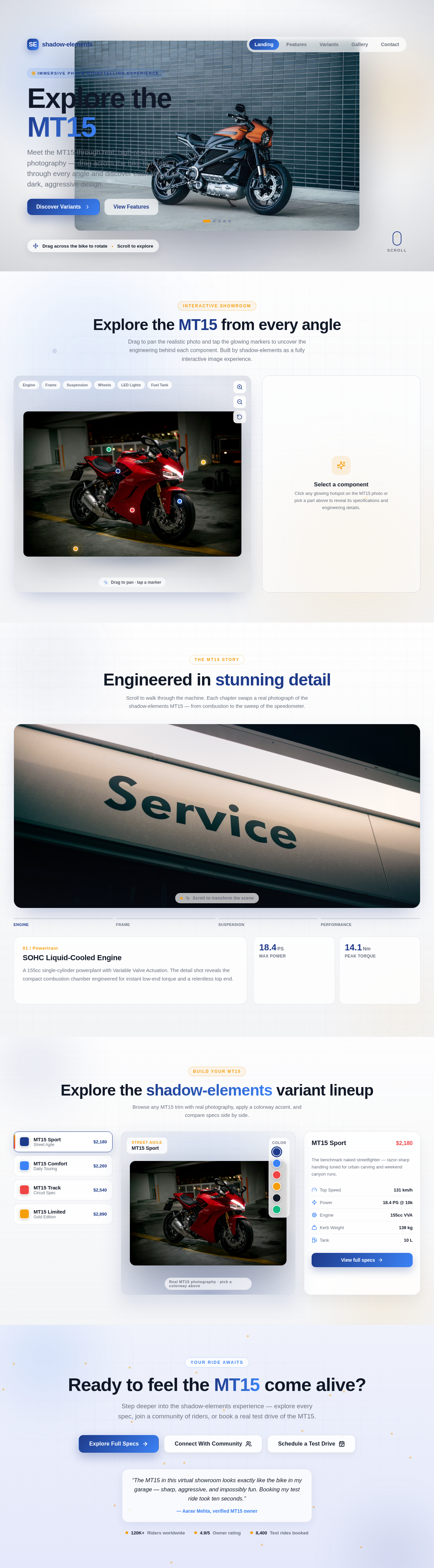


Explore the MT15 from every angle
Drag to pan the realistic photo and tap the glowing markers to uncover the engineering behind each component. Built by shadow-elements as a fully interactive image experience.

Click any glowing hotspot on the MT15 photo or pick a part above to reveal its specifications and engineering details.
Engineered in stunning detail
Scroll to walk through the machine. Each chapter swaps a real photograph of the shadow-elements MT15 — from combustion to the sweep of the speedometer.

Explore the shadow-elements variant lineup
Browse any MT15 trim with real photography, apply a colorway accent, and compare specs side by side.
The benchmark naked streetfighter — razor-sharp handling tuned for urban carving and weekend canyon runs.
Ready to feel the MT15 come alive?
Step deeper into the shadow-elements experience — explore every spec, join a community of riders, or book a real test drive of the MT15.
“The MT15 in this virtual showroom looks exactly like the bike in my garage — sharp, aggressive, and impossibly fun. Booking my test ride took ten seconds.”
No comments yet. Be the first!