school-management-platform
 Hussain Bekhushi
Create a production-ready School Management System using Python Flask for backend, ReactJS for frontend, PostgreSQL for database, and Docker to deploy. Include student list, teacher list, grade list, subject list, class list, and an admin panel.

Comments (0)
Sign in to leave a comment
System Requirements
System Requirements Document for school-management-platform
1. Introduction
school-management-platform is a production-ready School Management System that keeps a school's core records — students, teachers, grades, subjects, and classes — in one honest, consistently maintained place, with an admin panel where administrators oversee and maintain those records. It is built with Python Flask for the backend, ReactJS for the frontend, PostgreSQL for the database, and Docker for deployment.
The product serves the people who care for others' records every day: School Administrators who maintain the school's directory and academic records and approve teacher-entered marks, Teachers who consult the student, class, and subject lists for the classes they teach, enter marks for their students, and mark attendance for their classes, and Parents who use a Parent Portal to view their child's attendance and approved grades. Teacher-entered marks are held as Pending Admin Approval and become visible to parents only after an administrator approves them. Alongside the core register, the platform includes an Attendance Management module (attendance marking and per-student attendance records tied to students and classes) and a Fee Management module (fee structures, invoices, and payment status tied to students and classes). A fee-pending business rule governs report cards: if a student's school fees are pending for more than 60 days, grade report card downloads are blocked. The register must be trustworthy and legible but feel humane — like a well-made school handbook rather than a corporate dashboard.
2. System Overview
school-management-platform is a web application delivered as a ReactJS single-page frontend talking to a Python Flask backend API, persisting all school records in PostgreSQL, and deployed with Docker. It provides six source-named record destinations — student list, teacher list, grade list, subject list, and class list — plus an admin panel where administrators manage the school's records. Two additional modules extend the register: Attendance Management (a login-required, teacher-facing Attendance page for marking attendance for students in the classes a teacher teaches and reviewing per-student attendance records, plus administrator control of attendance through the admin panel) and Fee Management (administrator control of fee structures, invoices, and payment status through the admin panel). A Parent Portal gives signed-in Parents a read-only view of their child's attendance and approved grades, including grade report card downloads that are blocked while the child's school fees have been pending for more than 60 days. Grade records follow a two-step approval lifecycle: a mark entered by a Teacher is stored as Pending Admin Approval and is not visible to Parents until a School Administrator approves it. Anonymous visitors reach a Landing page, establish first use through Sign Up, and returning users verify through Login. All record destinations require login; the admin panel is additionally restricted to the administrator role; the Attendance page is restricted to signed-in Teachers; the Parent Portal is restricted to signed-in Parents.
Actors
- School Administrator (human persona) — oversees and maintains students, teachers, grades, subjects, and classes through the admin panel; manages attendance records and fee structures, invoices, and payment status through the admin panel; consults every list.
- Teacher (human persona) — consults the student, class, and subject lists for the classes they teach, enters marks for their students (which remain Pending Admin Approval until an administrator approves them), and marks and reviews attendance for their classes and students.
- Parent (human persona) — uses the Parent Portal to view their child's attendance and approved grades and to download grade report cards, subject to the 60-day pending-fee block.
- Anonymous visitor — a pre-identity state of the three human personas, reaching Landing, Sign Up, and Login only.
Current delivery and ownership
- All product surfaces are first-party custom pages owned by the application.
- Identity is application-owned: self-service Sign Up establishes first use; Login restores access; the administrator role is established before the admin panel becomes available; parent accounts reach the Parent Portal.
- The Flask backend owns all record APIs and domain logic, including the attendance and fee modules, the grade approval lifecycle, the Parent Portal reads, and the report card download rule; PostgreSQL owns durable state; Docker packages the deployment.
Narrow exclusions
- No student persona, student portal, or student login is established. The Parent Portal is a parent-facing surface only; it does not establish a student identity.
- No timetable, payroll, examination-scheduling, or messaging capability is established.
- No invitation or provisioning boundary is established; enrollment is self-service only.
- Attendance Management covers attendance marking and per-student attendance records only; no biometric, device-integration, or automated attendance-capture capability is established.
- Fee Management covers fee structures, invoices, and payment status only; no online payment gateway, card processing, or external payment-provider integration is established.
Removed from scope
- None. No concept was removed by the authoritative requirement thread.
2a. Product Interpretation and Delivery Boundary
The requester asked for a production-ready School Management System with a fixed technology shape (Flask, ReactJS, PostgreSQL, Docker) and a fixed set of record destinations plus an admin panel. That is the whole current product: a trustworthy register of students, teachers, grades, subjects, and classes, maintained by administrators and consulted by teachers.
Because the records are durable, actor-specific, and must remain bound to the correct participant, the application owns identity. Anonymous visitors can read the Landing page and can reach Sign Up and Login without being signed in; every record destination and the admin panel require an authenticated session, and the admin panel additionally requires the administrator role. A newly enrolled account is a teacher-level account; the administrator role is established before the admin panel is available (see Assumptions for the bootstrap boundary). No account-management capabilities beyond enrollment and login are in scope.
The Attendance Management module is one place where a Teacher writes to the register: teachers mark attendance for students in the classes they teach and review per-student attendance records, while administrators control attendance management through the admin panel. Teachers also enter marks for their students; those marks are written as Pending Admin Approval and are not visible to Parents until an administrator approves them. The Fee Management module is administrator-only: fee structures, invoices, and payment status are created and maintained through the admin panel, and teachers read no fee data. Both modules are current scope, not future horizon.
The Parent Portal is a read-only parent-facing surface: a signed-in Parent views their child's attendance records and approved grade records and downloads the child's grade report card. Parents never write to the register and never see other students' records. The report card download is governed by one business rule: if the child's school fees have been pending for more than 60 days, the download is blocked and the portal explains why; the rule blocks the download only and does not remove the parent's ability to view attendance and grades in the portal.
Everything described here is current. No future-horizon features are accepted.
2c. Page Content and Component Coverage
Landing
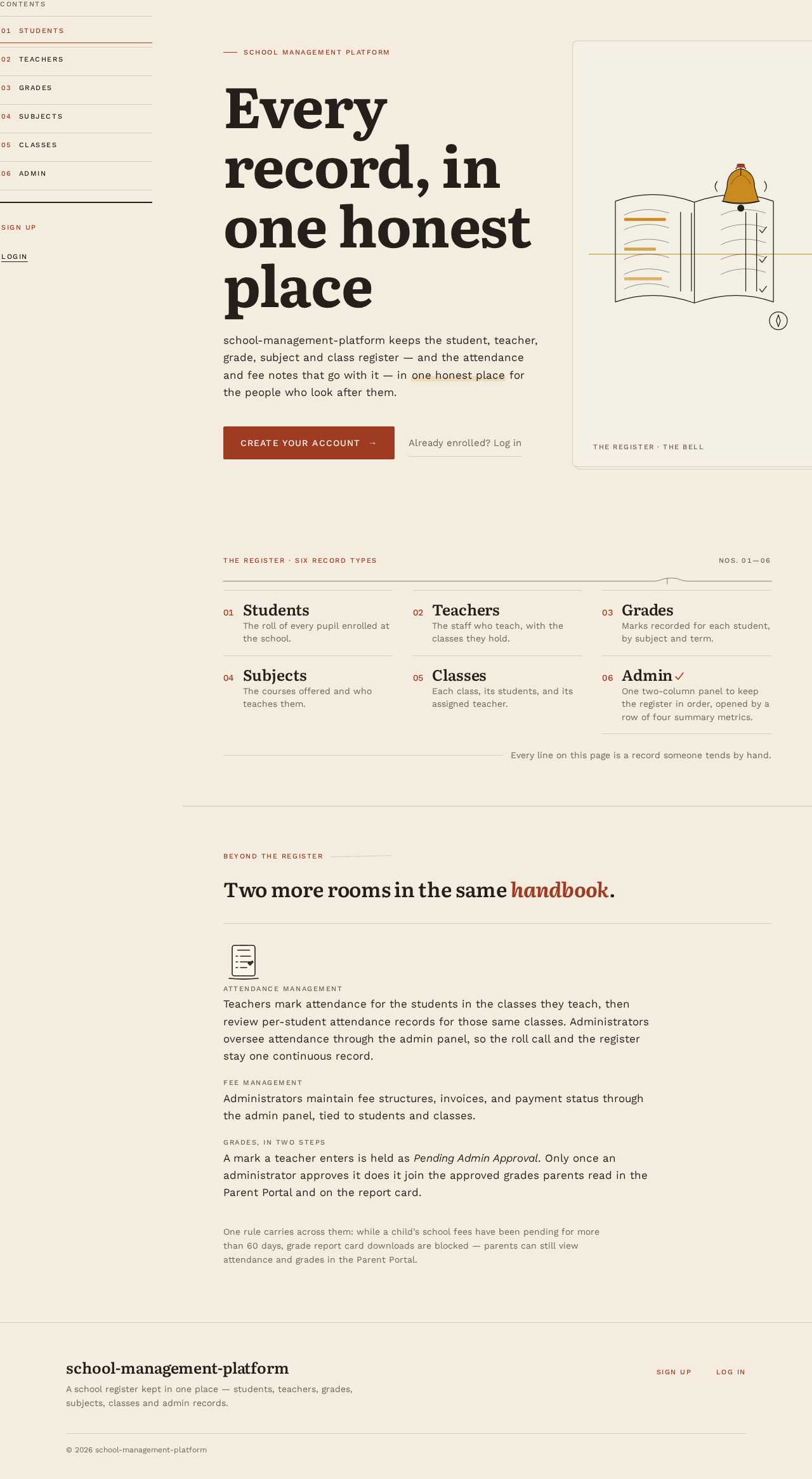
- Information/state: Anonymous public entry. Asymmetric editorial spread: rust kicker label, Literata headline "Every record, in one honest place", a single rust rectangular CTA, and a full-height cream panel with an ink-line illustration of a school register and bell bleeding off the right edge with a thin mustard rule behind it. Below the fold, a ruled three-column ledger of the six record types (students, teachers, grades, subjects, classes, admin) with tabular numerals, followed by a short ruled note introducing the Attendance and Fee modules.
- Primary action: CTA to Sign Up. Supporting action: link to Login.
- Domain entities: none persisted; presents the six record types and the Attendance and Fee modules.
- Component responsibilities: hero spread, ledger of record types, module note (attendance, fees), persistent left rail of numbered sections (01 Students … 06 Admin) that becomes a horizontal scrollable strip on mobile.
- States: loading (static content, no data fetch required); empty/success/error not applicable; recovery — if a signed-in user lands here, offer continuation into the record destinations.
Login
- Information/state: Anonymous identity-access surface. Email and password fields; inline validation; error banner for invalid credentials.
- Primary action: submit credentials to establish a session. Supporting action: link to Sign Up; link back to Landing.
- Domain entities: account (email, password credential, role).
- Component responsibilities: credential form with mustard underline focus states and a single rust submit; error region.
- States: loading (submit disabled, progress indicated); empty (blank form); success (redirect to the destination the user intended, or to the student list); error (invalid credentials, network failure) with retry; recovery — preserved email field, cleared password.
Sign Up
- Information/state: Anonymous self-service enrollment. Name, email, password, password confirmation; inline validation; error banner for duplicate email or mismatch.
- Primary action: create an account and establish a session. Supporting action: link to Login; link back to Landing.
- Domain entities: account (name, email, password credential, role).
- Component responsibilities: enrollment form; validation messages; error region.
- States: loading; empty; success (session established, continuation into record destinations); error (duplicate email, validation failure, network failure) with retry; recovery — preserved entered values except password.
student list
- Information/state: Login-required. Essay-style rule and illustrated section opener, then a ruled table of students with 1px dividers, generous row height, and tabular numerals: name (left-aligned), class, and active-status tick.
- Primary actions: browse and read student records. Supporting actions: navigate to other lists via the left rail; open a student's row detail.
- Domain entities: student (name, class, active status).
- Component responsibilities: section opener, ruled table, row detail, left rail.
- States: loading (skeleton rows); empty (illustrated empty state with a link to the admin panel for administrators); success; error (fetch failure with retry); recovery — retry preserves scroll position.
teacher list
- Information/state: Login-required. Section opener and ruled table of teachers: name (left-aligned), subjects taught, active-status tick.
- Primary actions: browse and read teacher records. Supporting actions: left-rail navigation; row detail.
- Domain entities: teacher (name, subjects, active status).
- Component responsibilities: section opener, ruled table, row detail, left rail.
- States: loading; empty; success; error with retry; recovery as above.
grade list
- Information/state: Login-required. Section opener and ruled table of grade records: student name (left-aligned), subject, class, grade value (right-aligned, tabular numerals), mustard grade band, and an approval-status cell showing Pending Admin Approval or Approved as a mustard-marked status label.
- Primary actions: browse and read grade records; Teachers enter marks for their students. Supporting actions: left-rail navigation; row detail; Teachers submit an entered mark for approval.
- Domain entities: grade record (student, subject, class, value, approval status, entered by, approved by).
- Component responsibilities: section opener, ruled table with right-aligned numerals, approval-status cell, mark-entry control for Teachers, row detail, left rail.
- States: loading; empty; success (marks saved as Pending Admin Approval with a confirmation that they are not yet visible to parents); error with retry; recovery as above.
subject list
- Information/state: Login-required. Section opener and ruled table of subjects: subject name (left-aligned), classes in which it is taught, active-status tick.
- Primary actions: browse and read subject records. Supporting actions: left-rail navigation; row detail.
- Domain entities: subject (name, classes, active status).
- Component responsibilities: section opener, ruled table, row detail, left rail.
- States: loading; empty; success; error with retry; recovery as above.
class list
- Information/state: Login-required. Section opener and ruled table of classes: class name (left-aligned), assigned teacher, enrolled-student count (tabular numerals), active-status tick.
- Primary actions: browse and read class records. Supporting actions: left-rail navigation; row detail.
- Domain entities: class (name, teacher, student count, active status).
- Component responsibilities: section opener, ruled table, row detail, left rail.
- States: loading; empty; success; error with retry; recovery as above.
Attendance
- Information/state: Login-required and restricted to signed-in Teachers. Section opener and a class selector limited to the classes the teacher teaches, then a ruled roll-call table of the students enrolled in the selected class for a chosen date: student name (left-aligned), attendance status (present / absent / late) as a mustard-marked status cell, and a per-student attendance summary (sessions attended out of sessions recorded, tabular numerals).
- Primary actions: mark and save attendance for the students in a class on a date. Supporting actions: switch class; change date; open a student's attendance record detail; left-rail navigation.
- Domain entities: attendance record (student, class, date, status), student, class.
- Component responsibilities: section opener, class selector, date selector, roll-call table with status controls, per-student attendance summary, row detail, save confirmation, left rail.
- States: loading (roll-call rows as skeleton lines, controls disabled); empty (no students enrolled in the selected class, or no attendance recorded yet for the date); success (saved confirmation and refreshed summary); error (fetch or save failure with retry, unsaved marks preserved); recovery — retry preserves the selected class, date, and scroll position. Non-teachers who reach this page see an access-denied state with a link back to the record lists.
Parent Portal
- Information/state: Login-required and role-restricted to signed-in Parents. Section opener and a child selector (the parent's own child or children only), then two ruled regions: an attendance region listing the child's attendance records by date and class with the present / absent / late status as a mustard-marked status cell and the per-student attendance summary (sessions attended out of sessions recorded, tabular numerals), and a grades region listing the child's approved grade records only, with subject, class, right-aligned grade value in tabular numerals, and mustard grade band. Marks still Pending Admin Approval are not listed. A report card region offers the grade report card download.
- Primary actions: view the child's attendance and grades; download the child's grade report card. Supporting actions: switch child; change the attendance date range; left-rail navigation.
- Domain entities: parent account, student (the parent's child), attendance record, approved grade record, invoice and payment status (read only, for the report card rule), grade report card.
- Component responsibilities: section opener, child selector, attendance region with per-student attendance summary, grades region with right-aligned numerals, report card download control, fee-pending block notice, left rail.
- States: loading (skeleton rows for both regions, download control disabled); empty (no attendance recorded yet, or no approved grade records yet, each with its own ruled note); success (attendance and approved grades rendered; report card download available); blocked (fees pending more than 60 days — the download control is disabled with a ruled notice stating that the report card is unavailable while fees are pending beyond 60 days, and attendance and grades remain fully readable); error (fetch or download failure with retry); recovery — retry preserves the selected child, date range, and scroll position. Non-parents who reach this page see an access-denied state with a link back to the record lists.
admin panel
- Information/state: Login-required and role-restricted to School Administrator. Two-column handbook spread on the Deep Indigo / Dark Slate admin dashboard theme: left column is a numbered nav (students, teachers, grades, subjects, classes, attendance, fees, approvals); right column is one focused record form at a time with mustard underline focus states and a rust submit that is the only saturated element on screen. Above the spread, a top summary metric row of four metric cards — Total Students, Total Teachers, Today's Attendance %, and Pending Fee Alerts — each showing its label and a tabular-numeral value. The approvals region lists teacher-entered marks awaiting approval with student, subject, class, grade value in tabular numerals, and the entering teacher.
- Primary actions: create and edit records for the selected record type; manage attendance records; manage fee structures, invoices, and payment status; approve or reject teacher-entered marks. Supporting actions: switch record type via the numbered nav; cancel an edit; filter pending marks by class or subject; read the four summary metrics.
- Domain entities: student, teacher, grade record (with approval status), subject, class, attendance record, fee structure, invoice, payment status; summary metrics derived from students, teachers, attendance records for today, and invoices with pending fees.
- Component responsibilities: top summary metric row (four metric cards: Total Students, Total Teachers, Today's Attendance %, Pending Fee Alerts), numbered nav, focused record form, attendance management region (attendance records by class and date), fee management region (fee structures, invoices, payment status), grade approval region (pending marks with approve and reject controls), validation region, save confirmation.
- States: loading (metric cards show placeholder values and form fields are disabled while fetching); empty (new-record form; no marks pending approval, with a ruled note; a metric with no underlying records shows 0 in tabular numerals); success (confirmation and refreshed list; metrics refresh with the change; an approved mark leaves the pending list and becomes visible to parents); error (validation or save failure with field-level messages and retry; a metric fetch failure shows an inline retry on that card without blocking the form); recovery — unsaved values preserved on failure. Non-administrators who reach this page see an access-denied state with a link back to the record lists.
3. Functional Requirements
FR-1 — Technology shape (explicit) As Hussain Bekhushi I should have the system built with a Python Flask backend, a ReactJS frontend, a PostgreSQL database, and Docker deployment, so that the platform is production-ready on the requested stack.
- Trigger: deployment. Observable result: the running system serves the ReactJS frontend, the Flask API, and PostgreSQL, all orchestrated by Docker. Failure: a service fails to start; recovery via container restart. Continuation: the platform serves all record destinations.
FR-2 — Student list (explicit) As a School Administrator or Teacher I should view the student list, so that I can see every student on record.
- Trigger: authenticated navigation to student list. Observable result: a ruled table of students with name, class, and active status. Access: login required. Failure: fetch error with retry. Continuation: open a row detail or navigate to another list.
FR-3 — Teacher list (explicit) As a School Administrator or Teacher I should view the teacher list, so that I can see every teacher on record.
- Trigger: authenticated navigation. Observable result: ruled table of teachers with name, subjects, and active status. Access: login required. Failure: fetch error with retry. Continuation: row detail or another list.
FR-4 — Grade list (explicit) As a School Administrator or Teacher I should view the grade list, so that I can review grades recorded for students.
- Trigger: authenticated navigation. Observable result: ruled table of grade records with student, subject, class, right-aligned grade value, and an approval-status cell showing Pending Admin Approval or Approved. Access: login required. Failure: fetch error with retry. Continuation: row detail or another list.
FR-4a — Teacher mark entry (explicit) As a Teacher I should enter marks for my students, so that their grade records are recorded for approval.
- Trigger: signed-in Teacher enters a mark for a student in a class they teach from the grade list. Observable result: the grade record is saved with approval status Pending Admin Approval, bound to the student, subject, and class, and the grade list shows the pending status; the mark is not visible to Parents. Access: login required and teacher role required. Failure: validation or save error with field-level messages and retry; entered values preserved. Continuation: the teacher reviews the pending mark in the grade list or returns to another list.
FR-4b — Two-step grade approval (explicit) As a School Administrator I should approve teacher-entered marks, so that only verified grades become visible to students and parents.
- Trigger: administrator opens the approvals region of the admin panel and selects a pending mark. Observable result: the administrator approves or rejects the mark; an approved grade record becomes visible in the Parent Portal grades region and in the child's grade report card, while a rejected mark does not become visible. Access: login required and administrator role required. Failure: validation or save error with field-level messages and retry; the pending list is preserved. Continuation: the administrator approves further marks or switches record type. Non-administrators see an access-denied state.
FR-5 — Subject list (explicit) As a School Administrator or Teacher I should view the subject list, so that I can see every subject taught.
- Trigger: authenticated navigation. Observable result: ruled table of subjects with name, classes, and active status. Access: login required. Failure: fetch error with retry. Continuation: row detail or another list.
FR-6 — Class list (explicit) As a School Administrator or Teacher I should view the class list, so that I can see every class, its teacher, and its enrolled-student count.
- Trigger: authenticated navigation. Observable result: ruled table of classes. Access: login required. Failure: fetch error with retry. Continuation: row detail or another list.
FR-7 — Admin panel (explicit) As a School Administrator I should use the admin panel to manage the school's records — students, teachers, grades, subjects, and classes — so that the lists stay accurate and current.
- Trigger: administrator selects a record type in the numbered nav. Observable result: a focused record form; on submit, the record is created or updated and the corresponding list reflects the change. Access: login required and administrator role required. Failure: validation or save error with field-level messages and retry; unsaved values preserved. Continuation: switch record type or return to the lists. Non-administrators see an access-denied state.
FR-7a — Admin dashboard summary metrics (explicit) As a School Administrator I should see four summary metric cards at the top of the admin panel, so that I can read the school's current state at a glance before working on records.
- Trigger: administrator opens the admin panel. Observable result: a top summary metric row renders four metric cards — Total Students (count of student records), Total Teachers (count of teacher records), Today's Attendance % (sessions marked present or late today out of sessions recorded for today, shown as a percentage), and Pending Fee Alerts (count of invoices carrying an outstanding balance past their due date) — each with its label and a tabular-numeral value, served by the shared Flask backend. Access: login required and administrator role required. Failure: a metric fetch failure shows an inline retry on the affected card without blocking the record form; a metric with no underlying records shows 0. Continuation: the administrator proceeds to the numbered nav and record form, and the metrics refresh after a save. Non-administrators see an access-denied state.
FR-8 — Anonymous entry (required_inference) As an anonymous visitor I should reach the Landing page before any identity establishment, so that I understand what the platform is and how to begin.
- Trigger: unauthenticated visit. Observable result: Landing renders the hero, the six-record ledger, and CTAs to Sign Up and Login. Access: none. Failure: static content, no data dependency. Continuation: Sign Up or Login.
FR-9 — Self-service enrollment (required_inference) As an anonymous visitor I should enroll through Sign Up, so that I establish first use of the platform.
- Trigger: submit name, email, password, and confirmation. Observable result: an account is created and a session is established; the user continues into the record destinations. Access: none. Failure: duplicate email, validation mismatch, or network error with retry; entered values preserved except password. Continuation: record destinations.
FR-10 — Returning verification (required_inference) As a returning School Administrator or Teacher I should log in, so that I restore access to protected school records.
- Trigger: submit email and password. Observable result: a session is established and the user reaches the intended destination or the student list. Access: none. Failure: invalid credentials or network error with retry; email preserved. Continuation: record destinations.
FR-11 — Administrator role establishment (required_inference) As the system I should establish the administrator role before the admin panel is available, so that only School Administrators can manage records.
- Trigger: account creation or role assignment at bootstrap. Observable result: accounts carry a role; the admin panel enforces the administrator role. Access: role-restricted. Failure: a non-administrator is denied with an access-denied state. Continuation: the denied user returns to the record lists.
FR-12 — Attendance Management module (explicit) As a Teacher I should mark and review attendance for the students in the classes I teach, so that per-student attendance records stay accurate and tied to the correct student and class.
- Trigger: signed-in Teacher opens the Attendance page and selects one of their classes and a date. Observable result: a ruled roll-call table of the students enrolled in that class with a present / absent / late status per student; saving writes attendance records bound to the student, the class, and the date, and the per-student attendance summary refreshes. Access: login required and teacher role required. Failure: fetch or save error with retry; unsaved marks preserved. Continuation: switch class or date, open a student's attendance record detail, or navigate to another list. Non-teachers see an access-denied state.
FR-13 — Administrator attendance control (explicit) As a School Administrator I should control attendance management through the admin panel, so that attendance records remain correct and current across the school.
- Trigger: administrator selects attendance in the admin panel's numbered nav. Observable result: attendance records are listed and editable by class and date; created or corrected records are persisted and reflected in the Attendance page and the per-student attendance summary. Access: login required and administrator role required. Failure: validation or save error with field-level messages and retry; unsaved values preserved. Continuation: switch record type or return to the lists. Non-administrators see an access-denied state.
FR-14 — Fee Management module (explicit) As a School Administrator I should manage fee structures, invoices, and payment status through the admin panel, so that each student's fees are recorded against the correct student and class.
- Trigger: administrator selects fees in the admin panel's numbered nav. Observable result: fee structures are defined per class (and optionally per student), invoices are issued to students referencing an existing student and class, and each invoice carries a payment status (unpaid / partially paid / paid) with the amount paid and balance shown in tabular numerals. Access: login required and administrator role required. Failure: validation or save error with field-level messages and retry; unsaved values preserved. Continuation: switch record type or return to the lists. Non-administrators see an access-denied state.
FR-15 — Attendance and fee data integrity (required_inference) As the system I should reject attendance and fee records that reference missing records, so that the register stays trustworthy.
- Trigger: saving an attendance record or an invoice. Observable result: attendance records reference an existing student and class; invoices reference an existing student and class and an existing fee structure; the backend rejects orphaned references with a validation error. Access: as per the calling surface. Failure: validation error with field-level messages and retry. Continuation: the user corrects the reference and resubmits.
FR-16 — Parent Portal (explicit) As a Parent I should use the Parent Portal to view my child's attendance and grades, so that I can follow my child's schooling without asking the school office.
- Trigger: signed-in Parent opens the Parent Portal. Observable result: the portal renders the parent's child (or children) with the child's attendance records by date and class — each carrying a present / absent / late status and the per-student attendance summary (sessions attended out of sessions recorded, tabular numerals) — and the child's approved grade records with subject, class, right-aligned grade value, and mustard grade band; marks still Pending Admin Approval are excluded from the portal. Access: login required and parent role required. Failure: fetch error with retry; the selected child and date range are preserved. Continuation: switch child, change the attendance date range, download the grade report card, or navigate to another permitted destination. Non-parents see an access-denied state.
FR-17 — Parent record scope (required_inference) As the system I should limit the Parent Portal to the signed-in parent's own child, so that no parent reads another family's records.
- Trigger: any Parent Portal read. Observable result: the backend resolves the parent's linked student(s) from the parent account and returns only those students' attendance records and grade records; a request for a student not linked to the parent is rejected with an access-denied response. Access: login required and parent role required. Failure: access-denied state with a link back to the record lists. Continuation: the parent returns to their own child's records.
FR-18 — Grade report card download (explicit) As a Parent I should download my child's grade report card from the Parent Portal, so that I hold an official record of the child's grades.
- Trigger: Parent selects the report card download for their child. Observable result: the backend assembles the child's approved grade records into a grade report card and returns it as a download; pending marks are excluded; the portal confirms the download. Access: login required and parent role required, limited to the parent's own child. Failure: download error with retry. Continuation: the parent remains in the Parent Portal with the selected child preserved.
FR-19 — Pending-fee report card block (explicit) As the system I should block grade report card downloads when school fees are pending for more than 60 days, so that the school's fee policy is enforced at the point of the report card.
- Trigger: a grade report card download is requested for a student. Observable result: the backend evaluates the student's invoices and their payment status; if any fee amount owed by the student has remained pending (unpaid or partially paid with an outstanding balance) for more than 60 days past its due date, the download is refused and the portal shows a ruled notice stating that the report card is unavailable while fees are pending beyond 60 days. If no fee has been pending for more than 60 days, the download proceeds. Access: login required and parent role required, limited to the parent's own child. Failure: the refusal is a business-rule outcome, not a system error — it is stated plainly with the reason and the outstanding amount in tabular numerals; a genuine download error offers retry. Continuation: the parent can still view the child's attendance and grades in the portal, and the download becomes available once the pending fees are settled or fall within the 60-day window. The rule blocks the report card download only; it does not block viewing attendance or grades, and it does not block any administrator or teacher surface.
4. User Personas
School Administrator
- Product context: The administrator is the person accountable for the school's register — the students enrolled, the teachers employed, the subjects and classes offered, and the grades recorded. They work in the admin panel daily and consult every list.
- Primary goal: Keep the school's core directory and academic records consistently maintained in one place.
- Distinct responsibilities: Create and edit student, teacher, grade, subject, and class records through the admin panel; approve or reject teacher-entered marks so they become visible to parents; manage attendance records through the admin panel; define fee structures, issue invoices, and maintain payment status through the admin panel; verify that each list reflects the current register.
- Inputs and decisions: Which record type to work on, which record to create or edit, and what values each record carries; which pending marks to approve or reject; which attendance records to correct; which fee structure applies to a class and which invoices are issued or updated.
- Interactions: Works alongside Teachers, whose consultation of the lists and attendance marking depend on the administrator's accuracy; the administrator's edits are what teachers see.
- Observable success: Every list is accurate and current, edits made in the admin panel appear immediately in the corresponding list, attendance records match what teachers marked, every invoice shows the correct payment status, and no unapproved mark is ever visible to a parent.
Teacher
- Product context: The teacher consults the register for the classes they teach, enters marks for their students, and records daily attendance for them. They do not maintain the directory or academic records; they read them, enter marks that await administrator approval, and mark attendance.
- Primary goal: Review their classes and the grades recorded for students in them, enter marks that are approved without ambiguity, and keep attendance for those classes accurate.
- Distinct responsibilities: Consult the student, class, and subject lists for the classes they teach; enter marks for their students, which remain Pending Admin Approval until an administrator approves them; mark and review attendance for their classes and students.
- Inputs and decisions: Which class or student to review; which grade records to examine and which marks to enter; which class and date to mark attendance for and what status each student receives.
- Interactions: Depends on the School Administrator's maintained records; the teacher's reading and attendance marking are the observable outcome of the administrator's accuracy, and the attendance the teacher marks is what Parents see in the Parent Portal.
- Observable success: The teacher can find their classes, their students, and the grades recorded for those students without ambiguity, can see which of their entered marks are still pending approval, and can mark attendance for a class in one pass without losing unsaved marks.
Parent
- Product context: The parent is the guardian of a student on the register. They do not maintain any record; they read their own child's attendance and approved grades in the Parent Portal and download the child's grade report card when the school's fee condition permits.
- Primary goal: Follow their child's attendance and grades without visiting the school office, and hold the child's report card when fees are in order.
- Distinct responsibilities: View the child's attendance records and per-student attendance summary; view the child's approved grade records; download the child's grade report card; read and act on the pending-fee notice when the download is blocked.
- Inputs and decisions: Which child to view (when more than one is linked); which attendance date range to review; whether to download the report card now or after settling pending fees.
- Interactions: Depends on the School Administrator's maintained records, grade approvals, and fee status and on the Teacher's attendance marking and mark entry; the parent reads only their own child's records and never writes to the register.
- Observable success: The parent can see current attendance and grade information for their child in one place, understands plainly why a report card download is blocked when fees are pending beyond 60 days, and obtains the report card once the fee condition is satisfied.
5. Core User Flows
Flow A — Anonymous visitor discovers the platform
- Anonymous visitor opens the platform and lands on Landing.
- They read the hero headline "Every record, in one honest place", the six-record ledger, and the CTAs.
- They choose Sign Up (Flow B) or Login (Flow C).
Flow B — New user enrolls
- On Sign Up, the visitor enters name, email, password, and confirmation.
- They submit. On success, an account is created and a session is established; they continue into the record destinations (Flow D or E depending on role).
- On failure (duplicate email, mismatch, network error), inline messages appear, entered values are preserved except password, and they retry.
Flow C — Returning user logs in
- On Login, the user enters email and password.
- They submit. On success, they reach the destination they intended, or the student list.
- On failure, an error banner appears, email is preserved, and they retry.
Flow D — Teacher reviews classes and grades
- Signed-in Teacher opens class list and reads their classes, assigned teachers, and enrolled-student counts.
- They open student list to see students and their classes.
- They open subject list to see subjects and the classes in which each is taught.
- They open grade list to review grade records for their students, reading right-aligned grade values, mustard grade bands, and each record's approval status.
- If a fetch fails, they retry; scroll position is preserved.
Flow D2 — Teacher enters marks (step 1 of the 2-step grade approval)
- Signed-in Teacher opens grade list and selects a student in a class they teach.
- They enter the mark for the subject and submit.
- The grade record is saved with approval status Pending Admin Approval; the grade list shows the pending status and confirms the mark is not yet visible to parents.
- On failure, field-level messages appear, entered values are preserved, and they retry.
- The teacher may review their pending marks in the grade list or return to another list.
Flow F — Teacher marks attendance
- Signed-in Teacher opens Attendance.
- They select one of the classes they teach and a date.
- The roll-call table lists the students enrolled in that class; they set each student's status to present, absent, or late.
- They save. On success, a confirmation appears and each student's attendance summary refreshes.
- On failure, an error appears, unsaved marks are preserved, and they retry.
- They may switch class or date, open a student's attendance record detail, or return to the record lists. A non-teacher who reaches the page sees an access-denied state.
Flow E — Administrator maintains the register
- Signed-in School Administrator opens admin panel.
- In the numbered nav they select a record type (students, teachers, grades, subjects, or classes).
- The right column shows one focused record form. They enter or edit values and submit.
- On success, a confirmation appears and the corresponding list reflects the change; they may switch record type or return to the lists.
- On failure, field-level messages appear, unsaved values are preserved, and they retry.
- A non-administrator who reaches the admin panel sees an access-denied state and returns to the record lists.
Flow G2 — Administrator approves teacher-entered marks (step 2 of the 2-step grade approval)
- Signed-in School Administrator opens admin panel and selects approvals in the numbered nav.
- The approvals region lists teacher-entered marks with status Pending Admin Approval, showing student, subject, class, grade value in tabular numerals, and the entering teacher.
- The administrator reviews a mark and approves or rejects it.
- On approval, the grade record becomes Approved and is visible to the student's parent in the Parent Portal grades region and in the grade report card; a rejected mark does not become visible.
- On failure, field-level messages appear, the pending list is preserved, and they retry.
- A non-administrator who reaches the admin panel sees an access-denied state and returns to the record lists.
Flow G — Administrator manages attendance and fees
- Signed-in School Administrator opens admin panel and selects attendance in the numbered nav.
- They pick a class and date, review the attendance records, and correct any status; on save the records persist and the Attendance page reflects them.
- They select fees in the numbered nav, define or edit the fee structure for a class, and issue invoices to students.
- They update each invoice's payment status (unpaid / partially paid / paid) with the amount paid; the balance is shown in tabular numerals.
- On failure, field-level messages appear, unsaved values are preserved, and they retry.
Flow H — Parent persona journey: Login → View Student → Attendance & Grades
- The Parent opens Login and submits email and password. On success a session is established and they reach the Parent Portal; on failure an error banner appears, email is preserved, and they retry.
- In the Parent Portal they view their student: the child selector shows only their own linked child or children, and they select the child to view.
- They read the attendance region: the child's attendance records by date and class with present / absent / late status and the per-student attendance summary.
- They read the grades region: the child's approved grade records with subject, class, right-aligned grade value, and mustard grade band. Marks still Pending Admin Approval are not shown.
- If a fetch fails, they retry; the selected child, date range, and scroll position are preserved.
- A non-parent who reaches the portal sees an access-denied state and returns to the record lists.
Flow I — Parent downloads the grade report card (with the pending-fee rule)
- From Parent Portal, the Parent selects the grade report card download for their child.
- The backend evaluates the child's invoices and payment status.
- If no fee has been pending for more than 60 days, the report card is assembled from the child's approved grade records and downloaded; the portal confirms the download.
- If a fee amount has been pending for more than 60 days past its due date, the download is refused and a ruled notice states that the report card is unavailable while fees are pending beyond 60 days, showing the outstanding amount in tabular numerals.
- The parent can still read the child's attendance and grades; the download becomes available once the pending fees are settled or fall within the 60-day window.
- On a genuine download error, an error message appears and they retry.
6. Visuals Colors and Theme
Muse: Frank Chimero — warm editorial order; a well-made school handbook, not a corporate dashboard.
Admin dashboard theme (Deep Indigo / Dark Slate) The admin panel is the one surface that departs from the cream paper ground and adopts a Deep Indigo and Dark Slate scheme, while keeping the same Literata / Work Sans typography, hairline rules, tabular numerals, and handbook-spread layout.
- Dashboard ground:
#0F172A(Dark Slate) - Dashboard surface (metric cards, form panel, nav column):
#1E293Bwith a 1px#334155border - Dashboard text:
#F8FAFC; secondary/muted text:#94A3B8 - Dashboard primary:
#4F46E5(Deep Indigo — primary action, active nav, metric emphasis) - Dashboard accent:
#C98A1E(mustard retained for status ticks, grade bands, and approval-status labels) - Dashboard status indicators:
#16A34A(positive/active),#FACC15(warning),#EF4444(critical, e.g. pending fee alerts) - Metric values are set in tabular numerals; the four summary metric cards sit in a single row on desktop and stack vertically at 768px and 375px.
- All other surfaces (Landing, Login, Sign Up, the five record lists, Attendance, Parent Portal) keep the cream/rust/mustard palette below.
Palette (light mode)
- Background:
#F4EDDF(cream paper ground) - Surface:
#FBF6EA(record panels) - Rule:
#D9CDB8(1px hairline) - Text:
#241F1A(ink) - Primary:
#9E3B22(rust — primary action and active nav, at most one element per screen) - Accent:
#C98A1E(mustard — status ticks, grade bands, inline highlights) - Muted:
#6E6457 - Secondary (spot art only):
#5B6E7A(dusty blue) - Balance: ~70% cream, 20% ink/rules, 10% rust + mustard.
Typography
- Headings: Literata 600–700, tight leading 1.05–1.15, sentence case.
- Body: Work Sans.
- Kickers/labels: Work Sans 500 uppercase, 11–12px, 0.14em tracking, rust.
- Scale (1.25 modular): display
clamp(44px, 7vw, 96px); h1clamp(32px, 4.4vw, 56px); h2 32px; h3 24px; body 17px; small 14px; label 11px. Body measure capped at 68ch.
Shape language: 8px radii on panels, 4px on inputs; hairline 1px rules as the main structural device; no hard shadows — depth from a 1px offset rule and a warm 3% ink wash. Spot illustrations are single-weight ink line drawings with flat rust or mustard fills, inline with copy. Exception — admin dashboard: every button and every metric card on the admin panel carries a smooth hover elevation effect (a soft shadow lift plus a 1–2px upward translate over ~160ms ease-out, returning on mouse-out), and the metric cards use the Dark Slate surface with a #334155 border. This hover elevation applies to the admin panel only; record-list rows and other surfaces keep the no-hover-lift rule.
Layout: Single editorial column max 1200px with a persistent 240px left rail on desktop; collapses to a top bar with a horizontal scrollable section strip at 768px and a bottom-sheet menu at 375px. Every list page opens with an essay-style rule and illustrated section opener, then a ruled table with 1px dividers, generous 16px row height, and tabular numerals. The admin panel is a two-column handbook spread with a four-card summary metric row above it (Total Students, Total Teachers, Today's Attendance %, Pending Fee Alerts), the metric row collapsing to a single stacked column at 768px and 375px.
Imagery: Warm flat spot illustrations in ink line with rust/mustard fills — books, bell, roll-call clipboard, compass — as section openers. One monochrome documentary-style image on Landing, warm duotone, cropped to bleed off the right edge. Hand-drawn rule flourishes connect headers to content.
Accessibility: Readable text and controls stay whole at 375px, 768px, and 1280px; imagery and decoration may bleed or crop, but never cover readable text or controls. On the Dark Slate admin dashboard, text and controls meet readable contrast against #0F172A / #1E293B, and the four metric cards wrap or stack rather than clip their labels and values.
7. Signature Design Concept
The Landing page is an asymmetric editorial spread. On the left, a rust kicker label sits above a 9-column Literata headline set at clamp(44px, 7vw, 96px) reading "Every record, in one honest place", with a single rust rectangular CTA beneath. On the right, a full-height cream panel carries a large ink-line illustration of a school register and bell, bleeding off the right edge, with a thin mustard rule running behind it. Below the fold, a ruled three-column ledger of the six record types — students, teachers, grades, subjects, classes, admin — with tabular numerals, no cards, no icons in boxes. The persistent left rail of numbered sections (01 Students … 06 Admin) in Work Sans small caps with rust numerals frames the page as a table of contents.
8. Interaction Model & Motion Direction
Interaction Model: Animated Motion Tempo: restrained Hero Dimensionality: flat
Admin Dashboard Motion
- Hover elevation: every button and every metric card on the admin panel lifts smoothly on hover — a soft shadow plus a 1–2px upward translate over ~160ms ease-out — and settles back on mouse-out. No bounce, no spring.
- Metric arrival: the four summary metric cards fade-and-rise once over 200ms on panel load, consistent with the section-opener tempo.
- Reduced-motion state: hover elevation and metric arrival become instant; the cards render in their final resting state with no translate or shadow transition.
Landing Hero Motion Brief
- Focal subject: the ink-line illustration of a school register and bell on the right cream panel.
- Thesis: on load, the hero's editorial spread composes itself — the rust kicker and Literata headline fade-and-rise over 200ms, the mustard rule draws behind the illustration, and the spot illustration crossfades once slowly into place. Input is page load; transformation is a single gentle fade-and-rise plus one slow crossfade; outcome is the composed spread with the CTA ready.
- Motion vocabulary: 200ms fade-and-rise on section openers, 160ms underline draw on nav hover, one slow crossfade on the landing spot illustration. No bounce, no parallax, no hover-lift on cards.
- Composed first frame: kicker, headline, CTA, and illustration all present and legible; motion only refines their arrival.
- Reduced-motion state: all transitions instant; the composed first frame is the final state.
9. Non-Functional Requirements
- NFR-1 — Production readiness (explicit): The system must be production-ready: containerized services, environment-based configuration, database migrations, and health checks for backend and database.
- NFR-2 — Stack fidelity (explicit): Backend in Python Flask; frontend in ReactJS; database in PostgreSQL; deployment via Docker. No substitutions.
- NFR-3 — Durable state (required_inference): All school records and accounts persist in PostgreSQL across restarts.
- NFR-4 — Access control (required_inference): Record destinations require an authenticated session; the admin panel additionally requires the administrator role; the Attendance page requires the teacher role; the Parent Portal requires the parent role and returns only the signed-in parent's own child's records. Unauthenticated requests to protected destinations redirect to Login.
- NFR-5 — Legibility and accessibility (explicit, from creative direction): Readable text and controls remain whole at 375px, 768px, and 1280px;
prefers-reduced-motiondrops all transitions to instant; body measure capped at 68ch. - NFR-6 — Data integrity (required_inference): Grade records reference an existing student, subject, and class; class records reference an existing teacher; attendance records reference an existing student and class; invoices reference an existing student, class, and fee structure; the backend rejects orphaned references with a validation error.
- NFR-9 — Grade approval enforcement (explicit): Every grade record carries an approval status (Pending Admin Approval or Approved). The backend enforces the two-step approval: teacher-entered marks are stored as Pending Admin Approval, and only Approved grade records are returned to the Parent Portal reads and included in the grade report card. Approval is restricted to the administrator role.
- NFR-7 — Attendance and fee durability (required_inference): Attendance records and fee structures, invoices, and payment status persist in PostgreSQL across restarts and are served by the shared Flask backend.
- NFR-8 — Report card rule enforcement (explicit): The 60-day pending-fee block on grade report card downloads is enforced server-side by the Flask backend on every download request, not only in the interface; the rule blocks the report card download only and never blocks viewing attendance or grades.
- NFR-10 — Admin dashboard theme and metrics (explicit): The admin panel renders on the Deep Indigo (
#4F46E5) and Dark Slate (#0F172A) theme defined in Visuals, and its four top summary metric cards (Total Students, Total Teachers, Today's Attendance %, Pending Fee Alerts) are computed by the shared Flask backend from persisted records — never hard-coded in the frontend — and are restricted to the administrator role. Every button and metric card on the admin panel carries a smooth hover elevation effect that is disabled underprefers-reduced-motion.
10. Tech Stack
- Backend: Python Flask (shared backend process serving all record APIs, identity, admin operations, attendance, fee management, grade approval, Parent Portal reads, and grade report card generation with the pending-fee rule).
- Frontend: ReactJS single-page application.
- Database: PostgreSQL for application-owned persistent data.
- Deployment: Docker and docker-compose orchestrating the backend, frontend, and database services.
- Note on scaffold: The initial scaffold lists a shared FastAPI backend and MariaDB. The authoritative user requirement explicitly mandates Python Flask and PostgreSQL; those explicit constraints take precedence, so the backend is implemented in Flask and the database is PostgreSQL. The shared backend process, frontend, and database service topology is preserved.
11. Assumptions and Constraints
- A-1: The administrator role is established at deployment bootstrap (a seeded administrator account) because no invitation or provisioning boundary is established and self-service Sign Up cannot grant administrator privileges. (required_inference)
- A-2: Self-service Sign Up creates teacher-level accounts. (required_inference)
- A-3: Teachers read grade records and enter marks for their students; entered marks are stored as Pending Admin Approval and only administrators approve or reject them through the admin panel's approvals region. Only approved grade records are visible to parents. (explicit)
- A-4: No student persona, student portal, or student login exists in the current scope. A Parent persona and the Parent Portal are in scope; parent accounts are linked to their child's student record so the portal can resolve which records the parent may read. (explicit)
- A-5: No timetable, payroll, examination-scheduling, or messaging capability is in scope.
- A-7: Attendance Management is scoped to attendance marking and per-student attendance records tied to students and classes; teachers mark attendance for the classes they teach, and administrators control attendance through the admin panel. (explicit)
- A-8: Fee Management is scoped to fee structures, invoices, and payment status tied to students and classes, controlled by administrators through the admin panel; no online payment gateway or external payment-provider integration is established. (explicit)
- A-9: The 60-day pending-fee rule is measured from an invoice's due date: a fee is pending for more than 60 days when an invoice for the student carries an outstanding balance (unpaid, or partially paid with a remaining balance) and its due date is more than 60 days in the past. The rule blocks grade report card downloads only; it does not block viewing attendance or grades, and it does not block any administrator or teacher surface. (explicit)
- A-10: Parent accounts are established through the same self-service Sign Up and Login as other accounts and carry the parent role; linking a parent account to a student record is an administrative act performed through the admin panel. (required_inference)
- A-11: The Parent persona journey is Login → View Student → Attendance & Grades; the Parent Portal is reached after Login and the child is selected before attendance and grades are read. (explicit)
- A-12: The 2-step grade approval lifecycle is: (1) a Teacher enters a mark, which is stored as Pending Admin Approval; (2) a School Administrator approves it, after which it becomes visible to students and parents. A rejected mark never becomes visible. (explicit)
- A-13: The admin panel adopts the Deep Indigo (
#4F46E5) and Dark Slate (#0F172A) theme with four top summary metric cards (Total Students, Total Teachers, Today's Attendance %, Pending Fee Alerts) and smooth hover elevation on all buttons and metric cards, as explicitly requested. This is a scoped override of the cream/rust palette and the no-hover-lift rule for the admin panel only; all other surfaces keep the cream/rust/mustard palette and the no-hover-lift rule. (explicit) - A-14: "Today's Attendance %" is computed from attendance records dated today as (present + late) ÷ sessions recorded for today, shown as a percentage; "Pending Fee Alerts" counts invoices with an outstanding balance past their due date. Both are read-only derived metrics and add no new record types. (required_inference)
- A-6: The creative direction is authoritative for visuals, typography, layout, and motion; the generic indigo/blue-on-white SaaS template is forbidden. The admin panel's Deep Indigo / Dark Slate theme is the one explicit, scoped exception requested by the user.
12. Glossary
- Record destination: One of the six source-named pages — student list, teacher list, grade list, subject list, class list, admin panel.
- Admin panel: The role-restricted two-column handbook spread where School Administrators create and edit records.
- Grade record: A grade value bound to a student, a subject, and a class, carrying an approval status.
- Pending Admin Approval: The approval status of a grade record entered by a Teacher that has not yet been approved by a School Administrator; such a record is not visible to parents.
- Approved grade: A grade record whose approval status is Approved after administrator review; only approved grades are visible in the Parent Portal and included in the grade report card.
- Grade approval: The second step of the 2-step grade approval flow, performed by a School Administrator in the admin panel's approvals region.
- Class: A taught group with an assigned teacher and enrolled students.
- Subject: A taught discipline, associated with the classes in which it is taught.
- Active status: A record's current-state marker, shown as a single rust tick.
- Grade band: A mustard visual band on the grade list indicating the grade value's range.
- Attendance record: A per-student, per-class, per-date attendance status (present, absent, or late).
- Attendance summary: The count of sessions a student attended out of the sessions recorded for them.
- Fee structure: The fee amount defined for a class (and optionally a student) from which invoices are issued.
- Invoice: A fee amount owed by a student for a class, carrying a payment status and the amount paid.
- Payment status: An invoice's state — unpaid, partially paid, or paid.
- Bootstrap administrator: The seeded administrator account established at deployment, before any self-service enrollment.
- Parent Portal: The role-restricted, read-only surface where a signed-in Parent views their own child's attendance and grades and downloads the child's grade report card.
- Grade report card: The downloadable document assembled from a student's grade records, offered to the student's parent in the Parent Portal.
- Pending-fee block: The business rule that refuses a grade report card download when the student's school fees have been pending for more than 60 days.
- Admin dashboard theme: The Deep Indigo (
#4F46E5) and Dark Slate (#0F172A) color scheme applied to the admin panel only. - Summary metric card: One of the four read-only figures at the top of the admin panel — Total Students, Total Teachers, Today's Attendance %, Pending Fee Alerts.
- Hover elevation: The smooth shadow-and-lift hover effect applied to every button and metric card on the admin panel.
School Management Platform
Every record, in one honest place
school-management-platform keeps the student, teacher, grade, subject and class register — and the attendance and fee notes that go with it — in one honest place for the people who look after them.
The register · six record types
- 01StudentsThe roll of every pupil enrolled at the school.
- 02TeachersThe staff who teach, with the classes they hold.
- 03GradesMarks recorded for each student, by subject and term.
- 04SubjectsThe courses offered and who teaches them.
- 05ClassesEach class, its students, and its assigned teacher.
- 06AdminOne two-column panel to keep the register in order, opened by a row of four summary metrics.
Beyond the register
Two more rooms in the same handbook.
Attendance ManagementTeachers mark attendance for the students in the classes they teach, then review per-student attendance records for those same classes. Administrators oversee attendance through the admin panel, so the roll call and the register stay one continuous record.
Fee ManagementAdministrators maintain fee structures, invoices, and payment status through the admin panel, tied to students and classes.
Grades, in two stepsA mark a teacher enters is held as Pending Admin Approval. Only once an administrator approves it does it join the approved grades parents read in the Parent Portal and on the report card.
One rule carries across them: while a child’s school fees have been pending for more than 60 days, grade report card downloads are blocked — parents can still view attendance and grades in the Parent Portal.
School Management Platform
Every record, in one honest place
school-management-platform keeps the student, teacher, grade, subject and class register — and the attendance and fee notes that go with it — in one honest place for the people who look after them.
The register · six record types
- 01StudentsThe roll of every pupil enrolled at the school.
- 02TeachersThe staff who teach, with the classes they hold.
- 03GradesMarks recorded for each student, by subject and term.
- 04SubjectsThe courses offered and who teaches them.
- 05ClassesEach class, its students, and its assigned teacher.
- 06AdminOne two-column panel to keep the register in order, opened by a row of four summary metrics.
Beyond the register
Two more rooms in the same handbook.
Attendance ManagementTeachers mark attendance for the students in the classes they teach, then review per-student attendance records for those same classes. Administrators oversee attendance through the admin panel, so the roll call and the register stay one continuous record.
Fee ManagementAdministrators maintain fee structures, invoices, and payment status through the admin panel, tied to students and classes.
Grades, in two stepsA mark a teacher enters is held as Pending Admin Approval. Only once an administrator approves it does it join the approved grades parents read in the Parent Portal and on the report card.
One rule carries across them: while a child’s school fees have been pending for more than 60 days, grade report card downloads are blocked — parents can still view attendance and grades in the Parent Portal.
No comments yet. Be the first!