scenic-complete
 Oluwacoded
Build a complete production-ready full-stack website for a premium marketplace selling legally owned and transferable social media accounts/digital social properties. IMPORTANT BUSINESS MODEL: This is NOT a multi-vendor marketplace. The WEBSITE OWNER/ADMIN is the ONLY SELLER. Regular users are BUYERS/VISITORS only. ADMIN ONLY: Only the Admin can create, edit, delete, publish, unpublish, feature, archive and mark listings as sold. Only Admin can upload listing images, set prices, edit statistics/descriptions, manage platforms, users, reports, SEO, analytics, contact settings and website settings. USERS: Users can register/login, browse, search, filter, view listings, favorite listings, report listings and contact the owner. Users MUST NOT be able to create, submit, edit, delete or manage listings. Do NOT create seller registration, seller verification, seller dashboard, seller profiles, "Become a Seller" or "Sell Your Account" functionality. SECURITY: Admin permissions MUST be enforced server-side. Do not rely on hiding frontend buttons. A normal user must receive 403 Forbidden if they try to create, edit, delete, publish or modify a listing through an API request. PAYMENTS: Do NOT integrate Paystack, Stripe, Flutterwave, PayPal, wallets, escrow, crypto or any payment processor. The website does NOT process payments. Every listing must have a prominent "BUY FROM OWNER" button. Clicking it opens a confirmation/disclaimer page and then redirects the buyer to the Admin's configured external contact method. Supported contact methods: - WhatsApp - Telegram - Email - Website - Instagram - X The actual transaction happens outside the website. Show: "This platform does not process, hold, escrow, or guarantee payments. Purchases are completed directly with the website owner through the selected contact channel." PLATFORMS: Support Instagram, Facebook, X/Twitter, TikTok, YouTube, Telegram, Snapchat, LinkedIn, Twitch, Discord communities and other digital/social properties. Listings must represent properties legally owned and permitted to be transferred. Never expose passwords, recovery information, 2FA codes, cookies, tokens, API keys or private credentials. DESIGN: Create a premium, modern marketplace with: - Dark/light mode - Responsive/mobile-first design - Desktop support - Modern cards - Professional typography - Smooth lightweight animations - Loading/skeleton states - Empty/error states - Toast notifications - Excellent spacing PUBLIC PAGES: HOME: Hero: "Find Premium Digital Social Properties" Include search, platform categories, featured listings, popular categories, safety section, contact CTA and footer. Do NOT show any seller CTA. MARKETPLACE: Create searchable/filterable listings. Filters: Platform, category, niche, followers, engagement, account age, audience country, language and price. Sorting: Newest, followers, engagement and price. Only PUBLISHED listings appear. LISTING DETAILS: Use SEO-friendly URLs such as: /marketplace/instagram/fashionhub Display: - Platform - Title - Username/handle - Followers - Following - Account age - Category/niche - Audience country - Language - Engagement rate - Verification status - Monetization status - Asking price - Description - Images/gallery - Performance statistics Performance may include average views, likes, comments, engagement rate, follower growth and audience demographics. Add "BUY FROM OWNER". CONTACT FLOW: Create: /contact-owner/:listingId Show listing information and a disclaimer, then: "CONTINUE TO CONTACT OWNER" Redirect to the Admin's configured contact destination. Track listing ID, timestamp, source/referrer and user ID when available. ADMIN DASHBOARD: Create a secure /admin dashboard accessible only to Admin. Dashboard: - Total listings - Published - Drafts - Sold - Archived - Views - Contact redirects - Most viewed listings - Most contacted listings - Popular platforms - User registrations - Recent activity LISTING MANAGEMENT: Admin can: - Create - Edit - Delete - Publish/unpublish - Archive/restore - Mark sold - Feature/unfeature - Change price - Edit statistics - Upload/delete images - Configure SEO - Change slug Statuses: Draft, Published, Sold, Archived. CREATE LISTING: Route: /admin/listings/create Fields: Platform, title, username/handle, category, niche, description, followers, following, engagement rate, average likes, average comments, average views, account age, audience country, demographics, language, monetization status, verification status, price, negotiable, featured, status, cover image, gallery images and analytics screenshots. ADMIN CONTACT SETTINGS: Create: /admin/settings/contact Admin can configure WhatsApp, Telegram, Email, Website, Instagram and X, then choose a default contact method. All "BUY FROM OWNER" buttons use this destination. SEO: Every listing page must automatically generate unique dynamic: - SEO title - Meta description - Canonical URL - Open Graph title - Open Graph description - Open Graph image - Open Graph URL - Open Graph type - Twitter/X card title - Twitter/X card description - Twitter/X card image Generate metadata from listing data such as platform, title, niche and followers. Use the approved listing cover image for OG/social previews. Metadata must be server-rendered or implemented through a framework method that search engines and social crawlers can reliably read. Also implement: - sitemap.xml - robots.txt - Canonical URLs - SEO-friendly slugs Never expose sensitive data in metadata. FAVORITES: Users can add/remove listings and view /favorites. REPORTING: Users can report listings for incorrect information, misleading statistics, unauthorized property, scam concerns, fake engagement or copyright issues. Admin can review, resolve, dismiss, archive or remove reported listings. DATABASE: Use a proper database. users: id, name, email, passwordHash, role, status, createdAt, updatedAt listings: id, adminId, platformId, title, slug, handle, category, niche, followers, following, engagementRate, averageLikes, averageComments, averageViews, accountAge, audienceCountry, audienceLanguage, demographics, description, askingPrice, negotiable, featured, listingStatus, coverImage, createdAt, updatedAt listing_images: id, listingId, imageUrl, altText, sortOrder platforms: id, name, slug, logo, active favorites: id, userId, listingId reports: id, userId, listingId, reason, description, status, createdAt, resolvedAt redirect_events: id, listingId, userId, source, timestamp admin_logs: id, adminId, action, targetId, metadata, timestamp API: Authentication: POST /api/auth/register POST /api/auth/login POST /api/auth/logout POST /api/auth/forgot-password POST /api/auth/reset-password Public: GET /api/listings GET /api/listings/:slug GET /api/platforms POST /api/reports POST /api/redirect/:listingId Favorites: GET /api/favorites POST /api/favorites DELETE /api/favorites/:listingId Admin: GET /api/admin/dashboard GET /api/admin/listings POST /api/admin/listings PUT /api/admin/listings/:id DELETE /api/admin/listings/:id PATCH /api/admin/listings/:id/status PATCH /api/admin/listings/:id/feature POST /api/admin/listings/:id/images DELETE /api/admin/images/:id GET /api/admin/users GET /api/admin/reports GET /api/admin/analytics GET /api/admin/redirects GET /api/admin/logs PUT /api/admin/settings All Admin APIs require ADMIN authorization. SECURITY: Implement secure authentication, password hashing, RBAC, rate limiting, input validation, output sanitization, XSS protection, CSRF protection where applicable, SQL injection protection, secure cookies/sessions, file validation, MIME validation, file size limits and audit logs. FILE UPLOADS: Allow JPG, JPEG, PNG, WEBP and optionally AVIF. Reject executables, credentials, tokens, cookies and other sensitive files. Optimize images and thumbnails. ANALYTICS: Track listing views, contact clicks, redirects, most viewed listings, most contacted listings, registrations, favorites and reports. Provide Today, 7 Days, 30 Days, 12 Months and Custom date filters. WEBSITE SETTINGS: Admin can control branding, logo, favicon, colors, footer, homepage content, featured listings, default SEO title/description/OG image and contact links. PUBLIC NAVIGATION: Home Marketplace Platforms Favorites About Safety Contact ADMIN NAVIGATION: Dashboard Listings Add Listing Published Drafts Sold Archived Platforms Users Reports Analytics Redirect Analytics Contact Settings SEO Settings Website Settings Security Admin Logs LEGAL PAGES: Create Terms, Privacy Policy, Safety, Disclaimer, Prohibited Content and Contact pages. Clearly explain that: - Admin is the sole seller. - Website does not process payments. - Buyers contact the owner externally. - Transactions happen outside the website. - Only legally owned/transferable properties may be listed. - Fraudulent listings are prohibited. - Credentials must never be shared. - Admin can remove listings. FINAL TESTING: Test: 1. Registration/login 2. Admin login 3. User cannot access admin 4. User cannot create listings through UI 5. User cannot create listings through API 6. User cannot edit/delete listings 7. User cannot upload listing media 8. Admin can create/edit/delete listings 9. Admin can publish/unpublish/mark sold 10. Search/filtering 11. Favorites 12. Reports 13. Buy From Owner redirect 14. Redirect analytics 15. Dynamic SEO 16. Open Graph cards 17. Twitter/X cards 18. Sitemap/robots 19. Mobile responsiveness 20. Backend authorization Do not create fake buttons or mock functionality. Connect all functionality to real backend/database operations. FINAL BUSINESS MODEL: ADMIN = ONLY SELLER USER = BUYER NO PUBLIC SELLERS NO ON-SITE PAYMENTS BUYER → LISTING → BUY FROM OWNER → EXTERNAL CONTACT → TRANSACTION OUTSIDE WEBSITE


Comments (0)
Sign in to leave a comment
Project Tasks
No tasks generated yet.
Tasks will appear here as requirements are defined.
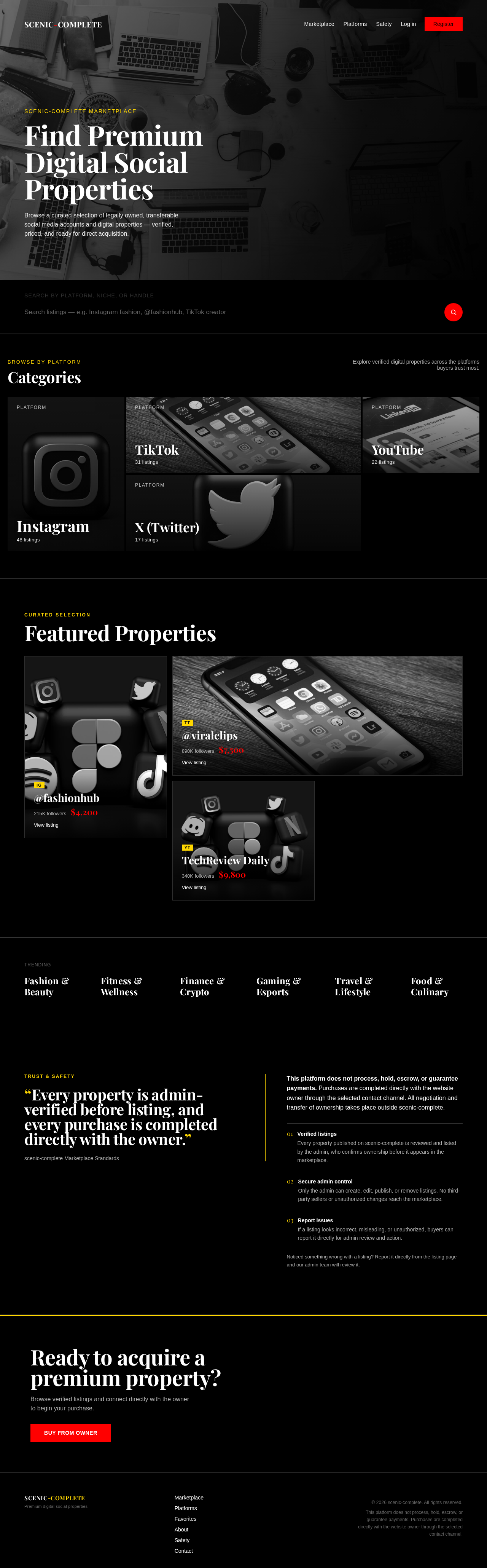

Find Premium Digital Social Properties
Browse a curated selection of legally owned, transferable social media accounts and digital properties — verified, priced, and ready for direct acquisition.
Browse by Platform
Categories
Explore verified digital properties across the platforms buyers trust most.










Trending
Popular Categories
“Every property is admin-verified before listing, and every purchase is completed directly with the owner.”
scenic-complete Marketplace Standards
This platform does not process, hold, escrow, or guarantee payments. Purchases are completed directly with the website owner through the selected contact channel. All negotiation and transfer of ownership takes place outside scenic-complete.
- Verified listingsEvery property published on scenic-complete is reviewed and listed by the admin, who confirms ownership before it appears in the marketplace.
- Secure admin controlOnly the admin can create, edit, publish, or remove listings. No third-party sellers or unauthorized changes reach the marketplace.
- Report issuesIf a listing looks incorrect, misleading, or unauthorized, buyers can report it directly for admin review and action.
Noticed something wrong with a listing? Report it directly from the listing page and our admin team will review it.
Ready to acquire a premium property?
Browse verified listings and connect directly with the owner to begin your purchase.
BUY FROM OWNERFind Premium Digital Social Properties
Browse a curated selection of legally owned, transferable social media accounts and digital properties — verified, priced, and ready for direct acquisition.
Browse by Platform
Categories
Explore verified digital properties across the platforms buyers trust most.
Trending
Popular Categories
“Every property is admin-verified before listing, and every purchase is completed directly with the owner.”
scenic-complete Marketplace Standards
This platform does not process, hold, escrow, or guarantee payments. Purchases are completed directly with the website owner through the selected contact channel. All negotiation and transfer of ownership takes place outside scenic-complete.
- Verified listingsEvery property published on scenic-complete is reviewed and listed by the admin, who confirms ownership before it appears in the marketplace.
- Secure admin controlOnly the admin can create, edit, publish, or remove listings. No third-party sellers or unauthorized changes reach the marketplace.
- Report issuesIf a listing looks incorrect, misleading, or unauthorized, buyers can report it directly for admin review and action.
Noticed something wrong with a listing? Report it directly from the listing page and our admin team will review it.
Ready to acquire a premium property?
Browse verified listings and connect directly with the owner to begin your purchase.
BUY FROM OWNER
No comments yet. Be the first!