sapphire-system
 clockerindo
https://checksec.vercel.app/

Comments (0)
Sign in to leave a comment
System Requirements
Sapphire-System
Introduction
The Sapphire-System is a comprehensive web application designed to enhance security, visibility, and performance monitoring for web applications. It integrates advanced scanning capabilities to provide users with detailed insights into their web application's security posture, SEO performance, and uptime status. This document outlines the system requirements for the Sapphire-System, ensuring it meets the needs of its target audience effectively.
System Overview
The Sapphire-System is a web-based platform that performs over 100 live checks on web applications within approximately 30 seconds. It is designed to cater to developers and teams requiring rapid security validation and AI-generated fix suggestions. The system offers a range of features, including security scanning, SEO and AEO monitoring, performance tracking, and uptime monitoring. The platform is accessible via a subscription model with varying tiers to accommodate different project needs.
Functional Requirements
- As a Developer, I should be able to perform security scans to detect SQL injection, XSS, exposed API keys, and misconfigured backends.
- As a Developer, I should be able to monitor SEO and AEO to grade Google ranking and visibility across AI search engines like ChatGPT, Claude, and Perplexity.
- As a Developer, I should be able to track performance, compliance, accessibility, and email deliverability.
- As a Developer, I should be able to monitor uptime with public status pages and 60-second ping intervals.
- As a User, I should be able to access a free initial scan to evaluate the system's capabilities.
- As a Subscriber, I should be able to choose from paid tiers ranging from $17 to $41 per month, offering different project limits, scan frequencies, and API keys.
User Personas
- Developer: A technical user responsible for ensuring the security and performance of web applications. They require detailed insights and actionable recommendations.
- Subscriber: A user who subscribes to the service for enhanced features and capabilities, including increased scan frequency and additional API keys.
Core User Flows
- Developer initiates a security scan -> System performs 100+ checks -> Developer receives a detailed report with AI-generated fix suggestions.
- Developer monitors SEO and AEO -> System grades visibility across search engines -> Developer receives actionable insights.
- Developer tracks performance metrics -> System analyzes compliance and accessibility -> Developer receives performance reports.
- Developer sets up uptime monitoring -> System generates public status pages -> Developer receives real-time uptime alerts.
Visuals Colors and Theme
- primary: #1A73E8 (a deep sapphire blue)
- primary_light: #4D90FE (a lighter tint of sapphire blue)
- secondary: #FF6F61 (a coral hue for emphasis)
- accent: #FFD700 (a vibrant gold for CTAs and active states)
- highlight: #FFA500 (a warm orange for hover states and notifications)
- bg: #F5F5F5 (a light grey background)
- surface: rgba(255, 255, 255, 0.9) (a soft white card/panel background)
- text: #333333 (a dark grey for primary text)
- text_muted: #777777 (a muted grey for secondary text)
- border: rgba(200, 200, 200, 0.5) (a subtle grey border)
Signature Design Concept
The Sapphire-System's homepage will feature an interactive 3D security dashboard using @react-three/fiber and @react-three/drei. Users will navigate through a virtual control room where each section of the dashboard represents a different feature of the system. As users hover over different sections, they will see real-time data visualizations and alerts. The dashboard will have dynamic lighting effects that change based on the time of day, providing an immersive experience. Users can click on different elements to drill down into detailed reports and insights, making the interaction both informative and engaging.
Interaction Model & Motion Direction
The landing page will employ a "parallax" interaction model, creating a layered depth effect as users scroll through the page. Decorative elements like atmospheric blobs and particle fields will move at different speeds, enhancing the storytelling aspect of the platform. Each section will have a distinctive core mechanic, such as kinetic typography or morphing SVGs, to maintain user engagement and provide a visually rich first impression.
Non-Functional Requirements
- The system must perform security scans within 30 seconds.
- The platform should support high concurrency to handle multiple users simultaneously.
- The uptime monitoring feature must provide real-time alerts with a maximum delay of 60 seconds.
Tech Stack
- Frontend: React for Web
- Backend: Python with FastAPI
- Database: MySQL or MariaDB, using Alembic for migrations
- AI Models: GPT 5.4 for user-friendly responses
- AI Tools: Litellm for LLM Routing, Langchain
- Local Orchestration: Docker, docker-compose
- Server-side Orchestration: Kubernetes
Assumptions and Constraints
- The system assumes users have a basic understanding of web application security and performance metrics.
- The platform is constrained by the need to provide real-time data and insights, requiring efficient data processing and analysis capabilities.
Glossary
- SEO: Search Engine Optimization
- AEO: AI Engine Optimization
- XSS: Cross-Site Scripting
- SQL Injection: A code injection technique used to attack data-driven applications
- API: Application Programming Interface
This document provides a comprehensive overview of the Sapphire-System's requirements, ensuring it meets the needs of its target audience effectively.
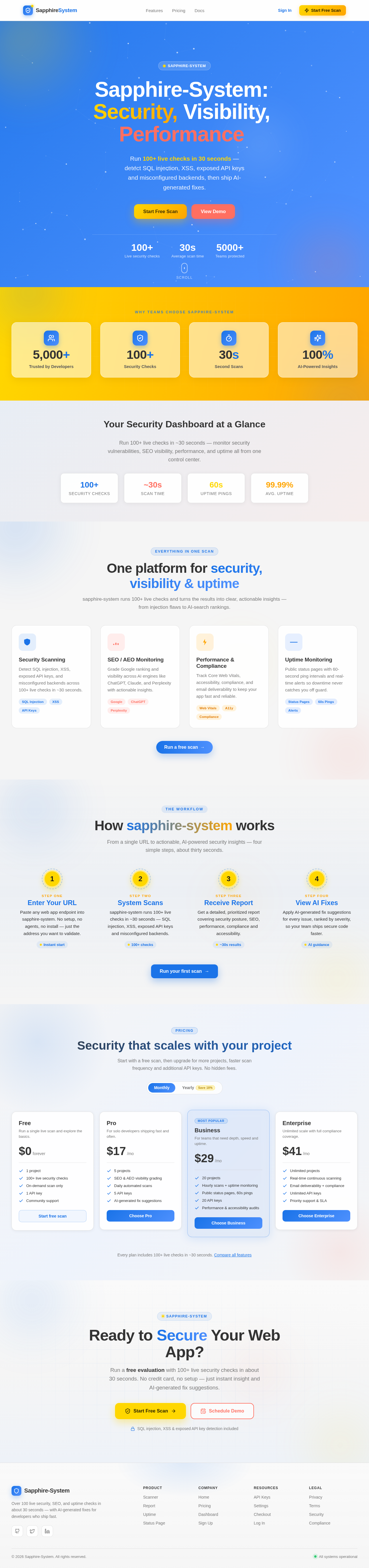
Sapphire-System:Security,Visibility,Performance
Run 100+ live checks in 30 seconds — detect SQL injection, XSS, exposed API keys and misconfigured backends, then ship AI-generated fixes.
Why teams choose sapphire-system
Your Security Dashboard at a Glance
Run 100+ live checks in ~30 seconds — monitor security vulnerabilities, SEO visibility, performance, and uptime all from one control center.
One platform for security, visibility & uptime
sapphire-system runs 100+ live checks and turns the results into clear, actionable insights — from injection flaws to AI-search rankings.
Security Scanning
Detect SQL injection, XSS, exposed API keys, and misconfigured backends across 100+ live checks in ~30 seconds.
SEO / AEO Monitoring
Grade Google ranking and visibility across AI engines like ChatGPT, Claude, and Perplexity with actionable insights.
Performance & Compliance
Track Core Web Vitals, accessibility, compliance, and email deliverability to keep your app fast and reliable.
Uptime Monitoring
Public status pages with 60-second ping intervals and real-time alerts so downtime never catches you off guard.
How sapphire-system works
From a single URL to actionable, AI-powered security insights — four simple steps, about thirty seconds.
Enter Your URL
Paste any web app endpoint into sapphire-system. No setup, no agents, no install — just the address you want to validate.
System Scans
sapphire-system runs 100+ live checks in ~30 seconds — SQL injection, XSS, exposed API keys and misconfigured backends.
Receive Report
Get a detailed, prioritized report covering security posture, SEO, performance, compliance and accessibility.
View AI Fixes
Apply AI-generated fix suggestions for every issue, ranked by severity, so your team ships secure code faster.
Ready to Secure Your Web App?
Run a free evaluation with 100+ live security checks in about 30 seconds. No credit card, no setup — just instant insight and AI-generated fix suggestions.
SQL injection, XSS & exposed API key detection included
No comments yet. Be the first!