sapphire-source
 Aryan Dixit
Source: Kling AI https://share.google/CgUbCXuKFEnteh4iX

Comments (0)
Sign in to leave a comment
System Requirements
System Requirements Document (SRD)
Project Name: Sapphire-Source
1. Introduction
The Sapphire-Source project aims to develop an advanced application inspired by Kling AI, incorporating all its existing features while introducing a cutting-edge motion control capability. This document outlines the system requirements for Sapphire-Source, ensuring clarity and alignment with Aryan Dixit's vision for the project.
The application will cater to users in India (IN), leveraging locale-specific defaults such as IST timezone, INR currency, and culturally relevant design elements. Sapphire-Source is envisioned as a futuristic, user-friendly platform that integrates AI-driven functionalities with intuitive motion-based interactions.
2. System Overview
Sapphire-Source is a next-generation AI-powered application designed to replicate the features of Kling AI while enhancing user experience through motion control capabilities. The system will support individual users, businesses, and developers, offering seamless interaction with AI models and tools.
Key objectives include:
- Replicating Kling AI's functionality and user interface.
- Introducing motion control features for gesture-based and device motion interactions.
- Ensuring scalability, reliability, and responsiveness across platforms (web and mobile).
3. Functional Requirements
Story Points:
- As a User, I should be able to access all features available in Kling AI.
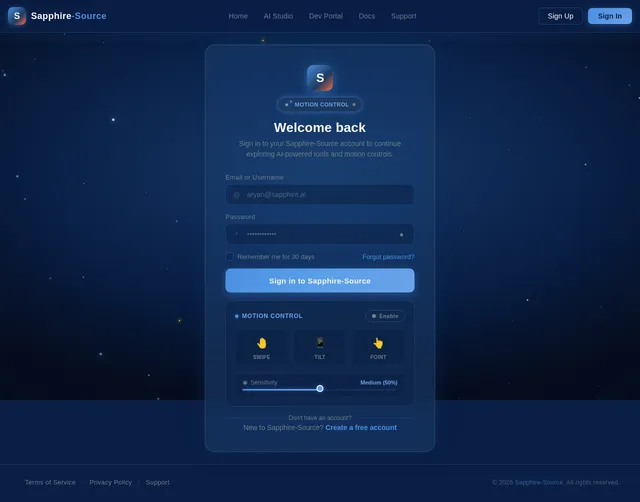
- As a User, I should be able to interact with the app using motion controls, including gestures like hand movements and device tilts.
- As a User, I should be able to customize motion control sensitivity and preferences.
- As an Admin, I should be able to manage user accounts and monitor app usage analytics.
- As a Developer, I should be able to integrate AI models seamlessly into the app.
- As a Guest, I should be able to explore limited features without creating an account.
4. User Personas
1. Admin
- Responsible for managing user accounts, monitoring analytics, and ensuring system security.
- Requires access to dashboards and control panels.
2. User
- Primary audience for the app, utilizing AI features and motion controls for personal or professional purposes.
- Requires intuitive interfaces and customizable settings.
3. Guest
- Casual users exploring the app's capabilities without committing to an account.
- Requires limited access to features with an option to upgrade.
4. Developer
- Technical users integrating AI models or customizing app functionalities.
- Requires access to APIs, SDKs, and documentation.
5. Visuals Colors and Theme
Unique Color Palette:
The Sapphire-Source project will feature a sleek, futuristic color palette inspired by the name "Sapphire."
- Background: #0A1F44 (Deep Sapphire Blue)
- Surface: #1E3A5F (Muted Navy Blue)
- Text: #F4F4F9 (Soft White)
- Accent: #4A90E2 (Vibrant Sky Blue)
- Muted Tones: #6B7D8A (Steel Gray)
This palette ensures a modern and professional aesthetic while maintaining visual harmony and accessibility.
6. Signature Design Concept
Interactive Motion-Controlled Galaxy Interface
The homepage of Sapphire-Source will feature an interactive galaxy map that responds to user gestures and device motions.
Details:
- Visuals: A 3D galaxy with stars representing app features. Users can navigate by tilting their device or swiping their hand across the screen.
- Animations: Stars pulsate gently, and constellations form dynamically as users explore.
- Micro-interactions: Hovering over a star reveals feature details, while tapping zooms into specific sections.
- Transitions: Smooth, fluid animations with a parallax effect for depth.
- Color Shifts: The galaxy background subtly changes hues based on the time of day (e.g., sapphire blue at night, lighter tones during the day).
This bold concept ensures an unforgettable first impression, immersing users in a futuristic and intuitive experience.
7. Non-Functional Requirements
- Performance: The app must load within 2 seconds and maintain responsiveness under high user traffic.
- Scalability: Support for up to 1 million concurrent users.
- Security: Implement robust encryption for user data and motion control inputs.
- Accessibility: Ensure compliance with WCAG 2.1 standards for accessibility.
- Cross-Platform Compatibility: Seamless functionality across web and mobile platforms.
8. Tech Stack
Frontend:
- React for Web
- React Native for Mobile
Backend:
- Python
- FastAPI
Database:
- MySQL or MariaDB (preferred for RDBMS)
- MongoDB (for NoSQL requirements)
AI Models:
- GPT 5.4 for user-friendly responses
- Claude 4.6 Opas for academic or coding work
- Gemini 3.1 Pro for friendly responses
- Google Nano Banana for image generation
AI Tools:
- Litellm for LLM Routing
- Langchain
Orchestration:
- Docker and docker-compose for local orchestration
- Kubernetes for server-side orchestration
9. Assumptions and Constraints
Assumptions:
- Users are familiar with basic motion control gestures.
- The app will primarily target the Indian market, with potential for global expansion.
- Motion control features will be compatible with modern smartphones and devices.
Constraints:
- Limited budget for initial development and testing phases.
- Dependence on third-party AI models and tools for core functionalities.
- Motion control features may require additional hardware compatibility testing.
10. Glossary
- Motion Control: Interaction with the app using gestures or device movements.
- AI Models: Pre-trained artificial intelligence systems integrated into the app.
- WCAG 2.1: Web Content Accessibility Guidelines ensuring inclusivity for users with disabilities.
- Parallax Effect: A visual design technique creating depth by moving background layers at different speeds.

Welcome to
Sapphire-Source
Experience the future of interaction through our motion-controlled galaxy interface. Navigate AI-driven features with intuitive gestures, device tilt, and hand movements — no clicks required.
Explore the Galaxy
Navigate our constellation of features — each star a powerful capability waiting to be discovered.
AI Studio
Create and fine-tune AI models with an intuitive visual workspace.
Motion Control
Navigate with gestures and device tilt for a hands-free experience.
Real-time Analytics
Monitor performance metrics and user engagement in real time.
Developer Tools
Access APIs, SDKs, and comprehensive documentation for integrations.
Gesture Recognition
Advanced hand-tracking and motion detection powered by AI.
Model Integration
Seamlessly connect GPT 5.4, Claude 4.6, Gemini 3.1 Pro and more.
SDK Hub
Pre-built SDKs for web, mobile, and IoT rapid deployment.
Security Suite
Enterprise-grade encryption, role-based access, and audit logs.
API Documentation
Interactive API explorer with code samples in 8+ languages.
Everything You Need to Explore the Galaxy
Sapphire-Source combines AI-driven intelligence with motion-based interactions to deliver a platform that feels as intuitive as it is powerful.
AI Studio
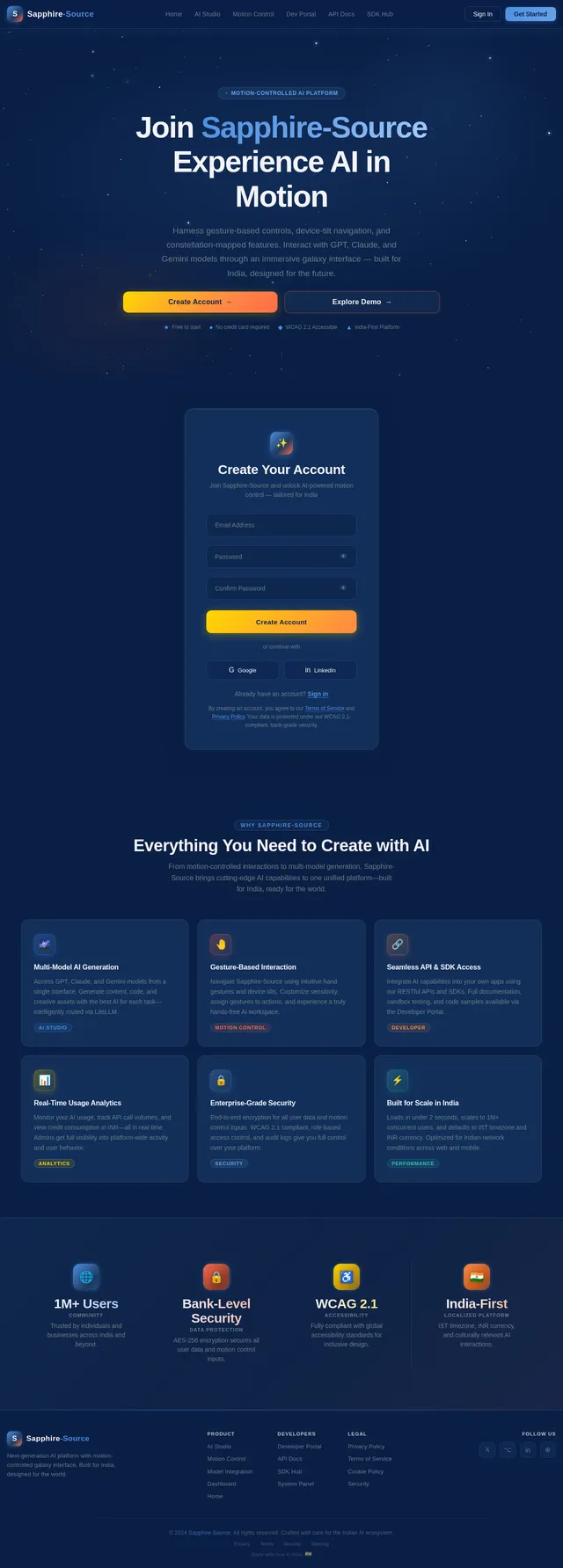
Harness powerful AI models including GPT 5.4, Claude 4.6, and Gemini 3.1 Pro to generate, analyze, and transform content with unprecedented precision.
Learn More→Motion Control
Navigate the interface with intuitive gesture-based interactions. Tilt, swipe, and wave to control your workspace without ever touching a button.
Learn More→Real-time Analytics
Monitor usage patterns, track model performance, and gain actionable insights with live dashboards updated in real time across all sessions.
Learn More→Developer Tools
Access robust APIs, SDKs, and comprehensive documentation to integrate AI models seamlessly into your own applications and workflows.
Learn More→Gesture Recognition
Advanced hand-tracking and device motion sensors detect swipes, tilts, pinches, and custom gestures for a truly immersive control experience.
Learn More→Customizable Sensitivity
Fine-tune motion thresholds, gesture responsiveness, and interaction preferences to match your comfort level and accessibility needs.
Learn More→Control with Motion, Not Clicks
Experience the future of interaction with intuitive gesture recognition. Swipe, tilt, and wave to navigate Sapphire-Source — no mouse or keyboard required. Our motion engine translates natural hand movements into seamless app controls.
Powered by World-Class AI
Sapphire-Source seamlessly integrates leading AI models, giving you the power to choose the right intelligence for every task.
GPT 5.4
User-Friendly Responses
Generates natural, conversational AI outputs optimized for clarity and user satisfaction across diverse interaction contexts.
Use Cases
Claude 4.6
Advanced Reasoning
Excels at nuanced analysis, multi-step problem solving, and safe, reliable code generation for developer workflows.
Use Cases
Gemini 3.1 Pro
Multimodal Intelligence
Processes text, images, and audio simultaneously, enabling rich multimodal experiences within the Sapphire-Source ecosystem.
Use Cases
Google Nano Banana
On-Device Processing
Lightweight model designed for real-time on-device inference, powering gesture recognition and motion control features.
Use Cases
Built for Every Role
Sapphire-Source adapts to your needs — whether you manage, create, explore, or build. Discover the experience designed for you.
Admin
System Manager- Manage user accounts and monitor analytics dashboards
- Ensure system security and enforce access policies
- Configure control panels and platform settings
User
Primary Audience- Utilize AI features and motion controls for daily tasks
- Customize gesture sensitivity and personal preferences
- Access intuitive interfaces for professional workflows
Guest
Explorer- Browse limited features without creating an account
- Preview AI capabilities and motion control demos
- Upgrade anytime to unlock the full experience
Developer
Technical User- Integrate AI models seamlessly via APIs and SDKs
- Access comprehensive documentation and dev tools
- Customize and extend app functionalities
Choose Your Plan
Unlock the full potential of Sapphire-Source with the plan that fits your needs. All plans include access to our galaxy interface.
Free
Explore Sapphire-Source with limited features, no account required.
No credit card required
- Explore AI model previews
- View galaxy interface demo
- Limited motion control trial
- Community forum access
- Basic documentation access
- 5 AI queries per day
Pro
Full access to AI features, motion controls, and personalized settings.
- Unlimited AI model access
- Full motion control suite
- Custom gesture sensitivity
- Real-time analytics dashboard
- Priority support
- AI Studio workspace
- Export and sharing tools
- Profile customization
Enterprise
Complete platform access with APIs, SDKs, and admin control panels.
- Everything in Pro
- Admin dashboard & user management
- Full API & SDK access
- Custom AI model integration
- Advanced analytics & monitoring
- Dedicated account manager
- SSO & security controls
- SLA guaranteed uptime
- Developer portal access
Ready to Explore the Galaxy?
Experience the future of AI interaction with intuitive motion controls, gesture-based navigation, and powerful AI models — all in one platform built for India.
Free to explore as a Guest · No credit card required · WCAG 2.1 accessible
Frequently Asked Questions
Everything you need to know about Sapphire-Source, motion controls, and our AI-powered platform.
Still have questions? Our team is here to help you get started.
Visit Developer Portal
No comments yet. Be the first!