
sapphire-quero

byStephany Caroline Sevulski

quero criar um app extrai a identidade visual (paleta de cores com Hex, fonte(s), elementos gráficos isolados, fundo limpo e uma descrição do estilo) de uma imagem q eu importar

Landing
Landing

Comments (0)

No comments yet. Be the first!

System Requirements

System Requirement Document
Page 1 of 4

System Requirements Document for sapphire-quero

Introduction

The project "sapphire-quero" aims to develop an application that extracts visual identity elements from an imported image. This includes generating a color palette with Hex values, identifying fonts, isolating graphic elements, providing a clean background, and offering a style description.

System Overview

The sapphire-quero application will allow users to import images and automatically extract key visual identity components. This functionality is designed to assist users in identifying and utilizing visual elements for branding and design purposes.

Functional Requirements as Story Points

  • As a User, I should be able to import an image into the application.
  • As a User, I should be able to extract a color palette with Hex values from the imported image.
  • As a User, I should be able to identify fonts used in the imported image.
  • As a User, I should be able to isolate graphic elements from the imported image.
  • As a User, I should be able to generate a clean background from the imported image.
  • As a User, I should be able to receive a style description based on the imported image.

User Personas

  • Regular User: Individuals who want to extract visual identity elements from images for personal or professional use.
Page 2 of 4

Core User Flows

  1. Image Import and Analysis
    • User imports an image into the application.
    • The application processes the image to extract visual identity elements.
    • The extracted elements are displayed to the user, including color palette, fonts, graphic elements, clean background, and style description.

Visuals Colors and Theme

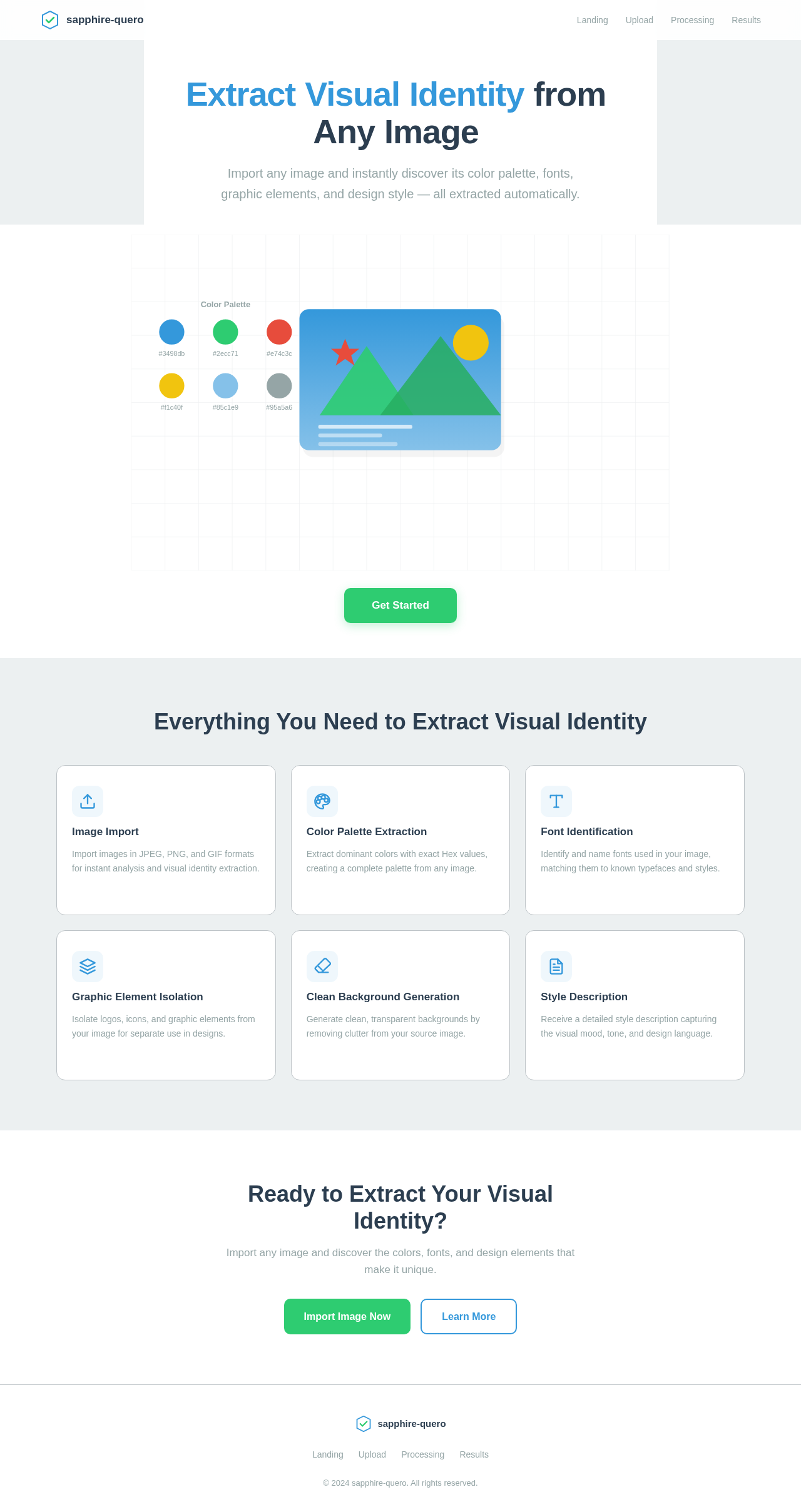
  • primary: #3498db (a shade of blue)
  • primary_light: #85c1e9 (a lighter tint of blue)
  • secondary: #2ecc71 (a shade of green)
  • accent: #e74c3c (a shade of red)
  • highlight: #f1c40f (a shade of yellow)
  • bg: #ecf0f1 (a light grey for background)
  • surface: #ffffff (white for card/panel background)
  • text: #2c3e50 (a dark shade for primary text)
  • text_muted: #95a5a6 (a softer grey for secondary text)
  • border: #bdc3c7 (a subtle grey for borders)
Page 3 of 4

Signature Design Concept

The sapphire-quero application will feature an interactive "Visual Identity Extraction" interface. Upon importing an image, users will see a dynamic breakdown of the image's visual elements. The interface will use a "living canvas" concept where colors, fonts, and graphic elements animate into view, highlighting their extraction process. Users can click on each element to see detailed information and options for export. This interactive experience will be built using motion/react for smooth animations and transitions.

Landing Hero Motion Brief

The landing page will feature an animated sequence where an imported image is deconstructed into its visual components. The animation will show colors swirling into a palette, fonts being highlighted and named, and graphic elements being isolated and displayed. This sequence will loop every 10 seconds, providing a continuous and engaging visual story. The animation will be crafted using motion/react to ensure smooth and responsive interactions.

Interaction Model & Motion Direction

  • Intended Interaction Model: Animated
    • The landing page will feature moderate scroll-triggered reveals and hover transitions, with spring physics on interactive elements to enhance user engagement.
Page 4 of 4

Non-Functional Requirements

  • The application must process images and extract visual elements within 5 seconds.
  • The application should support image formats such as JPEG, PNG, and GIF.
  • The application must be accessible and usable on both desktop and mobile devices.

Tech Stack

  • Frontend: React for Web
  • Backend: Python with FastAPI
  • Database: MongoDB
  • AI Models: Google Nano banana for image generation
  • Local Orchestration: Docker
  • Server-side Orchestration: Kubernetes

Assumptions and Constraints

  • The application assumes users have images ready for import and analysis.
  • The application will not store images or extracted data unless explicitly saved by the user.
  • Internet connectivity is required for the application to function.

Glossary

  • Hex: A six-digit, three-byte hexadecimal number used in HTML, CSS, and design software to represent colors.
  • Visual Identity: The visible elements of a brand, such as color, form, and shape, which encapsulate and convey the symbolic meanings that cannot be imparted through words alone.
Landing design preview
Landing: View Info
Landing: Import Image
Upload: Select Image
Processing: Analyze Image
Results: View Color Palette
Results: View Fonts
Results: View Graphic Elements
Results: View Clean Background
Results: View Style Description
Results: Export Element
Landing design preview
Landing: View Info
Landing: Import Image
Upload: Select Image
Processing: Analyze Image
Results: View Color Palette
Results: View Fonts
Results: View Graphic Elements
Results: View Clean Background
Results: View Style Description
Results: Export Element