sage-uptominute
 The Dominoes World
pratham0750Y/uptominute https://share.google/W4O1PiENJ7kVDZOiS check this out and improve it


Comments (0)
Sign in to leave a comment
System Requirements
System Requirements Document for Uptominute
1. Introduction
Uptominute is the improved version of the existing public site at pratham0750Y/uptominute (shared at https://share.google/W4O1PiENJ7kVDZOiS). The requester's instruction is to take the current site as the base and improve it — not to build a new product. The site keeps its current content and purpose; the improvement is in clarity, speed, and the owner's ability to keep the published content current from one place.
The audience is twofold. Site visitors arrive at the public site to read its content and use its main actions, and they succeed when the site loads fast and the content is clear. The site owner keeps that content current and checks that the site works, succeeding when the improved site shows correct content to visitors.
Because the shared link could not be retrieved (Google sharing restrictions), the source content itself is not reproduced here; this document specifies the site's structure, the owner's content-change lifecycle, and the visual system, and treats the existing repository as the authoritative base for the actual copy and sections.
2. System Overview
Uptominute is a small public website with a private owner edit surface, delivered as a React frontend, a shared FastAPI backend, and a MariaDB database.
- Public side. The Landing page presents the site's current content and its main actions to any visitor, with no account required.
- Owner side. The owner enrolls once on Sign Up, verifies identity on Login, and then works in Site Content to update the published content and confirm the site works. Site Content is reachable only after login.
- Ownership. All four surfaces are application-owned. The backend serves the content read and write APIs and the identity endpoints; MariaDB stores the site content and owner identity records.
- Scope. This is an improvement of the existing site. No new product category, no additional public destinations, and no content types beyond what the existing site already publishes are introduced.
Removed from scope
- None. No concept from the requirement thread was removed or replaced.
2a. Product Interpretation and Delivery Boundary
The product is the existing site, improved. Everything a visitor sees today remains the site's content; the improvement makes that content legible and fast, and gives the owner a plain, single place to change it. The public Landing page is anonymous and ephemeral — no account, no stored visitor state. The owner's work is durable and private: an account established once at Sign Up, identity verified at Login, and content changes made and confirmed in Site Content. Identity exists only to keep the owner's edits bound to the correct person and resumable across visits; it grants no differentiated roles, because there is exactly one owner role. Nothing in this document adds visitor accounts, comments, analytics dashboards, or multi-author workflows.
2b. Source Content Inventory
The authoritative reference (https://share.google/W4O1PiENJ7kVDZOiS, repository pratham0750Y/uptominute) could not be retrieved: access failed due to Google sharing platform restrictions, and no structured content, section list, copy, or media reference could be verified. No factual entities, collection items, fields, values, dates, contacts, links, or media references are therefore recorded here. The existing repository remains the authoritative source of the site's actual copy and sections, and the owner enters that content through Site Content. No placeholder facts are invented in this document.
2c. Page Content and Component Coverage
Landing
- Information and state. The site's current published content (headline, subline, and the site's content sections as held in the repository and managed through Site Content), plus the primary action leading into the site. Anonymous; no visitor identity or stored state.
- Primary action. "Open the site" — the single red-square action in the hero, leading to the site's main content/action.
- Supporting actions. Navigate to Login for the owner (a plain text link in the header area, not a competing primary button).
- Domain entities. Published site content (headline, subline, ordered content sections with their text).
- Component responsibilities.
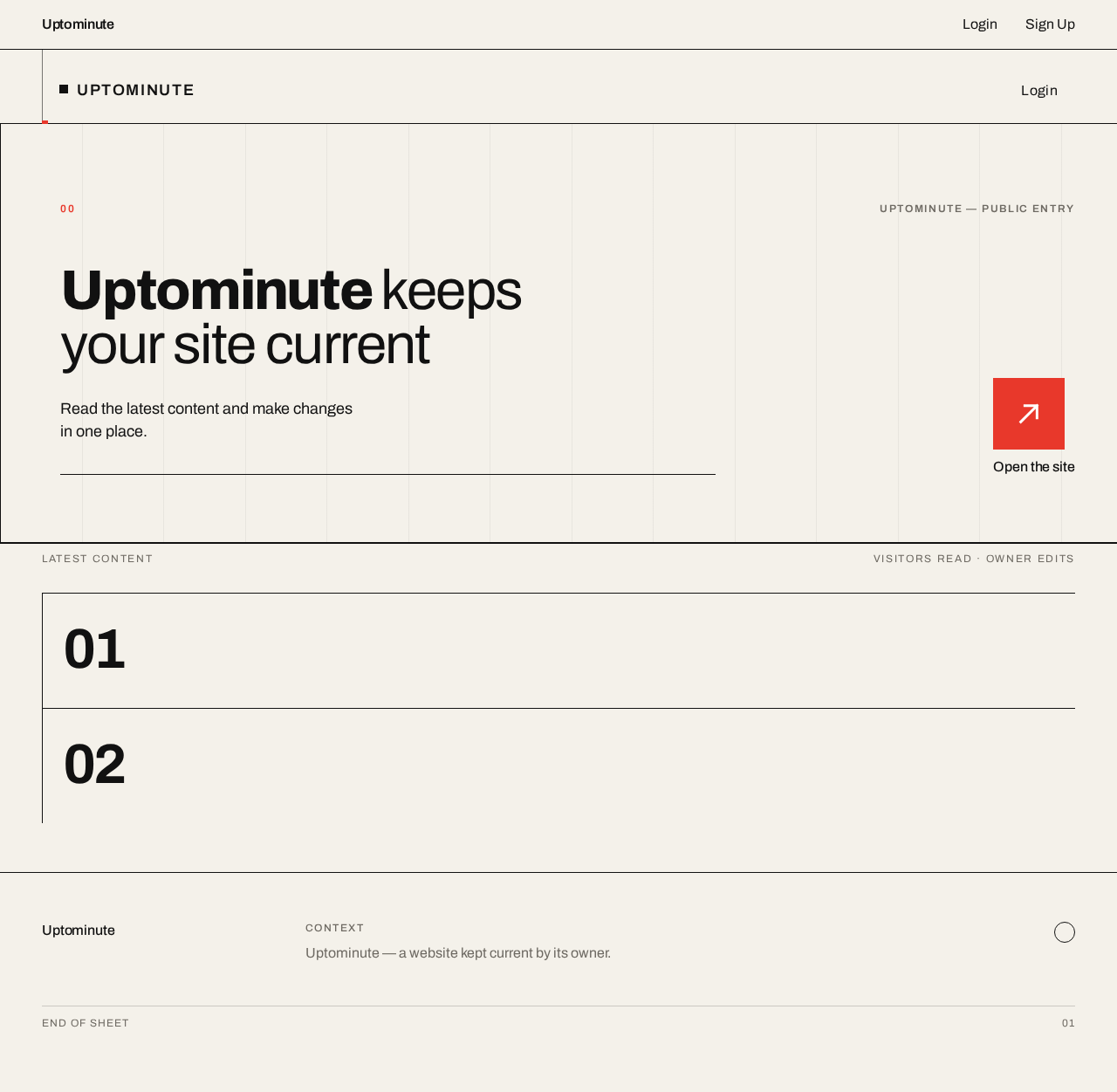
- Hero block — 12-column grid, full-width black rule beneath, 64px flush-left headline spanning columns 1–8, subline beneath, solid red square with white arrow in column 12.
- Section blocks — each with a large Archivo section numeral at its edge, a thin black rule that wipes across on entry, and the section's content set on the grid.
- Header — wordmark flush left, Login link flush right, thin black rule below.
- States.
- Loading — grid and rules render immediately; content blocks show their rules and numerals while text resolves.
- Empty — if a content section has no published text, its numeral and rule still render with no body text; the page never shows blank space without structure.
- Success — all content sections render with their text fully inside the viewport at 375px, 768px, and 1280px.
- Error — if content fails to load, the hero and header remain, with a plain message in the content area and a retry control.
- Recovery — retry re-requests the content; the page remains usable and the primary action stays available.
Login
- Information and state. Identity verification form for the site owner. Anonymous access; on success, an authenticated owner session that unlocks Site Content.
- Primary action. Submit credentials to verify identity.
- Supporting actions. Navigate to Sign Up for a first-time owner; return to Landing.
- Domain entities. Owner identity (email, credential).
- Component responsibilities.
- Form block — square fields on the grid, flush-left labels, one black submit control; the red accent marks only the active field rule.
- Error region — plain text beneath the form, no rounded alert card.
- States.
- Loading — submit control shows a restrained in-progress state; fields remain readable.
- Empty — fields blank with labels visible; submit disabled until both fields carry input.
- Success — identity verified; the owner is taken to Site Content.
- Error — incorrect credentials show a plain message and keep the entered email; the owner may retry or go to Sign Up.
- Recovery — repeated failure leaves the form usable; no lockout behavior is specified.
Site Content
- Information and state. The owner's working surface: the current published content, editable, with a way to confirm the site works. Requires login; unauthenticated visits are directed to Login.
- Primary action. Save content changes so the Landing page shows them.
- Supporting actions. Review the current published content; open the Landing page to check that the site works; end the session.
- Domain entities. Published site content (headline, subline, ordered content sections and their text), content revision state (last saved).
- Component responsibilities.
- Content list — each content section as a grid row with its numeral, its current text, and its edit control.
- Edit block — square text fields flush left on the grid, with the section numeral as the block mark.
- Save control — one black control; the red accent marks unsaved changes only.
- Status line — plain text stating whether changes are saved, with the last-saved time.
- Check-the-site link — opens Landing in a new context so the owner can verify the published result.
- States.
- Loading — rows render with numerals and rules while text resolves.
- Empty — a section with no text shows an empty field ready for input.
- Success — save confirms with a plain status line; the Landing page reflects the new content on next load.
- Error — a failed save keeps the owner's edits in the fields, shows a plain message, and offers retry; nothing is silently discarded.
- Recovery — retry resubmits the same edits; the owner can also copy text out before retrying.
- Session expiry — the owner is returned to Login and, after verifying identity, comes back to Site Content.
Sign Up
- Information and state. First-use enrollment for the site owner. Anonymous access.
- Primary action. Create the owner account.
- Supporting actions. Navigate to Login for an existing owner; return to Landing.
- Domain entities. Owner identity (email, credential).
- Component responsibilities.
- Form block — square fields on the grid, flush-left labels, one black submit control.
- Error region — plain text beneath the form.
- States.
- Loading — submit control shows a restrained in-progress state.
- Empty — fields blank with labels visible; submit disabled until required fields carry input.
- Success — account created; the owner proceeds to Login to verify identity before any content change.
- Error* — an already-registered email or invalid input shows a plain message with the path to Login.
- Recovery — the form stays usable and the entered values are preserved except the credential.
3. Functional Requirements
FR-1 — Visitor reads the site content (explicit) As a Site visitor I should open the Landing page and read the site's current content so that I get what the site offers without friction.
- Trigger: the visitor opens the site URL.
- Observable result: the hero headline, subline, and the site's content sections render with their text fully readable at 375px, 768px, and 1280px.
- Access: none; no account, no stored visitor state.
- Failure/recovery: if content fails to load, the hero and header remain with a plain message and a retry control.
- Continuation: the visitor uses the primary action to go further into the site.
FR-2 — Visitor uses the site's main action (explicit) As a Site visitor I should use the site's main action from the hero so that I reach what the site is for.
- Trigger: the visitor activates "Open the site" in the red square.
- Observable result: the site's main content/action is presented.
- Access: none.
- Failure/recovery: if the destination content is unavailable, the visitor stays on Landing with the action still available.
- Continuation: the visitor returns to Landing via the header wordmark.
FR-3 — Owner enrolls once (required_inference) As a Site owner I should create my account on Sign Up before my first content change so that my edits are bound to me and resumable.
- Trigger: the owner opens Sign Up from Login or the Landing header.
- Input: email and credential in square fields.
- Observable result: the account exists; the owner is directed to Login.
- Access: anonymous entry; the account it creates is the owner's own.
- Failure/recovery: an already-registered email or invalid input shows a plain message and a path to Login; entered values are preserved except the credential.
- Continuation: the owner verifies identity on Login.
FR-4 — Owner verifies identity before each content change (required_inference) As a Site owner I should verify my identity on Login so that only I can change the site content.
- Trigger: the owner submits credentials on Login.
- Observable result: an authenticated owner session; the owner is taken to Site Content.
- Access: anonymous entry to Login; Site Content remains unavailable until verification succeeds.
- Failure/recovery: incorrect credentials show a plain message, keep the entered email, and allow retry or a move to Sign Up.
- Continuation: the owner works in Site Content; an expired session returns the owner to Login and back to Site Content after verification.
FR-5 — Owner updates the site content (explicit) As a Site owner I should update the site content in Site Content so that the improved site shows correct content to visitors.
- Trigger: the owner edits a content section's text and saves.
- Observable result: the change is persisted and the Landing page shows the new content on next load; a plain status line confirms the save with the last-saved time.
- Access: login required; unauthenticated visits are directed to Login.
- Failure/recovery: a failed save keeps the edits in the fields, shows a plain message, and offers retry; nothing is silently discarded.
- Continuation: the owner checks the result on Landing and returns to Site Content for further edits.
FR-6 — Owner checks that the site works (explicit) As a Site owner I should open the Landing page from Site Content after saving so that I confirm visitors see the correct content.
- Trigger: the owner activates the check-the-site link.
- Observable result: Landing opens showing the saved content.
- Access: the check is a public read; the owner's session is unaffected.
- Failure/recovery: if the saved content is not shown, the owner returns to Site Content and re-saves.
- Continuation: the owner ends the session or continues editing.
FR-7 — Owner ends the session (required_inference) As a Site owner I should end my session from Site Content so that the edit surface is not left open.
- Trigger: the owner activates the end-session control.
- Observable result: the session ends; Site Content requires Login again.
- Access: login required to reach the control.
- Failure/recovery: if the session already expired, the owner is simply at Login.
- Continuation: the owner may verify identity again at any time.
4. User Personas
Site visitor
The visitor arrives at Uptominute with no account and no prior relationship to the site. Their context is a public page they may have reached from a link, and their goal is to understand what the site offers and use its main action quickly. Their responsibility is read-only: they consume the published content and take the hero action. They make no decisions that change state and interact with no other participant. Their success is observable — the page loads fast, the headline and content sections are clear and fully readable on their device, and the main action is obvious. What distinguishes this role is that everything they need must be present without identity, and nothing they do persists.
Site owner
The owner is the single person responsible for what the site publishes. Their context is a working session: they arrive at Login, verify identity, and work in Site Content against the live published content. Their goal is that the improved site shows correct content to visitors. Their distinct responsibilities are to enroll once at Sign Up, verify identity at Login before each content change, edit and save content sections in Site Content, and check the result on Landing. Their inputs are the section text they write and their credentials; their decisions are what to change and when a save is correct. They interact with visitors only indirectly — through the content those visitors read — and with no other human participant. Their success is observable: a save confirms with a plain status line, and Landing shows the new content when they check it. What distinguishes this role is durable, private, resumable state: their edits must remain bound to them and survive across sessions, which is why identity exists at all.
5. Core User Flows
Flow A — Visitor reads the site and takes the main action
- The visitor opens the Uptominute URL and lands on Landing (anonymous; no account).
- The hero renders: the 64px flush-left headline across columns 1–8, the subline beneath, and the red square with the white arrow in column 12. A thin black rule wipes across each section as it enters.
- The visitor reads the content sections, each marked by a large Archivo numeral at its block edge.
- The visitor activates "Open the site" in the red square.
- The site's main content/action is presented; the visitor continues there.
- If content fails to load, the hero and header remain, a plain message appears in the content area, and the visitor retries; the primary action stays available.
- The visitor returns to Landing via the header wordmark at any time.
Flow B — Owner enrolls for the first time
- The owner opens Sign Up from the Landing header or from Login.
- The owner enters email and credential in the square fields and submits.
- On success the account exists and the owner is directed to Login.
- If the email is already registered or input is invalid, a plain message appears with a path to Login; the entered values are preserved except the credential, and the form stays usable.
- The owner proceeds to Flow C.
Flow C — Owner verifies identity and changes content
- The owner opens Login and submits credentials.
- On success an authenticated session begins and the owner is taken to Site Content.
- On failure a plain message appears, the entered email is kept, and the owner retries or moves to Sign Up (Flow B).
- In Site Content the owner reviews the current published content as grid rows, each with its numeral and current text.
- The owner edits a section's text in its square field; the red accent marks the unsaved change.
- The owner activates Save. On success a plain status line confirms the save with the last-saved time.
- On a failed save the edits remain in the fields, a plain message appears, and the owner retries; nothing is silently discarded.
- The owner activates the check-the-site link, and Landing opens showing the saved content (Flow A, steps 2–3).
- If the saved content is not shown, the owner returns to Site Content and re-saves.
- If the session expires mid-work, the owner is returned to Login and, after verifying identity, comes back to Site Content.
Flow D — Owner ends the session
- From Site Content, the owner activates the end-session control.
- The session ends and Site Content requires Login again.
- If the session had already expired, the owner is simply at Login.
- The owner may verify identity again at any time (Flow C).
6. Visuals Colors and Theme
Muse and headline: Josef Müller-Brockmann — Swiss geometric rigour: one grid, one signal colour, content as the image.
Mode: light only.
Colour tokens (exact hex, by role):
| Role | Token | Value |
|---|---|---|
| Background (warm paper ground) | --bg | #F4F1EA |
| Surface (fields, content blocks) | --surface | #FFFFFF |
| Text (type and rules) | --text | #111111 |
| Primary (controls, rules) | --primary | #111111 |
| Accent (main action, active section, unsaved mark) | --accent | #E8382B |
| Muted (secondary text, status lines) | --muted | #6E6A63 |
Warm paper covers most of the page; black type and thin black rules carry structure; signal red appears only on the main action, the active section, and the unsaved-change mark.
Typography: headings and body both Archivo (grotesque). Headings are flush left with tight tracking and mixed weights; large numerals act as section marks. Modular scale 1.5: 64 / 40 / 26 / 18 / 16 px; headline runs 36px on mobile to 64px on desktop via clamp().
Shape language: hard edges, thin black rules (1px), square fields, circular section marks. No shadows, no rounded corners.
Layout: 12-column grid with a visible left rule; asymmetric blocks sit on the grid; section numbers mark each block edge.
Spacing rhythm: a single base unit of 8px; block spacing in multiples of 24px; rules sit flush to the grid, never inset.
Imagery: geometric shapes and grid diagrams replace photographs; the site content itself is the image. No stock photography, no gradients, no blobs.
Accessibility: text and controls stay whole at 375px, 768px, and 1280px, wrapping or scaling to fit; black on #F4F1EA and white on #111111 meet contrast; red is never the sole carrier of meaning (labels accompany it).
7. Signature Design Concept
The ruled page. The public entry is composed as a single printed sheet on warm paper. A full-width black rule sits under a 12-column grid whose left rule runs the height of the page. The 64px flush-left headline — "Uptominute keeps your site current" — fills columns 1 to 8, with the subline "Read the latest content and make changes in one place." directly beneath it. In column 12, sitting exactly on the grid line, a solid red square holds a white arrow: the only action, labelled "Open the site". Below, each content section is a numbered block — a large Archivo numeral at its edge, a thin black rule above it — so the site's own content reads as the page's imagery. Nothing is centred, nothing is rounded, nothing floats. The gesture is order: the visitor sees the whole structure at once and knows exactly where to act.
8. Interaction Model & Motion Direction
Interaction Model: Animated Motion Tempo: restrained Hero Dimensionality: flat
Landing Hero Motion Brief
- Focal subject: the headline-and-rule composition on the 12-column grid, with the red square as the single point of colour.
- Thesis: on entry, the black rule beneath the hero wipes left-to-right across the full width → the headline and subline settle flush left on the grid → the red square arrives last, landing exactly on the grid line. The outcome is the composed first frame, with the action ready.
- Motion vocabulary: one rule wipe per section on entry; hover changes colour with no easing bounce; no parallax, no scale, no fade of readable text.
- Composed first frame: warm paper ground, left rule visible, headline across columns 1–8, subline beneath, red square with white arrow in column 12, black rule beneath the hero.
- Reduced-motion state:
prefers-reduced-motionremoves the wipes and the square's arrival; the full composition renders statically in its final arrangement, with all text and the action fully visible.
9. Non-Functional Requirements
- NFR-1 — Speed for visitors (explicit): the Landing page must load fast enough that a visitor reads the content without waiting; the hero and header render before content text resolves. Rationale: the visitor's stated success condition is a fast load and clear content.
- NFR-2 — Readability at every viewport (explicit, from the design constraints): headlines, wordmark, labels, numerals, and controls stay entirely inside the viewport and their container at 375px, 768px, and 1280px, wrapping or scaling with
clamp(); no element covers readable text or a control. Decoration may bleed; text may not. - NFR-3 — Reduced motion (explicit, from the design constraints): with
prefers-reduced-motion, the page provides a usable static arrangement with every item fully readable. - NFR-4 — Owner-only writes (required_inference): content writes require a verified owner session; unauthenticated write requests are rejected and the owner is directed to Login. Rationale: the owner's edits must remain bound to the correct person.
- NFR-5 — No silent data loss (required_inference): a failed save preserves the owner's edits in the form and offers retry. Rationale: the owner's work is durable state that must not be discarded.
- NFR-6 — Single owner role (explicit boundary): identity establishes continuity only; no differentiated roles, permissions, or visibility tiers exist.
- NFR-7 — Content fidelity (explicit): the improvement preserves the existing site's content and purpose; the repository remains the authoritative source of copy and sections.
10. Tech Stack
- Frontend: React application UI, built on the 12-column grid system with Archivo typography and the token set in Section 6.
- Backend: a shared FastAPI process serving the content read API, the owner content-write API, and the identity endpoints (Sign Up, Login, session end). New domain modules extend this existing process, port, and deployment.
- Database: MariaDB for application-owned persistent data — published site content and owner identity records.
- Orchestration:
docker-compose.ymlwith three services:frontend,backend,database. The frontend depends on the backend gateway; the backend depends on the database. No additional services are required for the accepted workflows.
11. Assumptions and Constraints
- Constraint (explicit): the work is an improvement of the existing site, not a new product. No new product category, public destination, or content type is introduced.
- Constraint (explicit): the existing site's content and purpose are kept; the source provides no new feature list.
- Assumption: the shared link could not be retrieved, so the repository
pratham0750Y/uptominuteis the authoritative base for the site's actual copy and sections; the owner enters that content through Site Content. - Assumption (required_inference): there is exactly one owner; Sign Up is a one-time enrollment and Login verifies identity before each content change.
- Assumption: the owner's session may expire; expiry returns the owner to Login and back to Site Content after verification.
- Assumption: no lockout, password-reset, or account-management behavior is specified and none is added.
- Default — not specified by user: light mode only; no dark theme.
- Default — not specified by user: the check-the-site link opens Landing in a new context so the owner's edit session is preserved.
12. Glossary
- Landing — the public entry page showing the site's current content and its main action; anonymous.
- Login — the identity-verification page the owner uses before each content change.
- Sign Up — the one-time enrollment page that creates the owner account.
- Site Content — the login-protected owner surface where published content is reviewed, edited, saved, and checked.
- Published content — the headline, subline, and ordered content sections that Landing renders.
- Section numeral — the large Archivo number marking each content block's edge.
- Rule wipe — the restrained entry motion in which a thin black rule crosses a section.
- Owner session — the authenticated state established at Login that unlocks Site Content.
Uptominute keeps your site current
Read the latest content and make changes in one place.
Uptominute keeps your site current
Read the latest content and make changes in one place.
No comments yet. Be the first!