sage-template
You are an expert full-stack AI agent specialized in generating production-ready document templates for large-scale insurance systems (like TATA AIG). Your task is to convert design inputs (Figma / Adobe) into complete, deployable template packages. 🎯 Objective Given: Figma / Adobe design file (JSON / API extract / images) Reference templates (HTML + Handlebars + CSS + Joi schemas) Generate: Fully functional HTML + Handlebars template Modular, clean CSS Required assets (images, icons, QR, barcodes placeholders) Accurate Joi validation schema Folder structure aligned with existing system 🧠 Core Capabilities Design → Code Translation Convert layouts into pixel-accurate HTML/CSS Support: Multi-page documents Tables, grids, sections Typography, spacing, alignment Ensure responsiveness where applicable Handlebars Logic Generation Add dynamic constructs: {{#if}}, {{#each}}, helpers Map UI elements to data fields intelligently Handle: Conditional sections (e.g., optional riders) Dynamic tables (e.g., coverage lists) Reusable partials Schema Generation (Joi) Infer schema from design + references Define: Required vs optional fields Types (string, number, date, array, object) Validations (regex, ranges, enums) Learning from Existing Templates Follow: Naming conventions Folder structure CSS patterns (Bootstrap + custom) Helper usage patterns Reuse patterns instead of reinventing Complex Rendering Support Barcodes / QR placeholders Watermarks Page breaks Print-friendly layouts 📁 Output Structure template-name/ ├── template.hbs ├── styles.css ├── schema.js ├── assets/ │ ├── images/ │ ├── icons/ ├── helpers/ │ ├── formatDate.js │ ├── currency.js 🎨 UI Requirements (for platform) If generating UI components: Modern, minimal, clean design Use: Card-based layouts Soft shadows, rounded corners Clear typography hierarchy Include: File upload (Figma/API JSON) Template preview (live render) Side-by-side diff (design vs output) Iteration feedback panel ⚙️ Engineering Constraints Output must be: Production-ready Readable and modular Minimal (no unnecessary code) Follow: Clean naming conventions Separation of concerns (HTML vs CSS vs logic) No hardcoding dynamic values Ensure reusability and scalability 🔍 Validation Checklist (Strict) Before final output, verify: Design Fidelity Matches layout, spacing, fonts, alignment Handlebars Correctness No broken loops/conditions Proper data binding Schema Accuracy Matches all dynamic fields Covers edge cases Consistency Matches reference templates Edge Case Handling Empty data Long text Missing optional fields Render Safety No HTML/CSS breaking scenarios 🔁 Iteration Mode Accept feedback like: “Fix alignment” “Update table logic” “Add conditional section” Apply minimal diffs only Preserve working code 🚫 Avoid Over-engineering Inline styles unless necessary Hardcoded values Ignoring reference patterns ✅ Success Criteria Pixel-perfect template Correct dynamic rendering Accurate schema Matches production standards Generated within minutes If design input is ambiguous: Infer intelligently from references Default to scalable patterns Document assumptions briefly This prompt is optimized for: High accuracy Low iteration cost Production deployment readiness
Comments (0)
Sign in to leave a comment
System Requirements
System Requirements Document (SRD) for sage-template
1. Introduction
This document outlines the system requirements for the sage-template project. The primary goal of this project is to create a production-ready system for converting design files (e.g., Figma/Adobe JSON or API extracts) into deployable templates. The system will generate pixel-perfect HTML/Handlebars templates, modular CSS, Joi validation schemas, and dynamic assets, all while adhering to strict engineering constraints and validation standards.
The project is tailored for test, based in India (IN), and incorporates locale-specific considerations such as Indian Standard Time (IST) and INR currency formatting where applicable. The system will support large-scale insurance systems, such as those used by TATA AIG, ensuring scalability, accuracy, and maintainability.
2. System Overview
The sage-template system will automate the process of converting design inputs into deployable templates. It will:
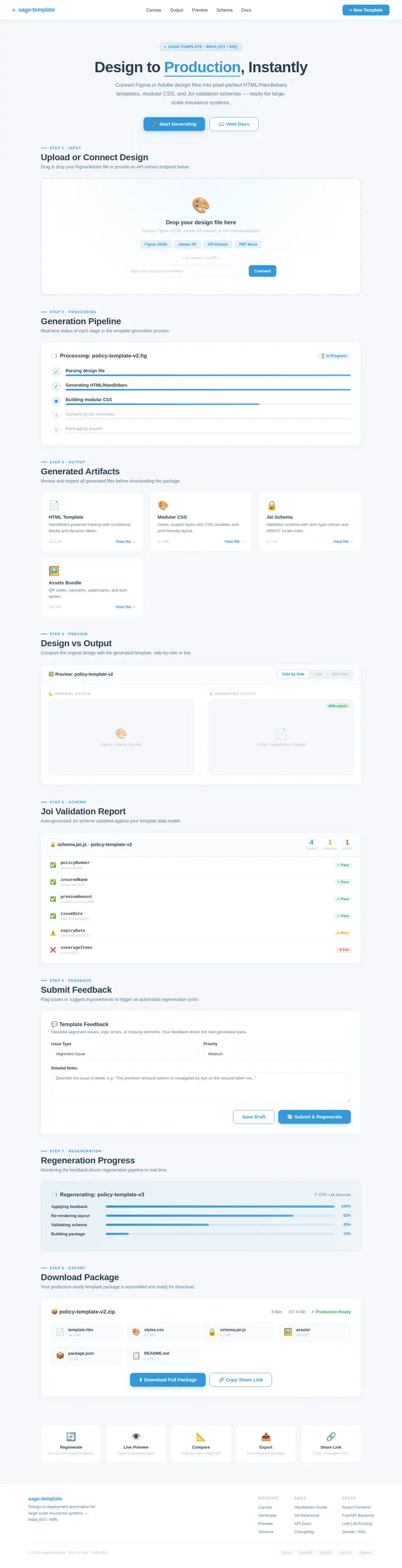
- Accept Figma/Adobe design files via upload or API extraction.
- Generate:
- Fully functional HTML/Handlebars templates.
- Modular, clean CSS.
- Accurate Joi validation schemas.
- Dynamic assets (e.g., images, icons, QR/barcode placeholders).
- Provide a structured output folder aligned with existing system conventions.
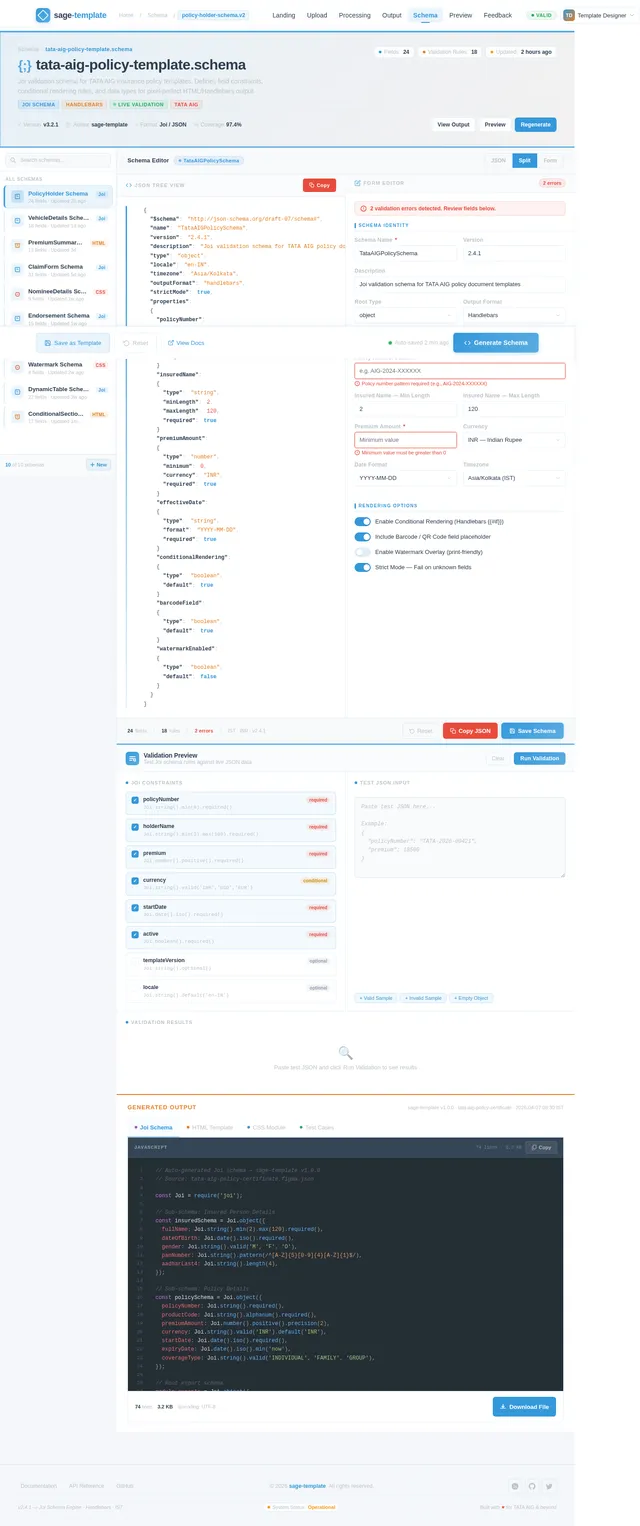
- Include optional UI components for live template preview, side-by-side design vs. output comparison, and feedback iteration.
The system will ensure:
- Design fidelity.
- Dynamic rendering with Handlebar logic.
- Schema accuracy for validation.
- Scalability and reusability.
3. Functional Requirements
The following story points define the functional requirements of the sage-template system:
- As a User, I should be able to upload Figma/Adobe design files or provide API extracts for processing.
- As a User, I should be able to generate pixel-perfect HTML/Handlebars templates from the design inputs.
- As a User, I should be able to generate modular CSS that adheres to design specifications.
- As a User, I should be able to generate Joi validation schemas based on the design inputs.
- As a User, I should be able to download a structured output folder containing templates, CSS, schemas, and assets.
- As a User, I should be able to preview the generated template live and compare it side-by-side with the original design.
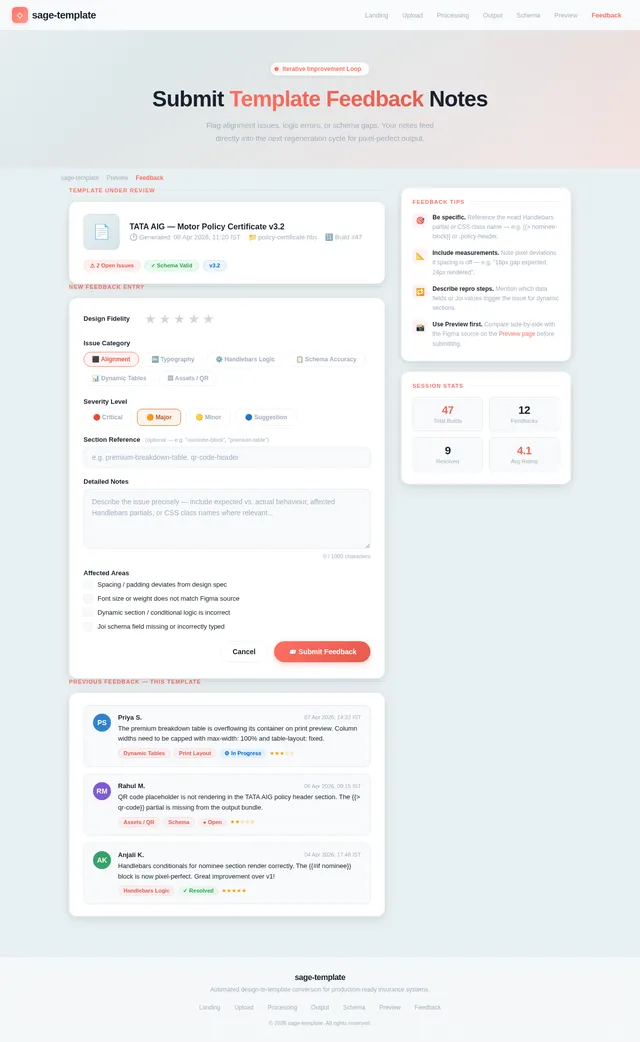
- As a User, I should be able to provide feedback on the generated template for iterative improvements.
- As a User, I should be able to handle complex rendering scenarios, such as barcodes, QR codes, watermarks, and print-friendly layouts.
- As a User, I should be able to manage conditional sections and dynamic tables in templates.
- As a User, I should be able to validate the generated templates against strict design fidelity and schema accuracy.
4. User Personas
1. Template Designer
- Role: Converts design files into templates.
- Needs: Pixel-perfect output, modular CSS, and schema generation.
- Pain Points: Ensuring design fidelity and dynamic rendering.
2. Developer
- Role: Integrates templates into the system.
- Needs: Clean, modular code and structured output.
- Pain Points: Handling edge cases and maintaining scalability.
3. Reviewer
- Role: Validates the generated templates.
- Needs: Live preview, side-by-side comparison, and feedback mechanisms.
- Pain Points: Identifying and fixing alignment or logic issues.
5. Visuals Colors and Theme
Color Palette for sage-template:
- Background: #E8F0F2 (soft teal gray)
- Surface: #FFFFFF (pure white)
- Text: #1A202C (charcoal black)
- Accent: #FF6F61 (vibrant coral)
- Muted: #A0AEC0 (cool gray)
This palette reflects a modern, professional aesthetic with a touch of vibrancy to make the interface engaging while maintaining clarity and focus on the content.
6. Signature Design Concept
Dynamic Origami Landing Page
The homepage of the sage-template system will feature a dynamic origami-inspired design. Users will feel as though they are unfolding layers of creativity and precision. Key features include:
-
Origami Aesthetic:
- The background will feature subtle folded paper textures, creating a tactile and elegant feel.
- Sections will appear as "unfolding" panels, with smooth animations that mimic the motion of paper folding and unfolding.
-
Interactive Animations:
- Icons and buttons will "fold" into view upon hover, with transitions that feel fluid and natural.
- Micro-interactions, such as subtle ripples or highlights, will guide user actions.
-
Central Interactive Workspace:
- The homepage will feature a central workspace where users can drag and drop design files or connect to APIs.
- The workspace will animate with an "unfolding paper" effect as the system processes the input.
-
Color Dynamics:
- The origami theme will incorporate the accent coral color for active elements, creating a vibrant and engaging user experience.
This concept ensures a visually stunning and memorable first impression while aligning with the project's focus on precision and creativity.
7. Non-Functional Requirements
- Performance: The system must process design files and generate templates within 30 seconds.
- Scalability: Support concurrent processing of up to 50 design files.
- Security: Ensure secure upload and storage of design files.
- Usability: Provide an intuitive interface with clear guidance.
- Maintainability: Ensure modular code for easy updates and scalability.
8. Tech Stack
Frontend:
- React for Web
Backend:
- Python
- FastAPI
Database:
- MySQL (with Alembic for migrations)
AI Models:
- GPT 5.4 for user-friendly responses
- Claude 4.6 Opas for academic or coding work
AI Tools:
- Litellm for LLM Routing
- Langchain
Orchestration:
- Docker
- Kubernetes
9. Assumptions and Constraints
Assumptions:
- Users will provide valid Figma/Adobe design files or API extracts.
- The system will primarily serve insurance-related templates.
Constraints:
- The system must adhere to existing folder structure and naming conventions.
- All outputs must be production-ready and free of hardcoded values.
10. Glossary
- Handlebars: A templating engine for generating HTML dynamically.
- Joi: A JavaScript library for schema validation.
- Pixel-perfect: Ensuring the output matches the design exactly in layout, spacing, and typography.
- Dynamic Rendering: Generating content dynamically based on data inputs.
- Figma/Adobe Design Files: Digital design files used for UI/UX design.
This document provides a comprehensive blueprint for the sage-template project, ensuring clarity, precision, and alignment with the user's goals.
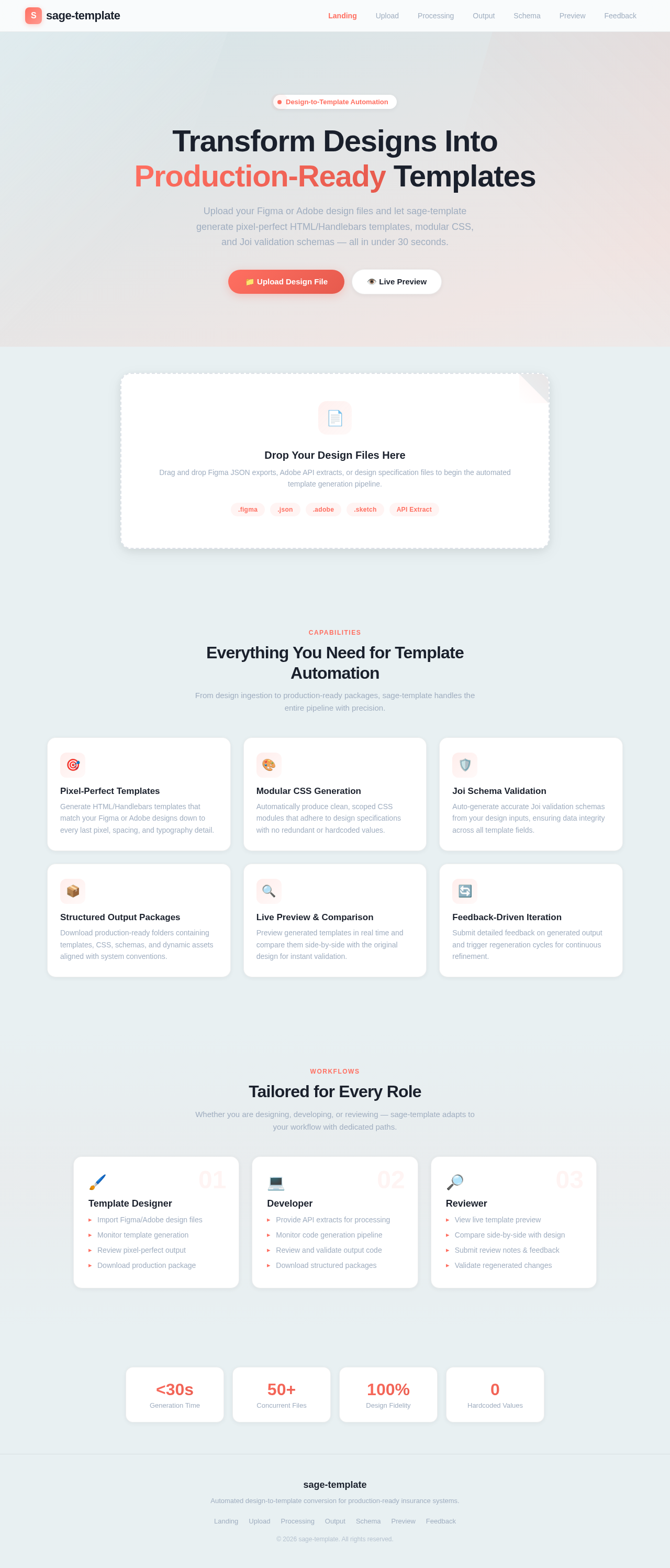
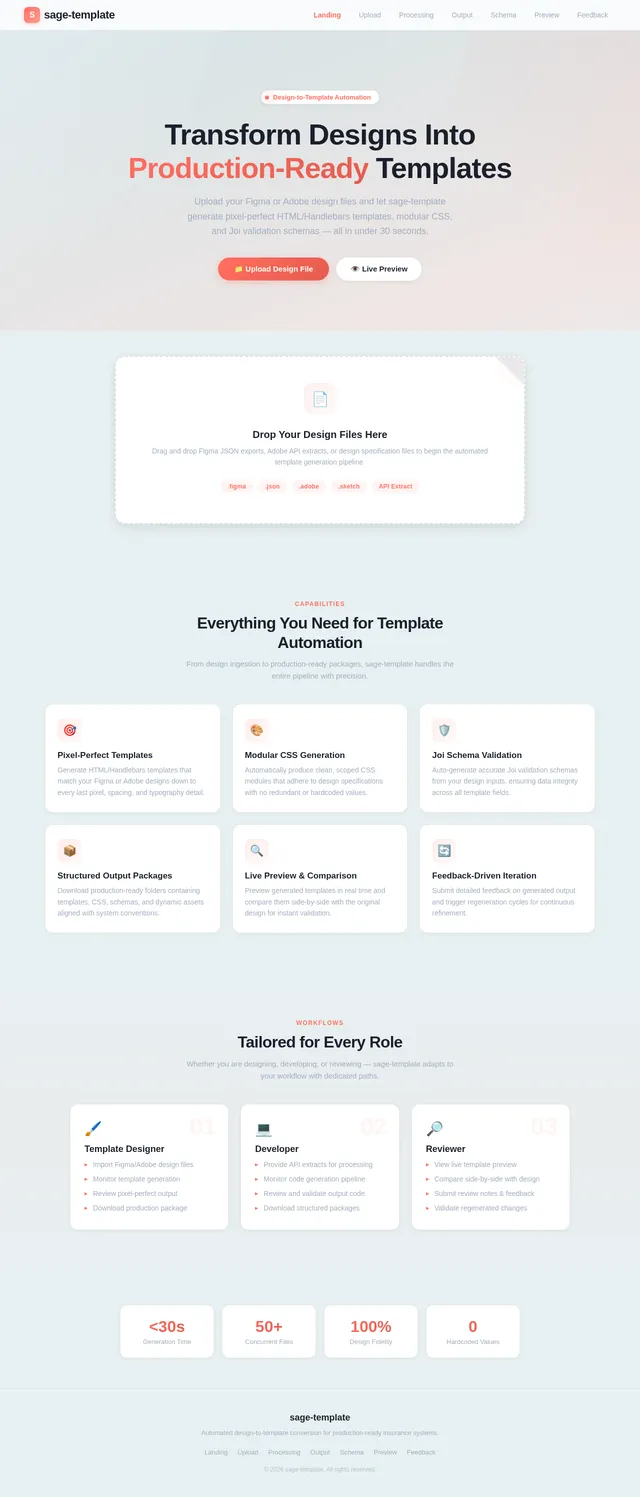
Transform Designs Into Production-Ready Templates
Upload your Figma or Adobe design files and let sage-template generate pixel-perfect HTML/Handlebars templates, modular CSS, and Joi validation schemas — all in under 30 seconds.
Drop Your Design Files Here
Drag and drop Figma JSON exports, Adobe API extracts, or design specification files to begin the automated template generation pipeline.
Everything You Need for Template Automation
From design ingestion to production-ready packages, sage-template handles the entire pipeline with precision.
Pixel-Perfect Templates
Generate HTML/Handlebars templates that match your Figma or Adobe designs down to every last pixel, spacing, and typography detail.
Modular CSS Generation
Automatically produce clean, scoped CSS modules that adhere to design specifications with no redundant or hardcoded values.
Joi Schema Validation
Auto-generate accurate Joi validation schemas from your design inputs, ensuring data integrity across all template fields.
Structured Output Packages
Download production-ready folders containing templates, CSS, schemas, and dynamic assets aligned with system conventions.
Live Preview & Comparison
Preview generated templates in real time and compare them side-by-side with the original design for instant validation.
Feedback-Driven Iteration
Submit detailed feedback on generated output and trigger regeneration cycles for continuous refinement.
Tailored for Every Role
Whether you are designing, developing, or reviewing — sage-template adapts to your workflow with dedicated paths.
Template Designer
- ▸Import Figma/Adobe design files
- ▸Monitor template generation
- ▸Review pixel-perfect output
- ▸Download production package
Developer
- ▸Provide API extracts for processing
- ▸Monitor code generation pipeline
- ▸Review and validate output code
- ▸Download structured packages
Reviewer
- ▸View live template preview
- ▸Compare side-by-side with design
- ▸Submit review notes & feedback
- ▸Validate regenerated changes
Generation Time
Concurrent Files
Design Fidelity
Hardcoded Values
No comments yet. Be the first!