sage-shopping
 Chanda Nagar
Build app online shopping smart watch and smart phones only Apple and Samsung
Comments (0)
Sign in to leave a comment
System Requirements
System Requirements Document (SRD) for sage-shopping
1. Introduction
The sage-shopping project is a dual-purpose platform designed to cater to two distinct markets: premium electronic devices (Apple and Samsung smartwatches and smartphones) and traditional Indian snacks (kachori, samosa, and similar food items). This document outlines the system requirements for building a website that supports both advertisement and online ordering functionalities for these categories.
The project aims to provide a seamless user experience for customers in India, leveraging localized preferences, INR currency, and IST timezone defaults. By combining the convenience of online shopping with the charm of traditional Indian snacks, sage-shopping will serve as a unique and innovative platform.
2. System Overview
The sage-shopping platform will consist of two primary modules:
- Electronics Module: Focused on the sale of Apple and Samsung smartwatches and smartphones. This module will include features like product browsing, detailed specifications, and secure online ordering.
- Food Module: Dedicated to the advertisement and online ordering of Indian snacks such as kachori, samosa, and similar items. This module will cater to food enthusiasts looking for convenience and quality.
The system will be designed to handle high traffic, ensure secure transactions, and provide a user-friendly interface for both modules. Localization features will be implemented to cater to the Indian market.
3. Functional Requirements
Electronics Module
- As a User, I should be able to browse Apple and Samsung smartphones and smartwatches.
- As a User, I should be able to view detailed specifications of each product.
- As a User, I should be able to add products to a shopping cart.
- As a User, I should be able to securely purchase products using multiple payment methods (credit/debit cards, UPI, wallets).
- As an Admin, I should be able to manage product listings, including adding, editing, and removing items.
Food Module
- As a User, I should be able to browse food items such as kachori, samosa, and other snacks.
- As a User, I should be able to place an online order for food items.
- As a User, I should be able to schedule delivery or pickup times.
- As a User, I should be able to track my food order in real-time.
- As an Admin, I should be able to manage food listings, including adding, editing, and removing items.
- As an Admin, I should be able to manage vendor details and availability.
4. User Personas
Electronics Module
- User: A tech-savvy individual looking to purchase premium Apple or Samsung devices.
- Admin: A platform manager responsible for maintaining product listings and ensuring smooth operations.
Food Module
- User: A foodie looking to order traditional Indian snacks online.
- Admin: A vendor or platform manager responsible for managing food listings and vendor details.
5. Visuals Colors and Theme
Color Palette
The sage-shopping platform will feature a dual-tone theme to reflect its two distinct modules:
Electronics Module
- Background: #F5F7FA (light gray)
- Surface: #FFFFFF (white)
- Text: #333333 (dark gray)
- Accent: #007AFF (Apple blue)
- Muted: #AAB2BD (soft gray)
Food Module
- Background: #FFF8E1 (light cream)
- Surface: #FFFFFF (white)
- Text: #4E342E (brown)
- Accent: #FF7043 (spicy orange)
- Muted: #D7CCC8 (beige)
6. Signature Design Concept
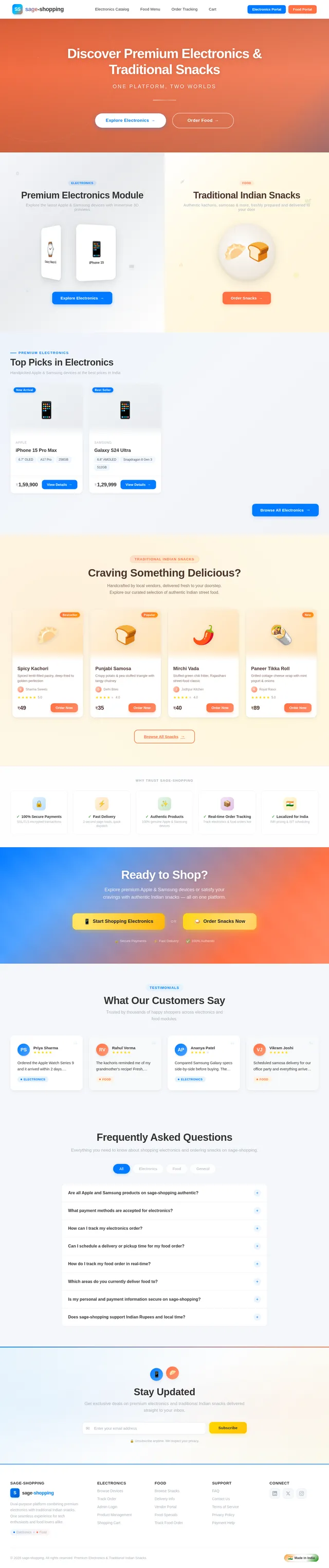
The sage-shopping homepage will feature a split-screen design that immediately highlights the dual nature of the platform.
- Left Side: A sleek, modern aesthetic showcasing Apple and Samsung devices. Users will see a rotating 3D carousel of smartphones and smartwatches, with smooth transitions and hover effects revealing product details.
- Right Side: A vibrant, food-themed design with animated steam rising from a plate of kachoris and samosas. Clicking on the food items will trigger a playful "bite" animation before redirecting users to the food module.
Micro-interactions will include:
- Subtle haptic feedback on button clicks (for mobile users).
- A dynamic color shift when hovering over the split-screen sections.
- A "floating" effect for icons and buttons to enhance interactivity.
This bold design will make the homepage instantly memorable and engaging.
7. Non-Functional Requirements
- The system must support at least 10,000 concurrent users.
- The website must load within 2 seconds for users on a 4G connection.
- All transactions must be secured using SSL/TLS encryption.
- The platform must be mobile-responsive and optimized for both iOS and Android devices.
- The system must support localization for Indian users, including INR currency and IST timezone.
8. Tech Stack
Frontend
- React for Web
Backend
- Python
- FastAPI
Database
- MySQL (with Alembic for migrations)
AI Models
- GPT 5.4 for user-friendly responses
AI Tools
- Langchain
- Litellm for LLM Routing
Local Orchestration
- Docker
- docker-compose
Server-Side Orchestration
- Kubernetes
9. Assumptions and Constraints
- The platform will initially target users in India.
- The food module will focus on snacks like kachori and samosa, with potential expansion based on user demand.
- The electronics module will exclusively feature Apple and Samsung products.
- The system will rely on third-party delivery services for food orders.
10. Glossary
- Admin: A person responsible for managing the platform's content and operations.
- User: A customer using the platform to browse and purchase products or food items.
- IST: Indian Standard Time.
- INR: Indian Rupee.
- SSL/TLS: Secure Sockets Layer / Transport Layer Security, protocols for securing online communications.
No comments yet. Be the first!