sage-outfit
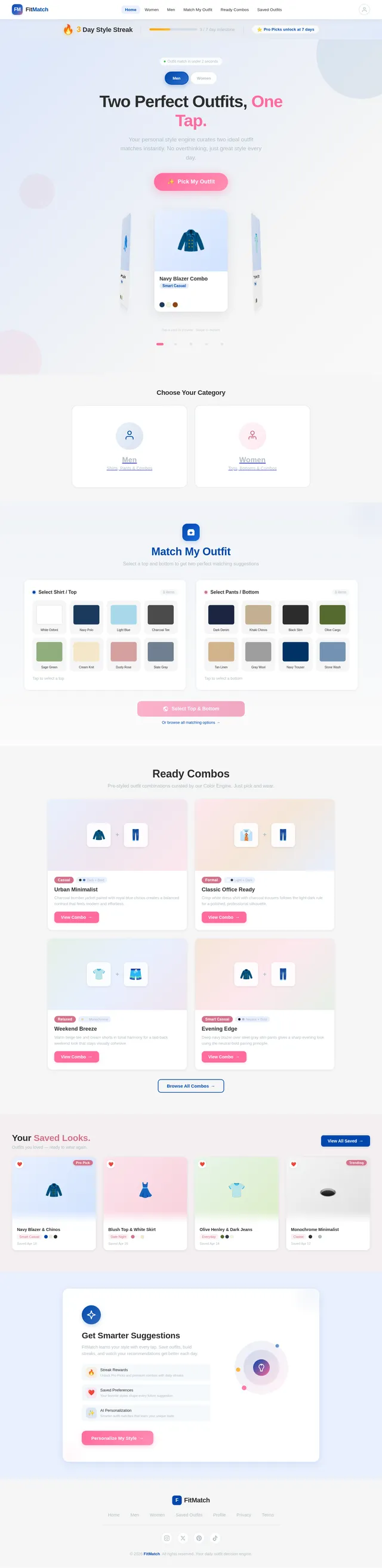
🚀 APP NAME FitMatch (final choice) 🎯 CORE IDEA A 1-tap outfit decision app that: Removes confusion Gives 2 perfect options instantly Feels fast, personal, and addictive 🧱 FULL APP STRUCTURE 🏠 HOME SCREEN Big primary button: “Pick My Outfit” Two sections: 👔 MEN 👗 WOMEN Small streak counter (🔥 3 Day Style Streak) ⚡ “PICK MY OUTFIT” FLOW Input (auto/minimal): Occasion: Casual / Office / Party Weather: Hot / Normal / Cold Output: Show 2 outfit cards instantly Each card includes: Top + Bottom combo Style tag 1-line reason 👔 MEN SECTION OPTION 1: Match My Clothes User selects: Shirt OR Pant LOGIC: If shirt selected: Suggest 2 pants If pant selected: Suggest 2 shirts RULES: White shirt → anything works (safe default) Light colors → dark bottoms Dark colors → light/neutral bottoms Printed → plain bottom only OPTION 2: Ready Combos Return exactly 2 outfits Examples: Navy shirt + Grey trousers → Smart casual Black shirt + Khaki chinos → Clean contrast 👗 WOMEN SECTION OPTION 1: Match My Outfit User selects: Top OR Bottom LOGIC: Same as men, but softer palettes allowed Rules: Pastel + White = safe combo Black top = universal match Floral = pair with solid neutral OPTION 2: Ready Combos Return 2 outfits Examples: White top + Blue jeans → Casual clean Pink top + White pants → Soft aesthetic 🧠 CORE COLOR ENGINE (IMPORTANT) NEUTRAL COLORS: White, Black, Grey, Beige, Navy SAFE MATCH FORMULA: Neutral + Bold Light + Dark Same tone (monochrome) AVOID: Bright + bright clash Too many colors 🎨 UI DESIGN (HIGH RETENTION) STYLE: Background: White / Light grey Text: Black / Dark grey Accent: Navy blue CARD DESIGN: Each outfit card: Rounded corners Shadow Large outfit text Small reason text ✨ ANIMATIONS (VERY IMPORTANT) Cards fade-in (0.3s) Swipe left/right → smooth slide Save button → heart pop animation Button tap → slight scale down ❤️ SAVE SYSTEM User can: Save outfit System stores: Color preferences Style type RESULT: Next suggestions become personalized 🔥 STREAK SYSTEM Track daily use Show: “🔥 5 Day Style Streak” Reward ideas: Unlock premium combos Show “Pro Picks” ⚡ SPEED RULE (CRITICAL) Output must appear in under 2 seconds No loading screens Use pre-built combo database 🧩 DATA STRUCTURE (USE THIS) TABLE: OUTFITS Gender Top Bottom Style Occasion Men White Shirt Black Pants Formal Office Men Navy Shirt Grey Pants Casual Daily Women Pink Top White Pants Casual Daily TABLE: MATCH RULES Input Match1 Match2 White Shirt Black Pants Blue Jeans Black Shirt Grey Pants Khaki Chinos 🎯 FINAL LOGIC PROMPT (USE DIRECTLY) Writing Create a fast, highly engaging outfit recommendation system. STRUCTURE: Categories: Men and Women Each has: Match My Clothes Ready Outfit Combos OUTPUT RULE: Always return exactly 2 outfit options Each option must include: Top + Bottom combination Style tag 1 short reason MATCH LOGIC: If user selects top → suggest 2 bottoms If user selects bottom → suggest 2 tops Use safe combinations: Neutral + bold Light + dark Monochrome tones READY COMBOS: Show 2 complete outfits Keep them simple and realistic TODAY FEATURE: Add “Pick My Outfit” button Instantly generate 2 outfits based on: Occasion Weather User preferences PERSONALIZATION: Track saved outfits Prioritize similar styles in future results UI: Card layout Smooth fade-in animation Swipe navigation Save button with animation ENGAGEMENT: Daily streak counter Quick reward messages Fast interaction with no delay 🧨 FINAL EDGE (WHY THIS WILL WIN) No confusion → just 2 answers Feels like a tool, not inspiration Works in 1 tap Learns user taste Builds daily habit If you follow this exactly, you’re not building just another fashion app—you’re building a daily decision engine people rely on.
Comments (0)
Sign in to leave a comment
System Requirements
System Requirements Document (SRD) for Sage-Outfit
1. Introduction
The Sage-Outfit project, also known as FitMatch, is a one-tap outfit decision application designed to simplify and personalize daily outfit selection. The app provides users with two perfect outfit options instantly, tailored to their preferences, occasion, and weather. The goal is to create a fast, engaging, and habit-forming experience that feels personal and addictive. This document outlines the system requirements for the development of Sage-Outfit, ensuring clarity and alignment with the project's objectives.
2. System Overview
Sage-Outfit is a decision engine that eliminates the confusion of outfit selection by providing users with two curated options based on minimal input. The app is divided into two main categories: Men and Women, each offering features like "Match My Clothes" and "Ready Outfit Combos." The system uses a Core Color Engine to ensure visually appealing combinations and a Save System to personalize future recommendations. The app is designed for speed, with a response time of under 2 seconds, and includes engaging features like a streak counter and reward system to encourage daily use.
Key features include:
- Home Screen with a "Pick My Outfit" button and streak counter.
- Outfit Matching logic for men and women based on user input.
- Core Color Engine for safe and stylish combinations.
- Personalization through saved preferences and streak tracking.
- High-Retention UI Design with smooth animations and intuitive navigation.
3. Functional Requirements
Home Screen
- As a User, I should see a large "Pick My Outfit" button for instant outfit suggestions.
- As a User, I should see separate sections for "Men" and "Women."
- As a User, I should see a streak counter (e.g., "🔥 3 Day Style Streak") to track my daily usage.
Outfit Matching
Men Section
- As a Male User, I should be able to select a shirt or pant to get two matching options.
- As a Male User, I should be able to view two "Ready Combos" for complete outfit suggestions.
Women Section
- As a Female User, I should be able to select a top or bottom to get two matching options.
- As a Female User, I should be able to view two "Ready Combos" for complete outfit suggestions.
Core Color Engine
- As a System, I should ensure all outfit combinations follow safe matching rules:
- Neutral + Bold
- Light + Dark
- Monochrome tones
- As a System, I should avoid bright clashes and overly colorful combinations.
Save System
- As a User, I should be able to save outfits I like.
- As a System, I should store user preferences (e.g., color and style) to personalize future suggestions.
Streak System
- As a User, I should see my daily streak count and receive rewards for consistent usage.
- As a System, I should unlock premium combos or "Pro Picks" as streak rewards.
Speed Rule
- As a System, I should generate outfit suggestions in under 2 seconds without loading screens.
4. User Personas
1. Male User
- Goal: Quickly find matching outfits or ready combos for various occasions.
- Needs: Simple interface, fast results, and stylish suggestions.
2. Female User
- Goal: Discover matching outfits or ready combos with softer palettes and aesthetic appeal.
- Needs: Personalization, visually pleasing combinations, and easy navigation.
3. Admin
- Goal: Manage the outfit database, update matching rules, and monitor system performance.
- Needs: Backend access, data visualization, and control over personalization algorithms.
5. Visuals Colors and Theme
Unique Color Palette
- Background: #F5F5F5 (Light Mist Gray)
- Surface: #FFFFFF (Pure White)
- Text: #2C2C2C (Charcoal Black)
- Accent: #0047AB (Royal Blue)
- Muted: #B0BEC5 (Steel Gray)
This palette ensures a clean, modern, and professional look while maintaining high readability and visual appeal.
6. Signature Design Concept
Interactive Wardrobe Carousel
The homepage will feature an Interactive Wardrobe Carousel as the centerpiece. Users will see a rotating 3D wardrobe with outfit cards displayed as hanging clothes. Each card will "slide out" as the user taps the "Pick My Outfit" button, revealing two outfit options in a smooth, animated sequence.
Details:
- Animations: The wardrobe rotates slightly with each tap, and the selected outfit cards "float" forward with a fade-in effect.
- Micro-Interactions: Hovering over an outfit card will cause it to gently "sway," mimicking the movement of hanging clothes.
- Transitions: Swiping left or right will smoothly transition between outfit categories (e.g., Men/Women).
- Color Shifts: The background subtly changes tone based on the selected category (e.g., light blue for Men, soft pink for Women).
This design creates a memorable first impression and reinforces the app's focus on style and personalization.
7. Non-Functional Requirements
- Performance: The system must generate outfit suggestions in under 2 seconds.
- Scalability: The app should handle up to 1 million daily active users.
- Localization: Support for Portuguese (BR) as the default language.
- Accessibility: Ensure WCAG 2.1 compliance for color contrast and text readability.
- Security: Protect user data with encryption and secure authentication.
8. Tech Stack
Frontend
- React for web application.
- React Native for mobile application.
Backend
- Python with FastAPI for API development.
Database
- MySQL for relational data (outfits, rules, user preferences).
- MongoDB for storing user interaction logs.
- WeaviateDB for vector-based personalization.
AI Models
- GPT 5.4 for user-friendly responses.
- Claude 4.6 Opas for coding and academic logic.
- Google Nano Banana for generating outfit visuals.
AI Tools
- Langchain for AI workflow orchestration.
- Litellm for LLM routing.
Orchestration
- Docker and docker-compose for local development.
- Kubernetes for server-side orchestration.
9. Assumptions and Constraints
Assumptions
- Users will primarily access the app via mobile devices.
- The app will initially target the Brazilian market, with potential for global expansion.
- Outfit suggestions will be based on a pre-defined database of combinations.
Constraints
- The system must operate within a 2-second response time.
- Limited to two outfit suggestions per query to maintain simplicity.
- Initial launch will support only Portuguese (BR).
10. Glossary
- Outfit Card: A visual representation of a suggested outfit, including a top, bottom, style tag, and reason.
- Core Color Engine: The algorithm responsible for generating visually appealing outfit combinations.
- Streak System: A feature that tracks daily app usage and rewards users for consistency.
- Interactive Wardrobe Carousel: A 3D rotating interface for selecting outfits on the homepage.
- Safe Match Formula: Rules for combining colors and styles to ensure aesthetic appeal.
This document provides a comprehensive blueprint for the development of Sage-Outfit. By adhering to these requirements, the project will deliver a fast, engaging, and user-friendly experience that meets the needs of its target audience.
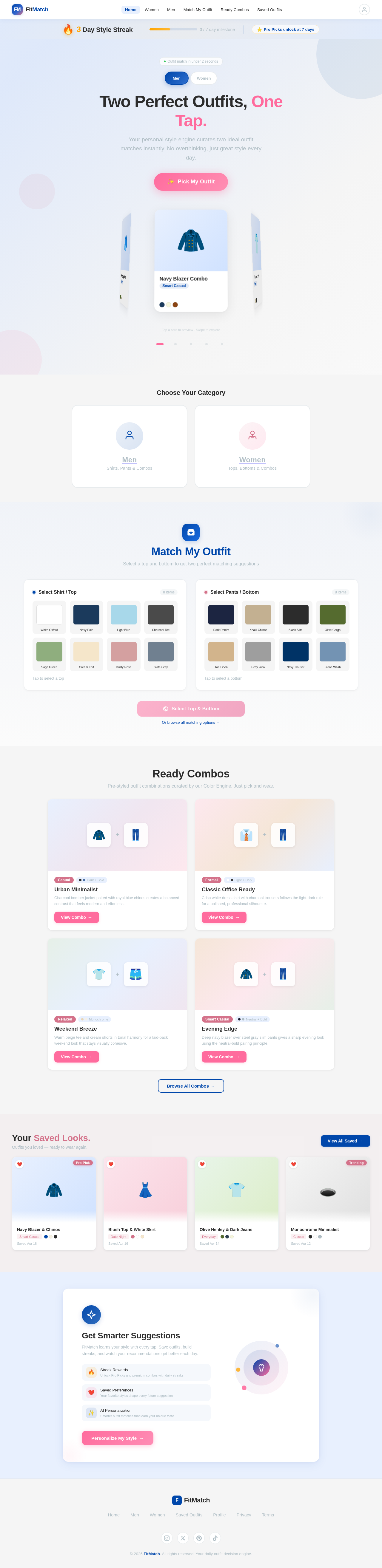
Two Perfect Outfits, One Tap.
Your personal style engine curates two ideal outfit matches instantly. No overthinking, just great style every day.
Navy Blazer Combo
Smart CasualWhite Tee + Chinos
EverydayDenim on Denim
WeekendBlack Monochrome
Night OutOlive Cargo Look
OutdoorChoose Your Category
Match My Outfit
Select a top and bottom to get two perfect matching suggestions
Select Shirt / Top
8 itemsSelect Pants / Bottom
8 itemsReady Combos
Pre-styled outfit combinations curated by our Color Engine. Just pick and wear.
Urban Minimalist
Charcoal bomber jacket paired with royal blue chinos creates a balanced contrast that feels modern and effortless.
Classic Office Ready
Crisp white dress shirt with charcoal trousers follows the light-dark rule for a polished, professional silhouette.
Weekend Breeze
Warm beige tee and cream shorts in tonal harmony for a laid-back weekend look that stays visually cohesive.
Evening Edge
Deep navy blazer over steel gray slim pants gives a sharp evening look using the neutral-bold pairing principle.
Your Saved Looks.
Outfits you loved — ready to wear again.
Navy Blazer & Chinos
Saved Apr 18
Blush Top & White Skirt
Saved Apr 16
Olive Henley & Dark Jeans
Saved Apr 14
Monochrome Minimalist
Saved Apr 12
Get Smarter Suggestions
FitMatch learns your style with every tap. Save outfits, build streaks, and watch your recommendations get better each day.
No comments yet. Be the first!