sage-finance
 khokhar bhai
You are a senior full-stack engineer and UI/UX designer. Build a complete production-ready web application called "FinovaAI" — an AI-powered personal finance and expense tracking system. Tech Stack Requirements: - Frontend: React (Next.js preferred) + Tailwind CSS - Backend: Node.js with Express (or Next.js API routes) - Database: MongoDB (with Mongoose) - Authentication: JWT + Google OAuth - Charts: Recharts or Chart.js - AI Integration: OpenAI API for financial insights --- Core Features: 1. Authentication System: - Signup/Login with email & password - Google login - JWT-based secure authentication - Protected routes --- 2. User Dashboard: - Show: - Total balance - Monthly income - Monthly expenses - Savings - Charts: - Pie chart (expense categories) - Line chart (monthly trend) --- 3. Transactions System: - Add / Edit / Delete transactions - Types: - Income - Expense - Fields: - Amount - Category (Food, Bills, Travel, etc.) - Date - Notes - Filtering (by date & category) --- 4. Budget Management: - Set monthly budget - Category-wise budget limits - Show progress bars (e.g., 70% used) --- 5. AI Insights Feature: - Analyze user transactions - Generate insights like: - "You spent 25% more on food this month" - "You can save 5000 PKR if you reduce dining out" - Use OpenAI API for dynamic insights --- 6. UI/UX Design: - Modern, clean, responsive design - Dark mode default - Colors: - Primary: Indigo (#4F46E5) - Secondary: Green (#22C55E) - Sidebar navigation: - Dashboard - Transactions - Budgets - AI Insights - Settings --- 7. Settings Page: - User profile - Currency selection (default PKR) - Dark/light mode toggle --- 8. Database Schema: Create proper MongoDB schemas for: - User - Transaction - Budget --- 9. Security: - Password hashing (bcrypt) - Input validation - Error handling --- 10. Extra: - Responsive mobile-friendly UI - Loading states - Toast notifications --- Output Requirements: - Full folder structure - Clean, modular code - Separate frontend and backend - API endpoints fully implemented - .env example file - Setup instructions (step-by-step) --- Goal: The app should be fully functional, scalable, and ready to deploy.

Comments (0)
Sign in to leave a comment
System Requirements
System Requirements Document (SRD) for Sage-Finance
1. Introduction
Welcome to the System Requirements Document (SRD) for Sage-Finance, an AI-powered personal finance and expense tracking system designed to cater to both individual users and small businesses. Sage-Finance aims to revolutionize financial management by combining intuitive design, powerful analytics, and actionable AI-driven insights. This document outlines the system's functional and non-functional requirements, user personas, design concepts, and technical specifications to ensure a robust, scalable, and user-friendly application.
The system will be tailored to the needs of users in Pakistan (PK), with PKR as the default currency and locale-specific considerations for financial insights and reporting. The project will also support global scalability for future expansion.
2. System Overview
Sage-Finance is a web and mobile application that empowers users to manage their finances effectively. By leveraging AI, the system provides personalized insights, helping users make informed financial decisions. The platform supports two primary user roles: Individuals and Businesses, offering customized dashboards and features for each.
Key features include:
- Secure authentication with email, password, and Google OAuth.
- A dynamic dashboard displaying financial summaries and visualizations.
- Comprehensive transaction management with categorization and filtering.
- Budget management tools with progress tracking.
- AI-powered insights for smarter financial planning.
- Responsive, modern UI/UX with dark mode as the default theme.
3. Functional Requirements
Authentication System
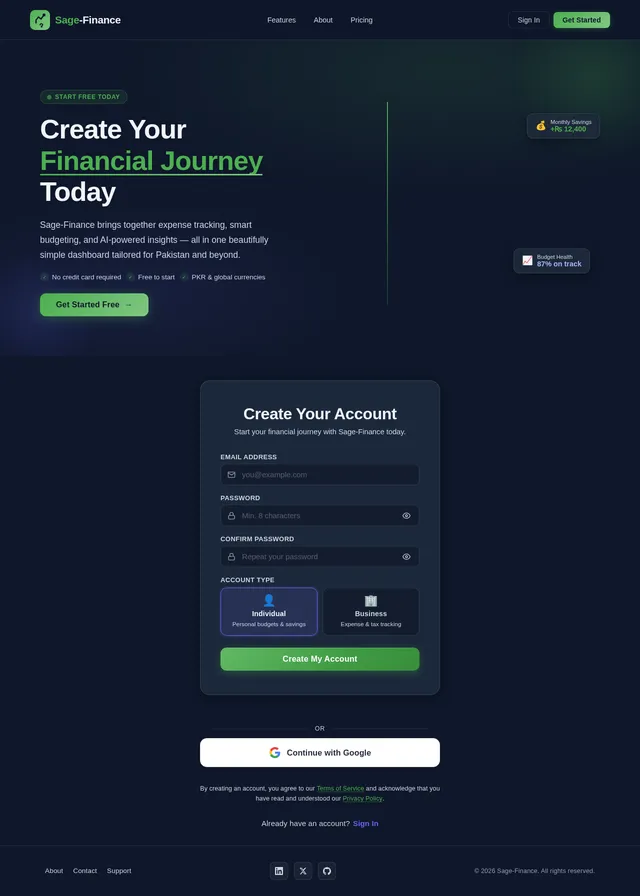
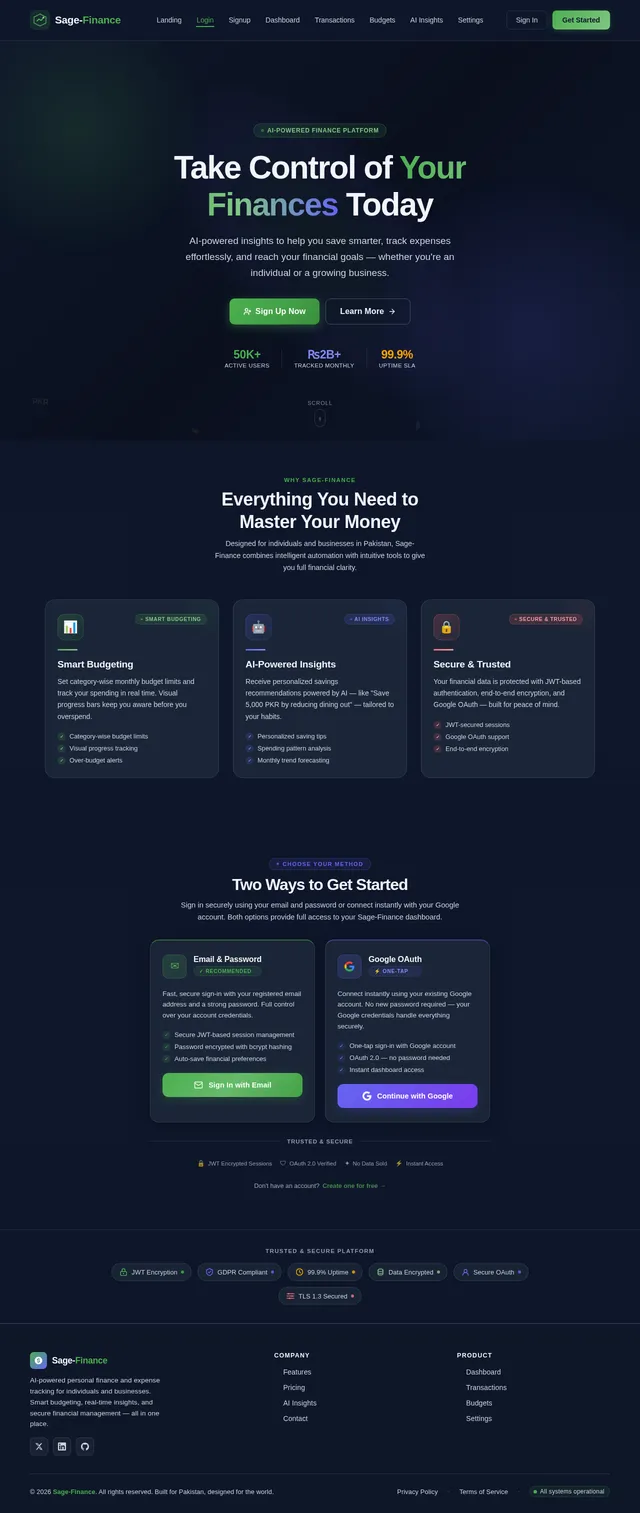
- As a User, I should be able to sign up and log in using email and password.
- As a User, I should be able to log in using my Google account.
- As a User, I should have secure JWT-based authentication for accessing protected routes.
User Dashboard
- As a User, I should see my total balance, monthly income, monthly expenses, and savings on the dashboard.
- As a User, I should see a pie chart showing expense categories.
- As a User, I should see a line chart showing monthly financial trends.
Transactions System
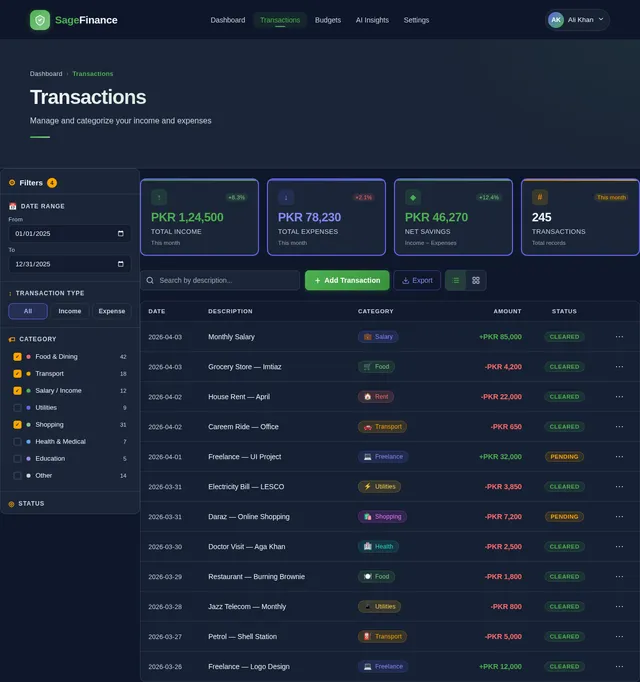
- As a User, I should be able to add, edit, and delete transactions.
- As a User, I should be able to categorize transactions as income or expense.
- As a User, I should be able to filter transactions by date and category.
- As a User, I should be able to add details to transactions, including amount, category, date, and notes.
Budget Management
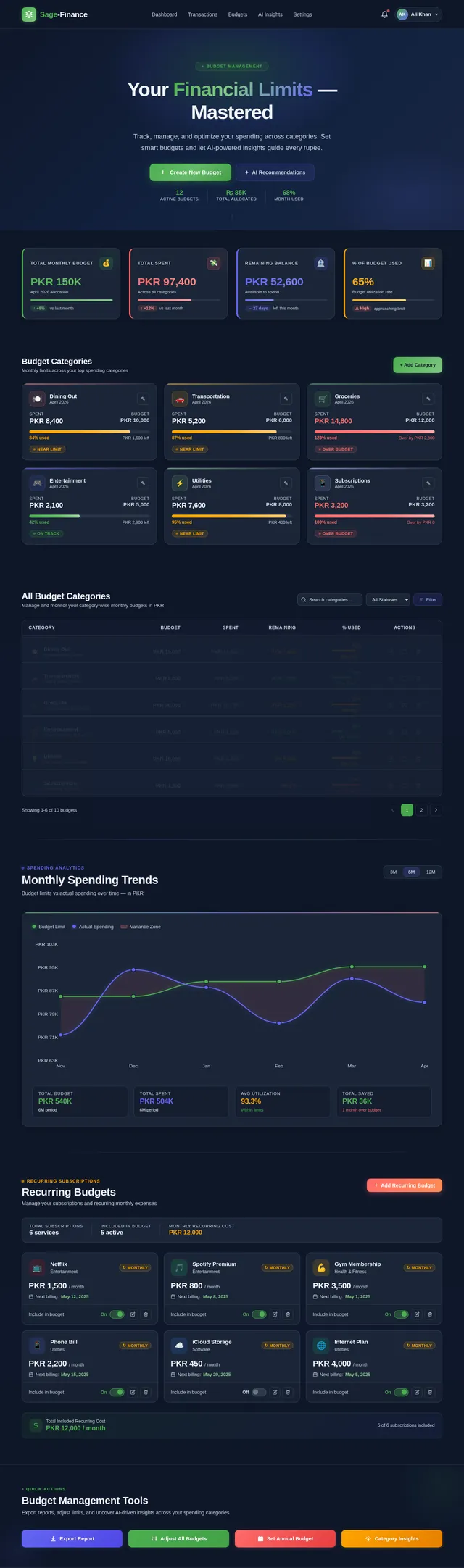
- As a User, I should be able to set a monthly budget.
- As a User, I should be able to set category-wise budget limits.
- As a User, I should see progress bars indicating budget usage (e.g., 70% used).
AI Insights Feature
- As a User, I should receive AI-generated insights based on my transactions.
- As a User, I should receive suggestions for saving money, such as "You can save 5000 PKR if you reduce dining out."
User Roles
- As an Individual User, I should have a dashboard focused on personal budgeting, savings, and lifestyle-related insights.
- As a Business User, I should have a dashboard focused on expense summaries, category budgets, and tax-related insights.
Settings Page
- As a User, I should be able to update my profile information.
- As a User, I should be able to select my preferred currency (default: PKR).
- As a User, I should be able to toggle between dark and light mode.
4. User Personas
Individual User
- Description: A person managing personal finances, tracking expenses, and planning savings.
- Goals: Budgeting, saving money, and understanding spending habits.
- Key Features: Personal dashboard, savings insights, and lifestyle-related financial advice.
Business User
- Description: A small business owner or manager tracking expenses, budgets, and financial performance.
- Goals: Expense categorization, tax reporting, and budget management.
- Key Features: Business-focused dashboard, category budgets, and expense summaries.
5. Visuals Colors and Theme
Unique Color Palette
- Background: #F5F7FA (Soft Cloud White)
- Surface: #FFFFFF (Pure White)
- Text: #1F2937 (Charcoal Gray)
- Accent: #4CAF50 (Emerald Green)
- Muted: #9CA3AF (Cool Gray)
Theme
The design will feature a clean, modern aesthetic with dark mode as the default. The color palette is chosen to evoke trust, clarity, and financial stability.
6. Signature Design Concept
The Sage-Finance homepage will feature an interactive financial journey map. Upon landing, users will see a dynamic, animated timeline that represents their financial journey.
Key Features:
-
Interactive Timeline:
- A horizontal scrollable timeline with key milestones (e.g., "First Budget Set," "Savings Goal Achieved," "Expense Reduced by 20%").
- Each milestone will have a clickable icon that expands into a card with detailed insights and tips.
-
AI-Powered Animations:
- The background will feature a subtle, flowing animation of currency symbols (e.g., PKR, USD) and financial graphs that shift in real-time based on the user's data.
-
Micro-Interactions:
- Hovering over elements will trigger smooth transitions, such as expanding cards or highlighting specific data points on charts.
-
Personalized Greeting:
- A warm, AI-generated greeting like "Good Morning, Khokhar! Here's your financial snapshot for today."
-
Dark Mode Default:
- The homepage will default to dark mode with an option to toggle to light mode, ensuring a visually comfortable experience.
This design will create an engaging and memorable first impression, encouraging users to explore the platform further.
7. Non-Functional Requirements
- Performance: The system should handle up to 10,000 concurrent users with minimal latency.
- Scalability: The architecture should support future expansion, including additional user roles and features.
- Security: All sensitive data must be encrypted, and the system must comply with GDPR and other relevant regulations.
- Availability: The system should maintain 99.9% uptime.
- Localization: Default currency is PKR, with support for other currencies in the future.
8. Tech Stack
Frontend
- React (Next.js preferred) for web application.
- Tailwind CSS for styling.
Backend
- Node.js with Express or Next.js API routes.
Database
- MongoDB with Mongoose for schema management.
Authentication
- JWT for secure authentication.
- Google OAuth for social login.
Charts
- Recharts or Chart.js for data visualization.
AI Integration
- OpenAI API for financial insights.
Tools
- Docker and Docker Compose for local orchestration.
- Kubernetes for server-side orchestration.
9. Assumptions and Constraints
- The system will initially target users in Pakistan, with PKR as the default currency.
- The application will be accessible via web and mobile platforms.
- AI insights will rely on the OpenAI API, which requires an active subscription.
- The system will be designed for scalability but will initially support up to 10,000 concurrent users.
10. Glossary
- JWT: JSON Web Token, a secure method for transmitting information between parties.
- OAuth: Open standard for access delegation, allowing third-party applications to access user information.
- PKR: Pakistani Rupee, the default currency for the application.
- AI Insights: Data-driven recommendations generated using artificial intelligence.
- Mongoose: An Object Data Modeling (ODM) library for MongoDB and Node.js.
- Recharts/Chart.js: Libraries for creating interactive data visualizations.
- Docker: A platform for developing, shipping, and running applications in containers.
- Kubernetes: An open-source system for automating deployment, scaling, and management of containerized applications.

Master Your Money
with AI
Personalized financial insights powered by AI. Track expenses, set budgets, and achieve your financial goals.
Everything You Need to Manage Your Money
Powerful tools designed for individuals and businesses to track, analyze, and optimize their financial health.
Smart Dashboard
Get a complete overview of your finances at a glance. Track balances, income, expenses, and savings with beautiful visualizations.
AI Insights
Receive personalized, AI-driven recommendations to save money and optimize spending habits based on your transaction patterns.
Budget Tracking
Set monthly and category-wise budgets with real-time progress bars. Stay on target and never overspend again.
Expense Categorization
Automatically categorize your transactions as income or expenses. Filter by date, category, and add detailed notes.
Multi-Currency Support
Manage finances in PKR, USD, EUR, and more. Seamlessly switch between currencies with live exchange rate updates.
Real-Time Sync
Access your financial data instantly across all devices. Every transaction syncs in real-time so you are always up to date.
From First Budget to Financial Freedom
Follow the milestones that thousands of Sage-Finance users have achieved. Click any milestone to discover actionable insights for each stage.
Step 1First Budget Set
Create your first monthly budget and take control of where your money goes. Define limits for categories like food, transport, and entertainment.
Step 2Savings Goal Achieved
Hit your first savings milestone. Whether it is 10,000 PKR or 50,000 PKR, every goal reached builds momentum.
Step 3Expenses Reduced by 20%
AI-powered insights identify spending patterns and help you cut unnecessary expenses by at least 20% within 3 months.
Step 4500+ Transactions Tracked
With over 500 transactions logged, Sage-Finance builds a comprehensive financial profile for highly personalized advice.
Step 5Emergency Fund Built
Secure 3-6 months of living expenses in your emergency fund. Financial peace of mind starts here.
Step 6Investment Started
Once your safety net is in place, begin investing with confidence. Sage-Finance tracks portfolio growth alongside daily finances.
Your Money, Made Smarter
Smart Insight: Reduce Dining Expenses
You can save ₨5,000 PKR/month if you reduce dining out by 30%. Based on your last 3 months of transaction data, dining expenses average ₨16,500 PKR monthly.
Built for Everyone
Whether you manage personal finances or run a business, Sage-Finance adapts to your unique needs.
Individual User
Managing personal finances, tracking expenses, and planning savings with ease.
Goals
- ✓Track daily expenses and understand spending habits
- ✓Set monthly budgets and hit personal savings goals
- ✓Get AI-powered tips to reduce unnecessary spending
Key Features
Business User
Small business owner tracking expenses, budgets, and financial performance.
Goals
- ✓Categorize and monitor business expenses in real-time
- ✓Generate tax-ready reports and financial summaries
- ✓Optimize cash flow with AI-driven budget forecasting
Key Features
What Our Users Say
Real stories from people who transformed their financial habits with Sage-Finance.
Sage-Finance completely transformed how I manage my freelancing income. The AI insights helped me save over 12,000 PKR in just two months by identifying unnecessary subscriptions.
As a shop owner, tracking daily expenses was a nightmare. The smart categorization and budget alerts keep my business finances organized without any extra effort.
I love the real-time sync across devices. I add transactions on my phone during lunch and see everything updated on my laptop at home. The multi-currency support is a lifesaver for remote work payments.
The budget tracking feature helped me stick to my monthly allowance for the first time. Seeing the progress bars fill up keeps me motivated to spend wisely.
Simple, Transparent Pricing
Choose the plan that fits your financial journey. No hidden fees, cancel anytime.
Starter
Perfect for individuals starting their financial journey
- ✓Personal finance dashboard
- ✓Up to 50 transactions/month
- ✓Basic expense categorization
- ✓Monthly budget tracking
- ✓Pie chart visualizations
- ✓PKR currency support
- ✓Email & password login
- ✓Mobile-responsive interface
- ✓Basic spending summaries
- ✓Community support
Professional
For individuals serious about financial growth with AI insights
- ✓Everything in Starter
- ✓Unlimited transactions
- ✓AI-powered financial insights
- ✓Advanced budget management
- ✓Category-wise budget limits
- ✓Line & pie chart analytics
- ✓Google OAuth login
- ✓Multi-currency support
- ✓Savings goal tracking
- ✓Smart spending suggestions
- ✓Export reports (CSV/PDF)
- ✓Priority email support
Enterprise
For businesses needing advanced tools, team access, and tax insights
- ✓Everything in Professional
- ✓Business expense dashboard
- ✓Tax-ready categorization
- ✓Team multi-user access
- ✓Custom budget categories
- ✓Advanced AI tax insights
- ✓Dedicated account manager
- ✓API access & integrations
- ✓Custom reporting & analytics
- ✓SSO & enhanced security
- ✓SLA guarantee (99.9% uptime)
- ✓Phone & chat support
Your Security is Our Priority
Sage-Finance uses bank-grade security to protect your financial data. Your trust is the foundation of everything we build.
All your financial data is encrypted in transit and at rest using AES-256, ensuring complete privacy for every transaction.
We adhere to international data protection regulations, giving you full control over your personal financial information.
Multi-factor authentication with JWT tokens and Google OAuth keeps your account secure from unauthorized access.
Continuous security assessments and penetration testing ensure our infrastructure meets the highest industry standards.
Ready to Transform Your Finances?
Join thousands of users already managing their money smarter. Get personalized AI insights, track expenses effortlessly, and achieve your financial goals.
No comments yet. Be the first!