
sage-a

by20BECE3OO77 Siddharth

A testimonial collection tool is a small SaaS that helps businesses ask for, gather, approve, and display customer testimonials in one place. The core value is simple: it removes friction from collecting social proof and makes it easy to turn happy customers into conversion assets. What it does Sends a testimonial request link by email or WhatsApp. Lets customers submit text, ratings, screenshots, or short videos. Stores responses in a dashboard for approval and editing. Generates an embed widget or testimonial wall for websites and landing pages. Why people pay Businesses want more trust on their sales pages, but collecting testimonials manually is annoying and inconsistent. A tool that makes this process automatic can directly help improve conversions, so teams are willing to pay a monthly fee. Best customers Solo founders. Agencies. Coaches and consultants. B2B SaaS companies. Service businesses with landing pages. Simple MVP Start with just: A testimonial request form. A public submission page. An admin approval screen. An embeddable widget. Pricing idea You could start around $9–$29/month for solo users, then add higher tiers for agencies and teams with branding, multiple campaigns, and custom embeds. For you, this is a good micro SaaS because it is API-friendly, easy to build in stages, and fits well with a backend-first approach.

LandingSubmissionLoginAdminWidget
Landing

Comments (0)

No comments yet. Be the first!

System Requirements

System Requirement Document

Sage-a System Requirements Document

1. Introduction

The project "Sage-a" is a testimonial collection tool designed as a small SaaS platform to help businesses efficiently gather, approve, and display customer testimonials. The core value proposition is to streamline the process of collecting social proof, thereby converting satisfied customers into valuable conversion assets.

2. System Overview

Sage-a aims to automate the testimonial collection process, making it seamless for businesses to enhance trust on their sales pages. The tool is particularly beneficial for solo founders, agencies, coaches, consultants, B2B SaaS companies, and service businesses with landing pages. By offering a frictionless experience, Sage-a helps improve conversion rates and justifies its subscription fee.

Page 1 of 6

3. Functional Requirements as Story Points

  • As a Business Owner, I should be able to send testimonial request links via email or WhatsApp.
  • As a Customer, I should be able to submit text, ratings, screenshots, or short videos as testimonials.
  • As an Admin, I should be able to view and approve testimonials in a dashboard.
  • As a Business Owner, I should be able to generate an embed widget or testimonial wall for websites and landing pages.
  • As a Solo Founder, I should be able to access a testimonial request form.
  • As a Customer, I should be able to access a public submission page.
  • As an Admin, I should be able to access an admin approval screen.
  • As a Business Owner, I should be able to use an embeddable widget on my site.

4. User Personas

  • Business Owner: Uses the tool to collect and display testimonials to enhance trust and conversions.
  • Customer: Provides testimonials through various media formats.
  • Admin: Manages the approval and editing of testimonials.
  • Solo Founder: Utilizes the tool for personal business needs.
  • Agency: Uses the tool for multiple clients and campaigns.
  • Coach/Consultant: Collects testimonials to build credibility.
  • B2B SaaS Company: Integrates testimonials into their sales strategy.
  • Service Business: Displays testimonials on landing pages to attract more clients.
Page 2 of 6

5. Core User Flows

  • Business Owner sends testimonial request link -> Customer submits testimonial -> Admin approves testimonial -> Testimonial is displayed on the website.
  • Customer accesses public submission page -> Submits testimonial -> Admin reviews and approves -> Testimonial is embedded on the landing page.

6. Visuals Colors and Theme

  • primary: #3498db (a professional blue for trust and reliability)
  • primary_light: #85c1e9 (a lighter blue for hover states)
  • secondary: #2ecc71 (a green for success and approval)
  • accent: #e74c3c (a red for emphasis and alerts)
  • highlight: #f1c40f (a yellow for notifications and active states)
  • bg: #ecf0f1 (a light grey for background)
  • surface: #ffffff (a white for cards and panels)
  • text: #2c3e50 (a dark blue for primary text)
  • text_muted: #7f8c8d (a grey for secondary text)
  • border: #bdc3c7 (a subtle grey for borders)

7. Signature Design Concept

Page 3 of 6

Interactive Testimonial Wall

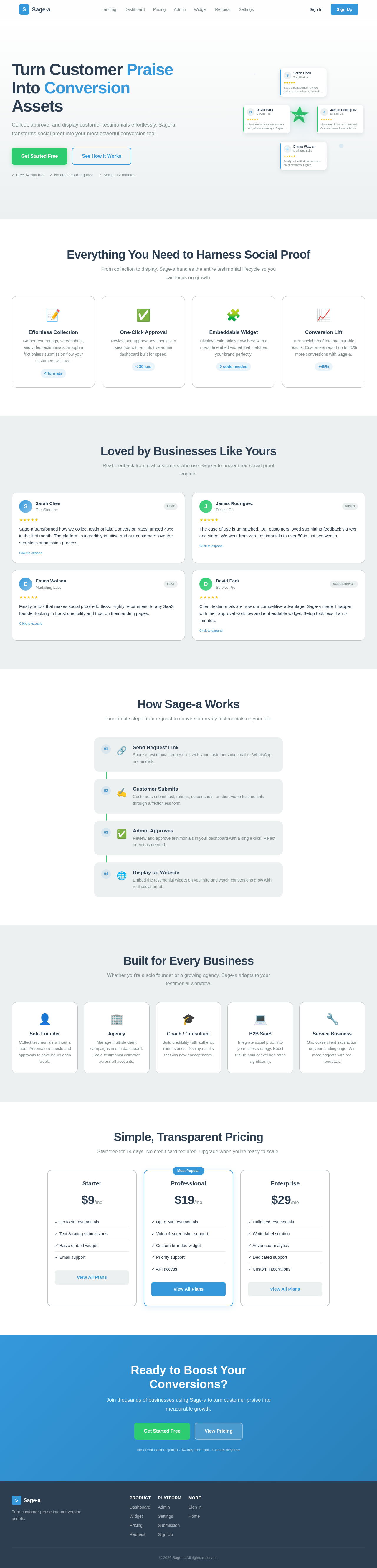
The homepage will feature an interactive testimonial wall where each testimonial appears as a card that users can click to expand. When expanded, the card will flip to reveal the full testimonial, including text, ratings, and media. The wall will dynamically update as new testimonials are approved, creating a living showcase of customer feedback. This concept will use motion/react for smooth animations and transitions.

LANDING HERO MOTION BRIEF

The landing page will feature a dynamic animation where testimonial cards float in from the sides and gather around a central focal point—a glowing "Trust" emblem. As cards settle, the emblem transforms into a "Conversion" badge, illustrating the transformation of testimonials into conversion assets. This animation will loop every 10 seconds, with interactive elements allowing users to click on cards for more details.

8. Interaction Model & Motion Direction

  • Interaction Model: Animated
  • The landing page will feature moderate scroll-triggered reveals and hover transitions. Testimonial cards will have spring physics for interactive elements, providing a polished and engaging user experience.
Page 4 of 6

9. Non-Functional Requirements

  • The system must ensure secure data handling and storage of testimonials.
  • The platform should be scalable to accommodate an increasing number of users and testimonials.
  • The tool must be responsive and accessible on various devices and screen sizes.

10. Tech Stack

  • Frontend: React for Web
  • Backend: Python, FastAPI
  • Database: MySQL or MariaDB, using Alembic for migrations
  • AI Models: Not applicable
  • AI Tools: Not applicable
  • Local Orchestration: Docker, docker-compose
  • Server-side Orchestration: Kubernetes

11. Assumptions and Constraints

  • The tool will primarily target small to medium-sized businesses.
  • Initial pricing will range from $9–$29/month, with potential for higher tiers.
  • The platform will be developed with a backend-first approach, focusing on API integration.
Page 5 of 6

12. Glossary

  • Testimonial: A statement from a customer endorsing a product or service.
  • Embed Widget: A small application that can be embedded into a webpage to display content.
  • API: Application Programming Interface, a set of protocols for building and interacting with software applications.
  • SaaS: Software as a Service, a software distribution model in which applications are hosted by a service provider and made available to customers over the internet.
Page 6 of 6
Landing design preview
Login: Sign In
Admin: View Testimonials
Admin: Approve Testimonial
Admin: Edit Testimonial
Admin: Reject Testimonial
Dashboard: View Analytics
Widget: Manage Display
Landing design preview
Login: Sign In
Admin: View Testimonials
Admin: Approve Testimonial
Admin: Edit Testimonial
Admin: Reject Testimonial
Dashboard: View Analytics
Widget: Manage Display