safestay

bySoniya Kamireddy

the attatched file has all details

LandingLogin
Landing

Comments (0)

No comments yet. Be the first!

System Requirements

System Requirement Document
Page 1 of 10

System Requirements Document for SafeStay

Introduction

This document outlines the system requirements for the SafeStay – Smart Hostel Management Network, a full-stack web application designed to centralize hostel management operations. The application is intended to serve as a B.Tech project demonstration, showcasing a production-style SaaS product with comprehensive functionality and a modern design.

System Overview

SafeStay connects students, parents, wardens, and administrators in a centralized platform to manage hostel operations efficiently. The application includes features such as room management, payments, complaints, maintenance, attendance, food menu, laundry, announcements, notifications, emergency alerts, and AI safety monitoring.

Product Interpretation and Delivery Boundary

SafeStay is delivered as a full-stack web application with role-specific dashboards for students, parents, wardens, and administrators. It supports role-based access control, ensuring that each user type has access to relevant features and information. The application must function in demo mode if external services are unavailable, providing a seamless experience without compromising on functionality.
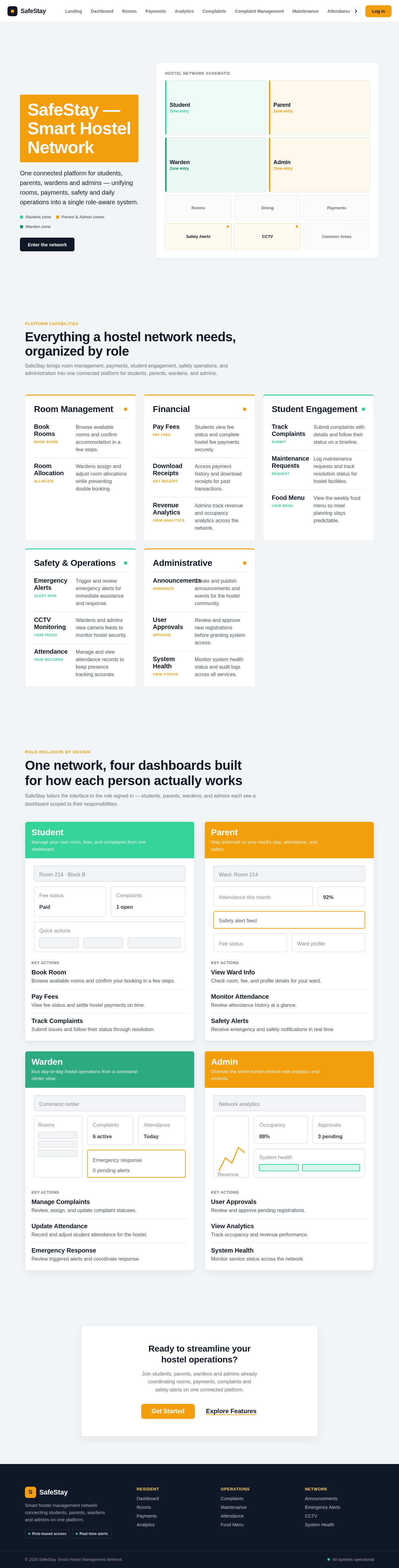
Page Content and Component Coverage

Page 2 of 10

Landing

  • Information/State: Overview of SafeStay, its audience, and core capabilities.
  • Primary Actions: Explore Features, Get Started.
  • Components: Hero visual, feature sections, call-to-action buttons.

Login

  • Information/State: User authentication interface.
  • Primary Actions: Login, Register.
  • Components: Email/Username field, Password field, Role selection, Login/Register buttons.

Dashboard

  • Information/State: Role-specific summaries and navigation.
  • Primary Actions: Access role-specific features.
  • Components: Overview cards, navigation links, notifications.

Rooms

  • Information/State: Available rooms for booking.
  • Primary Actions: Filter, Book Room.
  • Components: Room listings, filter options, booking confirmation.

Payments

  • Information/State: Fee status and payment history.
  • Primary Actions: Pay Fees, Download Receipt.
  • Components: Payment details, transaction history.
Page 3 of 10

Analytics

  • Information/State: Revenue and occupancy analytics.
  • Primary Actions: View detailed analytics.
  • Components: Charts, KPI cards.

Complaints

  • Information/State: Complaint submission and tracking.
  • Primary Actions: Submit Complaint, Track Status.
  • Components: Complaint form, status timeline.

Complaint Management

  • Information/State: Manage and update complaint statuses.
  • Primary Actions: Update Status, Assign Warden.
  • Components: Complaint list, status update options.

Maintenance

  • Information/State: Maintenance request submission and tracking.
  • Primary Actions: Submit Request, Track Status.
  • Components: Request form, status indicators.

Attendance

  • Information/State: Attendance records for students.
  • Primary Actions: Manage Attendance, View Records.
  • Components: Attendance table, status filters.
Page 4 of 10

Food Menu

  • Information/State: Weekly food menu.
  • Primary Actions: Update Menu, View Options.
  • Components: Menu cards, update form.

Announcements

  • Information/State: Announcements and events.
  • Primary Actions: Create Announcement, View Updates.
  • Components: Announcement list, creation form.

Emergency Alerts

  • Information/State: Emergency alert management.
  • Primary Actions: Trigger Alert, Review Alerts.
  • Components: Alert list, status updates.

CCTV

  • Information/State: CCTV camera feeds.
  • Primary Actions: View Feeds.
  • Components: Camera cards, status indicators.

Search

  • Information/State: Cross-module search and filtering.
  • Primary Actions: Search Records, Apply Filters.
  • Components: Search bar, filter options.
Page 5 of 10

System Health

  • Information/State: System health and audit logs.
  • Primary Actions: View Health Status, Audit Logs.
  • Components: Health indicators, log entries.

Functional Requirements

Authentication and User Management

  • As a user, I want to register with my details, including role-specific information, so that I can access the system. (explicit)
  • As an admin, I want to approve or reject new user registrations, so that only authorized users can access the system. (explicit)
  • As a user, I want to log in using my email/username and password, so that I can access my dashboard. (explicit)
  • As a user, I want to log out securely, so that my session is terminated. (explicit)

Dashboards

  • As a student, I want to view my dashboard with room details, payment status, attendance, and quick actions, so that I can manage my hostel activities. (explicit)
  • As a parent, I want to view my ward's information, attendance, fees, and safety alerts, so that I can monitor their hostel activities. (explicit)
  • As a warden, I want a command-center style dashboard to manage room allocations, complaints, and emergency alerts, so that I can efficiently oversee hostel operations. (explicit)
  • As an admin, I want a comprehensive dashboard with analytics and system status, so that I can manage the entire hostel network. (explicit)

Room Management

  • As a student, I want to book a room from available options, so that I can secure accommodation. (explicit)
  • As a system, I want to prevent double booking of rooms, so that room allocations are accurate. (explicit)
Page 6 of 10

Payments

  • As a student, I want to view and pay my hostel fees, so that I can maintain my accommodation. (explicit)
  • As an admin, I want to view revenue analytics, so that I can track financial performance. (explicit)

Complaints and Maintenance

  • As a student, I want to submit complaints with details and track their status, so that issues can be resolved. (explicit)
  • As a warden/admin, I want to update the status of complaints, so that students are informed of progress. (explicit)
  • As a user, I want to submit maintenance requests, so that hostel facilities are maintained. (explicit)

Attendance

  • As a warden, I want to manage student attendance records, so that attendance is accurately tracked. (explicit)
  • As a parent, I want to view my ward's attendance, so that I can monitor their presence in the hostel. (explicit)

Food Menu and Laundry

  • As an admin/warden, I want to update the weekly food menu, so that students are informed of meal options. (explicit)
  • As a student, I want to track my laundry submissions and status, so that I can manage my laundry needs. (explicit)

Announcements and Notifications

  • As an admin/warden, I want to create announcements and events, so that important information is communicated. (explicit)
  • As a user, I want to receive notifications for important updates, so that I am informed of relevant events. (explicit)

Emergency and Safety

  • As a student, I want to trigger an emergency alert, so that I can request immediate assistance. (explicit)
  • As a system, I want to analyze audio for potential distress events, so that safety alerts can be generated. (explicit)
Page 7 of 10

AI Safety Monitoring

  • As a system, I want to process audio inputs to detect potential distress events, so that safety alerts can be generated. (explicit)
  • As a user, I want to review AI-generated alerts, so that I can verify and respond to potential emergencies. (explicit)

CCTV Monitoring

  • As a warden/admin, I want to view CCTV camera feeds, so that I can monitor hostel security. (explicit)

Real-Time Alerts

  • As a system, I want to provide real-time updates for emergency alerts, so that users are immediately informed. (explicit)

Search and Filter

  • As an admin, I want to search and filter records across modules, so that I can efficiently manage data. (explicit)

System Health and Audit Logs

  • As an admin, I want to view system health status, so that I can ensure all services are operational. (explicit)
  • As a system, I want to log important events, so that actions can be audited. (explicit)

User Personas

  • Student: Manages personal hostel activities, including room booking, payments, and complaints.
  • Parent: Monitors ward's hostel activities and receives notifications.
  • Warden: Oversees hostel operations, manages complaints, and responds to emergencies.
  • Admin: Manages the entire hostel network, including user approvals, analytics, and system settings.
Page 8 of 10

Core User Flows

Student Room Booking

  1. Log in to the student dashboard.
  2. Navigate to the room booking section.
  3. View available rooms and apply filters.
  4. Select a room and confirm booking.
  5. Receive booking confirmation.

Admin User Approval

  1. Log in to the admin dashboard.
  2. Navigate to the pending approvals section.
  3. Review registration details.
  4. Approve or reject the registration.
  5. Notify the user of the decision.

Emergency Alert Workflow

  1. Student triggers a panic alert.
  2. Confirmation modal appears.
  3. Alert is created and notifications are sent to warden and admin.
  4. Alert status is updated as it is addressed.
Page 9 of 10

Visuals Colors and Theme

  • Primary colors: Deep navy/blue, teal/green safety accents.
  • Backgrounds: Clean white/light.
  • Design elements: Rounded cards, subtle gradients, soft shadows.

Signature Design Concept

  • Modern EdTech + Smart Hostel + Safety Technology + SaaS Dashboard.
  • Use of rounded cards, gradient headers, and animated statistics.

Interaction Model & Motion Direction

  • Interaction Model: Static
  • Motion Tempo: Restrained
  • Hero Dimensionality: Flat
  • Smooth hover effects, micro-interactions, and animated progress indicators.
  • Responsive design for desktop, tablet, and mobile.

Non-Functional Requirements

  • Responsive design across devices.
  • Secure authentication and authorization.
  • Real-time updates for critical alerts.
  • High availability and graceful degradation in demo mode.
Page 10 of 10

Tech Stack

Frontend

  • React.js, JavaScript, HTML5, CSS3
  • Axios/fetch for API communication
  • Recharts for charts

Backend

  • Java, Spring Boot, Spring Security
  • MySQL for database
  • FastAPI for AI service

Assumptions and Constraints

  • The application must function in demo mode if external services are unavailable.
  • All user interactions should be intuitive and require minimal training.

Glossary

  • JWT: JSON Web Token, used for secure authentication.
  • CRUD: Create, Read, Update, Delete operations.
  • AI: Artificial Intelligence, used for safety monitoring.
  • SaaS: Software as a Service, a software distribution model.
Landing design preview
Landing: Explore features
Login: Log in
Dashboard: View system overview
Analytics: View analytics
Complaint Management: Update status
Maintenance: Track status
Food Menu: Update menu
Announcements: Create announcement
Emergency Alerts: Review alerts
CCTV: View feeds
Search: Search records
System Health: View health status
System Health: View audit logs
Landing design preview
Landing: Explore features
Login: Log in
Dashboard: View system overview
Analytics: View analytics
Complaint Management: Update status
Maintenance: Track status
Food Menu: Update menu
Announcements: Create announcement
Emergency Alerts: Review alerts
CCTV: View feeds
Search: Search records
System Health: View health status
System Health: View audit logs