safe-stay
 Soniya Reddy
https://8080.ai/design/b87365fd-f9ca-4bfb-ab8d-0beaca636a31/cdef22f7-66f9-4204-97d1-e9468adfb290?device=mobile already i have done thismuch but due to low credits im doing this from another account so complete remaining in the above link only design and login page hasbeen completed


Comments (0)
Sign in to leave a comment
System Requirements
System Requirements Document for SafeStay
Introduction
This document outlines the system requirements for the SafeStay – Smart Hostel Management Network, a full-stack web application designed to centralize hostel/PG management for students, parents, wardens, and administrators. The application aims to provide a comprehensive solution for managing hostel operations, ensuring safety, and enhancing communication among stakeholders.
System Overview
SafeStay is a B.Tech project demonstration application that functions as a real SaaS product. It integrates various user roles and functionalities to manage hostel operations effectively. The application includes features such as authentication, dashboards for different user roles, room management, payments, complaints, maintenance, attendance, food menu, laundry, announcements, notifications, emergency alerts, AI safety monitoring, and CCTV monitoring.
Product Interpretation and Delivery Boundary
SafeStay is delivered as a full-stack web application with a focus on user-friendly technology and comfort. It is designed to be responsive and accessible across desktop, laptop, tablet, and mobile devices. The application uses a combination of real and mock services to ensure functionality even when external services are unavailable. Sensitive information and credentials are protected, and the system is built to handle real-time updates and secure interactions.
Page Content and Component Coverage
Landing Page
- Hero Section: Introduction to SafeStay with a modern hostel building visual and taglines.
- Feature Sections: Overview of key features like Room Management, Smart Payments, and AI Safety Detection.
- Call to Action: Buttons for "Get Started" and "Explore Features".
Authentication
- Login/Register Card: Fields for email/username, password, and role selection.
- Registration Fields: Full name, email, phone, password, confirm password, role, and student/parent ID where applicable.
- Approval Status: New registrations marked as "Pending Approval".
Student Dashboard
- Header: Welcome message with student name.
- Quick Action Cards: Book Room, Pay Fees, Raise Complaint, Maintenance, Attendance, Food Menu, Laundry, Emergency.
- Emergency Alert: Confirmation modal for sending alerts.
Parent Dashboard
- Header: Welcome message with linked ward information.
- Cards: Ward Information, Attendance, Fee Status, Open Complaints, Safety Alerts.
- Read-Only Access: View student profile, room, attendance, payments, complaints, maintenance, announcements, and alerts.
Warden Dashboard
- Header: Command-center style with occupancy and alert management.
- Sections: Room Allocation, Student Directory, Attendance, Complaints, Maintenance, Emergency Alerts, Announcements.
Admin Dashboard
- Header: Personalized greeting with KPIs.
- Analytics: Occupancy, Revenue, Complaints, Attendance, Emergency Alerts.
- Sidebar Navigation: Users, Hostel Management, Finance, Operations, Communication, Safety, System.
Room Booking
- Marketplace: Room cards with details and filters.
- Room Details Page: Large image, facilities, pricing, availability, occupants count, and booking button.
Payment Module
- Student Payment Page: Display of payment history and download receipt option.
- Admin Revenue Dashboard: Total and monthly revenue, pending and paid payments.
Complaint & Maintenance Module
- Complaint Submission: Fields for title, category, description, priority, room, and optional image.
- Maintenance Requests: Status tracking and updates by warden/admin.
Attendance
- Attendance Page: Columns for student, date, check-in/out, and status.
- Parent View: Access to ward's attendance records.
Food Menu and Laundry
- Weekly Menu: Admin/warden updates with food icons.
- Laundry Dashboard: Status tracking for submissions.
Announcements & Events
- Creation: Admin/warden can create announcements and events with categories and priorities.
Emergency/Safety Center
- Dashboard: Active alerts with details and status management.
- AI Safety Monitoring: Visualization of audio analysis pipeline and potential distress events.
CCTV Monitoring
- Camera Cards: Demo streams with location and status.
Functional Requirements
Authentication and User Management
- As a user, I want to register with my full name, email, phone, password, and role, so that I can access the system.
- As an admin, I want to approve or reject new user registrations, so that only authorized users can access the system.
- As a user, I want to log in using my email/username and password, so that I can access my dashboard.
- As a user, I want to log out, so that I can securely end my session.
- As a user, I want my session to expire after a certain period of inactivity, so that my account remains secure.
Dashboards
- As a student, I want to view my dashboard showing my current room, monthly fee, payment status, attendance, open complaints, and maintenance requests.
- As a parent, I want to view my ward's profile, room, attendance, fees, complaints, maintenance, announcements, and safety alerts.
- As a warden, I want a command-center style dashboard to manage hostel occupancy, students, attendance, complaints, maintenance, and emergency alerts.
- As an admin, I want a dashboard displaying key performance indicators such as total students, total rooms, occupied rooms, available rooms, pending approvals, pending complaints, total revenue, and active emergency alerts.
Room Management
- As a student, I want to book a room by viewing available rooms, so that I can secure accommodation.
- As a user, I want to view room details including room number, floor, hostel block, room type, capacity, occupied beds, available beds, price, and facilities.
- As an admin, I want to prevent double booking of rooms, so that room allocation is efficient.
Payments
- As a student, I want to view my payment history and download receipts, so that I can keep track of my payments.
- As an admin, I want to view a revenue dashboard showing total revenue, monthly revenue, pending payments, paid payments, and failed payments.
Complaints and Maintenance
- As a student, I want to submit complaints with details such as title, category, description, priority, room, and optional image.
- As a warden/admin, I want to update the status of complaints and maintenance requests, so that issues are resolved efficiently.
Attendance
- As a warden, I want to create and update attendance records, so that student attendance is accurately tracked.
- As a parent, I want to view my ward's attendance, so that I am informed about their presence in the hostel.
Food Menu and Laundry
- As an admin/warden, I want to update the weekly food menu, so that students are informed about meal options.
- As a student, I want to track my laundry submissions and status, so that I know when my clothes will be ready.
Announcements and Notifications
- As an admin/warden, I want to create announcements and events, so that important information is communicated to users.
- As a user, I want to receive notifications for payments, complaints, announcements, emergencies, attendance, and bookings.
Emergency and Safety
- As a student, I want to trigger an emergency alert with a confirmation, so that I can notify authorities in case of distress.
- As a warden/admin, I want to receive and manage emergency alerts, so that appropriate actions can be taken.
- As a user, I want to view AI safety monitoring results, so that potential distress events are identified.
AI Service
- As a system, I want to analyze audio inputs to detect potential distress events, so that safety is enhanced.
- As a developer, I want to use a mock AI service if the actual model is unavailable, so that the system remains functional.
CCTV Monitoring
- As a warden/admin, I want to view CCTV camera feeds, so that hostel security is monitored.
System and Security
- As a developer, I want to implement JWT authentication, BCrypt password hashing, role-based authorization, and input validation, so that the system is secure.
- As an admin, I want to view audit logs of important events, so that system activity is tracked.
User Personas
- Student: A hostel resident who manages their accommodation, payments, and complaints.
- Parent: A guardian who monitors their ward's hostel activities and safety.
- Warden: A hostel manager responsible for room allocation, attendance, and maintenance.
- Admin: A system administrator who oversees user management, financials, and system settings.
Core User Flows
-
Student Room Booking:
- Log in as a student.
- Navigate to the room booking section.
- View available rooms and select a room.
- Confirm booking and receive confirmation.
-
Admin User Approval:
- Log in as an admin.
- Navigate to the pending approvals section.
- Review new user registrations.
- Approve or reject registrations.
-
Warden Emergency Alert Management:
- Log in as a warden.
- Navigate to the emergency alerts section.
- View active alerts and details.
- Acknowledge and resolve alerts.
Visuals Colors and Theme
- Primary Colors: Deep navy/blue, teal/green safety accents.
- Background: Clean white/light backgrounds.
- Design Elements: Rounded cards, subtle gradients, soft shadows, modern typography.
Signature Design Concept
- Theme: Modern EdTech + Smart Hostel + Safety Technology + SaaS Dashboard.
- Design: Use of rounded cards, gradient headers, animated statistics, and responsive design.
Interaction Model & Motion Direction
- Model: Smooth hover effects, micro-interactions, skeleton loading, and animated progress indicators.
- Navigation: Responsive sidebar and mobile navigation.
Non-Functional Requirements
- The application must be responsive and work on desktop, laptop, tablet, and mobile devices.
- Implement real-time updates using WebSocket/STOMP or polling fallback.
- Ensure accessibility with semantic HTML, keyboard-friendly controls, and readable contrast.
Tech Stack
- Frontend: React.js, JavaScript, HTML5, CSS3, Axios, React Router.
- Backend: Java, Spring Boot, Spring Web, Spring Data JPA, Spring Security, MySQL.
- AI Service: Python, FastAPI, librosa, NumPy, scikit-learn, joblib.
Assumptions and Constraints
- The application must use realistic seeded demo data.
- External services like Twilio and AI models should have mock implementations if unavailable.
- The system must not expose sensitive information or credentials.
Glossary
- JWT: JSON Web Token, used for secure authentication.
- BCrypt: A password hashing function.
- CRUD: Create, Read, Update, Delete operations.
- AI: Artificial Intelligence, used for safety monitoring.
- CCTV: Closed-Circuit Television, used for security monitoring.
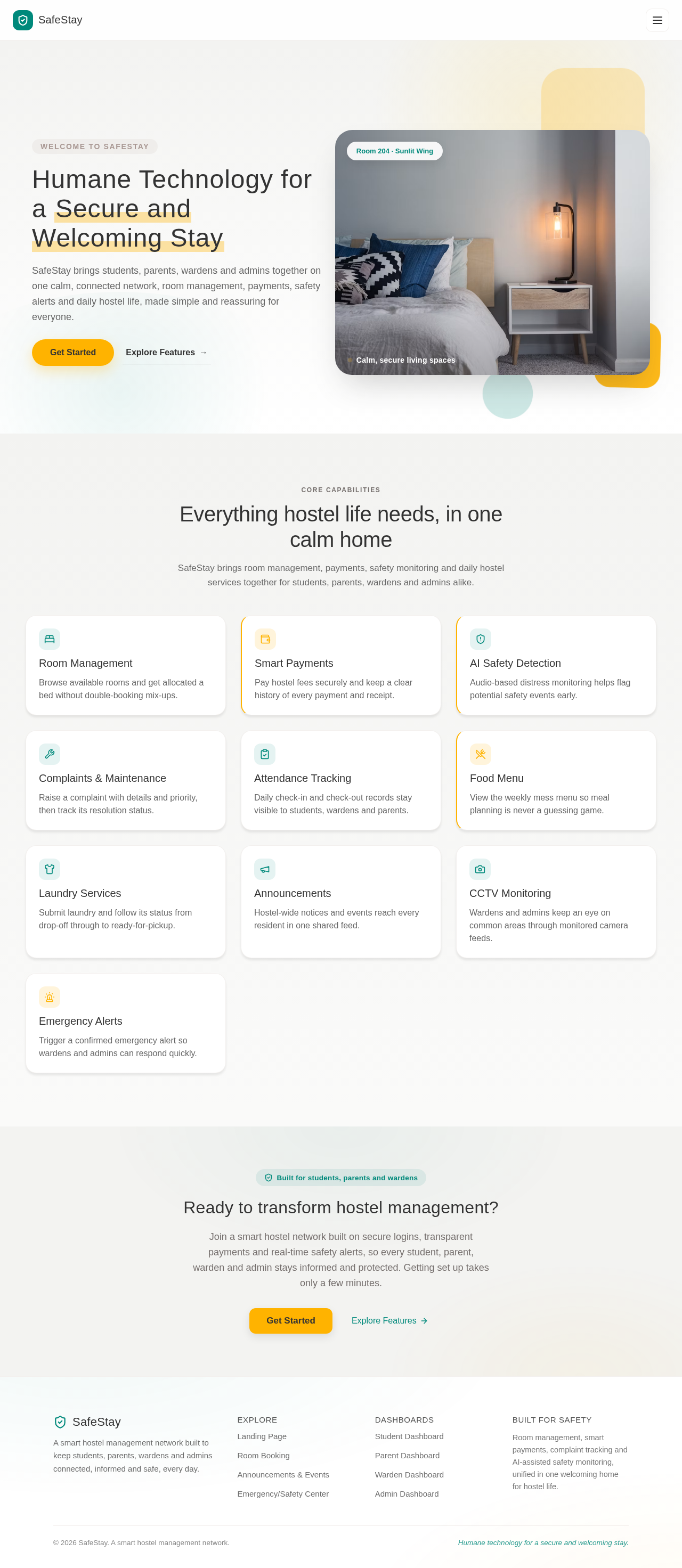
Welcome to SafeStay
Humane Technology for a Secure and Welcoming Stay
SafeStay brings students, parents, wardens and admins together on one calm, connected network, room management, payments, safety alerts and daily hostel life, made simple and reassuring for everyone.
 Room 204 · Sunlit Wing
Calm, secure living spaces
Core Capabilities
Everything hostel life needs, in one calm home
SafeStay brings room management, payments, safety monitoring and daily hostel services together for students, parents, wardens and admins alike.
Room Management
Browse available rooms and get allocated a bed without double-booking mix-ups.
Smart Payments
Pay hostel fees securely and keep a clear history of every payment and receipt.
AI Safety Detection
Audio-based distress monitoring helps flag potential safety events early.
Complaints & Maintenance
Raise a complaint with details and priority, then track its resolution status.
Attendance Tracking
Daily check-in and check-out records stay visible to students, wardens and parents.
Food Menu
View the weekly mess menu so meal planning is never a guessing game.
Laundry Services
Submit laundry and follow its status from drop-off through to ready-for-pickup.
Announcements
Hostel-wide notices and events reach every resident in one shared feed.
CCTV Monitoring
Wardens and admins keep an eye on common areas through monitored camera feeds.
Emergency Alerts
Trigger a confirmed emergency alert so wardens and admins can respond quickly.
Ready to transform hostel management?
Join a smart hostel network built on secure logins, transparent payments and real-time safety alerts, so every student, parent, warden and admin stays informed and protected. Getting set up takes only a few minutes.
Welcome to SafeStay
Humane Technology for a Secure and Welcoming Stay
SafeStay brings students, parents, wardens and admins together on one calm, connected network, room management, payments, safety alerts and daily hostel life, made simple and reassuring for everyone.
Room 204 · Sunlit WingCalm, secure living spaces
Core Capabilities
Everything hostel life needs, in one calm home
SafeStay brings room management, payments, safety monitoring and daily hostel services together for students, parents, wardens and admins alike.
Room Management
Browse available rooms and get allocated a bed without double-booking mix-ups.
Smart Payments
Pay hostel fees securely and keep a clear history of every payment and receipt.
AI Safety Detection
Audio-based distress monitoring helps flag potential safety events early.
Complaints & Maintenance
Raise a complaint with details and priority, then track its resolution status.
Attendance Tracking
Daily check-in and check-out records stay visible to students, wardens and parents.
Food Menu
View the weekly mess menu so meal planning is never a guessing game.
Laundry Services
Submit laundry and follow its status from drop-off through to ready-for-pickup.
Announcements
Hostel-wide notices and events reach every resident in one shared feed.
CCTV Monitoring
Wardens and admins keep an eye on common areas through monitored camera feeds.
Emergency Alerts
Trigger a confirmed emergency alert so wardens and admins can respond quickly.
Ready to transform hostel management?
Join a smart hostel network built on secure logins, transparent payments and real-time safety alerts, so every student, parent, warden and admin stays informed and protected. Getting set up takes only a few minutes.
No comments yet. Be the first!