rydrvault
Build a B2B2C e-commerce marketplace platform tailored specifically for the Indian biking ecosystem. The platform acts as a hyper-targeted marketplace connecting individual motorcycle owners/riders (Customers) with local and national motorcycle spare parts shops (Vendors). The primary problem this platform solves is "spare part fragmentation"—eliminating the need for riders to physically travel to multiple shops or cross different cities just to find uncommon, specialized, or vintage motorcycle components. ### Core User Personas 1. Rider (Customer): Needs to easily find exact, compatible spare parts by bike make/model/year. 2. Spare Parts Shop (Vendor): Needs a simple interface to list inventory, manage incoming orders, and handle multi-location or local fulfillment. 3. Platform Admin: Supersees marketplace operations, vendor verification, and dispute resolution. ### Key Functional Requirements 1. Part & Bike Compatibility Matrix (Critical Feature) - A robust search mechanism allowing riders to filter parts by: Motorcycle Brand (e.g., Royal Enfield, KTM, Yamaha), Model Name, Year of Manufacture, and Component Category (e.g., Engine, Electrical, Braking, Aesthetics). - Universal parts compatibility flags (e.g., "This brake pad fits both KTM Duke 200 and Duke 250"). 2. Rider App / Customer Interface - Clean, search-first homepage with a "Select Your Bike" garage widget to auto-filter the marketplace. - "Part Request Broadcast" feature: If an uncommon part is out of stock, a rider can post a request with photos/part numbers. This automatically alerts verified vendors on the platform who can bid or offer the item. - Product listings showing vendor location, shipping time, condition (OEM vs. OES vs. Aftermarket), and user ratings. - Integrated checkout with Indian payment gateways (UPI, Credit/Debit cards, NetBanking) and clear return/refund policies for incorrect fitment. 3. Vendor App / Shop Dashboard - Rapid inventory onboarding: Bulk CSV upload or quick mobile scanning to list spare parts by Part Number or SKU. - Order Management: Status tracking for New Orders, Packaging, Dispatched, and Delivered. - Logistics Integration: Shipping calculator matching local intra-city couriers (like Dunzo/Borzo for quick local parts delivery) and pan-India couriers (like Delhivery/BlueDart for inter-city rare parts). 4. Admin Control Panel - Onboarding and KYC verification for physical Indian spare parts vendors. - Standard marketplace commission management and payout tracking. ### Design & UX Requirements - Aesthetic: Modern, rugged, and clean. Dark mode elements preferred by the biking community, combined with highly readable typography for automotive part numbers. - Mobile-First Architecture: Both riders and shop mechanics will primarily use mobile interfaces. Ensure high-density data tables (like compatibility charts) collapse elegantly on mobile viewports.

Comments (0)
Sign in to leave a comment
System Requirements
System Requirements Document for rydrvault
1. Introduction
rydrvault is a B2B2C e-commerce marketplace built specifically for the Indian biking ecosystem. It connects individual motorcycle owners and riders (Customers) with local and national motorcycle spare parts shops (Vendors), under the operational oversight of a Platform Admin.
The product exists to solve spare part fragmentation: today a rider hunting an uncommon, specialized, or vintage component must physically travel between multiple shops, or across cities, to find it. rydrvault replaces that physical hunt with a search-first, compatibility-driven marketplace where a rider selects their exact bike (brand, model, year), filters by component category, and sees parts that genuinely fit — including universal parts flagged as fitting multiple models. When a part is out of stock anywhere on the platform, the rider can broadcast a part request with photos and part numbers, and verified vendors are alerted so they can bid or offer the item.
The audience is threefold: riders who need exact-fit parts fast; small and large spare parts shops that need a simple, phone-first way to list inventory, manage orders, and fulfill locally or pan-India; and platform operators who verify vendors, manage commissions and payouts, and resolve disputes.
2. System Overview
rydrvault is delivered as a mobile-first web application with a shared backend. It has three working surfaces:
- Rider surface — a search-first marketplace with a "Select Your Bike" garage widget, a compatibility matrix, part detail listings, part request broadcasts, and integrated Indian checkout.
- Vendor surface — a shop dashboard for rapid inventory onboarding (bulk CSV or quick mobile scanning by part number/SKU), order management across New Orders → Packaging → Dispatched → Delivered, a shipping calculator for intra-city and pan-India couriers, and a request-bid inbox for verified vendors.
- Admin surface — vendor onboarding and KYC verification, marketplace commission management and payout tracking, and dispute resolution oversight.
Actors:
- Rider (Customer) — human, self-service enrollment.
- Spare Parts Shop (Vendor) — human, self-service enrollment, KYC-verified by Admin before receiving broadcast alerts and bidding.
- Platform Admin — human, provisioned access.
- Payment gateway, courier partners, and vendor-alert delivery — typed non-persona external services.
2a. Product Interpretation and Delivery Boundary
Everything described in this document is current scope. There is no future-horizon section because the authoritative requirement thread does not defer any capability.
Access ownership: rydrvault owns identity. Riders and vendors self-enroll and verify on return; admins are provisioned. The Landing, Marketplace, Part Details, Login, and Sign Up surfaces are anonymously reachable. Garage, Part Requests, and Checkout are rider-only protected surfaces. Request Bids, Inventory, Orders, and Shipping are vendor-only protected surfaces. Vendors, Commissions & Payouts, and Disputes are admin-only protected surfaces. Application identity establishes continuity and role-scoped access to each actor's own work; it does not create differentiated permissions over shared marketplace state beyond the role boundaries stated here.
External ownership: payment capture for UPI, credit/debit cards, and NetBanking is handled by Indian payment gateways. Courier booking and rate quotes for intra-city (e.g., Dunzo/Borzo) and pan-India (e.g., Delhivery/BlueDart) partners are handled by those courier services. rydrvault integrates with them; it does not operate them.
Narrow exclusions: rydrvault does not onboard non-physical or non-Indian spare parts vendors — KYC verification applies to physical Indian spare parts shops. No other exclusions are stated by the source.
2b. Source Content Inventory
Not applicable — no reference directive declares a content_source.
2c. Page Content and Component Coverage
Landing
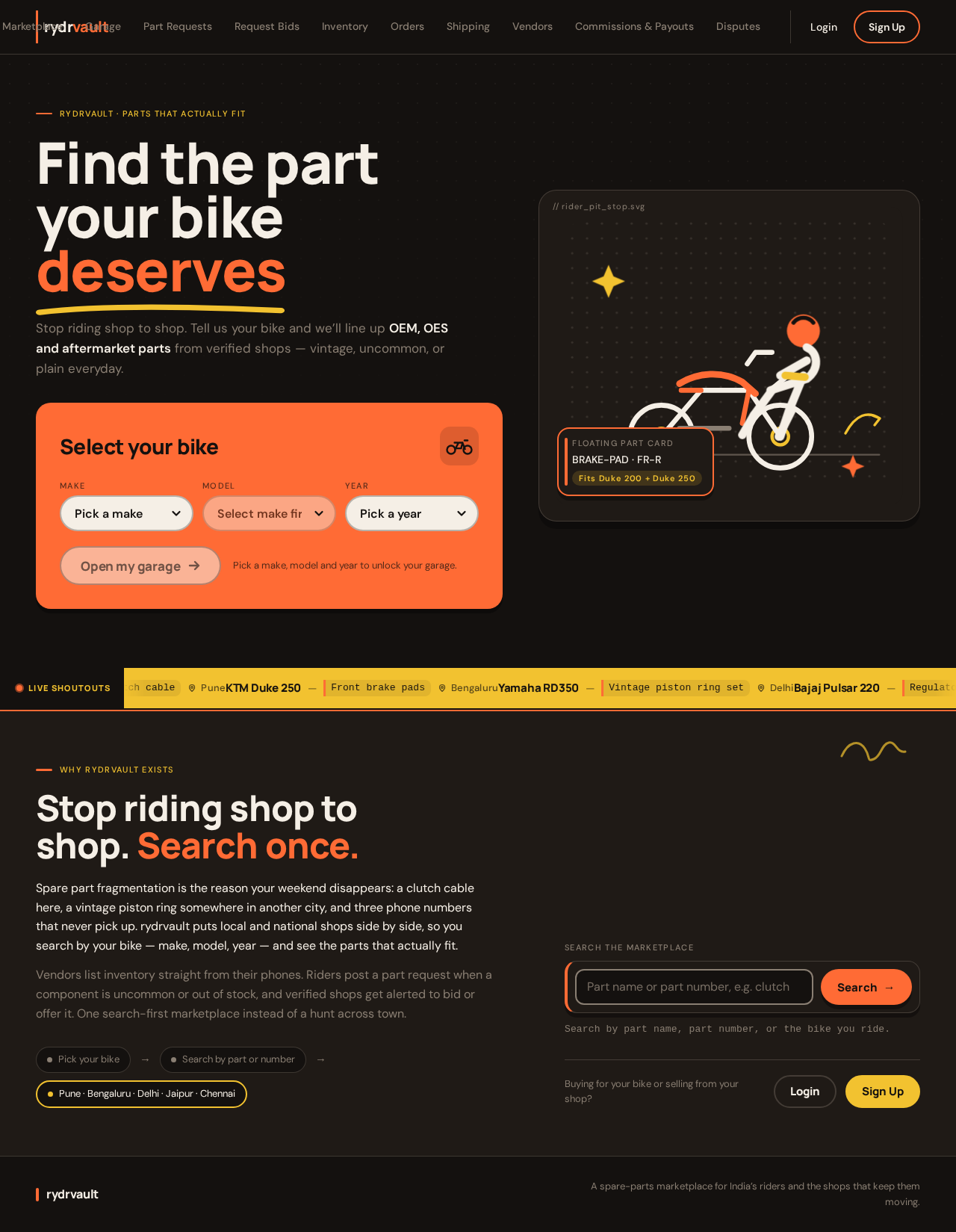
- Information/state: Anonymous public entry. Full-bleed dark charcoal hero with the oversized stacked headline "FIND THE PART YOUR BIKE DESERVES" in Manrope ExtraBold, cream on #14110F, left-aligned and spanning the viewport. Directly beneath, the "Select Your Bike" garage widget as a chunky orange (#FF6B35) rounded card with three pill dropdowns (Make / Model / Year) and a mustard CTA "Open my garage". On desktop, a modular vector illustration of a rider crouched beside a motorcycle with a floating part card and an orange speech bubble reading "Found it in Pune → 2 days". A thin mustard ticker below the hero scrolls live part-request broadcasts.
- Primary actions: Choose Make / Model / Year in the garage widget; tap "Open my garage" (routes to Garage for signed-in riders, or to Sign Up / Login for anonymous visitors); enter the Marketplace via the sticky top search bar; navigate to Login or Sign Up.
- Supporting actions: Read the live part-request ticker; follow the marketplace purpose copy.
- Domain entities: Motorcycle brand, model, year; part request broadcast (public summary).
- Component responsibilities: Hero headline block; garage widget (three pill dropdowns + CTA); modular vector illustration; live broadcast ticker; sticky top search bar; auth entry links.
- States: Loading — skeleton for the ticker and dropdown option lists. Empty — ticker shows a friendly "no live shoutouts right now" line. Success — dropdowns populated; CTA enabled once Make/Model/Year are chosen. Error — dropdown option fetch failure shows a retry affordance. Recovery — retry re-fetches options without losing selections.
Marketplace
- Information/state: Search-first marketplace. Sticky top search bar; persistent "Your Bike" garage chip that opens a bottom sheet; left rail (desktop) for bike garage + filters; main column with 2–3 column part cards. Filters: Motorcycle Brand (e.g., Royal Enfield, KTM, Yamaha), Model Name, Year of Manufacture, Component Category (e.g., Engine, Electrical, Braking, Aesthetics). Universal parts compatibility flags shown as mustard pills (e.g., "Fits KTM Duke 200 and Duke 250"). Compatibility matrix is a horizontally scrollable table on mobile and a full tabular grid on desktop; below 640px each row becomes a stacked "fits these bikes" pill card. Part numbers rendered in JetBrains Mono on a raised surface chip with an orange left-border tick.
- Primary actions: Search by keyword or part number; apply/clear filters; select a bike via the garage chip bottom sheet to auto-filter results; open a part card to Part Details.
- Supporting actions: Toggle universal-compatibility flag display; scroll the compatibility matrix; open the garage chip bottom sheet.
- Domain entities: Part, part number/SKU, motorcycle brand/model/year, component category, compatibility flag, vendor listing summary.
- Component responsibilities: Sticky search bar; garage chip + bottom sheet; filter rail/chips; part card grid; compatibility matrix (table ↔ stacked pill cards); part-number mono chip.
- States: Loading — skeleton part cards and matrix rows. Empty — "no parts match this bike + filter combo" with a link to post a Part Request. Success — filtered results and matrix render. Error — search/filter fetch failure shows inline retry. Recovery — retry preserves filters and bike selection.
Part Details
- Information/state: Single product listing showing vendor location, shipping time, condition (OEM vs. OES vs. Aftermarket), and user ratings. Part number in JetBrains Mono on a raised surface chip with orange left-border tick. Universal compatibility flags as mustard pills. Return/refund policy summary for incorrect fitment.
- Primary actions: Add to cart / proceed to Checkout; view full return/refund policy; open vendor info.
- Supporting actions: Read ratings; read compatibility pills; copy part number.
- Domain entities: Part, vendor, condition, shipping time, rating, return/refund policy.
- Component responsibilities: Product photo cutout on surface panel with thin orange outline; part-number chip; condition badge; vendor location + shipping time block; rating display; compatibility pill list; policy summary; checkout CTA.
- States: Loading — skeleton for photo, price, and vendor block. Empty — out-of-stock state with a "Broadcast a part request" CTA. Success — full listing renders. Error — listing fetch failure shows retry. Recovery — retry reloads the same part.
Garage
- Information/state: Rider's saved bike selection (brand, model, year) via the garage widget that auto-filters marketplace results. Protected — rider-only.
- Primary actions: Add a bike (Make / Model / Year); set the active bike; remove a bike.
- Supporting actions: Switch active bike; see which bike currently filters the Marketplace.
- Domain entities: Saved bike (brand, model, year), active-bike selection.
- Component responsibilities: Garage widget tiles with soft offset shadows; add-bike form; active-bike indicator; remove control.
- States: Loading — skeleton tiles. Empty — "no bikes in your garage yet" with add-bike CTA. Success — bike saved and marked active; Marketplace auto-filters. Error — save failure shows inline message and preserves input. Recovery — retry save.
Part Requests
- Information/state: Rider posts and tracks part request broadcasts with photos and part numbers for out-of-stock uncommon parts. Each request is a "shoutout" card with a hand-drawn megaphone sticker and vendor bid count. Protected — rider-only.
- Primary actions: Create a part request (photos + part number + description); view incoming vendor bids/offers; accept an offer.
- Supporting actions: Track request status; view bid count; open a bid to see vendor details.
- Domain entities: Part request (photos, part number, description, status), vendor bid/offer.
- Component responsibilities: Shoutout card with megaphone sticker; photo uploader; part-number input (JetBrains Mono); bid list; accept-offer control.
- States: Loading — skeleton shoutout cards. Empty — "no requests yet" with create CTA. Success — request posted; verified vendors alerted; bid count updates. Error — upload or post failure shows retry. Recovery — retry preserves photos and part number.
Checkout
- Information/state: Integrated checkout with Indian payment gateways (UPI, Credit/Debit cards, NetBanking) and clear return/refund policies for incorrect fitment. Protected — rider-only.
- Primary actions: Choose payment method (UPI / Credit/Debit card / NetBanking); confirm order; read return/refund policy.
- Supporting actions: Review cart and shipping; view policy before paying.
- Domain entities: Cart, order, payment method, return/refund policy.
- Component responsibilities: Order summary; payment-method selector; policy panel; pay CTA with spring press feedback.
- States: Loading — payment-method availability check. Empty — empty cart state with return-to-Marketplace CTA. Success — order confirmed; order reference shown. Error — payment failure shows reason and retry. Recovery — retry payment without losing cart.
Request Bids
- Information/state: Verified vendors receive part request broadcast alerts and respond with bids or offers. Broadcast sends a ripple across the vendor-alert list. Protected — vendor-only, and only KYC-verified vendors receive alerts and can bid.
- Primary actions: Open an alert; submit a bid/offer (price, availability, condition); withdraw a bid.
- Supporting actions: Filter alerts; view rider request details and photos.
- Domain entities: Part request broadcast, vendor bid/offer, KYC verification status.
- Component responsibilities: Alert list with ripple animation; request detail panel; bid form; bid status chip.
- States: Loading — skeleton alert list. Empty — "no open broadcasts" state. Success — bid submitted; status shows pending. Error — bid submission failure shows retry. Recovery — retry preserves bid input. Unverified-vendor state — alerts and bidding unavailable until KYC verification completes.
Inventory
- Information/state: Vendor rapid inventory onboarding via bulk CSV upload or quick mobile scanning to list spare parts by part number or SKU. Protected — vendor-only.
- Primary actions: Upload a CSV; scan a part by part number/SKU on mobile; add a single part manually.
- Supporting actions: Review upload results; edit or remove a listed part.
- Domain entities: Part, part number/SKU, inventory record.
- Component responsibilities: CSV uploader with validation summary; mobile scanner; manual add form; inventory table that collapses to card list below 768px; part-number mono chips.
- States: Loading — upload/scan progress. Empty — "no parts listed yet" with upload/scan CTA. Success — parts listed; row count confirmed. Error — CSV validation errors listed per row. Recovery — fix rows and re-upload without losing valid rows.
Orders
- Information/state: Vendor order management tracking New Orders, Packaging, Dispatched, and Delivered statuses. Status columns use sticker-like status chips (New / Packing / Dispatched / Delivered) with soft offset shadows and spring press feedback. Protected — vendor-only.
- Primary actions: Advance an order's status (New → Packaging → Dispatched → Delivered); open order detail.
- Supporting actions: Filter by status; view rider shipping details.
- Domain entities: Order, order status, rider, shipping address.
- Component responsibilities: Status columns with sticker chips; order table collapsing to card list below 768px; order detail panel.
- States: Loading — skeleton columns. Empty — "no orders yet" per column. Success — status advanced; chip updates with spring press. Error — status update failure shows retry. Recovery — retry preserves prior status.
Shipping
- Information/state: Vendor shipping calculator matching local intra-city couriers (e.g., Dunzo/Borzo) and pan-India couriers (e.g., Delhivery/BlueDart). Protected — vendor-only.
- Primary actions: Enter pickup and drop details; get courier quotes; select a courier.
- Supporting actions: Compare intra-city vs. pan-India options; view estimated delivery time.
- Domain entities: Shipment, courier partner, quote, delivery estimate.
- Component responsibilities: Pickup/drop form; courier quote list; intra-city vs. pan-India toggle; select-courier control.
- States: Loading — quote fetch spinner. Empty — "no couriers available for this route" state. Success — quotes listed with times. Error — courier API failure shows retry. Recovery — retry re-quotes without losing entered details.
Vendors
- Information/state: Admin onboarding and KYC verification of physical Indian spare parts vendors. Protected — admin-only.
- Primary actions: Review a vendor's KYC submission; approve or reject verification.
- Supporting actions: Filter by verification status; open vendor profile.
- Domain entities: Vendor, KYC submission, verification status.
- Component responsibilities: Vendor list; KYC review panel; approve/reject controls; status chips.
- States: Loading — skeleton list. Empty — "no vendors pending verification" state. Success — status updated; verified vendors become eligible for broadcast alerts. Error — review action failure shows retry. Recovery — retry preserves decision context.
Commissions & Payouts
- Information/state: Admin management of marketplace commissions and payout tracking. Protected — admin-only.
- Primary actions: Set/adjust commission rate; view payout records; mark a payout as tracked.
- Supporting actions: Filter payouts by vendor or period.
- Domain entities: Commission rate, payout record, vendor.
- Component responsibilities: Commission rate editor; payout table collapsing to card list on mobile; payout status chips.
- States: Loading — skeleton table. Empty — "no payouts recorded" state. Success — rate saved or payout tracked. Error — save failure shows retry. Recovery — retry preserves edits.
Disputes
- Information/state: Admin oversight and resolution of marketplace disputes. Protected — admin-only.
- Primary actions: Open a dispute; review evidence; record a resolution.
- Supporting actions: Filter by status; view related order and parties.
- Domain entities: Dispute, resolution, related order, parties.
- Component responsibilities: Dispute list; detail panel; resolution form; status chips.
- States: Loading — skeleton list. Empty — "no open disputes" state. Success — resolution recorded. Error — resolution save failure shows retry. Recovery — retry preserves resolution text.
Login
- Information/state: Returning verification for riders, vendors, and admins accessing their protected marketplace work. Anonymous.
- Primary actions: Enter credentials; submit; recover access.
- Supporting actions: Navigate to Sign Up.
- Domain entities: Account, role.
- Component responsibilities: Credential form; submit control; recovery link; Sign Up link.
- States: Loading — submit in progress. Empty — n/a. Success — routed to the actor's protected surface. Error — invalid credentials message. Recovery — recovery flow re-establishes access.
Sign Up
- Information/state: Self-service enrollment for riders and vendors who independently begin using the marketplace; admin access is provisioned through vendor/operations onboarding. Anonymous.
- Primary actions: Choose Rider or Vendor role; complete enrollment; submit.
- Supporting actions: Navigate to Login.
- Domain entities: Account, role, vendor profile (for vendor enrollment).
- Component responsibilities: Role selector; enrollment form; submit control; Login link.
- States: Loading — submit in progress. Empty — n/a. Success — account created; routed to the appropriate next surface (Garage for riders; Inventory for vendors pending KYC). Error — validation or duplicate-account message. Recovery — retry preserves entered fields.
3. Functional Requirements
Compatibility and Search
FR-1 — Filter parts by bike and category (explicit) As a Rider, I should filter parts by Motorcycle Brand (e.g., Royal Enfield, KTM, Yamaha), Model Name, Year of Manufacture, and Component Category (e.g., Engine, Electrical, Braking, Aesthetics), so that I only see parts that fit my bike.
- Trigger/input: rider selects brand, model, year, and category on Marketplace.
- Observable result: filtered part cards and compatibility matrix update.
- Access: anonymous or signed-in.
- Failure/recovery: filter fetch failure shows inline retry preserving selections.
- Continuation: rider opens a part card to Part Details.
FR-2 — Universal parts compatibility flags (explicit) As a Rider, I should see universal parts compatibility flags (e.g., "This brake pad fits both KTM Duke 200 and Duke 250"), so that I know a part fits multiple models.
- Trigger/input: part has multiple compatible models.
- Observable result: mustard compatibility pills render on the part card and Part Details.
- Access: anonymous or signed-in.
- Failure/recovery: missing compatibility data shows a neutral "compatibility not listed" state.
- Continuation: rider proceeds to Part Details.
FR-3 — Search-first homepage with garage widget (explicit) As a Rider, I should land on a clean, search-first homepage with a "Select Your Bike" garage widget that auto-filters the marketplace, so that I can start from my exact bike.
- Trigger/input: rider selects Make / Model / Year and taps "Open my garage".
- Observable result: Marketplace auto-filters to the selected bike.
- Access: widget visible anonymously; opening the garage requires sign-in.
- Failure/recovery: option fetch failure shows retry.
- Continuation: rider browses filtered results.
Rider Marketplace and Listings
FR-4 — Product listing details (explicit) As a Rider, I should see product listings showing vendor location, shipping time, condition (OEM vs. OES vs. Aftermarket), and user ratings, so that I can judge fit and trust before buying.
- Trigger/input: rider opens a part card.
- Observable result: Part Details shows vendor location, shipping time, condition badge, and ratings.
- Access: anonymous or signed-in.
- Failure/recovery: listing fetch failure shows retry.
- Continuation: rider adds to cart or broadcasts a request if out of stock.
FR-5 — Part Request Broadcast (explicit) As a Rider, I should post a request for an out-of-stock uncommon part with photos and part numbers, which automatically alerts verified vendors who can bid or offer the item, so that I can source rare parts without traveling.
- Trigger/input: rider creates a request with photos + part number on Part Requests.
- Observable result: request posted; verified vendors alerted; bid count visible on the shoutout card.
- Access: rider-only protected.
- Failure/recovery: upload/post failure shows retry preserving photos and part number.
- Continuation: rider reviews incoming bids and accepts an offer.
FR-6 — Integrated checkout with Indian payment gateways (explicit) As a Rider, I should check out with UPI, Credit/Debit cards, and NetBanking, so that I can pay the way I already do in India.
- Trigger/input: rider selects a payment method and confirms on Checkout.
- Observable result: order confirmed with reference.
- Access: rider-only protected.
- Failure/recovery: payment failure shows reason and retry without losing cart.
- Continuation: rider tracks the order via the vendor's status updates.
FR-7 — Clear return/refund policies for incorrect fitment (explicit) As a Rider, I should see clear return/refund policies for incorrect fitment, so that I can buy with confidence that a wrong-fit part is recoverable.
- Trigger/input: rider views policy on Part Details or Checkout.
- Observable result: policy text is visible before purchase.
- Access: anonymous or signed-in.
- Failure/recovery: policy fetch failure shows retry.
- Continuation: rider proceeds to checkout or raises a dispute if fitment fails.
Vendor Operations
FR-8 — Rapid inventory onboarding (explicit) As a Vendor, I should list spare parts by part number or SKU via bulk CSV upload or quick mobile scanning, so that I can onboard inventory fast from my phone.
- Trigger/input: vendor uploads CSV or scans a part on Inventory.
- Observable result: parts listed; row count confirmed.
- Access: vendor-only protected.
- Failure/recovery: CSV validation errors listed per row; valid rows preserved on re-upload.
- Continuation: vendor manages orders.
FR-9 — Order management status tracking (explicit) As a Vendor, I should track orders through New Orders, Packaging, Dispatched, and Delivered, so that I can manage incoming orders accurately.
- Trigger/input: vendor advances an order's status on Orders.
- Observable result: sticker-like status chip updates with spring press.
- Access: vendor-only protected.
- Failure/recovery: status update failure shows retry preserving prior status.
- Continuation: vendor books shipping.
FR-10 — Logistics shipping calculator (explicit) As a Vendor, I should get shipping quotes matching local intra-city couriers (e.g., Dunzo/Borzo) and pan-India couriers (e.g., Delhivery/BlueDart), so that I can fulfill both quick local and inter-city rare-part deliveries.
- Trigger/input: vendor enters pickup/drop details on Shipping.
- Observable result: courier quotes with delivery estimates listed.
- Access: vendor-only protected.
- Failure/recovery: courier API failure shows retry without losing entered details.
- Continuation: vendor selects a courier and dispatches.
FR-11 — Respond to part request broadcasts (explicit) As a verified Vendor, I should receive part request broadcast alerts and respond with bids or offers, so that I can win riders hunting rare parts.
- Trigger/input: rider posts a request; verified vendor opens the alert on Request Bids.
- Observable result: bid submitted; status shows pending; rider sees bid count.
- Access: vendor-only protected; requires KYC verification.
- Failure/recovery: bid submission failure shows retry preserving input.
- Continuation: rider accepts the offer.
Admin Operations
FR-12 — Vendor onboarding and KYC verification (explicit) As a Platform Admin, I should onboard and KYC-verify physical Indian spare parts vendors, so that only legitimate shops participate and receive broadcast alerts.
- Trigger/input: vendor submits KYC; admin reviews on Vendors.
- Observable result: verification status updated; verified vendors become eligible for alerts.
- Access: admin-only protected.
- Failure/recovery: review action failure shows retry preserving decision context.
- Continuation: verified vendor can bid on requests.
FR-13 — Commission management and payout tracking (explicit) As a Platform Admin, I should manage standard marketplace commissions and track payouts, so that vendor settlements are accurate and auditable.
- Trigger/input: admin sets a commission rate or marks a payout tracked on Commissions & Payouts.
- Observable result: rate saved or payout status updated.
- Access: admin-only protected.
- Failure/recovery: save failure shows retry preserving edits.
- Continuation: admin reviews payout history.
FR-14 — Dispute resolution oversight (explicit) As a Platform Admin, I should oversee and resolve marketplace disputes, so that fitment and fulfillment conflicts are settled fairly.
- Trigger/input: admin opens a dispute on Disputes.
- Observable result: resolution recorded.
- Access: admin-only protected.
- Failure/recovery: resolution save failure shows retry preserving text.
- Continuation: parties are notified of the outcome.
Identity and Access
FR-15 — Rider self-service enrollment and returning verification (required_inference) As a Rider, I should enroll and verify on return before accessing my garage, part requests, and checkout, so that my bike and requests stay bound to me.
- Trigger/input: rider signs up or logs in.
- Observable result: rider reaches Garage, Part Requests, and Checkout.
- Access: Sign Up and Login are anonymous; protected surfaces require identity.
- Failure/recovery: invalid credentials or duplicate account shows a clear message.
- Continuation: rider resumes their work.
FR-16 — Vendor self-service enrollment and returning verification (required_inference) As a Vendor, I should enroll and verify on return before inventory, order, and shipping work, so that my shop's operations stay bound to my account.
- Trigger/input: vendor signs up or logs in.
- Observable result: vendor reaches Inventory, Orders, and Shipping.
- Access: Sign Up and Login are anonymous; protected surfaces require identity.
- Failure/recovery: invalid credentials or duplicate account shows a clear message.
- Continuation: vendor resumes their work.
FR-17 — Vendor KYC gate before alerts and bidding (required_inference) As a Vendor, I should complete KYC verification before receiving part request broadcast alerts and bidding, so that only verified shops respond to riders.
- Trigger/input: vendor submits KYC; admin verifies.
- Observable result: Request Bids becomes available only after verification.
- Access: vendor-only protected; gated by KYC status.
- Failure/recovery: unverified state shows a clear "pending verification" message.
- Continuation: verified vendor bids on requests.
FR-18 — Admin provisioning (required_inference) As a Platform Admin, I should be provisioned with access to vendor KYC, commissions/payouts, and disputes, so that I can operate the marketplace.
- Trigger/input: admin account provisioned through operations onboarding.
- Observable result: admin reaches Vendors, Commissions & Payouts, and Disputes.
- Access: admin-only protected; not self-service.
- Failure/recovery: access failure shows a clear message.
- Continuation: admin performs oversight work.
Design and UX
FR-19 — Modern, rugged, clean dark-mode aesthetic (explicit) As a Rider or Vendor, I should experience a modern, rugged, clean aesthetic with dark mode elements and highly readable typography for automotive part numbers, so that scanning parts on a phone is fast and confident.
- Trigger/input: any surface render.
- Observable result: dark warm charcoal ground, cream text, signal orange CTAs, mustard accents, JetBrains Mono part numbers.
- Access: all surfaces.
- Failure/recovery: n/a (presentation).
- Continuation: n/a.
FR-20 — Mobile-first with collapsing high-density tables (explicit) As a Rider or Vendor, I should use a mobile-first interface where high-density data tables (like compatibility charts) collapse elegantly on mobile viewports, so that dense data stays readable on a phone.
- Trigger/input: viewport below 640px (compatibility matrix) or 768px (vendor tables).
- Observable result: matrix rows become stacked "fits these bikes" pill cards; vendor tables become card lists.
- Access: all surfaces.
- Failure/recovery: n/a (presentation).
- Continuation: n/a.
4. User Personas
Rider (Customer)
Product context. An individual motorcycle owner in India who needs a specific spare part — often uncommon, specialized, or vintage — and today must physically travel between shops or across cities to find it. They primarily use a phone.
Primary goal. Find the exact, compatible spare part for their bike by make/model/year and component category, and get it delivered without the physical hunt.
Distinct accepted responsibilities.
- Select their bike via the "Select Your Bike" garage widget to auto-filter the marketplace.
- Filter parts by brand, model, year, and component category; read universal compatibility flags.
- Judge listings by vendor location, shipping time, condition (OEM/OES/Aftermarket), and ratings.
- Post a part request broadcast with photos and part numbers when an uncommon part is out of stock.
- Review vendor bids/offers and accept one.
- Check out with UPI, credit/debit card, or NetBanking; rely on return/refund policy for incorrect fitment.
Inputs and decisions. Bike make/model/year; component category; part number or keyword; photos for a request; payment method; which vendor bid to accept.
Interactions with other participants. Their part request broadcast alerts verified vendors, who bid or offer; the rider sees bid counts and accepts an offer. Their order flows to a vendor who advances it through New Orders → Packaging → Dispatched → Delivered. If fitment fails, a dispute may reach the Platform Admin.
Observable success. Filtered results that genuinely fit their bike; a posted request with visible vendor bids; a confirmed order with a payment method they use; a clear return/refund path for incorrect fitment.
Spare Parts Shop (Vendor)
Product context. A local or national motorcycle spare parts shop in India — often a small shop whose staff work from phones — that needs to list inventory fast, manage incoming orders, and fulfill both locally and pan-India.
Primary goal. List inventory rapidly, manage orders accurately, and win riders hunting rare parts — with simple, phone-first tools.
Distinct accepted responsibilities.
- Rapid inventory onboarding via bulk CSV upload or quick mobile scanning by part number/SKU.
- Order management across New Orders, Packaging, Dispatched, and Delivered.
- Shipping calculator matching local intra-city couriers (e.g., Dunzo/Borzo) and pan-India couriers (e.g., Delhivery/BlueDart).
- Handle multi-location or local fulfillment.
- Once KYC-verified, receive part request broadcast alerts and respond with bids or offers.
Inputs and decisions. CSV files or scanned part numbers/SKUs; order status transitions; pickup/drop details for shipping quotes; bid price, availability, and condition for a rider request.
Interactions with other participants. Riders' broadcasts alert them (once verified) and they bid; riders accept offers; their order status updates are visible to riders; the Platform Admin verifies their KYC and manages their commissions and payouts; disputes may involve them.
Observable success. Inventory listed with confirmed row counts; orders advanced through all four statuses; courier quotes returned for both local and pan-India routes; bids submitted and visible to riders; KYC verified.
Platform Admin
Product context. The operator who supervises marketplace operations — vendor legitimacy, money flow, and conflict resolution — from a control panel.
Primary goal. Keep the marketplace trustworthy: only verified physical Indian shops participate, commissions and payouts are accurate, and disputes are resolved.
Distinct accepted responsibilities.
- Onboard and KYC-verify physical Indian spare parts vendors.
- Manage standard marketplace commissions and track payouts.
- Oversee and resolve disputes.
Inputs and decisions. Vendor KYC submissions; approve/reject decisions; commission rates; payout records; dispute evidence and resolutions.
Interactions with other participants. Verifies vendors (which gates their ability to receive alerts and bid); manages commissions and payouts affecting vendors; resolves disputes involving riders and vendors.
Observable success. Vendors verified or rejected with clear status; commission rates saved and payouts tracked; disputes resolved with recorded outcomes.
5. Core User Flows
Flow A — Rider finds a compatible part and checks out
- Rider opens Landing (anonymous). Sees the hero headline and the "Select Your Bike" garage widget.
- Rider picks Make / Model / Year in the widget and taps "Open my garage".
- If not signed in, rider is routed to Sign Up (or Login), enrolls or verifies, and returns.
- Rider lands on Garage; the selected bike is saved and marked active.
- Rider opens Marketplace; results auto-filter to the active bike. Rider adds Component Category (e.g., Braking) and reads universal compatibility flags as mustard pills.
- Rider opens a part card → Part Details; sees vendor location, shipping time, condition (OEM/OES/Aftermarket), ratings, and the return/refund policy for incorrect fitment.
- Rider proceeds to Checkout; selects UPI, credit/debit card, or NetBanking; confirms.
- Success: order confirmed with reference. Failure: payment failure shows reason and retry without losing cart. Continuation: rider tracks the order as the vendor advances status.
Flow B — Rider broadcasts a part request and accepts a vendor bid
- Rider searches Marketplace for an uncommon part; results are empty or out of stock.
- Rider opens Part Requests and creates a shoutout: uploads photos, enters the part number (JetBrains Mono), adds a description.
- Rider posts. Success: request is live; verified vendors are alerted; the shoutout card shows a megaphone sticker and a live bid count. Failure: upload/post failure shows retry preserving photos and part number.
- Verified vendors respond with bids/offers (see Flow D). Rider sees the bid count rise.
- Rider opens a bid, reviews vendor details, and accepts an offer.
- Continuation: rider proceeds to Checkout for the accepted offer.
Flow C — Rider saves and switches bikes in the garage
- Signed-in rider opens Garage.
- Rider adds a bike (Make / Model / Year) or switches the active bike.
- Success: bike saved and marked active; Marketplace auto-filters to it. Failure: save failure shows inline message preserving input; rider retries.
Flow D — Vendor onboards inventory, manages an order, and ships
- Vendor signs up on Sign Up (Vendor role) or logs in on Login; reaches Inventory.
- Vendor uploads a bulk CSV or scans parts by part number/SKU on mobile. Success: parts listed with confirmed row count. Failure: CSV validation errors listed per row; valid rows preserved on re-upload.
- A rider order arrives. Vendor opens Orders; advances status New → Packaging → Dispatched → Delivered via sticker-like status chips with spring press. Failure: status update failure shows retry preserving prior status.
- Vendor opens Shipping; enters pickup/drop details; gets quotes for intra-city (e.g., Dunzo/Borzo) and pan-India (e.g., Delhivery/BlueDart) couriers; selects one. Failure: courier API failure shows retry without losing details.
- Continuation: vendor dispatches and the rider sees status updates.
Flow E — Verified vendor responds to a part request broadcast
- Vendor must be KYC-verified (see Flow F). Unverified vendors see a "pending verification" state on Request Bids and cannot bid.
- Verified vendor receives a broadcast alert; the alert list ripples as new requests arrive.
- Vendor opens the request, reviews photos and part number, and submits a bid/offer (price, availability, condition). Success: bid submitted; status pending; rider sees bid count. Failure: submission failure shows retry preserving input.
- Continuation: rider accepts the offer (Flow B); vendor fulfills via Orders and Shipping.
Flow F — Admin verifies a vendor, manages commissions, and resolves a dispute
- Admin logs in on Login (provisioned account) and reaches Vendors.
- Admin reviews a physical Indian spare parts vendor's KYC submission and approves or rejects. Success: status updated; verified vendors become eligible for broadcast alerts and bidding. Failure: review action failure shows retry preserving decision context.
- Admin opens Commissions & Payouts; sets/adjusts the marketplace commission rate and tracks payouts. Failure: save failure shows retry preserving edits.
- Admin opens Disputes; reviews a fitment or fulfillment dispute; records a resolution. Failure: resolution save failure shows retry preserving text.
- Continuation: parties are notified of the outcome; vendor settlements reflect the tracked commission.
6. Visuals Colors and Theme
Muse: Pablo Stanley. Headline idea: "A marketplace that talks like a rider, not a catalog."
The direction is warm, human, and a little funny — rugged but friendly, mobile-first, dark-mode-friendly, with legible automotive part numbers. It stays rugged through chunky type and dark surface panels while avoiding the cold enterprise look.
Palette (dark mode):
- Background:
#14110F(warm charcoal ground) - Surface:
#1F1A16(lifted cards) - Text:
#F5EFE6(cream body) - Primary:
#FF6B35(signal orange — primary CTAs, active filters, garage widget) - Accent:
#F2C230(mustard — compatibility flags, ratings, vendor badges) - Muted:
#8A7F73(metadata, part-number labels, dividers)
Part numbers render in monospace cream on surface for maximum legibility.
Typography:
- Headings: Manrope ExtraBold (800), tight tracking (-0.02em), sentence case with occasional all-caps micro-labels in DM Sans Medium at 11px with 0.12em tracking.
- Body: DM Sans, 1.6 line-height.
- Part numbers/SKUs: JetBrains Mono at 14px medium, cream on surface.
- Scale: 1.25 modular — display 40/32/24 mobile scaling to 96/64/40 desktop via clamp; UI 18/16/14; micro-labels 11; part-number mono 14/13. Hero headline uses
clamp(2.5rem, 6vw, 6rem).
Shape language: Generous radii — 20px cards, 999px pill buttons and filter chips, 12px inputs and mono part-number tags. Soft offset shadows 0 6px 0 rgba(0,0,0,0.35) under primary buttons and garage-widget tiles. Chunky 2px borders on outlined chips; no hairlines — borders are either 1px muted or 2px accent.
Layout: Mobile-first single column with a sticky top search bar and a persistent "Your Bike" garage chip that opens a bottom sheet. Desktop: 12-column grid, left rail for bike-garage + filters, main column with 2–3 column part cards. Compatibility matrix is a horizontally scrollable table on mobile (each row becomes a stacked card under 640px) and a full tabular grid on desktop. Vendor dashboard uses a two-pane layout: sidebar nav + dense order/inventory tables that collapse to card lists below 768px.
Imagery: Modular vector illustrations of riders, helmets, tools, and engine parts in the sunny palette on dark ground; hand-drawn squiggles and arrows as accent stickers. Real product photos of parts are clean cutouts on surface panels with a thin orange outline. No stock photography of people; no glossy 3D renders.
Avoid: Blue/indigo primary on white; gradient-blob heroes and glassmorphism; grids of identical hover-lift cards; Inter, Roboto, Arial, Helvetica, Poppins, or system-ui as heading/body; stock photography of smiling people or glossy 3D car renders; hairline-only borders and flat grey dashboards; centred headline + subtext + blue CTA heroes; bouncy cartoon mascots on KYC/admin surfaces.
7. Signature Design Concept
The public entry (Landing) is a full-bleed dark charcoal hero where the "Select Your Bike" garage widget — not the headline — is the dominant object.
- A giant stacked headline "FIND THE PART YOUR BIKE DESERVES" in Manrope ExtraBold at
clamp(2.5rem, 6vw, 6rem), cream on#14110F, left-aligned and spanning the viewport width. - Directly beneath, a wide "Select Your Bike" garage widget as a chunky orange (
#FF6B35) rounded card with three pill dropdowns (Make / Model / Year) and a mustard CTA "Open my garage" — roughly 40% of the hero height on mobile. - To the right (desktop), a modular vector illustration of a rider crouched beside a motorcycle with a floating part card and an orange speech bubble reading "Found it in Pune → 2 days".
- A thin mustard ticker below the hero scrolls live part-request broadcasts.
Signature moves carried across the product:
- Part numbers always in JetBrains Mono on a raised surface chip with an orange left-border tick.
- Compatibility matrix becomes a stack of "fits these bikes" pill cards below 640px — each card lists bike makes/models as mustard pills, never a squished table.
- Part Request Broadcast rendered as the live mustard ticker under the hero and as a "shoutout" card in the rider feed with a hand-drawn megaphone sticker and vendor bid count.
- Vendor order-status columns use sticker-like status chips (New / Packing / Dispatched / Delivered) with soft offset shadows and spring press feedback.
Readable text and controls stay whole at 375px, 768px, and 1280px; imagery and decoration may bleed or overlap but never cover readable text or controls.
8. Interaction Model & Motion Direction
Interaction Model: Animated Motion Tempo: expressive Hero Dimensionality: layered_2d
Landing Hero Motion Brief
- Focal subject: the "Select Your Bike" garage widget as the hero's dominant object, with the modular rider-and-motorcycle vector illustration and floating part card to the right on desktop.
- Input → transformation → outcome thesis: the rider picks Make / Model / Year in the three pill dropdowns; the garage-widget bike icon does a small nod when a bike is selected; tapping "Open my garage" carries the selection into the Marketplace, which auto-filters to that bike.
- Motion vocabulary: springy micro-interactions — pill buttons scale to 0.97 on press with a 180ms spring; filter chips pop in with a 40ms stagger; the garage-widget bike icon nods on selection; the part-request broadcast sends a ripple across the vendor-alert list; the mustard ticker scrolls live broadcasts. No parallax or scroll-jacking.
- Composed first frame: full-bleed
#14110Fground; oversized left-aligned cream headline spanning the viewport; chunky orange garage widget beneath it with three pill dropdowns and mustard CTA; modular vector illustration and orange speech bubble on desktop; thin mustard ticker below. - Reduced-motion state: all animation becomes instant state changes with no transforms; the ticker becomes a static wrapped row or horizontally scrollable list so each broadcast can be brought fully into view.
9. Non-Functional Requirements
- NFR-1 — Mobile-first architecture (explicit): Both riders and shop mechanics primarily use mobile interfaces; layouts must be designed mobile-first and scale up. Rationale: source design requirement.
- NFR-2 — Collapsing high-density tables (explicit): High-density data tables such as compatibility charts must collapse elegantly on mobile viewports (matrix rows → stacked pill cards below 640px; vendor tables → card lists below 768px). Rationale: source design requirement.
- NFR-3 — Indian payment gateways (explicit): Checkout must support UPI, Credit/Debit cards, and NetBanking via Indian payment gateways. Rationale: source hard constraint.
- NFR-4 — Return/refund policy for incorrect fitment (explicit): Return/refund policies must clearly address incorrect fitment and be visible before purchase. Rationale: source hard constraint.
- NFR-5 — Verified-vendor-only broadcast alerts (explicit): Part request broadcasts alert verified vendors only; unverified vendors cannot receive alerts or bid. Rationale: source hard constraint.
- NFR-6 — Physical Indian vendor KYC (explicit): KYC verification applies to physical Indian spare parts vendors. Rationale: source hard constraint.
- NFR-7 — Part-number legibility (explicit): Automotive part numbers must be highly readable — JetBrains Mono, cream on surface, on a raised chip with an orange left-border tick. Rationale: source design requirement.
- NFR-8 — Dark-mode-friendly surfaces (explicit): Dark mode elements are preferred by the biking community; the palette is dark warm charcoal with cream text. Rationale: source design requirement.
- NFR-9 — Reduced-motion support (required_inference): All animation respects
prefers-reduced-motion(instant state changes, no transforms); moving content provides a usable static arrangement. Rationale: indispensable for accessible delivery of the expressive motion direction.
- NFR-10 — Readable text and controls at all viewports (required_inference): Headlines, labels, numbers, cards' text, and controls stay entirely inside the viewport and their container at 375px, 768px, and 1280px. Rationale: indispensable for the mobile-first constraint.
10. Tech Stack
- Frontend: React (mobile-first web application).
- Backend: Python / FastAPI, extending a single shared backend process for marketplace, vendor, admin, and identity APIs.
- Storage: Relational database for accounts, bikes, parts, compatibility, inventory, orders, requests, bids, commissions, payouts, and disputes.
- External integrations: Indian payment gateways (UPI, credit/debit cards, NetBanking); intra-city couriers (e.g., Dunzo/Borzo); pan-India couriers (e.g., Delhivery/BlueDart); vendor-alert delivery for part request broadcasts.
- Deployment: Docker / docker-compose for the frontend and backend services. Kubernetes is not required by the source and is omitted.
11. Assumptions and Constraints
- A-1 (required_inference): Riders and vendors self-enroll; admins are provisioned through operations onboarding. This is the minimum identity continuity needed for garage, requests, checkout, inventory, orders, shipping, KYC, commissions, and disputes to remain bound to the correct participant.
- A-2 (required_inference): Application identity establishes role-scoped access to each actor's own work; it does not create differentiated permissions over shared marketplace state beyond the stated role boundaries.
- A-3 (explicit): KYC verification applies to physical Indian spare parts vendors; non-physical or non-Indian vendors are outside the KYC scope stated by the source.
- A-4 (explicit): Part request broadcasts alert verified vendors only.
- A-5 (explicit): Checkout supports UPI, Credit/Debit cards, and NetBanking.
- A-6 (explicit): Return/refund policies must clearly address incorrect fitment.
- A-7 (explicit): Mobile-first architecture with high-density tables collapsing elegantly on mobile viewports.
- A-8 (explicit): Payment capture and courier booking are owned by external providers; rydrvault integrates with them.
- A-9 (required_inference): The compatibility matrix and vendor tables collapse at the stated breakpoints (640px and 768px) to satisfy the mobile-first constraint.
12. Glossary
- Rider (Customer): An individual motorcycle owner who searches for and buys compatible spare parts.
- Spare Parts Shop (Vendor): A local or national motorcycle spare parts shop that lists inventory, manages orders, and fulfills shipments.
- Platform Admin: The operator who verifies vendors, manages commissions and payouts, and resolves disputes.
- Compatibility Matrix: The filterable table of parts by motorcycle brand, model, year, and component category, with universal compatibility flags.
- Universal Compatibility Flag: A marker indicating a part fits multiple bike models (e.g., a brake pad fitting both KTM Duke 200 and Duke 250).
- Garage Widget: The "Select Your Bike" control (Make / Model / Year) that auto-filters the marketplace.
- Part Request Broadcast: A rider's posted request for an out-of-stock uncommon part, with photos and part numbers, that alerts verified vendors to bid or offer.
- Bid / Offer: A verified vendor's response to a part request broadcast.
- OEM / OES / Aftermarket: Part condition categories shown on listings.
- KYC: Know-your-customer verification of physical Indian spare parts vendors by the Platform Admin.
- Commission: The standard marketplace fee managed by the Platform Admin.
- Payout: A tracked settlement to a vendor.
- Dispute: A marketplace conflict (e.g., incorrect fitment or fulfillment) overseen and resolved by the Platform Admin.
- Intra-city courier: A local quick-delivery partner (e.g., Dunzo/Borzo).
- Pan-India courier: An inter-city delivery partner (e.g., Delhivery/BlueDart).
Find the partyour bike deserves
Stop riding shop to shop. Tell us your bike and we’ll line up OEM, OES and aftermarket parts from verified shops — vintage, uncommon, or plain everyday.
Select your bike
Pick a make, model and year to unlock your garage.
Live shoutouts
Why rydrvault exists
Stop riding shop to shop. Search once.
Spare part fragmentation is the reason your weekend disappears: a clutch cable here, a vintage piston ring somewhere in another city, and three phone numbers that never pick up. rydrvault puts local and national shops side by side, so you search by your bike — make, model, year — and see the parts that actually fit.
Vendors list inventory straight from their phones. Riders post a part request when a component is uncommon or out of stock, and verified shops get alerted to bid or offer it. One search-first marketplace instead of a hunt across town.
- Pick your bike
- Search by part or number
- Pune · Bengaluru · Delhi · Jaipur · Chennai
Find the partyour bike deserves
Stop riding shop to shop. Tell us your bike and we’ll line up OEM, OES and aftermarket parts from verified shops — vintage, uncommon, or plain everyday.
Select your bike
Pick a make, model and year to unlock your garage.
Live shoutouts
Why rydrvault exists
Stop riding shop to shop. Search once.
Spare part fragmentation is the reason your weekend disappears: a clutch cable here, a vintage piston ring somewhere in another city, and three phone numbers that never pick up. rydrvault puts local and national shops side by side, so you search by your bike — make, model, year — and see the parts that actually fit.
Vendors list inventory straight from their phones. Riders post a part request when a component is uncommon or out of stock, and verified shops get alerted to bid or offer it. One search-first marketplace instead of a hunt across town.
- Pick your bike
- Search by part or number
- Pune · Bengaluru · Delhi · Jaipur · Chennai
No comments yet. Be the first!