rustic-page
 Priyal Vadgama
hi i want to creare a single page todo app

Comments (0)
Sign in to leave a comment
System Requirements
rustic-page
Introduction
The purpose of this document is to outline the system requirements for the "rustic-page" project, a single-page todo application. This application is designed to provide users with a simple and efficient way to manage their tasks on a single page, ensuring seamless navigation and a smooth user experience.
System Overview
The rustic-page project is a single-page application (SPA) aimed at providing users with a straightforward task management tool. The application will allow users to create, view, and delete tasks without the need for multiple pages or complex navigation. This approach ensures a fast and responsive user experience, as all interactions occur within a single page.
Functional Requirements
- As a User, I should be able to create new tasks.
- As a User, I should be able to view a list of all tasks.
- As a User, I should be able to delete tasks.
User Personas
- User: The primary user of the application who will create, view, and manage tasks.
Visuals Colors and Theme
- primary: #3B5998 (a deep indigo for a calming, focused interface)
- primary_light: #8B9DC3 (a lighter tint of indigo for hover states and secondary UI elements)
- secondary: #FF6F61 (a vibrant coral for headlines and emphasis)
- accent: #FFD700 (a bright gold for call-to-action buttons and active states)
- highlight: #FFA500 (a warm orange for hover states and notifications)
- bg: #F5F5F5 (a soft, neutral background color)
- surface: rgba(255, 255, 255, 0.9) (a translucent white for card/panel backgrounds)
- text: #333333 (a dark gray for primary text and headings)
- text_muted: #777777 (a lighter gray for secondary text and labels)
- border: rgba(0, 0, 0, 0.1) (a subtle border color for dividing elements)
Signature Design Concept
The rustic-page application will feature an interactive "Task Garden" homepage. This unique design concept will transform the task list into a virtual garden where each task is represented as a plant. Users can "plant" new tasks, "water" them to mark progress, and "harvest" them when completed. The garden will grow dynamically as tasks are added, with animations that show plants sprouting and blooming. Users can interact with the garden by dragging and dropping tasks to reorder them, and hovering over a plant will reveal task details. This concept will be brought to life using framer-motion for smooth animations and react-icons for intuitive icons.
Interaction Model & Motion Direction
The landing page will utilize a "parallax" interaction model, creating a layered depth effect as users scroll through their task garden. The garden background will move at a slower pace than the task elements, providing a sense of depth and immersion. Each section of the garden will have its own unique animation, such as plants swaying gently in the breeze or flowers blooming when a task is completed. This approach will make the application visually engaging and interactive, encouraging users to manage their tasks in a fun and creative way.
Non-Functional Requirements
- The application must load within 2 seconds on a standard broadband connection.
- The interface should be responsive and accessible on both desktop and mobile devices.
- Data persistence should be ensured through local storage, allowing users to retain their tasks between sessions.
Tech Stack
- Frontend: React for Web
- Backend: FastAPI
- Database: MongoDB for storing task data
- AI Tools: None specified
- Local Orchestration: Docker, docker-compose
Assumptions and Constraints
- The application will be used primarily by individual users for personal task management.
- The application will not require user authentication or account management.
- The application will be developed and tested in the Indian timezone (IST).
Glossary
- SPA: Single-Page Application, a web application that interacts with the user by dynamically rewriting the current page rather than loading entire new pages from the server.
- Task Garden: A metaphorical representation of tasks as plants in a virtual garden, used to enhance user interaction and engagement.
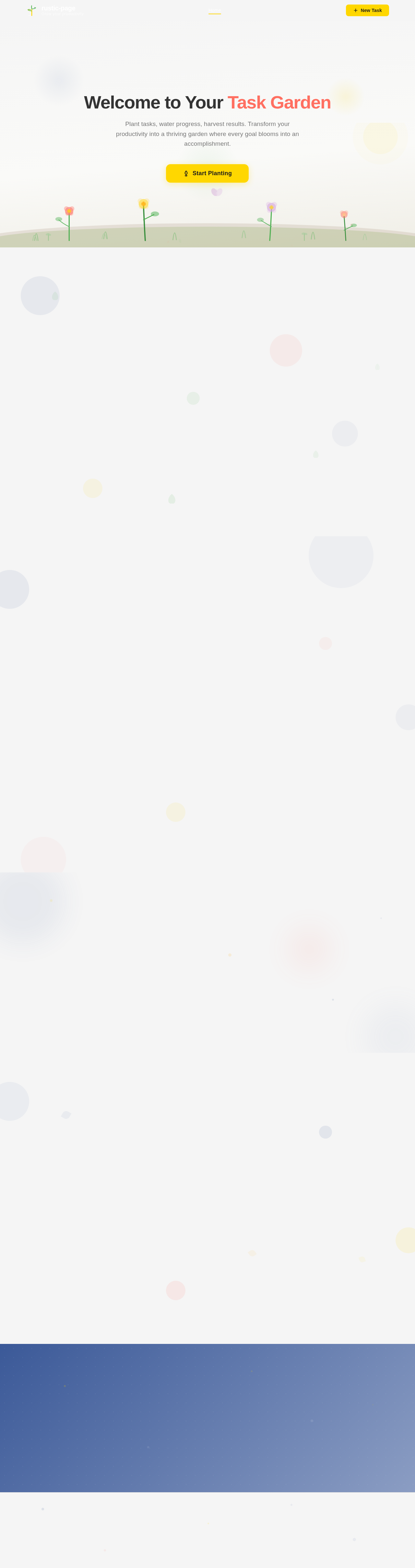
Welcome to Your Task Garden
Plant tasks, water progress, harvest results. Transform your productivity into a thriving garden where every goal blooms into an accomplishment.
Start PlantingWatch Your Tasks Grow
Each task is a living plant in your garden. Plant new seeds, nurture them as they sprout, and harvest them when complete. Drag to reorder your priorities.
Drag plants left or right to reorder your tasks
Your Task List
Manage, filter, and track all your garden tasks in one place.
Your Task Harvest
Plant a New Task
Add a task to your garden and watch your productivity grow
Ready to Grow Your Productivity?
Plant your first task and watch your garden flourish. Every completed task blooms into something beautiful — start cultivating your most productive day yet.
No comments yet. Be the first!