ruby-calculator
 Diya Trivedi
build simple single page design of calculator

Comments (0)
Sign in to leave a comment
System Requirements
System Requirements Document for ruby-calculator
1. Introduction
ruby-calculator is a simple calculator delivered as a single page. The product intent is narrow and complete: one page where a person enters numbers and operators and reads the arithmetic result. There is no account, no saved history, no multi-page navigation, and no secondary workflow. The design must be simple, and the entire product is that one page.
The audience is a single everyday user who wants to perform basic arithmetic quickly and read the answer without distraction. The page is anonymous and immediately usable: opening it is the whole entry experience.
2. System Overview
ruby-calculator is a one-page web calculator. The page presents a wordmark strip, a result band, and a modular grid of calculator keys. A user presses digit keys and operator keys; the current entry and the computed result are shown on the page. The result is the observable outcome of the interaction, and the page remains the same page throughout — there is no navigation, no submission to a server, and no persisted state.
Actors: one active human persona, the Calculator user, who enters numbers and operators and reads results. There are no other human participants; no counterparty, recipient, or beneficiary is affected by the calculation, so no additional persona interaction exists. The application itself is the only system actor, and it performs arithmetic locally in the page.
Ownership: the single Calculator page is the anonymous public entry surface and owns all accepted behavior — number entry, operator selection, clearing, and result display. Access is anonymous with no identity requirement, because no durable actor-specific state, commitment, entitlement, or value transfer exists to bind to a person.
Narrow exclusions: no accounts, no authentication, no saved calculation history, no sharing, no multi-page destinations, no server-side calculation requirement, and no settings or preferences.
Removed from scope
- Multi-page navigation (also: routes, page transitions)
- User accounts and authentication (also: sign-in, login, profiles)
- Calculation history and persistence (also: saved results, memory keys)
- Sharing or exporting results (also: copy-to-clipboard workflows, downloads)
2a. Product Interpretation and Delivery Boundary
The product is a single, self-contained calculator page. Delivery is a React frontend that renders the page and performs arithmetic in the browser. The provisioned FastAPI backend and MariaDB database exist as shared infrastructure but carry no required calculator behavior: the accepted workflow needs no server round-trip, no stored records, and no identity. They remain available and unexercised by the current product rather than being given invented endpoints or entities.
Access is anonymous and public. There is no pre-identity lifecycle to complete, because there is nothing private to protect and nothing to resume. The current horizon is exactly this one page. Anything beyond basic arithmetic — history, memory, scientific functions, accounts — is out of scope and is not represented as a future page or feature.
2c. Page Content and Component Coverage
Calculator
The single page. It is the anonymous entry surface and holds all entry, control, and result state.
- Information and state
- Current entry string (the digits and operator the user is composing).
- Current result value (the computed answer, shown in the result band).
- Operator/entry mode (whether the user is entering the first operand, has chosen an operator, or is entering the second operand).
- Error state (for example division by zero or malformed entry), shown in place of the result.
- Primary actions
- Press digit keys
0–9to append digits to the current entry. - Press operator keys
+,−,×,÷to select an operation. - Press
=to compute and display the result.
- Press digit keys
- Supporting actions
- Press the clear key to reset the entry and result to the initial state.
- Press the decimal key to begin a fractional entry.
- Domain entities
- Entry (the in-progress operand/expression string).
- Result (the numeric outcome of the last computation).
- Operation (the selected arithmetic operator).
- Component responsibilities
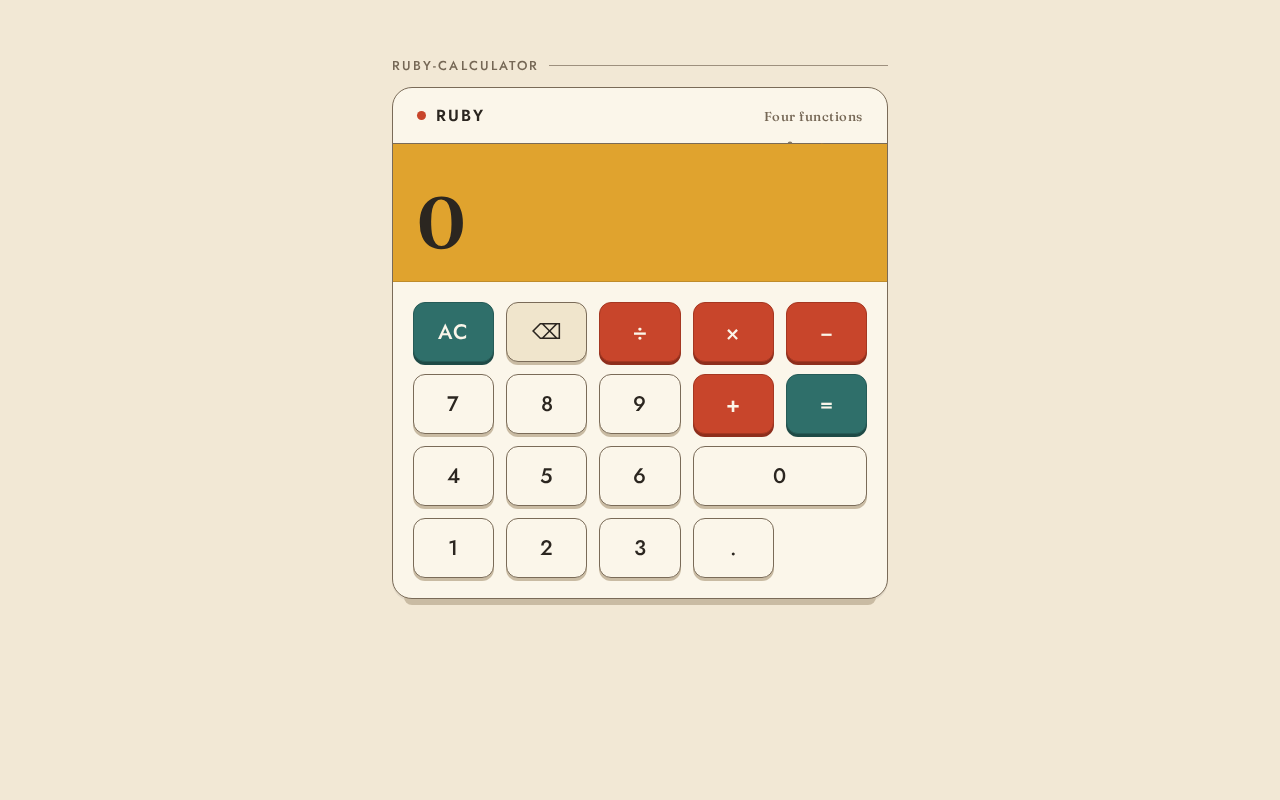
- Wordmark strip: displays the wordmark "Ruby" in Jost caps on a thin walnut rule spanning the panel width.
- Result band: a mustard band across the panel top showing the result in an oversized Fraunces numeral, flush left; fades in once when the result changes.
- Key grid: four rows of wide, equal keycaps; ruby red operator keys, teal clear key, neutral digit keys, each with a 3px darker bottom edge that sinks 2px on press.
- Corner decoration: a flat mid-century pattern of small circles and half-rounds cut by the panel's right edge; purely decorative and never covering readable text or controls.
- States
- Loading: not applicable; the page renders immediately with no data fetch.
- Empty/initial: result band shows
0; entry is empty; all keys available. - Success: pressing
=shows the computed result in the result band. - Error: an invalid operation (such as division by zero) shows an error message in the result band in place of a number.
- Recovery: pressing the clear key returns the page to the initial empty state from either success or error.
3. Functional Requirements
FR-1 — Enter digits As a Calculator user, I should press digit keys to build a number so that I can supply an operand.
- Provenance:
required_inference(indispensable mechanics of "simple calculator"). - Lifecycle: trigger = digit key press; input = digit
0–9; observable result = the digit appears appended to the current entry; access = anonymous; failure/recovery = none beyond clear; continuation = user may press more digits or an operator.
FR-2 — Select an operator As a Calculator user, I should press an operator key so that I can choose the arithmetic operation.
- Provenance:
required_inference. - Lifecycle: trigger = operator key press (
+,−,×,÷); observable result = the operator is recorded and the entry is ready for the second operand; access = anonymous; failure/recovery = pressing clear resets; continuation = user enters the second operand.
FR-3 — Compute a result
As a Calculator user, I should press = so that I can see the arithmetic result.
- Provenance:
required_inference. - Lifecycle: trigger =
=key press with a valid entry and operator; observable result = the computed value appears in the result band and fades in once; access = anonymous; failure/recovery = invalid operations show an error (FR-5); continuation = user may continue calculating or clear.
FR-4 — Clear the calculator As a Calculator user, I should press the clear key so that I can reset the entry and result.
- Provenance:
required_inference. - Lifecycle: trigger = clear key press; observable result = entry and result return to the initial state (
0); access = anonymous; failure/recovery = clear is always available; continuation = user starts a new calculation.
FR-5 — Handle invalid operations As a Calculator user, I should see an error message when an operation is invalid so that I understand why no number is shown.
- Provenance:
required_inference(material failure handling for a calculator). - Lifecycle: trigger =
=on an invalid operation such as division by zero; observable result = an error message replaces the result in the result band; access = anonymous; failure/recovery = clear returns to the initial state; continuation = user clears and retries.
FR-6 — Enter a decimal As a Calculator user, I should press the decimal key so that I can enter fractional numbers.
- Provenance:
required_inference. - Lifecycle: trigger = decimal key press; observable result = a decimal point is added to the current entry; access = anonymous; failure/recovery = clear resets; continuation = user continues entering digits.
FR-7 — Single-page delivery As a Calculator user, I should reach the entire calculator on one page so that I can calculate without navigating.
- Provenance:
explicit("build simple single page design of calculator"). - Lifecycle: trigger = opening the product; observable result = the Calculator page renders with wordmark, result band, and key grid; access = anonymous; failure/recovery = reloading the page returns to the initial state; continuation = user calculates.
4. User Personas
Calculator user
- Product context: A single everyday person who opens ruby-calculator to do quick basic arithmetic. They arrive with no account and no prior state; the page is immediately usable.
- Primary goal: Enter a calculation and read the correct answer with minimal effort.
- Distinct accepted responsibilities: Entering digits and a decimal point, selecting one of the four arithmetic operators, pressing
=to compute, reading the result, and pressing clear to reset. This is the only role in the product; there is no second participant whose state or decision the calculation affects. - Relevant inputs or decisions: Which digits to enter, which operator to apply, and when to compute or clear.
- Interactions with other accepted participants: None. The calculation is self-contained; no counterparty, recipient, or beneficiary is affected.
- Observable success: The result band shows the correct computed value, or a clear error message for an invalid operation, and the clear key reliably returns the page to its initial state.
5. Core User Flows
Flow A — Perform a basic calculation
- The Calculator user opens ruby-calculator. The Calculator page renders anonymously with the result band showing
0and the key grid available. - The user presses digit keys to enter the first operand; the digits appear in the current entry (FR-1).
- The user presses an operator key (
+,−,×, or÷); the operator is recorded and the entry is ready for the second operand (FR-2). - The user presses digit keys (and optionally the decimal key) to enter the second operand (FR-1, FR-6).
- The user presses
=; the computed result appears in the mustard result band in Fraunces numerals and fades in once (FR-3). - The user reads the result. To start over, they press the clear key and the page returns to the initial state (FR-4).
Flow B — Recover from an invalid operation
- The user has entered an operation that is invalid, such as dividing by zero.
- The user presses
=; an error message replaces the result in the result band (FR-5). - The user presses the clear key; the page returns to the initial state with the result band showing
0(FR-4). - The user begins a new calculation (Flow A).
Flow C — Continue calculating after a result
- After a result is shown (Flow A, step 5), the user presses an operator key to continue from the displayed result, or presses a digit key to begin a new entry.
- The user completes the next operation and presses
=to see the updated result (FR-3).
6. Visuals Colors and Theme
The creative direction is authoritative: warm modernism after Charles & Ray Eames — a crafted everyday object, calm and quick to read.
- Mode: Light.
- Colour tokens
- Background:
#F2E8D5(cream ground) - Surface:
#FBF6EA(panel) - Text:
#2B2620(walnut ink) - Primary:
#C8452B(ruby red — operator keys) - Accent:
#E0A32E(mustard — result band) - Muted:
#7A6B58(secondary text, rules) - Clear key:
#2F6F6A(teal)
- Background:
- Typography
- Headings and wordmark: Jost, medium weight, tight tracking, sentence case for the wordmark.
- Result digits and body: Fraunces.
- Scale: 1.25 modular — 64 / 48 / 32 / 20 / 16 px; display
clamp(40px, 8vw, 72px)for the result numeral.
- Shape language: Soft rounded panels with 20px radii, thin walnut rules, chunky keycaps with a 3px darker bottom edge.
- Layout: One centred column — wordmark strip, then a modular panel grid of four key rows; keys are wide and equal.
- Imagery: No photography. A flat mid-century pattern of small circles and half-rounds sits in the corner as decoration, cut by the panel's right edge.
- Accessibility: Readable text and controls stay whole at 375px, 768px, and 1280px, wrapping or scaling to fit; decoration never covers text or controls. The forbidden generic indigo/blue-on-white template is not used.
7. Signature Design Concept
The calculator is the hero. A cream page holds one large cream panel outlined with a walnut hairline. At the top of the panel, a mustard result band runs the full width, with the result number flush left in an oversized Fraunces numeral at clamp(40px, 8vw, 72px). Above the band, the wordmark "Ruby" runs small in Jost caps on a thin walnut rule spanning the panel width. Below, four rows of wide, equal keycaps: neutral digits, ruby red operators, and a teal clear key, each with a 3px darker bottom edge. A small mid-century circle-and-half-round pattern is cut by the panel's right edge as pure decoration. The composition recomposes only the accepted entry, operator, clear, and result controls — no new behavior.
8. Interaction Model & Motion Direction
Interaction Model: Animated Motion Tempo: restrained Hero Dimensionality: flat
Landing Hero Motion Brief
- Focal subject: The calculator panel itself — the mustard result band and the key grid.
- Input → transformation → outcome thesis: A key press sinks the keycap 2px with a 120ms ease; the entry updates; pressing
=fades the new result in once on the mustard band. The motion communicates tactile key response and a single, calm result reveal. - Motion vocabulary: 2px key sink at 120ms ease; one-time result fade-in on change; no other motion.
- Composed first frame: Cream page, centred cream panel with walnut hairline, "Ruby" wordmark on the walnut rule, mustard band showing
0in Fraunces, four rows of keycaps at rest. - Reduced-motion state: With
prefers-reduced-motion, key presses and result changes update instantly with no sink or fade; the static arrangement remains fully usable.
9. Non-Functional Requirements
- Single page (
explicit): The product is exactly one page; no additional routes or destinations. - Simplicity (
explicit): The interface presents only the wordmark, result band, and calculator keys; no extraneous panels or controls. - Responsive readability (
explicitvia creative direction): Text and controls remain fully inside the viewport and container at 375px, 768px, and 1280px. - Reduced motion (
explicitvia creative direction): A usable static arrangement is provided underprefers-reduced-motion. - No persistence or identity (
required_inference): The calculator holds no durable state and requires no account; reloading returns to the initial state. - Client-side arithmetic (
required_inference): Computation happens in the page; no server round-trip is required for the accepted workflow.
10. Tech Stack
- Frontend: React application UI rendering the single Calculator page.
- Backend: Shared FastAPI process, provisioned as shared infrastructure; it carries no required calculator endpoint for the current product.
- Database: MariaDB, provisioned as shared infrastructure; no calculator domain entities are stored.
- Deployment: docker-compose with the
frontend,backend, anddatabaseservices as inventoried.
11. Assumptions and Constraints
- Assumption (
required_inference): The calculator supports the four basic arithmetic operations (+,−,×,÷), digits0–9, a decimal point,=, and clear, as the indispensable mechanics of a "simple calculator." - Assumption (
required_inference): Invalid operations such as division by zero produce an error message in the result band. - Constraint (
explicit): The design is a single page. - Constraint (
explicit): The design is simple. - Constraint (
explicit): The product is a simple calculator. - Constraint (creative direction): The palette, fonts, shape language, layout, and restrained motion in Section 6 are authoritative; the generic indigo/blue-on-white template is forbidden.
12. Glossary
- Calculator page: The single page of ruby-calculator; the anonymous entry surface holding all entry, control, and result state.
- Entry: The in-progress operand or expression the user is composing.
- Result band: The mustard band at the panel top displaying the computed result in Fraunces numerals.
- Key grid: The four rows of wide, equal keycaps for digits, operators, decimal,
=, and clear. - Clear key: The teal key that resets the entry and result to the initial state.
ruby-calculator
ruby-calculator
No comments yet. Be the first!