royal-logistics
 Yuan Ambassador
Create a logistics company with a tracking code number

Comments (0)
Sign in to leave a comment
System Requirements
System Requirements Document for royal-logistics
1. Introduction
The royal-logistics project aims to provide a logistics company with a package tracking feature for customers. The primary audience for this system is customers who want to track their packages using a tracking code number. The system is designed to offer a straightforward and reliable tracking experience, inspired by Dieter Rams' design principles of clarity, functionality, and honesty.
2. System Overview
The royal-logistics system delivers a package tracking experience for customers, allowing them to enter a tracking code and view the status of their shipment. The system comprises three main pages: Landing, Tracking, and Tracking Results. The accepted audience is limited to customers who want to track their packages, and logistics staff are not included in the current scope.
2a. Product Interpretation and Delivery Boundary
The system is designed to be accessed publicly without requiring user authentication. Customers can enter a tracking code on the Tracking page and view the results on the Tracking Results page. The system retrieves shipment data and provides either the current tracking information or a clear code-not-found result. The design follows Dieter Rams' principles, ensuring clarity and functionality.
2b. Source Content Inventory
Not applicable as no content_source directive was provided.
2c. Page Content and Component Coverage
Landing
- Purpose: Introduce the logistics company's package tracking service.
- Components:
- Introduction to the tracking service.
- Explanation of how to use the tracking code.
- Call-to-action button to proceed to the Tracking page.
Tracking
- Purpose: Allow customers to enter and submit a package tracking code.
- Components:
- Input field for tracking code.
- Submit button to initiate tracking.
- Error message display for invalid or empty input.
Tracking Results
- Purpose: Display retrieved shipment information or a code-not-found result.
- Components:
- Shipment status and tracking details.
- Code-not-found message if applicable.
- Option to return to the Tracking page for another lookup.
3. Functional Requirements
- As a Package Tracking Customer, I should be able to enter a tracking code to view the status of my package. (Provenance: explicit)
- As a Package Tracking Customer, I should receive a clear message if the tracking code is not found. (Provenance: required_inference)
- As a Package Tracking Customer, I should see the current tracking information of my package if the code is valid. (Provenance: required_inference)
4. User Personas
- Package Tracking Customer: Customers who want to track their package use the product to submit a tracking code and view shipment progress.
5. Core User Flows
-
Landing Page Flow:
- The customer visits the Landing page.
- The customer reads about the tracking service.
- The customer clicks the call-to-action button to proceed to the Tracking page.
-
Tracking Page Flow:
- The customer enters a tracking code in the input field.
- The customer clicks the submit button.
- The system validates the input and retrieves shipment data.
- If the code is valid, the customer is redirected to the Tracking Results page.
- If the code is not found, an error message is displayed.
-
Tracking Results Page Flow:
- The customer views the shipment status and tracking details.
- If the code is not found, the customer sees a code-not-found message.
- The customer can choose to return to the Tracking page for another lookup.
6. Visuals Colors and Theme
- Muse: Dieter Rams
- Palette:
- Background: #F4F4F4
- Surface: #FFFFFF
- Text: #333333
- Primary: #FF6600
- Accent: #009688
- Muted: #CCCCCC
- Typography:
- Headings: Saira — Medium weight, small caps
- Body: Source Sans Pro
- Scale: 1.25 modular, 48/32/24/18/16
- Shape Language: Rounded rectangle controls, modular grid
- Layout: Strict modular grid with clear labels and values
- Imagery: Diagrammatic line art and product silhouettes
7. Signature Design Concept
The public entry page features a split-screen layout with a bold tracking code input section on the left and a visual diagram of tracking stages on the right. The primary orange accent is used for buttons and highlights, ensuring clarity and functionality.
8. Interaction Model & Motion Direction
- Interaction Model: Static
- Motion Tempo: Restrained
- Hero Dimensionality: Flat
- Landing Hero Motion Brief: The hero section features a composed split-screen with an input field for the tracking code and a diagrammatic representation of tracking stages. Instant state changes occur without unnecessary animations.
9. Non-Functional Requirements
- The system must provide instant feedback on tracking code submissions.
- The interface must be accessible and readable, adhering to WCAG 2.1 standards.
10. Tech Stack
- Frontend: React
- Backend: Python/FastAPI
- Database: PostgreSQL
- Containerization: Docker
11. Assumptions and Constraints
- The system is designed for customers only; logistics staff workflows are not included.
- The tracking service is publicly accessible without authentication.
12. Glossary
- Tracking Code: A unique identifier used to track the status of a package.
- Package Tracking Customer: An individual using the system to track their package.
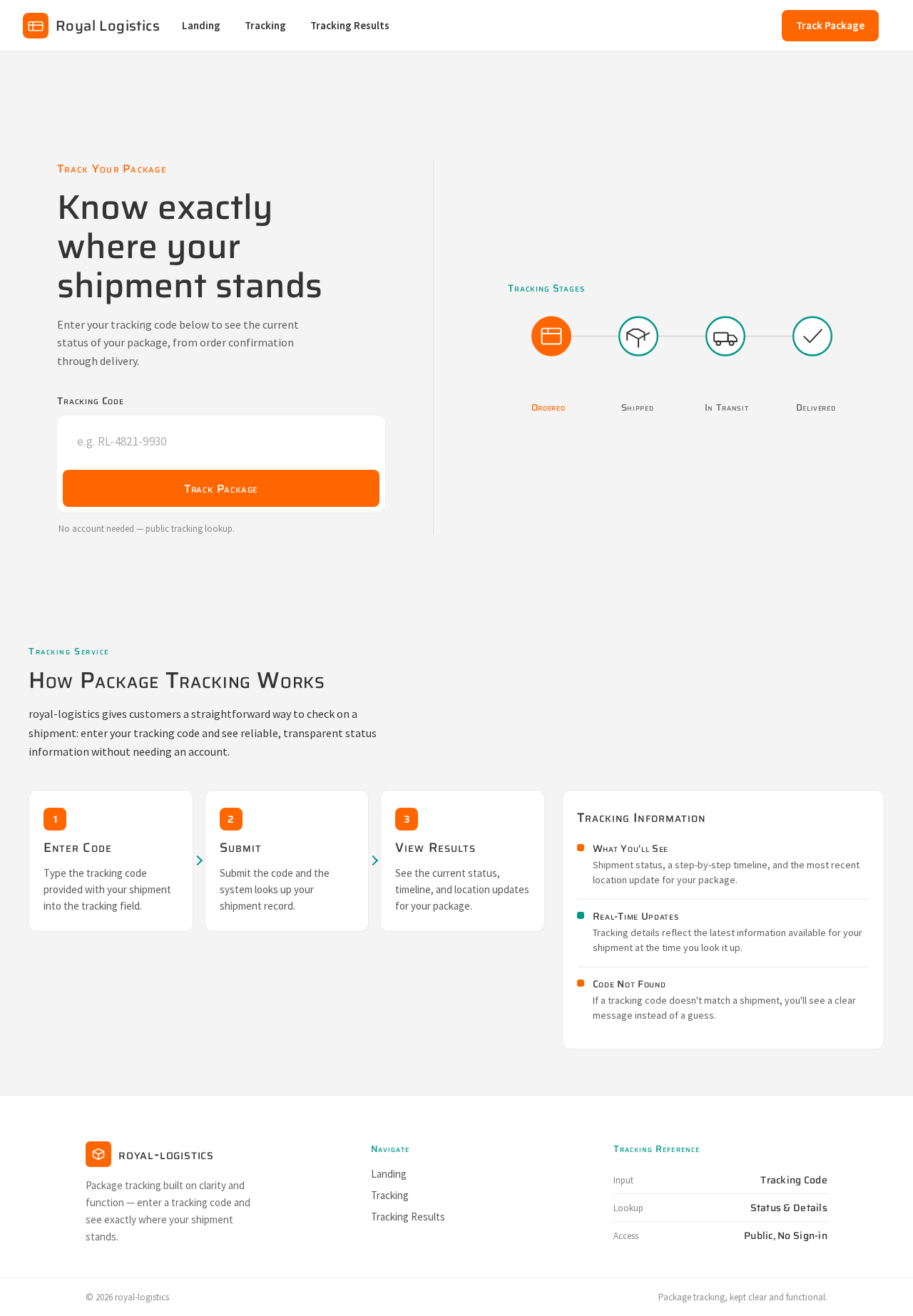
Track Your Package
Know exactly where your shipment stands
Enter your tracking code below to see the current status of your package, from order confirmation through delivery.
No account needed — public tracking lookup.
Tracking Stages
How Package Tracking Works
royal-logistics gives customers a straightforward way to check on a shipment: enter your tracking code and see reliable, transparent status information without needing an account.
Enter Code
Type the tracking code provided with your shipment into the tracking field.
Submit
Submit the code and the system looks up your shipment record.
View Results
See the current status, timeline, and location updates for your package.
Tracking Information
What You'll See
Shipment status, a step-by-step timeline, and the most recent location update for your package.
Real-Time Updates
Tracking details reflect the latest information available for your shipment at the time you look it up.
Code Not Found
If a tracking code doesn't match a shipment, you'll see a clear message instead of a guess.
Track Your Package
Know exactly where your shipment stands
Enter your tracking code below to see the current status of your package, from order confirmation through delivery.
No account needed — public tracking lookup.
Tracking Stages
How Package Tracking Works
royal-logistics gives customers a straightforward way to check on a shipment: enter your tracking code and see reliable, transparent status information without needing an account.
Enter Code
Type the tracking code provided with your shipment into the tracking field.
Submit
Submit the code and the system looks up your shipment record.
View Results
See the current status, timeline, and location updates for your package.
Tracking Information
What You'll See
Shipment status, a step-by-step timeline, and the most recent location update for your package.
Real-Time Updates
Tracking details reflect the latest information available for your shipment at the time you look it up.
Code Not Found
If a tracking code doesn't match a shipment, you'll see a clear message instead of a guess.
No comments yet. Be the first!