royal-backend
 Md. Manjur Morshed
You are a senior full-stack AI SaaS architect. Build a scalable backend system for an AI-powered Marketing & Analytics SaaS platform. STACK: - Backend: Python (FastAPI) - Database: PostgreSQL - Cache: Redis - Queue: Celery / Background workers - AI Integration: OpenAI API - Scraping: Playwright + BeautifulSoup - Auth: JWT + OAuth (Google login) - Cloud ready (AWS/GCP) MODULES TO BUILD: 1. USER SYSTEM - Signup/Login (JWT) - Role: Admin / User - Subscription system (Stripe) - API usage tracking (credits system) 2. PROJECT SYSTEM - Each user can create multiple projects - Store: brand name, website, niche, target audience --- 3. COMPETITOR AD SPY ENGINE - Scrape Meta Ads Library, Google Ads transparency, TikTok ads - Extract: - Ad creatives - Copy (headline, primary text) - CTA - Engagement (likes, shares if available) - AI Analysis: - Why this ad works - Hook type classification - Emotional triggers - Funnel stage detection --- 4. AI AD CREATIVE GENERATOR Input: - Product/service - Target audience - Country - Platform (Meta/Google/TikTok) Output: - Headlines (10 high-converting) - Primary text - Descriptions - Callouts - Sitelinks - Hooks - Angles - Offer ideas Use structured prompt engineering: - AIDA - PAS - Emotional triggers - Curiosity gaps --- 5. LANDING PAGE ANALYZER - Input: URL - Scrape content - Analyze: - Headline clarity - CTA placement - Trust signals - Load speed (mock) - Output: - Conversion score (0–100) - Fix suggestions - Improved copy --- 6. FUNNEL BUILDER ENGINE - Input: product + goal - Output: - Full funnel (TOF/MOF/BOF) - Ad → Landing → Retargeting → Email flow --- 7. LEAD SCORING SYSTEM - Input: user data (behavior, clicks, time) - AI scoring: - Hot / Warm / Cold - Predict conversion probability --- 8. WHATSAPP AUTOMATION API - Template message generator - Follow-up sequence - Integration-ready webhook system --- 9. COLD EMAIL AI ENGINE - Personalized emails using: - Name - Company - Industry - Output: - Subject lines - Email body - Follow-ups --- 10. SEO AUTHORITY BUILDER - Generate: - Topic clusters - Blog ideas - Internal linking map --- 11. LOCAL SEO TOOL - Input: business + location - Output: - Google Business optimization tips - Keyword suggestions - Competitor gaps --- 12. ANALYTICS DASHBOARD ENGINE Integrations: - Meta Ads API - Google Ads API - Google Analytics Features: - ROI calculation - ROAS tracking - Campaign comparison - Budget optimization suggestions --- 13. ADS AUDIT SYSTEM (IMPORTANT) For Meta + Google: Analyze: - CTR - CPC - Conversion rate Output: - Problems - Fix suggestions - Scaling opportunities --- 14. SOCIAL MEDIA ANALYZER - Analyze posts - Suggest: - Best posting time - Content type - Engagement improvement --- 15. HEATMAP SIMULATOR (AI-based) - Predict user attention zones - Suggest UI improvements --- 16. FINANCIAL FORECASTING - Input: spend + conversion rate - Output: - Revenue prediction - Break-even point --- 17. API LAYER - Clean REST API structure - Modular endpoints for each tool --- 18. ADMIN PANEL - User management - Revenue tracking - API usage monitoring --- IMPORTANT: - Write clean modular code - Use service-based architecture - Add logging and error handling - Prepare for scaling Return: - Folder structure - API routes - Sample responses


Comments (0)
Sign in to leave a comment
Project Tasks21
Implement Theme and Structure
As a user, I want the scaffold project pages (home, login, signup, welcome, dashboard/overview, dashboard/ai-assistant, dashboard/settings) to look exactly identical to the mock-design pages. This task covers: applying the global color palette (Black #0B0F0C, Surface #1A1F1D, White #FFFFFF, Neon Green #00FF9C, Muted Gray #3A3F3D), setting up Tailwind CSS theme config with neon green accent, implementing glassmorphism base styles, Framer Motion animation presets, reusable layout components (Sidebar with 12 menu items, Navbar, GlassCard, NeonButton), and removing any scaffold pages not present in the final design. This task must be completed before all other page-level tasks.
Build Login Page
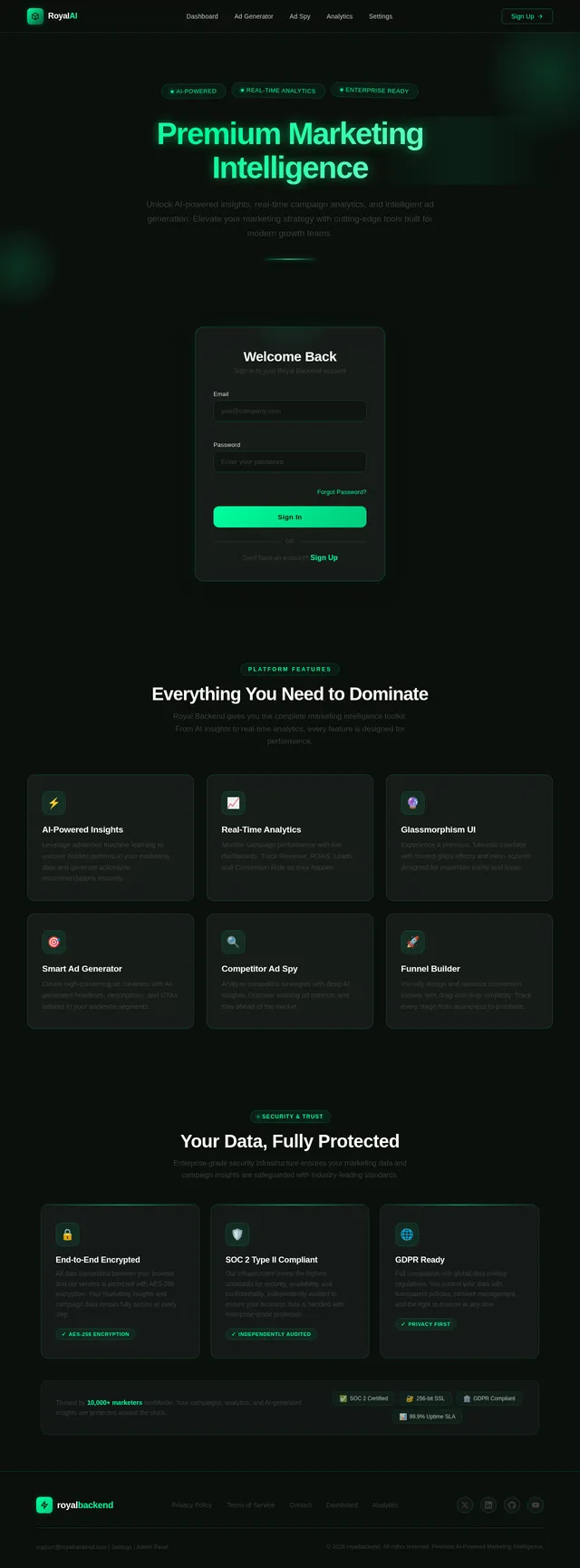
As a user, I want to access a premium glassmorphism login/signup page so I can authenticate into the platform. Implement the Login (v2) design: glassmorphism card centered on a dark background (#0B0F0C), email and password inputs with neon green borders, neon green CTA button with ripple effect, Google OAuth button, and link to signup. Follows the user flow: Login → Dashboard. Implement based on existing Login (v2) JSX design.
Build Dashboard Page
As a user, I want to see an overview dashboard with key metrics (Revenue, ROAS, Leads, Conversion Rate) displayed in glassmorphism cards with neon green glow on hover so I can monitor platform performance at a glance. Implement the Dashboard (v3) design: 3D neon grid background with pulsating animation, 4 metrics cards with Framer Motion zoom-on-hover, neon sidebar active indicator, and quick navigation to all tool pages. Includes mock data for metrics until backend APIs are connected. Follows user flow: Dashboard → Ad Generator, Ad Spy, Analytics, Funnel Builder. Implement based on existing Dashboard (v3) JSX design.
Build Ad Generator Page
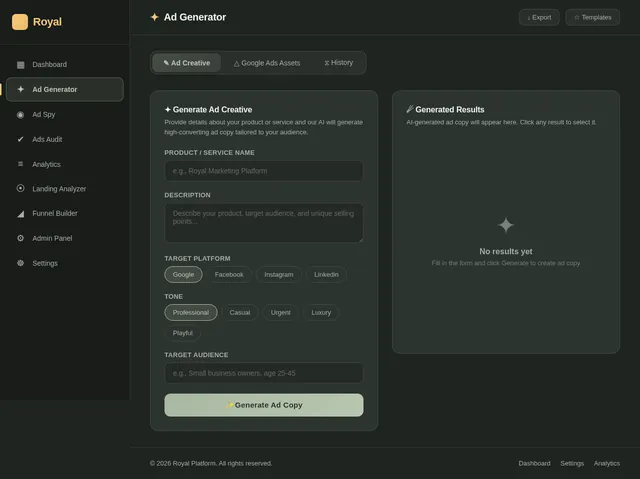
As a user, I want to input my product details and generate AI-powered ad copy (headlines, descriptions, CTAs, hooks, angles) with a copy button so I can create high-converting ads quickly. Implement the Ad Generator (v3) design: input form (product, audience, country, platform selector), structured output sections for Headlines, Primary Text, Descriptions, CTAs, Hooks, and Angles, each with a neon green Copy button and Framer Motion reveal animations. Also includes a dedicated Google Ads Assets Generator section for generating headlines, descriptions, images, sitelinks, callouts, and layout previews with preview mode. Follows user flow: Dashboard → Ad Generator → Generate Google Ads Assets. Implement based on existing Ad Generator (v3) JSX design.
Build Ad Spy Page
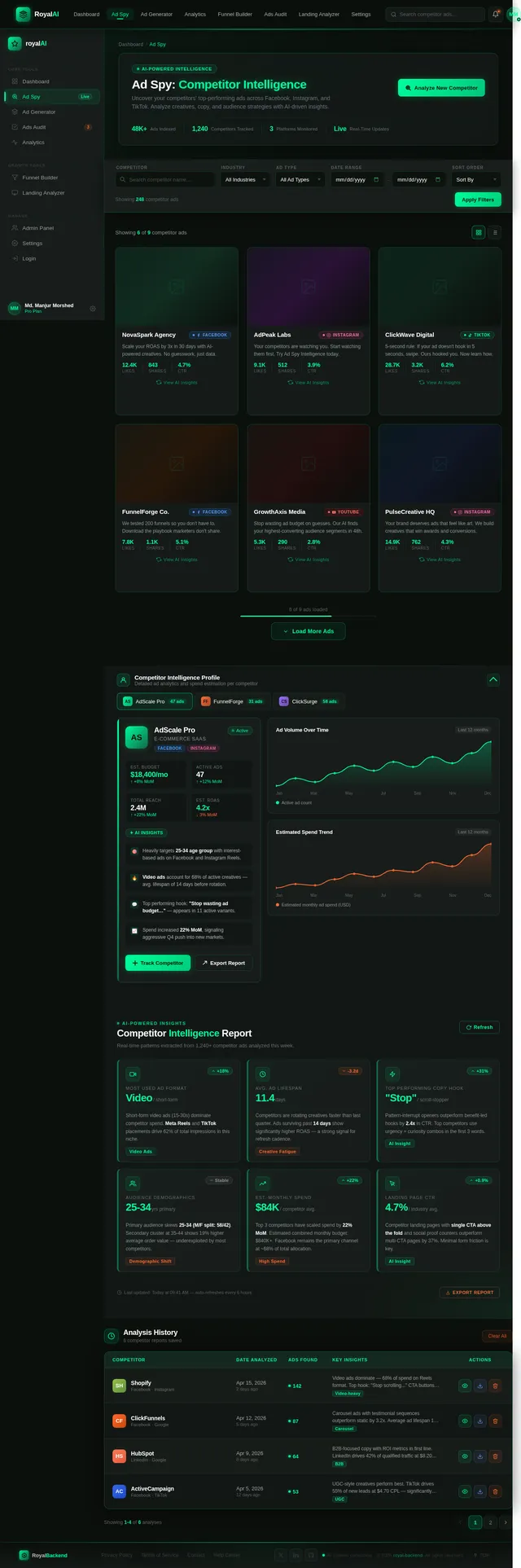
As a user, I want to view competitor ads as interactive flip cards that reveal AI insights on the back so I can analyze what's working in my niche. Implement the Ad Spy (v2) design: competitor ad cards showing image/video, copy, and CTA on the front; AI insights (hook classification, emotional triggers, funnel stage) on the back revealed via 3D flip animation; filter/search bar at the top; workable search and filter options connected to backend scraper API. Follows user flow: Dashboard → Ad Spy → View AI Insights. Implement based on existing Ad Spy (v2) JSX design.
Build Analytics Page
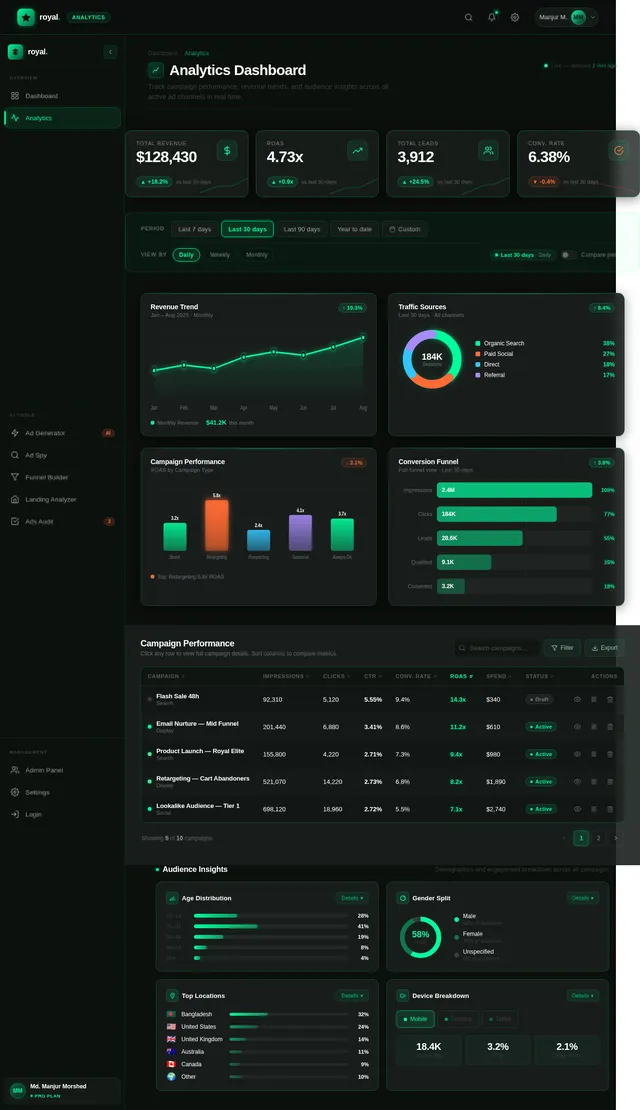
As a user, I want to view my campaign analytics with ROAS and Spend vs Revenue charts along with campaign filters so I can make data-driven decisions. Implement the Analytics (v2) design: dark-themed chart panels using Recharts or Chart.js with neon green data lines, ROAS trend chart, Spend vs Revenue comparison chart, date range and campaign filter controls, and summary metric cards. Follows user flow: Dashboard → Analytics → Ads Audit. Implement based on existing Analytics (v2) JSX design.
Build Ads Audit Page
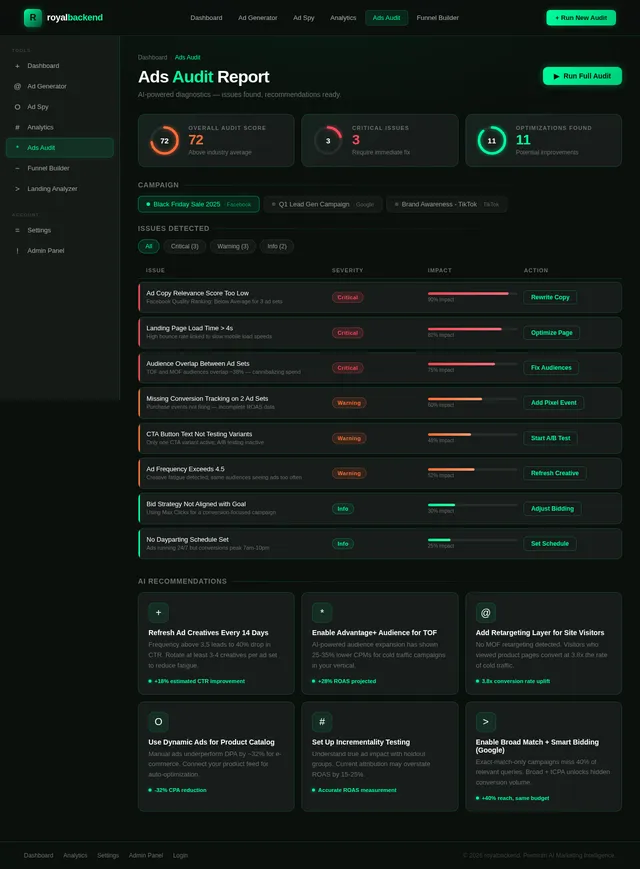
As a user, I want to see a structured audit of my Meta and Google ad campaigns showing issues, fix suggestions, and scaling opportunities so I can improve my ad performance. Implement the Ads Audit (v2) design: campaign selector, issue cards categorized by severity (CTR, CPC, Conversion Rate problems) with neon red/yellow/green severity indicators, recommendation panels, and scaling opportunity highlights. Follows user flow: Analytics → Ads Audit → Review Recommendations. Implement based on existing Ads Audit (v2) JSX design.
Build Funnel Builder Page
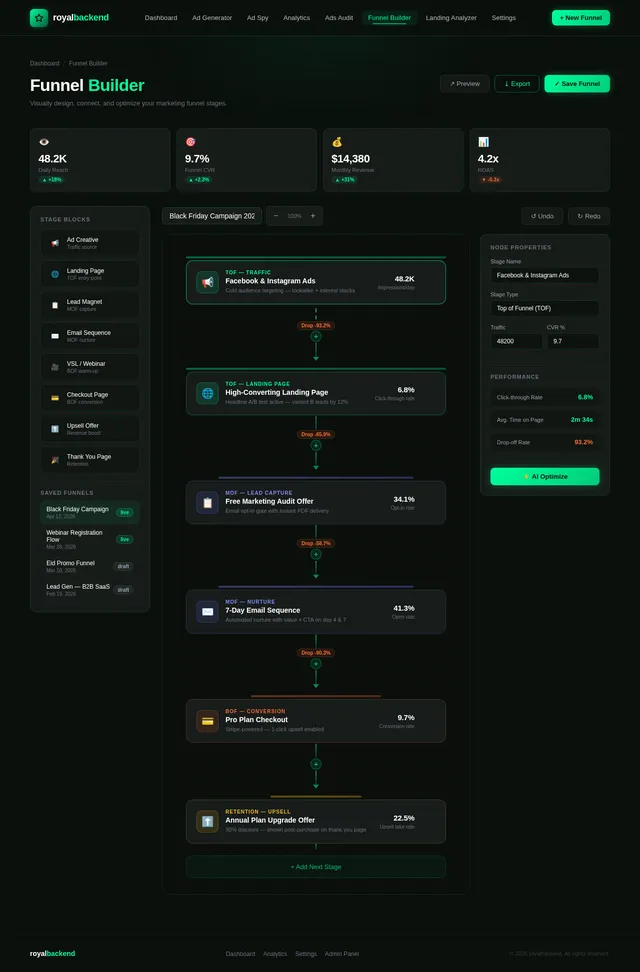
As a user, I want to visually build a marketing funnel using a drag-and-drop flow diagram with animated connections between TOF, MOF, and BOF stages so I can plan my full ad-to-conversion journey. Implement the Funnel Builder (v2) design: drag-and-drop canvas using React Flow or similar, animated neon green connection lines between funnel stages, stage cards (Ad, Landing Page, Retargeting, Email), and an export/save panel. Follows user flow: Landing Analyzer → Funnel Builder → Build Funnel. Implement based on existing Funnel Builder (v2) JSX design.
Build Landing Analyzer Page
As a user, I want to input a landing page URL and receive a conversion score with a glowing radial score meter and actionable improvement suggestions so I can optimize my landing pages. Implement the Landing Analyzer (v2) design: URL input with a neon green Analyze button, animated radial score meter (0–100) that fills with a glowing arc animation, categorized suggestions (headline clarity, CTA placement, trust signals, load speed), and improved copy output panel. Follows user flow: Ads Audit → Landing Analyzer → Analyze URL. Implement based on existing Landing Analyzer (v2) JSX design.
Build Admin Panel Page
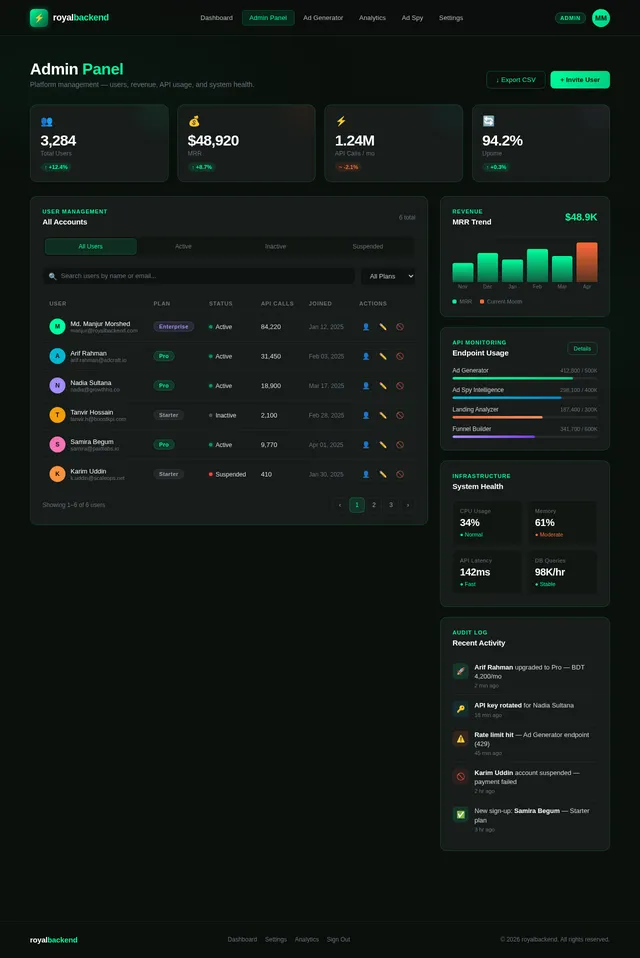
As an admin, I want access to a dedicated admin panel where I can manage users, track platform revenue, and monitor API usage so I can oversee the entire SaaS platform. Implement the Admin Panel (v2) design: user management table with role and subscription status columns, revenue tracking chart, API usage monitoring with credit consumption graphs, and platform configuration controls. Follows admin user flow: Login → Admin Panel: View Overview → Manage Users → Monitor API Usage → Analytics → Settings. Implement based on existing Admin Panel (v2) JSX design.
Build Settings Page
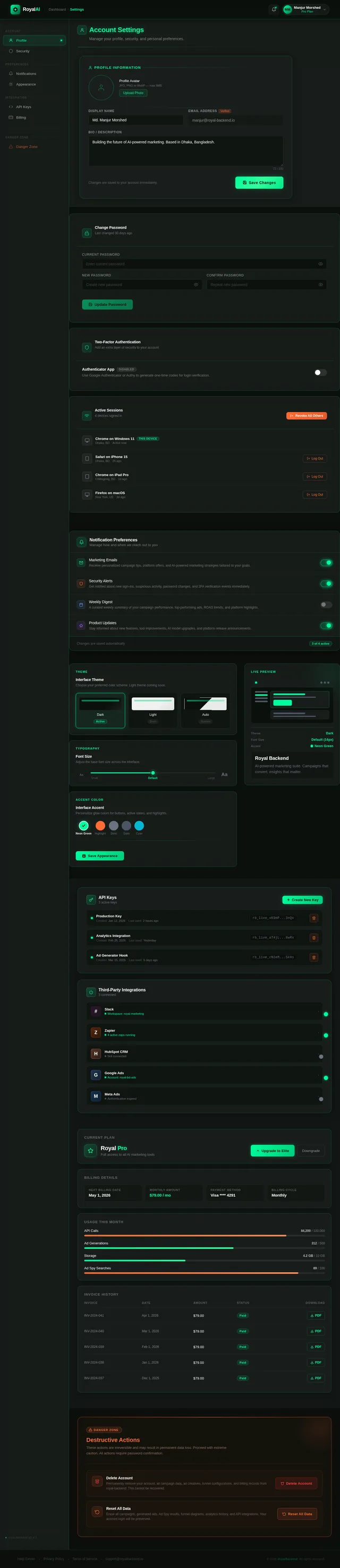
As a user, I want to access a settings page to configure my account, subscription, and platform preferences so I can personalize my experience. Implement the Settings (v2) design: profile section (name, email, avatar), subscription plan display with upgrade CTA, API key management panel, notification preferences, and security settings (password change). Follows admin user flow: Admin Panel → Settings: Configure Platform. Implement based on existing Settings (v2) JSX design.
Implement Ad Generator API
As a user, I want the Ad Generator page to call a backend AI API so that I receive structured, high-converting ad copy (headlines, primary text, descriptions, CTAs, hooks, angles) generated using AIDA/PAS prompt engineering for the specified product, audience, country, and platform.
Implement Ad Spy Scraper API
As a user, I want the Ad Spy page to fetch real competitor ad data scraped from Meta Ads Library, Google Ads Transparency, and TikTok Ads with AI-powered analysis (hook classification, emotional triggers, funnel stage detection) and recent internet research integration so I can gain competitive intelligence. Supports workable filter and search options on the frontend.
Implement Analytics Data API
As a user, I want the Analytics dashboard to fetch real campaign data from Meta Ads API and Google Ads API, calculating ROAS, spend vs revenue, and campaign comparisons so I can make informed budget decisions.
Implement Funnel Builder API
As a user, I want the Funnel Builder page to call a backend API that generates a complete AI-powered funnel (TOF/MOF/BOF: Ad → Landing → Retargeting → Email) based on my product and goal inputs so I can plan my full marketing strategy.
Implement Landing Analyzer API
As a user, I want the Landing Page Analyzer to scrape a submitted URL, analyze its headline clarity, CTA placement, trust signals, and load speed, then return a conversion score (0–100) with fix suggestions and improved copy so I can optimize my landing pages.
Implement Admin Panel API
As an admin, I want backend APIs to manage users (list, update roles, suspend), view revenue tracking data, and monitor per-user API credit consumption so I can effectively oversee the platform.
Implement Subscription & Credits API
As a user, I want a Stripe-integrated subscription system with API credit tracking so that I can subscribe to a plan, see my remaining credits, and get blocked when credits are exhausted.
Implement Ads Audit API
As a user, I want the Ads Audit page to receive AI-generated audit results for my Meta and Google campaigns analyzing CTR, CPC, and conversion rate, outputting problems, fix suggestions, and scaling opportunities.
Implement Google Ads Assets API
As a user, I want the Google Ads Assets Generator to call a backend AI API that generates all required Google Ads assets (headlines, descriptions, sitelinks, callouts, images, and responsive ad layouts) based on campaign inputs so I can launch complete Google Ads campaigns quickly. API should return structured asset sets compatible with Google Ads requirements (max character limits, asset counts). Includes preview mode support for visualizing generated assets.
Sync Frontend with Backend APIs
As a user, I want all frontend pages (Dashboard, Ad Generator, Ad Spy, Analytics, Ads Audit, Landing Analyzer, Funnel Builder, Admin Panel, Settings) to be fully connected to their respective backend APIs using Axios or fetch with proper loading states, error handling, and real data rendering so that every tool on the platform is functional end-to-end.
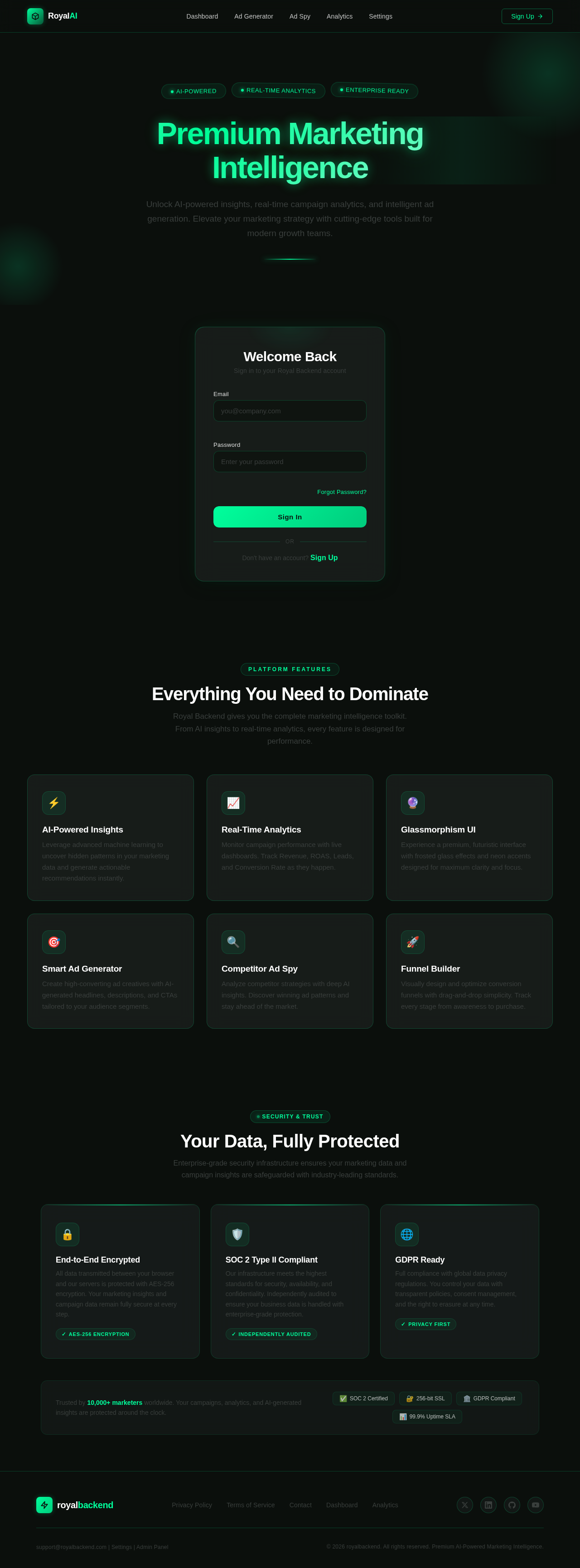
Premium Marketing Intelligence
Unlock AI-powered insights, real-time campaign analytics, and intelligent ad generation. Elevate your marketing strategy with cutting-edge tools built for modern growth teams.
Everything You Need to Dominate
Royal Backend gives you the complete marketing intelligence toolkit. From AI insights to real-time analytics, every feature is designed for performance.
AI-Powered Insights
Leverage advanced machine learning to uncover hidden patterns in your marketing data and generate actionable recommendations instantly.
Real-Time Analytics
Monitor campaign performance with live dashboards. Track Revenue, ROAS, Leads, and Conversion Rate as they happen.
Glassmorphism UI
Experience a premium, futuristic interface with frosted glass effects and neon accents designed for maximum clarity and focus.
Smart Ad Generator
Create high-converting ad creatives with AI-generated headlines, descriptions, and CTAs tailored to your audience segments.
Competitor Ad Spy
Analyze competitor strategies with deep AI insights. Discover winning ad patterns and stay ahead of the market.
Funnel Builder
Visually design and optimize conversion funnels with drag-and-drop simplicity. Track every stage from awareness to purchase.
Your Data, Fully Protected
Enterprise-grade security infrastructure ensures your marketing data and campaign insights are safeguarded with industry-leading standards.
End-to-End Encrypted
All data transmitted between your browser and our servers is protected with AES-256 encryption. Your marketing insights and campaign data remain fully secure at every step.
✓AES-256 EncryptionSOC 2 Type II Compliant
Our infrastructure meets the highest standards for security, availability, and confidentiality. Independently audited to ensure your business data is handled with enterprise-grade protection.
✓Independently AuditedGDPR Ready
Full compliance with global data privacy regulations. You control your data with transparent policies, consent management, and the right to erasure at any time.
✓Privacy First
No comments yet. Be the first!